Can Sora 2 Generate 4K Videos? Complete Resolution Guide 2026
Discover Sora 2 resolution limits: max 1080p output, no native 4K support. Learn upscaling solutions with Topaz Video AI, compare Veo 3 4K alternatives, and find the best workflow for 4K AI video.
Nano Banana Pro
4K-80%Google Gemini 3 Pro · AI Inpainting
谷歌原生模型 · AI智能修图

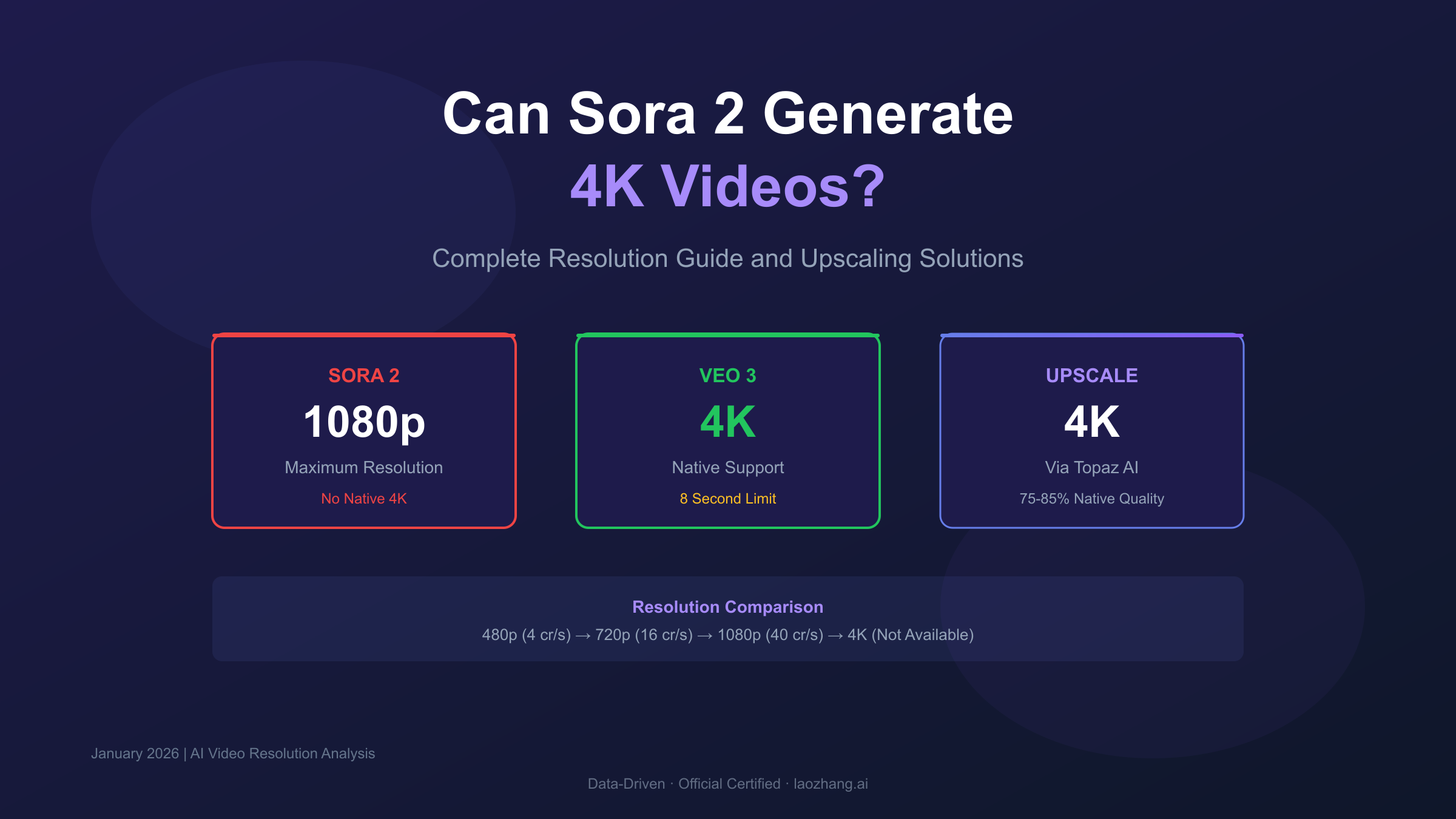
Can Sora 2 generate 4K videos? No—Sora 2 currently maxes out at 1080p resolution. OpenAI's flagship video generator cannot produce native 4K output, though you can upscale results to 4K using third-party tools like Topaz Video AI. This limitation matters significantly for broadcast, cinema, and professional production work where 4K (3840×2160 pixels) is the standard.
Understanding Sora 2's resolution constraints helps you set realistic expectations and plan effective workarounds. While 1080p serves most digital platforms well, the gap between rendered 1080p and native 4K affects sharpness, detail preservation, and large-screen presentation quality.
Sora 2 Resolution Specifications Explained
Sora 2 offers three resolution tiers, each consuming credits at different rates. The maximum output is 1080p (1920×1080 pixels), which is Full HD but not 4K.
| Resolution | Pixel Dimensions | Credit Cost/Second | Best Use Case |
|---|---|---|---|
| 480p | 854×480 | 4 credits | Previews, storyboards |
| 720p | 1280×720 | 16 credits | Social media, web content |
| 1080p | 1920×1080 | 40 credits | YouTube, professional work |
| 4K | 3840×2160 | Not available | — |
The 10x credit difference between 480p and 1080p reflects computational complexity. Higher resolutions require more processing power, memory, and generation time. This explains why 4K—with 4 times more pixels than 1080p—remains technically challenging.
Plus subscribers ($20/month) access only 720p maximum with watermarks. Pro subscribers ($200/month) unlock 1080p without watermarks, representing the highest native quality Sora 2 can produce.
Why Sora 2 Lacks Native 4K Support
OpenAI hasn't officially explained the 4K limitation, but technical factors make the constraint understandable.
Computational demands escalate dramatically with resolution. 4K contains 8.3 million pixels per frame versus 2.1 million for 1080p—a 4x increase. For a 20-second video at 24fps, that's 480 frames. Training diffusion models to generate coherent 4K content across 480 frames requires exponentially more GPU memory and processing time.
Current AI video generation operates at the edge of hardware capabilities. Even 1080p generation takes significant time—typically 5-20 minutes for a 5-second clip depending on server load. Native 4K generation would likely require 8-10x longer processing times, making it impractical for the user experience OpenAI wants to deliver.
Quality versus quantity tradeoffs favor longer videos. OpenAI chose to prioritize video duration (up to 20+ seconds) and creative flexibility over maximum resolution. This strategy serves social media and web content creators—Sora 2's primary audience—better than cinema-focused 4K output.
Industry sources suggest OpenAI is working on 4K capabilities, with some speculation pointing to Q1-Q2 2026 for an announcement. However, no official roadmap confirms 4K support.
Sora 2 vs Veo 3: The 4K Comparison
Google's Veo 3 offers what Sora 2 lacks: native 4K resolution. But this advantage comes with significant tradeoffs.
| Feature | Sora 2 | Veo 3 |
|---|---|---|
| Maximum Resolution | 1080p | 4K |
| Maximum Duration | 20+ seconds | 8 seconds at 4K |
| Native Audio | No | Yes |
| Pricing | $200/month (Pro) | $249/month |
| 4K Duration | N/A | Limited to 8 seconds |
Veo 3's 4K clips look stunning—studio details render with exceptional sharpness, and film grain appears natural. However, the 8-second maximum at 4K severely limits practical applications. Most professional projects need 15-60 second shots minimum.
For broadcast and cinema work where 4K is non-negotiable, Veo 3 provides true 4K quality. For social media, YouTube, and web content where 1080p suffices, Sora 2's longer duration and creative flexibility prove more valuable.
The practical verdict: Choose Sora 2 for most content creation. Choose Veo 3 only when native 4K quality is essential and you can work within 8-second constraints.
Complete AI Video Generator 4K Comparison
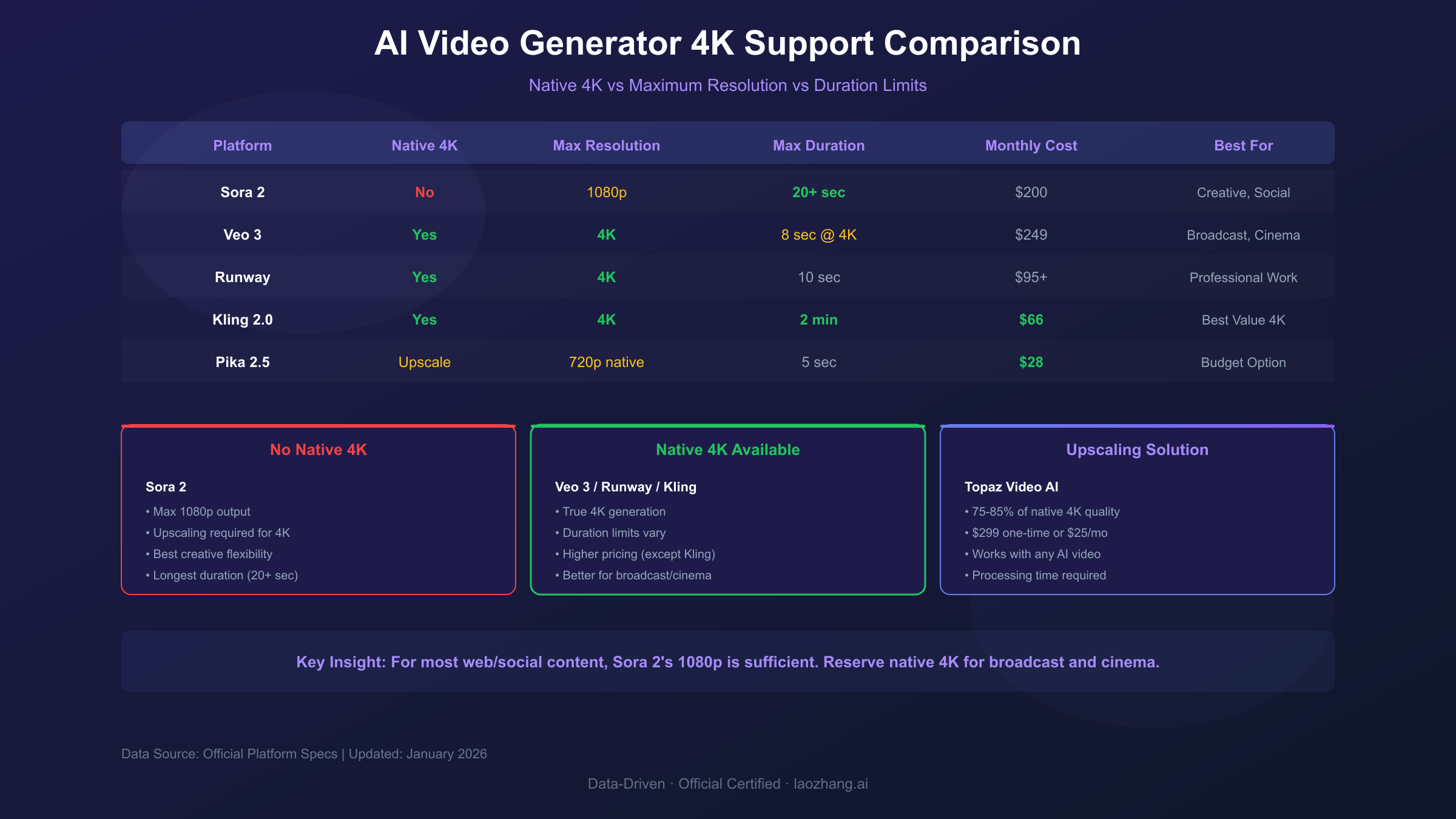
Beyond Sora 2 and Veo 3, several platforms now offer 4K capabilities.
| Platform | Native 4K | Max Resolution | Max Duration | Monthly Cost |
|---|---|---|---|---|
| Sora 2 | ❌ | 1080p | 20+ seconds | $200 |
| Veo 3 | ✅ | 4K | 8 sec @ 4K | $249 |
| Runway Gen-3/4 | ✅ | 4K | 10 seconds | $95+ |
| Kling 2.0 | ✅ | 4K | 2 minutes | $66 |
| Pika 2.5 | Upscale | 720p native | 5 seconds | $28 |
Runway Gen-3 excels for professional commercial work with 4K support, advanced camera controls, and enterprise features. It's the preferred choice for high-end production houses.
Kling 2.0 surprised the industry with 4K support and 2-minute durations—significantly longer than competitors. At $66/month, it offers the best 4K value, though quality consistency trails Sora 2 and Veo 3.
How to Upscale Sora 2 Videos to 4K
Since Sora 2 can't generate 4K natively, upscaling provides the practical workaround. Modern AI upscalers produce impressive results—though they can't match native 4K detail.
Topaz Video AI (Best Quality)
Topaz Video AI remains the industry standard for video upscaling. It uses deep learning models trained specifically for video enhancement.
Recommended workflow for Sora 2 content:
- Export your Sora 2 video at maximum quality (1080p)
- Import into Topaz Video AI
- Select the Artemis High Quality model for AI-generated content
- Set output resolution to 4K (3840×2160)
- Enable Proteus Fine Tune if initial results need adjustment
- Export with your preferred codec
Cost: $299 one-time license or $25/month subscription
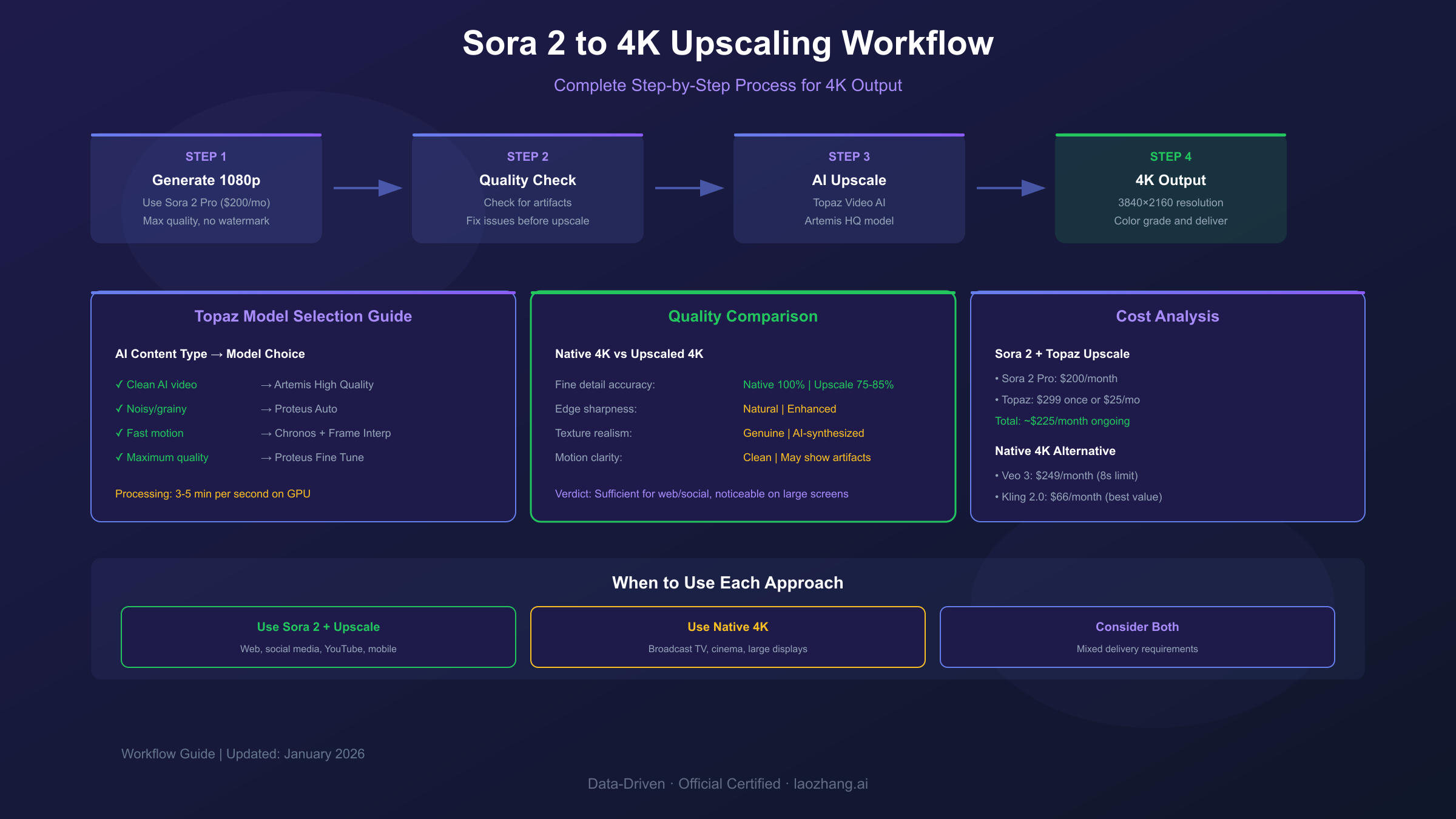
Topaz adds genuine detail rather than simple upscaling. Hair strands, fabric textures, and environmental elements gain realistic sharpness. However, processing is slow—expect 3-5 minutes per second of video on a capable GPU.
Topaz Astra (Web-Based Alternative)
Topaz Astra targets AI-generated content specifically. It's web-based, requiring no software installation.
Key features:
- Precise Mode: Maintains original footage integrity
- Creative Mode: Enhances with artistic improvements
- Frame interpolation up to 120fps
- 4K output resolution
Astra uses a credit-based system rather than fixed pricing. New users receive promotional credits to test the service.
For creators preferring browser-based tools without GPU requirements, Astra provides a capable alternative to the desktop application.
Other Upscaling Options
HitPaw Video Enhancer: Budget-friendly at ~$50/year, with simpler interface. Quality trails Topaz but handles basic upscaling adequately.
AVCLabs Video Enhancer AI: Excels at denoising and face detail recovery. Useful when Sora 2 output contains artifacts.
Cupscale: Free, open-source solution using ESRGAN models. Requires technical setup but costs nothing.
Upscaled 4K vs Native 4K: Quality Comparison
Understanding the quality gap helps set realistic expectations.
Native 4K (Veo 3) captures detail that never existed in lower resolutions. Fine textures, subtle gradients, and micro-contrast appear naturally because the AI generated them at 4K from the start.
Upscaled 4K (Sora 2 + Topaz) synthesizes additional detail using AI prediction. While impressive, this manufactured detail sometimes appears:
- Slightly over-sharpened edges
- Smoothed textures in complex areas
- Occasional artifacts in fast motion
| Quality Aspect | Native 4K | Upscaled 4K |
|---|---|---|
| Fine detail accuracy | 100% | 75-85% |
| Edge sharpness | Natural | Enhanced |
| Texture realism | Genuine | AI-synthesized |
| Motion clarity | Clean | May show artifacts |
| File size | Larger | Variable |
For social media and web content, upscaled 4K often suffices. Viewers on mobile devices can't distinguish between native and upscaled 4K at typical viewing distances.
For broadcast television, cinema projection, or large-format displays, the quality difference becomes noticeable. Professional colorists and QC teams will identify upscaled content.
Practical Workflow: Getting 4K from Sora 2
Here's the complete workflow for producing 4K content using Sora 2 as your primary generator.
Step 1: Generate at Maximum Quality
Always render at 1080p when planning to upscale:
- Use Pro subscription for watermark-free output
- Choose 16:9 aspect ratio for standard 4K conversion
- Export in highest available quality settings
Step 2: Quality Assessment
Before upscaling, evaluate your 1080p output:
- Check for visible artifacts or glitches
- Assess sharpness consistency throughout
- Note any areas needing special attention
Upscaling amplifies existing issues. Fix problems at 1080p before attempting 4K conversion.
Step 3: Upscale with AI Enhancement
Using Topaz Video AI:
hljs plaintextModel Selection Guide: ├── Clean AI content → Artemis High Quality ├── Noisy/grainy content → Proteus Auto ├── Fast motion → Chronos (with frame interpolation) └── Maximum quality → Proteus Fine Tune (manual adjustment)
Step 4: Color Grade and Finish
Upscaling often affects color balance. Apply final corrections in your editing software:
- Match original color profile
- Adjust contrast if upscaling added artificial sharpness
- Apply subtle grain to mask any synthetic appearance
Step 5: Export for Delivery
Standard 4K export settings:
- Resolution: 3840×2160
- Codec: H.265/HEVC for efficiency, ProRes for professional delivery
- Bitrate: 40-80 Mbps for quality retention
This workflow adds 10-30 minutes processing time per minute of video, depending on hardware and quality settings.
When 1080p Is Actually Enough
Many creators chase 4K unnecessarily. Consider whether your use case actually requires it.
1080p is sufficient for:
- YouTube (platform compresses heavily anyway)
- Social media platforms (Instagram, TikTok, Twitter)
- Web embedding and streaming
- Mobile viewing (device screens are 1080p or lower)
- Internal presentations and demos
4K is necessary for:
- Broadcast television delivery
- Cinema and theater projection
- Large-format displays (trade shows, digital signage)
- Professional archival requirements
- Projects requiring heavy cropping/reframing
Most Sora 2 users create for digital platforms where 1080p delivers excellent quality. The 10x credit cost for 1080p versus 480p already optimizes for quality—pushing to 4K through upscaling may not provide proportional value.
API Access for High-Volume 4K Workflows
For developers and studios processing many videos, API access provides automation opportunities.
OpenAI's Sora 2 API offers programmatic generation with pricing around $0.50/second for high-quality output. Combined with Topaz's API integration or batch processing, you can build automated pipelines.
If you need reliable API access for AI video generation, platforms like laozhang.ai aggregate multiple AI models including video generation APIs. This simplifies access compared to managing multiple provider accounts, with unified billing and consistent response formats.
A typical automated workflow:
hljs python# Conceptual workflow structure
# 1. Generate video via Sora 2 API (1080p)
# 2. Download and validate output
# 3. Send to upscaling pipeline
# 4. Deliver 4K result to storage
# Using aggregated API services reduces
# integration complexity for multi-model workflows
For high-volume production, automation saves significant time compared to manual generation and upscaling.
Future 4K Support: What We Know
OpenAI hasn't announced specific 4K plans for Sora 2. Bill Peebles, who heads Sora development, shared a product roadmap on X (Twitter) that focused on:
- Expanded social features and community channels
- Longer video durations (15-25 seconds)
- Android app release
- Performance improvements
Resolution upgrades weren't mentioned in the public roadmap. This suggests 4K isn't an immediate priority.
However, competitive pressure from Veo 3, Runway, and Kling may accelerate development. The AI video market moves fast—capabilities that seem distant can arrive quickly.
For planning purposes:
- Near term (Q1 2026): No confirmed 4K announcement
- Medium term (2026): 4K likely as competition intensifies
- Strategy: Build upscaling workflows now; adopt native 4K when available
Cost Analysis: Native 4K vs Upscaling
Understanding total cost helps optimize your production budget.
Native 4K (Veo 3):
- $249/month subscription
- Limited 4K clip duration (8 seconds)
- Additional costs for longer content
Upscaled 4K (Sora 2 + Topaz):
- $200/month Sora 2 Pro
- $299 one-time Topaz license (or $25/month)
- Processing time/electricity costs
For occasional 4K needs, the upscaling approach often costs less while providing longer video durations. For continuous high-volume 4K production, native generation (when available from any platform) will prove more efficient.
Consider your specific requirements:
- One-time 4K project → Upscale existing Sora 2 content
- Regular 4K production → Evaluate Runway or Kling
- Premium 4K quality → Veo 3 for critical shots, upscale for filler
Key Takeaways and Recommendations
Sora 2 cannot generate native 4K videos. Maximum resolution is 1080p, available to Pro subscribers at $200/month. This limitation affects broadcast, cinema, and large-format display projects.
Upscaling provides a viable workaround. Topaz Video AI produces excellent 4K upscales from Sora 2's 1080p output, though native 4K quality remains superior for critical applications.
Competition offers native 4K options. Veo 3 (8-second limit), Runway (professional features), and Kling (longest duration) all support 4K generation if you need true 4K.
For most creators, 1080p suffices. YouTube, social media, and web platforms compress video significantly. The quality difference between 1080p and 4K often disappears after platform processing.
Build upscaling workflows now. Whether Sora 2 adds 4K later or you switch platforms, understanding upscaling techniques provides lasting value.
For developers needing API access to multiple AI video models, consider aggregated services like laozhang.ai that simplify multi-provider integration. Check their documentation for current video API availability and pricing.
Frequently Asked Questions
What is Sora 2's maximum resolution? Sora 2 generates video at up to 1080p (1920×1080 pixels). 4K is not available as a native output option.
Can I upscale Sora 2 videos to 4K? Yes. Tools like Topaz Video AI can upscale 1080p Sora 2 output to 4K with good results. The upscaled video won't match native 4K quality but works well for most applications.
Which AI video generator supports 4K? Veo 3 (Google), Runway Gen-3/4, and Kling 2.0 all support native 4K generation. Each has different duration limits and pricing.
Is 4K coming to Sora 2? No official announcement confirms 4K support. OpenAI's published roadmap focuses on duration, social features, and performance rather than resolution upgrades.
How much does Sora 2 Pro cost? Sora 2 Pro costs $200/month, providing 10,000 credits and access to 1080p resolution without watermarks.
What's the best upscaler for AI video? Topaz Video AI leads in quality for AI-generated content upscaling. Topaz Astra offers a web-based alternative. HitPaw provides a budget option.
Should I wait for Sora 2 4K? If you need 4K now, use alternatives (Veo 3, Runway, Kling) or upscaling workflows. Waiting for unconfirmed features isn't practical for active projects.