ChatGPT Christmas Photo: 30+ Prompts & Complete Guide to AI Holiday Portraits (2025)
Create stunning AI Christmas photos with ChatGPT using our 30+ copy-paste prompts. Learn the viral holiday glamour shot trend, get tips for realistic results, compare ChatGPT vs Gemini, and discover free alternatives when you hit your limit.
Nano Banana Pro
4K-80%Google Gemini 3 Pro · AI Inpainting
谷歌原生模型 · AI智能修图

If you've scrolled through Facebook or Instagram in the past few days, you've probably noticed an avalanche of glamorous holiday portraits flooding your feed. These aren't professional photoshoots—they're AI-generated Christmas photos created using ChatGPT, and they've become the viral sensation of the 2025 holiday season. From nostalgic 80s-style glamour shots to cozy fireplace scenes, people everywhere are turning simple selfies into cinematic holiday portraits that look straight out of a professional studio.
The trend started gaining momentum in early December when users discovered that ChatGPT's image generation capabilities could create remarkably polished holiday portraits. The catch? Many of these AI creations look only somewhat like the people uploading their photos, which has become part of the fun. People share these images with self-deprecating humor, acknowledging the imperfections while enjoying the festive transformation. Whether you want a picture-perfect Christmas card photo or just want to join in on the viral fun, this guide covers everything you need to create your own AI holiday masterpiece.
This comprehensive guide includes over 30 copy-paste prompts organized by style, step-by-step instructions for beginners, tips for getting more realistic results, comparisons between ChatGPT and other AI tools, and solutions for when you inevitably hit your free tier limit. By the end, you'll have all the tools needed to create stunning AI Christmas photos that will make your social media followers do a double-take.
| Quick Facts | Details |
|---|---|
| Trending Since | December 2025 |
| Free Images/Day | 3 (ChatGPT free tier) |
| Plus Limit | ~50 images per 3 hours |
| Best For | Social media, fun, greeting cards |
| Key Tip | Always include "do not change my face" |
What You Need to Get Started
Creating AI Christmas photos with ChatGPT requires minimal setup. Here's everything you need before diving into the prompts:
A ChatGPT Account: The free tier works, but with limitations. Free users can generate approximately 3 images per day on a rolling 24-hour basis. If you want more, ChatGPT Plus ($20/month) provides roughly 50 images every 3 hours, while the Pro tier ($200/month) offers essentially unlimited generation within reasonable use parameters.
A Clear Photo of Yourself: The AI uses your uploaded photo as a reference. For best results, use a well-lit, front-facing photo where your face is clearly visible. A simple headshot works, but photos showing your upper body give the AI more context for generating outfits and poses. Avoid photos with heavy filters, unusual angles, or poor lighting.
Realistic Expectations: Here's what nobody tells you upfront—the AI-generated photos often don't look exactly like you. Sometimes the face is close but slightly off. Sometimes the result looks like your much more attractive cousin. This is part of the experience, and most people posting these viral photos acknowledge the imperfections with humor. If you need accurate representation, you may need multiple attempts and refined prompts.
Time to Experiment: Your first prompt rarely produces the perfect result. Plan to iterate. The free tier's 3-image limit can feel restrictive when you're just getting started, so you might want to outline several prompt variations before using your daily allowance.
Step-by-Step: Create Your First AI Christmas Photo
Let's walk through creating your first ChatGPT Christmas photo from start to finish:
Step 1: Access ChatGPT Image Generation
Navigate to chatgpt.com or open the ChatGPT mobile app. Sign in with your account. Once logged in, you can start a new conversation. ChatGPT's image generation is integrated directly into the chat interface—no special mode selection required.
Step 2: Upload Your Reference Photo
Click the plus (+) icon in the message input area to attach your photo. Select a clear, well-lit image of yourself. For best results:
- Use natural lighting
- Face the camera directly
- Avoid sunglasses or heavy accessories that obscure your face
- Consider including your upper body for outfit context
You can upload multiple photos to help the AI better understand your features, though one clear photo is usually sufficient.
Step 3: Craft Your Prompt
After uploading your photo, type your prompt. Here's a solid starter prompt that works well for most users:
Create an ultra-realistic 8K Christmas portrait using professional studio lighting. Use my real facial features exactly as they are. Do NOT change or alter my face in any way. I'm wearing a cozy red cashmere sweater with a festive scarf. The background features a warm fireplace with a decorated Christmas tree, soft bokeh lights, and a snowy window view. The mood is warm, elegant, and inviting.
Step 4: Generate and Evaluate
Press Enter or click Send. ChatGPT will process your request and generate the image. This typically takes 30-60 seconds. Once complete, evaluate the result:
- Does the face reasonably resemble you?
- Are the outfit and setting what you requested?
- Is the overall quality acceptable?
Step 5: Refine as Needed
If the result isn't quite right, you can request modifications without using another generation credit:
- "Make the lighting warmer"
- "Change the sweater to dark green velvet"
- "Add more Christmas decorations in the background"
For significant changes like a completely different style or pose, you'll need to generate a new image, which counts against your daily limit.
30+ Copy-Paste Christmas Photo Prompts
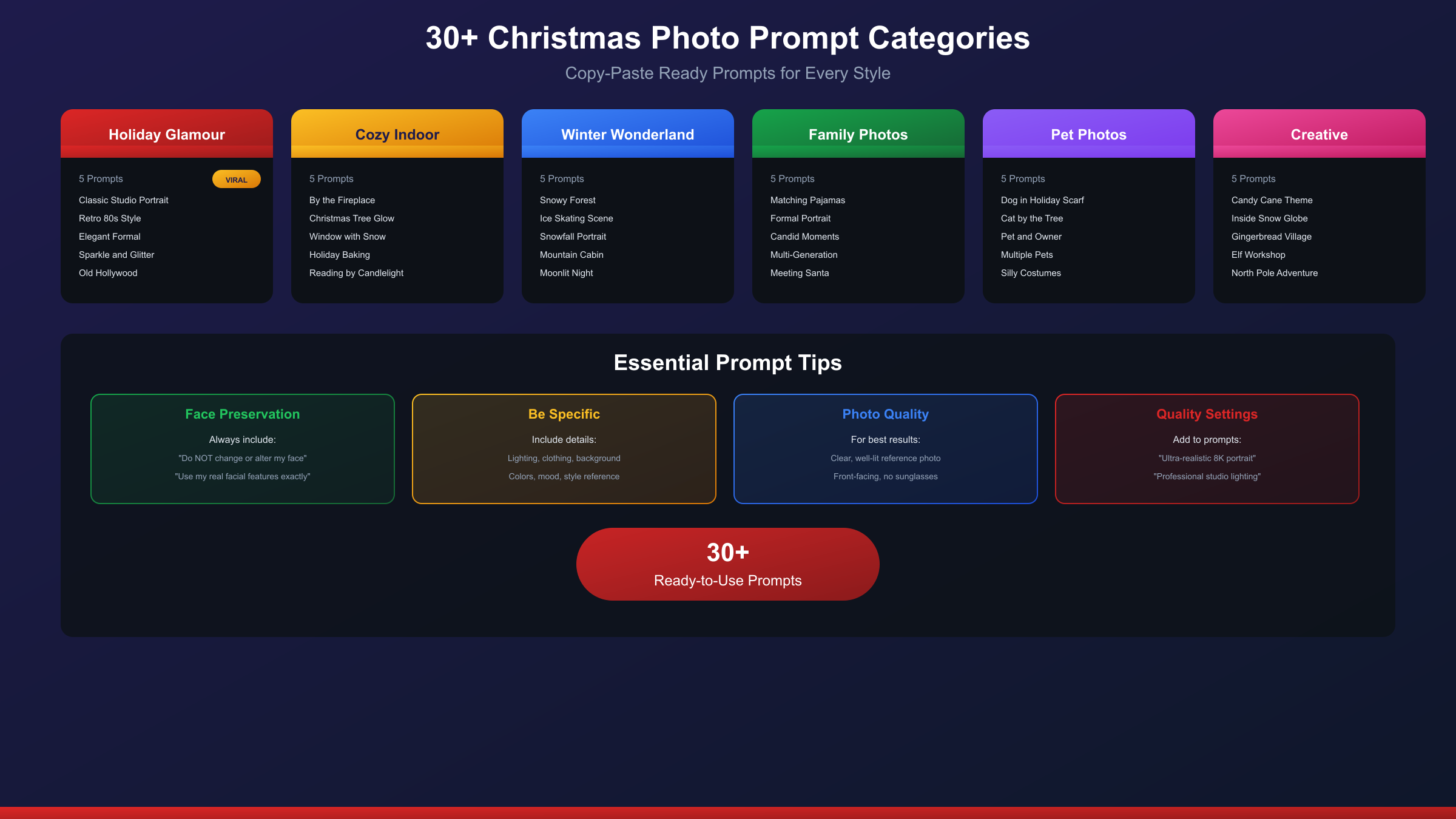
Below are over 30 tested prompts organized by category. Simply copy the one that matches your desired style, paste it into ChatGPT after uploading your photo, and generate.
Holiday Glamour Shots (The Viral Style)
These prompts recreate the nostalgic, over-the-top glamour shots that have gone viral on social media:
Classic Studio Glamour
Create an ultra-realistic 8K Christmas portrait using a 55mm lens with glamorous holiday studio lighting. Use my real facial features exactly as they are. Do NOT change or alter my face. I'm wearing a fitted red velvet dress with faux fur trim, diamond stud earrings, and subtle gold jewelry. My hair is styled elegantly with soft waves. The background is a professional studio setup with soft bokeh Christmas lights and a hint of falling snow. The mood is confident, festive, and polished.
Retro 80s Glamour
Create a nostalgic 1980s-style Christmas glamour shot portrait. Use my real facial features exactly as they are. Do NOT change my face. I'm wearing a sparkling sequined holiday sweater with dramatic shoulder pads, big statement earrings, and my hair is styled in voluminous waves. The lighting is dramatic with soft-focus glow effects typical of 80s portrait studios. The background features a misty gradient with floating Christmas ornament shapes. The mood is bold, glamorous, and playfully retro.
Elegant Formal Portrait
Create an elegant formal Christmas portrait with soft, flattering studio lighting. Use my real facial features exactly as they are. Do NOT change my face. I'm wearing a sophisticated black velvet blazer over a cream silk blouse with a delicate gold pendant necklace. The background is a tastefully decorated living room with a grand Christmas tree, garlands, and warm candlelight. The mood is refined, classic, and timeless.
Sparkle and Glitter
Create a festive glamour portrait with sparkly, playful holiday lighting. Use my real facial features exactly as they are. Do NOT change my face. I'm wearing a glittery silver party dress, statement crystal earrings, and bold red lips. The background is a whimsical candy-themed Christmas set with oversized candy canes, peppermint decorations, fluffy snow, and colorful twinkling lights. The mood is fun, glamorous, and Instagram-ready.
Old Hollywood Christmas
Create a classic Old Hollywood-style Christmas portrait in black and white with subtle color accents. Use my real facial features exactly as they are. Do NOT change my face. I'm wearing a elegant white fur stole over a red satin dress, pearl jewelry, and classic vintage makeup with red lips. The lighting is dramatic with soft shadows reminiscent of 1940s portrait photography. The background features an elegant Christmas tree and wrapped presents. The mood is sophisticated, timeless, and cinematic.
Cozy Indoor Scenes
These prompts capture the warmth and intimacy of holiday moments at home:
By the Fireplace
Create a realistic cozy Christmas portrait with warm firelight and soft ambient lighting. Use my real facial features exactly as they are. Do NOT change my face. I'm sitting in an overstuffed armchair wearing an oversized chunky cream knit sweater, holding a warm mug with both hands, smiling gently. The background shows a crackling fireplace with hung stockings, a decorated Christmas tree, string lights, and cozy blankets. The mood is warm, relaxed, and intimate.
Christmas Tree Glow
Create a magical Christmas portrait lit primarily by Christmas tree lights. Use my real facial features exactly as they are. Do NOT change my face. I'm kneeling beside a beautifully decorated tree, wearing festive red plaid pajamas, placing an ornament on a branch. My face is illuminated by the warm glow of hundreds of fairy lights. The background is a softly lit living room at night. The mood is magical, nostalgic, and wonder-filled.
Window with Snow View
Create a contemplative Christmas portrait by a frost-covered window. Use my real facial features exactly as they are. Do NOT change my face. I'm sitting on a window seat wrapped in a soft gray blanket, holding a steaming cup of cocoa, gazing at heavy snowfall outside. Inside, there's a small decorated tree and candles. The lighting is soft and natural, with cool tones from outside contrasting with warm indoor light. The mood is peaceful, reflective, and cozy.
Holiday Baking Scene
Create a candid Christmas portrait in a festive kitchen. Use my real facial features exactly as they are. Do NOT change my face. I'm wearing a cute holiday apron over a green sweater, decorating gingerbread cookies at a flour-dusted counter. The kitchen is decorated with garlands and red bows, with finished cookies cooling nearby. Soft afternoon light streams through the window. The mood is joyful, homey, and authentic.
Reading by Candlelight
Create a peaceful Christmas portrait in a reading nook. Use my real facial features exactly as they are. Do NOT change my face. I'm curled up in a leather armchair with a book, wearing cozy cable-knit sweater and thick socks, with a soft throw blanket. The room is lit by candlelight and a crackling fire, with bookshelves decorated with greenery and a small tree. The mood is quiet, intellectual, and warmly festive.
Winter Wonderland Outdoor
Outdoor scenes with magical winter settings:
Snowy Forest Portrait
Create an enchanting winter portrait in a snowy forest. Use my real facial features exactly as they are. Do NOT change my face. I'm wearing a elegant white wool coat with a fur collar, matching white hat and gloves, surrounded by snow-covered pine trees. Soft snowflakes are falling. The lighting is soft and ethereal, with a slight blue-white color grade. The mood is magical, serene, and winter-fairy-tale-like.
Ice Skating Scene
Create a dynamic winter portrait at an outdoor ice rink. Use my real facial features exactly as they are. Do NOT change my face. I'm skating gracefully, wearing a stylish burgundy peacoat, cream scarf, and ice skates. The background shows a frozen pond with string lights, evergreen trees, and soft falling snow at dusk. The mood is joyful, active, and festively romantic.
Snowfall Portrait
Create a romantic winter portrait during evening snowfall. Use my real facial features exactly as they are. Do NOT change my face. I'm standing on a quaint village street, wearing a long forest-green coat and cream knit beanie, with snowflakes catching in my hair and on my shoulders. Vintage lampposts and shop windows glow warmly behind me. The mood is dreamy, romantic, and Hallmark-movie-perfect.
Mountain Cabin Porch
Create a rustic Christmas portrait on a mountain cabin porch. Use my real facial features exactly as they are. Do NOT change my face. I'm wrapped in a flannel blanket, holding a lantern, sitting on wooden porch steps. The background shows snow-covered mountains, pine trees, and a starry night sky. A wreath hangs on the cabin door. The mood is adventurous, peaceful, and ruggedly festive.
Moonlit Winter Night
Create a mystical winter portrait under a full moon. Use my real facial features exactly as they are. Do NOT change my face. I'm walking through a snow-covered meadow in a long white cloak, with frost glittering on everything around me. The full moon illuminates the scene with silvery light, and a distant village shows warm glowing windows. The mood is ethereal, magical, and fairy-tale-inspired.
Family & Group Photos
Prompts for family and group Christmas portraits:
Matching Pajamas Family
Create a cheerful family Christmas portrait. Use my real facial features exactly as they are. Do NOT change my face. Our family of four is sitting together on a couch wearing matching red and green plaid pajamas, surrounded by wrapped presents. The living room features a large decorated tree, fireplace with stockings, and warm lighting. Everyone is smiling naturally. The mood is joyful, loving, and authentically festive.
Formal Family Portrait
Create an elegant formal family Christmas portrait. Use my real facial features exactly as they are. Do NOT change my face. Our family is posed in front of a grand decorated tree, wearing coordinated formal attire in burgundy and cream tones. The setting is an elegant living room with a marble fireplace and crystal chandelier. The mood is sophisticated, warm, and portrait-studio-quality.
Candid Family Moment
Create a candid family Christmas portrait capturing a genuine moment. Use my real facial features exactly as they are. Do NOT change my face. Our family is opening presents around the tree, with wrapping paper scattered around, genuine expressions of surprise and joy on our faces. The room is warmly lit with morning light through the windows and tree lights. The mood is authentic, joyful, and memorably real.
Generations Together
Create a multi-generational family Christmas portrait. Use my real facial features exactly as they are. Do NOT change my face. Three generations of our family—grandparents, parents, and children—are gathered around a decorated dining table, sharing a holiday meal. The room is elegantly decorated with candles, greenery, and crystal. The mood is loving, connected, and tradition-honoring.
Meeting Santa
Create a festive portrait of me meeting Santa Claus. Use my real facial features exactly as they are. Do NOT change my face. I'm sitting next to a jolly, realistic Santa in his traditional red suit and white beard, both of us smiling at the camera. The setting is Santa's workshop with toys, elves, and Christmas decorations. The lighting is warm and magical. The mood is playful, nostalgic, and childhood-dream-fulfilling.
Pet Christmas Photos
Because our furry friends need holiday portraits too:
Dog in Holiday Scarf
Create an adorable Christmas portrait of my pet. Generate a golden retriever wearing a knit reindeer-patterned scarf, sitting beside a small decorated Christmas tree and wrapped presents. The background is a cozy living room with a fireplace. The dog has a happy, tongue-out expression. The lighting is warm and the mood is festive, heartwarming, and social-media-ready.
Cat by the Tree
Create an elegant Christmas portrait of a cat. Generate a fluffy gray cat lounging on a velvet cushion beside a beautifully decorated Christmas tree. The cat wears a small festive bow tie. Ornaments and soft lights reflect in its eyes. The background is a sophisticated living room setting. The mood is peaceful, regal, and picture-perfect.
Pet and Owner Together
Create a heartwarming Christmas portrait of me and my pet. Use my real facial features exactly as they are. Do NOT change my face. I'm sitting by the fireplace in a cozy sweater, with my [dog/cat] wearing a matching holiday bandana, cuddled on my lap. We're both looking at the camera with happy expressions. The mood is loving, warm, and family-complete.
Multiple Pets Holiday Card
Create a festive Christmas card portrait featuring pets. Generate three dogs of different sizes wearing coordinated red and green holiday outfits, sitting in a row in front of a decorated tree. They're holding a small "Happy Holidays" sign. The background is a professionally lit studio setup with holiday props. The mood is cute, organized-chaos, and card-worthy.
Silly Pet Costumes
Create a humorous Christmas pet portrait. Generate a cat dressed as a tiny elf with pointy ears and a green costume, sitting grumpily next to an enthusiastic golden retriever in a full Santa suit. They're in front of a fireplace with stockings. The contrast in their expressions is the highlight. The mood is hilarious, memorable, and shareable.
Creative & Whimsical
For those who want something more imaginative:
Candy Cane Theme
Create a whimsical candy-themed Christmas portrait. Use my real facial features exactly as they are. Do NOT change my face. I'm in a fantastical candy wonderland, wearing a sparkly red and white striped outfit reminiscent of a candy cane. The background features giant peppermints, gumdrop trees, candy cane forests, and fluffy cotton-candy clouds. The lighting is bright and playful. The mood is magical, sweet, and Willy-Wonka-meets-Christmas.
Inside a Snow Globe
Create a magical portrait of me inside a snow globe. Use my real facial features exactly as they are. Do NOT change my face. I'm standing in a miniature Christmas village inside a giant snow globe, wearing a vintage winter coat and scarf. Snow swirls around me beautifully. Outside the globe, you can see a giant's perspective of a decorated room. The mood is magical, dreamy, and impossibly enchanting.
Gingerbread Village
Create a whimsical portrait in a life-sized gingerbread village. Use my real facial features exactly as they are. Do NOT change my face. I'm walking down a street of gingerbread houses with candy decorations, icing snow on the roofs, and gumdrop landscaping. I'm wearing a cute holiday outfit with candy-themed accessories. The lighting is warm and magical. The mood is playful, imaginative, and childhood-dream-inspired.
Elf Workshop
Create a festive portrait in Santa's workshop. Use my real facial features exactly as they are. Do NOT change my face. I'm dressed as a fashionable head elf, surrounded by busy toy-making elves, wrapped presents, and magical machinery. I'm holding a clipboard, looking important and festive. The workshop is colorful and full of Christmas magic. The mood is busy, joyful, and North-Pole-official.
North Pole Adventure
Create an epic Christmas adventure portrait. Use my real facial features exactly as they are. Do NOT change my face. I'm riding a magnificent reindeer through a starlit Arctic sky, with the Northern Lights dancing overhead and Santa's village glowing below. I'm wearing an elegant white fur-trimmed cloak. The composition is dynamic and cinematic. The mood is magical, adventurous, and legend-worthy.
Tips for Realistic Results
Getting your AI Christmas photos to actually look like you takes some technique. Here are proven strategies from extensive testing:
The "Do Not Change My Face" Rule
This phrase is essential in every prompt. Without it, the AI may "beautify" or alter your features. Always include variations like:
- "Use my real facial features exactly as they are"
- "Do NOT change or alter my face in any way"
- "Keep my face exactly as shown in the photo"
Some users report that adding this instruction twice—at the beginning and end of the prompt—improves accuracy.
Photo Quality Matters
The reference photo you upload significantly impacts results:
- Lighting: Use well-lit photos; avoid harsh shadows on your face
- Resolution: Higher resolution photos give the AI more detail to work with
- Angle: Front-facing photos work best; extreme angles confuse the AI
- Accessories: Remove sunglasses, hats, or items that obscure your face
- Expression: A neutral or slight smile transfers better than extreme expressions
Be Specific About Details
Vague prompts produce inconsistent results. Compare:
❌ "Make me a Christmas photo"
✅ "Create an ultra-realistic Christmas portrait using professional studio lighting. I'm wearing a fitted forest green velvet dress with pearl buttons, my hair is styled in loose waves over my shoulders. The background features a decorated tree with gold and red ornaments, soft bokeh lights, and wrapped presents."
The detailed prompt gives the AI specific instructions for every element, reducing guesswork.
Understand What the AI Does Well (and Poorly)
AI Excels At:
- Creating beautiful backgrounds and settings
- Generating festive clothing and accessories
- Producing professional lighting effects
- Creating atmospheric elements like snow and bokeh
AI Struggles With:
- Exact facial reproduction (expect "close but different")
- Text on signs or cards (often gibberish)
- Hands and finger positioning
- Specific personal items or jewelry you own
Iterate Strategically
Don't waste your limited free generations on random attempts:
- Start with one generation using your best prompt
- Evaluate what works and what doesn't
- Use the conversation to request adjustments without new generations
- Only generate a new image for significant changes
Save Successful Prompts
When you find a prompt that works well, save it. You can reuse it later or modify it for different settings while maintaining the elements that produced good results with your face.
ChatGPT vs Gemini for Christmas Photos
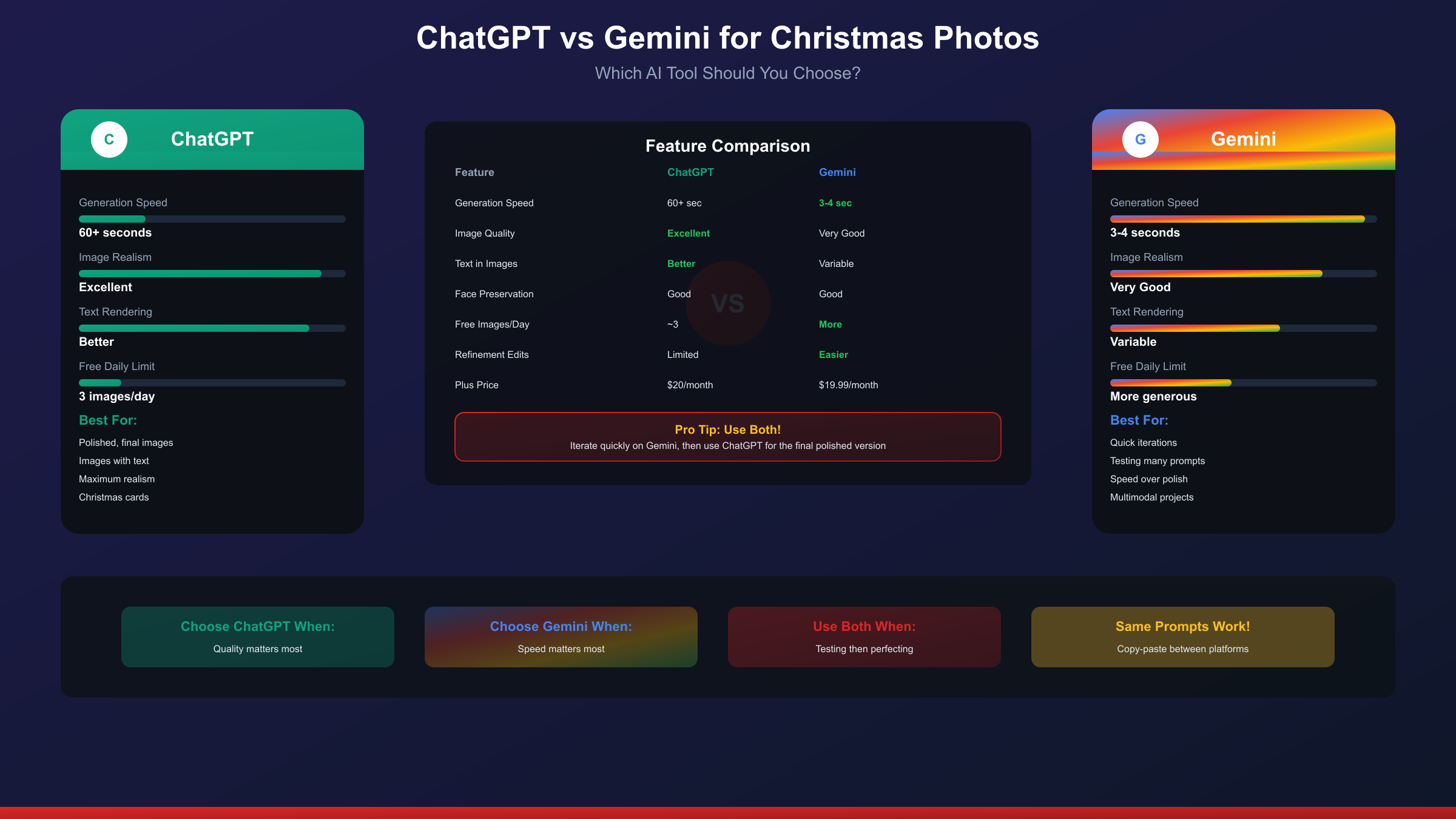
Both ChatGPT and Google's Gemini can create AI Christmas photos, but they have distinct strengths and trade-offs:
ChatGPT (DALL-E)
Strengths:
- More polished, photorealistic results
- Better text rendering when needed
- Familiar interface for existing users
- Strong at following detailed prompts
Limitations:
- Slower generation (60+ seconds per image)
- Free tier limited to 3 images per day
- Can feel restrictive for experimentation
- Plus subscription required for serious use
Best For: Users who want the most polished final results and don't mind slower generation speeds or daily limits.
Google Gemini
Strengths:
- Much faster generation (3-4 seconds)
- Good consistency when refining images
- Strong multimodal understanding
- Free tier more generous for testing
Limitations:
- Results sometimes less polished than ChatGPT
- Text rendering can be inconsistent
- Less intuitive for image-specific prompts
Best For: Users who want to iterate quickly, test multiple ideas, or prefer faster turnaround.
| Feature | ChatGPT | Gemini |
|---|---|---|
| Generation Speed | 60+ seconds | 3-4 seconds |
| Realism | Excellent | Very Good |
| Text Quality | Better | Variable |
| Face Preservation | Good | Good |
| Free Daily Limit | 3 images | Limited |
| Best Use | Final polished images | Quick iterations |
Cross-Platform Tip
Many of the prompts in this guide work on both platforms. You can copy and paste the same prompt into Gemini to compare results. Some users generate quick iterations on Gemini to refine their prompt, then use their final version on ChatGPT for the polished result.
Free Alternatives When You Hit the Limit
The 3-image-per-day free tier limit frustrates many users, especially during the holiday rush when everyone wants to create multiple photos. Here are legitimate alternatives:
Free AI Image Generators
MyEdit by CyberLink MyEdit offers free AI image generation with Christmas-specific features. Upload your photo and generate festive portraits without account creation. The free tier provides several daily generations, though exports may have watermarks or resolution limits.
BestPhoto Christmas Tools BestPhoto provides free, no-signup-required tools specifically for Christmas photo editing. Their Santa Hat Tool adds festive accessories, while the Santa Transform feature can create full holiday character transformations.
VisualGPT AI Christmas Generator A dedicated Christmas photo generator that creates festive images from text prompts. Upload your photo and select from various holiday styles. The interface is designed specifically for seasonal content.
Createimg Offers free AI Christmas filters that add snow, lights, and festive effects to existing photos. No signup required for basic features.
When You Need High Volume
For users needing more than free tiers provide—perhaps for batch Christmas card creation or business use—image generation API services offer pay-per-use access. Services like laozhang.ai provide access to image generation models at rates often lower than official pricing, with no monthly subscription required. This approach makes sense when you need dozens of images but don't want to commit to a $20/month subscription you'll only use seasonally.
Subscription Considerations
If you're hitting limits regularly, consider:
- ChatGPT Plus ($20/month): ~50 images per 3 hours
- Google One AI Premium ($19.99/month): Includes Gemini Advanced
- Midjourney ($10-30/month): Different aesthetic, separate platform
For purely holiday use, most users find that strategic use of free tiers across multiple platforms covers their needs. Save the subscriptions for those creating content professionally or wanting unlimited experimentation.
Troubleshooting Common Issues
"The Face Doesn't Look Like Me"
This is the most common complaint. Solutions:
- Upload multiple photos of yourself for better reference
- Add explicit instructions: "CRITICAL: Do not modify, beautify, or alter my facial features in any way"
- Use higher-resolution reference photos
- Try different photos with varied lighting and angles
- Accept that some variation is inherent to the technology
Weird Hand/Finger Issues
AI still struggles with hands. Workarounds:
- Frame prompts to minimize visible hands ("hands in pockets," "holding a mug close to chest")
- Use poses where hands are naturally obscured
- Accept minor imperfections in otherwise good images
Text Appears as Gibberish
AI-generated text is unreliable. If your prompt includes signs or written elements:
- Remove text requirements from the prompt
- Add text using a separate editing tool after generation
- Use the image as-is if text isn't critical
Wrong Style Generated
When the AI ignores style instructions:
- Be more explicit and detailed about the style
- Remove conflicting instructions (e.g., don't ask for "realistic" and "cartoon" elements)
- Generate a new image if refinements don't work
Slow Generation Times
ChatGPT image generation can take 60+ seconds:
- This is normal, not a bug
- Don't refresh or re-submit, which wastes your limit
- Use Gemini if speed is essential
Image Won't Generate (Content Filtered)
OpenAI's safety filters may block certain requests:
- Remove any potentially problematic terms
- Avoid requests involving children in certain contexts
- Rephrase using different wording
- Keep requests clearly appropriate and festive
From Digital to Print: Christmas Card Guide
Many users want to turn their AI Christmas photos into physical cards or prints. Here's how to do it properly:
Resolution Requirements
ChatGPT generates images at sufficient resolution for most uses, but consider:
- Social Media: Generated resolution is perfect
- 4x6 Prints: Works well at standard generation size
- 8x10 or Larger: May show quality loss
- Canvas Prints: Consider AI upscaling first
Recommended Print Services
Once you have your final image:
- Canva: Offers card templates; upload your AI image
- Shutterfly: Traditional photo printing with card options
- Vistaprint: Business-quality card printing
- Walgreens/CVS: Quick local pickup options
Design Tips for Cards
- Leave space for text (request this in your prompt: "leave room in the lower third for text overlay")
- Use horizontal orientation for standard card formats
- Consider multiple image cards using your best generations
- Add text using the card service's editor, not AI generation
Copyright Considerations
Images you generate using AI tools are generally yours to use for personal purposes like holiday cards. However:
- Review OpenAI's terms of service for commercial use
- Don't claim AI images are real photographs
- Be aware of potential issues with images resembling real people (other than yourself)
Frequently Asked Questions
Is ChatGPT image generation really free?
Yes, free users can generate approximately 3 images per day. The limit resets on a rolling 24-hour basis. ChatGPT Plus subscribers get significantly more capacity.
Why doesn't my AI photo look like me?
AI face preservation isn't perfect. The technology interprets your face rather than copying it exactly. Using high-quality photos, detailed prompts, and the "do not change my face" instruction improves accuracy but can't guarantee perfect likeness.
Can I use these photos for Christmas cards I'll mail?
Yes, AI-generated images from ChatGPT can be used for personal purposes like holiday cards. You created them, and you can print and mail them.
Which prompts work best for realistic results?
Prompts with specific details about lighting, clothing, setting, and explicit face-preservation instructions produce the most realistic results. The glamour shot and cozy indoor prompts tend to be most reliable.
Can I create photos of my family members?
Yes, with their permission. Upload their photos and use similar prompts. For group shots, the AI will attempt to include all faces, though accuracy decreases with more people.
Do these prompts work on Gemini too?
Yes, you can copy these prompts directly into Google Gemini. Results will differ slightly, and generation is much faster. Many users compare results across both platforms.
What if I need more than 3 images per day?
Options include: ChatGPT Plus subscription ($20/month), using free alternatives like MyEdit or BestPhoto, trying Google Gemini's free tier, or using pay-per-use API services for specific needs.
Can I make photos of celebrities in Christmas settings?
Generating images of real people (other than yourself) raises ethical and potentially legal concerns. OpenAI's policies restrict generating images of specific real individuals. Stick to generating images of yourself.
How do I fix weird hands in my generated image?
The easiest solution is crafting prompts where hands are naturally hidden—holding objects close to the chest, in pockets, or behind the subject. Alternatively, accept minor hand imperfections in otherwise good images.
Are there Christmas-specific GPTs I can use?
Yes, OpenAI's GPT Store includes several Christmas-focused GPTs like "Christmas Card Photo Generator" and "Merry Christmas Maker" that streamline the process with pre-configured settings for holiday content.
Conclusion
The ChatGPT Christmas photo trend represents one of the most accessible and entertaining uses of AI image generation. Whether you're creating a glamorous studio portrait that would make the 80s proud, a cozy fireplace scene for your holiday card, or a silly pet photo to share on social media, the prompts and techniques in this guide give you everything needed to join the trend.
Remember the key principles: upload a clear photo, include "do not change my face" in your prompts, be specific about details, and maintain realistic expectations. The AI won't produce a perfect copy of your face, but it will create festive, shareable images that capture the holiday spirit.
For those who exhaust the free tier—and many do during the holiday rush—free alternatives like MyEdit and BestPhoto provide additional options. Power users might consider ChatGPT Plus or services like laozhang.ai for pay-per-use image generation when seasonal volume exceeds free tier limits.
The viral holiday glamour shots flooding social media prove that imperfection is part of the fun. People share these images not because they're photorealistic portraits, but because they're entertaining, festive, and spark joy during the holiday season. So grab your best selfie, pick a prompt that matches your style, and create your own AI Christmas photo masterpiece. Happy holidays!