How to Use ChatGPT Plus Agent Mode for Research Tasks: Complete 2025 Guide
Master ChatGPT Agent Mode for powerful research automation. Learn step-by-step activation, prompting frameworks, practical examples for academic and market research, and expert tips to maximize your 40 monthly messages.
Nano Banana Pro
4K-80%Google Gemini 3 Pro · AI Inpainting
谷歌原生模型 · AI智能修图

ChatGPT Agent Mode represents a fundamental shift in how AI assists with research tasks. Unlike traditional chat interfaces that simply respond to questions, Agent Mode transforms ChatGPT into an autonomous research assistant capable of browsing websites, analyzing data, and delivering comprehensive reports—all from a single prompt. For researchers, analysts, and knowledge workers, this feature promises to compress hours of manual work into minutes of automated execution.
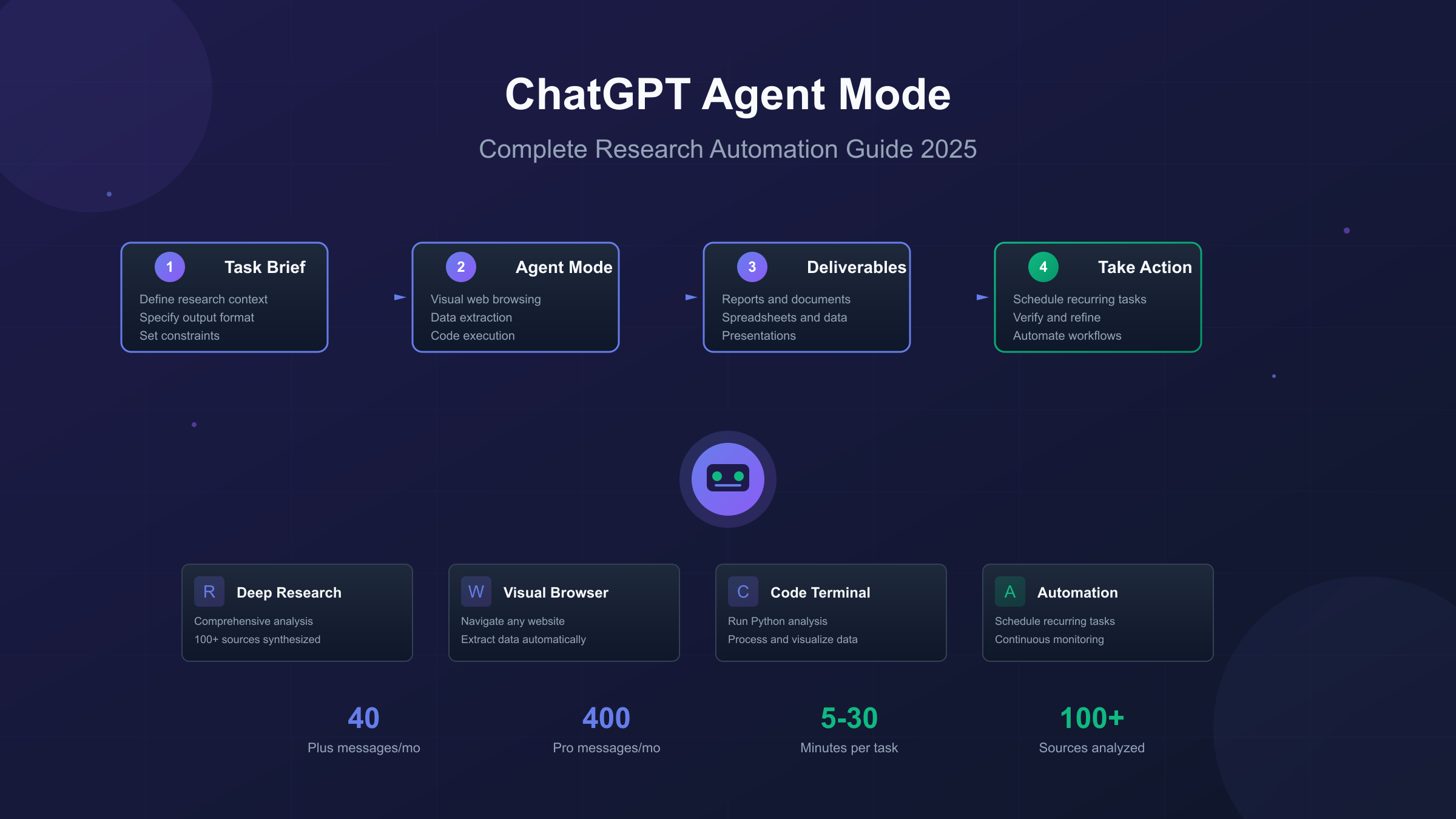
OpenAI officially rolled out Agent Mode to Plus, Pro, and Team subscribers on July 17, 2025. The feature combines three previously separate capabilities: Operator's web browsing, Deep Research's information synthesis, and ChatGPT's conversational intelligence. This unified system can navigate websites through a visual browser, execute code for data analysis, and produce deliverables like spreadsheets and presentations.
Key Insight: Agent Mode isn't just another chatbot feature—it's a task execution system. Understanding this distinction is crucial for getting meaningful results from your research requests.
This guide provides a hands-on approach to using Agent Mode effectively for research tasks. You'll learn how to activate the feature, structure prompts for maximum effectiveness, choose between Agent Mode and Deep Research for different scenarios, and work within the message limits of your subscription tier. Whether you're conducting competitive analysis, academic literature reviews, or market research, the strategies here are based on documented user experiences and OpenAI's official guidance.
How to Access and Activate ChatGPT Agent Mode
Getting started with Agent Mode requires a paid ChatGPT subscription and takes less than a minute to activate. The feature is available to Plus ($20/month), Pro ($200/month), Team, Business, Enterprise, and Education users in all supported countries except the European Economic Area and Switzerland. If you're in a supported region with an active subscription, activation is straightforward.
To enable Agent Mode, open any ChatGPT conversation and locate the Tools dropdown menu—marked by a "+" icon in the message composition area. Click the dropdown and select Agent mode from the available options. Alternatively, you can type /agent directly in the message composer followed by your task instructions. When Agent Mode is active, you'll see an "Agent" tag appear in the prompt area, confirming the feature is enabled.
Once activated, Agent Mode provides access to a sandboxed virtual environment where ChatGPT can perform actions on your behalf. This includes a visual browser that interacts with web pages through a graphical interface, a text-based browser for simpler queries, a terminal for code execution, and direct API access for integrations. The system displays its reasoning process in real-time, showing you exactly what searches it's conducting and what decisions it's making.
Important considerations before your first task:
- Each initial task request counts as one message toward your monthly limit (follow-up clarifications don't consume additional quota)
- Tasks typically complete within 5-30 minutes depending on complexity
- You can pause, interrupt, or take over browser control at any point
- The agent will request your approval before taking high-impact actions like sending emails
For researchers new to the feature, starting with a low-stakes task helps build familiarity with the interface. A simple competitive pricing comparison or industry news summary provides hands-on experience without risking your limited message allocation on complex requests that might require multiple refinements.
Agent Mode vs Deep Research: Choosing the Right Tool
ChatGPT now offers two distinct research-oriented features that serve different purposes. Understanding when to use each prevents wasted effort and delivers better results for your specific research needs. The fundamental difference lies in output type: Deep Research produces comprehensive reports, while Agent Mode produces actionable deliverables.
Deep Research is optimized for one-time intensive analysis. Powered by the o3 model optimized for web browsing and data synthesis, it searches, interprets, and analyzes massive amounts of text, images, and PDFs across the internet. A single Deep Research query can consult nearly 100 sources and produce a detailed report with citations—the kind of output you'd expect from a professional research analyst. Use Deep Research when you need:
- A comprehensive literature review on a technical topic
- Market analysis with verified data and cited sources
- In-depth competitive intelligence reports
- Research summaries that require high accuracy and minimal hallucination
Agent Mode is designed for task execution rather than pure research. It doesn't just gather information—it acts on it. The agent can browse websites, fill out forms, create spreadsheets, generate presentations, and schedule recurring tasks. Use Agent Mode when your research requires:
- Multi-step workflows that combine research with action
- Data extraction from specific websites into structured formats
- Recurring monitoring (competitor blogs, price changes, news)
- Integration with other tools (email, calendars, document creation)
| Feature | Deep Research | Agent Mode |
|---|---|---|
| Primary Output | Detailed reports with citations | Actionable deliverables (files, data, presentations) |
| Execution Time | 10-30 minutes | 5-30 minutes |
| Source Verification | High (explicit citations) | Moderate (shows sources but less structured) |
| Best For | One-time intensive analysis | Recurring tasks and multi-step workflows |
| Web Interaction | Read-only browsing | Interactive (can click, fill forms, navigate) |
The practical distinction: if you need to know something deeply, use Deep Research. If you need to do something with research, use Agent Mode. Many workflows benefit from using both—starting with Deep Research to understand a topic thoroughly, then using Agent Mode to act on those insights through data collection, outreach, or content creation.
Five Research Task Types with Ready-to-Use Prompts
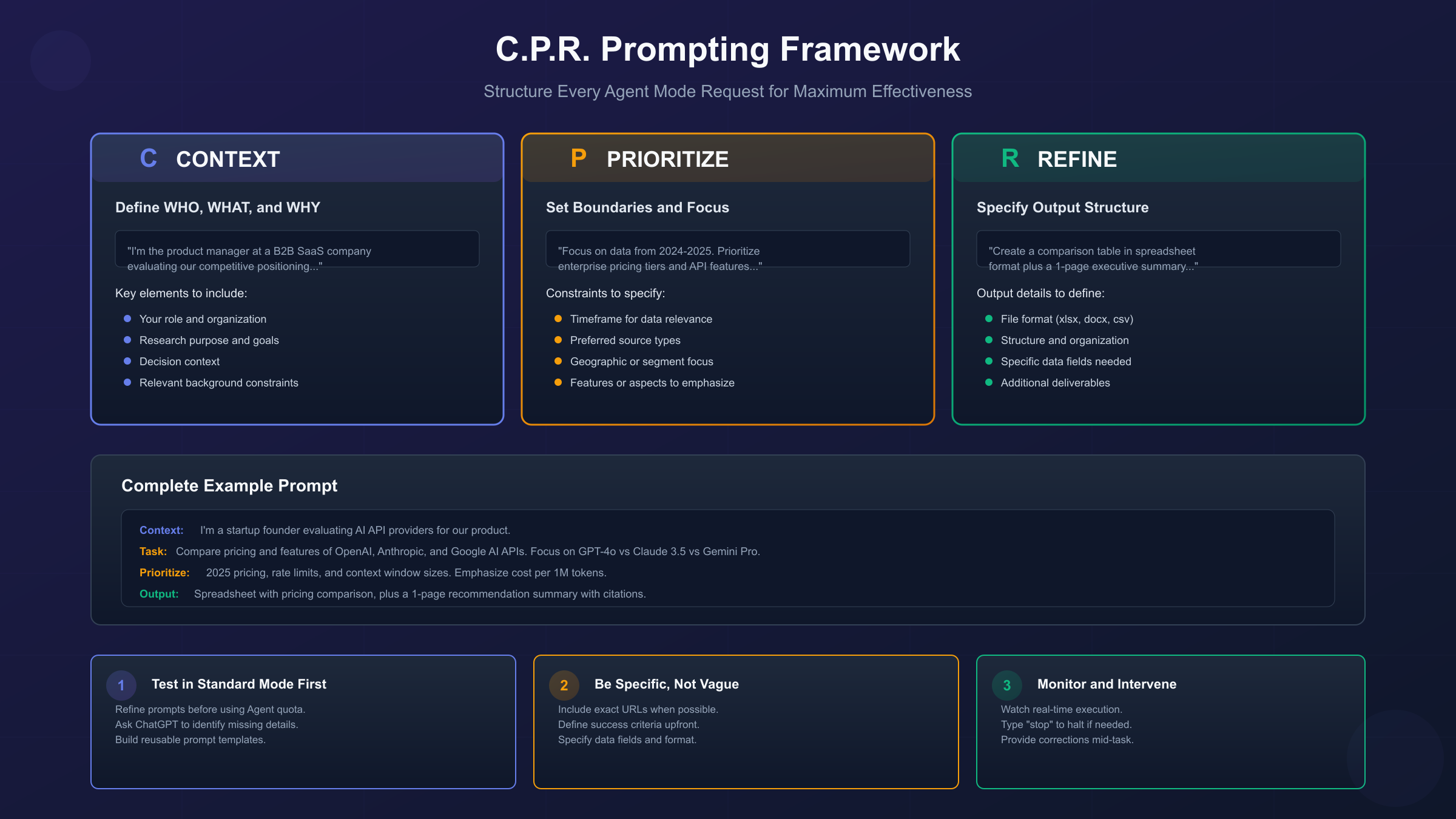
Effective Agent Mode usage requires treating each prompt like a task brief for a capable assistant. Vague requests lead to wasted messages and unsatisfying results. The following prompt templates are structured around the C.P.R. framework—Context, Prioritize, Refine—which has proven effective for research automation across multiple documented use cases.
1. Competitive Analysis Research
Competitive research is one of Agent Mode's strongest applications. The agent can navigate multiple competitor websites, extract pricing information, compare feature sets, and compile findings into structured deliverables. The key is specifying exactly which data points matter for your analysis.
Prompt Template:
Context: I'm the [role] at [company type] evaluating competitive positioning.

Task: Analyze these three competitors' offerings:
1. [Competitor URL 1]
2. [Competitor URL 2]
3. [Competitor URL 3]

For each company, extract:
- All pricing tiers and costs
- Core features per tier
- Any free trial or discount offers
- Recent product announcements (last 3 months)

Prioritize: Focus on [specific features relevant to your use case].

Output: Create a comparison table in spreadsheet format, plus a 1-page summary highlighting key differentiators. Include screenshots of pricing pages.
Example in Practice: A SaaS product manager used this template to analyze three project management tools. Within 12 minutes, the agent compiled a comparison spreadsheet with 47 data points, captured pricing page screenshots, and identified that one competitor had quietly introduced a new enterprise tier not yet announced on their blog.
2. Market Research and Trend Analysis
Market research requires synthesizing information from multiple source types—news articles, industry reports, social media trends, and company announcements. Agent Mode excels at this multi-source aggregation, though it's important to specify the timeframe and source preferences.
Prompt Template:
Context: I need market intelligence on [industry/product category] for [purpose: investment decision, product launch, strategic planning].

Task: Research the current state of [specific market or technology]:
- Market size and growth projections (cite sources)
- Top 5 players and their market share
- Emerging trends from the past 6 months
- Key challenges facing the industry

Prioritize: Focus on [geographic region] and [specific segment]. Use data from [preferred source types: industry reports, news, analyst coverage].

Output: A 3-page market brief with:
- Executive summary (1 paragraph)
- Key findings with citations
- Trend visualization or data table
- Actionable recommendations
Practical Tip: For market research, explicitly request citations. Agent Mode includes source links in its outputs, allowing you to verify claims and dig deeper into promising findings.
3. Academic Literature Review Assistance
While Agent Mode cannot access paywalled academic databases directly, it can assist with literature reviews by identifying relevant papers, extracting key findings from abstracts and open-access content, and organizing sources thematically. This works best as a starting point for deeper manual research.
Prompt Template:
Context: I'm researching [topic] for [thesis/paper/report] in [field].

Task: Identify relevant academic literature on [specific research question]:
- Search for papers from the past [timeframe]
- Focus on [methodologies, theories, or approaches of interest]
- Look for meta-analyses and systematic reviews when available

Prioritize: Peer-reviewed sources from [specific journals or publishers if known]. Emphasize empirical studies over opinion pieces.

Output: An annotated bibliography with:
- Paper title, authors, publication year
- Brief summary of findings (2-3 sentences)
- Key methodology used
- Relevance to my research question
- Direct link to the paper or abstract

Organize findings by [theme/chronology/methodology].
Important Limitation: ChatGPT's knowledge cutoff and inability to access paywalled content means Agent Mode should supplement, not replace, traditional academic database searches. Cross-reference findings with Google Scholar, PubMed, or your institution's library resources.
4. Data Collection and Extraction
Agent Mode can systematically collect structured data from websites—product catalogs, job listings, event schedules, contact directories—and export it in usable formats. This is particularly valuable for research requiring large datasets that would take hours to compile manually.
Prompt Template:
Context: I need to build a dataset of [data type] for [analysis purpose].

Task: Extract the following information from [source website or list of websites]:

Data fields to collect:
- [Field 1]: [description and format]
- [Field 2]: [description and format]
- [Field 3]: [description and format]

Constraints:
- Only include entries that [specific criteria]
- Date range: [start date] to [end date]
- Maximum entries: [number]

Output: Export as CSV file with headers matching the field names above. Include a separate text file documenting any entries that couldn't be extracted and why.
Real-World Example: A recruitment researcher extracted job posting data from three career sites, collecting 87 listings with salary ranges, required skills, and company names in under 20 minutes. The structured CSV output fed directly into their salary benchmarking analysis.
5. Recurring Monitoring and Alerts
One of Agent Mode's most practical features is scheduling recurring research tasks. After completing any task, clicking the clock icon allows you to set daily, weekly, or monthly repetition. This transforms one-time research into ongoing intelligence gathering.
Prompt Template:
Context: I need to monitor [topic/competitors/industry] for [ongoing purpose].

Task: Check the following sources weekly:
1. [Source 1]: Look for [specific content type]
2. [Source 2]: Monitor for [announcements/changes/updates]
3. [Source 3]: Track [metrics or news]

For each monitoring cycle:
- Summarize any new developments
- Flag items that match these criteria: [priority triggers]
- Compare to previous week's findings

Output: Weekly briefing document with:
- Changes since last report
- Priority items highlighted
- Links to original sources
- Recommended actions if applicable
Scheduling Tip: Manage all recurring tasks at chatgpt.com/schedules. You can review, modify, or cancel scheduled research from this dashboard.
Best Practices for Prompting in Agent Mode
Prompting in Agent Mode differs fundamentally from conversational ChatGPT use. You're not brainstorming with a co-pilot—you're managing a task runner. Every message should read like a job instruction: specific, structured, and outcome-focused. The following practices consistently produce better results across different research scenarios.
Write Task Briefs, Not Questions
Standard ChatGPT excels at answering questions and generating ideas through dialogue. Agent Mode performs best with complete task specifications upfront. Instead of asking "What are the best project management tools?", provide a task brief: "Compare Asana, Monday.com, and ClickUp's pricing, extract feature lists for their mid-tier plans, and create a recommendation based on teams under 50 people with a $500/month budget."
The agent can't read your mind about constraints, preferences, or success criteria. Front-loading this context prevents wasted execution time and produces immediately usable outputs.
Specify Output Formats Explicitly
Agent Mode can produce various deliverables: spreadsheets, slide decks, text documents, CSV files, and more. Always specify your preferred format. Vague requests like "give me a report" might produce a chat message when you needed a downloadable document, or vice versa.
Effective format specifications include:
- "Create a Google Docs-compatible document formatted for email sharing"
- "Export as .xlsx with column headers matching the data fields I specified"
- "Generate a 5-slide presentation with one key finding per slide"
Test Prompts in Standard Mode First
Given the limited monthly message allocation (40 for Plus, 400 for Pro), refining prompts in regular ChatGPT before using Agent Mode preserves your quota for actual execution. Draft your task brief in standard mode, ask ChatGPT to identify ambiguities or missing details, then transfer the refined prompt to Agent Mode.
This approach is especially valuable for complex research projects where the first attempt rarely produces perfect results. Building a library of tested prompt templates reduces experimentation costs over time.
Monitor and Intervene Proactively
Agent Mode displays its actions in real-time, showing browsing activity and decision-making. Don't treat this as a "set and forget" feature—watching the agent work allows you to:
- Redirect if it's pursuing irrelevant sources
- Provide clarification before it goes too far down a wrong path
- Take over browser control for authentication or complex navigation
- Stop execution if the task is clearly failing
Typing "stop" halts the current process. You can then provide corrections and continue from that point without consuming another message.
Handle Authentication Carefully
When a task requires logging into websites, Agent Mode pauses and prompts you to take control. In this "takeover mode," no screenshots are captured—your inputs remain private. Once you've completed the login step, return control to the agent. This maintains privacy for credentials while still enabling authenticated research tasks.
Security Practice: Avoid including passwords or sensitive credentials directly in your prompts. Always use the takeover mode for authentication, and review which cookies the agent has stored (it persists authentication cookies unless manually cleared).
Subscription Tiers, Message Limits, and Alternatives
Understanding the economics of Agent Mode is essential for planning research workflows. The feature operates on a message-based quota system with significant differences between subscription tiers. For research-heavy users, these limits directly impact how you can incorporate Agent Mode into your work.
ChatGPT Plus ($20/month)
The Plus tier provides 40 agent messages per month. Only the initial task request counts toward this limit—follow-up clarifications and corrections within the same task session don't consume additional quota. This sounds generous until you consider that Plus users typically exhaust their allocation within the first week of each billing cycle, according to usage analyses.
With 40 messages, you can realistically execute:
- 8-10 substantial research tasks (assuming some require refinement)
- 2-3 complex multi-step projects with room for iteration
- 20+ simple data extraction or lookup tasks
The limitation forces strategic usage. Reserve Agent Mode for high-impact tasks that would take significant manual time. Use standard ChatGPT for routine questions and brainstorming.
ChatGPT Pro ($200/month)
Pro users receive 400 agent messages monthly—a 10x increase that fundamentally changes how you can use the feature. At this volume, Agent Mode becomes a daily tool rather than a reserved capability. Pro users also get priority access to new features, faster response times during peak hours, and extended access to compute-intensive features like Sora.
The Pro tier makes sense for:
- Professional researchers running multiple projects
- Business users with recurring automation needs
- Power users who consistently hit Plus limits
When Message Limits Become a Constraint
For users who need AI-powered research at higher volumes than 400 messages monthly, or who want programmatic access without the ChatGPT interface, API-based alternatives offer different trade-offs. OpenAI's API provides direct access to the same models powering ChatGPT, with usage-based pricing rather than subscription limits.
However, the Agent Mode capabilities (visual browsing, form filling, task scheduling) aren't currently available through the API. API users get the underlying language models but not the agentic execution layer. This means API access is suitable for:
- Text analysis and synthesis at scale
- Batch processing of research queries
- Integration into custom applications
- Cost optimization for high-volume usage
For researchers who need both the agentic capabilities and high volume, combining ChatGPT Pro with API access for overflow tasks often provides the best balance. Platforms like laozhang.ai offer API access to multiple models including GPT-4o and Claude at usage-based pricing, which can supplement ChatGPT's subscription limits when you need to run large-scale analysis or synthesis tasks that don't require visual browsing.

| Feature | Plus ($20/mo) | Pro ($200/mo) | API Access |
|---|---|---|---|
| Agent Messages | 40/month | 400/month | N/A (no agent mode) |
| Deep Research | Included | Unlimited | N/A |
| Visual Browsing | Yes | Yes | No |
| Recurring Tasks | Yes | Yes | No |
| Model Access | GPT-4o, o1 | All models + priority | All models |
| Best For | Occasional research | Daily research workflows | High-volume text processing |
Security and Privacy Considerations
Agent Mode's ability to browse websites, access files, and connect to third-party services creates a broader attack surface than traditional chatbot interactions. OpenAI has implemented multiple safeguards, but understanding the risks helps you use the feature responsibly—especially when researching sensitive topics or accessing authenticated services.
Prompt Injection: An Unsolved Risk
The most significant security concern is prompt injection—attacks where malicious instructions hidden in websites or documents trick the agent into taking unintended actions. Hackers can embed commands in text that's invisible to humans but readable by AI, potentially overriding your instructions.
OpenAI acknowledges this risk directly: "Prompt injection, much like scams and social engineering on the web, is unlikely to ever be fully 'solved.'" The company uses AI-powered adversarial testing to catch obvious attacks, but the underlying vulnerability remains.
Practical Mitigation:
- Avoid using Agent Mode to access untrusted websites or documents
- Review the agent's planned actions before approving high-impact operations
- Use "watch mode" for sensitive tasks requiring human oversight
- Don't send the agent to banking, health, or personal finance sites
Cookie and Session Persistence
Agent Mode stores cookies from browsing sessions, including authentication cookies that can automatically sign you into previously visited sites. While convenient, this means:
- Future tasks can access previously logged-in websites, even unrelated tasks
- Your authentication state persists across sessions
- Stored cookies could potentially be exposed in certain attack scenarios
Recommendation: Clear the agent's browser data after completing sensitive research sessions. Review stored cookies periodically, especially if you've authenticated to important accounts.
Data Access Through Connectors
When you enable connectors for Gmail, Google Drive, or other services, the agent gains read access to that data. This creates potential privacy risks:
- Emails and documents become accessible to research tasks
- Prompt injection attacks could potentially exfiltrate sensitive information
- Over-broad connector permissions may expose more data than intended
Best Practice: Enable only the connectors needed for your current task, and disable them when finished. Review connector permissions regularly in your settings.
OpenAI's Implemented Safeguards
Despite these risks, Agent Mode includes meaningful protections:
- User confirmations for high-impact actions (sending emails, submitting forms)
- Refusal patterns that block disallowed or dangerous tasks
- Watch mode requiring human supervision on high-risk sites
- Takeover mode privacy that prevents screenshot capture during authentication
The system also provides real-time transparency into its actions, allowing you to catch suspicious behavior before it completes.
Limitations and What to Expect
Setting realistic expectations about Agent Mode's capabilities prevents frustration and helps you identify tasks where the feature adds genuine value. Based on extensive user testing and documented experiences, certain limitations consistently affect research workflows.
Speed and Reliability Trade-offs
Agent Mode is slower than manual research for simple tasks. A competitive pricing lookup that might take you 5 minutes of browsing can take the agent 15-20 minutes as it reasons through each step, navigates interfaces, and verifies information. The value proposition works for complex, multi-step tasks where the accumulated time savings outweigh the slower per-action pace.
Reliability varies by website complexity. The agent handles static content and simple forms well but struggles with:
- Dynamic JavaScript-heavy sites that load content progressively
- Complex navigation patterns requiring hover menus or multi-step interactions
- CAPTCHAs and bot detection that many websites deploy
- Rapidly changing interfaces where button positions shift
When the agent encounters these obstacles, it may get stuck, mis-click, or fail silently. Monitoring execution helps catch these failures early.
Context and Accuracy Limitations
Like all large language models, Agent Mode can produce confident-sounding outputs that are incorrect. The agent might:
- Misread webpage information due to parsing errors
- Draw incorrect conclusions from partial data
- Confuse similar-sounding products or companies
- Generate plausible but fabricated details when sources are unclear
Critical Verification Requirement: Always cross-check Agent Mode outputs before acting on research findings, especially for decisions with significant consequences. The agent provides source links—use them.
Regional and Feature Availability
Agent Mode isn't available in the European Economic Area or Switzerland due to regulatory considerations. Users in these regions see standard ChatGPT features only. Additionally:
- Slideshow generation is still in beta with inconsistent quality
- Memory features are temporarily disabled for security reasons
- Some website categories are dynamically enabled or disabled
- No public API exists for programmatic agent task submission
Task Types That Work Well vs. Poorly
Strong Performance:
- Web data extraction from structured sources
- Multi-site price and feature comparisons
- News and announcement monitoring
- Research synthesis from public sources
- Spreadsheet and document generation
Weak Performance:
- Calendar and scheduling tasks (time zone and conflict handling issues)
- Complex presentation creation (shallow research, formatting problems)
- Authentication-heavy workflows (frequent interruptions)
- Real-time monitoring requiring instant updates
- Tasks requiring nuanced judgment calls
The most successful Agent Mode users match tasks to capabilities, using the feature where it genuinely excels while maintaining manual processes for areas where AI assistance adds friction rather than value.
Getting Started: Your First Research Task
With the concepts covered in this guide, you're ready to run your first Agent Mode research task. The following starter workflow minimizes the risk of wasting your message quota while building familiarity with the feature's capabilities.
Step 1: Choose a Low-Stakes Task
Select a research task you could complete manually in 30-60 minutes. Good first tasks include:
- Comparing pricing across three competitor websites
- Extracting product specifications from a manufacturer's site
- Gathering recent news about a company or industry
Avoid tasks requiring authentication, sensitive data access, or complex multi-site navigation for your first attempt.
Step 2: Draft Your Prompt in Standard Mode
Open a regular ChatGPT conversation (not Agent Mode) and draft your task brief using the C.P.R. framework. Ask ChatGPT to identify any missing details or ambiguities. Refine until the instructions are clear and complete.
Step 3: Activate Agent Mode and Execute
Switch to Agent Mode using the Tools dropdown or /agent command. Paste your refined prompt and let the agent begin execution. Watch the real-time activity display to understand how it interprets your instructions.
Step 4: Evaluate and Iterate
Review the output against your expectations. Note what worked well and what needed clarification. Update your prompt template based on lessons learned, building toward a reusable library of tested research prompts.
Step 5: Verify Before Acting
Before using research findings for any important decision, cross-check key facts using the source links provided. The agent's outputs should be a starting point for informed action, not a replacement for critical thinking.
Getting the Most Value: Agent Mode delivers the highest ROI when research tasks would otherwise take hours of repetitive work. The feature compresses time-intensive information gathering into minutes of automated execution—but only when tasks are well-specified and aligned with the agent's actual capabilities.
For researchers ready to explore beyond Agent Mode's subscription limits, combining ChatGPT's agentic capabilities with API-based text processing through services like laozhang.ai provides flexibility for different research scales. The key is matching tools to tasks: Agent Mode for interactive research requiring web browsing, API access for high-volume text analysis and synthesis.
The research assistant landscape continues evolving rapidly. ChatGPT Agent Mode represents a significant step toward AI systems that don't just inform but execute—transforming how knowledge workers approach information gathering and analysis. Starting with clear expectations and growing your usage strategically positions you to benefit as the technology matures.