Claude Code Skills vs Slash Commands 2026: Complete Guide to the Unified System
Master Claude Code extensibility in 2026. Learn the difference between skills and slash commands, when to use each, complete SKILL.md frontmatter reference, practical examples, and migration guide from legacy commands.
Nano Banana Pro
4K-80%Google Gemini 3 Pro · AI Inpainting
谷歌原生模型 · AI智能修图

Claude Code's extensibility system has evolved significantly, merging what were once separate features into a unified architecture. Understanding the relationship between skills and slash commands determines whether you build maintainable, powerful workflows or struggle with deprecated patterns. This guide clarifies the 2026 reality: skills and slash commands now operate as a single system, though with distinct invocation behaviors that serve different purposes.
The confusion stems from documentation that still references the old separation. As of the latest releases, any skill you create can be invoked with a slash prefix, and legacy command files continue working. However, skills offer capabilities that pure slash commands never had—automatic context loading, supporting file directories, and frontmatter-controlled invocation. Knowing when to leverage each approach separates effective Claude Code users from those fighting against the system's design.
Understanding the Unified System
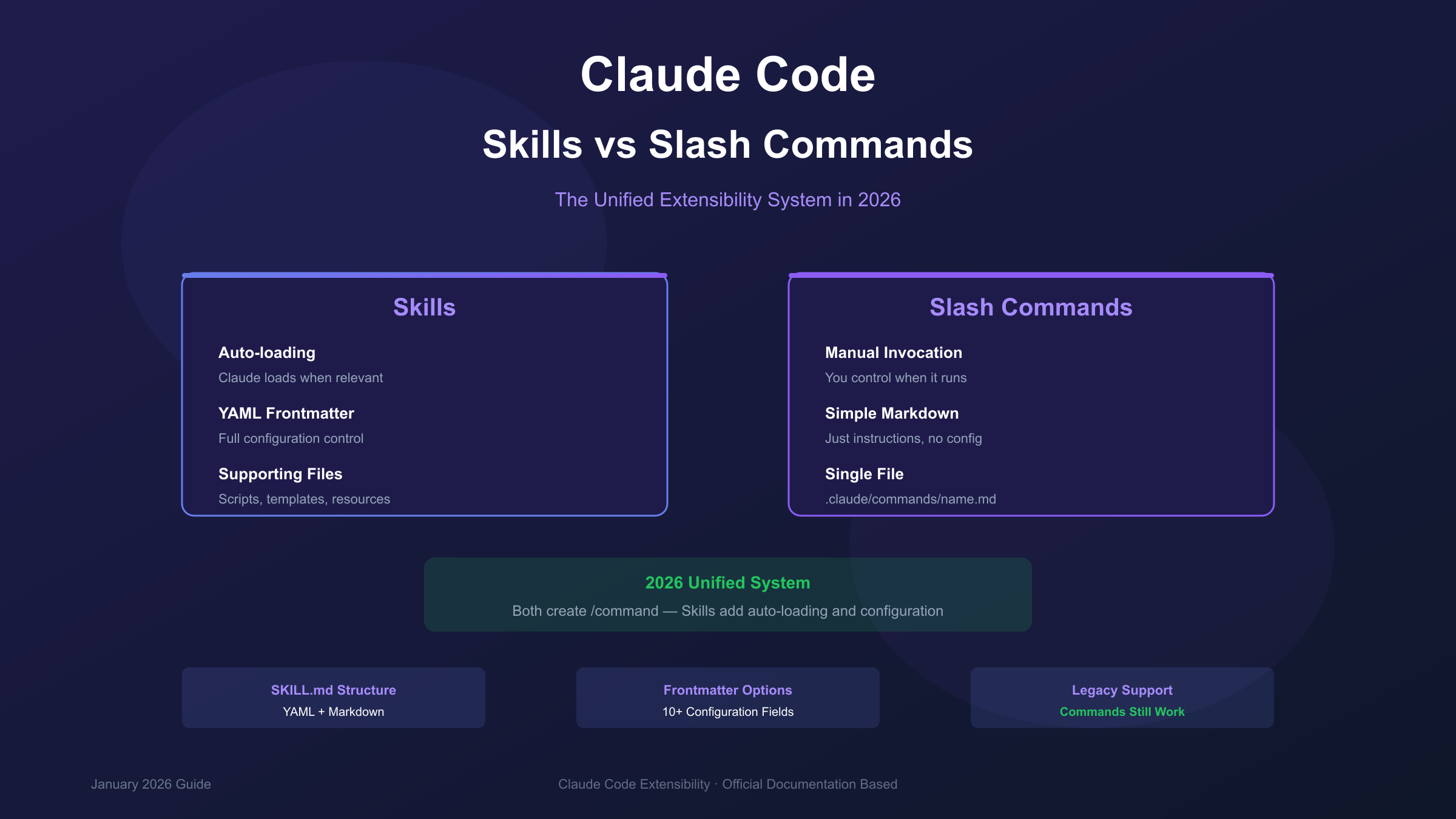
In 2026, skills and slash commands operate as part of a unified extensibility system. Creating a skill automatically makes it available as a slash command, while legacy command files remain functional for backward compatibility.
The unification happened gradually. Anthropic recognized that maintaining two parallel systems created unnecessary complexity. Rather than forcing migration, they merged the concepts: skills became the primary abstraction, with slash command invocation as one of their capabilities. According to the official skills documentation, a file at .claude/commands/review.md and a skill at .claude/skills/review/SKILL.md both create /review—they're now equivalent paths to the same functionality.
This matters because skills offer additional features that plain command files lack. Skills support YAML frontmatter for controlling invocation behavior, can include supporting files like scripts and templates, and enable Claude to auto-load relevant context without explicit user commands. If you're starting fresh, skills are the recommended approach. If you have existing command files, they work fine—but understanding the full skill system unlocks capabilities you're currently missing.
Skills vs Slash Commands: Core Differences
Skills auto-load based on context relevance; slash commands require explicit manual invocation. This fundamental distinction shapes when you choose each approach.
Slash commands are explicit triggers you invoke from the terminal. Type /deploy, and Claude loads the associated instructions and executes the workflow. You control exactly when the command runs. This works well for actions with side effects—deploying code, sending messages, or modifying external systems—where you want deliberate human initiation.
Skills operate differently. When you create a skill with a description field, Claude continuously evaluates whether that skill applies to the current conversation. If you're discussing database optimization and you have a skill with description "Optimize database queries and indexes," Claude may load that skill's instructions automatically. The full content lazy-loads only when relevant, keeping context efficient.
| Aspect | Slash Commands | Skills |
|---|---|---|
| Invocation | Manual only (/command) | Manual or automatic |
| Context loading | On explicit invoke | Description always; full on invoke |
| Supporting files | Single markdown file | Directory with scripts, templates |
| Frontmatter | Not supported | Full YAML configuration |
| Best for | Actions with side effects | Knowledge and context enhancement |
The practical implication: use slash commands (or skills with disable-model-invocation: true) when you want control over timing. Use full skills when Claude should apply expertise automatically based on conversation context.
When to Use Each: Decision Framework
Choosing between skills and slash commands depends on your workflow's nature: who should trigger the action, what side effects exist, and whether the capability enhances context or performs discrete tasks.
Use slash commands when:
- The action has side effects (deployment, file modification, external API calls)
- Timing matters and you need explicit control
- The command is a one-off utility rather than ongoing expertise
- You're creating personal shortcuts for repetitive tasks
Use full skills when:
- The capability represents domain knowledge Claude should apply contextually
- Multiple conversations could benefit from the same expertise
- You want Claude to recognize when the skill applies without prompting
- The skill includes supporting files, scripts, or templates
Use skills with disable-model-invocation: true when:
- You want the organizational benefits of skills (directories, frontmatter)
- But the action should only run when you explicitly invoke it
- Side effects make automatic invocation dangerous
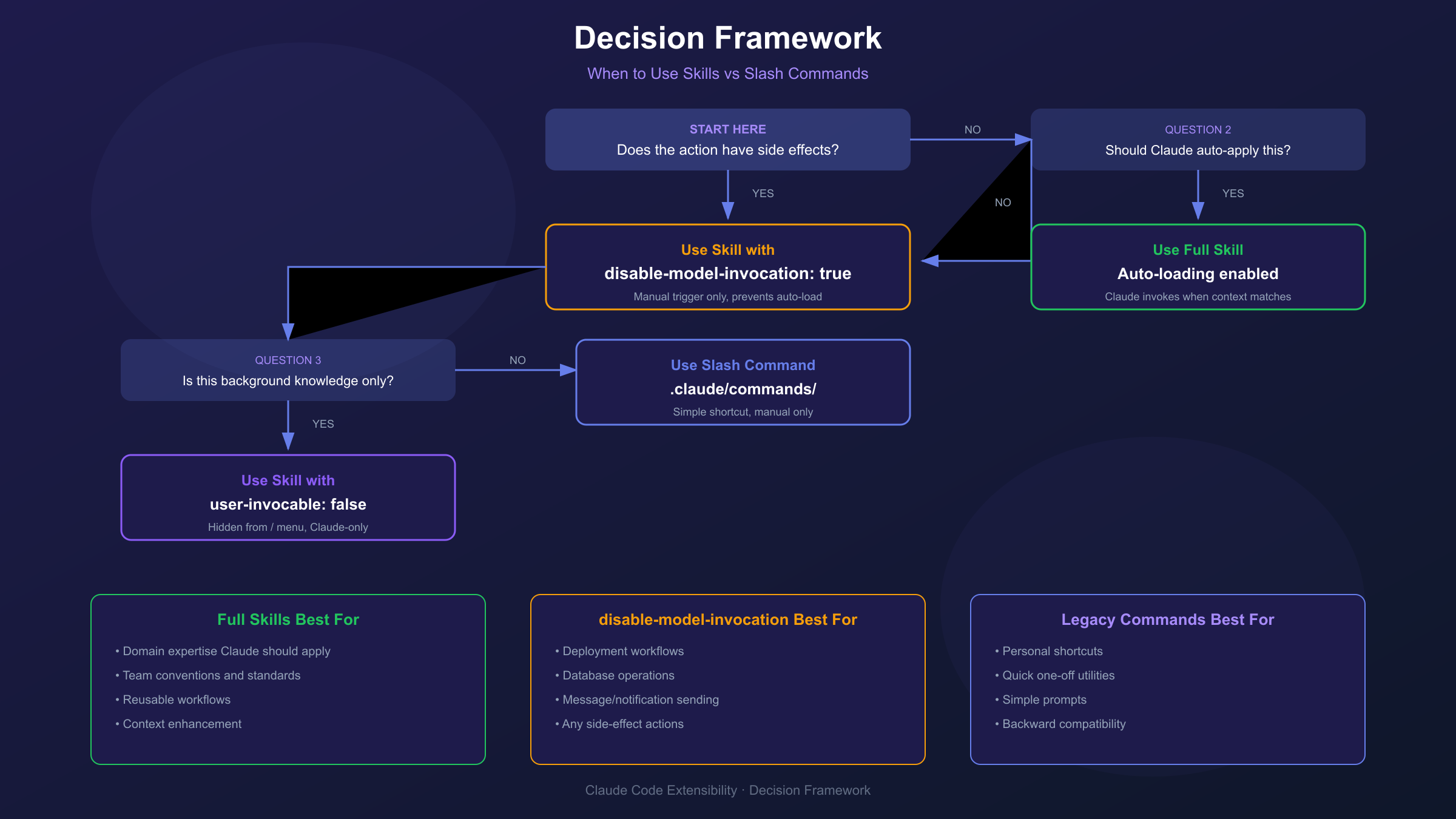
For example, a /deploy command should always require explicit invocation—you don't want Claude deciding your code looks ready and triggering deployment. But a code-review-standards skill that contains your team's review checklist can load automatically whenever someone asks Claude to review code.
Creating Skills: Step-by-Step Guide
Creating a skill requires a directory containing a SKILL.md file with YAML frontmatter and markdown instructions. The structure follows the Agent Skills open standard with Anthropic extensions, intentionally simple while supporting complex workflows through supporting files.
Basic Skill Structure
.claude/skills/my-skill/
├── SKILL.md           # Required: Main instructions
├── reference.md       # Optional: Detailed documentation
├── examples.md        # Optional: Usage examples
└── scripts/
    └── validate.sh    # Optional: Helper scripts
Minimal SKILL.md
hljs yaml---
name: code-explainer
description: Explains code with diagrams and analogies. Use when explaining how code works.
---
When explaining code:
1. Start with an analogy to something familiar
2. Draw ASCII diagrams showing structure or flow
3. Walk through the code step-by-step
4. Highlight common misconceptions or gotchas
Keep explanations conversational. Use multiple analogies for complex concepts.
The name field becomes your slash command (/code-explainer). The description tells Claude when to auto-load this skill—be specific about trigger conditions.
Skill with Arguments
hljs yaml---
name: fix-issue
description: Fix a GitHub issue by number
argument-hint: [issue-number]
disable-model-invocation: true
---
Fix GitHub issue $ARGUMENTS following our standards:
1. Read the issue with `gh issue view $ARGUMENTS`
2. Understand requirements and acceptance criteria
3. Implement the fix in appropriate files
4. Write tests covering the changes
5. Create a commit with conventional commit message
6. Reference the issue number in the commit
The $ARGUMENTS placeholder captures everything after the command. Running /fix-issue 123 replaces $ARGUMENTS with 123.
Skill Locations
| Location | Path | Scope |
|---|---|---|
| Personal | ~/.claude/skills/skill-name/SKILL.md | Available in all your projects |
| Project | .claude/skills/skill-name/SKILL.md | This project only |
| Plugin | plugin-name/skills/skill-name/SKILL.md | Where plugin enabled |
Project skills override personal skills with the same name, allowing project-specific customization of global skills.
Frontmatter Reference
The YAML frontmatter controls skill behavior. Understanding each option prevents configuration mistakes and unlocks advanced patterns.
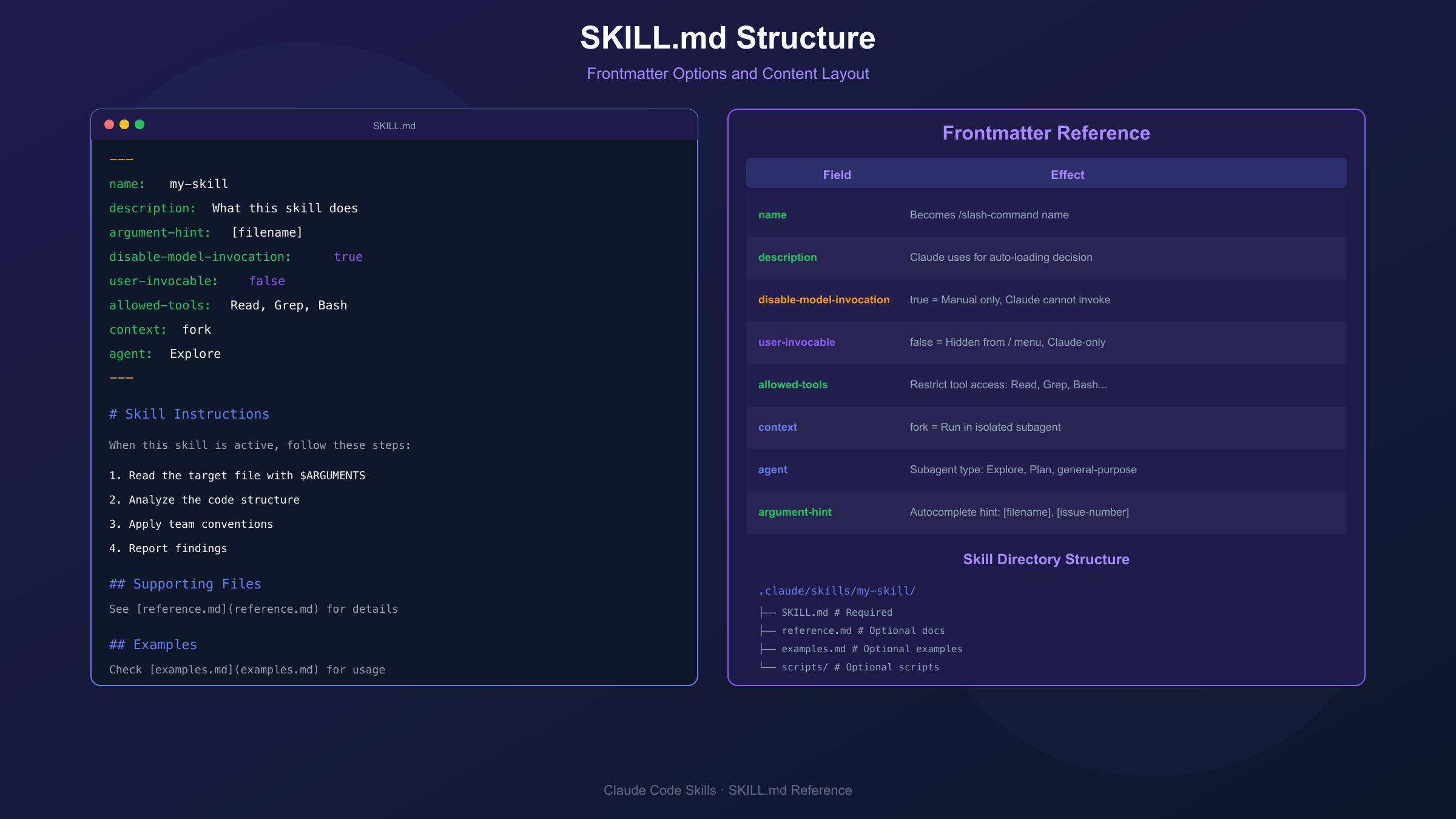
| Field | Required | Default | Description |
|---|---|---|---|
name | No | Directory name | Slash command name (lowercase, hyphens, max 64 chars) |
description | Recommended | None | When to use; Claude uses this for auto-loading decisions |
argument-hint | No | None | Autocomplete hint like [filename] or [issue-number] |
disable-model-invocation | No | false | true prevents Claude from auto-triggering |
user-invocable | No | true | false hides from slash menu (Claude-only background knowledge) |
allowed-tools | No | All | Restrict to specific tools: Read, Grep, Bash, Write |
model | No | Default | Override model when skill is active |
context | No | None | Set to fork to run in isolated subagent |
agent | No | None | Subagent type when context: fork (Explore, Plan, general-purpose) |
hooks | No | None | Lifecycle hooks for this skill |
Invocation Control Matrix
| Configuration | User Invoke | Claude Invoke | Use Case |
|---|---|---|---|
| Default (no flags) | Yes | Yes | General-purpose skills |
disable-model-invocation: true | Yes | No | Actions with side effects |
user-invocable: false | No | Yes | Background knowledge |
Example: Subagent-Powered Skill
hljs yaml---
name: deep-research
description: Research a topic thoroughly across the codebase
context: fork
agent: Explore
allowed-tools: Bash(gh:*), Read, Grep, Glob
---
Research $ARGUMENTS thoroughly:
1. Find all relevant files with Glob and Grep
2. Read and analyze the code
3. Check git history for context
4. Summarize findings with specific file references
5. Identify potential issues or improvements
Return a structured report to the main conversation.
Setting context: fork runs this skill in an isolated subagent with its own context window, preventing research from polluting the main conversation.
Practical Examples
Real-world skills demonstrate patterns beyond basic documentation examples. These production-tested patterns address common development workflows.
Team Code Review Skill
hljs yaml---
name: review-code
description: Review code changes against team standards
---
## Review Standards
Follow our team's code review checklist:
### Security
- [ ] No hardcoded credentials or secrets
- [ ] Input validation on all user data
- [ ] SQL queries use parameterized statements
- [ ] Authentication/authorization checks present
### Code Quality
- [ ] Functions under 50 lines
- [ ] Clear naming conventions followed
- [ ] No commented-out code blocks
- [ ] Error handling for external calls
### Testing
- [ ] New functionality has tests
- [ ] Edge cases covered
- [ ] Tests are deterministic
Provide specific feedback with file:line references.
Commit Automation Skill
hljs yaml---
name: commit
description: Create a well-formatted git commit
disable-model-invocation: true
---
Create a git commit following conventional commits:
1. Run `git status` to see changes
2. Run `git diff --staged` for staged changes
3. Analyze the nature of changes (feat/fix/docs/refactor/test)
4. Draft commit message:
- Type prefix (feat:, fix:, etc.)
- Brief description (50 chars max)
- Body explaining why, not what
5. Run `git commit -m "message"`
Never use --amend unless explicitly requested.
Dynamic Context Skill
hljs yaml---
name: pr-context
description: Load pull request context for review
context: fork
agent: Explore
---
## Pull Request Context
- PR diff: !`gh pr diff`
- Comments: !`gh pr view --comments`
- Changed files: !`gh pr diff --name-only`
The `!command` syntax executes before the skill loads, injecting dynamic output.
Migrating from Legacy Commands
According to the slash commands documentation, existing .claude/commands/ files continue working indefinitely. Migration to skills is optional but recommended for accessing advanced features like auto-loading and supporting files.
Migration Steps
-
Create skill directory:
hljs bashmkdir -p .claude/skills/my-command -
Move and rename:
hljs bashmv .claude/commands/my-command.md .claude/skills/my-command/SKILL.md -
Add frontmatter:
hljs yaml--- name: my-command description: What this skill does and when to use it --- [Your existing content here] -
Test both paths work:
hljs bash# Both should work after migration /my-command
Before/After Comparison
Before (legacy command):
hljs markdown<!-- .claude/commands/analyze.md -->
Analyze this code and explain the architecture.
Focus on design patterns and potential improvements.
After (skill):
hljs yaml<!-- .claude/skills/analyze/SKILL.md -->
---
name: analyze
description: Analyze code architecture, patterns, and improvements
argument-hint: [file-or-directory]
---
Analyze $ARGUMENTS for:
1. **Architecture Overview**
- High-level structure
- Key components and relationships
2. **Design Patterns**
- Patterns in use
- Pattern appropriateness
3. **Improvement Opportunities**
- Refactoring candidates
- Performance considerations
- Maintainability concerns
Provide specific recommendations with code examples.
The skill version adds auto-loading capability, argument hints, and more structured instructions.
FAQ
What happens to my existing slash commands?
Your existing .claude/commands/ files continue working without modification. The unified system treats them as simplified skills without frontmatter. You can migrate to full skills at your convenience to access additional features like auto-loading and supporting files.
Can Claude invoke my skills without permission?
By default, yes—skills can auto-load when Claude determines they're relevant based on the description field. To prevent automatic invocation, add disable-model-invocation: true to the frontmatter. This is recommended for skills with side effects like deployment or message sending.
How many skills can Claude load simultaneously?
Claude's skill system respects a context character budget (default 15,000 characters). When you have many skills, only descriptions load initially; full content loads on invocation. You can increase the budget with the SLASH_COMMAND_TOOL_CHAR_BUDGET environment variable if needed.
Should I use personal or project skills?
Use project skills (.claude/skills/) for team conventions and project-specific workflows—these get version controlled and shared. Use personal skills (~/.claude/skills/) for your individual preferences and cross-project utilities that shouldn't be in version control.
Conclusion
The unified skills and slash commands system in 2026 eliminates the confusion of maintaining parallel extensibility mechanisms. Skills are now the primary abstraction, with slash command invocation as one of their capabilities. Legacy command files work indefinitely, but new development should use skills to access auto-loading, frontmatter configuration, and supporting file directories.
The decision framework is straightforward: use disable-model-invocation: true for actions with side effects where timing matters, use full skills for knowledge and context that Claude should apply automatically, and use user-invocable: false for background expertise that shouldn't appear in the command menu. With the frontmatter reference and practical examples in this guide, you have everything needed to build powerful, maintainable Claude Code workflows.