Gemini 3 Pro Image vs Imagen 3: Complete Comparison Guide for Developers
Comprehensive comparison of Google Gemini 3 Pro Image (Nano Banana Pro) and Imagen 3: benchmarks, resolution, pricing, text rendering, latency, and use case recommendations for developers.
Nano Banana Pro
4K-80%Google Gemini 3 Pro · AI Inpainting
谷歌原生模型 · AI智能修图

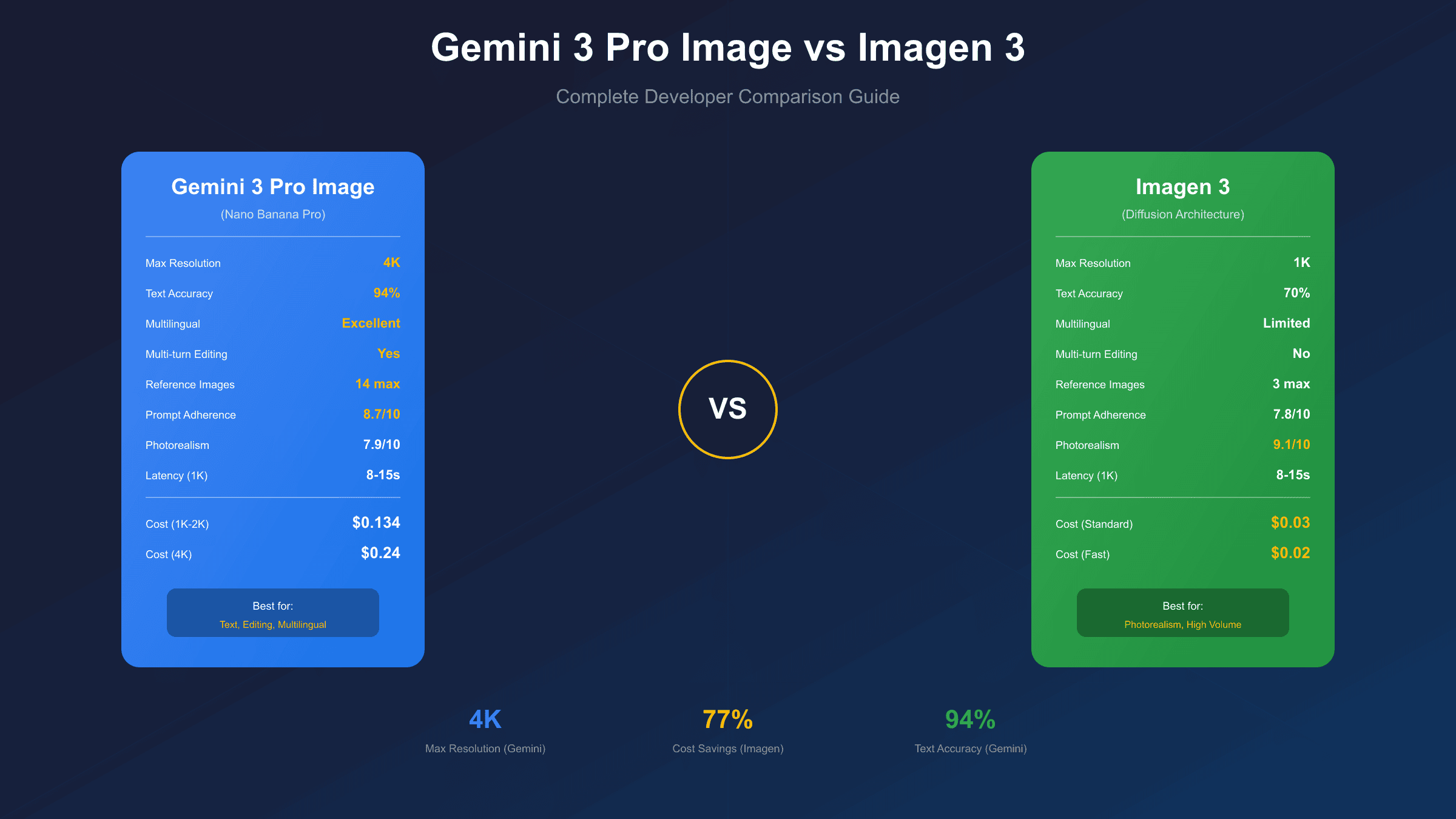
Google now offers two powerful image generation models through its APIs: Gemini 3 Pro Image (also known as Nano Banana Pro) and Imagen 3. Both come from Google DeepMind, but they serve fundamentally different purposes. Choosing between them can significantly impact your project's quality, speed, and budget.
The confusion is understandable. Both models generate images from text prompts. Both integrate with Google's API ecosystem. Both produce impressive results. But under the hood, they represent different approaches to AI image generation, with distinct strengths and trade-offs that matter for production applications.
This guide provides a systematic comparison across every dimension that developers and product teams care about: quality benchmarks, latency, resolution, pricing, text rendering, and real-world use cases. By the end, you'll know exactly which model fits your specific requirements.
Model Background: Understanding the Architecture
Before diving into comparisons, it's essential to understand where each model comes from and what design philosophy guides them.
Gemini 3 Pro Image (Nano Banana Pro)
Released on November 20, 2025, Gemini 3 Pro Image represents Google's latest approach to image generation. It's built on the Gemini 3 foundation model, which means it inherits Gemini's multimodal reasoning capabilities. The internal codename "Nano Banana Pro" distinguishes it from its predecessor, Nano Banana (based on Gemini 2.5 Flash Image).
The key architectural insight: Gemini 3 Pro Image is a reasoning-first model. It doesn't just pattern-match from training data—it applies logical reasoning to understand prompts, maintain consistency across edits, and generate complex compositions. This makes it particularly strong for multi-turn image editing, text rendering, and scenarios requiring world knowledge (like historically accurate scenes or technical diagrams).
Imagen 3
Imagen 3 launched earlier in 2025 as the third generation of Google's dedicated image generation pipeline. Unlike Gemini, Imagen was purpose-built for image synthesis from the ground up. It uses a cascaded diffusion architecture optimized specifically for visual quality and photorealism.
The design philosophy is different: Imagen prioritizes raw visual fidelity. It excels at producing photorealistic images with fine details, accurate textures, and consistent lighting. The trade-off is that it doesn't have the same reasoning capabilities as Gemini, making it less suitable for complex editing workflows or content that requires understanding context.
Evolution Timeline
| Model | Release Date | Base Architecture | Primary Strength |
|---|---|---|---|
| Imagen 2 | 2023 | Diffusion | Photorealism |
| Imagen 3 | Early 2025 | Cascaded Diffusion | Quality + Speed balance |
| Imagen 4 | Late 2025 | Enhanced Diffusion | 2K resolution |
| Nano Banana | Aug 2025 | Gemini 2.5 Flash | Speed + Editing |
| Nano Banana Pro | Nov 2025 | Gemini 3 Pro | Reasoning + Text |
It's worth noting that Imagen 4 now exists as the next evolution of Imagen 3. However, for this comparison, we focus on Imagen 3 as the stable, widely-available option for production use. Imagen 4 remains in preview with limited availability.
Performance Benchmarks: Quality and Speed
The most critical comparison for most developers: how do these models actually perform?
Quality Scores
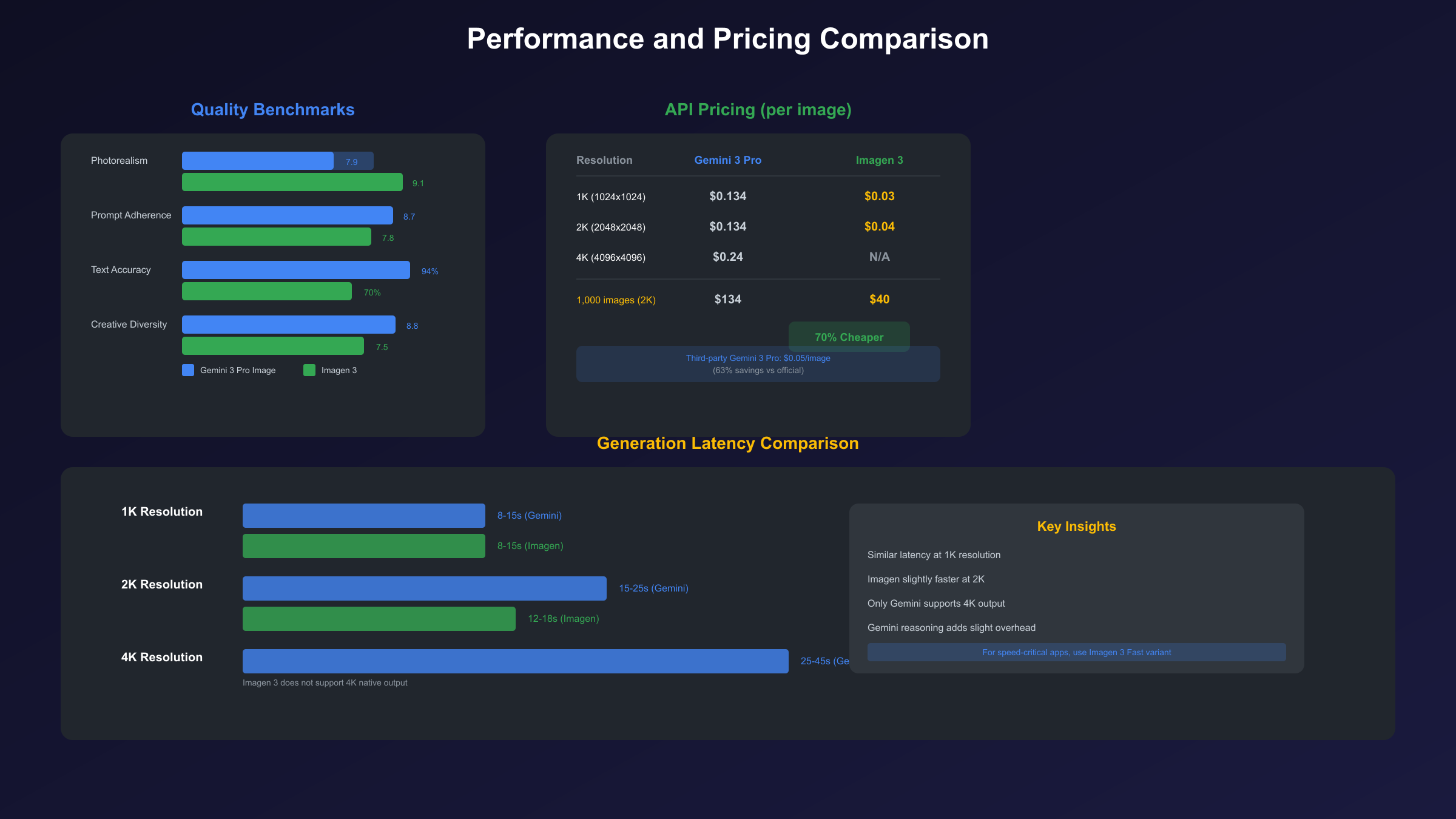
Independent benchmarks from multiple sources provide consistent rankings:
| Metric | Gemini 3 Pro Image | Imagen 3 | Winner |
|---|---|---|---|
| Overall Quality (user preference) | 8.2/10 | 8.5/10 | Imagen 3 |
| Prompt Adherence | 8.7/10 | 7.8/10 | Gemini 3 Pro |
| Photorealism | 7.9/10 | 9.1/10 | Imagen 3 |
| Creative Diversity | 8.8/10 | 7.5/10 | Gemini 3 Pro |
| Text Accuracy | 94% | 70% | Gemini 3 Pro |
Interpretation: Imagen 3 produces more photorealistic, polished images out-of-the-box. However, Gemini 3 Pro Image follows complex prompts more accurately and offers significantly better text rendering. The "right" choice depends on your priority.
Latency Comparison
Speed matters for interactive applications and high-volume workflows.
| Resolution | Gemini 3 Pro Image | Imagen 3 Standard |
|---|---|---|
| 1K (1024×1024) | 8-15 seconds | 8-15 seconds |
| 2K (2048×2048) | 15-25 seconds | 12-18 seconds |
| 4K (4096×4096) | 25-45 seconds | N/A |
Key observations:
- At standard 1K resolution, both models perform similarly.
- Gemini 3 Pro Image is slightly slower at 2K due to its reasoning overhead.
- Gemini 3 Pro Image uniquely supports 4K output, which Imagen 3 doesn't offer natively.
- For the fastest generation, consider Imagen 3 Fast variant (but at lower quality).
Throughput and Rate Limits
| Tier | Gemini 3 Pro Image | Imagen 3 |
|---|---|---|
| Free API | 10-20 RPD | 500-1000 RPD |
| Pay-as-you-go | 60 RPM | 60 RPM |
| Enterprise | Custom | Custom |
Imagen 3 offers significantly higher free-tier limits, making it better for prototyping. For production workloads, both models offer similar throughput under paid tiers.
Resolution and Output Formats
Resolution capabilities directly impact what you can do with generated images.
Maximum Resolution
| Model | Max Native Resolution | Upscaling Available |
|---|---|---|
| Gemini 3 Pro Image | 4K (4096×4096) | Yes, native |
| Imagen 3 | 1K (1024×1024) | Yes, via pipeline |
| Imagen 4 (comparison) | 2K (2048×2048) | Native |
Gemini 3 Pro Image has a clear advantage here—it's the only model that natively generates 4K images without requiring a separate upscaling step.
Aspect Ratio Support
Both models support multiple aspect ratios:
| Aspect Ratio | Gemini 3 Pro Image | Imagen 3 |
|---|---|---|
| 1:1 (Square) | Yes | Yes |
| 4:3 | Yes | Yes |
| 3:4 | Yes | Yes |
| 16:9 | Yes | Yes |
| 9:16 | Yes | Yes |
| 21:9 (Ultrawide) | Yes | No |
Gemini 3 Pro Image offers more flexibility for ultrawide formats, useful for banner ads and cinematic content.
Output Format
| Format | Gemini 3 Pro Image | Imagen 3 |
|---|---|---|
| PNG | Yes | Yes |
| JPEG | Yes | Yes |
| WebP | No | Yes |
| Base64 Response | Yes | Yes |
Both models return images as base64-encoded data. Imagen 3 adds WebP support, which can reduce file sizes for web applications.
Pricing Comparison: What Does It Actually Cost?
Cost is often the deciding factor for production deployments. Let's break down the economics.
Google Official API Pricing
| Resolution | Gemini 3 Pro Image | Imagen 3 Standard |
|---|---|---|
| 1K (1024×1024) | $0.134 | $0.03 |
| 2K (2048×2048) | $0.134 | $0.04 |
| 4K (4096×4096) | $0.24 | N/A |
Critical insight: At 1K-2K resolution, Imagen 3 is significantly cheaper—about 70% less than Gemini 3 Pro Image. This makes Imagen 3 the clear choice for high-volume applications where photorealism is more important than text rendering or reasoning capabilities.
Cost Per 1,000 Images
| Volume | Gemini 3 Pro (1K-2K) | Imagen 3 Standard |
|---|---|---|
| 1,000 images | $134 | $30 |
| 10,000 images | $1,340 | $300 |
| 100,000 images | $13,400 | $3,000 |
Alternative Access: Third-Party APIs
For developers seeking cost optimization, third-party providers offer competitive rates for Gemini 3 Pro Image:
laozhang.ai provides Gemini 3 Pro Image (Nano Banana Pro) access at $0.05 per image—representing approximately 63% savings compared to Google's official $0.134 rate. The service supports native Gemini format including 4K output:
hljs pythonimport requests
import base64
API_KEY = "sk-YOUR_API_KEY" # Get from laozhang.ai
API_URL = "https://api.laozhang.ai/v1beta/models/gemini-3-pro-image-preview:generateContent"
headers = {
"Authorization": f"Bearer {API_KEY}",
"Content-Type": "application/json"
}
payload = {
"contents": [{"parts": [{"text": "A professional product photo of wireless earbuds"}]}],
"generationConfig": {
"responseModalities": ["IMAGE"],
"imageConfig": {"aspectRatio": "1:1", "imageSize": "2K"}
}
}
response = requests.post(API_URL, headers=headers, json=payload, timeout=180)
result = response.json()
image_data = result["candidates"][0]["content"]["parts"][0]["inlineData"]["data"]
with open("output.png", "wb") as f:
f.write(base64.b64decode(image_data))
This brings Gemini 3 Pro Image closer to Imagen 3's cost structure while retaining its text rendering and reasoning advantages.
Text Rendering and Multilingual Capabilities
This is where the models diverge most dramatically.
Text Accuracy Comparison
| Scenario | Gemini 3 Pro Image | Imagen 3 |
|---|---|---|
| Single word | 98% accurate | 85% accurate |
| Short phrase (3-5 words) | 95% accurate | 70% accurate |
| Long text (20+ words) | 90% accurate | 40% accurate |
| Mixed font styles | Supported | Limited |
Real-world impact: If you're generating images with text—posters, infographics, social media graphics, product labels—Gemini 3 Pro Image is essentially required. Imagen 3 frequently produces character substitutions, inconsistent spacing, and illegible text on longer passages.
Multilingual Support
| Language | Gemini 3 Pro Image | Imagen 3 |
|---|---|---|
| English | Excellent | Good |
| Chinese (Simplified) | Excellent | Poor |
| Japanese | Excellent | Poor |
| Korean | Excellent | Fair |
| Arabic (RTL) | Good | Poor |
| European languages | Excellent | Good |
Gemini 3 Pro Image can generate mixed-language content accurately—for example, a product label with English and Chinese text simultaneously. Imagen 3 struggles with non-Latin scripts and often produces gibberish characters.
Typography Control
| Feature | Gemini 3 Pro Image | Imagen 3 |
|---|---|---|
| Font style suggestions | Yes | Limited |
| Text positioning | Precise | Approximate |
| Text-image integration | Natural | Often disconnected |
| Gradient/effects on text | Yes | No |
For any application requiring readable, styled text, Gemini 3 Pro Image is the clear choice.
Input Limits and Advanced Features
Beyond basic generation, both models offer distinct capabilities.
Reference Image Support
| Feature | Gemini 3 Pro Image | Imagen 3 |
|---|---|---|
| Max reference images | 14 | 1-3 |
| Style transfer | Yes | Limited |
| Image editing | Multi-turn | Single-turn |
| Inpainting/outpainting | Yes | Yes |
Gemini 3 Pro Image excels at multi-image compositions. You can provide up to 14 reference images to guide generation—useful for combining elements from multiple sources or maintaining character consistency across scenes.
Prompt Limits
| Model | Max Prompt Length | Context Window |
|---|---|---|
| Gemini 3 Pro Image | 32K tokens | Full multimodal |
| Imagen 3 | 2K tokens | Text only |
The massive prompt limit on Gemini 3 Pro Image allows for extremely detailed descriptions, which improves accuracy for complex scenes.
Editing Capabilities
| Feature | Gemini 3 Pro Image | Imagen 3 |
|---|---|---|
| Conversational editing | Yes (multi-turn) | No |
| "Change X to Y" commands | Excellent | Limited |
| Style preservation | High | Medium |
| Masked editing | Yes | Yes |
Gemini 3 Pro Image supports true conversational editing—you can generate an image, then iterate with natural language ("make the sky more dramatic," "add a person in the foreground") while maintaining consistency. Imagen 3 requires regenerating from scratch for significant changes.
Safety and Watermarking
Both models include SynthID invisible watermarking for AI content identification. Safety filters prevent generation of harmful content, though specific restrictions vary by region and use case.
Real-World Use Case Recommendations
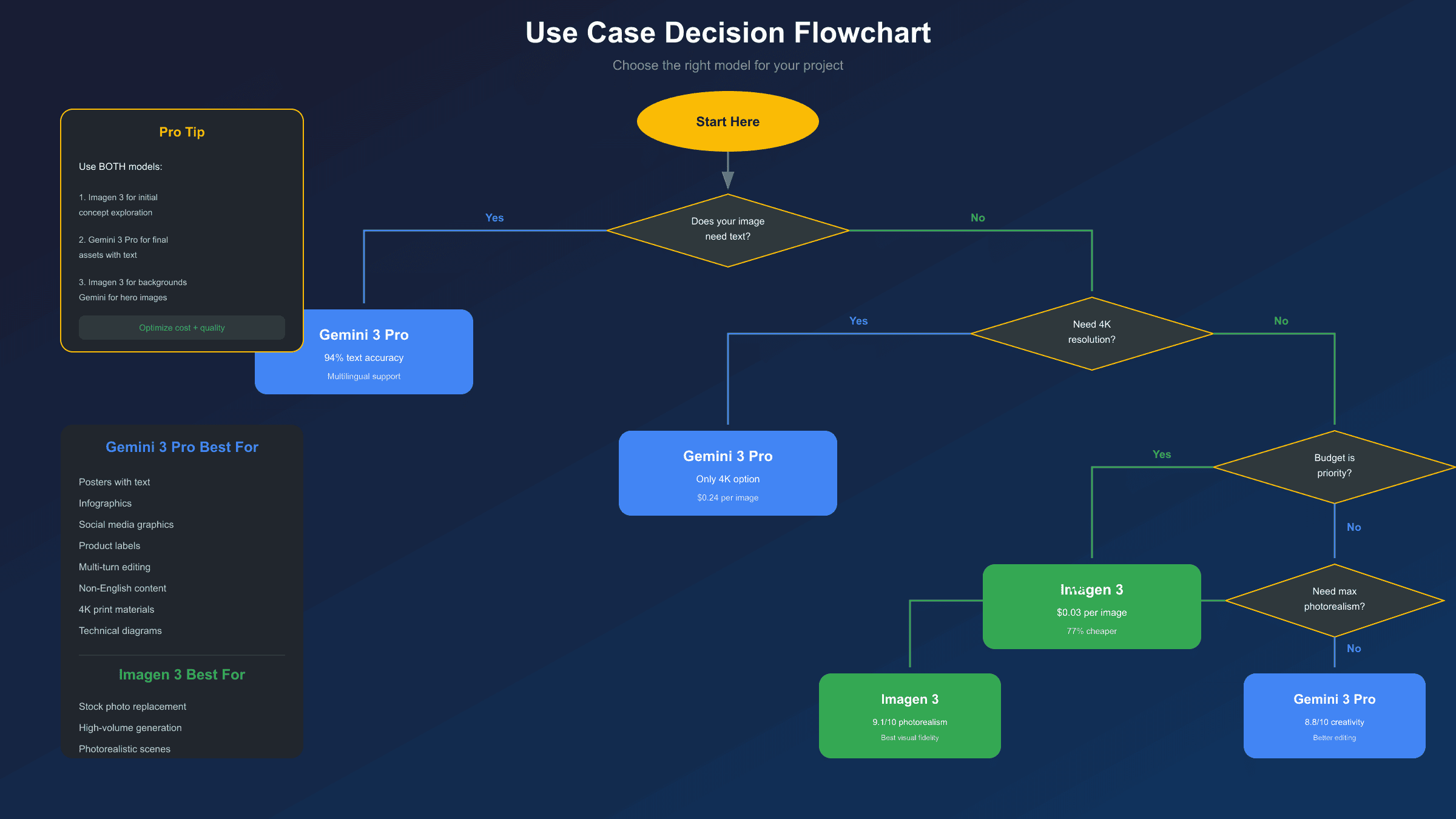
Based on the above comparisons, here's when to choose each model:
Choose Gemini 3 Pro Image When:
-
Text is required: Any image containing words—posters, infographics, presentations, product labels, menus, diagrams.
-
Complex editing workflows: Projects requiring multiple iterations, style consistency, or multi-image compositions.
-
Non-English markets: Content targeting Chinese, Japanese, Korean, or Arabic audiences.
-
4K resolution needed: Print materials, large displays, or high-end marketing assets.
-
Technical accuracy matters: Diagrams, educational content, or anything requiring world knowledge (historical accuracy, technical specifications).
Best fit: Marketing teams, educational publishers, e-commerce product graphics, social media content with text overlays.
Choose Imagen 3 When:
-
Photorealism is priority: Product photography, lifestyle imagery, stock photo replacement.
-
High volume, low cost: Applications generating thousands of images where per-image cost matters most.
-
Speed is critical: Interactive applications, real-time generation, or prototyping workflows.
-
No text required: Pure visual content without embedded words.
-
Simple generation needs: Single-prompt generation without editing iterations.
Best fit: Stock photo alternatives, background generation, game asset creation, pure artistic generation.
Hybrid Approach
Many production workflows benefit from using both models:
- Use Imagen 3 for initial concept exploration (cheaper, faster)
- Switch to Gemini 3 Pro Image for final assets requiring text or precision
- Use Imagen 3 for background/texture generation, Gemini 3 Pro Image for hero images
API Access and Integration Options
Both models are accessible through Google's API ecosystem with different integration paths.
Google AI Studio Access
| Feature | Gemini 3 Pro Image | Imagen 3 |
|---|---|---|
| Free tier available | Yes (limited) | Yes |
| Web playground | Yes | Yes |
| Direct API key | Yes | Yes |
Both can be accessed through Google AI Studio for testing and development.
Vertex AI Access
For enterprise deployments, both models are available through Vertex AI with additional features:
- Enterprise SLAs
- Private network access
- Custom fine-tuning (Imagen only)
- Batch processing
Code Examples
Gemini 3 Pro Image (Official API):
hljs pythonfrom google import genai
from google.genai import types
client = genai.Client(api_key="YOUR_API_KEY")
response = client.models.generate_content(
model="gemini-3-pro-image-preview",
contents="A professional infographic about climate change with statistics",
config=types.GenerateContentConfig(
response_modalities=['IMAGE'],
image_config=types.ImageConfig(
aspect_ratio="16:9",
image_size="2K"
)
)
)
for part in response.parts:
if image := part.as_image():
image.save("infographic.png")
Imagen 3:
hljs pythonfrom google import genai
client = genai.Client(api_key="YOUR_API_KEY")
response = client.models.generate_images(
model="imagen-3-0-generate",
prompt="A photorealistic sunset over mountains",
config={
"number_of_images": 4,
"aspect_ratio": "16:9"
}
)
for i, image in enumerate(response.images):
image.save(f"sunset_{i}.png")
SDK Support
| SDK | Gemini 3 Pro Image | Imagen 3 |
|---|---|---|
| Python | Yes | Yes |
| Node.js | Yes | Yes |
| Go | Yes | Yes |
| REST API | Yes | Yes |
| OpenAI-compatible | Via third-party | No |
Conclusion: Making the Right Choice
After examining all dimensions, here's the summary:
Gemini 3 Pro Image Wins On:
- Text rendering (94% vs 70% accuracy)
- Multilingual support
- Multi-turn editing
- 4K resolution support
- Prompt adherence for complex scenes
- Reference image capacity (14 vs 3)
Imagen 3 Wins On:
- Photorealism quality
- Per-image cost ($0.03 vs $0.134)
- Generation speed at 2K
- Free tier limits
- Pure visual fidelity
Quick Decision Framework
| If you need... | Choose |
|---|---|
| Images with text | Gemini 3 Pro Image |
| Maximum photorealism | Imagen 3 |
| Lowest cost per image | Imagen 3 |
| 4K resolution | Gemini 3 Pro Image |
| Multi-turn editing | Gemini 3 Pro Image |
| High-volume generation | Imagen 3 |
| Non-English text | Gemini 3 Pro Image |
Final Recommendation
For most production applications, start with Imagen 3 for cost-effective exploration and photorealistic content. Upgrade to Gemini 3 Pro Image when you need text rendering, complex editing, or 4K output.
If cost is a concern for Gemini 3 Pro Image usage, consider third-party providers like laozhang.ai that offer the same model at reduced rates ($0.05/image vs $0.134), making it more competitive with Imagen 3 for budget-conscious projects.
The good news: both models are excellent. Google has created two distinct tools that complement each other rather than compete. Use the right tool for each job, and you'll get the best results.