Gemini Flash Free Access: Complete 2025 Guide to Google AI Studio Free Tier
Complete guide to using Gemini 3 Flash and Gemini 2.5 Flash for free in 2025. Learn about free tier limits (updated December 2025), Google AI Studio setup, Python API integration, and alternative access methods when quotas run out.
Nano Banana Pro
4K-80%Google Gemini 3 Pro · AI Inpainting
谷歌原生模型 · AI智能修图

Google's Gemini Flash models represent some of the most capable AI available today, and the good news is you can start using them completely free. Whether you're a developer building AI applications, a researcher exploring large language models, or simply curious about cutting-edge AI technology, Gemini Flash's free tier provides substantial access to frontier AI capabilities without spending a dollar. However, navigating the free tier landscape in late 2025 requires current knowledge, as Google significantly reduced free quotas in early December 2025.
This comprehensive guide covers everything you need to know about accessing Gemini Flash for free: the current limits, step-by-step API setup, working code examples, and what to do when you hit your quotas. The information here reflects the December 2025 reality, including the controversial quota reductions that affected thousands of developers. By the end of this guide, you'll have a clear understanding of how to maximize your free access and when it makes sense to consider paid alternatives.
| Free Tier Snapshot | Details |
|---|---|
| Primary Model | Gemini 3 Flash Preview |
| Access Method | Google AI Studio |
| Cost | Free (within limits) |
| Context Window | 1 million tokens |
| Key Limitation | Rate limits, daily quotas |
| December 2025 Change | Significant quota reductions |
Gemini 3 Flash vs Gemini 2.5 Flash: Understanding the Difference
Before diving into free access methods, it's essential to understand which Gemini Flash model you'll be working with. Google currently offers multiple Flash variants, and the distinction matters for both capabilities and pricing.
Gemini 3 Flash Preview represents Google's latest reasoning model, released in December 2025. It delivers what Google calls "frontier intelligence built for speed at a fraction of the cost." The model achieves remarkable benchmark scores: 90.4% on GPQA Diamond (PhD-level reasoning), 81.2% on MMMU-Pro (multimodal understanding), and 78% on SWE-bench (agentic coding tasks). Importantly, Gemini 3 Flash outperforms its predecessor Gemini 2.5 Pro on many benchmarks while operating 3x faster.
Gemini 2.5 Flash is the previous generation workhorse model. While still highly capable, it saw significant free tier quota reductions in December 2025. The model excels at large-scale processing, low-latency tasks, and agentic use cases. Its configurable "thinking" capability allows developers to balance reasoning depth against response speed.
| Specification | Gemini 3 Flash Preview | Gemini 2.5 Flash |
|---|---|---|
| Release | December 2025 | June 2025 |
| Context Window | 1M tokens | 1M tokens |
| Output Limit | 64k tokens | 65k tokens |
| Input Types | Text, Image, Video, Audio, PDF | Text, Image, Video, Audio |
| Thinking Mode | Built-in, optimized | Configurable |
| Free Tier | Available | Available (reduced) |
| Paid Input | $0.50/1M tokens | $0.30/1M tokens |
| Paid Output | $3.00/1M tokens | $2.50/1M tokens |
The key takeaway: Gemini 3 Flash Preview is now the recommended model for most developers seeking free access. It offers better performance, competitive pricing, and Google actively promotes it as the default model going forward. Gemini 2.5 Flash remains available but with increasingly constrained free quotas.
Technical Capabilities Deep Dive
Both Flash models share impressive technical foundations that make them suitable for production applications. The 1 million token context window represents a significant advantage over competitors, enabling use cases like full codebase analysis, long document summarization, and extended multi-turn conversations without context truncation.
Gemini 3 Flash's "Deep Think" mode deserves special attention. Unlike earlier models where thinking was a fixed overhead, Gemini 3 Flash dynamically adjusts its reasoning depth based on query complexity. Simple questions receive fast, direct answers. Complex multi-step problems trigger deeper reasoning chains. This adaptive approach reduces token usage by 30% on average compared to Gemini 2.5 Pro while maintaining comparable output quality.
The multimodal input capabilities extend beyond basic image understanding. Gemini Flash models can process video content (up to several minutes), audio files for transcription and analysis, and PDF documents with both text and visual elements. For developers building applications that handle diverse content types, this eliminates the need for separate models or preprocessing pipelines.
Native tool use represents another capability advancement. Gemini 3 Flash achieves 78% on SWE-bench Verified, demonstrating strong agentic coding abilities. The model can execute code, search the web, and chain multiple tool calls to complete complex tasks—all within a single API call when using the appropriate configuration.
Current Free Tier Limits (December 2025 Update)
The December 2025 quota changes sent shockwaves through the developer community. On December 6, 2025, many developers woke up to flooding 429 "quota exceeded" errors that hadn't appeared before. Google's official statement confirmed capacity reallocation to newer models, including Gemini 3 variants.
Gemini 3 Flash Preview Free Tier
The newest model maintains generous free access:
- Input/Output Tokens: Free of charge
- Google Search Grounding: 5,000 prompts per month (free)
- Context Caching: Available with 90% cost reduction on repeat tokens
- Batch API: Available with 50% cost savings
Gemini 2.5 Flash Free Tier (Post-December Cuts)
The 2.5 Flash free tier experienced dramatic reductions:
| Metric | Before December 2025 | After December 2025 |
|---|---|---|
| Requests per Day (RPD) | ~250-500 | ~20 |
| Requests per Minute (RPM) | 10 | Reduced |
| Tokens per Minute (TPM) | 250,000 | Reduced |
| Free Google Search | 1,500 RPD | 500 RPD (shared) |
Gemini 2.5 Pro Free Tier
The biggest shock: Gemini 2.5 Pro was completely removed from the free tier for many accounts. Developers who built applications around 2.5 Pro's free access found themselves locked out without warning.
Important Notice: Rate limits are project-based, not API key-based. Creating multiple API keys within the same project won't increase your quotas. Requests per day quotas reset at midnight Pacific Time.
Understanding these limitations is crucial for planning your usage. For development and testing, the free tiers remain viable. For production workloads, you'll likely need to consider paid options or alternative providers (discussed in the alternative access section).
Quota Tier System Explained
Google operates a tiered quota system that affects both free and paid users. Understanding this system helps you predict and optimize your usage:
| Tier | Requirements | Typical Limits | Notes |
|---|---|---|---|
| Free | Google account only | 10 RPM, 20 RPD | Default for new users |
| Tier 1 | Billing enabled | Higher RPM/RPD | No spend requirement |
| Tier 2 | $250+ lifetime spend | Significantly higher | Production-ready |
| Tier 3 | $1000+ lifetime spend | Maximum limits | Enterprise-scale |
The tier system means that even adding a payment method—without actually spending—can unlock Tier 1 limits. This represents a useful middle ground between the restrictive free tier and committing to significant usage. For developers testing production workflows, enabling billing to reach Tier 1 often provides sufficient headroom while maintaining pay-as-you-go flexibility.
Importantly, quotas are project-based, not account-based. You can create multiple Google Cloud projects, each with its own quotas. While this doesn't bypass per-model limits, it does allow organizing different applications with separate rate limit pools—useful for isolating development, staging, and production environments.
How to Access Gemini Flash for Free via Google AI Studio
Google AI Studio provides the most straightforward path to free Gemini Flash access. The web-based platform requires no credit card and offers both interactive chat and API key generation.
Step 1: Create or Sign Into Your Google Account
Navigate to aistudio.google.com and sign in with your Google account. Any standard Google account works—you don't need a Google Cloud account or billing setup for free tier access.
Step 2: Access the Chat Interface
Once logged in, you'll see the AI Studio dashboard. The interface defaults to Gemini 3 Flash Preview, Google's recommended model. You can immediately start chatting to test capabilities before writing any code.
Key interface elements:
- Model selector: Switch between Gemini 3 Flash, 2.5 Flash, and other variants
- Temperature control: Adjust response randomness (0-2 scale)
- System instructions: Define AI behavior for your use case
- Output length: Control maximum response tokens
Step 3: Generate Your API Key
For programmatic access, click "Get API Key" in the left sidebar. AI Studio will:
- Create a new API key linked to a default project
- Display the key once—copy it immediately
- Enable Gemini API access for that project
Security best practices:
- Never commit API keys to version control
- Use environment variables in your applications
- Rotate keys if you suspect exposure
- Consider using separate keys for development and production
Step 4: Verify Your Quotas
After generating your key, visit the usage dashboard at:
https://aistudio.google.com/usage?timeRange=last-28-days&tab=rate-limit
This dashboard shows your actual rate limits, which vary based on:
- Account tier (Free, Tier 1, Tier 2, Tier 3)
- Usage history
- Model selection
- Regional factors
Regional Considerations
Google AI Studio is available free of charge in most regions, but some countries face restrictions. If you encounter "Gemini is not available in your region" errors, you may need alternative access methods. Users in China, Russia, and certain other regions often require API relay services to access Gemini models reliably.
The specific restricted regions include:
- Mainland China - Full access blocked
- Hong Kong - Partial restrictions
- Russia and Belarus - Full access blocked
- Iran, North Korea, Syria, Cuba - Sanctions-related blocks
- Crimea region - Geographic restrictions
For users in these regions, the API still functions when accessed through appropriate routing. VPN solutions work for testing, but production applications typically benefit from dedicated API relay services that provide stable, low-latency access without the overhead of maintaining VPN infrastructure.
Troubleshooting Initial Setup
Common issues during first-time setup and their solutions:
"API not enabled" error: After creating your API key, the Generative Language API may take 5-10 minutes to fully activate. Wait briefly and retry before troubleshooting further.
Key not working in code: Verify you're using the complete key without trailing spaces. Environment variable storage can sometimes introduce hidden characters. Test by printing the key length—it should be exactly 39 characters.
Project permissions issues: If you're part of an organization's Google Workspace, your administrator may need to enable AI Studio access. Check with your IT department if you see permission-related errors.
Python API Integration: Complete Code Examples
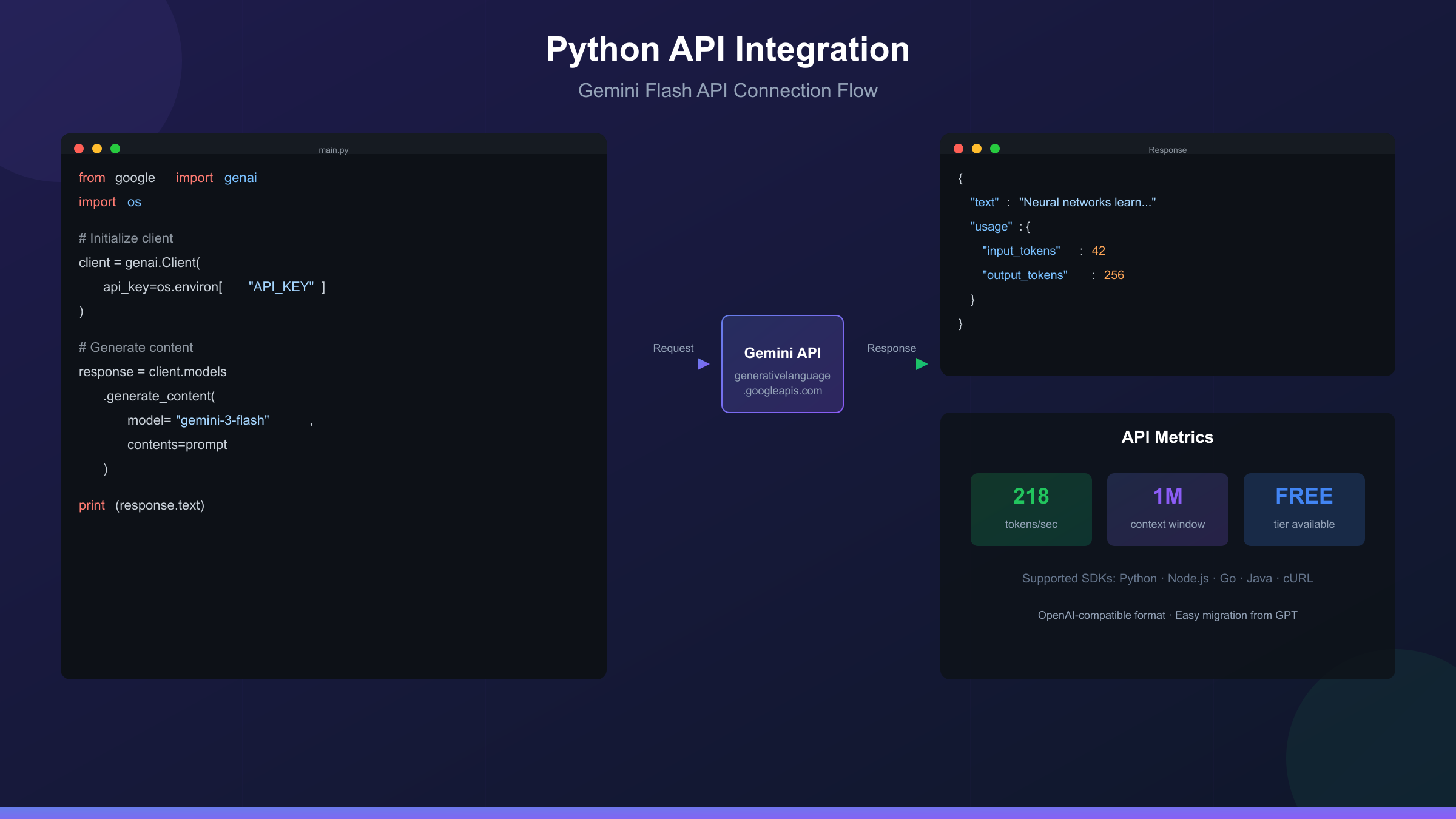
With your API key ready, let's implement Gemini Flash in Python. These examples use the official google-genai SDK, which requires Python 3.9 or higher.
Installation
hljs bashpip install google-genai
Basic Text Generation
hljs pythonfrom google import genai
from google.genai import types
import os
# Set your API key (use environment variable in production)
os.environ["GEMINI_API_KEY"] = "your-api-key-here"
client = genai.Client(api_key=os.environ["GEMINI_API_KEY"])
response = client.models.generate_content(
model="gemini-3-flash-preview",
contents="Explain how neural networks learn in simple terms"
)
print(response.text)
Configuring Generation Parameters
hljs pythonfrom google import genai
from google.genai import types
import os
client = genai.Client(api_key=os.environ["GEMINI_API_KEY"])
response = client.models.generate_content(
model="gemini-3-flash-preview",
contents="Write a creative story about a programmer who discovers AI",
config=types.GenerateContentConfig(
temperature=0.9, # Higher = more creative
top_p=0.95, # Nucleus sampling
top_k=40, # Token selection pool
max_output_tokens=2048
)
)
print(response.text)
Implementing Chat Conversations
hljs pythonfrom google import genai
import os
client = genai.Client(api_key=os.environ["GEMINI_API_KEY"])
chat = client.chats.create(model="gemini-3-flash-preview")
# First message
response = chat.send_message("What are the key principles of clean code?")
print("Assistant:", response.text)
# Follow-up maintains context
response = chat.send_message("Can you give me an example of the first principle?")
print("Assistant:", response.text)
# Continue the conversation
response = chat.send_message("How would I apply this in Python specifically?")
print("Assistant:", response.text)
Error Handling for Rate Limits
Since free tier users frequently encounter quota limits, robust error handling is essential:
hljs pythonfrom google import genai
import time
import os
client = genai.Client(api_key=os.environ["GEMINI_API_KEY"])
def generate_with_retry(prompt, max_retries=3, base_delay=60):
"""Generate content with exponential backoff for rate limits."""
for attempt in range(max_retries):
try:
response = client.models.generate_content(
model="gemini-3-flash-preview",
contents=prompt
)
return response.text
except Exception as e:
error_message = str(e)
if "429" in error_message or "quota" in error_message.lower():
wait_time = base_delay * (2 ** attempt)
print(f"Rate limited. Waiting {wait_time} seconds...")
time.sleep(wait_time)
else:
raise e
raise Exception("Max retries exceeded")
# Usage
result = generate_with_retry("Summarize the key features of Gemini Flash")
print(result)
cURL Alternative
For quick testing without Python setup:
hljs bashcurl "https://generativelanguage.googleapis.com/v1beta/models/gemini-3-flash-preview:generateContent" \
-H "x-goog-api-key: $GEMINI_API_KEY" \
-H "Content-Type: application/json" \
-X POST \
-d '{
"contents": [{
"parts": [{
"text": "What makes Gemini Flash different from other AI models?"
}]
}]
}'
Streaming Responses for Real-Time Applications
For applications requiring immediate feedback, streaming provides a better user experience:
hljs pythonfrom google import genai
import os
client = genai.Client(api_key=os.environ["GEMINI_API_KEY"])
# Stream the response token by token
for chunk in client.models.generate_content_stream(
model="gemini-3-flash-preview",
contents="Write a detailed explanation of quantum computing"
):
print(chunk.text, end="", flush=True)
Streaming reduces perceived latency significantly. Instead of waiting for the complete response, users see text appearing in real-time. This approach works particularly well for:
- Chatbot interfaces where responsiveness matters
- Long-form content generation where users want to see progress
- Applications with strict timeout requirements
Multimodal Input Examples
Gemini Flash's multimodal capabilities enable sophisticated use cases:
hljs pythonfrom google import genai
from google.genai import types
import base64
import os
client = genai.Client(api_key=os.environ["GEMINI_API_KEY"])
# Read and encode an image
with open("chart.png", "rb") as f:
image_data = base64.b64encode(f.read()).decode()
response = client.models.generate_content(
model="gemini-3-flash-preview",
contents=[
types.Part(text="Analyze this chart and extract the key trends"),
types.Part(inline_data=types.Blob(
mime_type="image/png",
data=image_data
))
]
)
print(response.text)
This capability enables applications like document analysis, image-based Q&A, and visual data extraction—all using a single API endpoint rather than chaining multiple services.
Free vs Paid Tier: Complete Feature Comparison
Understanding the full feature matrix helps you decide when the free tier suffices and when upgrading makes sense.
| Feature | Free Tier | Paid Tier |
|---|---|---|
| Gemini 3 Flash | Yes | Yes |
| Gemini 2.5 Flash | Limited (~20 RPD) | Unlimited |
| Gemini 2.5 Pro | No | Yes |
| Context Window | 1M tokens | 1M tokens |
| Batch API | Yes (limited) | Yes (50% savings) |
| Context Caching | Yes | Yes (90% savings) |
| Google Search | Limited | 5,000+ prompts |
| Support | Community only | Priority support |
| SLA | None | Available |
| Rate Limits | Strict | Higher quotas |
Cost Structure (When You Upgrade)
Gemini 3 Flash Paid Pricing:
- Input: $0.50 per 1M tokens
- Output: $3.00 per 1M tokens
- Audio input: $1.00 per 1M tokens
- Context caching: $0.05 per 1M tokens (90% reduction)
- Batch processing: 50% discount on standard rates
Gemini 2.5 Flash Paid Pricing:
- Input: $0.30 per 1M tokens (text/image/video)
- Output: $2.50 per 1M tokens
- Audio input: $1.00 per 1M tokens
Break-Even Analysis
For a typical development workflow with 100 requests per day averaging 1,000 input tokens and 500 output tokens each:
- Monthly tokens: 3M input + 1.5M output
- Gemini 3 Flash cost: ~$1.50 + ~$4.50 = $6/month
- Gemini 2.5 Flash cost: ~$0.90 + ~$3.75 = $4.65/month
For light usage, the free tier covers most needs. For production applications processing thousands of requests daily, paid access becomes essential—and remains remarkably affordable compared to competitors.
Alternative Access Methods When Free Limits Hit
When Google's free tier quotas prove insufficient, several alternative access methods exist. These range from other Google services to third-party API aggregators.
Option 1: OpenRouter Free Models
OpenRouter aggregates multiple AI providers and offers some Gemini models with free quotas. The platform provides:
- 30+ free models across providers
- OpenAI-compatible API format
- No credit card required
- Community-driven rate limits
Option 2: API Aggregation Services
For developers needing reliable, high-volume access without Google's rate limits, API aggregation platforms offer a practical solution. These services typically:
- Aggregate multiple model providers
- Offer OpenAI-compatible endpoints for easy migration
- Provide more predictable rate limits
- Support pay-as-you-go pricing
For example, laozhang.ai provides aggregated access to Gemini models alongside GPT-4, Claude, and other models through a unified API. The OpenAI SDK compatibility means migrating existing code requires only changing the base URL:
hljs pythonfrom openai import OpenAI
client = OpenAI(
api_key="your-laozhang-api-key",
base_url="https://api.laozhang.ai/v1"
)
response = client.chat.completions.create(
model="gemini-3-flash-preview",
messages=[{"role": "user", "content": "Your prompt here"}]
)
print(response.choices[0].message.content)
Such services prove especially valuable when:
- You need consistent access without worrying about quota exhaustion
- Your application serves users in regions with Gemini restrictions
- You want to easily switch between models (GPT-4, Claude, Gemini) with the same codebase
- Development requires predictable costs without sudden rate limiting
Option 3: Vertex AI (Enterprise)
For enterprise users, Google's Vertex AI provides production-grade Gemini access with:
- Higher rate limits
- Service level agreements
- Enterprise support
- Compliance certifications
Vertex AI pricing matches the Gemini API but adds enterprise features essential for production deployments.
Option 4: Local Alternatives
For privacy-sensitive applications or offline access, consider:
- Ollama: Run Gemma (Google's open model) locally
- LM Studio: User-friendly local model interface
- llama.cpp: Efficient local inference engine
These don't provide Gemini specifically but offer comparable capabilities for many use cases without API dependencies.
Performance Benchmarks: How Gemini Flash Compares
Understanding how Gemini Flash stacks up against competitors helps you make informed choices. These benchmarks reflect December 2025 data.
Reasoning and Knowledge
| Benchmark | Gemini 3 Flash | GPT-5.2 | Claude Opus 4 |
|---|---|---|---|
| GPQA Diamond | 90.4% | ~88% | ~85% |
| MMMU-Pro | 81.2% | 79.5% | ~78% |
| Humanity's Last Exam | 33.7% | 34.5% | ~32% |
| AIME 2025 (w/ code) | 99.7% | ~95% | 90% |
Coding Performance
| Benchmark | Gemini 3 Flash | GPT-5.2 | Claude 4 |
|---|---|---|---|
| SWE-bench Verified | 78.0% | ~70% | 72.7% |
| Agentic Coding | Strong | Good | Excellent |
Speed and Efficiency
| Metric | Gemini 3 Flash | Gemini 2.5 Flash | GPT-5.1 | Claude Sonnet |
|---|---|---|---|---|
| Tokens/sec | 218 | 280 | 125 | 170 |
| Time to First Token | <1s | <0.5s | ~1s | ~0.8s |
Key Insights
Gemini 3 Flash excels at:
- Multimodal understanding (images, video, audio, PDF)
- Large-scale processing with 1M context
- Cost-efficiency for high-volume applications
- Speed-critical applications
Consider alternatives when:
- Maximum coding performance matters (Claude leads)
- You need specific enterprise integrations
- Creative writing is the primary use case
Real-World Performance Observations
Beyond benchmarks, practical testing reveals nuanced performance characteristics worth noting:
Response Quality Consistency: Gemini 3 Flash maintains remarkably consistent output quality across different prompt styles. Unlike some models that perform better with specific prompt engineering techniques, Flash responds well to both simple natural language prompts and structured, detailed instructions.
Thinking Token Efficiency: The model's adaptive thinking system means you rarely see wasted reasoning on simple queries. When asking "What is 2+2?", the response arrives immediately without unnecessary deliberation. When requesting complex analysis, the model appropriately allocates thinking resources.
Long Context Reliability: Testing with documents approaching the 1M token limit shows stable performance. Some competing models degrade on very long contexts, but Gemini Flash maintains coherent understanding and accurate retrieval even from documents exceeding 500,000 tokens.
Error Recovery: When encountering ambiguous prompts or edge cases, Flash typically asks clarifying questions rather than producing nonsensical output. This behavior reduces debugging time in production applications.

Troubleshooting Common Issues
Error: 429 - Rate Limit Exceeded
Cause: You've exceeded your requests per minute, tokens per minute, or requests per day quota.
Solutions:
- Implement exponential backoff (see code example above)
- Reduce request frequency
- Check your actual quotas in AI Studio dashboard
- Consider upgrading to paid tier for higher limits
- Use an aggregator service for overflow capacity
Error: API Key Invalid
Cause: Key not activated, expired, or incorrectly copied.
Solutions:
- Generate a new key in AI Studio
- Verify no trailing whitespace in your key
- Ensure the key is for the correct project
- Check that the Generative Language API is enabled
Error: Region Not Supported
Cause: Gemini isn't available in your geographic region.
Solutions:
- Use a VPN to access from a supported region
- Access via API aggregator services instead
- Consider Vertex AI for enterprise access
- Use the API rather than the web interface
Error: Content Blocked
Cause: Gemini's safety filters flagged your content.
Solutions:
- Adjust your prompt to avoid triggering safety filters
- Review Gemini's usage policies
- Use system instructions to clarify legitimate use cases
- Consider safety setting adjustments (available in paid tier)
Slow Response Times
Cause: Server load, complex prompts, or thinking mode overhead.
Solutions:
- Try during off-peak hours
- Reduce prompt complexity if possible
- For Gemini 2.5 Flash, adjust thinking budget
- Use streaming for perceived faster responses
When to Upgrade: Cost Analysis
The decision to upgrade from free to paid depends on your specific usage patterns and requirements.
Stay on Free Tier If:
- You're prototyping or learning
- Daily usage stays under 20 requests (2.5 Flash) or modest Gemini 3 Flash usage
- Occasional rate limiting is acceptable
- You don't need Gemini 2.5 Pro
- Response latency isn't critical
Upgrade to Paid Tier When:
- 429 errors disrupt your workflow
- You need Gemini 2.5 Pro capabilities
- Production applications require reliability
- Context caching would significantly reduce costs
- Batch processing suits your use case
Cost Projection Examples
Personal Project (500 requests/month):
- Free tier likely sufficient
- Estimated paid cost if needed: $2-5/month
Startup MVP (5,000 requests/month):
- Free tier will hit limits
- Estimated paid cost: $20-50/month
- ROI: Easily justified for AI-powered features
Production Application (50,000+ requests/month):
- Paid tier essential
- Estimated cost: $200-500/month
- Consider: Batch API for 50% savings, context caching for 90% reduction on repeated content
For context, comparable services often charge significantly more. GPT-4 API costs roughly 2-3x Gemini Flash prices for similar capabilities. This makes Gemini Flash one of the most cost-effective frontier AI options available.
Cost Optimization Strategies
Several techniques can reduce your Gemini Flash costs by 50% or more:
Context Caching: If your application repeatedly sends the same system prompts, documents, or context, context caching reduces costs by 90% on cached content. For applications with substantial static context (like a knowledge base or fixed instructions), this feature provides dramatic savings.
hljs python# Example: Creating a cached context
cached_content = client.caches.create(
model="gemini-3-flash-preview",
contents=[system_prompt, knowledge_base],
ttl="3600s" # 1 hour cache
)
# Subsequent requests use the cached context
response = client.models.generate_content(
model="gemini-3-flash-preview",
cached_content=cached_content.name,
contents=user_query
)
Batch API: For non-time-sensitive workloads, the Batch API offers 50% cost reduction. Queue your requests, and Google processes them within 24 hours. This works well for batch document processing, large-scale analysis, or overnight processing jobs.
Prompt Optimization: Shorter prompts cost less. Refining your prompts to be concise while maintaining clarity can reduce input tokens significantly. Removing unnecessary instructions, examples, or context often improves both cost and response quality.
Output Limiting: Setting appropriate max_output_tokens prevents unnecessarily long responses. If you only need a yes/no answer, limiting output to 10 tokens prevents the model from elaborating when you don't need it.
Frequently Asked Questions
Is Gemini 3 Flash really free?
Yes, Gemini 3 Flash Preview offers free tier access through Google AI Studio. You can generate content without any payment, subject to rate limits. For unlimited access or higher quotas, paid pricing applies at $0.50/1M input tokens and $3.00/1M output tokens.
What happened to the free tier in December 2025?
Google significantly reduced free tier quotas, particularly for Gemini 2.5 Flash (from ~250 to ~20 requests per day) and completely removed Gemini 2.5 Pro from the free tier. The company cited capacity reallocation to newer models like Gemini 3.
Can I use Gemini Flash for commercial projects on the free tier?
Yes, but review Google's terms of service. The free tier is primarily intended for development and experimentation. Production applications should typically use paid access for reliability, support, and appropriate rate limits.
How does Gemini Flash compare to ChatGPT?
Gemini 3 Flash outperforms GPT-5.2 on several benchmarks including MMMU-Pro (multimodal understanding). It offers comparable or better performance at significantly lower prices. GPT excels in some creative and reasoning tasks, while Gemini leads in multimodal processing and cost-efficiency.
Why am I getting 429 errors even with light usage?
The December 2025 quota reductions dramatically lowered thresholds. Even moderate usage can trigger limits. Additionally, rate limits are per-project, not per-key. Check your actual quotas in the AI Studio dashboard, as they vary by account tier.
Can I use Gemini Flash from China?
Direct access faces restrictions. Developers in China typically use API relay services or VPN solutions. Aggregator platforms like laozhang.ai provide reliable access for users in restricted regions, with low latency through optimized routing.
Is the 1 million token context window available on free tier?
Yes, both free and paid tiers support the full 1 million token context window. This massive context enables processing entire codebases, long documents, or extended conversations within a single request.
How do I maximize my free tier usage?
- Use Gemini 3 Flash Preview (newest, best quotas)
- Implement caching for repeated content
- Batch similar requests together
- Monitor usage through AI Studio dashboard
- Consider off-peak usage times
What's the difference between Gemini Flash and Gemini Pro?
Gemini Flash models prioritize speed and cost-efficiency, making them ideal for high-volume applications. Gemini Pro models offer deeper reasoning capabilities at higher cost. For most applications, Flash provides sufficient quality at significantly lower prices. Pro becomes worthwhile for tasks requiring maximum reasoning depth, like complex scientific analysis or advanced mathematical problem-solving.
Can I use Gemini Flash with existing OpenAI code?
Not directly with the official SDK. Gemini uses a different API format than OpenAI. However, you can use wrapper libraries or aggregator services that provide OpenAI-compatible endpoints. This allows using the familiar OpenAI SDK syntax while routing requests to Gemini backends—useful when migrating existing applications.
How reliable is the free tier for prototyping?
The free tier works well for prototyping and development with moderate usage. However, the December 2025 quota reductions mean you may encounter rate limits during intensive development sessions. Building in retry logic from the start prevents frustration later. For team projects with multiple developers, consider upgrading to Tier 1 by adding a payment method.
Does Gemini Flash support function calling/tool use?
Yes, Gemini Flash fully supports function calling (Google's term: "tool use"). You can define functions the model can call, enabling agentic behaviors like database queries, API calls, or multi-step workflows. The 78% SWE-bench score demonstrates strong performance on complex, multi-tool tasks.
Conclusion
Gemini Flash's free tier remains valuable despite the December 2025 quota reductions. Gemini 3 Flash Preview offers frontier AI capabilities—90%+ on PhD-level reasoning benchmarks, 1 million token context, multimodal understanding—accessible to anyone with a Google account.
The practical approach in late 2025: start with Google AI Studio's free tier for development and testing, implement proper rate limit handling in your code, and have a fallback plan for when you hit quotas, whether that's upgrading to paid access or using aggregator services.
For developers building production applications, the math favors Gemini Flash. At $0.50/$3.00 per million tokens (input/output), it's among the most cost-effective frontier AI APIs available. The combination of performance, price, and generous context window makes it a compelling choice for both hobby projects and enterprise applications.
If you're looking for stable, high-volume access without worrying about rate limits, services like laozhang.ai offer aggregated access with OpenAI-compatible APIs. For detailed pricing information on both Google's official rates and alternative providers, check the official documentation.
Whatever your path, Gemini Flash represents Google's commitment to making advanced AI accessible. The free tier, even with its limitations, provides genuine value for learning, prototyping, and moderate-scale applications. Use it wisely, plan for scale, and you'll find Gemini Flash a powerful addition to your AI toolkit.