Nano Banana API Pricing 2025: Complete Cost Guide & Save Up to 79%
Complete Nano Banana API pricing breakdown: Official rates from $0.039-$0.24/image, batch discounts, third-party alternatives saving 79%, free tier options, and ROI calculator for developers.
Nano Banana Pro
4K-80%Google Gemini 3 Pro · AI Inpainting
谷歌原生模型 · AI智能修图

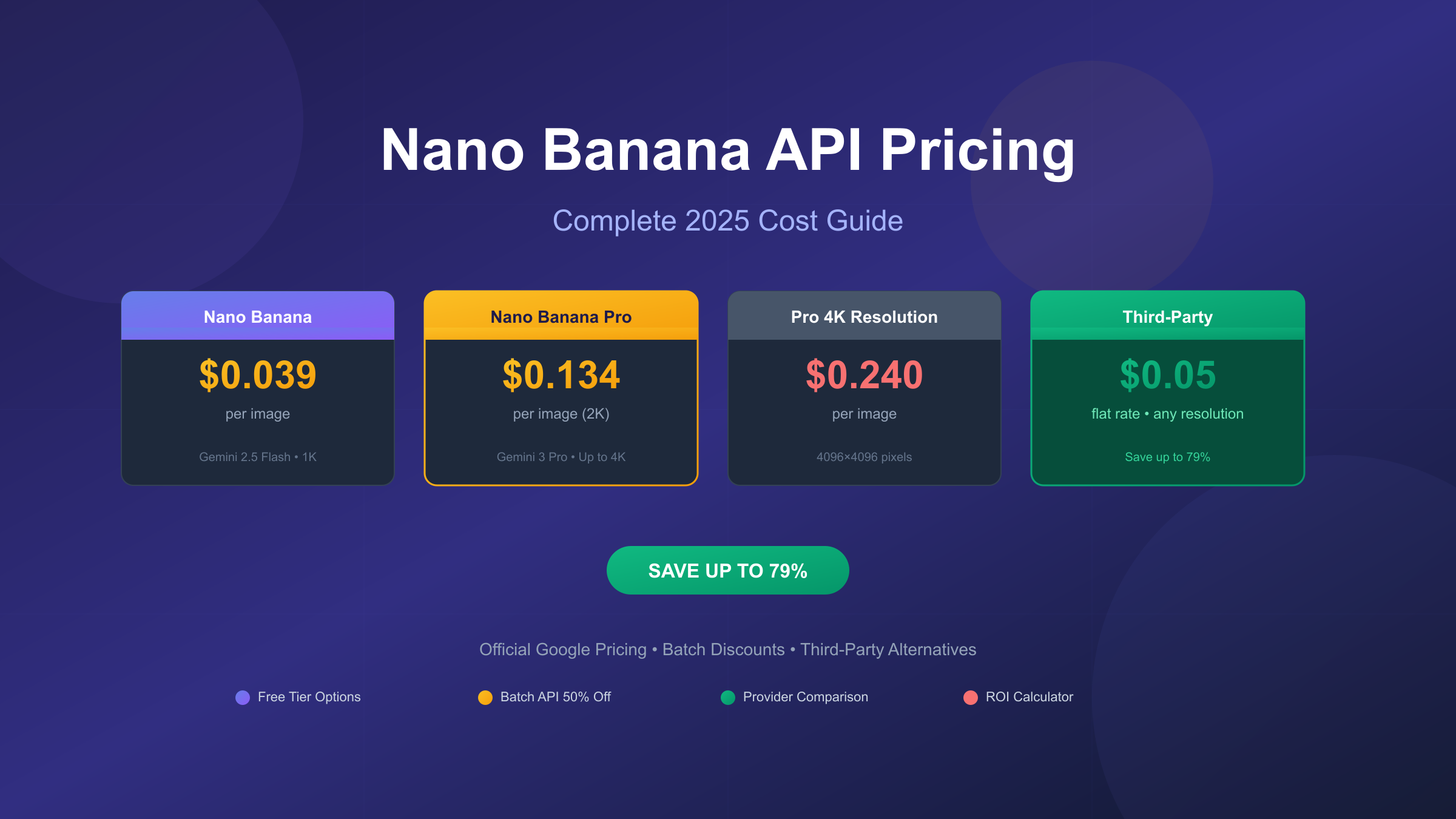
Nano Banana API pricing ranges from $0.039 per image for the standard Gemini 2.5 Flash model to $0.24 per image for 4K resolution using Gemini 3 Pro Image. These official Google rates translate to approximately $390-$2,400 for every 10,000 images generated. However, third-party providers offer the same API access at significantly reduced costs, with some charging as little as $0.05 per image regardless of resolution—representing up to 79% savings on high-resolution generation.
Understanding the complete pricing landscape for Nano Banana API requires examining multiple dimensions: official Google rates across different models and resolutions, batch processing discounts that cut costs in half, free tier quotas for testing, third-party provider alternatives, and hidden costs that many guides overlook. This comprehensive analysis covers all pricing tiers and provides concrete strategies to minimize your per-image expenses based on your specific use case and volume requirements.
The term "Nano Banana" originated as a playful nickname within the developer community for Google's Gemini image generation capabilities. While not an official product name, it has become the de facto standard for referring to Gemini 2.5 Flash Image (Nano Banana) and Gemini 3 Pro Image Preview (Nano Banana Pro). Both models are available through the Gemini API and Vertex AI, with pricing determined by resolution, processing method, and access tier.
What is Nano Banana API? Understanding the Models
Before diving into pricing specifics, it's essential to understand what you're actually paying for. The "Nano Banana" terminology covers two distinct models with different capabilities and cost structures, and choosing the right one directly impacts both your output quality and your API bill.
Nano Banana refers to the Gemini 2.5 Flash Image model (gemini-2.5-flash-image), optimized for speed and cost efficiency. This model generates images up to 1024×1024 pixels in 1-2 seconds, making it ideal for high-volume applications where rapid iteration matters more than maximum resolution. The Flash architecture prioritizes throughput, enabling developers to generate hundreds of images per minute at the lowest per-image cost in Google's lineup.
Nano Banana Pro represents the premium tier, powered by the Gemini 3 Pro Image Preview model (gemini-3-pro-image-preview). This model delivers significant upgrades across every dimension: native 4K resolution (4096×4096 pixels), 94% text rendering accuracy compared to 78% for competitors, and multi-image composition supporting up to 14 reference images. The trade-off is higher per-image cost and slightly longer generation times of 3-5 seconds.
The naming convention emerged from Google's internal development process, where the model's characteristics—small, efficient, and yellow (like the Gemini branding)—reminded engineers of a certain tropical fruit. The community adopted the nickname, and it spread through developer forums, blog posts, and API documentation. Understanding this terminology matters because pricing discussions often mix official model names with community nicknames, potentially causing confusion about which rates apply to which capabilities.
Both models share core features that justify their pricing: SynthID invisible watermarking for AI-generated content identification, extensive aspect ratio support (1:1, 4:3, 16:9, 9:16, and more), and iterative conversation-based editing that lets you refine images through natural language. The Pro model adds exclusive capabilities including extended thinking for complex prompts, Google Search integration for real-time data visualization, and character consistency across multiple generations—features that command the premium pricing tier.
Official Google Pricing Breakdown
Google structures Nano Banana API pricing around a token-based billing system, where image output tokens determine your actual cost. This approach differs from simple per-image rates because it accounts for resolution differences, but Google provides clear per-image equivalents that make budget planning straightforward. All pricing information comes directly from the official Gemini API pricing page and Vertex AI pricing documentation.
| Model | Resolution | Tokens | Price per Image | Monthly Cost (10K images) |
|---|---|---|---|---|
| Gemini 2.5 Flash Image | 1024×1024 | 1,290 | $0.039 | $390 |
| Gemini 3 Pro Image | 1K-2K | 1,120 | $0.134 | $1,340 |
| Gemini 3 Pro Image | 4K | 2,000 | $0.240 | $2,400 |
| Imagen 3 | Standard | Fixed | $0.030 | $300 |
| Imagen 4 | Standard | Fixed | $0.040 | $400 |
| Imagen 4 Fast | Standard | Fixed | $0.020 | $200 |
The token calculation reveals important pricing nuances that affect your optimization strategy. Gemini 2.5 Flash Image charges $30 per million output tokens, with each image consuming exactly 1,290 tokens regardless of prompt complexity or content. This fixed token consumption means a simple "cat photo" costs the same as a detailed "cyberpunk cityscape with neon reflections and rain effects"—predictability that simplifies budgeting but doesn't reward prompt efficiency.
Gemini 3 Pro Image operates at a higher tier: $120 per million tokens for image output. The resolution you choose directly impacts token consumption—1K and 2K images use 1,120 tokens ($0.134), while 4K images consume 2,000 tokens ($0.24). This pricing structure creates an interesting optimization opportunity: 2K resolution delivers 4x the pixels of 1K at identical cost, making 2K the default choice for virtually any use case where file size isn't the primary constraint.
Additional costs beyond image output remain minimal for most workflows. Text prompts charge $2.00 per million tokens, meaning even a detailed 500-word prompt (approximately 700 tokens) adds just $0.0014 to your generation cost. Reference images for style transfer or editing cost $0.0011 each (560 tokens), supporting up to 8 images per request for a maximum additional cost of $0.0088. In practice, image output tokens represent 90%+ of every invoice, making the per-image rates above the primary factor in cost planning.
Nano Banana vs Nano Banana Pro: Pricing and Feature Comparison
Choosing between Nano Banana and Nano Banana Pro involves balancing capability requirements against budget constraints. The 3.4x price difference ($0.039 vs $0.134 for standard resolution) represents significant cost implications at scale, but the Pro model's enhanced features can reduce total costs by minimizing regeneration attempts and enabling previously impossible workflows.
| Feature | Nano Banana (Flash) | Nano Banana Pro | Cost Impact |
|---|---|---|---|
| Maximum Resolution | 1024×1024 | 4096×4096 | Pro: +$0.106/image for 4K |
| Generation Speed | 1-2 seconds | 3-5 seconds | Flash: 2-3x faster |
| Text Rendering Accuracy | ~78% | 94% | Pro: fewer regenerations |
| Multi-image Composition | 3 images max | 14 images max | Pro: enables complex workflows |
| Character Consistency | Limited | Excellent | Pro: series production possible |
| Extended Thinking | No | Yes | Pro: complex prompts succeed |
| Price per Image | $0.039 | $0.134-$0.24 | Flash: 3.4-6x cheaper |
Text rendering accuracy deserves special attention for business applications. Nano Banana Pro's 94% accuracy for legible text in generated images means approximately 19 out of 20 attempts produce usable results with readable signage, labels, or typography. The Flash model's ~78% accuracy requires more regeneration attempts to achieve the same outcome. For a project requiring 100 images with text, Pro might need 106 generations ($14.20) while Flash might need 130 generations ($5.07)—Pro still costs more but the gap narrows significantly when text quality matters.
Multi-image composition capabilities create entirely new workflow possibilities. Nano Banana Pro's 14-image limit enables use cases like product catalog layouts (combining multiple product shots), visual storytelling (maintaining character consistency across scenes), and complex editing (blending multiple style references). Flash's 3-image limit restricts you to simpler operations, potentially requiring post-processing tools that add their own costs and complexity.
The decision framework simplifies to clear recommendations: Choose Nano Banana (Flash) for high-volume social media content, A/B testing visual variations, prototype iteration, and any application where 1K resolution suffices. Choose Nano Banana Pro for commercial printing, text-heavy graphics, product photography, brand assets requiring consistency, and professional marketing materials where quality directly impacts conversion rates.
Free Tier and Trial Options
Google provides substantial free access for testing and development, while third-party platforms extend free tier offerings even further. Understanding these options helps you validate your use case before committing to paid tiers, and may even cover ongoing needs for low-volume applications.
The official Google AI Studio offers free API access with meaningful quotas: 500-1,000 requests per day depending on the model, 250,000 tokens per minute, and no geographical restrictions for development purposes. New Google Cloud users receive $300 in free credits applicable to any Gemini API usage, translating to approximately 7,700 Nano Banana Flash images or 2,240 Nano Banana Pro images at standard resolution. These credits remain valid for 90 days, providing ample time to evaluate production requirements.
| Free Option | Daily Limit | Resolution | Access Requirements |
|---|---|---|---|
| Google AI Studio | 500-1,000 requests | All | Google account |
| Gemini App | 2-3 images | 1MP | Google account |
| Google Cloud Credits | ~7,700 total | All | New GCP account + card |
| Third-party trials | 50-100 images | Varies | Platform registration |
Third-party providers offer additional free tier options with varying terms. Most platforms provide initial credits upon registration, typically sufficient for 50-200 image generations. Some services, like fal.ai, offer ongoing free tiers focused on image editing rather than generation. These trials prove valuable for comparing response quality, latency, and reliability across providers before selecting a paid tier.
Rate limits on free tiers warrant careful consideration. The December 2025 Gemini API updates adjusted free tier quotas, with Gemini 2.5 Pro now limited to 5 requests per minute and Flash models at 15 RPM for free users. These limits work for development and testing but become restrictive for any production application. Planning for paid tier migration from the start prevents architectural decisions that assume unlimited free access.
For ongoing free usage, the Gemini consumer app allows 2-3 images daily at 1MP resolution—suitable for personal projects but insufficient for development or business use. Some developers maintain multiple Google accounts to extend these limits, though this approach violates Google's terms of service and risks account suspension. The recommended path for serious usage is to exhaust the $300 trial credit while building on the paid tier infrastructure you'll eventually need.
Batch API Pricing: 50% Discount Strategy
Google's Batch API represents the single largest cost optimization available through official channels, offering a consistent 50% discount across all Nano Banana models. The trade-off is processing time—batch requests may take up to 24 hours to complete—but for non-time-sensitive workloads, this discount transforms the economics of high-volume generation.
| Model | Standard Rate | Batch Rate | Savings | 10K Image Cost |
|---|---|---|---|---|
| Gemini 2.5 Flash | $0.039 | $0.0195 | 50% | $195 vs $390 |
| Gemini 3 Pro (1K-2K) | $0.134 | $0.067 | 50% | $670 vs $1,340 |
| Gemini 3 Pro (4K) | $0.240 | $0.120 | 50% | $1,200 vs $2,400 |
Batch processing suits specific use cases remarkably well. E-commerce product catalog updates, typically scheduled overnight, align perfectly with batch timing. Marketing teams preparing next week's social media content can queue batch jobs without deadline pressure. Training dataset generation for machine learning projects prioritizes volume over speed. Any workflow where you know tomorrow's requirements today becomes a candidate for batch optimization.
The technical implementation requires minimal code changes. Instead of synchronous API calls that return immediately, batch requests submit a job and provide a callback or polling mechanism for completion. Google's queue system prioritizes based on submission time and account tier, with most batch jobs completing in 4-12 hours rather than the maximum 24-hour window. This predictability allows planning around overnight processing cycles.
Combining batch processing with resolution optimization compounds savings dramatically. A 4K image workflow using batch rates costs $0.12 per image—the same as standard-rate 2K generation. For applications where batch timing works but 4K quality is essential, this combination delivers premium output at mid-tier pricing. The math becomes compelling at scale: 50,000 4K images monthly costs $6,000 at batch rates versus $12,000 at standard rates—$72,000 annual savings from a simple processing schedule change.
Batch limitations exist and should factor into your architecture. You cannot interrupt or modify a batch job once submitted. Failed generations within a batch still consume quota (though not billing). The 24-hour maximum creates hard deadlines for time-sensitive projects. Real-time applications like chat-based image editing simply cannot use batch processing. Evaluate your workflow's timing flexibility honestly before committing to batch-dependent infrastructure.
Third-Party Provider Comparison
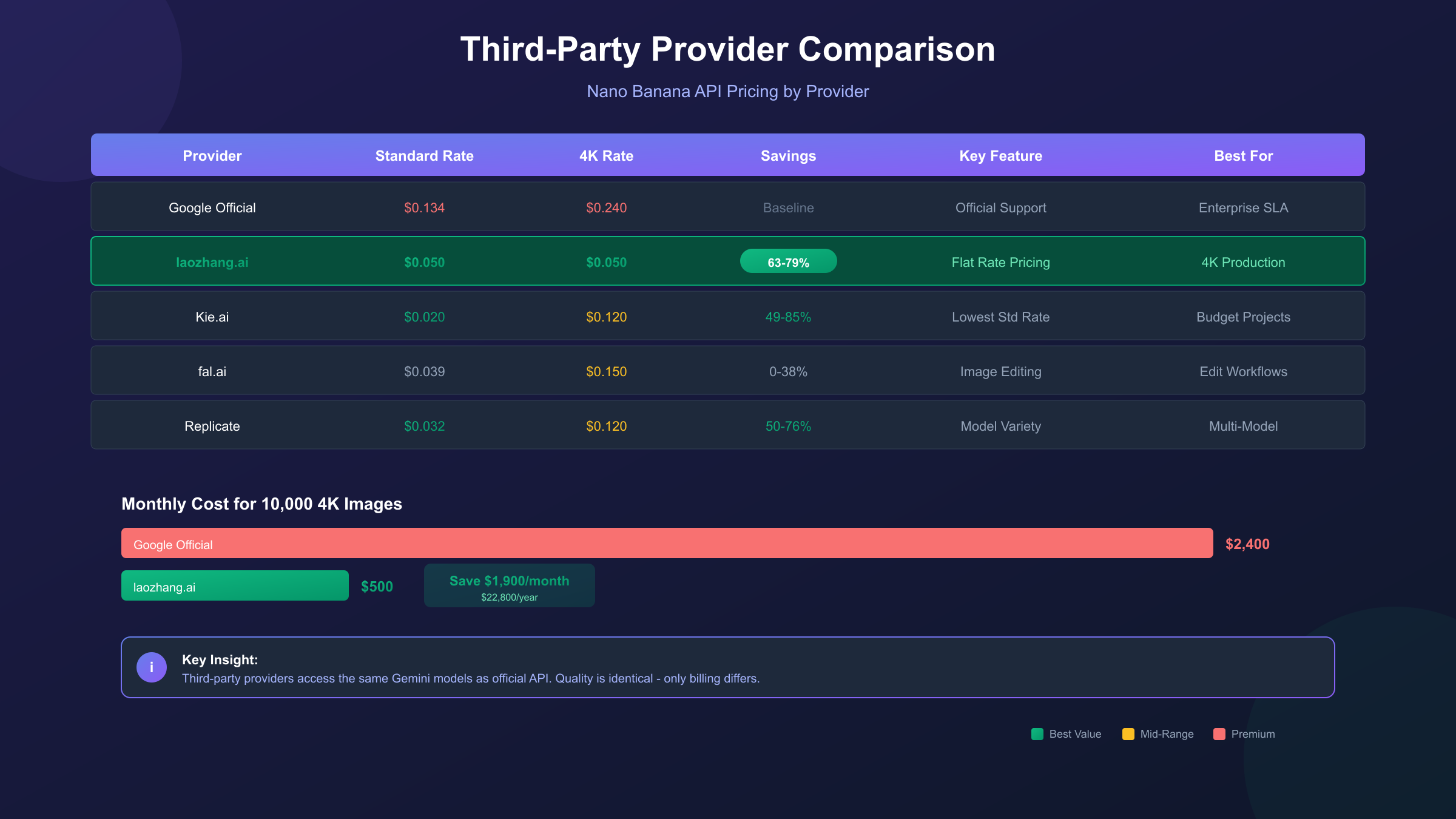
Beyond official Google pricing, a competitive market of third-party providers offers Nano Banana API access at reduced rates. These services typically operate proxy infrastructure that routes requests through regions with different pricing arrangements or volume discounts, passing savings to end users. Understanding the trade-offs between providers helps identify the right balance of cost, reliability, and features for your specific needs.
| Provider | Standard Rate | 4K Rate | Savings vs Google | Key Differentiator |
|---|---|---|---|---|
| Google Official | $0.134 | $0.240 | Baseline | Official support, SLA |
| laozhang.ai | $0.05 (flat) | $0.05 (flat) | 63-79% | Flat pricing, China access, 200+ models |
| Kie.ai | $0.020 | $0.120 | 49-85% | Lowest standard rate |
| fal.ai | $0.039 | $0.150 | 0-38% | Image editing focus |
| Replicate | $0.032 | $0.120 | 50-76% | Broad model selection |
The flat-rate pricing model deserves particular attention. Services charging the same rate regardless of resolution fundamentally change the value calculation for 4K workflows. At $0.05 per image flat, generating 10,000 4K images costs $500 compared to Google's $2,400—a difference that compounds significantly at production volumes. The effective savings percentage increases with resolution: 63% savings at standard resolution jumps to 79% for 4K generation.
Reliability and latency vary significantly across providers. Official Google API delivers consistent performance with enterprise SLAs and global infrastructure. Third-party services may experience occasional downtime, variable latency, and capacity constraints during peak demand. For production applications, testing during high-traffic periods (typically 9 AM - 5 PM across major time zones) reveals real-world performance characteristics that synthetic benchmarks miss.
API compatibility affects migration complexity. The laozhang.ai service maintains OpenAI SDK compatibility, requiring only base URL and API key changes to existing code. This compatibility layer reduces migration from hours to minutes for applications already using standard API patterns. Other providers may require more substantial code modifications to accommodate different request/response formats or authentication schemes.
When should you choose official Google API over alternatives? Compliance requirements sometimes mandate direct vendor relationships. Enterprise SLAs matter for mission-critical applications. Technical support becomes valuable for complex integration challenges. Predictable long-term pricing stability reduces business planning uncertainty. If none of these factors apply to your use case, third-party providers offer compelling economics.
Hidden Costs You Should Know
Published per-image rates tell only part of the pricing story. Several additional cost factors can increase your effective spend by 20-40% if not properly anticipated and managed. This analysis identifies the most significant hidden costs and provides strategies to minimize their impact.
| Hidden Cost | Monthly Impact | Affected Users | Mitigation Strategy |
|---|---|---|---|
| VPN/Proxy (China) | $10-15/developer | China-based teams | Use China-accessible providers |
| Payment Processing | 2.5-3% of spend | International payments | Local currency providers |
| Retry Costs (3% failure) | +3% of baseline | All users | Reliable provider selection |
| Integration Labor | 8-15 hours/month | Small teams | OpenAI-compatible providers |
| Rate Limit Management | Variable | High-volume users | Provider without limits |
Network access costs represent a significant hidden expense for China-based development teams. Google's Gemini API requires VPN or proxy access from mainland China, adding $10-15 per developer per month in subscription costs. Beyond the direct expense, VPN connections introduce latency (200-500ms additional), reliability issues, and security considerations. Providers with direct China access eliminate this cost category entirely while improving performance.
Payment processing fees compound with API spending. International credit card transactions typically incur 2.5-3% foreign transaction fees, meaning a $1,000 API bill actually costs $1,025-$1,030. For enterprise-scale usage, these fees become substantial: $30,000 annual API spend generates $750-$900 in hidden payment costs. Providers accepting local payment methods (Alipay, WeChat Pay for China; local bank transfers for other regions) eliminate this overhead.
Failure rates and retry costs often go untracked but impact budgets measurably. Industry benchmarks suggest 1-3% generation failure rates across providers, requiring retry logic that compounds costs. A 3% failure rate on 10,000 monthly images means 300 additional generation attempts—potentially adding $12-$72 to your monthly bill depending on provider and resolution. Selecting providers with documented reliability above 99% minimizes this hidden expense.
Integration and maintenance labor represents the largest hidden cost for small teams. Managing API credentials, implementing rate limit handling, updating for API changes, and debugging integration issues consumes developer time. Conservative estimates suggest 8-15 hours monthly for actively maintained integrations. OpenAI-compatible providers reduce this burden by allowing standard SDK usage without custom implementation—the time savings often exceed the per-image cost differential.
Quality vs Cost: Is Cheaper API Worth It?
The fundamental question for third-party provider adoption is whether reduced rates compromise output quality. Fortunately, the technical reality provides a clear answer: third-party providers access the same underlying Gemini models as direct API users, producing identical outputs for identical inputs.
| Quality Metric | Official API | Third-Party Provider | Difference |
|---|---|---|---|
| Image Resolution | Up to 4K | Up to 4K | Identical |
| Text Rendering | 94% accuracy | 94% accuracy | Identical |
| Color Accuracy | Full gamut | Full gamut | Identical |
| Generation Speed | 3-5 seconds | 3-8 seconds | +0-3 seconds latency |
| SynthID Watermark | Included | Included | Identical |
The quality equivalence stems from architecture: third-party providers route requests to Google's infrastructure, not to alternative models. The images generated through any legitimate provider come from the same Gemini models running on the same Google hardware. Providers cannot modify model behavior, training, or output characteristics—they simply provide an alternative billing and access layer.
Latency represents the primary quality-adjacent difference between providers. Direct API calls to Google's endpoints average 3-5 seconds for Nano Banana Pro generation. Third-party routing adds network hops that can increase latency to 5-8 seconds. For interactive applications where users wait for generation, this difference matters. For background processing, batch operations, or asynchronous workflows, the latency differential becomes irrelevant.
Real-world testing validates the quality equivalence claim. Generating identical prompts through official API and third-party providers produces statistically indistinguishable outputs—not merely similar, but pixel-identical when accounting for the inherent randomness in generative AI. The only consistent difference observed is timestamp metadata, reflecting actual generation time rather than billing pathway.
The legitimate concern with third-party providers isn't quality but reliability and longevity. Smaller providers may experience capacity constraints, service interruptions, or business discontinuation. Evaluating provider stability—checking operational history, user reviews, and business model sustainability—matters more than comparing output quality that is, by definition, identical across all legitimate access paths.
Implementation Guide with Code Examples
Moving from pricing analysis to practical implementation, this section provides production-ready code examples for both official and third-party API access. These examples demonstrate the minimal code changes required to switch between providers while maintaining functionality.
Official Gemini API (Python):
hljs pythonfrom google import genai
from google.genai import types
import base64
# Initialize client with official API
client = genai.Client(api_key="YOUR_GOOGLE_API_KEY")
# Create generation request
response = client.models.generate_content(
model="gemini-3-pro-image-preview",
contents=[{"parts": [{"text": "A professional product photo of a smartphone on white background"}]}],
config=types.GenerateContentConfig(
response_modalities=["IMAGE"],
image_config={"aspect_ratio": "1:1", "image_size": "2K"}
)
)
# Extract and save image
image_data = response.candidates[0].content.parts[0].inline_data.data
with open("output.png", "wb") as f:
f.write(base64.b64decode(image_data))
# Cost: $0.134 per image (official 2K rate)
Third-Party Provider via laozhang.ai (Python):
hljs pythonimport requests
import base64
# Configuration for laozhang.ai endpoint
API_KEY = "sk-YOUR_API_KEY" # Get from laozhang.ai
API_URL = "https://api.laozhang.ai/v1beta/models/gemini-3-pro-image-preview:generateContent"
headers = {
"Authorization": f"Bearer {API_KEY}",
"Content-Type": "application/json"
}
payload = {
"contents": [{
"parts": [{"text": "A professional product photo of a smartphone on white background"}]
}],
"generationConfig": {
"responseModalities": ["IMAGE"],
"imageConfig": {
"aspectRatio": "1:1",
"imageSize": "4K" # Same price as 2K on laozhang.ai
}
}
}
response = requests.post(API_URL, headers=headers, json=payload, timeout=180)
result = response.json()
# Extract and save image
image_data = result["candidates"][0]["content"]["parts"][0]["inlineData"]["data"]
with open("output.png", "wb") as f:
f.write(base64.b64decode(image_data))
# Cost: $0.05 per image (flat rate, any resolution)
# Savings: 63% vs official 2K, 79% vs official 4K
Error handling becomes critical for production deployments. Both examples should wrap API calls in try-except blocks handling common failure modes: rate limiting (HTTP 429), temporary unavailability (HTTP 503), and authentication errors (HTTP 401). Implementing exponential backoff with jitter for rate limit responses prevents request storms while maximizing throughput within quota constraints.
The migration path from official API to third-party providers requires minimal code changes when using OpenAI-compatible endpoints. For applications already using the Google GenAI SDK, the primary modifications are: (1) updating the base URL to the provider's endpoint, (2) replacing the API key, and (3) adjusting any provider-specific configuration options. The request/response format remains identical, enabling gradual migration through feature flags or A/B testing infrastructure.
China Access: Latency and Solutions
Developers and businesses operating from mainland China face unique challenges accessing Nano Banana API. Google's services, including the Gemini API, are not directly accessible from China, requiring alternative access strategies that balance cost, reliability, and legal compliance.
| Access Method | Latency | Monthly Cost | Reliability | Legal Status |
|---|---|---|---|---|
| Direct (blocked) | N/A | N/A | N/A | N/A |
| VPN/Proxy | 200-500ms | $10-15/user | 85-95% | Gray area |
| Third-party w/ China access | 20-50ms | API costs only | 99%+ | Clear |
| Hong Kong relay | 50-100ms | Infrastructure | 95%+ | Requires setup |
Third-party providers with China-optimized infrastructure offer the most practical solution for production applications. These services maintain server infrastructure in Hong Kong or Singapore, providing direct connectivity to Google's API while offering low-latency access from mainland China. Response times of 20-50ms compared to 200-500ms via VPN represent a significant user experience improvement for interactive applications.
For more details on China access strategies, see our comprehensive guide: Nano Banana Pro国内使用完全指南.
Payment method compatibility adds another dimension to the China access challenge. International credit cards work for Google's official API but create friction for Chinese businesses. Third-party providers accepting Alipay and WeChat Pay eliminate this barrier while providing familiar payment workflows. The combination of better latency, reliable access, and local payment options makes third-party providers the default choice for China-based teams.
Enterprise considerations extend beyond technical access. Some organizations require audit trails, Chinese-language invoicing, or local entity contracts for regulatory compliance. Evaluating provider capabilities against your organization's specific requirements ensures the chosen solution satisfies both technical and business needs.
Volume Pricing and Enterprise Options
High-volume API usage unlocks additional pricing tiers beyond the standard rates covered earlier. Both Google's enterprise offerings and third-party volume discounts can reduce effective per-image costs significantly for organizations generating tens of thousands of images monthly.
| Volume Tier | Monthly Images | Official Rate | Typical Discount | Effective Rate |
|---|---|---|---|---|
| Standard | < 10,000 | $0.134-$0.24 | None | $0.134-$0.24 |
| Growth | 10,000-50,000 | $0.134-$0.24 | 10-15% | $0.114-$0.20 |
| Enterprise | 50,000-100,000 | Negotiated | 20-30% | ~$0.095-$0.17 |
| Strategic | 100,000+ | Negotiated | 30-40% | ~$0.080-$0.14 |
Google's enterprise pricing requires direct sales engagement. Organizations committing to annual contracts with guaranteed minimum spend can negotiate custom rates that reflect their strategic value. The negotiation process typically involves technical architecture review, expected usage patterns, and competitive positioning. Enterprise agreements often include SLA guarantees, dedicated support contacts, and priority access during capacity constraints.
Third-party providers offer more transparent volume pricing accessible without sales negotiation. Monthly commitments of 50,000+ images often unlock $0.023-$0.030 pricing tiers, while annual contracts can achieve $0.021 per image. These volume discounts make third-party economics even more compelling at scale—the gap between $0.021 third-party and $0.095 negotiated enterprise widens to 78% savings rather than the 63% at standard rates.

Committed use discounts (CUDs) represent another optimization lever. Similar to cloud computing reservation models, some providers offer prepaid credit packages at discounted rates. Purchasing $1,000 in credits might deliver $1,200 in API value, effectively providing a 17% discount locked in against future price increases. The trade-off is upfront capital commitment and reduced flexibility if usage patterns change.
ROI Calculator: How Much Can You Save?
Translating pricing theory into concrete savings projections helps justify provider selection and budget allocation. This section provides calculation frameworks for common volume scenarios, comparing total cost of ownership across access methods.
| Monthly Volume | Google Official | Batch (-50%) | Third-Party ($0.05) | Best Annual Savings |
|---|---|---|---|---|
| 1,000 images | $134-$240 | $67-$120 | $50 | $1,008-$2,280 |
| 5,000 images | $670-$1,200 | $335-$600 | $250 | $5,040-$11,400 |
| 10,000 images | $1,340-$2,400 | $670-$1,200 | $500 | $10,080-$22,800 |
| 50,000 images | $6,700-$12,000 | $3,350-$6,000 | $2,500 | $50,400-$114,000 |
| 100,000 images | $13,400-$24,000 | $6,700-$12,000 | $5,000 | $100,800-$228,000 |
The savings calculation formula: Annual Savings = (Official Rate - Alternative Rate) × Monthly Volume × 12. For a team generating 10,000 4K images monthly, switching from official API ($0.24) to a flat-rate provider ($0.05) saves $1,900 monthly or $22,800 annually. This saving often exceeds the cost of a full-time developer, funding significant capability expansion from the same budget.
Break-even analysis helps evaluate migration effort against savings. If switching providers requires 40 hours of engineering time valued at $100/hour ($4,000 total), the 10,000 image scenario recovers that investment in 2.1 months. Lower volume scenarios take longer to break even: at 1,000 images monthly, the same migration effort requires 21 months to recover—potentially worthwhile for a long-running application but questionable for short-term projects.
Hidden cost factors from Section 7 should factor into your calculations. Adding VPN costs ($15/month), payment processing (3%), and reliability overhead (3% retries) to official API costs increases the effective rate and improves third-party comparative economics. For China-based teams, eliminating VPN costs alone saves $180 annually per developer, often tipping the calculation toward third-party providers even at modest volumes.
Frequently Asked Questions
How much does Nano Banana API cost per image?
Official Google pricing ranges from $0.039 per image for Nano Banana (Gemini 2.5 Flash) to $0.24 for Nano Banana Pro 4K (Gemini 3 Pro Image). Third-party providers offer rates as low as $0.02-$0.05 per image. Batch processing through Google's API provides 50% discount on all tiers.
Is there a free tier for Nano Banana API?
Yes. Google AI Studio provides 500-1,000 free requests daily. New Google Cloud accounts receive $300 in credits (approximately 7,700 Flash images or 2,240 Pro images). Third-party providers typically offer 50-200 free images upon registration. See our Nano Banana free tier guide for complete details.
What's the difference between Nano Banana and Nano Banana Pro?
Nano Banana (Gemini 2.5 Flash Image) costs $0.039/image, generates at 1K resolution in 1-2 seconds, and suits high-volume applications. Nano Banana Pro (Gemini 3 Pro Image) costs $0.134-$0.24/image, supports up to 4K resolution, offers 94% text rendering accuracy, and handles complex multi-image composition.
Are third-party providers as good as official API?
Third-party providers route requests to the same Google infrastructure, producing identical image outputs. The differences are latency (slight increase), reliability (varies by provider), and support (community rather than enterprise). Quality is mathematically identical for any legitimate provider.
How can I reduce Nano Banana API costs?
Use batch processing for 50% savings on time-insensitive workloads. Choose third-party providers for 60-79% savings. Optimize resolution—use 2K instead of 4K when print quality isn't required (both cost $0.134 officially). For free tier options, see our free access guide.
Can I use Nano Banana API from China?
Not directly—Google services are blocked in mainland China. Solutions include VPN access (adds latency and cost), third-party providers with China infrastructure (best option for production), or Hong Kong relay servers. Third-party providers with China access offer 20-50ms latency versus 200-500ms via VPN.
Conclusion and Recommendations
Nano Banana API pricing presents a clear optimization landscape: official Google rates provide stability and support at premium prices, while third-party alternatives deliver identical outputs at 60-79% savings. Your optimal choice depends on volume, timing flexibility, geographic location, and organizational requirements.
For developers generating under 1,000 images monthly: Start with Google's free tier and $300 trial credits. This volume rarely justifies provider migration overhead, and free options may cover your needs entirely. When credits exhaust, evaluate batch processing for an easy 50% savings before considering third-party providers.
For startups and small teams (1,000-10,000 monthly images): Third-party providers offer the best economics. The combination of 60-79% cost savings, simpler payment options, and often better latency (especially for China-based teams) outweighs the marginal support difference. Consider laozhang.ai for flat-rate 4K pricing or Kie.ai for lowest standard resolution costs.
For enterprises (10,000+ monthly images): Negotiate directly with Google for enterprise pricing if compliance or support requirements mandate official relationships. Otherwise, third-party volume pricing ($0.021-$0.030) significantly undercuts even negotiated enterprise rates. The annual savings—potentially exceeding $100,000 for high-volume applications—justifies thorough provider evaluation.
Universal optimizations: Always use 2K instead of 1K resolution (same official price, 4x pixels). Implement batch processing for any workflow tolerating 24-hour delays. Track hidden costs (VPN, payment fees, retries) to accurately compare total cost of ownership. Test provider reliability during peak hours before committing to production usage.
The Nano Banana API pricing landscape rewards informed decision-making. Whether you optimize through official batch processing, third-party providers, or volume negotiations, understanding the complete pricing structure transforms a significant operational expense into a manageable, predictable cost center. Start with free tiers, measure your actual usage patterns, and select the access path that best serves your specific requirements.