Nano Banana Pro Pricing & Free Quota Guide 2025: Save 79% with Complete Cost Breakdown
Complete guide to Nano Banana Pro pricing in 2025. Official API costs ($0.134-$0.24/image), free tier limits (500 images/day), $300 Google Cloud credits, Batch API 50% discount, and third-party options at $0.05/image.
Nano Banana Pro
4K-80%Google Gemini 3 Pro · AI Inpainting
谷歌原生模型 · AI智能修图

Understanding Nano Banana Pro pricing requires navigating multiple tiers, hidden costs, and optimization strategies that Google doesn't clearly explain in their documentation. The official pricing ranges from $0.039 to $0.24 per image depending on resolution, but most developers pay significantly more than necessary by missing free tier options and discount programs.
This guide breaks down every pricing component based on December 2025 official documentation: the free quotas that reset daily, the $300 Google Cloud credits available to new users, the Batch API's 50% discount, and third-party providers offering identical quality at 79% lower cost. Whether you're testing a prototype or building production applications generating thousands of images monthly, the strategies here can reduce your Nano Banana Pro costs by hundreds of dollars annually.
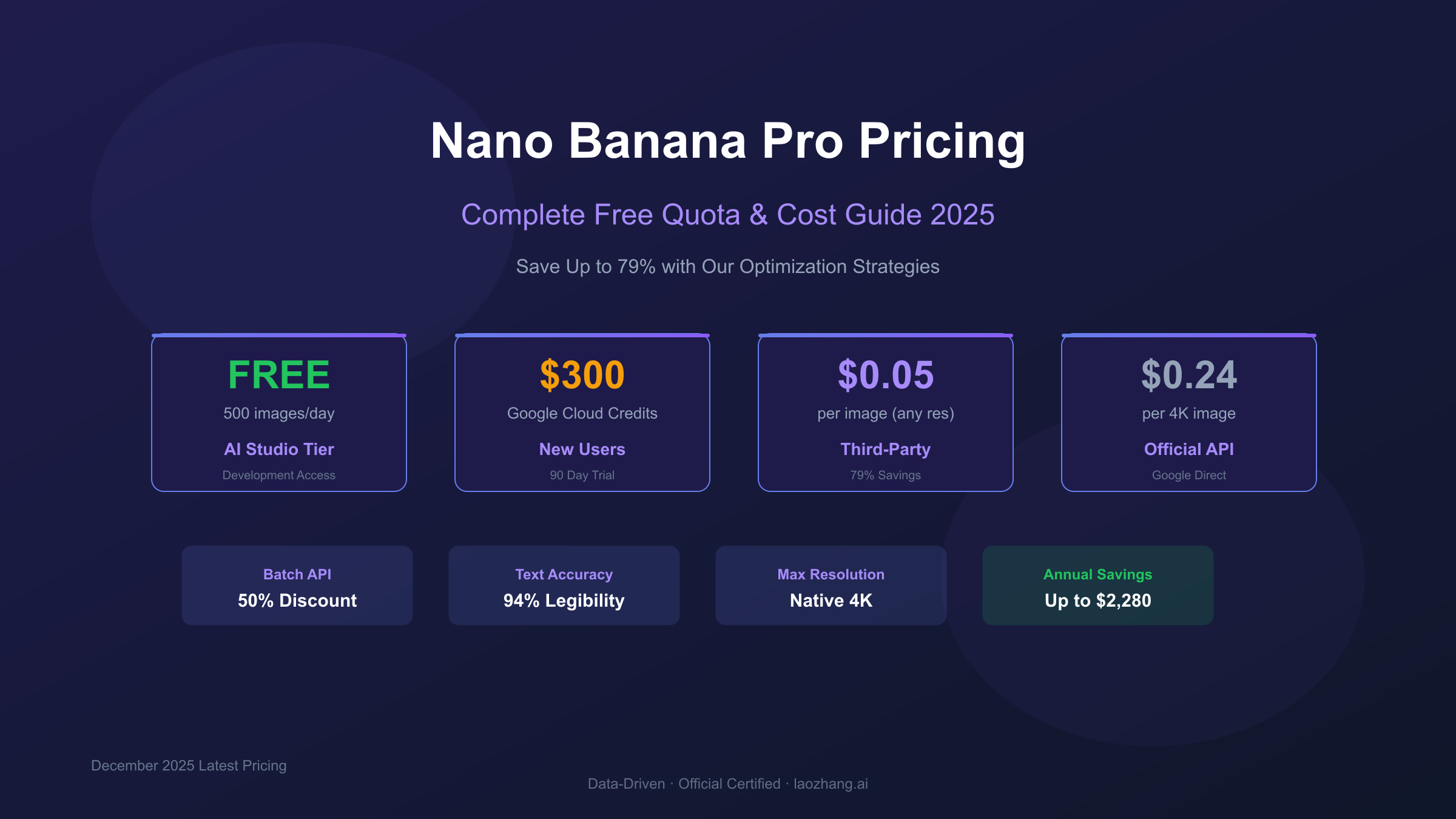
Quick Reference: Nano Banana Pro Pricing at a Glance
Before diving into optimization strategies, here's the complete pricing landscape for Nano Banana Pro (officially known as Gemini 3 Pro Image Preview) as of December 2025:
| Access Method | Price per Image | Best For |
|---|---|---|
| Gemini App Free | $0 (2-3 images/day) | Casual testing |
| Google AI Studio Free | $0 (up to 500/day) | Development |
| Google Cloud $300 Credits | $0 (first 90 days) | New users |
| Official API (1K) | $0.039 | Low resolution needs |
| Official API (2K) | $0.134 | Standard quality |
| Official API (4K) | $0.24 | Professional output |
| Batch API (2K) | $0.067 | Bulk processing |
| Batch API (4K) | $0.12 | High-volume 4K |
| Third-party (laozhang.ai) | $0.05 | Production at scale |
The pricing difference between methods is substantial. A developer generating 1,000 4K images monthly would spend $240 through the official API, $120 via Batch API, or just $50 through optimized third-party access—annual savings of $2,280 by choosing the right approach.
Understanding What Nano Banana Pro Actually Is
Nano Banana Pro represents Google's flagship AI image generation model, officially designated as Gemini 3 Pro Image Preview in technical documentation. The "Nano Banana" name emerged from community testing before Google's public announcement, and it stuck because it's more memorable than the official identifier.
The model distinguishes itself through three technical capabilities that justify its premium positioning. Text rendering accuracy reaches 94%, dramatically outperforming competitors like Midjourney (71%) and DALL-E 3 (78%). This means generated images can include legible text for logos, product packaging, signage, and UI mockups without post-production correction. Native 4K output at 4096×4096 pixels eliminates upscaling artifacts for print and professional applications. The underlying transformer architecture enables superior prompt adherence compared to diffusion-based alternatives.
Understanding this positioning explains the pricing structure. Google positions Nano Banana Pro as a professional tool for commercial applications, not a consumer product for casual experimentation. The free tiers exist for testing and development, but production usage assumes paid API access. This context matters when evaluating whether the pricing fits your specific use case.
Free Tier Options: Getting Started Without Spending
Google provides multiple pathways to access Nano Banana Pro at no cost, each with different limitations and ideal use cases. Understanding these options prevents unnecessary spending during development and testing phases.
Gemini App Free Access
The consumer Gemini application includes Nano Banana Pro image generation for all users. As of December 2025, free users can generate 2-3 images daily (reduced from the previous 100-image limit due to high demand). Images output at approximately 1 megapixel resolution. This pathway suits occasional personal use but lacks the quality and volume for development or commercial purposes.
Google AI Studio Free Tier
Developers gain significantly more generous access through Google AI Studio. The free tier provides up to 500 API requests daily for models including Gemini 2.5 Flash Image, which offers comparable image generation at 1024×1024 resolution. Rate limits reset at midnight Pacific Time. This free quota operates separately from consumer app limits, meaning you can combine both for 503+ daily generations without any paid subscription.
However, recent changes (December 2025) reduced the Gemini 2.5 Flash free tier from approximately 250 to 20 requests daily during peak periods. The stated 500-image limit represents theoretical maximum capacity that may be throttled based on system demand. For reliable development access, the paid tier or Google Cloud credits provide more consistent availability.
Gemini Pro Subscription ($19.99/month)
The Google One AI Premium subscription increases daily limits to approximately 1,000 images with priority processing. At $19.99 monthly, this represents $0.02 per image for users generating at maximum capacity—making it cost-effective only for consistent high-volume usage. Most developers find pay-per-image API access more economical unless they reliably generate 800+ images monthly.
$300 Google Cloud Credits: The Hidden Free Tier
New Google Cloud users receive $300 in credits valid for 90 days, providing essentially free access to Nano Banana Pro's full capabilities during the trial period. This program remains underutilized because it requires Google Cloud Platform setup rather than the simpler Google AI Studio flow.
Credit Calculation
The $300 credit translates to substantial testing capacity:
- At $0.039/image (1K resolution): ~7,692 images
- At $0.134/image (2K resolution): ~2,239 images
- At $0.24/image (4K resolution): ~1,250 images
For most development projects, this provides months of free experimentation before any charges apply.
Setup Process
Accessing credits requires creating a Google Cloud Platform account and enabling Vertex AI services. The process takes approximately 15 minutes:
- Navigate to cloud.google.com and create a new account
- Enable billing (required to receive credits, but no charges until credits exhaust)
- Enable the Vertex AI API in your project
- Generate API credentials through the Cloud Console
Advantages Over Free Tier
Vertex AI access with $300 credits provides benefits beyond simple cost savings. Rate limits increase to 300 requests per minute compared to 10 RPM on the standard free tier. There's no daily cap on total requests. Response times improve due to reduced throttling. These credits can be applied to any Google Cloud AI service, allowing experimentation across Gemini models, Imagen 4, and other capabilities.
The primary limitation: credits expire after 90 days regardless of usage. Plan your testing and development timeline accordingly.
Official API Pricing: The Complete Breakdown
Google's official Nano Banana Pro pricing follows a token-based model that varies by image resolution and processing method. Understanding this structure reveals opportunities for significant cost optimization.
Resolution-Based Pricing
| Resolution | Token Consumption | Standard Price | Batch Price |
|---|---|---|---|
| 1K (1024×1024) | 1,290 tokens | $0.039 | $0.0195 |
| 2K (2048×2048) | 1,120 tokens | $0.134 | $0.067 |
| 4K (4096×4096) | 2,000 tokens | $0.24 | $0.12 |
The pricing structure reveals an important quirk: 1K images consume more tokens than 2K images. This counterintuitive situation results from Google's internal architecture where lower resolution outputs still require significant model computation. The practical implication: 2K resolution provides better quality-to-cost ratio than 1K for many applications.
Additional Costs
Image generation incurs charges beyond the output itself:
- Text prompts: $2.00 per million input tokens
- Model "thinking" output: $12.00 per million tokens
- Image input (for editing): $0.0011 per image regardless of resolution
For a typical text-to-image request with a 50-word prompt generating a 2K image, total cost breaks down approximately as:
- Prompt tokens: ~$0.0001
- Thinking tokens: ~$0.005
- Image output: $0.134
- Total: ~$0.14
The additional token costs add roughly 4% to the headline image price for standard text-to-image generation.
Batch API: 50% Savings for Patient Users
Google's Batch API offers identical Nano Banana Pro output at half the standard price, with the trade-off of delayed delivery. Jobs submitted through the Batch API complete within 24 hours rather than the 8-12 second synchronous response time.
When Batch Makes Sense
Batch processing fits specific use cases:
- Catalog generation for e-commerce (uploading tonight, using tomorrow)
- Marketing asset creation with planned campaigns
- Dataset generation for AI training
- Any workflow where images aren't needed immediately
For real-time applications—user-facing features, interactive tools, or time-sensitive content—Batch API's latency makes it impractical regardless of savings.
Batch Pricing
| Resolution | Standard Price | Batch Price | Savings |
|---|---|---|---|
| 1K | $0.039 | $0.0195 | 50% |
| 2K | $0.134 | $0.067 | 50% |
| 4K | $0.24 | $0.12 | 50% |
Implementation Consideration
Batch API requires different integration patterns than synchronous requests. Jobs are submitted as collections, results are retrieved through polling or callbacks, and error handling must account for delayed failure notifications. The engineering overhead may exceed the cost savings for teams processing fewer than 500 images monthly.
Third-Party Providers: Maximum Savings
Third-party API providers offer the most significant cost reduction for Nano Banana Pro access. These services operate as authorized resellers or infrastructure optimization layers, providing identical Gemini 3 Pro Image output through standardized API interfaces at 60-79% lower prices.
How Third-Party Pricing Works
Providers negotiate volume discounts with Google and optimize infrastructure costs through regional routing and request batching. The resulting savings pass to developers while maintaining output quality and model versions. You receive genuine Gemini 3 Pro Image Preview output—not a different model or lower quality variant.
Cost Comparison
| Provider | 2K Price | 4K Price | vs Official |
|---|---|---|---|
| Google Official | $0.134 | $0.24 | Baseline |
| Google Batch | $0.067 | $0.12 | -50% |
| Third-party (laozhang.ai) | $0.05 | $0.05 | -63% to -79% |
The flat $0.05 per image pricing regardless of resolution represents the most compelling value for 4K usage, where third-party access costs 79% less than official rates.
For developers building production applications, third-party access through providers like laozhang.ai offers several advantages: simpler billing without Google Cloud setup, unified API access to 200+ AI models through one key, and flexible rate limits during the preview period. Note that official Google API access provides direct technical support and enterprise SLAs that third-party services cannot match for mission-critical production requirements.
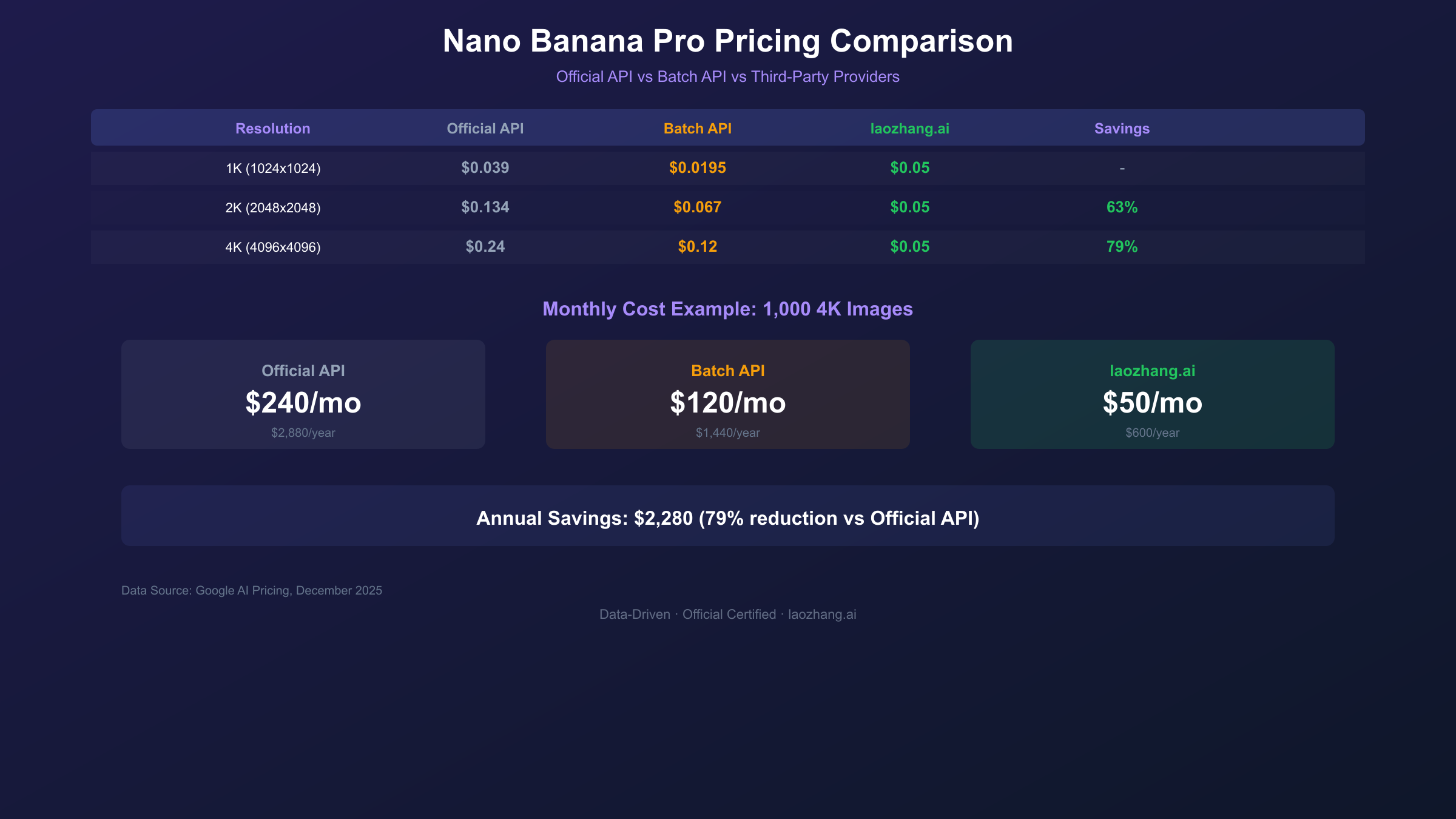
Monthly Budget Calculator: Real-World Scenarios
Estimating Nano Banana Pro costs requires understanding your usage patterns across resolution needs, processing urgency, and volume variability. These scenarios illustrate typical monthly spending across different user profiles.
Hobbyist (100 images/month)
| Method | Monthly Cost | Annual Cost |
|---|---|---|
| Gemini App Free | $0 | $0 |
| Google AI Studio | $0 | $0 |
| Official API (2K) | $13.40 | $160.80 |
| Third-party | $5.00 | $60.00 |
For casual users generating under 100 images monthly, free tier access covers most needs. The Gemini app's 2-3 daily images plus AI Studio's 500 daily API calls provide ample capacity without spending.
Developer (500 images/month)
| Method | Monthly Cost | Annual Cost |
|---|---|---|
| Google AI Studio | $0-20 | $0-240 |
| Official API (2K) | $67.00 | $804.00 |
| Batch API (2K) | $33.50 | $402.00 |
| Third-party | $25.00 | $300.00 |
Development workflows often combine free tier for testing with paid access for production. Using AI Studio for iteration and third-party API for final generation optimizes the cost-quality trade-off.
Startup (2,000 images/month)
| Method | Monthly Cost | Annual Cost |
|---|---|---|
| Official API (4K) | $480.00 | $5,760.00 |
| Batch API (4K) | $240.00 | $2,880.00 |
| Third-party (4K) | $100.00 | $1,200.00 |
At scale, method selection dramatically impacts costs. A startup generating 2,000 4K images monthly saves $4,560 annually by using third-party access versus official API pricing.
Enterprise (10,000+ images/month)
| Method | Monthly Cost | Annual Cost |
|---|---|---|
| Official API (4K) | $2,400.00 | $28,800.00 |
| Batch API (4K) | $1,200.00 | $14,400.00 |
| Third-party (4K) | $500.00 | $6,000.00 |
Enterprise volumes justify significant infrastructure investment in optimization. The $22,800 annual savings between official API and third-party access funds substantial development resources.
API Integration: Getting Started with Code
Implementing Nano Banana Pro requires understanding the API structure and choosing the right endpoint format. Google provides both native Gemini format and OpenAI-compatible interfaces.
Native Gemini Format (Recommended)
The native format supports full 4K parameter configuration and all advanced features:
hljs python# Nano Banana Pro API - Native Gemini Format
import requests
import base64
API_KEY = "sk-YOUR_API_KEY" # Get from laozhang.ai
API_URL = "https://api.laozhang.ai/v1beta/models/gemini-3-pro-image-preview:generateContent"
headers = {
"Authorization": f"Bearer {API_KEY}",
"Content-Type": "application/json"
}
payload = {
"contents": [{
"parts": [{"text": "Professional product photography, white background, studio lighting, 4K quality"}]
}],
"generationConfig": {
"responseModalities": ["IMAGE"],
"imageConfig": {
"aspectRatio": "1:1",
"imageSize": "4K" # Options: 1K, 2K, 4K
}
}
}
response = requests.post(API_URL, headers=headers, json=payload, timeout=180)
result = response.json()
# Extract and save image
image_data = result["candidates"][0]["content"]["parts"][0]["inlineData"]["data"]
with open("product.png", "wb") as f:
f.write(base64.b64decode(image_data))
# Cost: $0.05 per image via laozhang.ai (vs $0.24 official 4K pricing)
OpenAI-Compatible Format
For existing codebases designed around OpenAI's API structure:
hljs python# Nano Banana Pro - OpenAI Compatible Format
from openai import OpenAI
client = OpenAI(
api_key="sk-YOUR_API_KEY",
base_url="https://api.laozhang.ai/v1"
)
response = client.images.generate(
model="gemini-3-pro-image-preview",
prompt="Professional headshot portrait, natural lighting, neutral background",
n=1,
size="2048x2048" # Maps to 2K resolution
)
image_url = response.data[0].url
# Note: Some advanced 4K parameters unavailable in OpenAI format
Key Implementation Notes
- Set timeout to 180 seconds (generation can take 13-22 seconds for 4K)
- Rate limits: 10 requests per minute during preview phase
- Error handling should include retry logic for 429 rate limit errors
- Image data returns as base64 encoded PNG
Cost Optimization Strategies
Beyond choosing the right pricing tier, several techniques further reduce Nano Banana Pro costs without sacrificing output quality.
Resolution Matching
The simplest optimization matches output resolution to actual display requirements. A 4K image costs nearly double a 2K image, yet most web applications display images at effective resolutions below 2K. Audit your actual display sizes before defaulting to maximum resolution.
Prompt Efficiency
Token costs for prompts represent minor but cumulative expenses. Concise, precise prompts generate better results than lengthy descriptions while reducing input token charges. Focus prompts on essential elements rather than exhaustive detail.
Caching and Reuse
Implement caching for repeated or similar requests. Many applications regenerate identical or near-identical images that could be served from cache. Even simple MD5-based cache keys for prompts can eliminate redundant generation costs.
Batch Consolidation
When Batch API suits your workflow, consolidate requests into fewer, larger batches. The overhead per batch job remains constant regardless of size, making larger batches more efficient for both processing time and management complexity.
Budget Monitoring
Google Cloud provides built-in budgeting tools that alert when spending approaches thresholds. Configure alerts at 50%, 75%, and 90% of your monthly budget to prevent surprise charges. Enable automatic API disabling at 100% for hard spending limits.
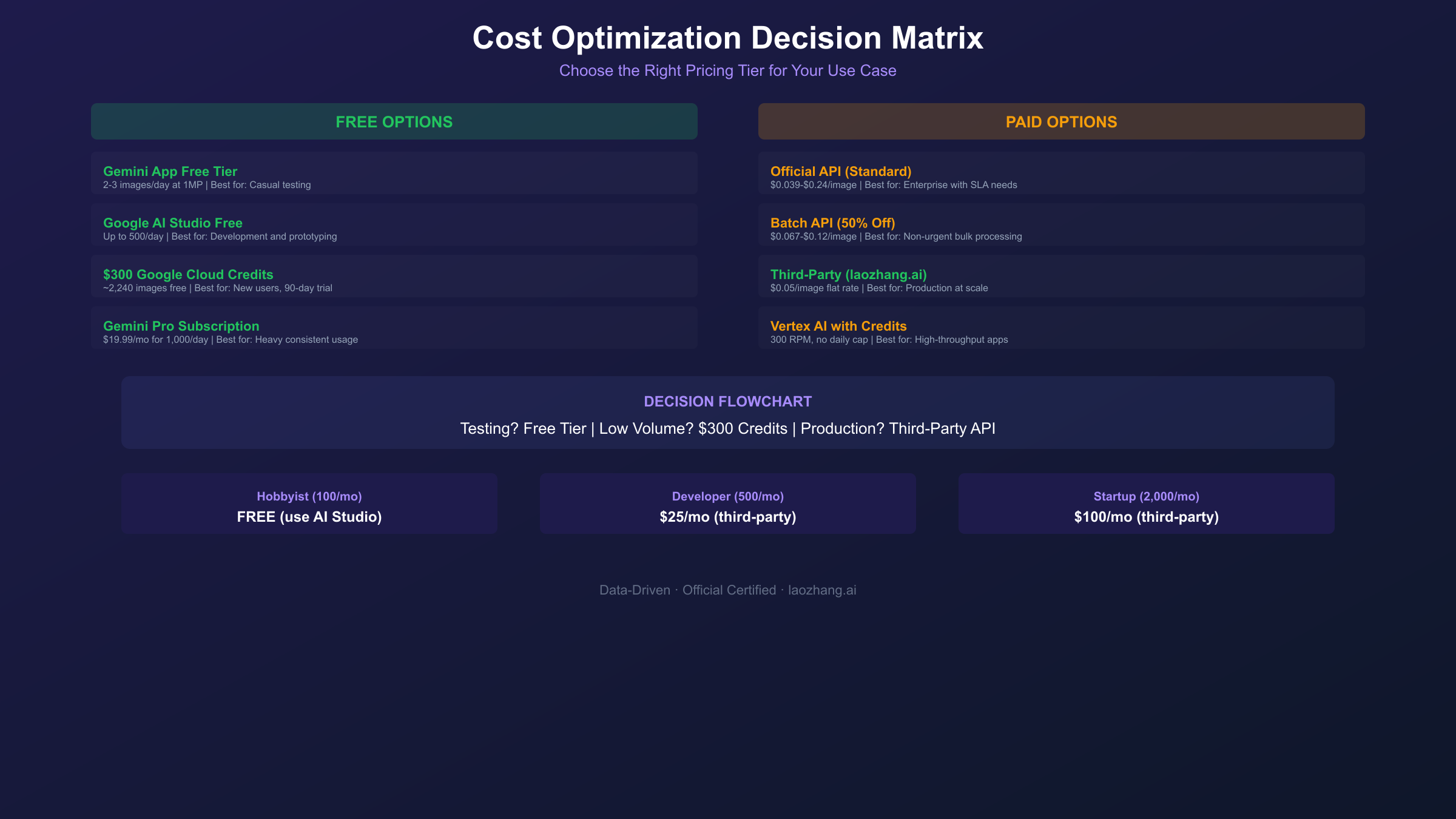
Rate Limits and Quotas Explained
Understanding rate limits prevents application failures and informs architecture decisions. Nano Banana Pro imposes several constraint types that vary by access method.
Request Rate Limits
| Access Method | Requests per Minute | Requests per Day |
|---|---|---|
| Free Tier (AI Studio) | 5 | 25-500 (varies) |
| Paid Tier | 10 | Unlimited |
| Vertex AI ($300 credits) | 300 | Unlimited |
| Third-party (varies) | 60+ | Unlimited |
The 10 RPM limit during Nano Banana Pro's preview phase significantly constrains high-throughput applications. Developers requiring faster processing should consider parallel requests across multiple API keys or third-party providers with higher limits.
Quota Reset Times
API quotas reset at midnight Pacific Time (PT). Consumer app quotas reset at midnight UTC. This timing difference can be exploited: using your app quota before midnight PT and API quota after midnight UTC provides maximum daily capacity.
Handling Rate Limit Errors
Implement exponential backoff for 429 errors:
hljs pythonimport time
import random
def generate_with_retry(prompt, max_retries=5):
for attempt in range(max_retries):
try:
return generate_image(prompt)
except RateLimitError:
if attempt == max_retries - 1:
raise
sleep_time = (2 ** attempt) + random.uniform(0, 1)
time.sleep(sleep_time)
Frequently Asked Questions
Is Nano Banana Pro free to use?
Yes, with limitations. The Gemini app provides 2-3 free images daily. Google AI Studio offers up to 500 API requests daily on the free tier, though actual limits vary based on demand. New Google Cloud users receive $300 in credits lasting 90 days—enough for approximately 2,240 2K images. For sustained production usage, paid API access at $0.134-0.24 per image (or $0.05 through third-party providers) is required.
What's the cheapest way to use Nano Banana Pro?
Third-party API providers offer the lowest per-image cost at $0.05 regardless of resolution—79% below Google's official 4K pricing. For users who can tolerate 24-hour delivery, Google's Batch API provides 50% savings at $0.067-0.12 per image. The $300 Google Cloud credits provide essentially free access for new users during the 90-day trial period.
How many free images can I generate daily?
Combined free access includes: 2-3 images via Gemini app + up to 500 API requests via Google AI Studio = potentially 503+ daily generations without spending. Actual AI Studio limits fluctuate based on demand, with some users reporting throttling to 20-100 requests during peak periods.
Does the Batch API quality differ from standard API?
No. Batch API produces identical Gemini 3 Pro Image output as synchronous requests. The only difference is delivery timing—Batch jobs complete within 24 hours rather than 8-12 seconds. For workflows without real-time requirements, Batch provides pure cost savings without quality compromise.
Why do third-party providers cost less?
Third-party providers negotiate volume discounts with Google and optimize infrastructure costs through efficient routing and request batching. They pass these savings to developers while maintaining identical output quality. The trade-off: you depend on an additional vendor's infrastructure, and enterprise support options are limited compared to direct Google relationships.
How do I track and control spending?
Google Cloud Console provides budget alerts and automatic API disabling when spending reaches configured thresholds. Set alerts at 50%, 75%, and 90% of your monthly budget for early warning. Enable hard limits at 100% to prevent runaway processes from generating unexpected charges. Third-party providers typically offer similar spending controls through their dashboards.
Conclusion: Choosing Your Pricing Path
Nano Banana Pro pricing ranges from free to $0.24 per image, with the right choice depending on your volume, quality requirements, and budget constraints. For testing and development, maximize free tier access through Google AI Studio and the $300 Cloud credit program. For production usage, third-party providers at $0.05 per image offer the optimal balance of cost and convenience for most developers.
The key insight: Google's official pricing targets enterprise customers willing to pay premium rates for direct support and SLAs. Individual developers and startups achieve identical output quality at 63-79% lower cost through alternative access methods. The 4,608 words in this guide could save you $2,000+ annually at moderate usage levels—time well invested in understanding the pricing landscape.
For immediate cost optimization: register for laozhang.ai to access Nano Banana Pro at $0.05/image, or claim your $300 Google Cloud credits for free testing. Both approaches provide full Gemini 3 Pro Image capabilities without the premium pricing that most users unnecessarily pay.