Nano Banana Pro ComfyUI: Complete Setup & Workflow Guide (2025)
Master Nano Banana Pro in ComfyUI with this complete guide. Learn setup, API configuration, text-to-image workflows, 4K generation, and cost optimization strategies. Official and custom node installation included.
Nano Banana Pro
4K-80%Google Gemini 3 Pro · AI Inpainting
谷歌原生模型 · AI智能修图

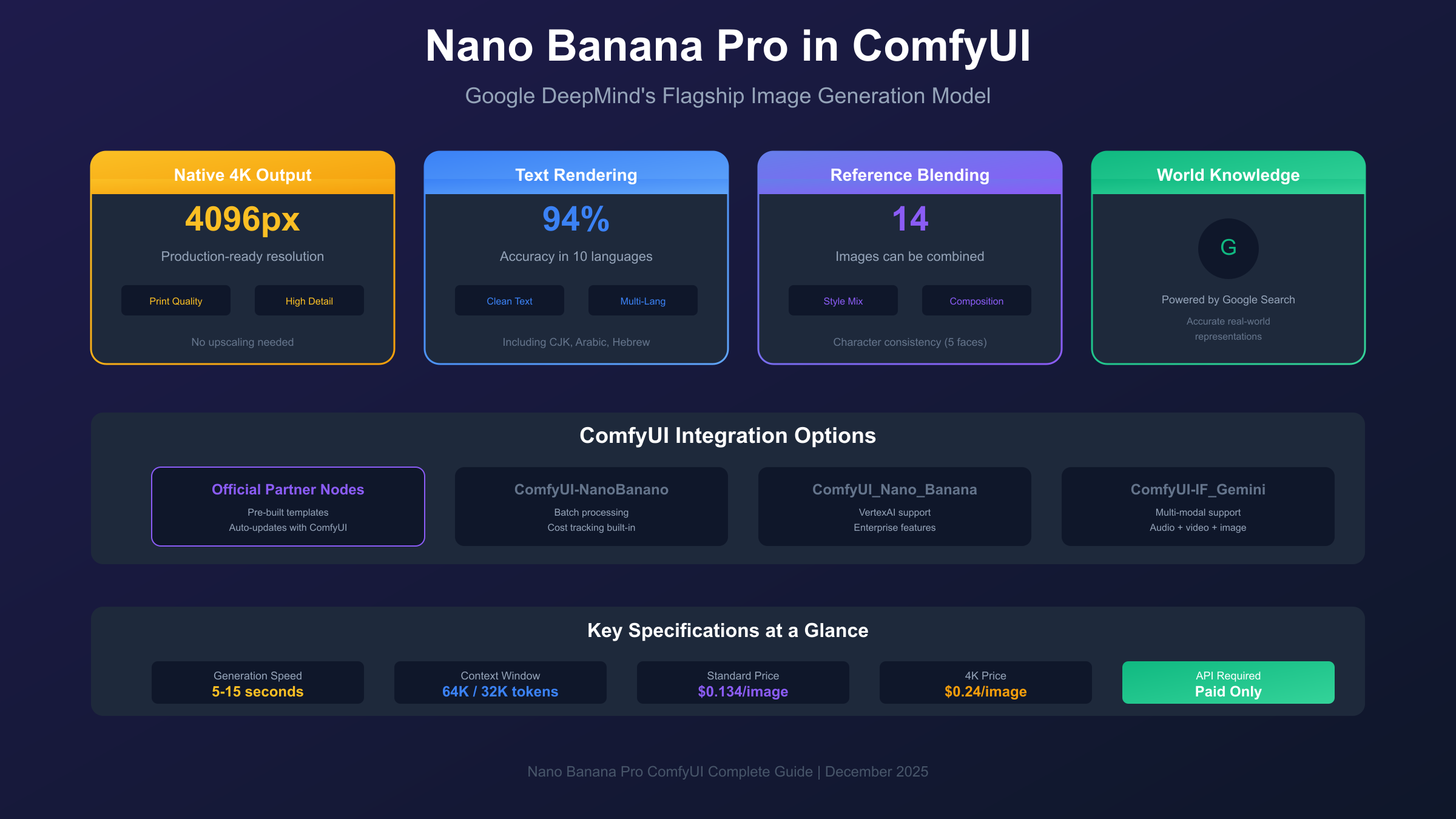
Google DeepMind's Nano Banana Pro has arrived in ComfyUI, bringing production-grade image generation capabilities directly into the node-based workflow environment that creative professionals depend on. Built on the Gemini 3 Pro Image architecture, this integration transforms ComfyUI from a local-first image generation platform into a hybrid powerhouse capable of native 4K output, accurate text rendering in ten languages, and character consistency that maintains identity across multiple generations.
The significance of this integration extends beyond simple API access. ComfyUI's node-based system allows Nano Banana Pro to be chained with local models, creating hybrid workflows where cloud-based generation handles composition while local processing manages refinement. This approach optimizes both quality and cost, letting creators leverage the best of both worlds without the typical tradeoffs that come with choosing one platform over another.
This comprehensive guide walks through everything required to integrate Nano Banana Pro into your ComfyUI setup, from initial API configuration through advanced multi-reference workflows. Whether you're exploring AI image generation for the first time or looking to add Google's latest model to your existing toolkit, the following sections provide the technical foundation and practical knowledge needed for successful implementation.
Understanding Nano Banana Pro: The Technical Foundation
Nano Banana Pro represents Google DeepMind's flagship offering for high-fidelity image generation and editing, distinguished from its predecessor through capabilities that address the primary limitations of earlier AI image models. The technical name, gemini-3-pro-image-preview, reflects its foundation in the broader Gemini 3 architecture while signaling its focus on visual content creation.
The model's core capabilities solve problems that have historically required workarounds or compromises. World knowledge integration connects image generation to Google Search's knowledge base, producing accurate representations of real-world objects, locations, and concepts without the hallucinations common in isolated models. When asked to generate a specific architectural style or historical setting, Nano Banana Pro retrieves contextual information to inform its output, resulting in generations that reflect actual visual characteristics rather than learned approximations.
Text rendering accuracy reaches 94% in benchmark tests, dramatically exceeding the 71% typical of comparable models. This capability enables practical applications previously impractical with AI generation: product mockups with readable labels, social media graphics with clean typography, and technical diagrams with legible annotations. The model supports ten languages natively, handling character sets from Latin scripts through CJK languages without the distortion that typically accompanies non-English text generation.
| Capability | Nano Banana (2.5 Flash) | Nano Banana Pro (3 Pro) |
|---|---|---|
| Maximum Resolution | ~1024px | Native 4K |
| Reference Images | Up to 5 | Up to 14 |
| Character Consistency | Basic | 5-face identity preservation |
| Text Accuracy | Limited | 94% (10 languages) |
| Context Window | Standard | 64K input / 32K output |
| Generation Speed | 3-5 seconds | 5-15 seconds |
The expanded context window enables multi-step creative workflows that would overwhelm smaller models. With 64K input tokens and 32K output tokens, Nano Banana Pro can process detailed creative briefs, multi-image references, and iterative refinement requests within a single session. This architecture supports the kind of directed evolution that creative professionals use to develop concepts from rough ideas through polished finals.
Prerequisites: What You Need Before Starting
Successful Nano Banana Pro integration requires specific technical foundations that differ from purely local ComfyUI workflows. Understanding these requirements prevents the configuration issues that commonly frustrate first-time users and ensures your environment supports the full range of model capabilities.
ComfyUI version requirements represent the first consideration. The official Partner Nodes integration requires the nightly build or a stable release from October 2025 or later. Earlier versions lack the node definitions and API handling necessary for Gemini integration. If you're running an older installation, update through your package manager or re-clone from the official repository before proceeding. Desktop and Cloud deployments typically auto-update, but verify your version through the settings panel if generation nodes fail to appear in search results.
Python version compatibility affects custom node installation more than official Partner Nodes. Custom nodes like ComfyUI-NanoBanano require Python 3.10 or higher due to dependencies on modern type hints and async functionality. Check your version with python --version and upgrade if necessary—Python 3.11 or 3.12 provide the best compatibility with current ComfyUI extensions.
The most critical prerequisite involves API key access with billing enabled. Google's free tier explicitly excludes image generation capabilities. Attempting to use a free-tier key results in authentication errors that can be mistaken for configuration problems. Before proceeding with installation, ensure your Google AI Studio account has billing configured and your API key explicitly grants access to the Gemini 3 Pro Image model. Test your key directly through the Google AI Studio interface to confirm image generation permissions before troubleshooting ComfyUI integration.
Hardware requirements remain modest because generation happens server-side rather than locally. A stable internet connection matters more than GPU specifications, though you'll want reasonable VRAM if combining Nano Banana Pro with local models in hybrid workflows. The integration transmits prompts and receives completed images, meaning the computational burden falls on Google's infrastructure rather than your machine.
Getting Your API Key: Step-by-Step Configuration
The API key configuration process determines whether your integration succeeds or fails, and subtle mistakes during this phase cause the majority of setup issues reported by new users. Following the exact sequence below eliminates the common pitfalls that lead to authentication errors and generation failures.
Navigate to Google AI Studio and sign in with a Google account that has billing permissions. If you're using a workspace account, verify with your administrator that API access is permitted—some organizations restrict external API usage. Personal Gmail accounts typically encounter fewer restrictions but require manual billing configuration.
Once logged in, access the API Keys section through the left navigation panel. Click "Create API Key" and select a project or create a new one. The key generation takes a few seconds and produces a string beginning with "AIza" followed by approximately 35 alphanumeric characters. Copy this key immediately and store it securely—you cannot view the complete key again after leaving this page.
Billing configuration must happen before the key will work for image generation. Navigate to the billing section and add a payment method. Google Cloud Platform provides $300 in free credits for new users, which covers approximately 2,240 standard-resolution Nano Banana Pro generations at $0.134 per image. Even with free credits active, a payment method must be on file for image generation access.
Test your key before ComfyUI integration by using the AI Studio's built-in generation interface. Request a simple image with a text prompt and verify that generation completes successfully. If you receive an error indicating the model is unavailable or unsupported, your key lacks image generation permissions—contact Google support or create a new key with the appropriate access level.
Security best practices suggest storing the API key as an environment variable rather than embedding it directly in node configurations. Set GEMINI_API_KEY in your shell profile or system environment variables. This approach prevents accidental key exposure in shared workflows or version control commits while enabling seamless node configuration across sessions.
Installation Method 1: Official Partner Nodes (Recommended)
The official Partner Nodes integration, developed collaboratively between the ComfyUI team and Google, represents the most reliable path to Nano Banana Pro functionality. This method receives priority support, updates alongside ComfyUI releases, and includes pre-built workflow templates that eliminate initial configuration complexity.
Begin by updating ComfyUI to the latest version. For self-hosted installations, pull the latest changes from the official repository and restart the server. Desktop applications check for updates automatically on launch—accept any pending updates before proceeding. Cloud deployments typically maintain current versions but verify through the settings panel if you encounter missing nodes.
After updating, access the node library by double-clicking anywhere on your canvas. Search for "Google Gemini Image" and verify the node appears in the results. If the search returns no matches, your installation predates Partner Node support—try switching to the nightly channel or waiting for the next stable release if nightly builds aren't feasible for your workflow.
The fastest path to working generation uses the pre-built template system. Navigate to Template (through the menu or keyboard shortcut) and search for "Nano Banana Pro." Loading this template populates your canvas with properly connected nodes including image output handling, prompt input, and API configuration. This approach eliminates connection errors that occur when manually assembling workflows from individual nodes.
Configure your API key in the designated field of the Google Gemini Image node. If you set an environment variable earlier, the node may auto-detect the key—otherwise, paste the complete key string. Verify there are no leading or trailing spaces by clicking into the field and using Ctrl+A to select all content, then re-pasting if necessary.
Enter a test prompt describing a simple subject—"a red apple on a white table" works well for verification. Queue the generation and wait for completion. Successful generation confirms your configuration is correct; errors at this stage typically indicate API key issues rather than node configuration problems.
Installation Method 2: Custom Nodes for Advanced Users
Custom nodes provide capabilities beyond the official integration, including batch processing, cost tracking, and alternative API handling that may better suit specific workflow requirements. The tradeoff involves manual installation, potential compatibility issues with future ComfyUI updates, and reduced support compared to official Partner Nodes.
ComfyUI-NanoBanano by ShmuelRonen offers the most mature custom implementation, supporting multi-modal operations including generate, edit, style transfer, and object insertion with up to five reference images. Installation requires navigating to your custom_nodes directory and executing the clone command:
hljs bashcd ComfyUI/custom_nodes/
git clone https://github.com/ShmuelRonen/ComfyUI-NanoBanano.git
cd ComfyUI-NanoBanano
pip install -r requirements.txt
Restart ComfyUI after installation to load the new nodes. Search for "Nano Banana" to access the available operations. The node includes dedicated fields for API key entry, aspect ratio selection, temperature control (affecting creativity vs. determinism), and batch count specification up to four images per request.
ComfyUI_Nano_Banana by ru4ls provides alternative implementation supporting both Google's Generative AI SDK and Vertex AI connections. This option suits enterprise deployments where Vertex AI's compliance features outweigh the simplicity of direct API access. Installation follows the same pattern as above, substituting the appropriate repository URL.
Choosing between official and custom nodes depends on your requirements. Official Partner Nodes suit most users through their simplicity and support coverage. Custom nodes make sense when you need batch processing with cost tracking, alternative authentication methods, or features the official integration doesn't yet support. Many advanced users maintain both, using official nodes for standard work and custom nodes for specialized operations.
Basic Workflow: Creating Your First Generation
With configuration complete, creating your first Nano Banana Pro generation in ComfyUI demonstrates the practical workflow you'll use for all future projects. This foundational workflow introduces the node connections and settings that more advanced techniques build upon.
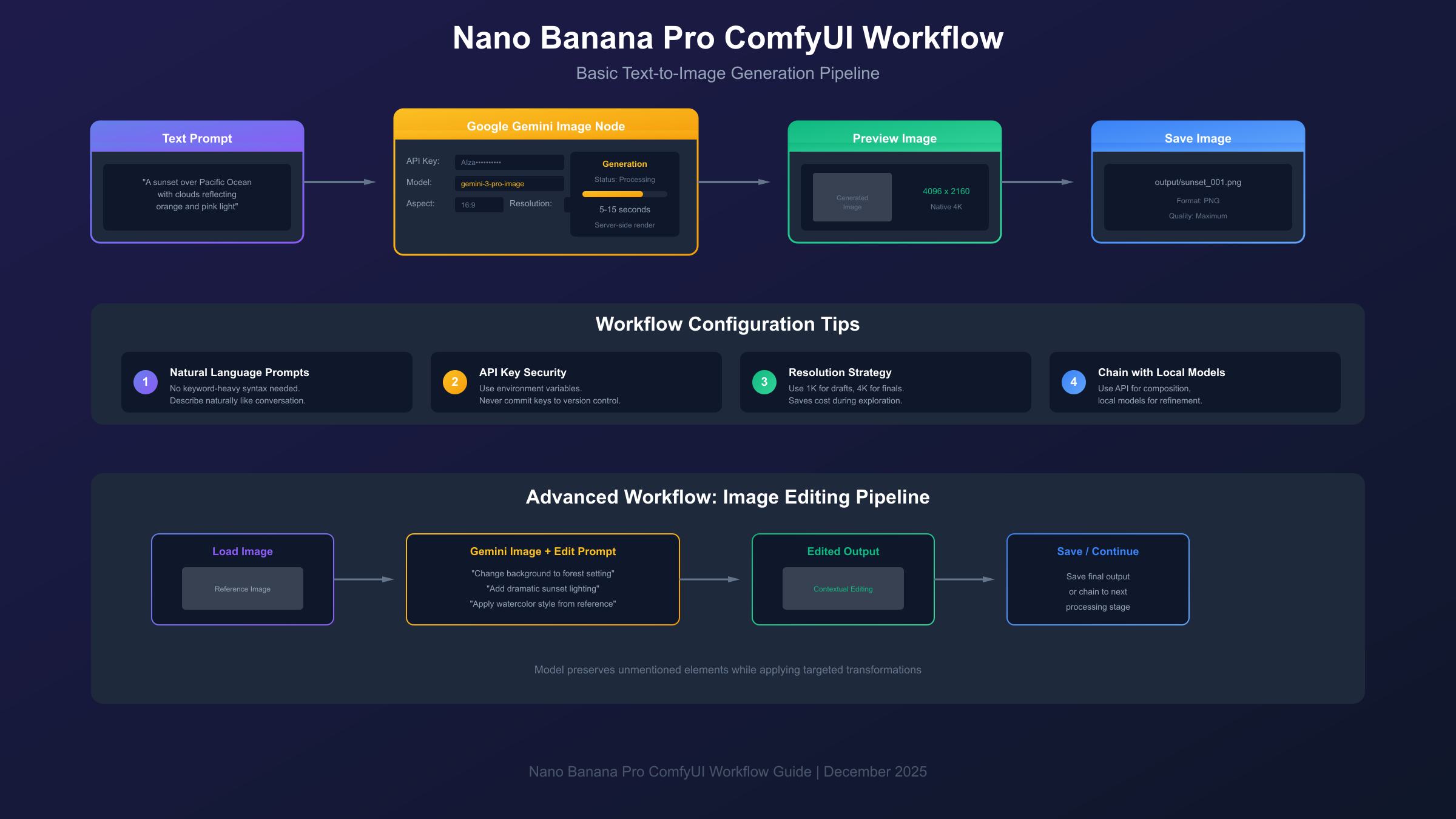
Load the Nano Banana Pro template or manually add the Google Gemini Image node to your canvas. The node accepts text input for your generation prompt and outputs an image that can be saved or passed to downstream nodes for additional processing. Connect a Save Image node to the output if the template doesn't already include one.
Prompt construction for Nano Banana Pro differs from local model workflows. The model's extended context window and world knowledge integration mean you can describe subjects in natural language without the keyword-heavy syntax that Stable Diffusion variants require. Instead of "beautiful sunset, golden hour, high detail, 4k, masterpiece," simply describe what you want: "A sunset over the Pacific Ocean with clouds reflecting orange and pink light." The model interprets natural descriptions accurately and often produces better results than over-engineered prompts.
Aspect ratio selection happens through the node's configuration panel. Available options include standard ratios (1:1, 4:3, 3:4) and widescreen formats (16:9, 9:16). Unlike local models that require specific resolution training, Nano Banana Pro handles arbitrary aspect ratios natively, composing content appropriately regardless of your selection.
Queue your first generation and observe the process. Initial generations take 5-15 seconds depending on server load and selected resolution. The node displays progress indicators during generation, with completed images appearing in the output panel and connected preview/save nodes. If generation fails, check the console for error messages—most failures at this stage relate to prompt content (safety filters) rather than configuration issues.
Successful first generation confirms your complete setup. From here, you can refine prompts, adjust aspect ratios, and begin exploring the editing and multi-reference capabilities covered in subsequent sections.
Image Editing: Modifying Existing Content
Nano Banana Pro's editing capabilities transform existing images through natural language instructions, enabling modifications that would require extensive manual work in traditional image editing software. This functionality integrates seamlessly into ComfyUI workflows, accepting input images and producing edited versions based on text prompts.
Connect a Load Image node to the reference input of your Gemini Image node. This node accepts images from your filesystem, generated by other workflow nodes, or passed from previous pipeline stages. The reference image provides context that the model preserves while applying your requested modifications.
Editing prompts should describe the desired change rather than the complete final image. Phrases like "change the background to a forest setting" or "add dramatic sunset lighting" instruct the model on what to modify while preserving elements you didn't mention. This approach maintains the subject, composition, and details from your original image while applying targeted transformations.
Style transfer works through similar mechanisms. Load a style reference image and prompt with instructions like "apply the artistic style from the reference to this photograph." The model extracts stylistic elements—color palettes, brushwork patterns, lighting approaches—and applies them while preserving the content and composition of your target image. This technique produces results in seconds that would require hours of manual adjustment in traditional software.
The model's contextual understanding enables sophisticated modifications that simpler approaches couldn't achieve. Requesting "make it winter" doesn't just add snow—it adjusts lighting color temperature, modifies shadows appropriate to low sun angles, and changes vegetation states. This holistic transformation produces coherent results rather than the pasted-overlay appearance of basic compositing techniques.
Advanced Techniques: Multi-Reference Composition
Nano Banana Pro's ability to blend up to fourteen reference images enables composition techniques previously requiring extensive manual work or specialized training. This capability produces coherent outputs that combine elements from multiple sources while maintaining the visual consistency that distinguishes professional work from obvious collage.
The multi-reference workflow begins with loading all source images through separate Load Image nodes. Connect these to the reference inputs of your Gemini Image node—the node's configuration expands to accommodate multiple inputs as they're connected. Each reference contributes elements to the final generation based on your prompt instructions.
Prompting for multi-reference generation requires explicit assignment of which elements come from which reference. A prompt like "Create a portrait combining the face from reference 1, the clothing style from reference 2, and the background setting from reference 3" produces deliberate combinations rather than arbitrary blending. The model interprets these instructions semantically, understanding that "face" means facial features and proportions while "clothing style" encompasses cut, fabric, and color palette.
Character consistency across generations represents one of Nano Banana Pro's strongest capabilities. The model can maintain identity for up to five distinct faces across multiple outputs, enabling storyboard creation, character sheets, and narrative sequences that would otherwise require either careful manual editing or character-specific model training. Load your character references, describe the desired scene, and the model preserves recognizable identities while placing them in new contexts.
Advanced users chain multiple Nano Banana Pro nodes to create multi-stage pipelines. An initial generation establishes composition, a second pass refines details, and a third applies stylistic finishing. This approach mirrors professional creative workflows where rough concepts evolve through iterative refinement toward polished finals. ComfyUI's node-based architecture makes such pipelines explicit and reproducible.
Mastering Text Rendering in Generated Images
The ability to generate images containing accurate, readable text distinguishes Nano Banana Pro from most AI image generators, where text output typically appears garbled or inconsistent. This capability enables practical applications—product mockups, social media graphics, presentation visuals—that were previously impractical with AI generation.
Text rendering accuracy reaches 94% in benchmark testing, meaning the model correctly generates requested text in approximately nineteen of twenty attempts. The remaining failures typically involve unusual fonts, very small text sizes, or complex layouts rather than basic readability issues. For most practical applications, text appears correctly on the first attempt.
Prompt strategies for reliable text generation emphasize clarity and context. Instead of simply including quoted text in your prompt, describe where and how the text should appear: "A coffee shop sign with the text 'Morning Brew' in a warm serif font above the door." This contextual framing helps the model understand text placement, size relationships, and appropriate styling.
The model supports ten languages natively, handling Latin scripts, Cyrillic, Greek, Hebrew, Arabic, and CJK character sets. When generating text in non-Latin scripts, specify the language in your prompt to ensure proper character selection and reading direction. The model's world knowledge includes understanding that Hebrew reads right-to-left and that Chinese text can be laid out vertically.
Common mistakes that reduce text accuracy include requesting very long text strings, combining multiple text elements at different scales, or asking for text in unusual orientations. Keep individual text elements short—a few words works better than paragraphs—and specify legible scales relative to the image. If a generation produces text errors, regenerating with a clearer prompt typically succeeds.
Pricing and Cost Optimization Strategies
Understanding Nano Banana Pro's pricing structure and available optimization strategies directly impacts the economics of integrating this capability into your workflows. While powerful, the model charges per generation, making cost management a practical concern for regular users and essential for commercial applications.
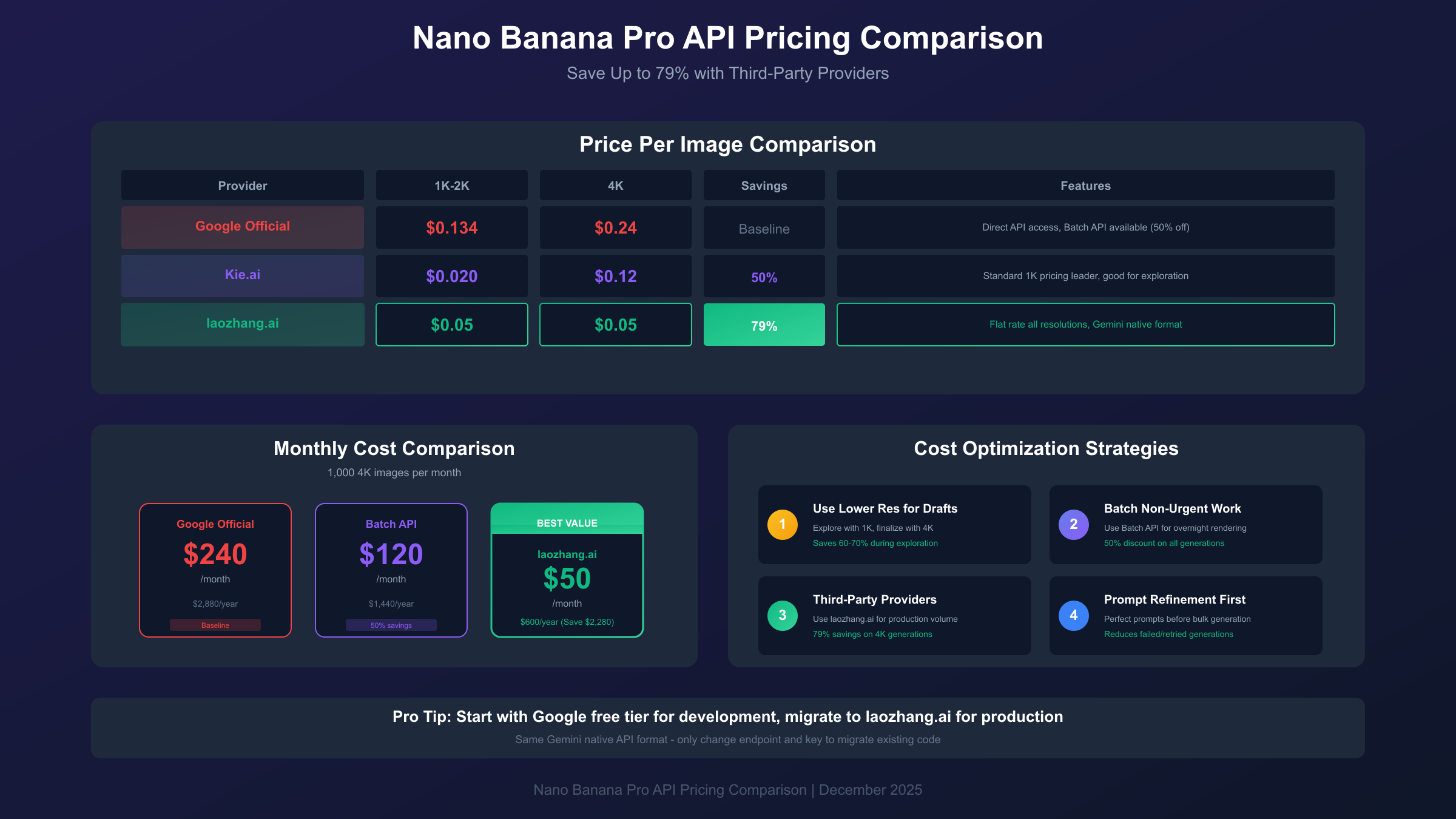
Official Google pricing sets baseline costs. Standard resolution (1K-2K) generations cost $0.134 per image through the direct Gemini API. Native 4K output commands a premium at $0.24 per image. At these rates, generating 1,000 images monthly costs $134-$240 depending on resolution requirements—reasonable for professional use but significant for exploration or high-volume applications.
Google's Batch API offers 50% savings in exchange for accepting processing delays up to 24 hours. At $0.067 per standard image and $0.12 per 4K image, batch processing dramatically reduces costs for applications where immediate results aren't essential. Overnight rendering of next-day content, bulk asset generation, and background processing of reference libraries all suit batch pricing. For a comprehensive breakdown of Gemini API pricing strategies, see our complete Gemini Flash API cost guide.
Third-party providers offer additional savings through API aggregation and volume purchasing. laozhang.ai provides Nano Banana Pro access at $0.05 per image regardless of resolution—representing 79% savings on 4K generation compared to Google's official pricing. The service uses Gemini's native API format, meaning existing code requires only endpoint and key changes to migrate. For high-volume users generating thousands of images monthly, this pricing difference translates to significant annual savings.
hljs python# Nano Banana Pro via laozhang.ai - 79% cheaper than official
import requests
import base64
API_KEY = "sk-YOUR_API_KEY" # From laozhang.ai
API_URL = "https://api.laozhang.ai/v1beta/models/gemini-3-pro-image-preview:generateContent"
headers = {
"Authorization": f"Bearer {API_KEY}",
"Content-Type": "application/json"
}
payload = {
"contents": [{"parts": [{"text": "A professional product photograph"}]}],
"generationConfig": {
"responseModalities": ["IMAGE"],
"imageConfig": {"aspectRatio": "auto", "imageSize": "4K"}
}
}
response = requests.post(API_URL, headers=headers, json=payload, timeout=180)
Workflow optimization reduces costs regardless of pricing tier. Refine prompts in lower-cost environments—even free tiers support text-only model interaction for prompt development. Use lower resolutions during exploration, reserving 4K for final outputs. Batch related generations to minimize API overhead. These practices compound with pricing optimizations to dramatically reduce per-project costs.
Troubleshooting Common Issues
Even properly configured integrations encounter issues that interrupt workflows. Understanding common problems and their solutions restores functionality quickly and prevents the frustration of debugging through trial and error.
"Invalid API Key" errors most commonly result from key format problems rather than key invalidity. Verify your key by testing directly in Google AI Studio—if it works there but not in ComfyUI, check for invisible characters or spacing issues. Copy the key into a plain text editor, verify no extra characters exist, then re-copy into your node configuration. Environment variable assignments sometimes include surrounding quotes that shouldn't be present; ensure your variable contains only the key string.
Rate limiting manifests as generation failures after a series of successful requests. The Gemini API enforces per-minute and per-day quotas that vary by account type. When you hit limits, wait a few minutes before retrying rather than queueing additional requests that will also fail. Implementing exponential backoff in automated workflows prevents rate limit cascades. If you consistently hit limits, request quota increases through Google Cloud Console or consider batch processing for non-urgent generations.
Generation failures with safety filter messages indicate your prompt triggered content restrictions. The model refuses certain content categories regardless of phrasing. Rework your prompt to avoid triggering terms, and if you receive false positives (safety blocks on clearly appropriate content), simplify your prompt to identify the triggering phrase. Some common words have unexpected safety associations depending on context.
Node not appearing in search typically means your ComfyUI version predates Partner Node support. Update to nightly or wait for the next stable release. If you recently updated but nodes still don't appear, restart ComfyUI completely—sometimes node registration requires a fresh server start rather than just a page refresh. Check console output during startup for error messages that might indicate failed node loading.
Conclusion: Integrating Nano Banana Pro Into Your Workflow
Nano Banana Pro in ComfyUI represents a significant capability expansion for creators already invested in node-based image workflows. The combination of production-quality output, accurate text rendering, and sophisticated multi-reference composition addresses limitations that have historically required workarounds or compromises in AI-assisted creative work.
The integration path you choose—official Partner Nodes for simplicity or custom nodes for advanced features—depends on your specific requirements. Most users should start with official nodes to ensure reliable operation and straightforward updates, adding custom nodes only when specific capabilities justify the additional maintenance overhead.
Cost considerations matter for regular users and become critical at scale. Understanding the pricing structure, leveraging batch processing when appropriate, and considering third-party providers for high-volume work keeps Nano Banana Pro economically viable across use cases from exploration through production deployment.
Begin with the basic text-to-image workflow, verify your configuration functions correctly, then progressively explore editing, multi-reference, and advanced text rendering capabilities. Each capability builds on the foundation established in earlier sections, creating a progression from simple generation through sophisticated compositional work. The node-based architecture means every technique you develop integrates with your broader ComfyUI workflows, contributing to a toolkit that grows more capable as you explore its possibilities.