Nano Banana Pro Download: Complete Access Guide for All Platforms (2025)
Learn how to access Nano Banana Pro on every platform. Get the Gemini app download links, web access methods, third-party platforms, and API integration guide with step-by-step instructions.
Nano Banana Pro
4K-80%Google Gemini 3 Pro · AI Inpainting
谷歌原生模型 · AI智能修图

If you're searching for a Nano Banana Pro download, you've likely discovered that finding a simple installer or executable file is surprisingly difficult. That's because Nano Banana Pro isn't downloadable software in the traditional sense. It's Google's powerful cloud-based AI image generation model—officially named Gemini 3 Pro Image—that runs on Google's servers and can only be accessed through specific apps, websites, and APIs. Understanding this distinction saves you from hunting for non-existent download links and helps you choose the best access method for your needs.
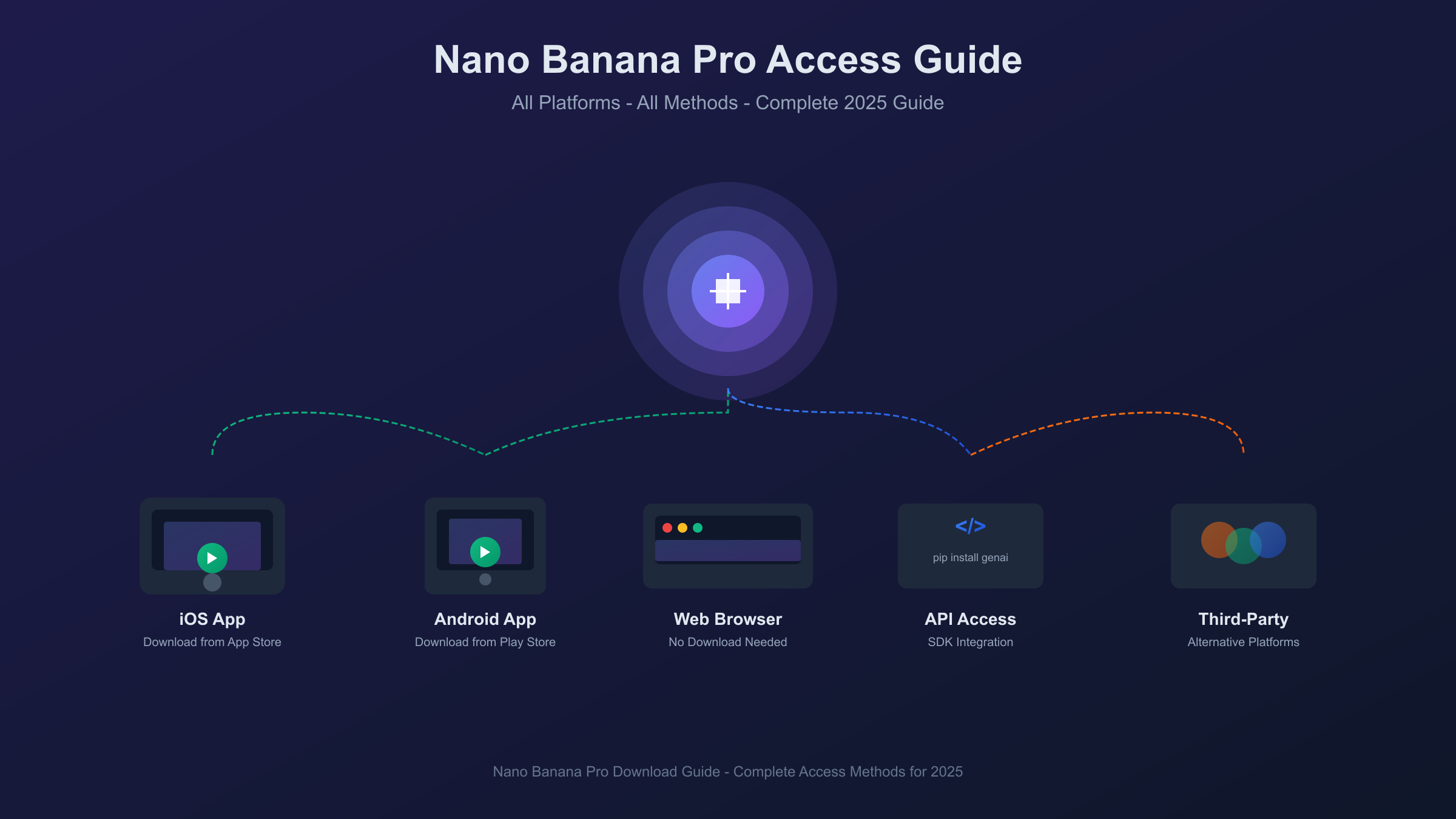
This guide covers every legitimate way to access Nano Banana Pro in 2025. We'll walk through the Gemini app download process for mobile devices, explain web-based access options that require no downloads at all, compare third-party platforms that offer Nano Banana Pro integration, and provide a complete API setup guide for developers. Whether you want quick casual access or professional integration for production workflows, you'll find the right approach here.
| Access Method | Download Required | Platform | Free Tier |
|---|---|---|---|
| Gemini App | Yes (iOS/Android) | Mobile | ~3 images/day |
| gemini.google.com | No | Web | ~3 images/day |
| Google AI Studio | No | Web | 1,500 requests/day |
| Third-Party Sites | No | Web | Varies |
| API Integration | SDK only | Developer | $300 credits |
What is Nano Banana Pro?
Nano Banana Pro is Google DeepMind's flagship image generation and editing model, officially designated as Gemini 3 Pro Image. The playful "Nano Banana" nickname emerged from the AI community when its predecessor—Gemini 2.5 Flash Image—went viral in August 2025 for creating realistic 3D figurine transformations. The "Pro" version launched on November 20, 2025, representing a significant leap in quality, text rendering capability, and creative control.
Unlike standalone image editing software that you install on your computer, Nano Banana Pro operates entirely in the cloud. When you submit a prompt, it travels to Google's servers where the model generates your image, then returns the result to your device. This architecture means there's no executable file to download—instead, you access the model through official Google interfaces or authorized third-party platforms that connect to Google's infrastructure.
The cloud-based approach brings distinct advantages. You always have access to the latest model version without updating software. The computational demands of generating 4K images don't strain your device's hardware. Multiple devices can access your generation history through your Google account. The tradeoff is that you need an internet connection to use it, and some access methods require subscriptions for full features.
Nano Banana Pro's standout capabilities include native 4K resolution output (4096×4096 pixels), accurate text rendering in multiple languages, the ability to blend up to 14 reference images in a single composition, and real-time information visualization through Google Search grounding. These features position it as a professional-grade creative tool rather than a casual image generator, though free access tiers make it available to everyone for experimentation.
Gemini App Download Guide
The most straightforward way to access Nano Banana Pro is through Google's official Gemini app. This is the only component you actually download to your device, and it serves as your interface to the cloud-based Nano Banana Pro model.
iOS Download (iPhone and iPad)
Installing the Gemini app on Apple devices takes about two minutes. Open the App Store on your iPhone or iPad and search for "Google Gemini" or visit the direct link at apps.apple.com/app/google-gemini. The app is published by Google LLC and shows the distinctive Gemini sparkle icon. Tap "Get" to begin downloading—the app size is approximately 120MB, so a Wi-Fi connection is recommended.
Once installed, open the app and sign in with your Google account. If you don't have one, you can create a free account during this process. After signing in, you'll see the main Gemini interface. To access Nano Banana Pro specifically, tap the tools menu and select "Create images." Then select "Thinking" from the model menu—this activates the Pro version rather than the standard Nano Banana model.
Free users receive approximately 3 image generations per day at 1K resolution with a visible watermark. The images download at the resolution generated, so free-tier outputs are limited to around 1024×1024 pixels. Upgrading to Google AI Pro ($19.99/month) or Ultra ($249/month) unlocks higher quotas, 4K resolution, and removes the visible watermark on Ultra tier.
Android Download (Phone and Tablet)
Android users can find the Gemini app in the Google Play Store. Search for "Google Gemini" or navigate to play.google.com/store/apps/details?id=com.google.android.apps.bard. Verify the publisher is Google LLC before installing. The app requires Android 12 or later and approximately 150MB of storage space.
The setup process mirrors iOS: install, open, sign in with your Google account, and navigate to the image creation feature. On some Android devices, Gemini may already be integrated with Google Assistant—you can check by long-pressing the home button and looking for Gemini options in the assistant interface.
Android users have an additional access point through the Google app itself. Open the Google app, tap the AI icon to enter Gemini Mode, and access image generation from there. This eliminates the need for a separate app download if you prefer a unified Google experience.
Accessing Nano Banana Pro Within the App
Once you have the Gemini app installed, distinguishing between the standard Nano Banana and Nano Banana Pro models matters for output quality. The standard model (Gemini 2.5 Flash Image) is faster but produces lower-fidelity results. Nano Banana Pro (Gemini 3 Pro Image) takes longer but delivers significantly better quality, especially for complex scenes, accurate text, and professional applications.
To ensure you're using Nano Banana Pro, check two things in the app interface. First, look at the model indicator—it should show "Thinking" rather than "Fast" mode. Second, when you initiate image generation, the interface should indicate the Pro model is active. If you're on the free tier and have exhausted your Pro quota, the app automatically falls back to the standard model, so watch for this transition if quality suddenly drops.
Web-Based Access (No Download Needed)
For users who prefer not to install apps or need quick access from any device, several web-based options provide direct Nano Banana Pro access through your browser.
gemini.google.com
Google's official Gemini web interface at gemini.google.com offers the same functionality as the mobile app without any download. Navigate to the site, sign in with your Google account, and select "Create images" from the tools menu. Choose "Thinking" mode to access Nano Banana Pro specifically.
The web interface provides some advantages over the mobile app. Larger screens make it easier to review generated images in detail. You can right-click to download images directly rather than using touch gestures. The interface also supports drag-and-drop for uploading reference images, streamlining multi-image compositions.
Free tier limitations remain the same: approximately 3 generations per day at 1K resolution. Subscription benefits (Pro at $19.99/month, Ultra at $249/month) apply across all access points linked to your Google account—subscribing once grants enhanced access on mobile, web, and through any integrated Google service.
Google AI Studio
For developers and power users, Google AI Studio at aistudio.google.com provides a more technical interface to Nano Banana Pro. This platform is designed for prototyping and testing AI applications before full API integration.
Creating an AI Studio account is free. Navigate to the site, authenticate with your Google account, and select "Create new" to start a project. From the model picker, choose "Nano Banana Pro" or "Gemini 3 Pro Image"—both names refer to the same model. The interface provides direct prompt input, parameter controls for resolution and aspect ratio, and immediate output preview.
AI Studio offers a generous free tier: up to 1,500 API requests per day for development and prototyping. This significantly exceeds the consumer Gemini app limits, making it the best free option for users who need high-volume access without paying for a subscription. The tradeoff is a more technical interface that assumes some familiarity with AI model parameters.
Google Workspace Integration
Organizations using Google Workspace have Nano Banana Pro integrated directly into productivity tools. In Google Slides, you can generate images within presentations by selecting "Insert" > "Image" > "Generate with Gemini." Google Vids includes AI image generation for video creation workflows. NotebookLM uses the model to visualize concepts during research.
These integrations require an active Workspace subscription with AI features enabled by your organization's administrator. Individual users cannot access Workspace integrations without organizational membership, but the seamless workflow integration makes this the preferred access method for enterprise creative teams.
Third-Party Platforms
Several independent websites offer Nano Banana Pro access, often with different pricing structures, interface designs, or additional features not available through official Google channels.
Platform Comparison
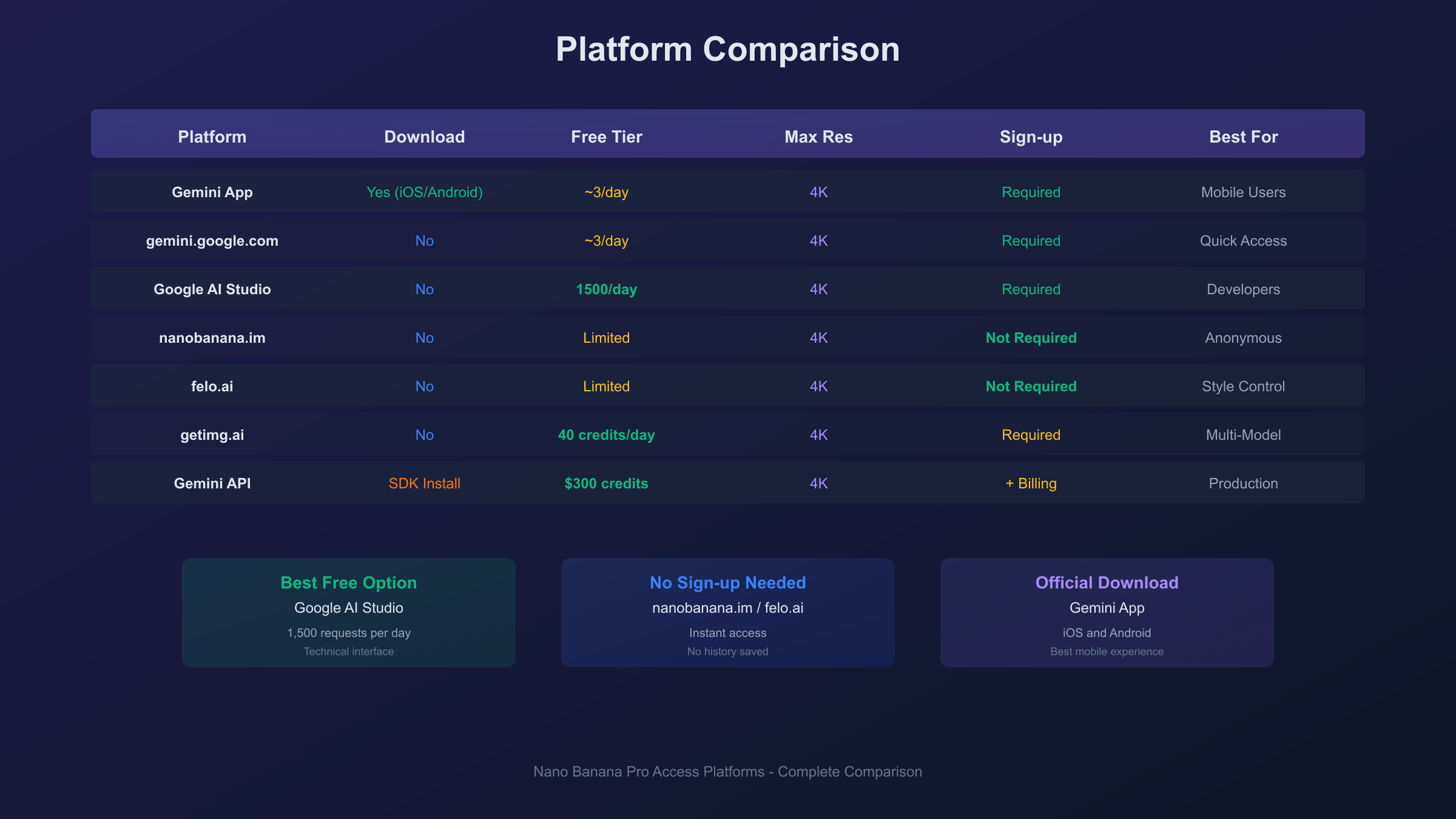
| Platform | Free Tier | Resolution | Sign-up Required | Special Features |
|---|---|---|---|---|
| nanobanana.im | Yes | Up to 4K | No | No login needed |
| felo.ai | Yes | Up to 4K | No | Style parameters |
| getimg.ai | 40 credits/day | Up to 4K | Yes | Multi-model access |
| notegpt.io | Limited | Up to 4K | Yes | Note integration |
| visualgpt.io | Limited | Up to 4K | Yes | Multiple AI tools |
| invideo.io | Unlimited* | Varies | Yes | Video creation |
*Unlimited claims may have fair-use restrictions
nanobanana.im
This browser-based platform provides immediate access without account creation. Navigate to nanobanana.im, enter your prompt, and generate. The simplicity makes it ideal for quick experiments, but the lack of account means no generation history is saved between sessions.
felo.ai
At felo.ai/image, you can access Nano Banana Pro with additional style parameters not exposed in the official Gemini interface. Select resolution up to 4K, choose from preset styles, or define custom style parameters. No login is required for basic use, though creating an account enables history and favorites.
getimg.ai
This platform offers 40 free credits per day for Nano Banana Pro generation and editing. Credits reset daily, providing consistent free access for regular users. The platform also aggregates multiple AI models, so you can compare Nano Banana Pro outputs against competitors like Midjourney or DALL-E in the same interface.
Choosing a Third-Party Platform
When selecting a third-party platform, consider these factors. Legitimacy varies—stick to well-established platforms with clear privacy policies. Some sites claiming "free unlimited" access may monetize through ads, data collection, or quality limitations. The most reliable third-party options either operate on a credit system (clear usage limits) or require authentication (accountable users).
Third-party platforms typically offer advantages in specific areas: no login requirements, extended free quotas, additional style controls, or integration with other tools. However, they may lag behind official Google updates, and output quality can vary depending on how they access the underlying model.
API Access for Developers
Developers building applications that incorporate AI image generation need programmatic access to Nano Banana Pro through the Gemini API. This "download" consists of installing the SDK and configuring authentication—not downloading the model itself.
Setting Up Google AI Studio Access
Before writing code, obtain an API key from Google AI Studio. Navigate to aistudio.google.com and sign in. In the left sidebar, click "Get API key" and create a new key or use existing credentials. Store this key securely in environment variables—never hardcode API keys in source code or commit them to version control.
New Google Cloud users receive $300 in free credits applicable to Gemini API usage, including Nano Banana Pro. At standard rates of approximately $0.139 per image at 1K/2K resolution, this enables around 2,160 image generations before any charges apply. Set up billing alerts to monitor consumption and avoid unexpected costs.
Python Integration Example
Install the Google Generative AI SDK:
hljs bashpip install google-generativeai
Basic image generation with Nano Banana Pro:
hljs pythonimport google.generativeai as genai
import base64
# Configure with your API key
genai.configure(api_key="YOUR_API_KEY")
# Initialize the Nano Banana Pro model
model = genai.GenerativeModel("gemini-3-pro-image-preview")
# Generate an image
response = model.generate_content(
"A professional product photograph of wireless earbuds "
"on white marble, studio lighting, with the text 'PRO AUDIO' "
"visible on the charging case, 4K quality"
)
# Extract and save the image
image_data = response.candidates[0].content.parts[0].inline_data.data
with open("output.png", "wb") as f:
f.write(base64.b64decode(image_data))
API Pricing Breakdown
| Resolution | Standard Rate | Batch Rate |
|---|---|---|
| 1K (1024×1024) | $0.139/image | $0.067/image |
| 2K (2048×2048) | $0.139/image | $0.067/image |
| 4K (4096×4096) | $0.24/image | $0.12/image |
Batch API pricing applies to asynchronous requests processed during off-peak hours, offering 50% savings over standard rates. For production workloads generating thousands of images, this discount substantially reduces operational costs.
For developers requiring even lower costs or simplified multi-model access, third-party API aggregators provide alternatives. Services like laozhang.ai offer Nano Banana Pro at approximately $0.05 per image—over 60% below official rates—with support for both Gemini native format and OpenAI-compatible endpoints. This approach particularly benefits high-volume applications where per-image costs compound significantly.
How to Download Generated Images
While you can't download Nano Banana Pro itself, you can—and will want to—download the images it generates. The process varies slightly by platform.
From the Gemini Mobile App
On iOS, tap and hold the generated image until a menu appears. Select "Save Image" to download it to your Photos library. The image saves at the resolution it was generated—1K for free users, up to 4K for paid subscribers.
On Android, the same tap-and-hold gesture reveals saving options. Choose "Save" or "Download" depending on your Android version. Images save to your Downloads folder or a Gemini-specific album in your gallery app.
From Web Interfaces
On gemini.google.com, hover over the generated image to reveal a download icon. Click it to save the full-resolution file. In Google AI Studio, right-click the image and select "Save image as" to choose your save location and filename.
Third-party platforms typically provide dedicated download buttons below generated images. Some offer format options (PNG vs JPEG) and resolution choices during download.
Resolution and Format Considerations
All Nano Banana Pro outputs generate as PNG files with transparency support where applicable. Free tier images are capped at approximately 1K resolution (1024×1024 pixels). Pro subscribers can download at 2K, while Ultra subscribers access full 4K outputs.
Images from free tiers include a visible Gemini sparkle watermark in one corner. Pro tier outputs also include this watermark. Only Ultra subscribers ($249/month) receive watermark-free images. All outputs, regardless of tier, contain an invisible SynthID digital watermark that identifies them as AI-generated—this cannot be removed and is designed for content provenance tracking.
Downloading Multiple Images
When generating variations (multiple images from a single prompt), you'll need to download each individually through the standard process. No bulk download feature currently exists in the Gemini app or web interface. Third-party platforms sometimes offer batch downloads as a premium feature.
For developers using the API, images return as base64-encoded data within the API response. Your code handles the decoding and saving—you can automate batch downloads by iterating through response data.
Free vs Paid Access Comparison
Choosing between free access and paid subscriptions depends on your usage volume, quality requirements, and whether you need production-grade outputs.
Free Access Options Ranked
- Google AI Studio (1,500 requests/day) - Best for developers and power users comfortable with a technical interface
- getimg.ai (40 credits/day) - Good for regular creative use with simple interface
- Gemini App/Web (~3 images/day) - Sufficient for casual experimentation
- Third-party platforms (varies) - Useful supplements when primary quotas exhaust
Paid Subscription Tiers
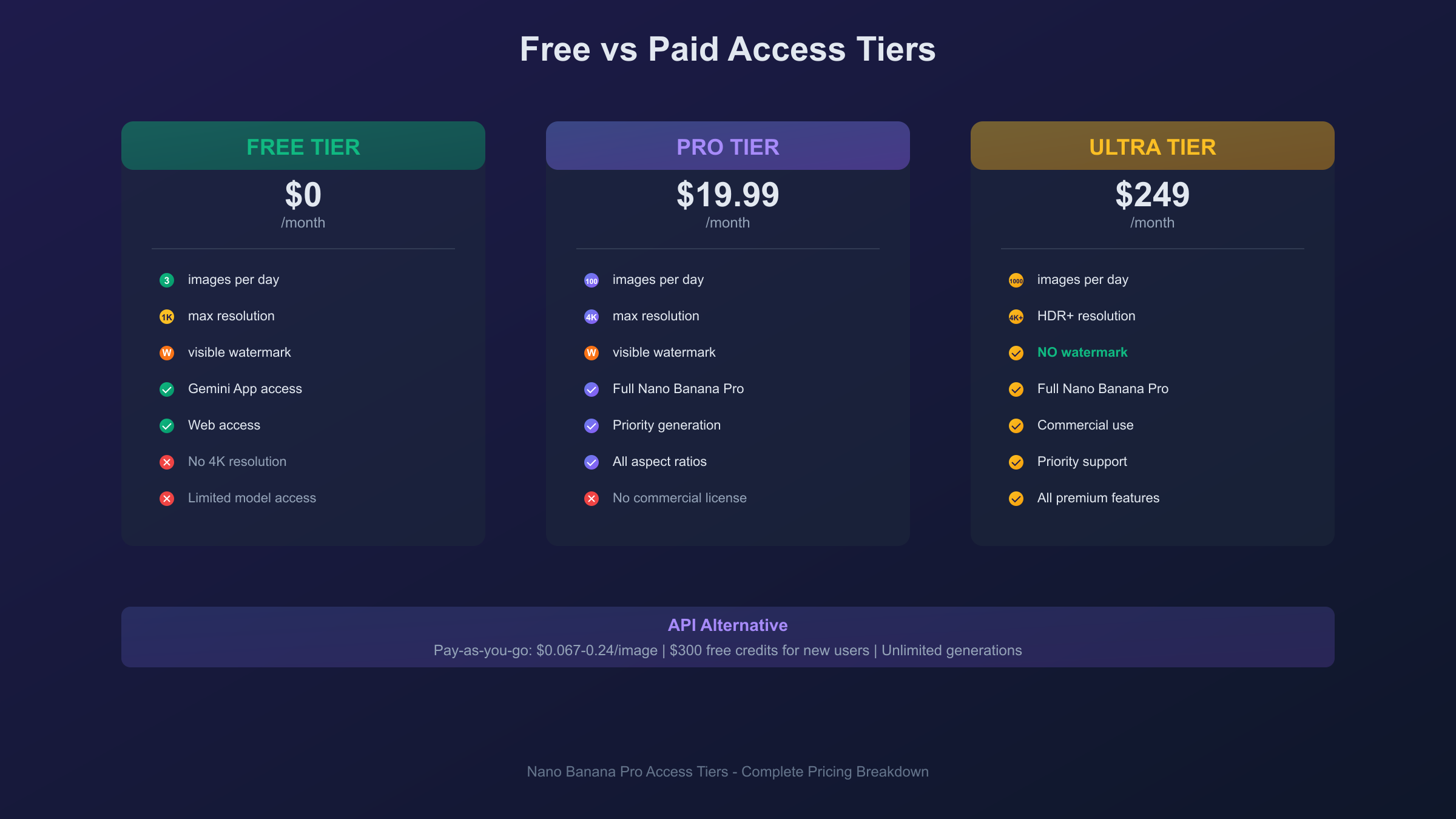
| Tier | Monthly Cost | Daily Limit | Max Resolution | Watermark |
|---|---|---|---|---|
| Google AI Pro | $19.99 | ~100 images | 4K | Visible |
| Google AI Ultra | $249 | ~1,000 images | 4K HDR+ | None |
| API (pay-as-you-go) | ~$0.139/image | Unlimited* | 4K | None |
*Subject to rate limits and billing
When to Upgrade
Consider upgrading to Pro if you regularly exhaust free limits or need 4K resolution for professional projects. The $19.99 monthly cost works out to roughly $0.20 per image if you use the full 100-image daily quota—competitive with API pricing without the setup complexity.
Ultra makes sense for agencies, content studios, or anyone who needs watermark-free outputs for commercial use. The 1,000 daily images and HDR+ quality justify the $249 price point for high-volume professional applications.
For developers building products, API access typically provides the best economics at scale. After exhausting $300 in free credits, pay-as-you-go pricing ($0.067-0.24/image depending on resolution and batch mode) often beats subscriptions for consistent production workloads.
Troubleshooting Common Access Issues
Even with multiple access options, you may encounter obstacles. Here are solutions to frequent problems.
"Model not available" Error
This typically indicates you've exhausted your free tier quota. Nano Banana Pro falls back to the standard Nano Banana model when Pro access depletes. Solutions include waiting 24 hours for quota reset, upgrading to a paid tier, or using a third-party platform with separate limits.
Geographic Restrictions
Some Gemini features have regional availability limitations. If you can access the Gemini app but image generation options don't appear, your region may have restricted access. VPN usage violates Google's terms of service, but API access often works globally even when consumer apps are restricted.
For users in regions with access issues, API aggregator services like laozhang.ai provide reliable access through alternative routing, often with lower latency for international users and support for both native Gemini and OpenAI-compatible API formats.
Generation Timeout
Complex prompts or 4K generations may time out on slow connections. Solutions include reducing resolution to 2K for testing, simplifying your prompt before scaling up, or using API access with explicit timeout configuration (recommended: 180 seconds for 4K generation).
Authentication Failures
If the Gemini app or website won't accept your login, ensure you're using a personal Google account—some organizational accounts restrict access to consumer AI features. Try signing out completely, clearing app cache, and signing in fresh.
Rate Limiting
Both free and paid tiers have rate limits beyond daily quotas. If generations consistently fail or queue, you may be hitting per-minute limits. Space out requests by at least 10 seconds for free tiers, 5 seconds for paid.
Frequently Asked Questions
Is there a Nano Banana Pro installer I can download?
No, Nano Banana Pro is a cloud-based AI model, not installable software. You access it through the Gemini app (which you can download), web interfaces, or API integration. The model itself runs on Google's servers.
Which access method is completely free?
Google AI Studio offers the most generous free access at 1,500 daily requests, though it requires a developer-oriented interface. For a consumer experience, the Gemini app and gemini.google.com provide approximately 3 free generations per day.
Can I use Nano Banana Pro offline?
No, all access methods require an internet connection. The model processes on Google's cloud infrastructure and returns results to your device. There is no offline mode or local processing option.
How do I get 4K resolution outputs for free?
Free tiers are limited to approximately 1K resolution. 4K requires either a Google AI Pro/Ultra subscription or API access with billing enabled. Some third-party platforms advertise 4K free access, but verify the actual output quality before relying on these claims.
Do generated images have watermarks?
Free and Pro tier outputs include a visible Gemini sparkle watermark. Only Ultra subscribers ($249/month) receive watermark-free images. All outputs include an invisible SynthID watermark that cannot be removed.
Can I use Nano Banana Pro for commercial projects?
Yes, with appropriate licensing. Images generated through paid subscriptions (Pro/Ultra) or API access can generally be used commercially, subject to Google's terms of service. Review the current terms before commercial deployment.
Why does generation sometimes fall back to lower quality?
When you exhaust your Nano Banana Pro quota (the higher-fidelity model), the system automatically uses the standard Nano Banana model (Gemini 2.5 Flash Image) for remaining requests. This appears as lower quality output and indicates quota depletion.
How do I verify I'm using Nano Banana Pro vs the standard model?
In the Gemini app and web interface, check that "Thinking" mode is selected rather than "Fast" mode. The Thinking mode corresponds to Nano Banana Pro (Gemini 3 Pro Image), while Fast mode uses the standard model.
Conclusion
Nano Banana Pro access doesn't come from a traditional download, but you have more options than you might expect. For mobile users, downloading the Gemini app from the App Store or Google Play provides the most convenient access with free tier functionality for experimentation. Web users can skip any download entirely through gemini.google.com or third-party platforms like felo.ai and getimg.ai.
Developers building applications should focus on Google AI Studio for prototyping and the Gemini API for production integration. The $300 in free credits enables substantial testing before any payment is required, and ongoing costs remain competitive with pay-as-you-go pricing starting at $0.067 per image with batch processing.
Choose your access method based on your primary use case: casual users benefit from the simplicity of the Gemini app or web interface, creative professionals should consider Google AI Pro for the 4K resolution and higher quotas, and developers integrating AI image generation into products will find the API most flexible. Regardless of your choice, you're accessing the same underlying Nano Banana Pro model—Google's state-of-the-art Gemini 3 Pro Image capability—just through different interfaces optimized for different workflows.