Nano Banana Pro is Only Available for Paid Tier Users: Complete Guide to Upgrade & Alternatives (2025)
See the "Nano Banana Pro is only available for paid tier users" error? This complete guide covers the upgrade process, pricing breakdown, tier requirements, and affordable alternatives for developers in 2025.
Nano Banana Pro
4K-80%Google Gemini 3 Pro · AI Inpainting
谷歌原生模型 · AI智能修图

You've written the perfect prompt, configured your API call correctly, and hit send—only to receive an error message stating that Nano Banana Pro is only available for paid tier users. This frustrating experience is shared by thousands of developers encountering Google's image generation model for the first time. The restriction isn't a bug; it's a deliberate policy that affects how you can access one of the most capable AI image generators available.
Nano Banana Pro, officially known as Gemini 3 Pro Image Preview, represents Google DeepMind's breakthrough in combining deep reasoning with professional-grade visual generation. With a 94% text rendering accuracy rate and support for up to 4K resolution output, it outperforms most competitors. However, unlike Google's text-based Gemini models that offer generous free tiers, image generation capabilities are locked behind a paywall.
This guide will walk you through exactly why this restriction exists, how to upgrade to the paid tier step-by-step, what you'll actually pay, and most importantly—alternative solutions that can save you significant costs while maintaining access to this powerful technology.
Understanding the "Paid Tier Only" Restriction
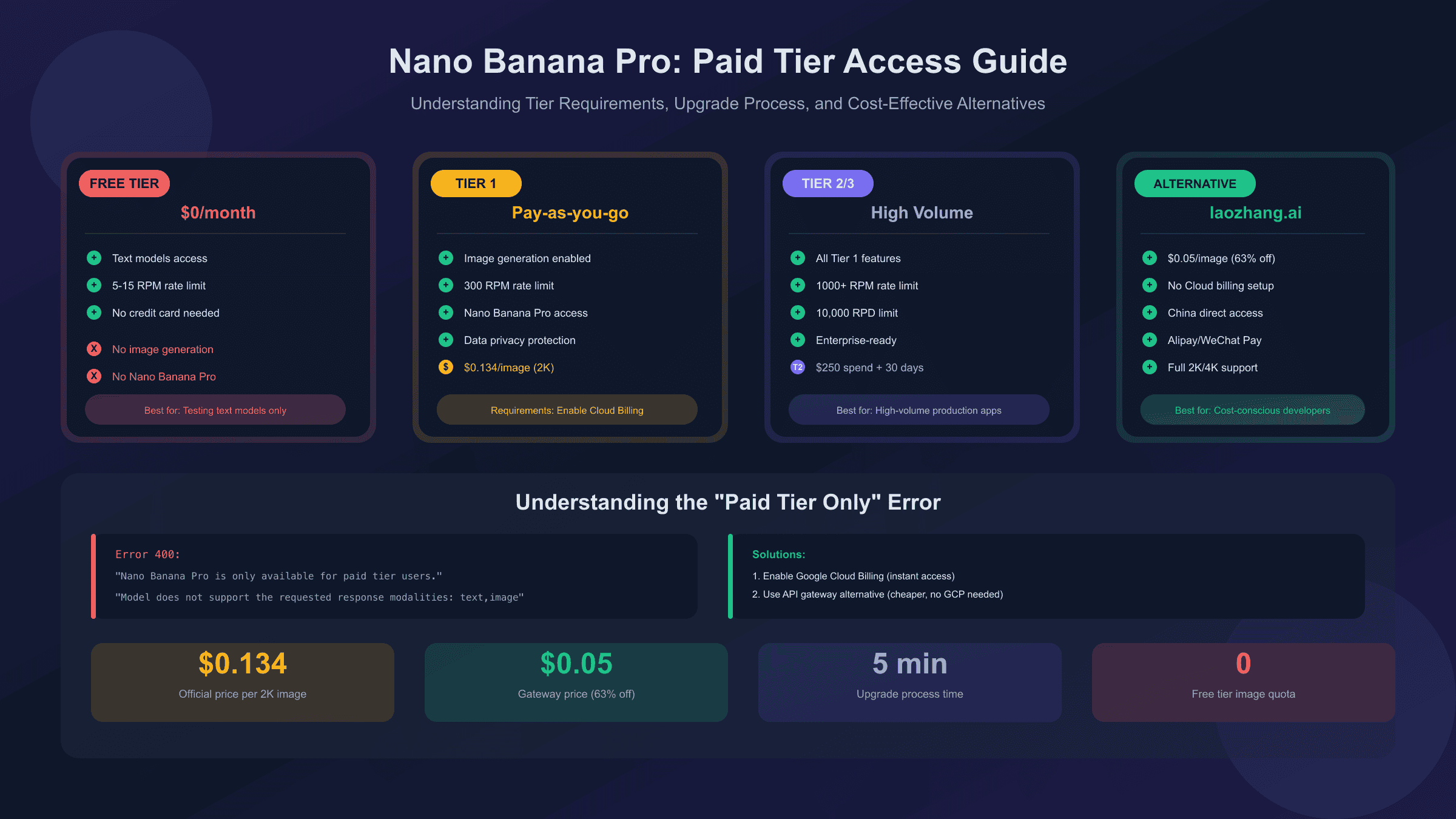
When you attempt to call the Nano Banana Pro model without proper billing setup, the API returns specific error messages that indicate the restriction. Understanding why Google implemented this limitation helps you make informed decisions about how to proceed.
The fundamental reason behind the paid-tier-only policy is resource economics. Image generation consumes significantly more computational resources than text generation. While a text query might use a few hundred tokens processed in milliseconds, generating a single 2K image requires specialized GPU resources for several seconds. Google's infrastructure costs for serving image generation requests are substantially higher than for text-based queries.
According to Google's official documentation, the Gemini API free tier is designed for testing and light development work with text models. When you enable Cloud Billing and transition to the paid tier, you unlock several benefits beyond just image generation: higher rate limits across all models, data privacy guarantees (your prompts and outputs aren't used to improve Google products), and access to premium features like context caching and batch processing.
The error messages you might encounter vary depending on your exact situation. A 400 error stating "Model does not support the requested response modalities: text,image" typically indicates you're trying to use image generation without paid tier access. A 429 error about exceeding quota can mean either rate limiting or, in some cases, attempting to access paid features on a free account.
For developers who need to evaluate the model before committing to payment, Google does provide limited access through the consumer Gemini app, which allows approximately 50-100 image generations. However, this doesn't help with API integration or automated workflows—for those use cases, you need either the official paid tier or an alternative solution.
Google's Tier System Explained
Google structures its Gemini API access into distinct tiers, each with different capabilities, rate limits, and requirements. Understanding this system is essential for planning your integration and budget.
The Free Tier requires no payment setup and provides access to text-based Gemini models with reasonable limits: 5-15 requests per minute (RPM), 250,000 tokens per minute (TPM), and up to 1,000 requests per day (RPD) depending on the specific model. However, image generation with Nano Banana Pro is completely unavailable on this tier. You can experiment with text prompting and API structure, but any request that includes image output modalities will fail.
Tier 1 (Paid) unlocks immediately when you enable Cloud Billing on your Google Cloud project. There's no waiting period or minimum spending requirement—the moment your payment method is verified, your rate limits increase to approximately 300 RPM, 1 million TPM, and significantly higher daily quotas. More importantly, you gain access to image generation capabilities. The upgrade process takes just minutes, and your new limits apply immediately.
| Tier | Requirements | Rate Limits | Image Generation | Cost Model |
|---|---|---|---|---|
| Free | None | 5-15 RPM, 250K TPM | Not Available | Free |
| Tier 1 | Enable billing | 300 RPM, 1M TPM | Available | Pay-as-you-go |
| Tier 2 | $250 spend + 30 days | 1000 RPM, 2M TPM | Available | Pay-as-you-go |
| Tier 3 | $1000+ spend | Highest limits | Available | Pay-as-you-go |
Tier 2 becomes available after you've accumulated $250 in total Google Cloud spending (not just Gemini API usage) and 30 days have passed since your first successful payment. Importantly, Google Cloud free credits do not count toward this spending requirement—only actual charges to your payment method qualify. This tier provides 1,000 RPM, 2 million TPM, and 10,000 RPD, enabling high-volume processing and multiple concurrent users.
Tier 3 requires $1,000 or more in cumulative spending and offers the highest rate limits available. This tier is designed for enterprise applications processing millions of requests.
One critical detail that catches many developers off guard: once you upgrade to the paid tier, you're paying for everything you use. The free allowance doesn't persist as a "baseline" that you can exceed. This differs from some other Google Cloud services where free tier limits remain available even after enabling billing.
Step-by-Step: Upgrading to Paid Tier
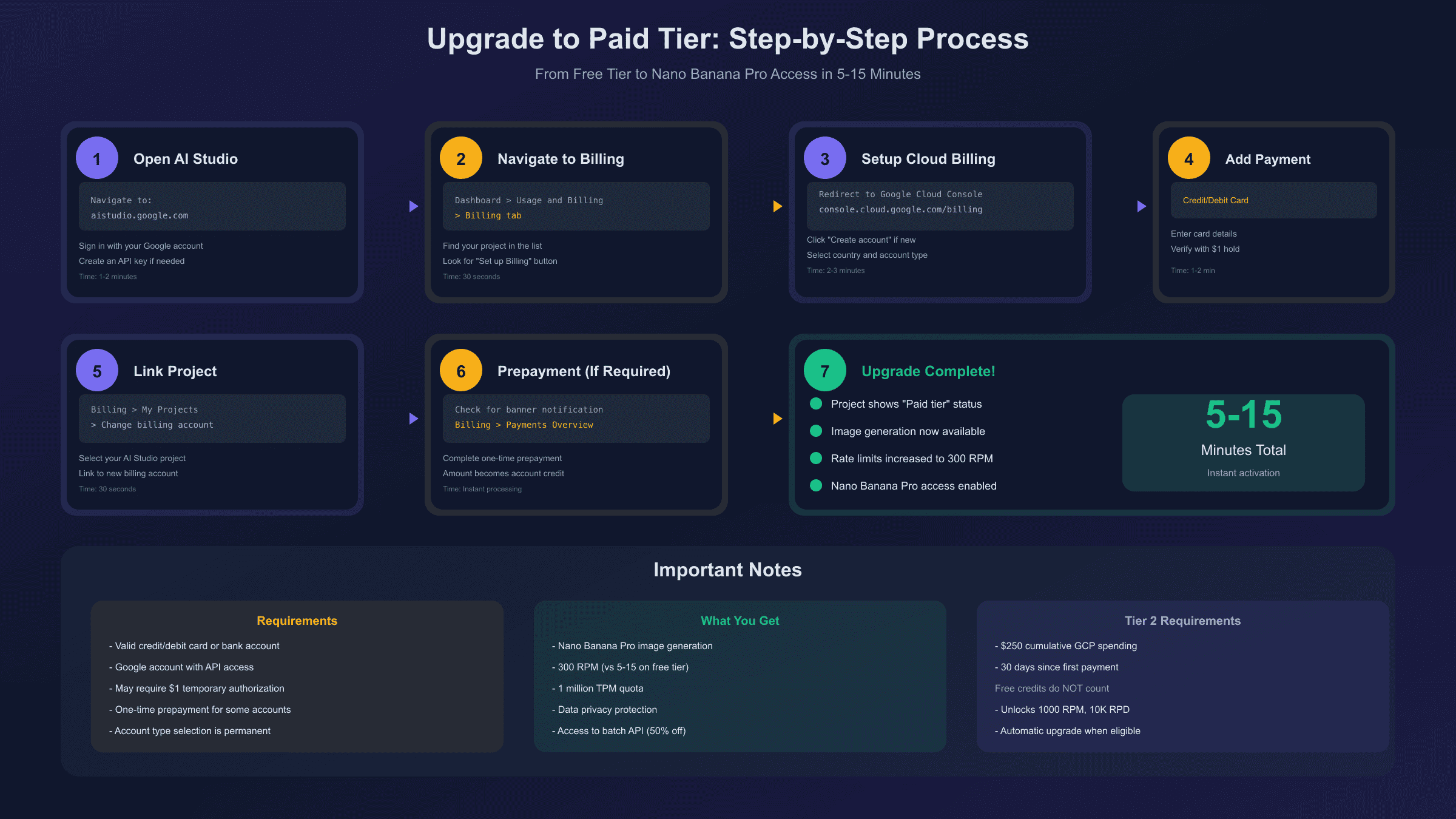
The upgrade process involves several steps across Google AI Studio and Google Cloud Console. Here's a detailed walkthrough to ensure you complete it correctly.
Prerequisites checklist before starting:
- A Google account (personal or Workspace)
- Access to Google AI Studio (aistudio.google.com)
- A valid payment method (credit card, debit card, or bank account)
- Basic understanding of your expected usage for budget planning
Step 1: Access Google AI Studio
Navigate to Google AI Studio and sign in with your Google account. If you haven't created an API key yet, you'll need to do that first. In the left sidebar, look for the "Get API key" option and create a new key or use an existing one.
Step 2: Navigate to Billing Settings
In the bottom of the left sidebar, click on "Dashboard," then select "Usage and Billing," and finally the "Billing" tab. You'll see your current projects listed along with their billing status. Projects without billing enabled will show "Free tier" status.
Step 3: Initiate Billing Setup
Click the "Set up Billing" button next to your project. This redirects you to Google Cloud Console. If you've never used Google Cloud before, you may need to accept the terms of service and complete initial account setup.
Step 4: Create or Link a Billing Account
In Google Cloud Console, navigate to Billing. If you don't have an existing billing account, click "Create account." Enter a name for your billing account, select your country (this determines your currency and available payment options), and choose your account type—"Individual" or "Business." Note that this selection is permanent for the billing account.
Step 5: Add Payment Method
Enter your payment details. Google accepts major credit cards, debit cards, and in some regions, bank account direct debit. Your card may be charged a small temporary authorization (typically $1) that's reversed within a few days.
Step 6: Link Project to Billing Account
Return to the Billing section, find "My Projects," and ensure your AI Studio project is linked to your new billing account. If it's not automatically linked, click "Change billing" and select the appropriate account.
Step 7: Complete One-Time Prepayment (If Required)
Google may require a one-time prepayment to activate the paid tier. This isn't a fee—it's a credit applied directly to your account for future usage. You'll see a banner in Google Cloud Console if this requirement applies to your account. Navigate to Billing > Payments Overview and complete the prepayment. Processing is typically instant for most payment methods.
Step 8: Verify Upgrade
Return to Google AI Studio and check the Usage and Billing section. Your project should now show "Paid tier" status. You can immediately start using image generation capabilities. The rate limit increase applies instantly—no waiting period required.
Pricing Breakdown: What You'll Actually Pay
Understanding the exact costs helps you budget appropriately and decide whether the official paid tier or alternatives make more sense for your use case.
Nano Banana Pro pricing follows a token-based model, though for image generation the calculation is straightforward:
| Image Resolution | Token Consumption | Cost per Image |
|---|---|---|
| 1024×1024 (1K) | 1,120 tokens | $0.134 |
| 2048×2048 (2K) | 1,120 tokens | $0.134 |
| 4096×4096 (4K) | 2,000 tokens | $0.240 |
For input, images consume 560 tokens each (approximately $0.0011 per input image), and text input is charged at $2.00 per million tokens. The bulk of your costs will come from output image generation.
Monthly cost projections:
| Daily Images | Monthly Total | 2K Resolution | 4K Resolution |
|---|---|---|---|
| 10 | 300 | $40.20 | $72.00 |
| 50 | 1,500 | $201.00 | $360.00 |
| 100 | 3,000 | $402.00 | $720.00 |
| 500 | 15,000 | $2,010.00 | $3,600.00 |
Batch API Savings
Google offers a Batch API with 50% reduced pricing for non-time-sensitive workloads. With batch processing, the cost drops to $0.067 per 1K/2K image and $0.12 per 4K image. The trade-off is that batch jobs don't return results immediately—they're processed in the background and may take anywhere from minutes to hours depending on queue depth.
| Processing Type | 1K/2K Image | 4K Image | Best For |
|---|---|---|---|
| Standard (Real-time) | $0.134 | $0.24 | Interactive apps |
| Batch API | $0.067 | $0.12 | Background processing |
For comparison, third-party API gateways often price Nano Banana Pro access at $0.02-0.15 per image, with the most reliable services typically charging around $0.05 per image—a 63% savings compared to Google's standard tier pricing.
Troubleshooting Common Errors
Several error messages can appear when working with Nano Banana Pro, each indicating different issues and requiring different solutions.
Error 400: "Image generation is not available in your country"
This error indicates geographic restrictions. Google limits image generation access in certain regions due to local regulations or infrastructure limitations. Solutions include:
- Use a VPN to access from a supported region (note: this may violate Google's terms of service)
- Use an API gateway service that routes through supported regions
- Contact Google support if you believe your region should be supported
Error 429: "You exceeded your current quota, please check your plan and billing details"
This is the most common error and can have multiple causes. First, verify that billing is actually enabled and your payment method is valid. Check Google Cloud Console > Billing to confirm your account is in good standing. If billing is confirmed, you may be hitting rate limits. Implement exponential backoff in your code: wait 30 seconds after the first 429, 60 seconds after the second, and so on.
As of December 2025, Google implemented significant quota adjustments that affected both free and paid tier users. If you're seeing 429 errors despite having unused quota showing in your dashboard, this is a known issue. Try:
- Switching to a different model version (gemini-1.5-flash instead of 2.5 models)
- Waiting 24 hours for quota to fully reset
- Distributing requests across multiple API keys
Error 400: "Model does not support the requested response modalities: text,image"
This typically means you're using a model that doesn't support image output, or you're on the free tier trying to access paid features. Verify you're calling the correct model endpoint: gemini-3-pro-image-preview and that your generationConfig properly specifies responseModalities: ["IMAGE"].
Error 500: Internal Server Error
Server-side errors are usually temporary. Implement retry logic with exponential backoff. If errors persist for more than an hour, check the Google Cloud Status Dashboard for service incidents.
Alternative Solutions for Developers
If the official paid tier pricing doesn't fit your budget, or if you're facing regional restrictions, several alternatives provide access to Nano Banana Pro capabilities.
Third-Party Platforms
Services like felo.ai and similar platforms proxy requests to Google's API using their own billed projects. You don't need a Google Cloud account—simply use their interface or API. Limitations include varying quotas (often 10-50 images per day on free tiers), potential reliability issues, and less control over parameters.
Developer Frameworks
Puter.js offers a unique approach: it provides Nano Banana Pro access directly from frontend code without requiring any API key or server-side setup. The framework handles authentication and billing through their infrastructure, making it effectively free for developers. This works well for client-side applications but isn't suitable for server-side batch processing.
API Gateway Services
For developers needing reliable, high-volume access at reduced costs, API gateway services offer a compelling middle ground. These services maintain their own Google Cloud projects with paid billing, then offer access through a unified API at wholesale pricing.
laozhang.ai is one such service specifically designed for the Chinese developer market but available globally. Key advantages include:
- Cost: $0.05 per image generation (63% savings vs official)
- Format: Supports both Gemini native format and OpenAI-compatible format
- Resolution: Full 2K/4K support through native endpoint
- Billing: Pay-as-you-go with Alipay, WeChat Pay, or credit card
- No VPN needed: Direct access from China
hljs pythonimport requests
import base64
# laozhang.ai API example for Nano Banana Pro
API_KEY = "sk-your-api-key" # Get from laozhang.ai
API_URL = "https://api.laozhang.ai/v1beta/models/gemini-3-pro-image-preview:generateContent"
headers = {
"Authorization": f"Bearer {API_KEY}",
"Content-Type": "application/json"
}
payload = {
"contents": [{
"parts": [{"text": "A serene mountain landscape at sunset, 4K quality"}]
}],
"generationConfig": {
"responseModalities": ["IMAGE"],
"imageConfig": {
"aspectRatio": "auto",
"imageSize": "4K"
}
}
}
response = requests.post(API_URL, headers=headers, json=payload, timeout=180)
result = response.json()
image_data = result["candidates"][0]["content"]["parts"][0]["inlineData"]["data"]
with open("output.png", "wb") as f:
f.write(base64.b64decode(image_data))
Educational/Student Access
Students can apply for Google's Gemini 3 student trial, which provides up to one year of free access with higher quotas than standard free tiers. Verification requires an educational email address (.edu or equivalent) and typically takes 1-2 business days to process.
Regional Access: Solutions for Restricted Countries
Users in certain countries, including China, face additional barriers when attempting to access Nano Banana Pro through official channels. Google's services are either blocked or significantly degraded in these regions.
The Challenge
In China, Google services are blocked by the Great Firewall. Even with a VPN, latency can make real-time image generation impractical—response times of 5-10 seconds become 30+ seconds. Payment is another barrier: Google Cloud accepts international credit cards, but many Chinese developers don't have access to Visa or Mastercard.
API Gateway Solutions
Regional API gateways solve both problems by:
- Maintaining server infrastructure within the region (domestic nodes with ~20ms latency)
- Accepting local payment methods (Alipay, WeChat Pay)
- Handling all communication with Google's APIs from supported regions
laozhang.ai specifically addresses China market needs with domestic nodes that provide consistent low-latency access. The service supports local payment methods, eliminating the need for international credit cards. You can test the image generation capabilities directly at their online demo.
VPN Considerations
While VPNs can technically enable access to Google services, they come with significant drawbacks for production use:
- Violates Google's terms of service (risk of account suspension)
- Unpredictable latency and reliability
- Additional cost ($5-20/month for quality VPN service)
- Potential legal issues in certain jurisdictions
For testing and personal use, VPNs may be acceptable. For production applications serving users, API gateways provide more reliable and compliant access.
Making the Right Choice: When to Pay vs Use Alternatives
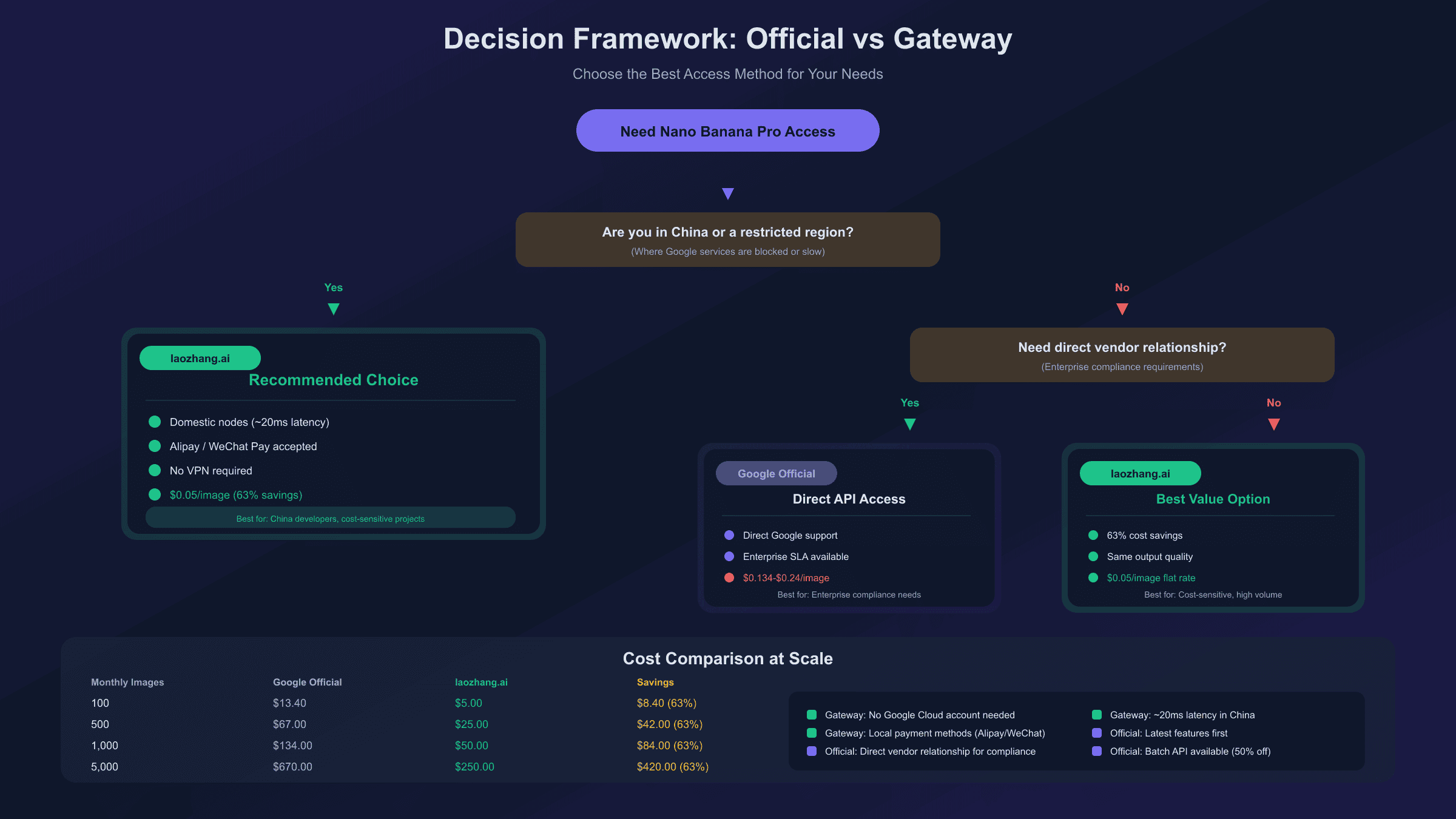
Your optimal choice depends on several factors: volume, reliability requirements, budget, and geographic location.
Choose Official Google Paid Tier When:
- You need direct vendor relationship for enterprise compliance
- You're already using other Google Cloud services and can reach Tier 2/3 discounts
- You require official SLA guarantees
- You're in a supported region with good connectivity
- Your volume is low enough that the per-image cost difference is marginal
- You need access to the absolute latest model updates immediately
Choose API Gateway Alternatives When:
- Cost efficiency is a primary concern (>100 images/month)
- You're in a region with restricted Google access
- You need local payment methods (Alipay, WeChat)
- You want simplified billing without Google Cloud complexity
- Lower latency in specific regions matters
- You're building applications for users in restricted regions
Cost Comparison at Scale:
| Monthly Images | Google Official | laozhang.ai | Savings |
|---|---|---|---|
| 100 | $13.40 | $5.00 | $8.40 (63%) |
| 500 | $67.00 | $25.00 | $42.00 (63%) |
| 1,000 | $134.00 | $50.00 | $84.00 (63%) |
| 5,000 | $670.00 | $250.00 | $420.00 (63%) |
Hybrid Approach
Some developers use both: official access for development and testing (leveraging any free credits), and API gateways for production deployment where cost matters. This provides the best of both worlds—direct Google access for debugging issues and cost-effective scaling for production.
Frequently Asked Questions
Can I use the free tier for any image generation at all?
No. Image generation with Nano Banana Pro requires at minimum Tier 1 (paid) access. The free tier only supports text-based Gemini models. You can experiment with the consumer Gemini app for limited personal image generation, but API access requires billing.
Do I lose my free tier benefits after upgrading to paid?
Yes, in a sense. Unlike some Google Cloud services where free tier limits persist after enabling billing, the Gemini API switches entirely to pay-as-you-go once you upgrade. However, Google AI Studio itself remains free to use for testing—you're only charged for API calls that consume tokens.
How long does the upgrade process take?
Typically 5-15 minutes if you have a valid payment method ready. The rate limit increases apply immediately after successful billing verification. The one-time prepayment (if required) also processes instantly for most payment methods.
What's the cheapest way to access Nano Banana Pro?
For API access, third-party gateways like laozhang.ai at $0.05/image offer the lowest per-image cost for reliable service. For occasional personal use, the consumer Gemini app provides limited free generations. For students, the educational trial offers extended free access.
Will my prompts be used to train Google's models?
On the free tier, your data may be used to improve Google products. On paid tier, Google explicitly states that prompts and outputs are not used for product improvement. This is an important consideration for applications handling sensitive or proprietary content.
Can I switch between tiers?
You can upgrade from a lower tier to higher by meeting the spending requirements. However, you cannot downgrade from paid to free—once billing is enabled, it stays enabled. You can remove the payment method to prevent charges, but the project remains on paid tier status.
The "paid tier only" restriction for Nano Banana Pro reflects the computational costs of image generation, but it doesn't have to be a barrier to using this powerful technology. Whether you choose to set up official Google Cloud billing or use a third-party gateway depends on your specific needs around cost, compliance, and regional access.
For most developers, the path forward involves either enabling Google Cloud billing for direct access, or using a gateway service for more cost-effective access. Both approaches give you full access to Nano Banana Pro's capabilities—the choice comes down to your operational requirements and budget constraints.