Where Can You Use Nano Banana Pro? Complete Platform Availability Guide (2025)
Discover where Nano Banana Pro is available across 12+ platforms: Gemini app, AI Studio, Vertex AI, Search, Workspace, and more. Compare features, limitations, and find your ideal access point.
Nano Banana Pro
4K-80%Google Gemini 3 Pro · AI Inpainting
谷歌原生模型 · AI智能修图

Nano Banana Pro isn't confined to a single product—it's woven throughout Google's ecosystem across consumer apps, developer tools, enterprise platforms, and creative suites. Knowing exactly where you can access this powerful image generation model, and understanding what capabilities each platform offers, determines whether you'll spend hours searching for the right entry point or start generating 4K images within minutes.
The platform landscape for Nano Banana Pro has expanded dramatically since its November 2025 launch. What started as API access through AI Studio and Vertex AI has grown to include the Gemini app, Google Search's AI mode, NotebookLM, Google Workspace tools (Slides, Vids), Flow for AI filmmaking, Mixboard for presentations, and developer platforms like Firebase and Antigravity. Each platform serves different users with distinct feature sets, pricing structures, and integration capabilities.
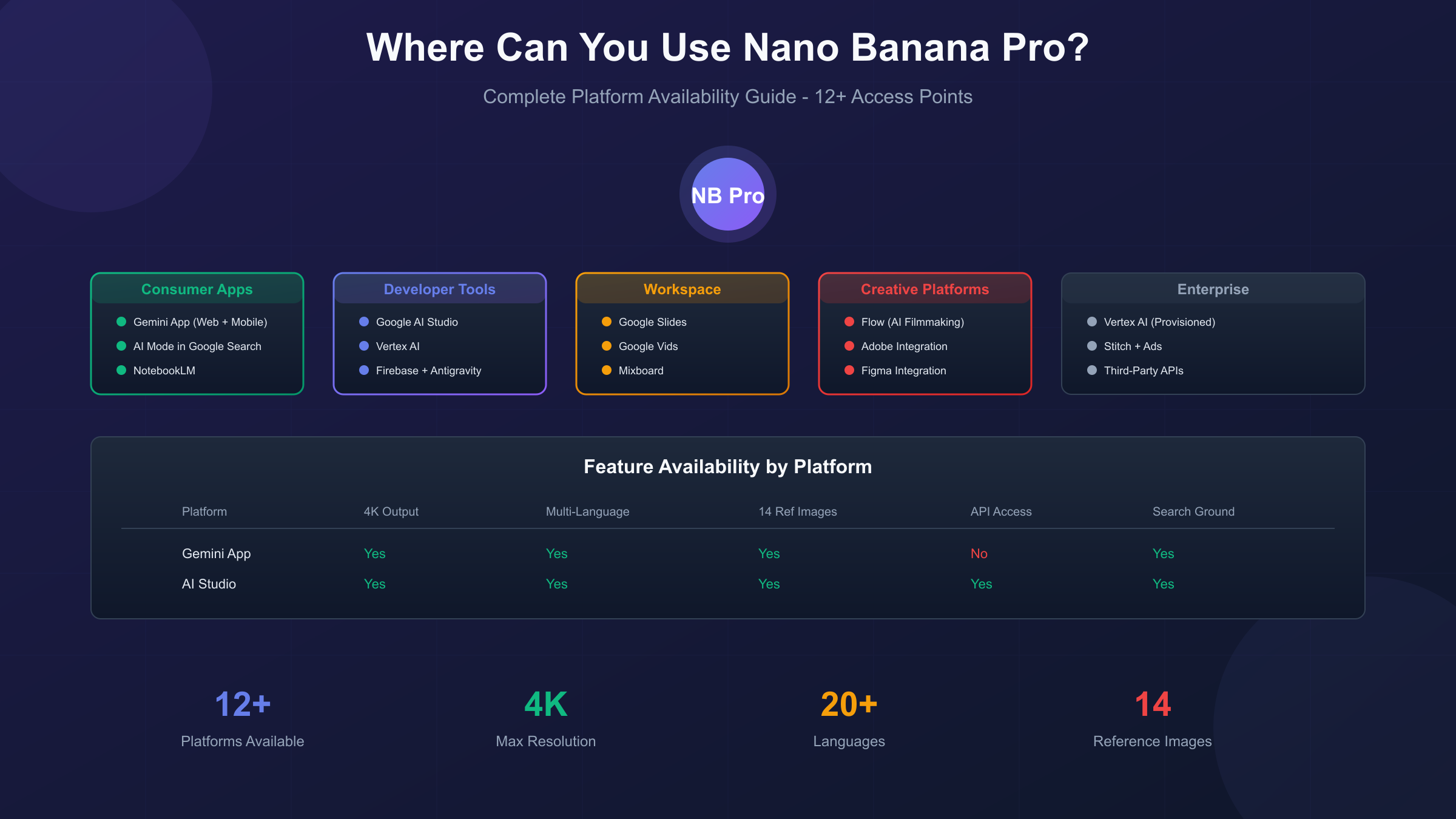
Complete Platform Availability Matrix
Before diving into individual platforms, this comprehensive matrix shows exactly where Nano Banana Pro is available, what features each platform supports, and who benefits most from each access point. Use this as your reference for choosing the right platform based on your specific needs.
| Platform | Status | Max Resolution | Text Rendering | Reference Images | Best For |
|---|---|---|---|---|---|
| Gemini App | Available Globally | 4K | Full multilingual | Up to 14 | General creators |
| Google AI Studio | Available | 4K | Full multilingual | Up to 14 | Developers testing |
| Vertex AI | Available | 4K | Full multilingual | Up to 14 | Enterprise production |
| AI Mode in Search | Select Countries | 2K | English primary | Limited | Quick generations |
| NotebookLM | Available Globally | 2K | Auto from sources | Source-based | Research visualization |
| Google Slides | Workspace Required | 2K | Search-grounded | Context-aware | Presentations |
| Google Vids | Workspace Required | 2K | Multi-turn editing | Context-aware | Video production |
| Flow | Paid Plans | 4K | Full support | Scene-based | AI filmmaking |
| Mixboard | Available | 2K | Slide-optimized | Board-based | Quick presentations |
| Firebase | Developer Access | 4K | API-dependent | Full API | Mobile apps |
| Antigravity | Developer Access | 4K | Full | Full API | Agentic development |
The distinction between platforms isn't just about availability—it's about optimizing your workflow. A developer building an image generation app needs API access through Vertex AI or Firebase, while a marketer creating presentation graphics benefits more from the integrated Slides experience. Understanding these nuances prevents wasted time experimenting with platforms unsuited to your goals.
Gemini App: The Primary Consumer Access Point
The Gemini app represents the most accessible entry point for Nano Banana Pro, available both as a mobile application and through the web interface at gemini.google.com. This platform serves casual users, content creators, and professionals who need image generation without API integration or enterprise infrastructure.
Accessing Nano Banana Pro through the Gemini app requires selecting the correct model configuration. From the interface, navigate to the model selector and choose "Thinking" mode—this specifically activates Nano Banana Pro (Gemini 3 Pro Image). The "Fast" option uses the standard Nano Banana model (Gemini 2.5 Flash), which offers quicker generation but lower quality and fewer features.
Feature availability in Gemini app:
- Full 4K resolution support (subscription tier dependent)
- Text rendering in 20+ languages including Chinese, Japanese, and Arabic
- Up to 14 reference image uploads for style consistency
- Search grounding for accurate real-world depictions
- Multi-turn refinement through conversational iteration
- SynthID watermarking on all generated images
Subscription tiers determine your daily quotas and maximum output resolution. Free users receive approximately 3 low-resolution generations daily—suitable for testing but inadequate for production work. Google AI Pro subscribers ($19.99/month) unlock 100 daily images at 2K resolution, while Ultra tier ($99.99/month) provides 1,000 daily generations at native 4K. The economic calculation favors Pro tier for users generating 50-100 images monthly, with Ultra becoming cost-effective above 300 monthly generations.
The Gemini app excels at iterative creative work where you refine prompts through conversation. You might start with "a cyberpunk cityscape at night," receive the initial result, then continue: "add more neon signs with Japanese text" and "make the sky more purple with distant flying vehicles." This conversational refinement leverages Nano Banana Pro's reasoning architecture, producing results that precisely match your evolving vision.
Google AI Studio: The Developer Playground
Google AI Studio bridges the gap between consumer usage and full API integration, offering a browser-based environment for experimenting with Nano Banana Pro while providing code export for production implementation. Developers, prompt engineers, and technical creators find this platform invaluable for prototyping before committing to application development.
Access AI Studio at aistudio.google.com with your Google account. New users receive $300 in free API credits upon creating a Google Cloud project—translating to approximately 1,250-2,200 free Nano Banana Pro generations depending on resolution choices. These credits provide substantial runway for experimentation without immediate cost commitment.
The AI Studio interface exposes configuration options unavailable through consumer apps:
- Resolution Control: Explicitly choose 1K, 2K, or 4K output dimensions
- Aspect Ratio Selection: Standard (1:1), landscape (16:9), portrait (9:16), or custom ratios
- Safety Filter Adjustment: Configure content moderation thresholds for your use case
- Response Format Options: Request image-only, text-only, or combined responses
- System Instruction Presets: Define persistent context for consistent outputs
The code export feature transforms interactive experiments into production-ready API calls. After perfecting your prompt configuration through the visual interface, click "Get Code" to generate working Python, JavaScript, cURL, or other language implementations. This workflow eliminates the trial-and-error typically associated with API parameter configuration.
hljs python# Example AI Studio export configuration
from google import genai
client = genai.Client(api_key="YOUR_KEY")
response = client.models.generate_content(
model="gemini-3-pro-image-preview",
contents="A detailed product photo of a futuristic smartwatch",
config={
"response_modalities": ["IMAGE"],
"image_resolution": "4K",
"aspect_ratio": "1:1"
}
)
AI Studio also provides usage analytics, showing your credit consumption, generation history, and performance metrics. This visibility helps optimize costs and identify which prompt patterns produce the best results for your specific use cases.
Vertex AI: Enterprise-Grade Production Access
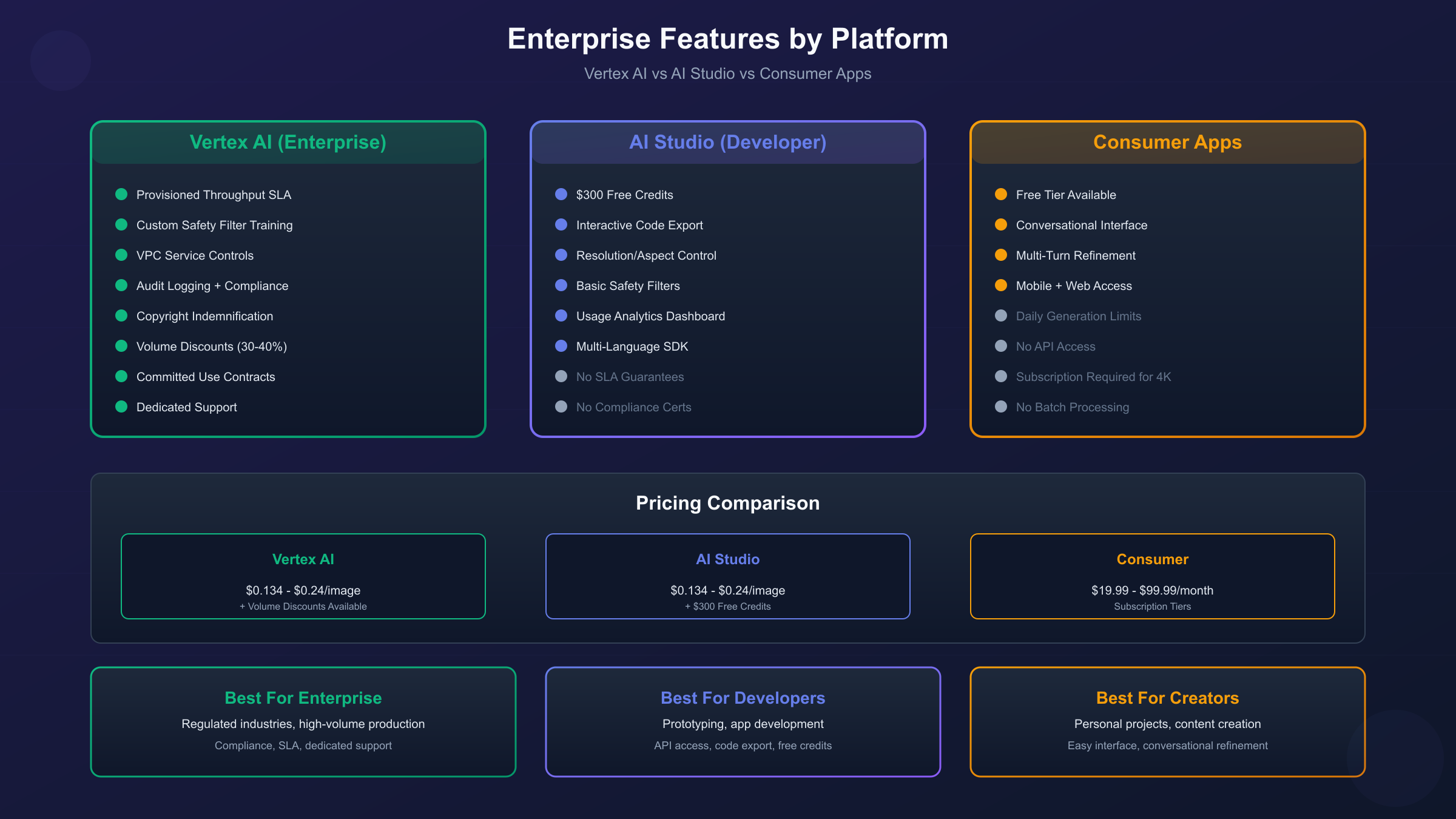
Vertex AI positions Nano Banana Pro as an enterprise-grade offering with production SLAs, compliance controls, and integration capabilities suitable for organizations deploying AI at scale. This platform serves companies building commercial products, agencies handling client work, and enterprises with governance requirements that consumer platforms cannot satisfy.
The Vertex AI implementation differs from AI Studio in several critical ways. While both provide API access to the same underlying model, Vertex AI adds enterprise infrastructure including provisioned throughput guarantees, advanced safety filters configurable per-organization, usage quota management, and integration with Google Cloud's broader security and compliance frameworks.
Vertex AI deployment options:
| Option | Description | Best For |
|---|---|---|
| Pay As You Go | Standard per-image pricing | Variable workloads |
| Provisioned Throughput | Reserved capacity with guaranteed performance | Predictable high-volume |
| Committed Use | Discounted rates for usage commitments | Cost optimization |
Enterprise features exclusive to Vertex AI include copyright indemnification (available at general availability), custom safety filter training, VPC Service Controls for network isolation, and audit logging for compliance requirements. Organizations in regulated industries or handling sensitive content find these capabilities essential for production deployment.
The pricing structure differs slightly from consumer options. While the base per-image cost remains similar, Vertex AI offers volume discounts and committed use contracts that reduce costs significantly at scale. Organizations generating 10,000+ images monthly often achieve 30-40% cost reductions through committed use agreements compared to standard pay-as-you-go pricing.
AI Mode in Search: Quick Generation Within Google Search
Google Search's AI mode now includes Nano Banana Pro capabilities, enabling image generation directly within search results. This integration provides the most frictionless access point—no separate app or login required beyond your Google account—though with more limited capabilities than dedicated platforms.
Accessing Nano Banana Pro through Search requires enabling AI mode in supported regions (currently available in the United States, with expansion planned). Look for "Thinking with 3 Pro" in the dropdown menu when AI mode is active. Generation happens directly within the search interface, with results appearing alongside traditional search features.
The Search integration excels at quick, contextual generations. Searching for "image of a sustainable modern office building" and selecting the image generation option produces results informed by Google's real-time knowledge of current architectural trends. This search grounding provides accuracy impossible with models lacking access to current information.
Limitations include reduced resolution (maximum 2K), English-primary text rendering, and quota restrictions tighter than subscription-based access. The platform serves exploratory use cases rather than production work—perfect for visualizing a concept before committing to dedicated tool usage.
Google Workspace: Slides, Vids, and NotebookLM
Google Workspace customers received Nano Banana Pro integration across Slides, Vids, and NotebookLM in November 2025, embedding image generation directly into productivity workflows. These integrations differ from standalone access by providing context-aware generation that understands your document's content.
Google Slides integration introduces "Help me visualize" functionality through a sidebar option. Select text describing a concept, and Nano Banana Pro generates relevant infographics, charts, or images grounded in Google Search for accuracy. The "Beautify this slide" feature transforms existing slides into professionally designed visuals with improved text legibility and visual hierarchy.
The Slides integration shines for presentation development. Rather than searching stock photo libraries or switching to external tools, you generate custom visuals that precisely match your content. A slide about "Q4 revenue growth" can include an auto-generated chart visualization that matches your company's color scheme and incorporates actual data context from the document.
NotebookLM uses Nano Banana Pro to convert research into visual formats. Upload your source materials, and the system generates infographics summarizing key insights, slide decks presenting your findings, and visual representations of complex topics. The generation quality reflects the underlying sources, making this ideal for academic research, competitive analysis, and knowledge synthesis.
Google Vids applies Nano Banana Pro to video production with multi-turn prompting for iterative refinement. Generate custom assets for video projects, edit them through conversation, and produce production-ready visuals that integrate seamlessly with the Vids editing timeline. The platform targets marketers and content creators building video content without dedicated design resources.
Workspace access requires Business Standard/Plus or Enterprise Standard/Plus plans. Education and Nonprofit organizations also receive access. Promotional 60-day periods offer enhanced quotas for new users, with per-user limits applying afterward.
Flow and Mixboard: Creative Production Platforms
Flow, Google's AI filmmaking platform, incorporates Nano Banana Pro for frame and scene generation with cinematic controls. Available on all paid plans, Flow leverages the model's state-of-the-art text rendering and camera control capabilities for professional video production.
The Flow integration differs from other platforms by emphasizing narrative consistency. When generating a sequence of scenes, Flow maintains character likeness, environmental continuity, and stylistic coherence across frames. This capability, powered by Nano Banana Pro's ability to process up to 14 reference images, enables animated storytelling and conceptual visualization that previous tools couldn't achieve.
Flow-specific features:
- Camera angle control (wide, medium, close-up, extreme close-up)
- Lighting direction specification (golden hour, harsh overhead, dramatic side lighting)
- Color grading presets (cinematic, vintage, modern, high contrast)
- Motion blur and depth of field simulation
- Text rendering for signage, titles, and overlay elements
Mixboard applies Nano Banana Pro to board-based presentation creation. Convert your inspiration boards, mood boards, or rough layouts into polished presentation slides with design refinement that maintains your original creative intent while elevating visual quality.
Developer Platforms: Firebase, Antigravity, Stitch
Developers building applications can access Nano Banana Pro through several Google developer platforms, each optimized for different development contexts. Understanding which platform suits your project prevents architectural decisions you'll later regret.
Firebase integration enables mobile and web applications to generate images through the familiar Firebase SDK. This approach suits developers already using Firebase for authentication, database, and hosting—adding image generation requires minimal additional configuration. The pricing flows through your existing Firebase billing, simplifying cost management for small teams.
Antigravity, Google's agentic development platform, positions Nano Banana Pro as a tool for AI agents rather than direct human usage. Coding agents can autonomously leverage image generation capabilities, enabling automated content creation workflows, design iteration systems, and visual reasoning agents. This platform targets developers building sophisticated AI systems rather than simple image generation apps.
Stitch provides video and animation capabilities with Nano Banana Pro powering the visual generation layer. Developers building video creation tools, animation platforms, or dynamic content systems find Stitch's API more suitable than general image generation endpoints.
The common thread across developer platforms is full API feature access—4K resolution, multilingual text rendering, 14 reference images, and search grounding. The differentiation lies in integration context, SDK ecosystems, and billing arrangements rather than capability restrictions.
Third-Party Creative Platforms: Adobe, Figma, and More
Nano Banana Pro extends beyond Google's ecosystem through integrations with leading creative platforms. Adobe and Figma represent the most significant partnerships, bringing Google's image generation capabilities into tools where designers already work.
The Adobe integration embeds Nano Banana Pro within Creative Cloud applications, allowing Photoshop and Illustrator users to generate images without leaving their design environment. This workflow eliminates the context-switching that slows creative production—generate an asset, refine it with Adobe's editing tools, and incorporate it into your project within a single application.
Figma's integration targets UI/UX designers who frequently need placeholder images, concept illustrations, and visual assets during the design process. Generate interface mockups, user avatars, product images, and environmental scenes directly within your design file. The generated assets inherit Figma's layer structure, enabling immediate editing and iteration.
For developers and creators outside Google's ecosystem, third-party API providers offer an alternative access path. Services like laozhang.ai provide Nano Banana Pro access at $0.05 per image—approximately 80% below official pricing—with the same native Gemini format supporting full 4K generation. This approach suits developers who need cost-effective production access without enterprise Vertex AI requirements.
hljs python# Third-party API example with laozhang.ai
import requests
import base64
response = requests.post(
"https://api.laozhang.ai/v1beta/models/gemini-3-pro-image-preview:generateContent",
headers={"Authorization": "Bearer YOUR_KEY"},
json={
"contents": [{"parts": [{"text": "A professional product photo"}]}],
"generationConfig": {
"responseModalities": ["IMAGE"],
"imageConfig": {"imageSize": "4K"}
}
}
)
Geographic Availability and Regional Restrictions
Platform availability varies by region, with some access points restricted to specific countries or requiring compliance with local regulations. Understanding these restrictions prevents frustration when a platform appears available globally but functions differently in your location.
Unrestricted global availability:
- Gemini app (web and mobile)
- Google AI Studio
- Vertex AI
- NotebookLM
- Firebase integration
Region-specific availability:
- AI Mode in Search: Currently United States only, expansion planned
- Flow: Available in most markets, some content restrictions by region
- Workspace integrations: Tied to Workspace data residency settings
Users in regions with restricted access can still reach Nano Banana Pro through globally available platforms. The Gemini app and AI Studio provide full functionality regardless of location, making them reliable fallbacks when region-specific integrations aren't available.
Enterprise users should note that Vertex AI's data residency options allow specifying where generated content is processed and stored. This capability addresses compliance requirements for organizations bound by GDPR, data sovereignty laws, or internal policies restricting data processing locations.
Feature Availability Comparison by Platform
Not all platforms provide identical Nano Banana Pro capabilities. This detailed comparison helps identify which platforms support the specific features your use case requires.
| Feature | Gemini App | AI Studio | Vertex AI | Workspace | Search | Flow |
|---|---|---|---|---|---|---|
| 4K Resolution | Tier-dependent | Yes | Yes | No (2K max) | No | Yes |
| Text in 20+ Languages | Yes | Yes | Yes | Limited | English | Yes |
| 14 Reference Images | Yes | Yes | Yes | Context-based | No | Scene-based |
| Search Grounding | Yes | Yes | Yes | Yes | Yes | Limited |
| API Access | No | Yes | Yes | No | No | Yes |
| Custom Safety Filters | No | Basic | Advanced | Workspace policies | No | Basic |
| SynthID Watermark | Yes | Yes | Configurable | Yes | Yes | Yes |
| Multi-turn Editing | Yes | Yes | Yes | Limited | No | Yes |
The feature gap between consumer and developer platforms primarily affects control and customization. Consumer platforms provide excellent image generation with sensible defaults, while developer platforms expose configuration options for fine-tuning behavior to specific requirements.
Choosing Your Ideal Platform
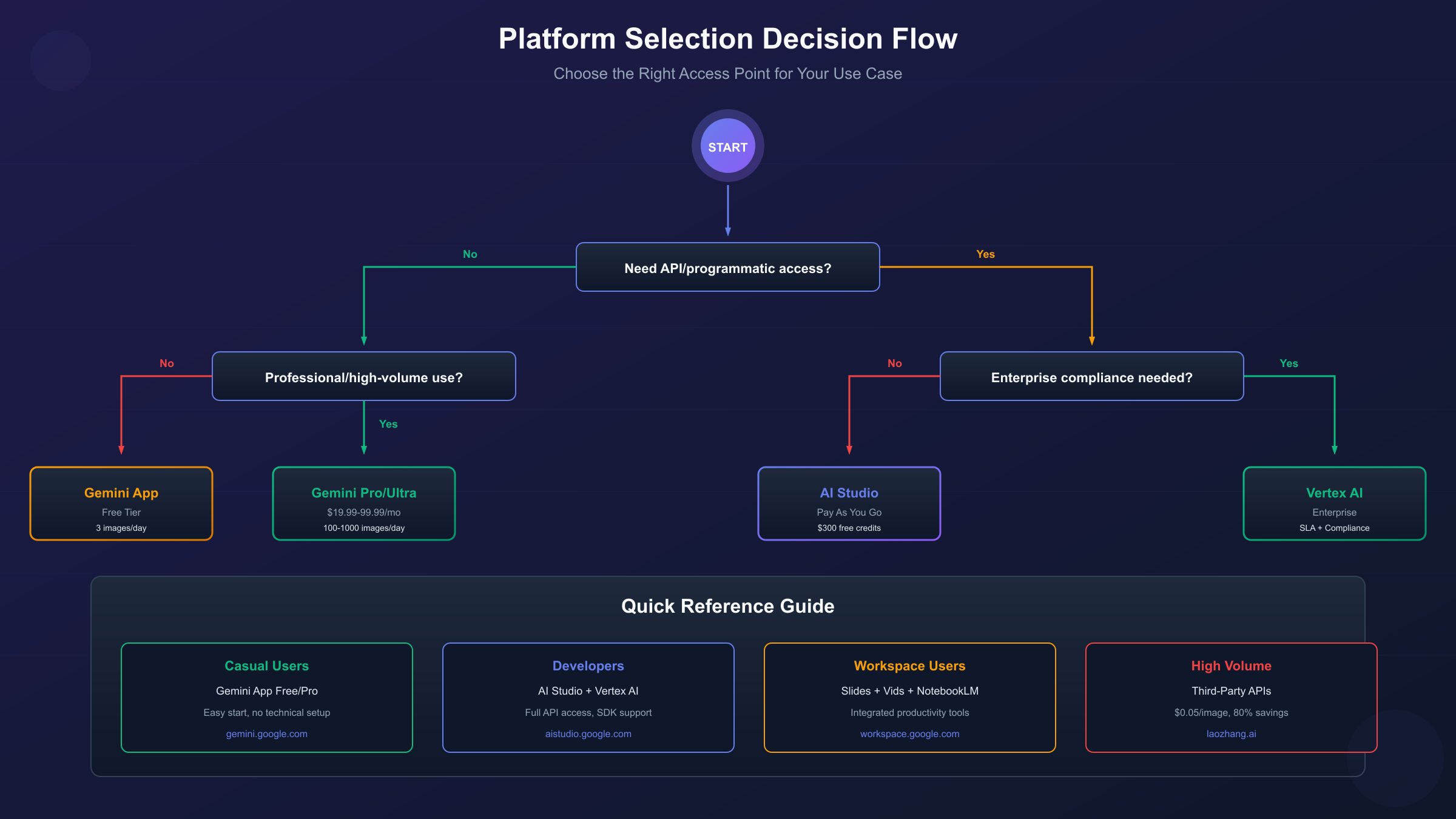
Selecting the right platform depends on your use case, technical requirements, and budget constraints. This decision framework matches common scenarios to optimal platform choices:
For casual personal use: Start with the Gemini app's free tier. If you find yourself hitting daily limits regularly, upgrade to Pro subscription ($19.99/month) for increased quota and resolution.
For content creators and marketers: The Gemini app with Pro or Ultra subscription balances capability with convenience. Workspace integrations add value if you're already using Google's productivity suite.
For developers building apps: Begin prototyping in AI Studio with free credits, then migrate to Vertex AI or Firebase for production based on your existing infrastructure preferences.
For enterprise deployment: Vertex AI provides the compliance controls, SLAs, and scalability that production applications require. The additional cost over consumer options reflects enterprise-grade reliability and governance.
For cost-sensitive high-volume users: Third-party API providers like laozhang.ai offer significant cost savings—$0.05 versus $0.20+ per image—suitable for batch processing, content pipelines, and applications where volume makes official pricing prohibitive.
For designers in creative workflows: Adobe or Figma integrations minimize context-switching. Generate assets where you design rather than switching between applications.
Getting Started Today
The fastest path to using Nano Banana Pro requires no payment, no API setup, and takes under two minutes. Open gemini.google.com, sign in with your Google account, select "Thinking" from the model dropdown, and describe the image you want to create. Your first generation demonstrates Nano Banana Pro's capabilities immediately.
For developers, AI Studio provides the next step. Access aistudio.google.com, create a project, and claim your $300 free credit. Experiment with the interactive interface, then export working code when ready for integration.
Enterprise users should contact Google Cloud sales to discuss Vertex AI deployment options, committed use pricing, and compliance requirements specific to their industry. The enterprise sales process takes longer but results in optimized pricing and dedicated support.
Regardless of which platform you choose, Nano Banana Pro's capabilities remain consistent—4K resolution, multilingual text rendering, reference image blending, and search grounding. The platform choice determines how you access these capabilities, not what capabilities you can access. Match your platform to your workflow, and start generating.
FAQ: Platform-Specific Questions
Can I use the same API key across AI Studio and Vertex AI? No. AI Studio and Vertex AI use different authentication mechanisms. AI Studio uses simple API keys, while Vertex AI requires service account credentials or application default credentials. Projects can access both, but you'll configure authentication separately for each.
Does the Gemini app subscription include API access? No. Gemini app subscriptions (Pro, Ultra) provide access through the app interface only. API access requires separate AI Studio or Vertex AI configuration with associated billing.
Which platform has the lowest latency for real-time applications? Vertex AI with Provisioned Throughput offers the most consistent low-latency performance. Consumer platforms and pay-as-you-go API access experience variable latency based on server load.
Can I disable the SynthID watermark? Only through Vertex AI with specific enterprise configurations. All consumer and standard developer access includes mandatory SynthID watermarking as part of Google's responsible AI practices.
Which platforms support batch generation? AI Studio and Vertex AI both support batch generation through their respective APIs. Consumer apps (Gemini, Workspace) generate images individually through conversational interaction.