Nano Banana Pro Quota Limits 2025: Complete Free vs Plus vs Pro vs Ultra Comparison Guide
Complete guide to Nano Banana Pro image generation limits. Compare Free (2/day), Plus, Pro (~100/day), and Ultra (1000/day) tiers with reset times, API limits, workarounds, and cost analysis.
Nano Banana Pro
4K-80%Google Gemini 3 Pro · AI Inpainting
谷歌原生模型 · AI智能修图

If you've ever tried generating images with Nano Banana Pro and hit the dreaded "quota exhausted" message after just two attempts, you're not alone. Google's most powerful AI image generator comes with strict daily limits that vary dramatically across subscription tiers, and understanding these quotas is essential for anyone serious about AI-powered image creation.
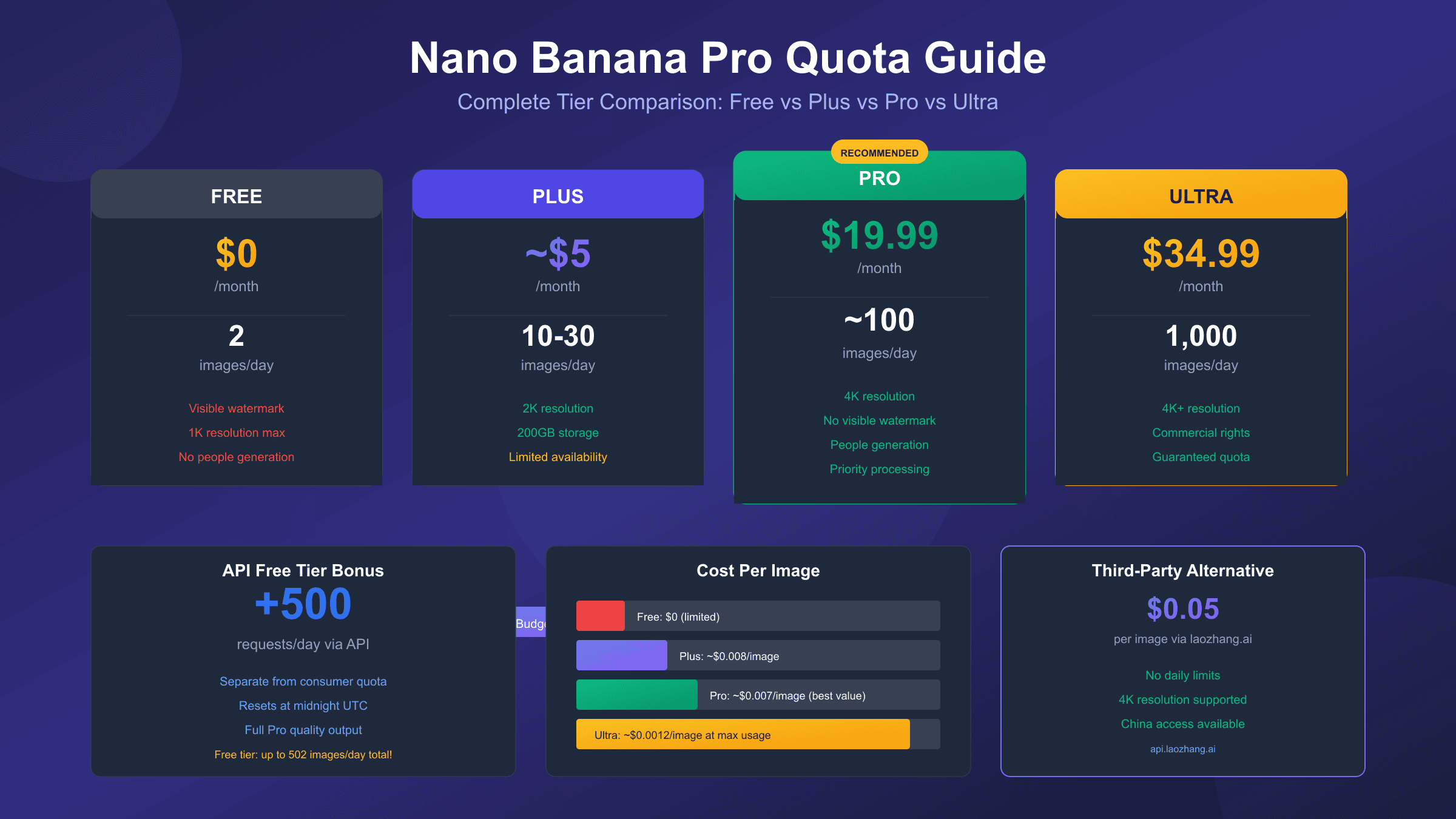
Here's the quick answer you're looking for: Free tier users get just 2 images per day (reduced from 3 in November 2025), while Pro subscribers at $19.99/month receive approximately 100 images daily, and Ultra users paying $34.99/month unlock up to 1,000 images per day. But there's much more nuance to these limits than simple numbers suggest, including API alternatives that offer up to 500 free requests daily and third-party solutions that bypass these restrictions entirely.
| Tier | Monthly Price | Daily Images | Max Resolution | Watermark | Commercial Rights |
|---|---|---|---|---|---|
| Free | $0 | 2 | 1K (1024px) | Visible | Personal only |
| Plus | ~$5 | Higher | 2K | Reduced | Personal only |
| Pro | $19.99 | ~100 | 4K | Invisible (SynthID) | Personal only |
| Ultra | $34.99-249.99 | 1,000 | 4K+ | Invisible (SynthID) | Full commercial |
This comprehensive guide covers everything from exact quota numbers and reset times to proven workarounds and cost-effective alternatives. Whether you're a casual user trying to maximize your free tier or a professional evaluating subscription options, you'll find actionable strategies to get more from Nano Banana Pro.
Understanding Nano Banana Pro vs Standard Nano Banana
Before diving into quota specifics, it's crucial to understand the fundamental difference between Nano Banana Pro and the standard Nano Banana model. These aren't just branding distinctions—they represent significantly different capabilities and quality levels that directly impact how you should approach quota management.
The original Nano Banana (internally known as Gemini 2.5 Flash Image) launched in August 2025 and quickly became the go-to free image generation tool. When your Nano Banana Pro quota depletes, you're automatically and silently downgraded to this standard model. The quality difference is immediately noticeable: standard Nano Banana caps resolution at approximately 1 megapixel (roughly 1024×1024), while Nano Banana Pro (Gemini 3 Pro Image) delivers stunning 4K output at 8 megapixels—an 8x increase in pixel count that transforms image usability for professional applications.
| Feature | Nano Banana (Standard) | Nano Banana Pro |
|---|---|---|
| Maximum Resolution | ~1K (1 megapixel) | 4K (8 megapixels) |
| Generation Speed | ~3 seconds | 8-12 seconds |
| Text Rendering | Poor (frequent errors) | Excellent (multilingual) |
| Character Consistency | 3 input images | Up to 14 input images |
| Lighting Controls | Basic | Advanced (exposure, DoF, color grading) |
| World Knowledge | Generic scenes | Location-specific accuracy |
| Quality Level | Good for testing | Production-ready |
Text rendering represents perhaps the most dramatic improvement. The original Nano Banana struggled with anything beyond single words—attempting "Welcome to Our Store" might produce "Welcme to Oru Stroe." Nano Banana Pro handles complex phrases, multiple languages, various fonts, and stylized text with remarkable accuracy. For anyone creating signage, infographics, or text-heavy visuals, this alone justifies the upgrade consideration.
The speed trade-off deserves attention for high-volume users. Standard Nano Banana generates images in approximately 3 seconds—roughly 10x faster than Midjourney and a significant advantage for rapid iteration. Nano Banana Pro takes 8-12 seconds depending on complexity. While still faster than most competitors, this difference matters when testing 20+ prompt variations. For ideation phases, the standard model's speed can actually be preferable, making quota management strategy even more important: use your precious Pro quota for final production assets rather than exploratory drafts.
Character consistency across multiple images sees a major upgrade as well. Standard Nano Banana handles up to 3 input reference images for maintaining character appearance, while Pro extends this to 14 images. This enables creation of consistent characters across different angles, poses, and scenes—essential for storytelling, marketing campaigns, or any project requiring visual continuity.
Complete Tier Breakdown: Free, Plus, Pro, and Ultra
Google's AI subscription ecosystem has evolved considerably, with Nano Banana Pro access varying significantly across tiers. Understanding these distinctions helps you choose the right plan and avoid unexpected limitations that could disrupt your workflow.
Free Tier: 2 Images Per Day
The free tier experienced a significant reduction in November 2025, dropping from 3 to 2 daily generations. Google cited "high demand" as the primary driver, a pattern likely to continue as Nano Banana Pro's popularity grows. Your free allocation provides basic access but with substantial restrictions that limit practical utility.
Beyond the 2-image daily cap, free tier outputs include a visible Gemini sparkle watermark plus invisible SynthID digital signature. You cannot generate images containing realistic human faces—attempts trigger content policy rejections that still consume your quota. Resolution caps at approximately 1 megapixel, and when your Pro quota depletes, you're silently switched to the lower-quality standard Nano Banana model without notification.
Most frustratingly, failed attempts count against your quota regardless of rejection reason. If your prompt triggers a safety filter or encounters a technical error, that generation attempt is gone. With only 2 daily chances, prompt quality becomes critical—unlike paid tiers where you have room for experimentation.
Plus Tier: The Budget-Friendly Middle Ground (~$5/month)
Google AI Plus represents the newest addition to the tier structure, rolling out in September 2025 across 40+ countries at approximately $5/month. This tier targets users who need more than free access but can't justify the $20 Pro subscription. Plus provides access to Gemini 2.5 Pro, Flow video creation tools, Whisk, and NotebookLM with enhanced limits compared to free tier.
For Nano Banana Pro specifically, Plus offers "higher quotas" than free tier—community reports suggest approximately 10-30 images daily, though Google hasn't published exact numbers. You receive 200 GB of cloud storage and 200 monthly AI credits usable across Flow and other features. The tier includes priority access during peak hours, reducing the frustrating queue times that free users experience.
Currently, Plus availability remains limited geographically, notably absent from the United States and China in the initial rollout. This positioning suggests Google is testing pricing elasticity in emerging markets before broader expansion.
Pro Tier: The Sweet Spot ($19.99/month)
Google AI Pro at $19.99 monthly represents the practical choice for regular Nano Banana Pro users. The tier promises approximately 100 images daily with 4K resolution support, no visible watermarks (retaining only invisible SynthID metadata), and the ability to generate realistic human faces. You gain priority processing that reduces generation wait times during peak demand periods.
However, real-world experience reveals more complexity. User reports indicate actual daily allocations vary between 35-100 images depending on server load and your historical usage patterns. During the December 2025 capacity crisis, 60% of Pro subscribers experienced quotas reduced to just 15-25 images daily. While Google has addressed the most severe throttling, the variance demonstrates that Pro limits aren't guaranteed minimums.
At maximum utilization (100 images × 30 days = 3,000 monthly), Pro costs approximately $0.007 per image—exceptional value compared to pay-per-image alternatives. However, most users won't approach this theoretical maximum, making actual cost-per-image higher in practice.
Ultra Tier: Maximum Capacity ($34.99-$249.99/month)
Ultra tier pricing varies by region and feature bundle, ranging from $34.99/month for basic Ultra to $249.99/month for the complete Google AI Ultra package including YouTube Premium, 30TB storage, and exclusive features like Deep Think and Gemini Agent.
For image generation specifically, Ultra guarantees up to 1,000 Nano Banana Pro images daily—the only tier with consistent quota fulfillment even during high-demand periods. You receive full commercial usage rights (free and Pro tiers license for personal use only), maximum resolution support (4K+), and highest priority processing.
The economics work differently at this tier. At $34.99 monthly and 1,000 daily images (30,000 monthly potential), your cost drops to approximately $0.0012 per image if fully utilized. This makes Ultra the most cost-effective option for true power users—but only if you're actually generating thousands of images monthly. For typical users generating 10-50 images daily, Pro offers better value.
API Limits vs Consumer App Limits: A Critical Distinction
One of the most important yet overlooked aspects of Nano Banana Pro access is the complete separation between API quotas and consumer app quotas. Understanding this distinction can effectively multiply your available generations without spending anything.
The Gemini API maintains entirely independent rate limits from the Gemini consumer app (gemini.google.com). As a free API user, you receive up to 500 requests per day—that's 250x more than the 2-image consumer limit. This API allocation resets at midnight UTC, operates through Google AI Studio, and provides full Nano Banana Pro quality output through programmatic access.
| Access Method | Daily Limit | Reset Time | Quality | Setup Required |
|---|---|---|---|---|
| Consumer App (Free) | 2 images | Midnight PT | Pro | None |
| Consumer App (Pro) | ~100 images | Midnight PT | Pro | Subscription |
| API Free Tier | 500 requests | Midnight UTC | Pro | API key setup |
| API Paid Tier | 1,000+ | Midnight UTC | Pro | Billing enabled |
Setting up API access requires minimal technical knowledge. You'll create a project in Google AI Studio, generate an API key, and make requests using standard HTTP calls or Google's SDK. The crucial understanding: exhausting your 2-image consumer quota doesn't touch your 500 API requests. You could theoretically generate up to 502 images daily as a free user by combining both access methods.
Here's a basic Python example for API-based generation:
hljs pythonimport requests
import base64
API_KEY = "your-api-key-here" # From Google AI Studio
API_URL = "https://generativelanguage.googleapis.com/v1beta/models/gemini-2.0-flash-exp:generateContent"
headers = {
"Content-Type": "application/json",
}
payload = {
"contents": [{
"parts": [{"text": "A serene mountain landscape at sunset, photorealistic, 4K quality"}]
}],
"generationConfig": {
"responseModalities": ["IMAGE"],
}
}
response = requests.post(
f"{API_URL}?key={API_KEY}",
headers=headers,
json=payload,
timeout=180
)
if response.status_code == 200:
result = response.json()
image_data = result["candidates"][0]["content"]["parts"][0]["inlineData"]["data"]
with open("output.png", "wb") as f:
f.write(base64.b64decode(image_data))
print("Image saved successfully!")
else:
print(f"Error: {response.status_code} - {response.text}")
API rate limits also include per-minute restrictions: 5-10 RPM (requests per minute) on the free tier, scaling to 100-300+ RPM for paid accounts. These prevent burst usage that could strain infrastructure but rarely impact normal workflows. The 250,000 tokens-per-minute limit similarly accommodates typical image generation patterns.
One important caveat: enabling billing for the Gemini API completely removes your free tier allocation. Every API call becomes billable from that point forward—there's no hybrid option where you get free requests up to a limit then pay for overages. Plan your transition carefully if you're considering moving to paid API access.
When Do Quotas Reset? Complete Timezone Guide
Timing your image generation strategically can effectively extend your daily capacity. Understanding reset mechanics helps you maximize quota usage across multiple time zones, especially relevant for teams working globally or individuals traveling.
Consumer app quotas reset at midnight Pacific Time (PT). This translates to different local times worldwide:
| Location | Reset Time | Notes |
|---|---|---|
| Los Angeles | 12:00 AM | Pacific Time (base) |
| New York | 3:00 AM | Eastern Time |
| London | 8:00 AM | GMT/BST |
| Paris/Berlin | 9:00 AM | CET/CEST |
| Dubai | 12:00 PM | GST |
| Mumbai | 1:30 PM | IST |
| Singapore/Hong Kong | 4:00 PM | SGT/HKT |
| Tokyo/Seoul | 5:00 PM | JST/KST |
| Sydney | 7:00 PM | AEST/AEDT |
API quotas reset at midnight UTC, one hour different from Pacific Time. This subtle distinction matters if you're combining both access methods for maximum daily output.
Daylight Saving Time creates additional complexity. The United States observes DST from mid-March through early November, shifting the UTC offset by one hour. During DST, Pacific Daylight Time (PDT) is UTC-7; during standard time, Pacific Standard Time (PST) is UTC-8. This means your reset time shifts by an hour twice yearly if you're coordinating across time zones.
A strategic approach: generate your most important images just before midnight PT, then immediately after reset for another batch. This "compressed quota" technique gives you effectively double your daily limit within a short window—useful for deadline-driven projects requiring more generations than your tier normally allows.
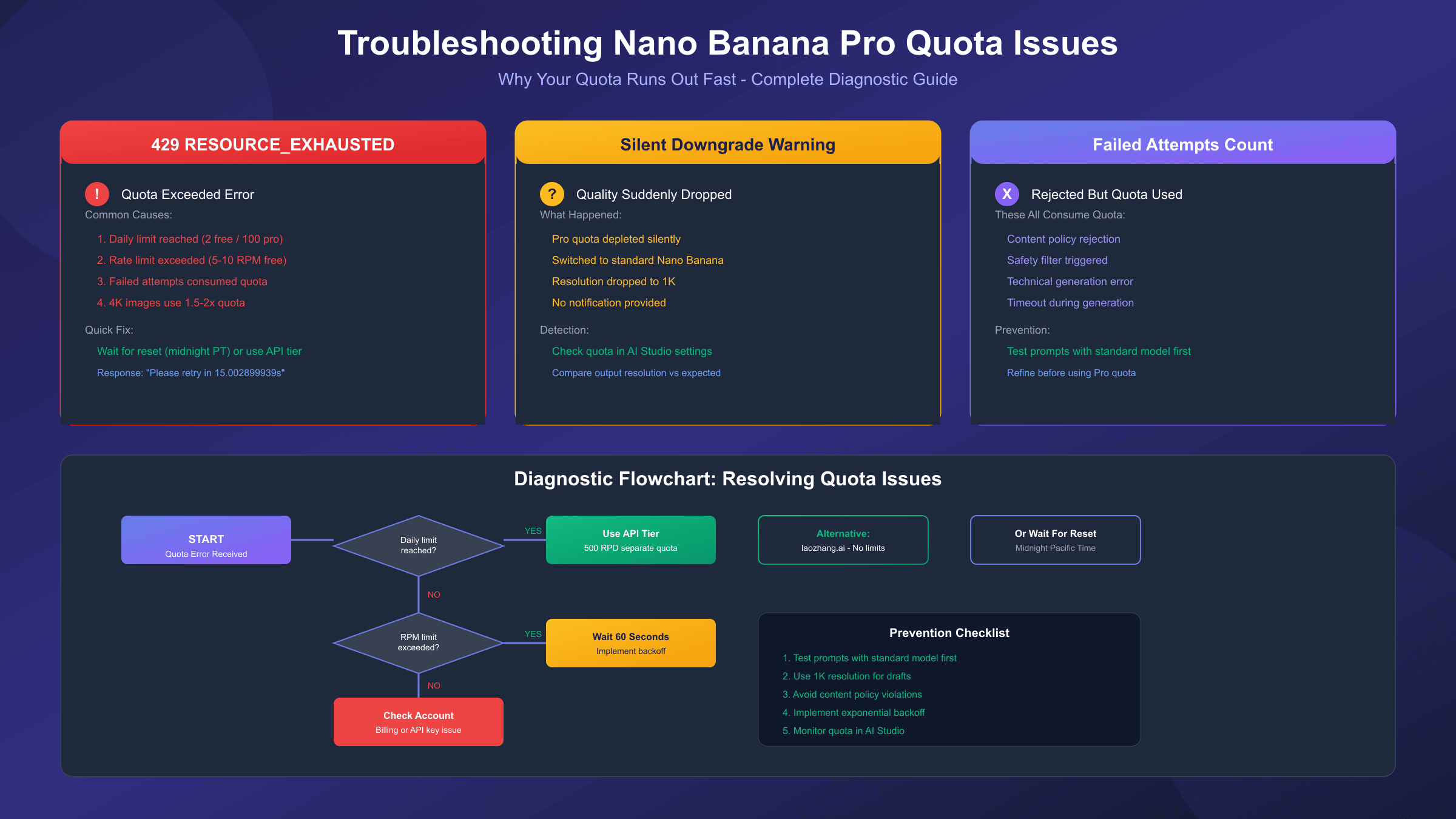
Why Your Quota Runs Out Fast: Troubleshooting Guide
Many users report exhausting their quota faster than expected, often before generating the number of images their tier supposedly allows. Several mechanics explain this discrepancy, and understanding them helps prevent wasted generations.
Failed Attempts Count Against Your Quota
This is the most frustrating reality of Nano Banana Pro limits: every generation attempt consumes quota regardless of outcome. If your prompt triggers a content policy rejection, that's a lost image. If the system encounters a technical error mid-generation, that counts too. With only 2 daily attempts on free tier, a single poorly-worded prompt can waste 50% of your capacity.
The solution involves prompt refinement before submitting. Use standard Nano Banana (which has higher limits) for testing prompt concepts, then switch to Pro mode only for final generations. Alternatively, test prompts via the API where you have 500 daily requests to experiment with.
Resolution Multiplier Effect
While not officially documented, community testing suggests higher resolution outputs may consume more quota. Generating a 4K image reportedly costs 1.5-2x the quota of a 1K image on some tiers. For free tier users with just 2 images, requesting maximum resolution might effectively reduce your capacity to 1 high-quality generation.
Conservative approach: request standard resolution during ideation, reserve 4K requests for final production assets where the quality difference justifies the quota cost.
The Silent Downgrade Problem
When your Nano Banana Pro quota depletes, Google automatically switches you to standard Nano Banana without notification. You'll continue generating images, but at significantly lower quality. Many users don't notice the switch until reviewing outputs later—discovering their "Pro" images are actually 1K standard generations.
Monitor your quota status in Google AI Studio or the Gemini app settings. If you notice quality degradation, check whether you've been downgraded and either wait for reset or upgrade your tier.
429 Error Handling
The HTTP 429 "Resource Exhausted" error indicates you've hit a limit. The response typically includes retry timing: "Please retry in 15.002899939s" provides the exact wait duration. Implementing proper error handling with exponential backoff improves application stability:
hljs pythonimport time
import requests
def generate_with_retry(prompt, max_retries=3):
for attempt in range(max_retries):
response = requests.post(API_URL, json=payload)
if response.status_code == 200:
return response.json()
elif response.status_code == 429:
# Extract retry delay from response or use exponential backoff
wait_time = 2 ** attempt * 15 # 15s, 30s, 60s
print(f"Rate limited. Waiting {wait_time}s before retry...")
time.sleep(wait_time)
else:
raise Exception(f"API error: {response.status_code}")
raise Exception("Max retries exceeded")
8 Proven Workarounds to Get More Images
When standard tier limits feel restrictive, several legitimate strategies can extend your effective capacity. These range from maximizing existing allocations to leveraging alternative access methods.
1. Leverage the API Free Tier (500 Requests/Day)
The most powerful workaround requires minimal setup. Your Gemini API free tier operates independently from consumer app quotas, providing 500 daily requests versus just 2 in the app. Combined, free users can access up to 502 images daily—a 251x increase over app-only usage. Setup involves creating a Google AI Studio project and generating an API key, typically taking under 10 minutes.
2. Use Third-Party API Gateways
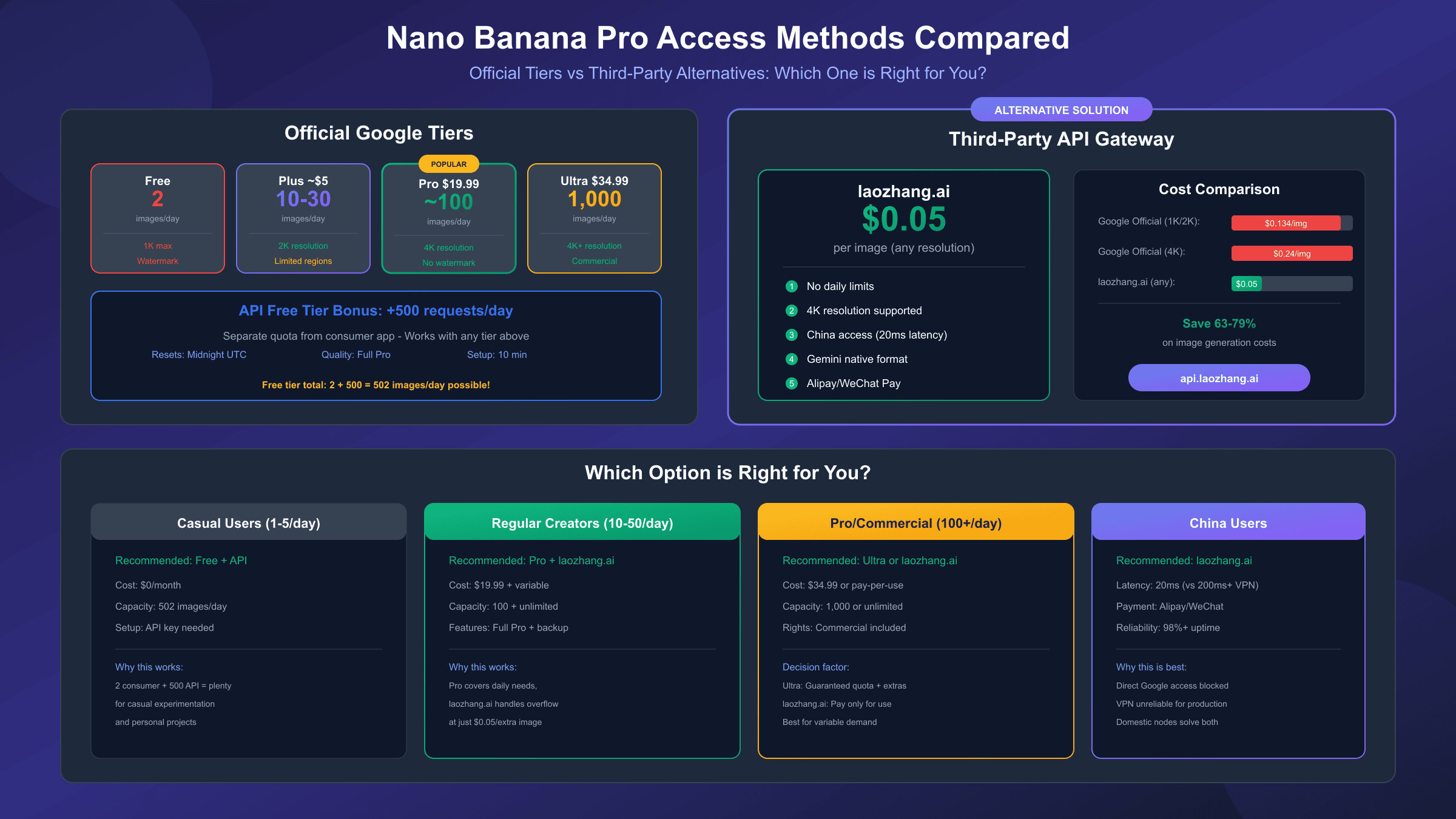
Services like laozhang.ai provide access to Nano Banana Pro through alternative infrastructure without Google's per-project limits. At approximately $0.05 per image with no daily caps, these gateways make sense for users needing consistent high-volume access. The trade-off involves using third-party infrastructure rather than direct Google access, though reputable services maintain high reliability.
hljs python# Example using laozhang.ai API gateway
import requests
import base64
API_KEY = "sk-your-laozhang-key" # From laozhang.ai
API_URL = "https://api.laozhang.ai/v1beta/models/gemini-3-pro-image-preview:generateContent"
headers = {
"Authorization": f"Bearer {API_KEY}",
"Content-Type": "application/json"
}
payload = {
"contents": [{
"parts": [{"text": "A cute cat in cyberpunk style, 4K quality"}]
}],
"generationConfig": {
"responseModalities": ["IMAGE"],
"imageConfig": {
"aspectRatio": "auto",
"imageSize": "4K" # Supports native 4K
}
}
}
response = requests.post(API_URL, headers=headers, json=payload, timeout=180)
# $0.05 per image, no daily limits
3. Google Flow Labs Trial
Google occasionally offers promotional trials providing free access to enhanced features. The Flow Labs trial includes 1,000 monthly AI credits—enough for hundreds of Nano Banana Pro generations depending on prompt complexity. Monitor Google's announcements and promotional emails for availability.
4. Strategic Timing Around Resets
Generate images just before midnight PT, then immediately after reset for another batch. This "compressed quota" approach effectively doubles your daily limit within a short window. Particularly useful for deadline-driven projects requiring burst capacity.
5. Combine Multiple Access Methods
Use consumer app quota for convenience, API quota for volume, and third-party services for overflow. Each system operates independently, allowing you to stack allocations across methods. A structured approach: casual browsing via app, development work via API, production batches via third-party gateway.
6. Optimize Prompts Before Generation
Refine prompts using standard Nano Banana (higher limits) before consuming Pro quota. Test concepts, iterate on descriptions, and finalize wording—then use Nano Banana Pro for the actual generation. This prevents wasting precious Pro quota on experimental attempts.
7. Manage Resolution Strategically
Request standard resolution for drafts and previews, reserve 4K for final assets. Given the potential resolution multiplier effect on quota consumption, this approach maximizes images per day while ensuring production outputs meet quality requirements.
8. Explore Partner Platform Access
Several third-party platforms integrate Nano Banana Pro with their own quota systems. InVideo, Higgsfield, and ImagineArt offer free or paid plans that include unlimited or high-volume access to the underlying model. These platforms add their own interfaces and features, which may suit specific workflows better than direct Google access.
Cost Analysis: Is Upgrading Worth It?
The upgrade decision depends heavily on your usage patterns, budget constraints, and whether alternatives meet your needs. Let's break down the economics across scenarios.
Cost Per Image by Tier
| Tier | Monthly Cost | Max Monthly Images | Cost Per Image (Max Usage) | Cost Per Image (50% Usage) |
|---|---|---|---|---|
| Free | $0 | 60 | $0 | $0 |
| Plus | ~$5 | ~600 | $0.008 | $0.017 |
| Pro | $19.99 | 3,000 | $0.007 | $0.013 |
| Ultra | $34.99 | 30,000 | $0.0012 | $0.0023 |
| API Paid | Variable | Variable | $0.039-0.134 | Per-image |
| laozhang.ai | Variable | Unlimited | $0.05 | $0.05 |
Break-Even Analysis
Free to Plus upgrade makes sense if you need more than 2 images daily but fewer than ~20. The $5 monthly cost breaks even at around 10-15 images/day versus API alternatives.
Free/Plus to Pro upgrade becomes economical when you need 30+ images daily consistently. Below that threshold, combining free tier with API access or third-party services often provides better value.
Pro to Ultra upgrade makes financial sense only for true power users generating 200+ images daily. At lower volumes, Pro's ~100-image limit suffices, and the Ultra premium doesn't justify the cost.
Decision Framework
| Daily Need | Recommended Tier | Reasoning |
|---|---|---|
| 1-2 images | Free + API | Sufficient with combined access |
| 3-20 images | Plus or Free + laozhang.ai | Budget-friendly options |
| 20-100 images | Pro | Sweet spot for regular users |
| 100-300 images | Pro + laozhang.ai | Hybrid approach saves cost |
| 300+ images | Ultra | Only tier guaranteeing high volume |
Hidden Costs to Consider
Subscription costs don't tell the complete story. Pro and Ultra tiers include additional benefits like cloud storage (2TB and 30TB respectively), YouTube Premium (Ultra), and enhanced access to other Gemini features. If you'd pay for these services independently, the effective image generation cost drops further.
Conversely, if you only need image generation, the bundled features represent unused value. Third-party alternatives like laozhang.ai offer pure image access without bundling overhead—at $0.05/image, generating 400 images monthly costs $20, comparable to Pro subscription but without the feature lock-in.
Third-Party Alternatives: Bypassing Official Limits
When Google's official quotas prove insufficient, third-party API gateways offer viable alternatives with different trade-off profiles. These services proxy requests through their infrastructure, often providing enhanced limits, simplified billing, and additional features.
laozhang.ai: Detailed Guide
laozhang.ai aggregates multiple AI models including Nano Banana Pro through a unified API interface. The service offers several advantages for users facing quota limitations:
Pricing: $0.05 per image regardless of resolution (4K supported), representing approximately 63% savings compared to Google's official $0.134 per image at standard resolution. No daily limits apply—you can generate thousands of images limited only by your balance.
Technical compatibility: The platform supports both Gemini native format (recommended for full 4K parameter access) and OpenAI-compatible format for easier integration with existing codebases. The native endpoint /v1beta/models/gemini-3-pro-image-preview:generateContent provides complete feature parity with direct Google access.
Regional access: For users in China where direct Google access faces network restrictions, laozhang.ai provides domestic nodes with approximately 20ms latency versus 200ms+ through VPN solutions. Payment supports Alipay and WeChat Pay, bypassing international card requirements.
Complete implementation example:
hljs pythonimport requests
import base64
import os
# laozhang.ai Nano Banana Pro API
API_KEY = os.environ.get("LAOZHANG_API_KEY") # From https://api.laozhang.ai
API_URL = "https://api.laozhang.ai/v1beta/models/gemini-3-pro-image-preview:generateContent"
headers = {
"Authorization": f"Bearer {API_KEY}",
"Content-Type": "application/json"
}
def generate_image(prompt, resolution="4K"):
payload = {
"contents": [{
"parts": [{"text": prompt}]
}],
"generationConfig": {
"responseModalities": ["IMAGE"],
"imageConfig": {
"aspectRatio": "auto",
"imageSize": resolution
}
}
}
response = requests.post(
API_URL,
headers=headers,
json=payload,
timeout=180
)
if response.status_code == 200:
result = response.json()
image_data = result["candidates"][0]["content"]["parts"][0]["inlineData"]["data"]
return base64.b64decode(image_data)
else:
raise Exception(f"Generation failed: {response.text}")
# Usage: $0.05 per image, no daily limits
image_bytes = generate_image("Professional headshot, studio lighting, 4K")
with open("headshot.png", "wb") as f:
f.write(image_bytes)
Reliability Considerations
Third-party services introduce dependency on infrastructure outside Google's direct control. Evaluate providers based on uptime guarantees, response time consistency, and business longevity. Established services like laozhang.ai maintain high availability through multi-node architectures and transparent status reporting.
For mission-critical applications, consider a hybrid approach: primary production through official Google access (ensuring direct relationship with the model provider), overflow and development work through third-party gateways. This balances reliability with cost efficiency.
Regional Access: Using Nano Banana Pro from China
Developers and users in China face unique challenges accessing Nano Banana Pro due to network restrictions and payment system incompatibilities. Understanding available solutions enables successful implementation despite geographical constraints.
The Access Problem
Google AI Studio and associated API endpoints operate on infrastructure subject to China's network filtering systems. Direct access attempts from Chinese IP addresses encounter DNS resolution failures, connection timeouts, SSL certificate errors, and intermittent availability unsuitable for production use.
Consumer VPN services demonstrate poor reliability because Google actively blocks datacenter IP ranges to prevent abuse. Success rates hover around 70-80% for VPN solutions, with average latency of 200ms+ degrading user experience compared to unrestricted regions.
Payment presents additional friction. Google's billing systems require international credit cards, excluding users reliant on domestic payment methods like Alipay and WeChat Pay.
API Gateway Solution
For developers requiring production-grade reliability, specialized API gateway services provide the most effective solution. laozhang.ai specifically addresses China access challenges:
Domestic connectivity: Requests route through nodes within China, achieving approximately 20ms latency—comparable to local services. This 10x improvement over VPN solutions enables real-time applications that would otherwise suffer unacceptable delays.
Local payment: Platform accepts Alipay and WeChat Pay, eliminating the international card requirement that blocks many Chinese users from direct Google access.
Reliability: Multi-node architecture achieves 98%+ availability, far exceeding the intermittent access possible through VPN connections.
The trade-off involves routing requests through third-party infrastructure rather than direct Google servers. For users prioritizing access reliability over direct provider relationship, this represents an acceptable compromise.
Alternative Approaches
Self-hosted VPS solutions in unrestricted regions (Hong Kong, Singapore, Japan) offer another path, routing API requests through your own infrastructure. This provides more control than commercial VPN services but requires technical setup and ongoing maintenance. Success rates reach approximately 67%, with 400ms+ latency still impacting user experience.
For non-production use cases, consumer VPN services may suffice despite their limitations. Test thoroughly before relying on VPN access for any deadline-sensitive work.
FAQ and Recommendations
Frequently Asked Questions
Q: Why did my quota drop from 3 to 2 images per day?
Google reduced free tier limits in November 2025 citing "high demand" following the viral 3D figurine trend that strained infrastructure. The reduction applies globally to all free tier users.
Q: Do failed image generations count against my quota?
Yes. Any generation attempt—whether successful, rejected by content filters, or failed due to technical errors—consumes your daily allocation. Optimize prompts before submitting to avoid wasted attempts.
Q: Can I combine consumer app and API quotas?
Absolutely. These operate as entirely separate systems. Free users can access 2 images via the consumer app plus 500 via the API daily, for a total of 502 potential generations.
Q: When exactly does my quota reset?
Consumer app quotas reset at midnight Pacific Time. API quotas reset at midnight UTC. These differ by approximately 7-8 hours depending on daylight saving time.
Q: Is using multiple accounts to bypass limits against terms of service?
Creating multiple accounts specifically to circumvent rate limits violates Google's Terms of Service and risks account termination. Legitimate alternatives include upgrading tiers, using API access, or employing third-party services.
Q: What happens when my Pro/Ultra quota runs out during the day?
Unlike free tier, paid subscriptions don't silently downgrade to standard Nano Banana. Instead, you'll receive quota exhaustion errors until reset. The consistent quality is maintained, just with enforced limits.
Q: Can I carry over unused quota to the next day?
No. All quotas reset completely at their designated times without accumulation. Unused generations don't roll over.
Q: How does Nano Banana Pro compare to DALL-E 3 or Midjourney?
For pure photorealism, DALL-E 3 and Midjourney remain competitive. Nano Banana Pro excels in text rendering, character consistency, and value (especially via third-party access at $0.05/image). Many professionals use multiple tools, switching based on specific project needs.
Final Recommendations by User Type
Casual Users (1-5 images/day): Start with free tier combined with API access. The 502 combined daily limit far exceeds casual needs. Only upgrade if you specifically need features like human face generation or commercial rights.
Regular Creators (10-50 images/day): Pro subscription at $19.99/month offers the best balance of features and quota. Supplement with laozhang.ai for overflow needs or when Pro quota runs thin.
Professional/Commercial Users (100+ images/day): Ultra tier guarantees high-volume access with commercial rights included. For even higher volumes, combine Ultra with third-party services for cost optimization.
Developers Building Applications: Start with API free tier (500 RPD) for development. Migrate to paid API or third-party gateways for production based on volume requirements and cost sensitivity.
Users in China: Third-party gateways like laozhang.ai provide the most reliable access with domestic payment options. VPN solutions introduce too much latency and reliability variance for consistent workflows.
The Nano Banana Pro quota landscape continues evolving as Google balances infrastructure costs against user demand. Stay informed about tier changes, monitor your usage patterns, and maintain flexibility across access methods to ensure uninterrupted creative workflows regardless of how official limits shift.