Nano Banana Pro vs Sora 2: Complete Guide to Choosing the Right AI Creative Tool (2025)
Compare Nano Banana Pro and Sora 2 for AI creative work. Learn the key differences between Google image generation and OpenAI video synthesis, with pricing analysis, use case guidance, and workflow integration strategies.
Nano Banana Pro
4K-80%Google Gemini 3 Pro · AI Inpainting
谷歌原生模型 · AI智能修图

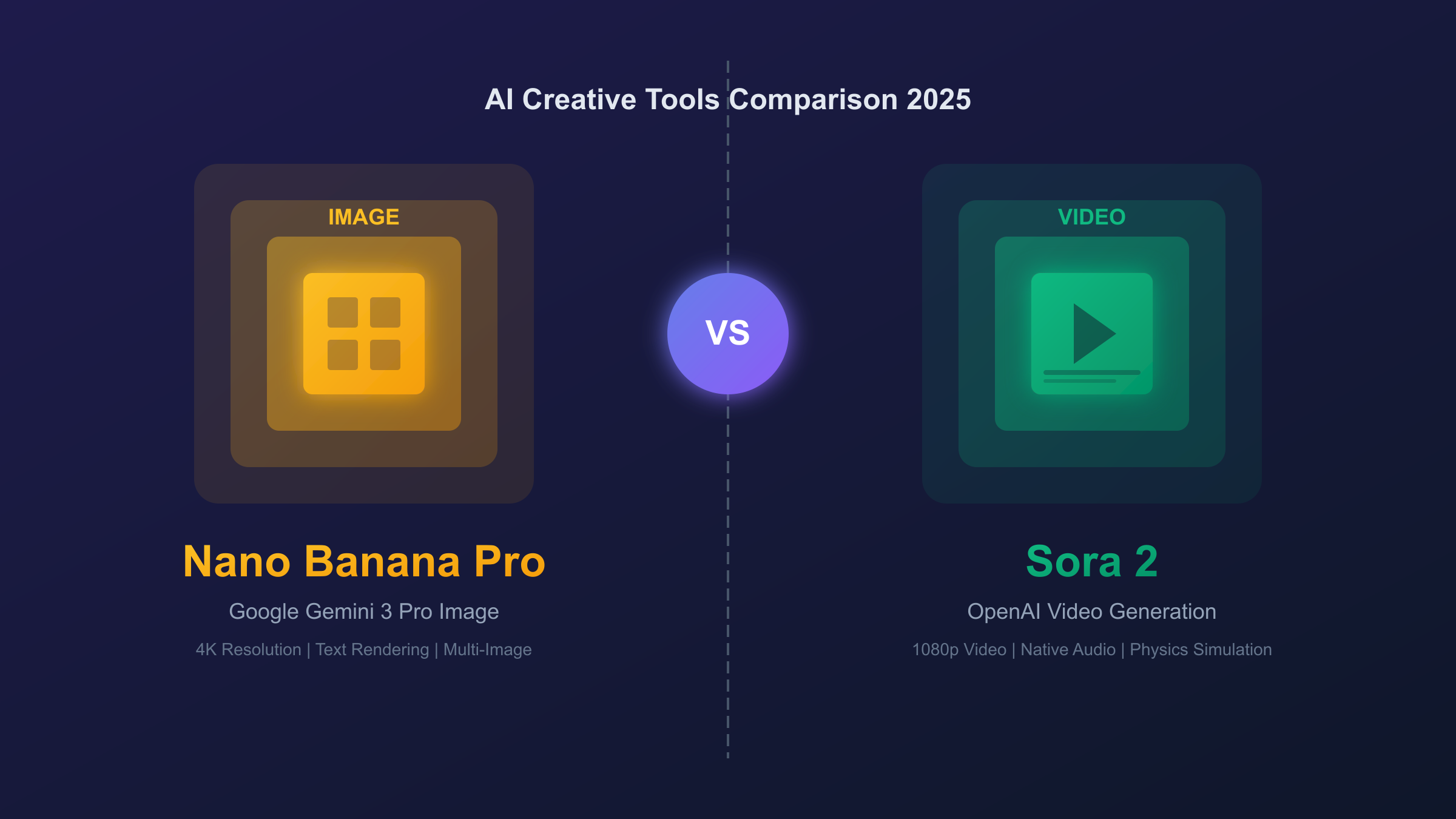
The AI creative tools landscape split dramatically in late 2025 when two powerhouse releases arrived within weeks of each other: Google's Nano Banana Pro for image generation and OpenAI's Sora 2 for video creation. Both represent the cutting edge of their respective domains, but they solve fundamentally different creative problems. Nano Banana Pro excels at producing photorealistic still images with unprecedented text rendering accuracy, while Sora 2 generates videos complete with synchronized audio, physics-accurate motion, and cinematic quality. Choosing between them—or understanding how to use both—requires clarity on what each tool does best.
This comparison guide breaks down everything creative professionals and developers need to know. We'll examine the technical capabilities, pricing structures, availability limitations, and ideal use cases for each tool. More importantly, we'll provide a practical decision framework and workflow strategies for integrating both into your creative pipeline. Whether you're a marketer planning a campaign, a developer building AI-powered applications, or a creator exploring these new possibilities, understanding the Nano Banana Pro vs Sora 2 divide will help you choose the right tool for each project.
| Quick Comparison | Nano Banana Pro | Sora 2 |
|---|---|---|
| Output Type | Static images (up to 4K) | Video + audio (up to 1080p) |
| Duration | N/A (still image) | 10-25 seconds |
| Text Rendering | Excellent (multilingual) | Poor |
| Audio | None | Native synthesis |
| Availability | Global | US/Canada only |
| Company | Google (Gemini 3) | OpenAI |
What is Nano Banana Pro?
Nano Banana Pro is Google DeepMind's flagship image generation model, officially named Gemini 3 Pro Image. The "Nano Banana" nickname originated from the AI community when its predecessor, Gemini 2.5 Flash Image, went viral in August 2025 for creating 3D figurine transformations that spread across social media. The "Pro" version launched on November 20, 2025, bringing substantial improvements in quality, text rendering, and professional creative controls.
Built on Gemini 3's advanced reasoning architecture, Nano Banana Pro doesn't just generate images—it thinks through complex compositions before rendering. The model understands spatial relationships, lighting physics, and factual accuracy in ways that distinguish it from earlier image generators. When you request an infographic with specific data, the model can verify that information through Google Search before visualizing it. When you describe a product shot with precise lighting requirements, it reasons through how light would actually behave before producing the image.
The model's standout capability is text rendering. Previous AI image generators struggled with legible text—letters would blur, words would scramble, and anything beyond a few characters became unreadable. Nano Banana Pro breaks this barrier. The model renders sharp, accurate text in multiple languages across various fonts and styles. This transforms its utility for practical applications: marketing materials with headlines, infographics with labeled data, product mockups with branding, posters with readable copy. Text that actually says what you intend opens an entire category of commercial use cases that weren't viable with earlier models.
Resolution flexibility gives Nano Banana Pro professional-grade output options. Standard generation produces 1K images (1024×1024 pixels) suitable for web use and quick iteration. Stepping up to 2K doubles the resolution for marketing-quality assets. For print and maximum detail requirements, 4K output (4096×4096) delivers assets that hold up under magnification. The multi-image composition feature accepts up to 14 reference images simultaneously, enabling brand consistency across variations and complex scene construction from multiple visual sources.
Platform availability spans consumer, professional, and developer tiers. Free users access the model through the Gemini app with approximately three daily generations. Paid subscribers receive higher quotas and watermark-free output. Developers access the model through Google AI Studio and the Gemini API, with enterprise deployment available through Vertex AI. Unlike some AI tools with geographic restrictions, Nano Banana Pro operates globally, making it accessible regardless of location.
What is Sora 2?
Sora 2 is OpenAI's second-generation video synthesis model, released on October 1, 2025, as the flagship product in their new Sora iOS app. While the original Sora model from February 2024 demonstrated the possibility of text-to-video generation, Sora 2 represents OpenAI's first attempt at a commercially viable, consumer-ready video creation tool. The model generates videos up to 25 seconds long at 1080p resolution, complete with synchronized audio—a combination no competitor has matched.
The native audio synthesis sets Sora 2 apart from every other video generation tool currently available. The model doesn't just create video; it simultaneously generates dialogue, sound effects, and ambient soundscapes that match the visual content. A scene of a basketball game includes the bounce of the ball, crowd reactions, and sneaker squeaks on hardwood. A forest scene comes with rustling leaves, bird calls, and distant streams. This integration eliminates an entire post-production step that previously required separate audio tools, making Sora 2 substantially more practical for quick content creation.
Physics simulation in Sora 2 exceeds what earlier video generators achieved. When a basketball player misses a shot, the ball rebounds realistically off the backboard. Water splashes behave like water. Objects fall with appropriate weight. This attention to physical accuracy gives Sora 2 outputs a cinematic believability that distinguishes them from the uncanny, physics-defying clips earlier models produced. The model maintains consistent world state across shots, keeping track of object positions, character appearances, and environmental conditions throughout a generated video.
The "Cameo" feature represents Sora 2's most distinctive capability. By observing a video of a person, the model can insert them into any generated scene with accurate representation of their appearance and voice. This works for humans, animals, or objects. The feature enables personalized video content at a scale previously impossible—imagine receiving a video message where you appear in a fantasy landscape or historical setting, rendered by AI from a few seconds of reference footage.
Current limitations significantly constrain who can use Sora 2. Access requires an iOS device, an invite code, and location in the United States or Canada. Video length caps at 10 seconds for free users and 25 seconds for Pro subscribers ($200/month). The model struggles with generating readable text in videos—signs and t-shirts often show gibberish. Complex logical sequences beyond 3-4 steps tend to break coherence. Small details like watches or earrings may vanish between shots in longer videos. OpenAI has indicated plans to expand availability but hasn't provided specific timelines.
Feature-by-Feature Comparison
Understanding the specific capabilities of each tool reveals when to use which. This section breaks down the key features where Nano Banana Pro and Sora 2 differ most significantly.
Output Type and Resolution
The fundamental difference is static versus motion. Nano Banana Pro produces still images at resolutions up to 4096×4096 pixels (4K). Every output is a single frame—perfect for thumbnails, posters, product shots, and social media images. Sora 2 produces video at up to 1080p resolution with durations from a few seconds to 25 seconds maximum. The video includes motion, environmental animation, and synchronized audio.
This isn't a quality hierarchy—it's a format choice. A 4K still image contains more visual detail per frame than a 1080p video frame, but video provides temporal dimension that still images cannot. Choose based on whether your output needs motion or maximum resolution.
Text Rendering Accuracy
Text handling represents perhaps the starkest contrast between these tools. Nano Banana Pro excels at rendering accurate, legible text across multiple languages. Headlines, product names, diagram labels, and even paragraphs of body text generate cleanly. This capability makes the model viable for marketing assets, infographics, educational materials, and any application requiring text within images.
Sora 2, like most video generation models, struggles with text. Signs, t-shirts, documents, and any surface that should display readable text typically show gibberish, scrambled letters, or blurred characters. If your video requires readable text, plan to add it in post-production using traditional editing tools. The model's audio synthesis partially compensates—voice-over can convey information that would otherwise appear as on-screen text.
Audio Capabilities
Nano Banana Pro generates only visual output. If you need audio alongside an image—a product demo video, a podcast thumbnail with accompanying audio, or any multimedia experience—the audio must come from a separate source.
Sora 2 generates synchronized audio natively. Dialogue, sound effects, background ambience, and music all generate alongside the video without additional tools. A coffee shop scene includes the clinking of cups and murmur of conversation. An action sequence includes appropriate impact sounds and motion effects. This integration dramatically reduces production time for video content but introduces a limitation: you have less control over audio than you would with traditional sound design.
Multi-Image Input
Nano Banana Pro accepts up to 14 reference images in a single prompt. This enables sophisticated composition tasks: maintaining brand consistency across variations, blending elements from multiple sources, ensuring character consistency across a series, or constructing complex scenes from discrete visual references. The model uses all uploaded references to inform its generation, producing outputs that intelligently combine specified elements.
Sora 2 supports image-to-video generation, taking a single still image and animating it into video. This bridges the gap between static and motion content but doesn't offer the multi-reference composition flexibility of Nano Banana Pro. The workaround involves creating your perfect still image first (potentially with Nano Banana Pro), then animating it with Sora 2.
Platform Availability
Nano Banana Pro operates globally through multiple access points: the Gemini app for consumers, Google AI Studio for developers, Vertex AI for enterprises, and integrations with tools like Adobe Firefly. No geographic restrictions limit access, and the service is available across web, mobile, and API channels.
Sora 2 currently restricts access to iOS users in the United States and Canada who have received invites. The service experienced demand-driven outages during its initial launch, and OpenAI has not announced expansion timelines. This geographic and platform limitation significantly affects which creators can currently use the tool, regardless of their willingness to pay.
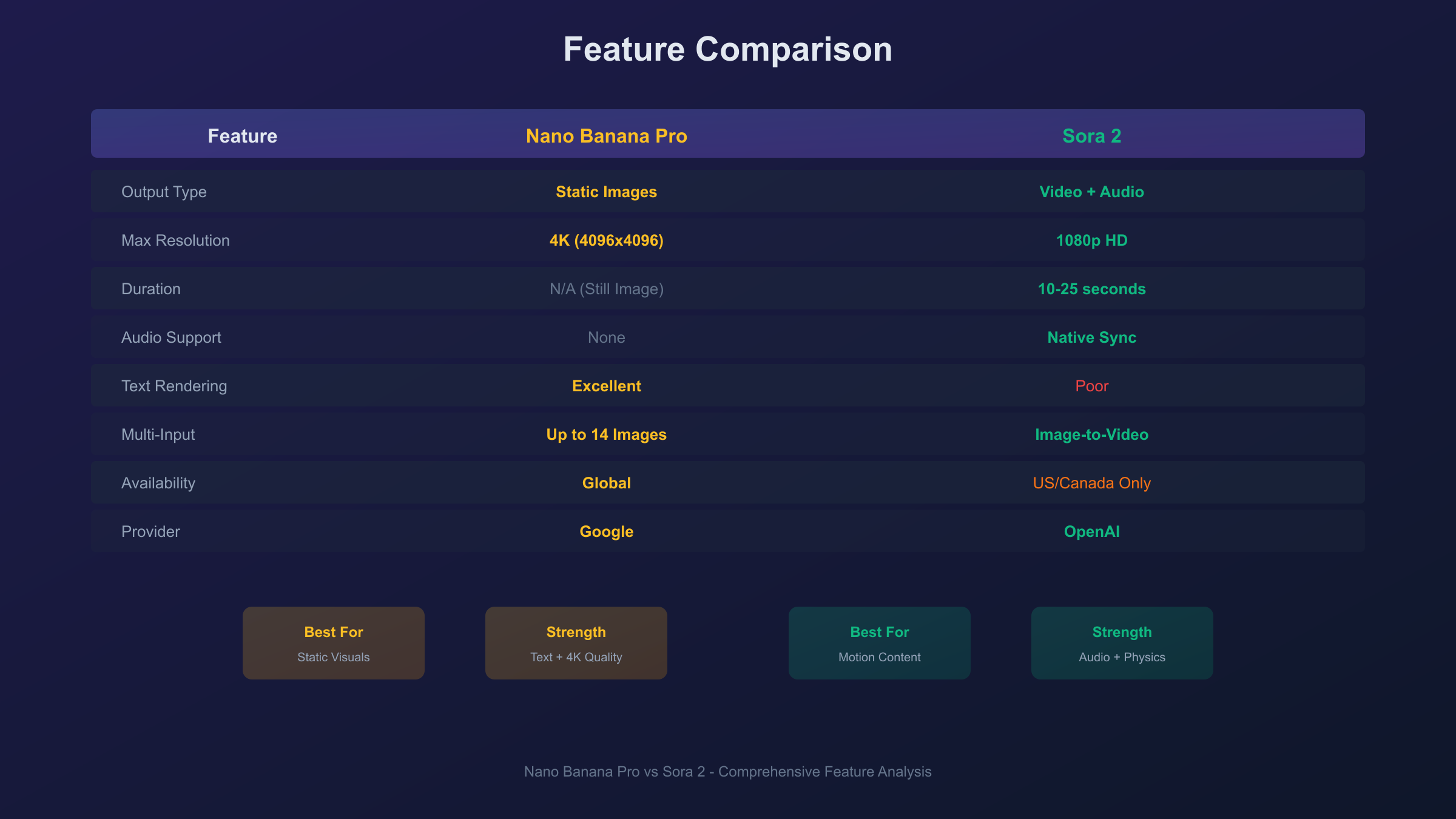
| Feature | Nano Banana Pro | Sora 2 |
|---|---|---|
| Maximum Resolution | 4K (4096×4096) | 1080p |
| Video Duration | N/A | 10-25 seconds |
| Text Rendering | Excellent | Poor |
| Audio Output | None | Native synthesis |
| Reference Images | Up to 14 | Single (image-to-video) |
| Geographic Access | Global | US/Canada only |
| Platform | Web, API, Mobile | iOS only |
| Thinking/Reasoning | Yes | Limited |
Pricing Analysis
Understanding the cost structure of each tool helps plan budgets for creative projects. Both tools offer free tiers with limitations and paid options for professional use.
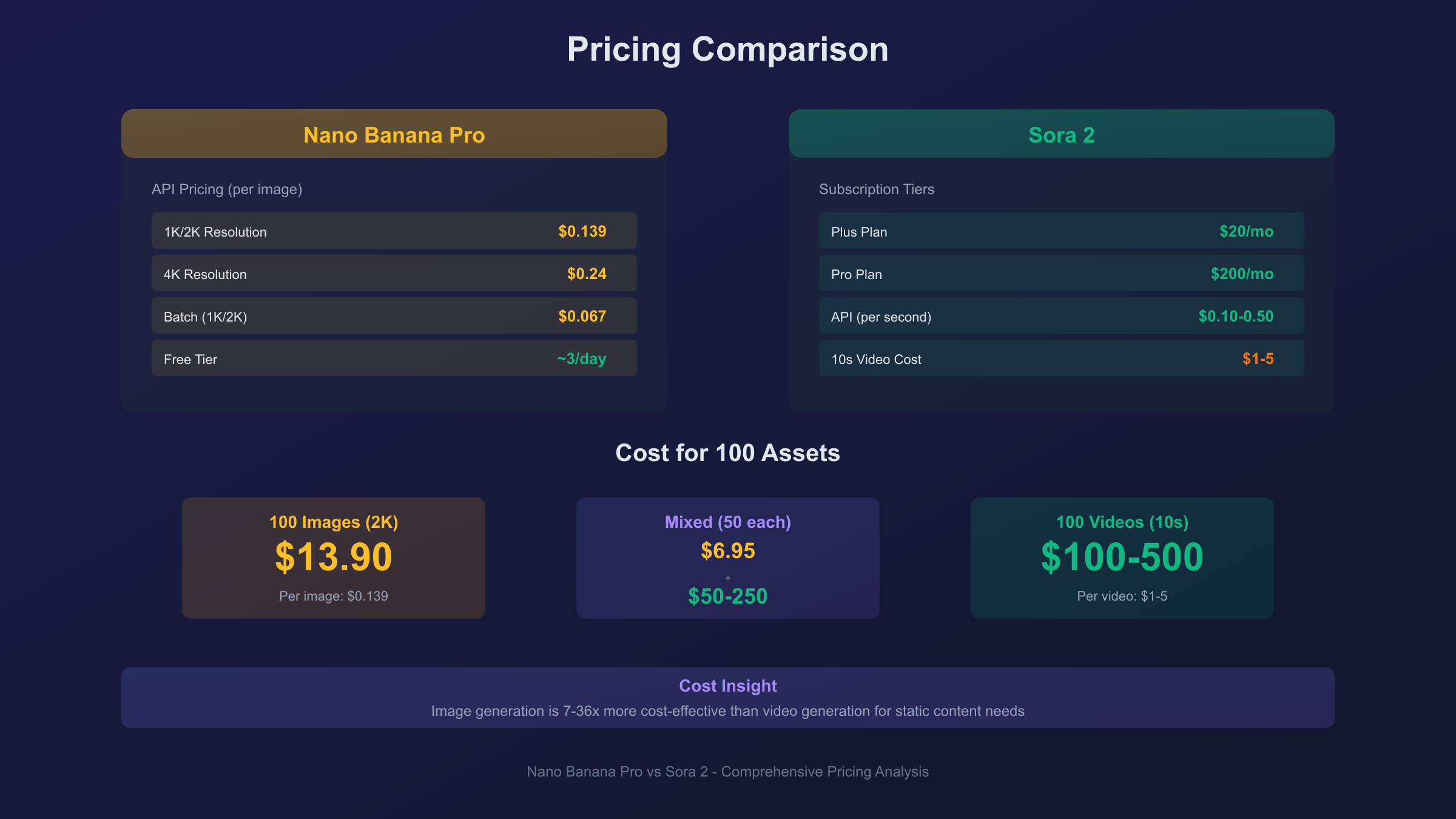
Nano Banana Pro Pricing
Google structures Nano Banana Pro pricing around subscription tiers and API usage.
Consumer Access:
- Free tier: Approximately 3 image generations per day through the Gemini app at 1K resolution with visible watermark
- Google AI Pro ($19.99/month): Increased quota, faster generation
- Google AI Ultra ($249/month): Highest quota, no visible watermark
API Pricing:
- Standard API: $0.139 per image at 1K/2K resolution, $0.24 per image at 4K
- Batch API (for volume): $0.067 per image at 1K/2K, $0.12 per image at 4K
- Token basis: 1K/2K images use 1,120 tokens; 4K uses 2,000 tokens
Developer Credits:
- New Google Cloud users receive $300 in free credits applicable to Gemini API usage
- At standard rates, $300 enables approximately 2,240 image generations
Sora 2 Pricing
OpenAI's Sora 2 pricing integrates with their ChatGPT subscription tiers.
Subscription Access:
- Free tier: Invite-only access with approximately 10-second video limit at 720p, subject to capacity constraints
- ChatGPT Plus ($20/month): Limited Sora 2 access, specific allocations unclear
- ChatGPT Pro ($200/month): Priority access, up to 25-second videos at 1080p, no watermark
Add-On Purchases:
- Bundle of 10 extra video generations: $4.00 (for users who exhaust daily quota)
API Pricing:
- Official rate: $0.10 to $0.50 per second of video, depending on resolution and model variant
- Per-video cost: Approximately $1 to $5 for a 10-second video
Cost Comparison for Projects
Consider a marketing campaign requiring 100 creative assets:
| Scenario | Nano Banana Pro | Sora 2 |
|---|---|---|
| 100 images (2K) | $13.90 (API) | N/A |
| 100 videos (10s) | N/A | $100-500 (API) |
| 50 images + 50 videos | $6.95 + N/A | N/A + $50-250 |
For high-volume production needs, third-party API aggregators offer reduced rates. Services like laozhang.ai provide access to both Nano Banana Pro and Sora 2 models at rates often 50-70% below official pricing. This approach suits developers and businesses running production workloads where per-asset costs compound significantly.
Cost Optimization Strategies
For Nano Banana Pro:
- Use Batch API for volume work (50% savings over standard API)
- Generate at 1K for drafts, reserve 4K for final assets
- Leverage $300 GCP credits for initial development
For Sora 2:
- Start with shorter clips (10 seconds) during iteration
- Use ChatGPT Pro subscription for predictable monthly costs
- Consider third-party access for production volumes
Use Case Decision Guide
Choosing between Nano Banana Pro and Sora 2 depends on your specific creative requirements. This decision matrix helps match tools to common scenarios.
Marketing Campaigns
Choose Nano Banana Pro when:
- Creating banner ads, social media images, or display advertising
- Producing product photography or hero images
- Designing infographics or data visualizations
- Generating marketing materials with headlines or text overlays
- Building assets for print materials
Choose Sora 2 when:
- Creating video ads for social platforms
- Producing promotional clips with audio
- Generating dynamic content for video-first platforms (TikTok, Reels)
- Making announcement videos or trailers
Use both when:
- Developing integrated campaigns requiring static and video assets
- Creating thumbnail images alongside promotional videos
- Building brand presence across multiple format types
Social Media Content
Nano Banana Pro excels for:
- Instagram feed posts
- LinkedIn carousels
- Twitter/X images
- Pinterest pins
- Facebook cover images
Sora 2 excels for:
- TikTok videos
- Instagram Reels
- YouTube Shorts
- Story content with motion
The platform format dictates the choice: image-first platforms favor Nano Banana Pro; video-first platforms favor Sora 2.
Product and E-commerce
Nano Banana Pro dominates for:
- Product photography with controlled lighting
- Lifestyle context images
- Catalog assets at various angles
- Marketing images with product names visible
- Before/after comparisons
Sora 2 offers limited utility for e-commerce unless you need product demo videos. Even then, text readability issues mean product names and pricing may need post-production addition.
Educational and Informational Content
Nano Banana Pro suits:
- Diagrams and technical illustrations
- Infographics with accurate text
- Educational posters
- Process flowcharts
- Labeled anatomical or scientific images
Sora 2 suits:
- Explainer videos with narration
- Concept demonstrations
- Animated process visualizations
- Scenario recreations
The text rendering difference matters significantly here. If your content requires readable labels, annotations, or data, Nano Banana Pro is currently the only viable option.
Creative and Artistic Projects
Both tools offer distinct creative possibilities:
Nano Banana Pro for:
- Digital art and illustrations
- Concept art and character design
- Style experimentation with reference images
- High-resolution prints
Sora 2 for:
- Short films and narrative clips
- Music video elements
- Animated artwork
- Cinematic mood pieces
Artists often use both tools in sequence—developing visual concepts in Nano Banana Pro, then animating selected pieces with Sora 2.
Workflow: Using Both Tools Together
The most powerful creative workflows combine both tools, leveraging their complementary strengths. Here's how to integrate Nano Banana Pro and Sora 2 into a unified pipeline.
The Image-First Video Pipeline
-
Concept Development (Nano Banana Pro): Generate multiple variations of your key visual. Use the multi-image input feature to maintain style consistency. Iterate quickly at 1K resolution until you achieve the desired composition.
-
Asset Refinement (Nano Banana Pro): Upscale your selected concept to 2K or 4K. Add any text elements, branding, or detailed annotations that need legibility. This becomes your hero still image and your video source.
-
Motion Addition (Sora 2): Use image-to-video generation to animate your refined still. The visual style, composition, and even text (where visible) carry forward from your carefully crafted source image.
-
Audio Enhancement (Sora 2): Let Sora 2's native audio synthesis add appropriate sound, or export the video and add custom audio in editing software for more control.
Campaign Asset Generation
For a product launch requiring multiple asset types:
-
Hero Image: Generate with Nano Banana Pro at 4K, including product name and tagline with perfect text rendering.
-
Social Variants: Create aspect ratio variations (1:1 for Instagram, 9:16 for Stories, 16:9 for YouTube) using Nano Banana Pro's flexible output options.
-
Video Announcement: Feed the hero image into Sora 2 to create an animated reveal video with matching audio.
-
Thumbnail Consistency: Use the same Nano Banana Pro generation for video thumbnails, ensuring brand consistency across static and motion content.
Brand Consistency Strategy
Maintaining visual identity across AI-generated content requires deliberate workflow design:
-
Reference Image Library: Create a set of brand reference images (logos, color swatches, style examples) to upload with every Nano Banana Pro generation.
-
Style Anchor: Generate an initial "style anchor" image that captures your desired aesthetic. Use this as a reference for all subsequent generations.
-
Cross-Tool Continuity: When moving from Nano Banana Pro to Sora 2, use your style anchor image as the source for video generation, carrying visual DNA between tools.
-
Prompt Templates: Develop consistent prompt structures that include brand-specific terminology, color references, and style descriptors to maintain coherence across hundreds of generations.
Limitations and Workarounds
Both tools have significant constraints. Understanding these limitations—and knowing how to work around them—determines productive use.
Nano Banana Pro Limitations
No motion or audio: Static images cannot be animated within the tool. Workaround: Use Sora 2's image-to-video feature or dedicated animation tools to add motion to Nano Banana Pro outputs.
Thinking mode latency: Complex prompts with reasoning requirements take longer to generate. Workaround: Use thinking mode for final assets; iterate with standard mode for speed during concept development.
Hands and fine details: Like all current image generators, Nano Banana Pro occasionally produces anatomical errors in hands, fingers, and small accessories. Workaround: Frame compositions to minimize visible hands, or regenerate problematic outputs. For critical work, plan for touch-up in editing software.
Subscription cost for high volume: API costs compound for production workloads. Workaround: Use Batch API for 50% savings, or access through aggregators like laozhang.ai for reduced per-image costs.
Sora 2 Limitations
Geographic restriction: Only available in US and Canada on iOS. Workaround: No current workaround exists for the geographic restriction. International users must wait for expansion or access through third-party providers who offer API access.
Video length caps: Maximum 25 seconds even for Pro subscribers. Workaround: Create multiple shorter clips and edit together in post-production. Plan content in sequences rather than single long takes.
Text rendering failures: Signs, documents, and text surfaces show gibberish. Workaround: Add text in post-production using video editing software. Avoid prompts that require readable text in frame.
Audio generation inconsistency: Some reports indicate 75% audio failure rate for certain prompt types. Workaround: Generate without audio requirements, then add audio separately. Or regenerate until audio produces correctly.
Capacity constraints: High demand causes service outages and queue delays. Workaround: Generate during off-peak hours. Build buffer time into production schedules.
Invite-only access: Requires invitation to create account. Workaround: Apply through official channels and wait, or access via third-party API providers who already have allocation.
Cross-Tool Compatibility Issues
Resolution mismatch: Nano Banana Pro outputs up to 4K; Sora 2 limits to 1080p. Workaround: When using Nano Banana Pro images as Sora 2 input, downscale to match Sora 2's resolution limits for optimal results.
Style transfer inconsistencies: Visual style may shift when moving from image to video. Workaround: Use detailed prompts on both sides describing identical style parameters. Include style reference images when possible.
API Access and Integration
Developers building AI-powered applications need programmatic access to both tools. This section covers the technical integration path.
Nano Banana Pro API
Official Endpoint:
https://generativelanguage.googleapis.com/v1beta/models/gemini-3-pro-image-preview:generateContent
Python Example:
hljs pythonimport google.generativeai as genai
genai.configure(api_key="YOUR_API_KEY")
model = genai.GenerativeModel("gemini-3-pro-image-preview")
response = model.generate_content(
"A professional product photograph of wireless earbuds on white marble, "
"studio lighting, the text 'PRO AUDIO' visible on the case"
)
# Save the generated image
image = response.candidates[0].content.parts[0].inline_data
with open("output.png", "wb") as f:
f.write(image.data)
Key Configuration Options:
aspectRatio: "1:1", "16:9", "9:16", "4:3", etc.imageSize: "1K", "2K", or "4K" (uppercase required)responseModalities: ["IMAGE"] for image-only output
Sora 2 API
As of December 2025, Sora 2 API access remains limited and invitation-based. Official documentation indicates the following structure:
Endpoint:
https://api.openai.com/v1/video/generations
Expected Request Format:
hljs pythonimport openai
client = openai.OpenAI(api_key="YOUR_API_KEY")
response = client.video.generations.create(
model="sora-2",
prompt="A coffee cup on a wooden table, steam rising, morning light",
duration=10, # seconds
resolution="1080p"
)
# Handle video output
video_url = response.data[0].url
Note: Full API access has not rolled out broadly. Check OpenAI's platform documentation for current availability.
Simplified Multi-Model Access
For developers who need both image and video generation without managing multiple API integrations, aggregation services provide unified access. Through platforms that consolidate AI model access, you can call both Nano Banana Pro and Sora 2 through a single API endpoint with consistent authentication. This approach simplifies development, often reduces costs, and provides fallback options if any single provider experiences outages.
Frequently Asked Questions
Can Nano Banana Pro generate video?
No, Nano Banana Pro is strictly an image generation model. It produces still images at resolutions up to 4K. For video, use Sora 2 or consider feeding Nano Banana Pro outputs into Sora 2's image-to-video feature.
Can Sora 2 generate high-resolution images?
No, Sora 2 generates video at up to 1080p resolution. Individual video frames cannot match the detail of a dedicated 4K image generator like Nano Banana Pro.
Which is better for text in images?
Nano Banana Pro is significantly better. It renders accurate, multilingual text across various fonts and styles. Sora 2 struggles with text legibility and typically produces garbled characters.
Is Sora 2 available outside the US?
Not currently. As of December 2025, Sora 2 access requires iOS devices in the United States or Canada. OpenAI has announced intentions to expand but has not provided timelines.
How do the free tiers compare?
Nano Banana Pro free tier: approximately 3 images per day at 1K resolution with watermark. Sora 2 free tier: invite-only access with approximately 10-second video limit at 720p, subject to capacity.
Nano Banana Pro's free tier is more accessible (no invite needed, available globally) but produces fewer assets.
Can I use Nano Banana Pro images as Sora 2 input?
Yes, this is an effective workflow. Generate and refine your still image in Nano Banana Pro, then use Sora 2's image-to-video feature to animate it.
Which costs less for production work?
Nano Banana Pro costs less per asset ($0.07-0.24 per image) compared to Sora 2 ($1-5 per 10-second video). However, they serve different purposes—compare costs only when either tool could satisfy your requirement.
Do both tools work with third-party API services?
Yes, many API aggregation services provide access to both models, often at rates below official pricing. This approach can reduce costs and simplify integration for developers working with multiple AI models.
Which should I learn first?
If you work primarily with static marketing assets, product photography, or text-heavy content, start with Nano Banana Pro. If your focus is video-first platforms or you need motion content, prioritize Sora 2 (if you have access).
Will these tools replace traditional creative software?
Not entirely. Both tools generate raw assets that often benefit from refinement in traditional tools (Photoshop, Premiere, After Effects). Think of them as asset generators that accelerate the initial creation phase rather than end-to-end replacements.
Conclusion: Choosing Your Tool
The Nano Banana Pro vs Sora 2 decision ultimately reduces to a format question: do you need still images or video?
Choose Nano Banana Pro when:
- Your output is a static image
- Text accuracy matters (marketing materials, infographics, diagrams)
- You need resolutions above 1080p
- Global availability is required
- Lower per-asset cost matters
- You're working with multiple reference images
Choose Sora 2 when:
- Your output must be video with motion
- Audio integration adds value (ads, social clips)
- Physics-realistic animation matters
- You have US/Canada iOS access
- The $200/month Pro tier fits your budget
Use both when:
- Your campaigns span static and video formats
- You want to create stills first, then animate selectively
- Brand consistency across media types matters
- You're building a creative pipeline that scales
For most creative professionals and developers, the practical approach is gaining proficiency with both tools. Nano Banana Pro handles the still-image majority of creative needs—product shots, social images, marketing graphics, and any text-heavy content. Sora 2 addresses the growing demand for video-first content on platforms like TikTok and Instagram Reels, where motion and audio capture attention.
The most efficient workflow often combines both: perfect your key visual in Nano Banana Pro with its superior text rendering and resolution options, then feed that polished image into Sora 2 to add motion and audio for video derivatives. This pipeline leverages each tool's strengths while minimizing their limitations.
As both tools continue evolving—Nano Banana Pro likely gaining more dynamic capabilities, Sora 2 expanding global availability—the integration opportunities will only grow. Starting now with a clear understanding of each tool's role positions you to adapt as the AI creative landscape develops.