Sora 2 API: Complete Guide to Getting Access and Using OpenAI Video Generation API [2026]
Learn how to get official Sora 2 API access, understand pricing, write code examples in Python & JavaScript, and optimize costs. Complete developer guide with troubleshooting and alternative access options.
Nano Banana Pro
4K-80%Google Gemini 3 Pro · AI Inpainting
谷歌原生模型 · AI智能修图

The Sora 2 API represents OpenAI's most significant advancement in AI video generation, enabling developers to programmatically create richly detailed video clips with synchronized audio from text prompts or images. As of January 2026, OpenAI has made substantial policy changes that affect how developers can access and use this powerful capability, making it essential to understand the current requirements and best practices.
This comprehensive guide covers everything you need to know about the Sora 2 API: from obtaining official access through organization verification and subscription requirements, to understanding the pricing structure that starts at $0.10 per second for standard 720p video. You will learn how to write production-ready code in Python and JavaScript, choose between the sora-2 and sora-2-pro models based on your specific use case, and implement cost optimization strategies that can significantly reduce your video generation expenses.
Whether you are building a content creation platform, adding AI video capabilities to your marketing tools, or exploring video generation for creative projects, this guide provides the practical knowledge you need. We also address common challenges including content moderation errors, rate limit management, and alternative access options for developers in regions where OpenAI services are restricted. By the end of this article, you will have a clear roadmap from initial API access to production deployment.
What is Sora 2 API?
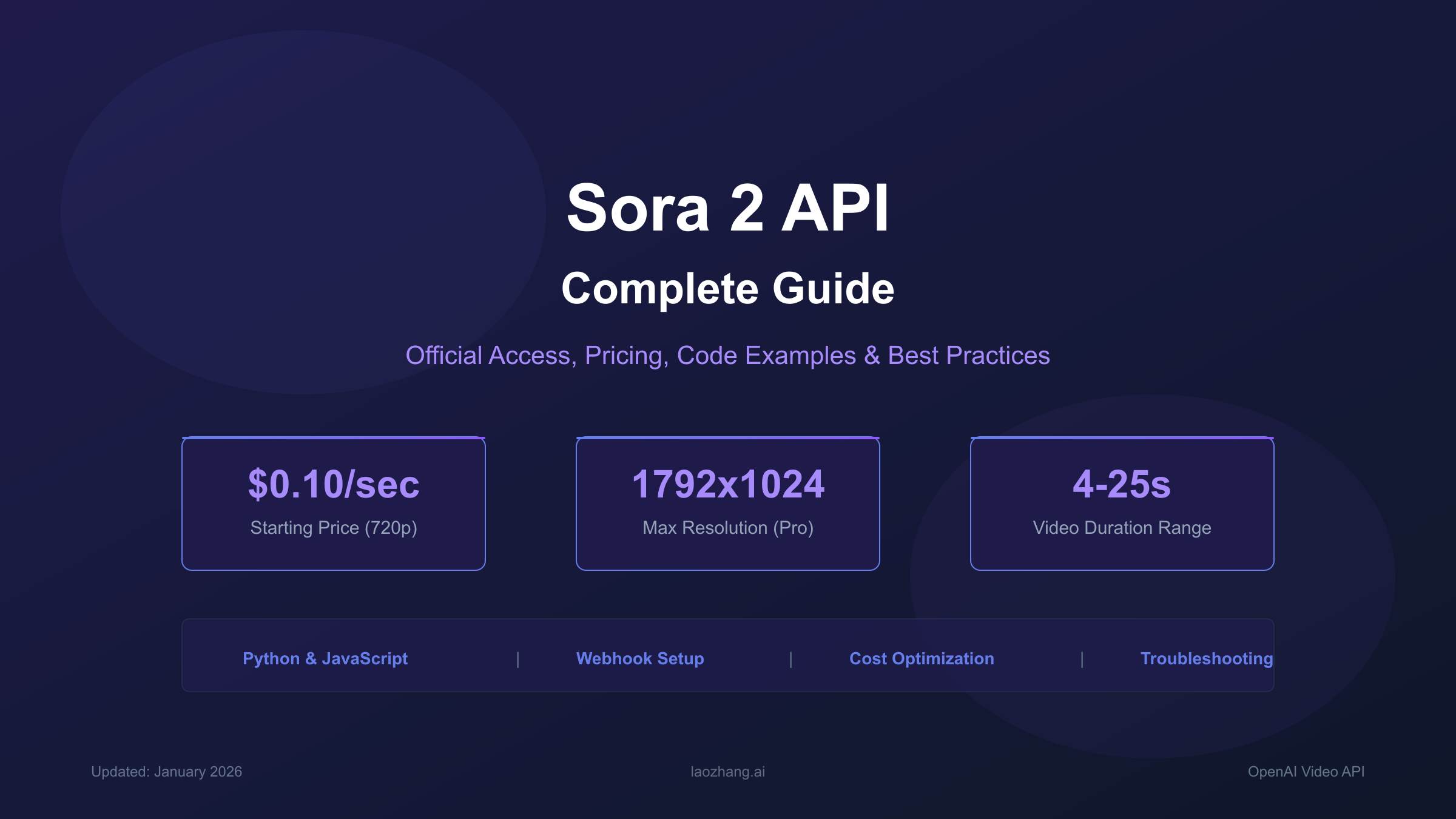
Quick Answer: Sora 2 API is OpenAI's video generation interface that creates high-quality videos with synchronized audio from text or image inputs. It supports 4-25 second clips at up to 1792×1024 resolution through two model variants:
sora-2for rapid prototyping andsora-2-profor production-quality output.
The Sora 2 API marks a fundamental shift in how developers can leverage AI for video creation. Unlike the web-based Sora interface available through sora.com, the API provides programmatic access that enables integration into applications, automation workflows, and production systems. This distinction is crucial for developers who need to generate videos at scale or embed video generation capabilities into their own products.
At its core, Sora 2 represents a text-to-video and image-to-video model that understands real-world physics, maintains temporal consistency across frames, and generates synchronized audio including dialogue, sound effects, and ambient sounds. The model can produce videos ranging from 4 to 25 seconds depending on the variant used, with resolutions spanning from 480p to 1792×1024 for the Pro model.
What sets Sora 2 apart from earlier video generation systems is its ability to handle multi-shot sequences while maintaining consistent characters, environments, and lighting across scene transitions. When you describe a basketball missing a shot, the ball bounces realistically off the backboard rather than exhibiting the physics violations common in earlier AI video systems. This level of coherence makes Sora 2 suitable for commercial applications where visual quality and realism are paramount.
The API exposes these capabilities through a straightforward REST interface with five primary endpoints for creating, monitoring, downloading, listing, and deleting videos. OpenAI has designed the system to handle the inherently asynchronous nature of video generation—a single render can take several minutes depending on resolution and server load—through both polling and webhook notification mechanisms.
How to Get Official API Access
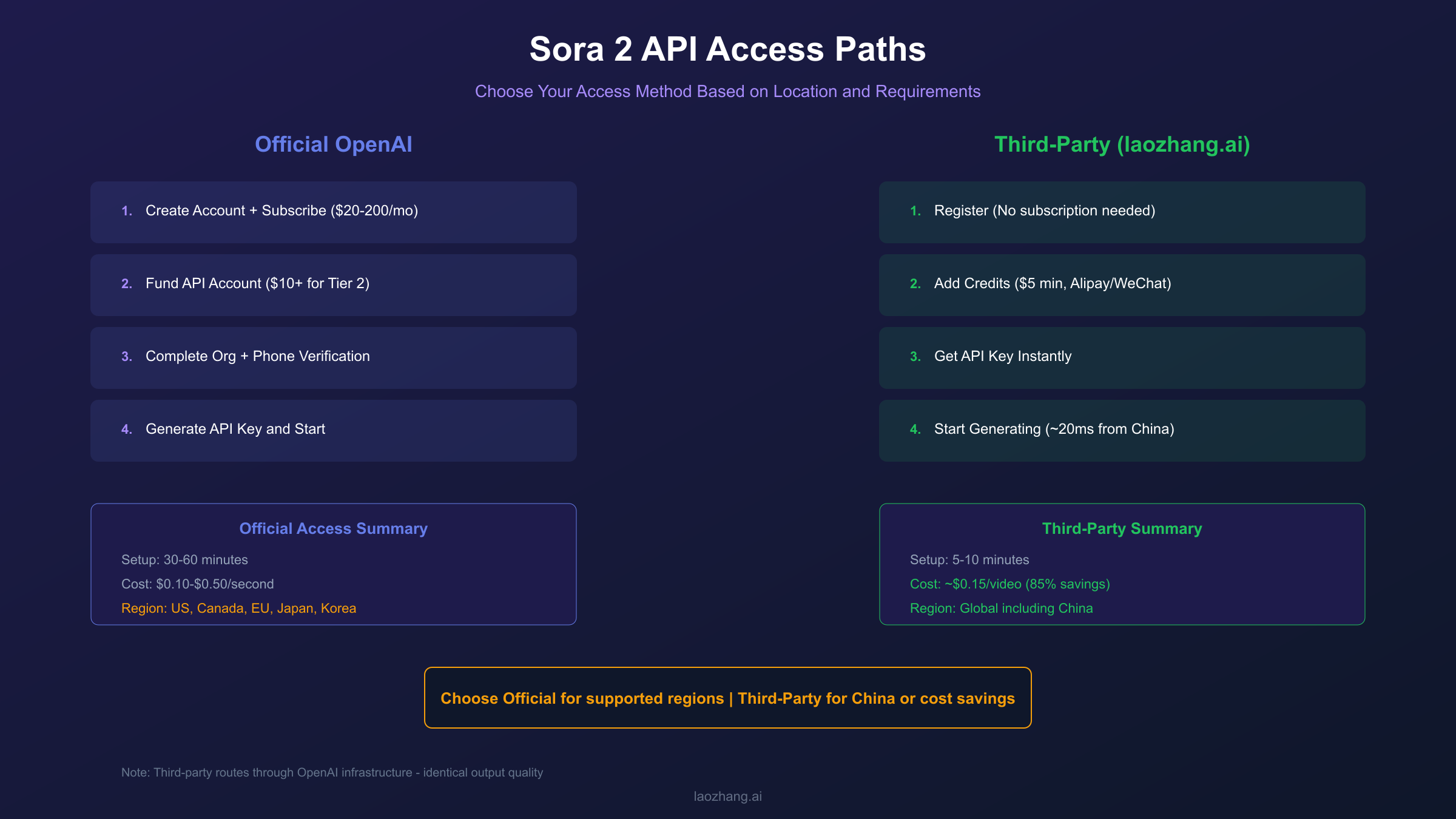
Quick Answer: Getting Sora 2 API access requires a ChatGPT Plus ($20/month) or Pro ($200/month) subscription, a minimum $10 API account top-up to reach Tier 2, organization verification through the OpenAI platform, and phone number verification as of January 7, 2026.
The path to Sora 2 API access involves several distinct requirements that must be completed in sequence. OpenAI has implemented these verification steps to ensure responsible use of the video generation technology while managing infrastructure capacity during the API preview period.
Step 1: Create an OpenAI Account and Subscribe
If you do not already have an OpenAI account, navigate to platform.openai.com and complete the registration process. For Sora 2 API access, you must have an active ChatGPT Plus or Pro subscription. The Plus tier at $20 per month provides basic access with 1,000 monthly credits, while the Pro tier at $200 per month offers 10,000 credits plus unlimited "Relaxed" mode generation during off-peak hours. As of January 10, 2026, free users can no longer access Sora for video generation—this restriction applies to both the web interface and API access.
Step 2: Fund Your API Account to Tier 2
API access requires reaching at least Tier 2 on OpenAI's usage tier system. This means adding a minimum of $10 to your API account through the billing settings at platform.openai.com/account/billing. Your tier automatically upgrades based on consistent usage and verified payment history. Higher tiers unlock better rate limits and priority processing, which becomes important when generating videos at scale.
Step 3: Complete Organization Verification
Navigate to platform.openai.com/settings/organization/general and click "Verify Organization." This process confirms your organization's identity and typically requires providing business information. If you encounter the error "your organization must be verified to use the model," this verification step is the solution. Access may take up to 15 minutes to propagate after verification completes, so plan accordingly when setting up your development environment.
Step 4: Phone Number Verification
Starting January 7, 2026, OpenAI requires phone number verification for all Sora 2 usage. This applies to both web interface access and API calls. Complete this verification through your account settings to ensure uninterrupted access to the video generation capabilities.
Step 5: Generate API Keys
Once all verifications are complete, navigate to platform.openai.com/api-keys and click "Create new secret key." Store this key securely—it provides full access to your account and cannot be retrieved after initial display. For production applications, use environment variables or a secrets management system rather than hardcoding the key in your source code.
The entire process typically takes 30-60 minutes assuming your payment method processes successfully. Some developers report that organization verification for new accounts can take longer during high-demand periods, so consider completing these steps well before you need to begin development.
API Reference: Endpoints & Parameters
Quick Answer: The Sora 2 API provides five core endpoints: POST
/v1/videos(create), GET/v1/videos/:id(status), GET/v1/videos/:id/content(download), GET/v1/videos(list), and DELETE/v1/videos/:id(remove). Key parameters include model, prompt, size, and seconds.
Understanding the API structure is essential for building reliable integrations. The Video API follows RESTful conventions and uses JSON for request and response bodies, with the exception of video download which returns binary MP4 data.
Core Endpoints
| Endpoint | Method | Purpose | Authentication |
|---|---|---|---|
/v1/videos | POST | Create new video generation job | Bearer token |
/v1/videos/:video_id | GET | Retrieve job status and progress | Bearer token |
/v1/videos/:video_id/content | GET | Download completed MP4 file | Bearer token |
/v1/videos | GET | List videos with pagination | Bearer token |
/v1/videos/:video_id | DELETE | Remove video from account | Bearer token |
/v1/videos/:video_id/remix | POST | Apply modifications to existing video | Bearer token |
Create Video Parameters
When calling POST /v1/videos, you can specify the following parameters:
| Parameter | Type | Required | Values | Description |
|---|---|---|---|---|
| model | string | Yes | "sora-2", "sora-2-pro" | Model variant to use |
| prompt | string | Yes | Text description | Creative direction for the video |
| size | string | No | "1280x720", "720x1280", "1792x1024", "1024x1792" | Output resolution |
| seconds | string | No | "4", "8", "12" (sora-2) or "10", "15", "25" (sora-2-pro) | Video duration |
| input_reference | file | No | Image file (multipart) | Starting frame for image-to-video |
The size parameter determines both resolution and aspect ratio. Standard sora-2 supports up to 1280×720 (landscape) or 720×1280 (portrait), while sora-2-pro extends to 1792×1024 or 1024×1792 for higher resolution output. Note that higher resolutions incur proportionally higher costs.
Response Status Values
Video generation is asynchronous, and the GET /v1/videos/:video_id endpoint returns status information:
| Status | Description | Next Action |
|---|---|---|
| queued | Job waiting in generation queue | Continue polling |
| in_progress | Video actively being generated | Continue polling; progress field may indicate percentage |
| completed | Generation finished successfully | Call content endpoint to download |
| failed | Generation encountered an error | Check error field for details |
Poll at reasonable intervals—every 10-20 seconds is appropriate. Implement exponential backoff if you receive rate limit responses to avoid account throttling.
Pricing, Credits & Rate Limits
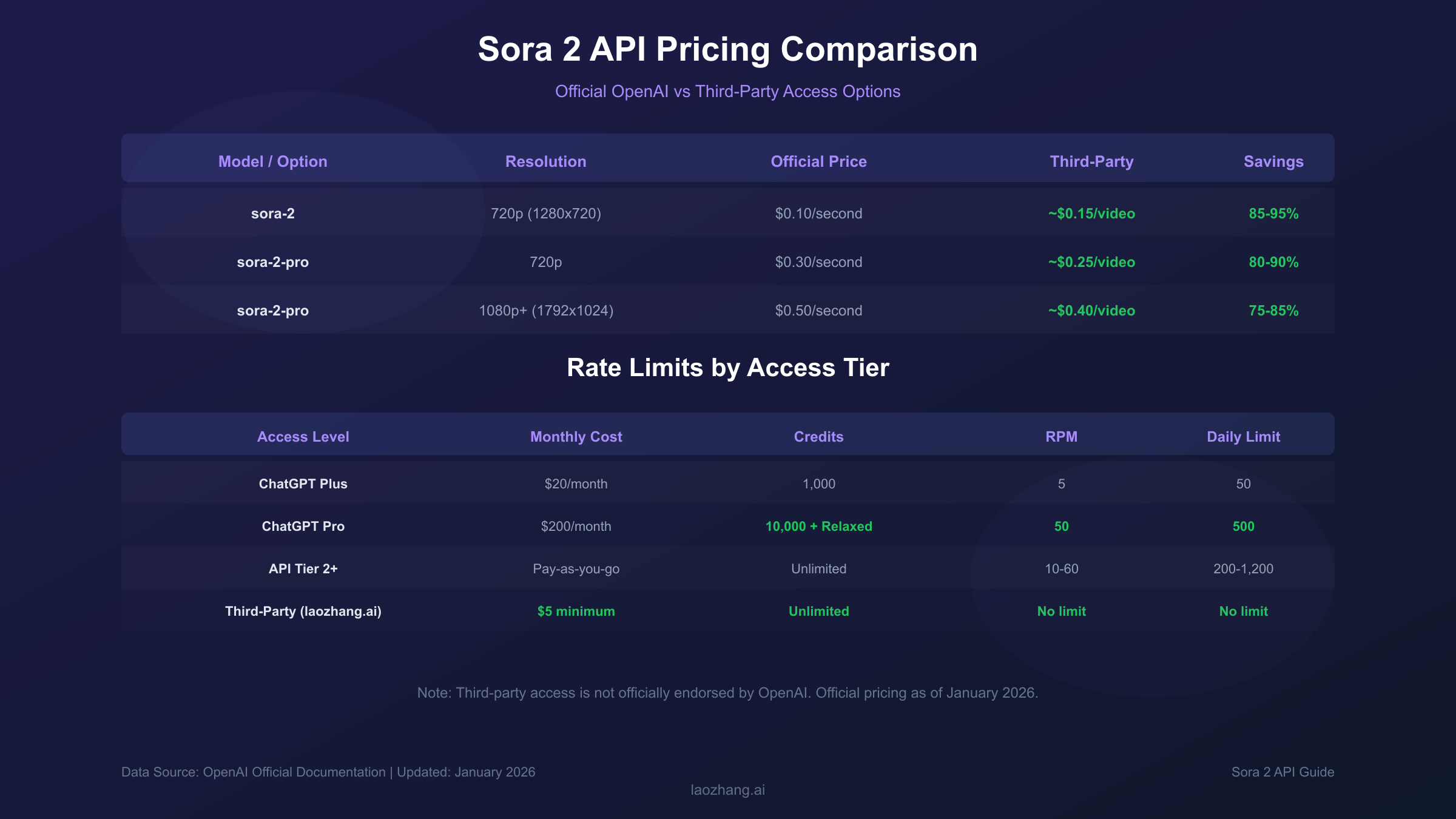
Quick Answer: Sora 2 costs $0.10/second at 720p, while Sora 2 Pro ranges from $0.30/second (720p) to $0.50/second (1080p+). ChatGPT Plus subscribers receive 1,000 monthly credits; Pro subscribers get 10,000 credits. Rate limits range from 5 RPM (Plus) to 50+ RPM (Pro/Enterprise).
Understanding the cost structure is critical for budgeting and architecture decisions. OpenAI uses a per-second billing model for Sora 2, which is more intuitive than token-based pricing used for text models. Your total cost depends on video duration, resolution, and model selection.
Official Pricing Table
| Model | Resolution | Cost per Second | 10-Second Video Cost |
|---|---|---|---|
| sora-2 | 720p | $0.10 | $1.00 |
| sora-2-pro | 720p | $0.30 | $3.00 |
| sora-2-pro | 1792×1024 | $0.50 | $5.00 |
For subscription-based access through ChatGPT Plus or Pro, credits are consumed based on resolution and duration:
| Resolution | Credits per Second | 5-Second Video |
|---|---|---|
| 480p | 4 credits | 20 credits |
| 720p | 16 credits | 80 credits |
| 1080p | 40 credits | 200 credits |
ChatGPT Plus provides 1,000 credits monthly, meaning you can generate approximately twelve 5-second 720p videos or fewer higher-resolution clips. Pro subscribers receive 10,000 credits plus unlimited "Relaxed" mode generation during overnight hours (10 PM - 6 AM PST), which processes jobs at lower priority but without credit consumption.
Rate Limits by Tier
| Access Level | Requests per Minute | Daily Limit | Queue Priority |
|---|---|---|---|
| ChatGPT Plus | 5 RPM | 50 requests | Standard |
| ChatGPT Pro | 50 RPM | 500 requests | Priority |
| API Tier 2 | 10 RPM | 200 requests | Standard |
| API Tier 3 | 30 RPM | 600 requests | Priority |
| API Tier 4+ | 60 RPM | 1,200 requests | Priority |
| Enterprise | 200+ RPM | Custom | Dedicated |
These limits apply to generation requests, not status polling. Design your application to respect these boundaries, implementing queuing mechanisms for batch processing scenarios.
Third-Party Pricing Comparison
For developers seeking lower costs or access from restricted regions, third-party API providers offer Sora 2 access at significantly reduced rates. Platforms like laozhang.ai provide access starting at approximately $0.15 per video—representing 85-95% savings compared to official per-second pricing. These services route requests through the same OpenAI infrastructure, meaning output quality is identical.
Important consideration: Third-party access is not officially endorsed by OpenAI and carries inherent risks including potential service interruptions if OpenAI changes authentication methods, possible Terms of Service implications, and lack of official support channels. For production applications with strict reliability requirements, official API access remains the recommended approach when available in your region.
Code Examples: Python & JavaScript
Quick Answer: Use the OpenAI Python SDK (pip install openai) or JavaScript SDK (npm install openai) with the client.videos.create() method. Video generation is asynchronous—poll the status endpoint or configure webhooks to know when your video is ready for download.
Implementing Sora 2 in your application follows a straightforward pattern: create a generation job, monitor its progress, and download the result. The following examples demonstrate production-ready patterns including error handling and status polling.
Python Implementation
First, install the OpenAI SDK and set up your environment:
hljs python# requirements.txt
openai>=1.51.0
python-dotenv>=1.0.0
hljs pythonimport os
import time
from openai import OpenAI
from dotenv import load_dotenv
load_dotenv()
client = OpenAI(api_key=os.getenv("OPENAI_API_KEY"))
def generate_video(prompt: str, model: str = "sora-2",
size: str = "1280x720", seconds: str = "8") -> str:
"""
Generate a video and return the video ID.
"""
response = client.videos.create(
model=model,
prompt=prompt,
size=size,
seconds=seconds
)
return response.id
def wait_for_completion(video_id: str,
poll_interval: int = 15,
max_wait: int = 600) -> dict:
"""
Poll until video generation completes or fails.
"""
elapsed = 0
while elapsed < max_wait:
status = client.videos.retrieve(video_id)
if status.status == "completed":
return {"success": True, "video_id": video_id}
elif status.status == "failed":
return {"success": False, "error": status.error}
time.sleep(poll_interval)
elapsed += poll_interval
return {"success": False, "error": "Timeout waiting for generation"}
def download_video(video_id: str, output_path: str) -> bool:
"""
Download completed video to local file.
"""
content = client.videos.retrieve_content(video_id)
with open(output_path, "wb") as f:
f.write(content)
return True
# Usage example
if __name__ == "__main__":
video_id = generate_video(
prompt="A golden retriever running through autumn leaves in slow motion, "
"warm afternoon sunlight, shallow depth of field, cinematic",
model="sora-2",
seconds="8"
)
print(f"Generation started: {video_id}")
result = wait_for_completion(video_id)
if result["success"]:
download_video(video_id, "output.mp4")
print("Video saved to output.mp4")
else:
print(f"Generation failed: {result['error']}")
JavaScript/Node.js Implementation
hljs javascriptimport OpenAI from 'openai';
import fs from 'fs';
const openai = new OpenAI({
apiKey: process.env.OPENAI_API_KEY
});
async function generateVideo(prompt, options = {}) {
const { model = 'sora-2', size = '1280x720', seconds = '8' } = options;
const response = await openai.videos.create({
model,
prompt,
size,
seconds
});
return response.id;
}
async function waitForCompletion(videoId, pollInterval = 15000, maxWait = 600000) {
const startTime = Date.now();
while (Date.now() - startTime < maxWait) {
const status = await openai.videos.retrieve(videoId);
if (status.status === 'completed') {
return { success: true, videoId };
}
if (status.status === 'failed') {
return { success: false, error: status.error };
}
await new Promise(resolve => setTimeout(resolve, pollInterval));
}
return { success: false, error: 'Timeout' };
}
async function downloadVideo(videoId, outputPath) {
const content = await openai.videos.retrieveContent(videoId);
fs.writeFileSync(outputPath, Buffer.from(content));
}
// Usage
const videoId = await generateVideo(
'A futuristic cityscape at sunset with flying vehicles, neon lights reflecting on wet streets',
{ model: 'sora-2-pro', seconds: '12' }
);
const result = await waitForCompletion(videoId);
if (result.success) {
await downloadVideo(videoId, 'city-scene.mp4');
}
Image-to-Video Example
For image-to-video generation, provide a starting frame through multipart form data:
hljs pythondef generate_from_image(image_path: str, prompt: str) -> str:
"""
Generate video using an image as the starting frame.
Note: Input images cannot contain human faces.
"""
with open(image_path, "rb") as image_file:
response = client.videos.create(
model="sora-2-pro",
prompt=prompt,
size="1280x720",
seconds="8",
input_reference=image_file
)
return response.id
These examples provide a foundation for integration. For production systems, consider adding retry logic with exponential backoff, structured logging, and integration with your application's error tracking system.
Model Comparison: sora-2 vs sora-2-pro
Quick Answer: Choose
sora-2for rapid prototyping, social media content, and cost-sensitive applications (720p max, 4-12 seconds, $0.10/sec). Choosesora-2-profor commercial production, marketing assets, and cinematic quality (up to 1792×1024, 10-25 seconds, $0.30-$0.50/sec).
OpenAI offers two model variants that serve different use cases and budget requirements. Understanding when to use each model can significantly impact both your costs and output quality.
Feature Comparison
| Feature | sora-2 | sora-2-pro |
|---|---|---|
| Maximum Resolution | 1280×720 | 1792×1024 |
| Duration Options | 4s, 8s, 12s | 10s, 15s, 25s |
| Cost (720p) | $0.10/second | $0.30/second |
| Cost (1080p+) | Not available | $0.50/second |
| Rendering Speed | Faster | Slower |
| Visual Quality | Good | Production-grade |
| Physics Simulation | Standard | Enhanced |
| Audio Synchronization | Basic | Advanced |
When to Use sora-2
The standard model excels in scenarios where iteration speed and cost efficiency matter more than maximum visual fidelity. This includes the exploration and concepting phase when you are experimenting with different prompts, visual styles, and narrative approaches. Generating five variations at $0.10/second is far more economical than the same exploration at $0.50/second.
Social media content often benefits from sora-2's efficiency because platform compression algorithms reduce quality differences between model tiers. A TikTok or Instagram Reel compressed to 1080p will show minimal distinction between videos generated from either model, making the 3-5x cost difference hard to justify.
Internal presentations, proof-of-concept demonstrations, and rapid prototyping represent ideal sora-2 use cases. The model provides sufficient quality to communicate ideas and evaluate concepts without the premium pricing of production-grade output.
When to Use sora-2-pro
Production work demands sora-2-pro when the output will represent your brand publicly or generate revenue. Marketing campaigns, product videos, and customer-facing content benefit from the enhanced visual stability, finer detail rendering, and improved physics simulation that distinguish the Pro model.
The extended duration options (up to 25 seconds) prove valuable for narrative content, tutorials, and explainer videos where maintaining visual consistency across longer sequences is essential. Multi-shot capabilities perform better in the Pro model, with more reliable character and environment persistence across scene transitions.
High-resolution requirements naturally dictate sora-2-pro selection. If your output target is 4K displays or large-format presentations, starting with higher source resolution produces better results after any downstream processing or scaling.
Cost-Optimized Workflow
A practical approach combines both models in your production pipeline. Use sora-2 for prompt development and concept validation—generate multiple variations quickly and cheaply until you identify the direction that works. Then switch to sora-2-pro for the final render that will be used publicly.
This workflow can reduce overall video production costs by 60-70% compared to using sora-2-pro for all iterations. For a typical project requiring 5-7 iterations before final output, you might spend $15-20 on sora-2 exploration plus $5-10 on the final sora-2-pro render, versus $50-70 using Pro throughout.
Prompt Engineering Best Practices
Quick Answer: Structure prompts with five elements: subject, action, setting, camera/lighting, and style. Be specific about visual details while leaving room for creative interpretation. Avoid copyrighted characters, real people, and brand logos which trigger content moderation.
Effective prompts are the foundation of quality Sora 2 output. Unlike text generation where vague prompts might produce acceptable results, video generation benefits enormously from precise visual direction.
The Five-Element Framework
Organize your prompts around these components:
Subject: Who or what is the primary focus? Be specific about appearance, size, and distinguishing features. "A golden retriever puppy" produces more predictable results than "a dog."
Action: What is happening? Describe movement, behavior, and timing. "Running through leaves, occasionally jumping" gives the model clear motion guidance.
Setting: Where does this take place? Include environmental details, time of day, and weather conditions. "Autumn park with orange maple trees, late afternoon" establishes visual context.
Camera/Lighting: How should this be filmed? Specify shot type, camera movement, and lighting quality. "Tracking shot, warm golden hour sunlight, shallow depth of field" translates to cinematic techniques.
Style: What aesthetic are you targeting? Reference moods, genres, or visual approaches. "Documentary style, naturalistic colors" versus "Music video aesthetic, saturated colors" produces distinctly different outputs.
Example Prompt Evolution
Weak prompt: "A cat playing" This provides minimal guidance, resulting in unpredictable output quality.
Improved prompt: "A fluffy orange tabby cat batting at a red yarn ball on a hardwood floor, afternoon sunlight streaming through a window, warm home interior, eye-level camera, playful mood"
Production prompt: "Close-up tracking shot of an orange tabby cat's paws batting at a rolling red yarn ball. Warm afternoon sunlight creates long shadows on honey-colored hardwood floors. Shallow depth of field keeps focus on the cat while blurring a cozy living room background. Slow-motion capture at 120fps equivalent, naturalistic color grading, documentary style."
The production prompt specifies technical parameters (close-up, tracking, shallow DOF, slow-motion) that guide the model toward a specific visual outcome.
Content Moderation Considerations
Sora 2 employs a three-tier safety system that checks prompts before generation, monitors during processing, and reviews completed output. Understanding what triggers these filters helps you craft prompts that succeed on the first attempt.
Prohibited content includes: Real people (including public figures and celebrities), copyrighted characters (Disney, Marvel, video game characters), brand logos and trademarks, violence or dangerous activities, and adult content.
Workarounds for common restrictions: Instead of "Nike shoes," describe "white athletic sneakers with a curved side logo." Instead of naming a celebrity, describe their distinctive features: "A man with short gray hair and a calm demeanor." These descriptions often achieve similar visual results without triggering moderation.
If your prompt fails three times with similar phrasing, restructure completely rather than making minor adjustments. The model may be interpreting something as problematic even when your intent is benign.
Cost Optimization Strategies
Quick Answer: Reduce costs by prototyping at 480p before rendering at full resolution, leveraging Relaxed Mode for Pro subscribers, scheduling batch jobs during off-peak hours (10 PM - 6 AM PST), and using sora-2 for iteration with sora-2-pro only for final output.
Video generation costs can accumulate quickly during development and production. These strategies help manage expenses without sacrificing output quality when it matters.
Resolution Strategy
The relationship between resolution and cost is significant—a 1080p video costs 10x more credits than the same video at 480p. This differential creates an obvious optimization opportunity: develop and refine your prompts at lower resolution, then render the final version at your target quality.
A practical workflow involves generating initial concepts at 480p to evaluate prompt effectiveness and overall direction. Once you have identified a successful approach, step up to 720p for client or stakeholder review. Reserve full 1080p or higher resolution for final delivery files that will be used publicly.
This approach can reduce iteration costs by 75-90% compared to always rendering at maximum resolution. For a project requiring 10 prompt variations before settling on a final direction, 480p iterations might cost $4-5 versus $40-50 at 1080p.
Timing Optimization
OpenAI's infrastructure experiences predictable load patterns. Request processing during North American business hours (9 AM - 6 PM PST) faces the highest demand, resulting in longer queue times and higher likelihood of hitting rate limits. Scheduling batch generation jobs during off-peak hours—particularly between 10 PM and 6 AM PST—often produces faster completion times.
ChatGPT Pro subscribers can leverage "Relaxed Mode" during these overnight hours for unlimited generation without credit consumption. This feature processes requests at lower priority but is ideal for batch operations where immediate delivery is not required. A workflow that queues requests in the evening and harvests results in the morning can dramatically reduce effective costs.
Batch Processing Architecture
For applications requiring multiple videos, implement a job queue system rather than synchronous generation. This approach provides several cost benefits: you can easily pause processing if you approach budget limits, retry failed generations automatically, and take advantage of off-peak pricing or Relaxed Mode scheduling.
A simple queue structure might store prompt, resolution, model, and priority fields, allowing your application to process jobs in optimal order—highest priority immediately, lower priority queued for off-peak hours.
Budget Monitoring
Set up usage alerts in your OpenAI dashboard to receive notifications at spending thresholds (50%, 75%, 90% of monthly budget). For production applications, implement your own tracking that estimates costs before submission and maintains running totals. This prevents unexpected bills from development testing or usage spikes.
Consider maintaining a small buffer of unused budget allocation for urgent requests that cannot wait for off-peak scheduling.
Troubleshooting Common Errors
Quick Answer: The two most common errors are
sentinel_block(prompt rejected before generation—rephrase sensitive terms) andmoderation_blocked(content flagged during generation—substantially revise prompt strategy). Rate limit errors (429) require implementing exponential backoff in your code.
Content moderation and rate limiting are the primary obstacles developers encounter when working with Sora 2. Understanding the error types and their causes enables faster resolution and more reliable integrations.
Error Code Reference
| Error | Stage | Cost Impact | Root Cause |
|---|---|---|---|
| sentinel_block | Pre-generation | No charge | Prompt contains flagged terms |
| moderation_blocked | During generation | May charge | Generated content violated policy |
| 429 Too Many Requests | Request submission | No charge | Rate limit exceeded |
| 400 Bad Request | Request submission | No charge | Invalid parameters |
| 500 Internal Server Error | Variable | No charge | OpenAI infrastructure issue |
Resolving sentinel_block Errors
This error occurs when the initial prompt analysis identifies potentially problematic content before any generation begins. Because it triggers immediately, no credits are consumed—you can iterate on the prompt without cost.
Common triggers include real brand names (Nike, Apple, McDonald's), celebrity names or clear descriptions, copyrighted character references, violent action words, and certain medical or political terms. The moderation system errs on the side of caution, so neutral terms occasionally trigger false positives.
Resolution strategy: Replace specific brand/character names with descriptive alternatives. Use cinematographic language that describes visual outcomes rather than naming things directly. Test prompt segments individually to isolate the triggering phrase if the cause is not obvious.
Resolving moderation_blocked Errors
This error appears during or after generation when the visual content produced violates content policy. This is more challenging because the generation has already consumed resources and credits, and the specific issue may not be apparent from the prompt alone.
The model might interpret prompt elements differently than intended, creating unexpected visual content. A prompt describing "action scene" might generate violent imagery even if your intent was sports or adventure content.
Resolution strategy: Add explicit modifiers that constrain interpretation ("family-friendly action scene," "non-violent adventure sequence"). Break complex prompts into simpler components to identify which element triggers moderation. Consider whether image-to-video generation with a safe starting frame might provide more predictable results.
Handling Rate Limits
Rate limit errors (HTTP 429) indicate you have exceeded your tier's request allowance. These are temporary blocks that lift automatically, but handling them gracefully is essential for production reliability.
Implement exponential backoff: wait 1 second after the first 429, then 2 seconds, 4 seconds, and so on up to a maximum delay. Most rate limit situations resolve within 30-60 seconds. Include a maximum retry count to prevent infinite loops.
hljs pythonimport time
def submit_with_retry(request_func, max_retries=5):
delay = 1
for attempt in range(max_retries):
try:
return request_func()
except RateLimitError:
if attempt == max_retries - 1:
raise
time.sleep(delay)
delay *= 2
Debugging Generation Failures
When videos fail with status "failed" after processing begins, check the error field in the status response for specific details. Common causes include prompt interpretation issues (the model could not visualize the described scene), infrastructure timeouts (very complex scenes may exceed processing limits), and temporary capacity constraints.
For persistent failures with a specific prompt type, try simplifying the scene complexity, reducing requested duration, or switching between model variants. Some prompts that fail on sora-2 succeed on sora-2-pro due to the latter's enhanced scene understanding.
Content Restrictions & Limitations
Quick Answer: Sora 2 prohibits generating real people (including public figures), copyrighted characters, brand logos, violent content, and adult material. Input images for image-to-video cannot contain human faces. All generated content includes watermarking and provenance metadata.
Understanding content restrictions prevents wasted iterations and ensures your use case is viable before investing development effort. OpenAI enforces these policies through automated moderation at multiple stages.
Explicit Prohibitions
Real people: The model will not generate videos depicting identifiable real individuals, whether celebrities, politicians, or private persons. This restriction applies regardless of whether you have rights or authorization—the automated system rejects all such requests.
Copyrighted characters: Recognizable characters from movies, TV shows, video games, and other media are prohibited. This includes Disney characters, Marvel superheroes, video game protagonists, and similar intellectual property.
Brand imagery: Company logos, product packaging, and distinctive brand elements trigger moderation. You cannot generate videos showing specific branded products or retail environments with visible logos.
Violence and weapons: Depictions of violence, injuries, weapons, or dangerous activities are filtered. This extends to mild action sequences that could be interpreted as violent.
Adult content: Any sexually suggestive content, nudity, or adult themes are prohibited regardless of artistic intent.
Image Input Restrictions
For image-to-video generation, additional constraints apply. Input images cannot contain human faces—the system will reject images where faces are detected. This prevents deepfake creation and unauthorized use of someone's likeness as a video starting point.
Images must be your own original work or content you have rights to use. While the system cannot verify ownership, using copyrighted images as input creates legal liability even if generation succeeds.
Watermarking and Provenance
All Sora 2 generated content includes embedded metadata identifying it as AI-generated. This provenance information follows C2PA (Coalition for Content Provenance and Authenticity) standards, allowing verification that content was created by Sora rather than captured by camera.
Visual watermarks may also appear in certain contexts, particularly for free-tier usage or when content appears to push against policy boundaries. The specific watermarking approach varies and is subject to change as OpenAI refines their content safety systems.
Working Within Restrictions
Creative workarounds exist for many restrictions. Instead of generating recognizable characters, create original characters with similar archetypes—a "friendly animated robot companion" instead of a specific movie robot. Instead of brand products, use generic descriptors that achieve similar visual effects.
For projects requiring human subjects, consider using Sora for environmental and background elements while sourcing human footage through traditional means. Composite workflows that combine AI-generated scenery with licensed human performance footage can achieve results that pure AI generation cannot.
Alternative Access for Restricted Regions
Quick Answer: Users in China and other restricted regions can access Sora 2 through third-party API providers like laozhang.ai, which offers low-latency access (approximately 20ms from mainland China) with native Alipay/WeChat Pay support. Choose official access when available; use alternatives only when regional restrictions apply.
OpenAI's services are not uniformly available worldwide. As of January 2026, official Sora 2 access is available in the United States, Canada, Japan, South Korea, Taiwan, and various European and Latin American countries. Users in mainland China and certain other regions face both technical blocks (sora.com is inaccessible) and payment method incompatibilities (Alipay, WeChat Pay, and UnionPay are not accepted by OpenAI).
Third-Party Access Solutions
Third-party API aggregators have emerged to address this access gap. These services maintain their own infrastructure that routes requests to OpenAI's systems, providing access to users who cannot reach OpenAI directly. The video output is identical—requests ultimately process through the same Sora 2 models—but the access method differs.
laozhang.ai represents one such provider, offering Sora 2 API access with specific advantages for China-based users. The service provides ultra-low latency through edge nodes deployed in Beijing, Shanghai, and Shenzhen data centers, achieving approximately 20ms median latency for China-originated requests. This compares favorably to the 300-500ms latency experienced when routing through international gateways via VPN.
Payment integration supports native Chinese methods including Alipay and WeChat Pay, with RMB pricing and real-time exchange rate display. This eliminates the need for international credit cards or complex payment workarounds.
Making the Access Decision
Choose official OpenAI access when: You are located in a supported region, you have access to international payment methods, your application requires official support channels, or your organization's compliance requirements mandate direct vendor relationships.
Consider third-party alternatives when: Regional restrictions prevent direct access, payment method limitations block official subscription, latency requirements favor geographically closer infrastructure, or cost optimization is a primary concern (third-party pricing often provides significant savings).
Risk Assessment
Third-party access carries inherent risks that must be weighed against the benefits. Service continuity is not guaranteed—if OpenAI changes authentication mechanisms, third-party providers may experience disruptions until they adapt. There is no official support channel for issues arising from third-party access, and Terms of Service implications exist though enforcement patterns vary.
For production applications with strict reliability requirements, evaluate whether the cost and access benefits outweigh these risks. Many developers use third-party access for development and testing while maintaining official access for production workloads.
Production Deployment & Webhooks
Quick Answer: Configure webhooks through your OpenAI account settings to receive
video.completedandvideo.failedevents, eliminating polling overhead. For production, implement job queuing, structured logging, budget monitoring, and graceful error handling with automatic retries.
Moving from development to production requires infrastructure considerations beyond basic API integration. Reliable video generation at scale demands proper async handling, monitoring, and operational procedures.
Webhook Configuration
Webhooks eliminate the need for continuous status polling. Instead of repeatedly calling GET /videos/:id, your server receives HTTP POST notifications when generation completes or fails. Configure webhooks through the OpenAI dashboard's account settings section.
Events include:
video.completed: Generation succeeded; video ready for downloadvideo.failed: Generation encountered an error; check event payload for details
Your webhook endpoint must respond with HTTP 200 within a reasonable timeout (typically 30 seconds) to acknowledge receipt. Failed acknowledgments trigger retry attempts from OpenAI's side.
hljs pythonfrom flask import Flask, request, jsonify
import hmac
import hashlib
app = Flask(__name__)
WEBHOOK_SECRET = os.getenv("OPENAI_WEBHOOK_SECRET")
@app.route("/webhooks/sora", methods=["POST"])
def handle_webhook():
# Verify signature
signature = request.headers.get("X-OpenAI-Signature")
payload = request.data
expected = hmac.new(
WEBHOOK_SECRET.encode(),
payload,
hashlib.sha256
).hexdigest()
if not hmac.compare_digest(signature, expected):
return jsonify({"error": "Invalid signature"}), 401
event = request.json
video_id = event["data"]["video_id"]
if event["type"] == "video.completed":
# Queue download task
download_queue.enqueue(video_id)
elif event["type"] == "video.failed":
# Log failure and notify
log_failure(video_id, event["data"]["error"])
return jsonify({"received": True}), 200
Job Queue Architecture
Production workloads benefit from decoupling request submission from result processing. A job queue system stores pending generation requests and processes them according to rate limits and business priority.
Key components include:
- Request intake: Validates prompts, estimates costs, and creates queue entries
- Submission worker: Processes queue entries within rate limit constraints
- Status tracker: Monitors in-progress jobs (via webhook or fallback polling)
- Result processor: Downloads completed videos, handles failures, triggers downstream workflows
This architecture enables graceful handling of traffic spikes, easy pause/resume of processing, and clear visibility into system state.
Monitoring and Alerting
Track these metrics for operational awareness:
- Generation success rate: Percentage of submitted jobs that complete successfully
- Average generation time: Time from submission to completion
- Error rate by type: Distribution of failure causes (moderation, timeout, rate limit)
- Cost per period: Daily and monthly spending totals
- Queue depth: Number of pending requests awaiting processing
Set alerts for anomalies: sudden increases in error rates, generation times exceeding normal ranges, or spending approaching budget limits.
Security Considerations
Protect API keys through environment variables or secrets management systems—never commit keys to source control. Rotate keys periodically and immediately if compromise is suspected. Implement request logging that captures prompts and metadata for debugging without storing API credentials.
For webhook endpoints, verify signatures on all incoming requests to prevent spoofing. Use HTTPS exclusively and consider IP allowlisting if your infrastructure supports it.
FAQ
How long does Sora 2 video generation take?
Generation time varies based on model, resolution, duration, and current server load. Typical times range from 2-5 minutes for standard 720p videos using sora-2, to 5-15 minutes for longer, higher-resolution sora-2-pro generations. During high-demand periods, queue times can add additional delays. Design your application to handle async workflows rather than expecting synchronous responses.
Can I generate videos longer than 25 seconds?
The maximum single-generation duration is 25 seconds with sora-2-pro (12 seconds for standard sora-2). For longer content, generate multiple clips and stitch them together in post-production. Maintain visual consistency by using the last frame of each clip as the starting point for the next (via image-to-video), and include persistent elements in your prompts to preserve character and environment continuity.
Why does my prompt keep getting rejected?
Content moderation rejects prompts containing real people, copyrighted characters, brand logos, violence, or adult content. If your prompt seems benign, it may contain terms that trigger false positives—try using cinematographic descriptions rather than naming specific things. Test prompt segments individually to isolate problematic phrases. After three failures with similar phrasing, restructure the prompt completely.
Is the video quality identical between official and third-party API access?
Yes, third-party providers route requests to the same OpenAI Sora 2 infrastructure, producing identical output. Quality differences, if any, arise from the same factors that affect official access: model selection, resolution settings, and prompt quality. The distinction lies in access method, pricing, latency, and support channels rather than generation capability.
How do I handle the asynchronous generation workflow?
Submit your request with POST /v1/videos, receive a video_id in response, then either poll GET /v1/videos/:video_id at 10-20 second intervals until status reaches "completed" or "failed," or configure webhooks to receive automatic notification when generation finishes. For production applications, webhooks are strongly preferred as they reduce unnecessary API calls and provide faster notification of completion.
What happens if I exceed my rate limits?
You will receive HTTP 429 responses until the rate limit window resets. Implement exponential backoff in your code: wait 1 second after the first 429, then 2, 4, 8 seconds on subsequent attempts. Most rate limit situations resolve within 30-60 seconds. For sustained high-volume needs, contact OpenAI about Enterprise tier access with custom limits.
Can I fine-tune Sora 2 for my specific use case?
As of January 2026, OpenAI does not offer fine-tuning for Sora 2. The model operates with fixed weights, and customization happens entirely through prompt engineering. For consistent visual styles across multiple generations, develop detailed prompt templates that specify your desired aesthetic, camera work, and color treatment.
The Sora 2 API opens significant possibilities for developers building video-enabled applications. Success requires understanding both the technical integration patterns and the operational considerations around costs, content policies, and reliability. Start with the official access path when available in your region, develop robust error handling from the beginning, and scale your usage thoughtfully as you understand your application's specific requirements.
For developers seeking stable, cost-effective API access, laozhang.ai provides a unified platform supporting Sora 2 alongside other AI models, with straightforward pricing and simplified integration. Whether you choose official or alternative access, the patterns and practices in this guide provide a foundation for building production-quality video generation capabilities.