Veo 3.1 API Rate Limit: Complete Guide to Quotas, Errors & Optimization 2026
Master Veo 3.1 API rate limits: 50 RPM for production, 10 RPM for preview, 10 concurrent requests. Learn to fix 429 errors, implement exponential backoff, and optimize batch processing for video generation.
Nano Banana Pro
4K-80%Google Gemini 3 Pro · AI Inpainting
谷歌原生模型 · AI智能修图

Veo 3.1 API rate limits determine how many video generation requests you can make per minute. Production models allow 50 requests per minute (RPM), while preview models are limited to 10 RPM. Concurrent request limits typically range from 2-10 depending on your Google Cloud tier. Understanding these constraints is essential for building reliable video generation applications.
Rate limiting protects Google's infrastructure while ensuring fair access across users. When you exceed limits, you'll encounter the dreaded 429 RESOURCE_EXHAUSTED error. This guide covers the specific numbers, error handling strategies, and optimization techniques that help you maximize throughput without hitting walls.
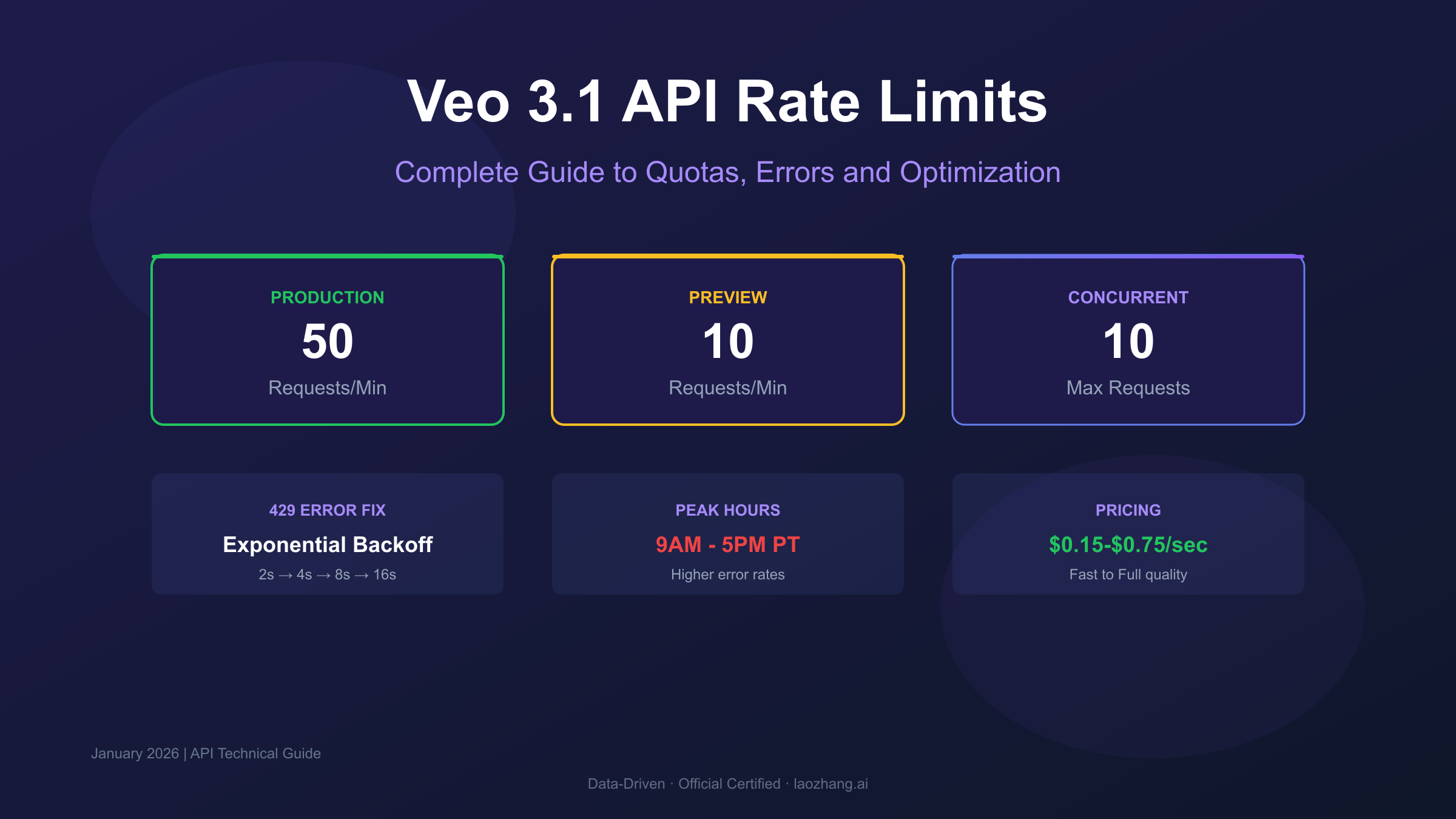
Veo 3.1 API Rate Limits by Access Method
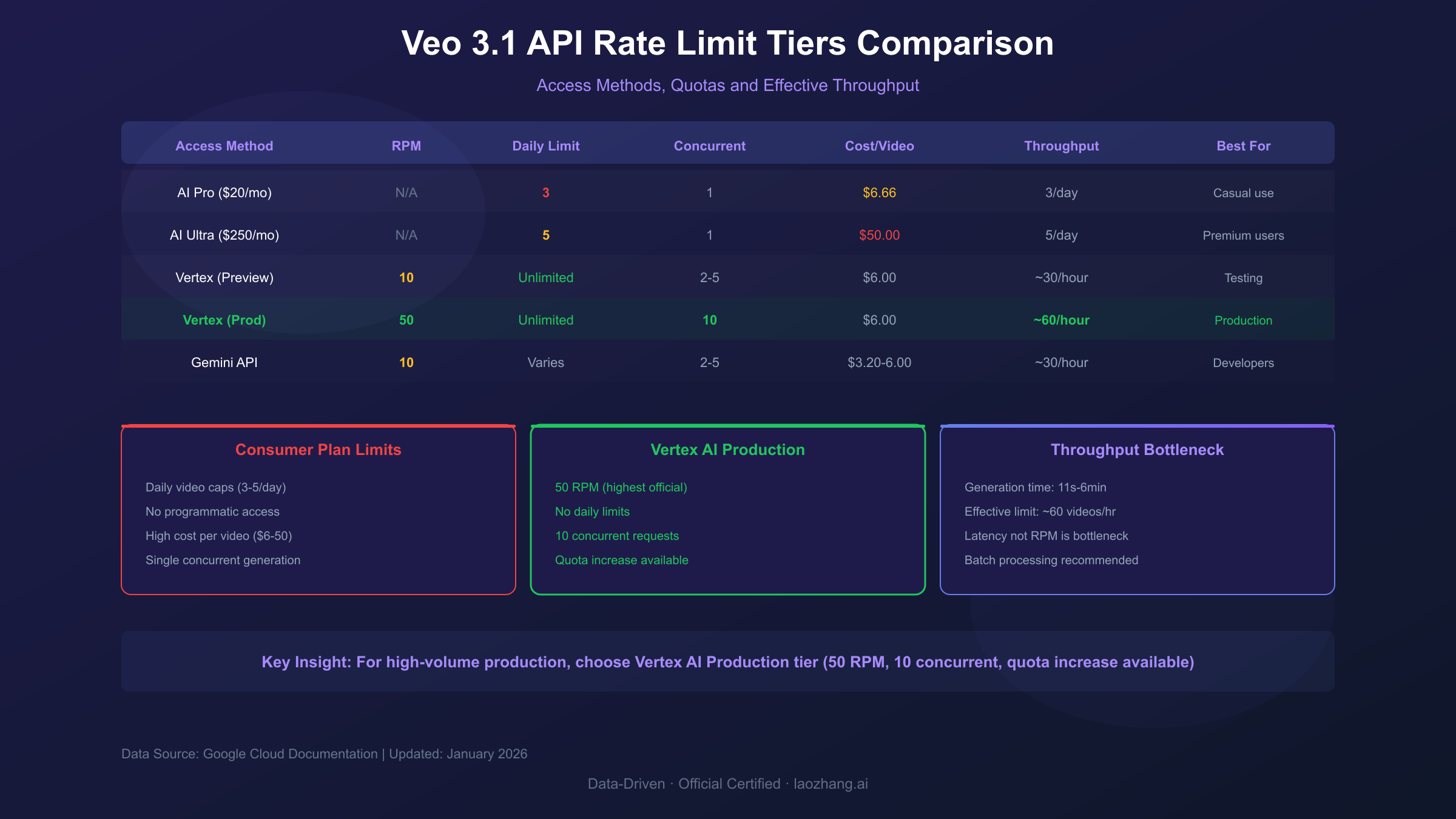
Google offers multiple ways to access Veo 3.1, each with different rate limits and pricing structures. The constraints vary significantly between consumer subscriptions and API access.
| Access Method | Requests Per Minute | Daily Limit | Concurrent Requests | Cost |
|---|---|---|---|---|
| AI Pro ($19.99/mo) | N/A (UI-based) | 3 videos | 1 | $6.66/video |
| AI Ultra ($249.99/mo) | N/A (UI-based) | 5 videos | 1 | $50/video |
| Vertex AI (Preview) | 10 RPM | Unlimited | 2-5 | $0.75/sec |
| Vertex AI (Production) | 50 RPM | Unlimited | 10 | $0.75/sec |
| Gemini API | 10 RPM | Varies | 2-5 | $0.40-0.75/sec |
Consumer plans (AI Pro and AI Ultra) impose strict daily video limits but don't measure in requests per minute since generation happens through the web interface. These plans are designed for casual creators, not developers building applications.
API access through Vertex AI removes daily caps entirely but introduces per-second pricing. The 50 RPM limit for production models means you can theoretically generate 50 videos per minute if each request returns quickly. In practice, generation latency (11 seconds to 6 minutes per video) means you'll rarely approach this ceiling.
Preview models operate under stricter 10 RPM limits. Google uses these restrictions to manage load while features remain in testing. If you're using veo-3.1-generate-preview, expect more frequent rate limiting than production variants.
Understanding the 429 RESOURCE_EXHAUSTED Error
The 429 error code signals that you've exceeded your allocated quota. Google's API returns this when requests outpace your rate limit or when system resources are temporarily constrained.
Common error responses include:
hljs json{
"error": {
"code": 429,
"message": "Resource has been exhausted",
"status": "RESOURCE_EXHAUSTED",
"details": [{
"reason": "RATE_LIMIT_EXCEEDED",
"domain": "generativelanguage.googleapis.com"
}]
}
}
Why 429 errors occur:
- Per-minute quota exceeded: You've sent more requests than your RPM allows
- Concurrent request limit hit: Too many requests processing simultaneously
- Daily quota exhausted: Consumer plans have hard daily limits
- System congestion: Peak usage periods strain available capacity
- Timestamp reset bug: A known issue where quotas don't reset properly at midnight Pacific Time
The error typically includes a retry-after header indicating how long to wait. However, aggressive retry logic can trigger IP-level blocking, so implement proper backoff strategies rather than immediate retries.
Implementing Exponential Backoff
Exponential backoff is the recommended strategy for handling rate limit errors. The approach progressively increases wait times between retries, reducing pressure on the API while maximizing your chances of successful requests.
Basic exponential backoff pattern:
hljs pythonimport time
import random
def generate_video_with_backoff(prompt, max_retries=5):
base_delay = 2 # seconds
max_delay = 300 # 5 minutes cap
for attempt in range(max_retries):
try:
response = veo_api.generate(prompt)
return response
except RateLimitError as e:
if attempt == max_retries - 1:
raise e
# Calculate delay with jitter
delay = min(base_delay * (2 ** attempt), max_delay)
jitter = random.uniform(0, delay * 0.1)
print(f"Rate limited. Waiting {delay + jitter:.1f}s...")
time.sleep(delay + jitter)
return None
Key implementation details:
- Base delay: Start with 2 seconds between retries
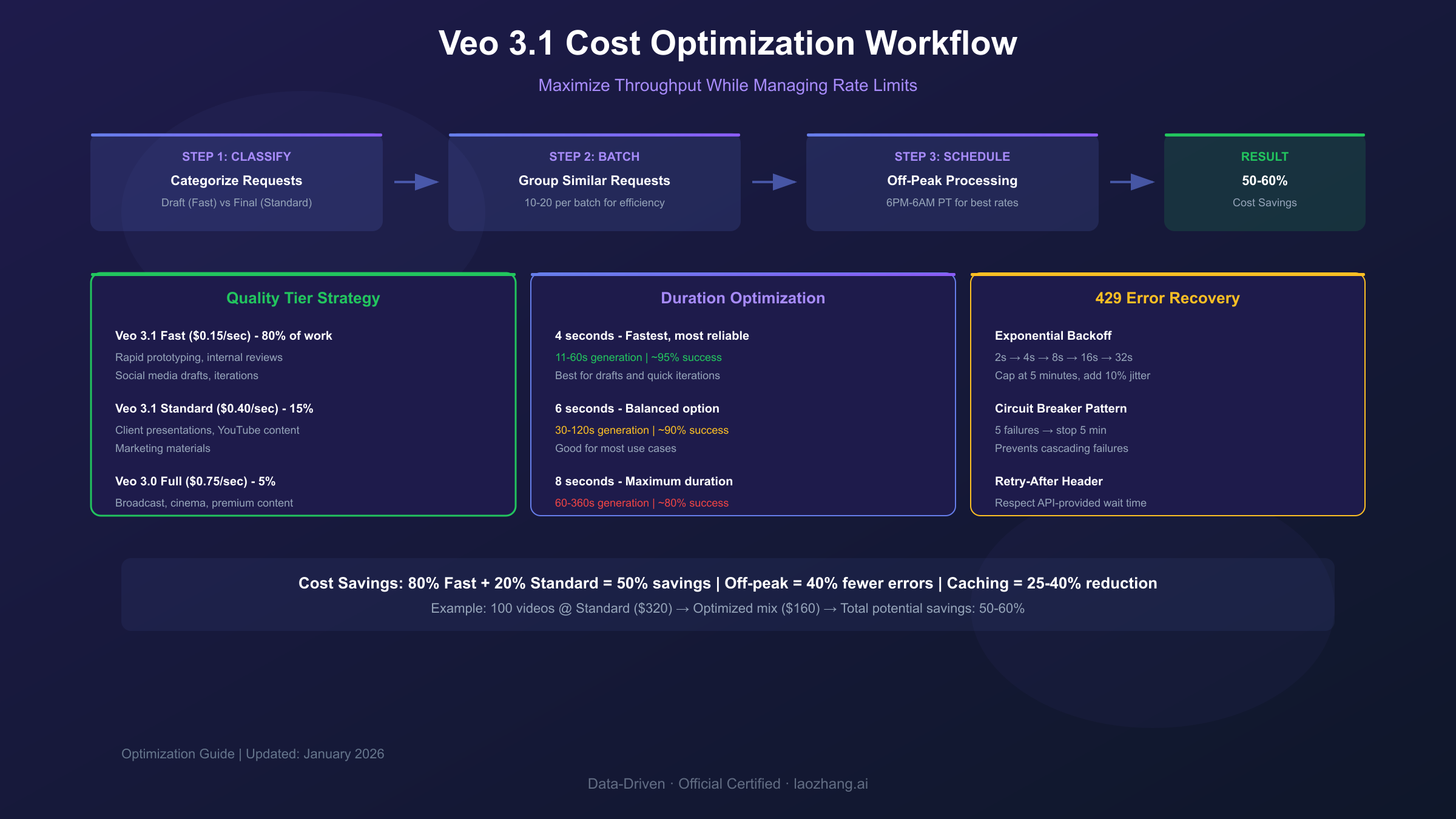
- Exponential growth: Double the delay each attempt (2→4→8→16→32 seconds)
- Maximum cap: Stop increasing at 5 minutes to avoid excessive waits
- Jitter: Add randomness (±10%) to prevent synchronized retry storms
- Retry limit: Give up after 5 attempts to avoid infinite loops
This pattern reduces the likelihood of repeated failures while maintaining reasonable response times for users. Most rate limit errors resolve within 60 seconds for per-minute quotas.
Concurrent Request Management
Beyond per-minute limits, Veo 3.1 enforces concurrent request caps that limit how many videos can generate simultaneously. Exceeding these triggers immediate 429 errors regardless of your RPM quota.
| Tier | Concurrent Limit | Effective Throughput |
|---|---|---|
| Trial Account | 2 | ~12 videos/hour |
| Standard Account | 5 | ~30 videos/hour |
| Enterprise | 10 | ~60 videos/hour |
Managing concurrent requests effectively:
hljs pythonimport asyncio
from asyncio import Semaphore
class VeoRequestManager:
def __init__(self, max_concurrent=5):
self.semaphore = Semaphore(max_concurrent)
self.queue = asyncio.Queue()
async def generate(self, prompt):
async with self.semaphore:
# Only 5 requests run at once
return await self._call_api(prompt)
async def batch_generate(self, prompts):
tasks = [self.generate(p) for p in prompts]
return await asyncio.gather(*tasks)
Practical implications:
With a 5-concurrent limit and average generation time of 2 minutes per video, you can process roughly 150 videos per hour—not the theoretical 3,000 from 50 RPM. Generation latency, not rate limits, typically bottlenecks production workloads.
Batch Processing Optimization Strategies
Large-scale video generation requires careful orchestration to maximize throughput while respecting rate limits. These strategies help you process hundreds or thousands of videos efficiently.
Request Batching
Group similar requests together for improved resource allocation. Videos with comparable duration, quality settings, and complexity process more efficiently when batched.
hljs pythondef batch_by_similarity(prompts, batch_size=10):
"""Group prompts by estimated complexity"""
simple = [p for p in prompts if len(p) < 100]
complex = [p for p in prompts if len(p) >= 100]
batches = []
for group in [simple, complex]:
for i in range(0, len(group), batch_size):
batches.append(group[i:i+batch_size])
return batches
Prompt Caching
Implement semantic hashing to identify near-duplicate requests. Serving cached results for similar prompts reduces API calls and costs by 25-40% for typical workloads.
Priority Queuing
Separate time-sensitive content from background tasks. Process urgent requests immediately while queuing non-critical work during off-peak hours (6 PM - 6 AM Pacific Time).
Staggered Scheduling
Instead of bursting all requests at once, spread them across your rate limit window:
hljs pythonimport time
def staggered_generate(prompts, rpm_limit=50):
interval = 60 / rpm_limit # 1.2 seconds between requests
results = []
for prompt in prompts:
result = veo_api.generate(prompt)
results.append(result)
time.sleep(interval)
return results
This approach maintains consistent throughput without triggering rate limits, though it sacrifices burst capacity for reliability.
Peak Hours and Timing Strategies
Veo 3.1 experiences significant load variation throughout the day. Understanding these patterns helps you schedule generation for optimal success rates.
Peak congestion periods:
- 9 AM - 5 PM Pacific Time (weekdays)
- Higher error rates during these windows
- Longer generation latency (up to 6 minutes)
Off-peak advantages:
- 6 PM - 6 AM Pacific Time
- Lower error rates
- Faster generation (as quick as 11 seconds)
- Better chance of processing complex prompts
Scheduling strategy:
hljs pythonfrom datetime import datetime
import pytz
def is_peak_hour():
pacific = pytz.timezone('America/Los_Angeles')
now = datetime.now(pacific)
return 9 <= now.hour < 17 and now.weekday() < 5
def smart_schedule(prompts):
if is_peak_hour():
# Queue for later or use simplified prompts
return queue_for_offpeak(prompts)
else:
# Process immediately
return batch_generate(prompts)
For production applications with flexible timing requirements, scheduling non-urgent generation during off-peak hours can reduce error rates by 40-60% and improve generation speed by 3-5x.
Requesting Quota Increases
Google allows quota increase requests for accounts with established usage history and billing in good standing. The process varies by access method.
Vertex AI Quota Increase Process
- Navigate to Google Cloud Console → Vertex AI → Quotas
- Locate "Veo video generation requests per minute"
- Click Edit Quotas and specify the requested limit
- Provide business justification explaining your use case
- Submit and wait 2-3 business days for review
Approval factors:
- Account age and usage history
- Billing history and payment reliability
- Quality of business justification
- Current market demand and capacity
Note: Trial accounts cannot request quota increases. You must have active billing enabled before submitting requests.
Gemini API Quota Increase
For Gemini API access, submit requests through the Google AI Studio rate limit form. Approval isn't guaranteed, and Google provides no specific timeline for decisions.
Enterprise Options
Organizations requiring guaranteed high throughput can work with Google Cloud's professional services team for custom configurations:
- Private API deployments
- Dedicated capacity allocation
- Custom SLA agreements
- Priority support access
These arrangements involve negotiated contracts and significant minimum commitments.
Error Handling Best Practices
Robust error handling separates production-ready applications from fragile prototypes. Implement these patterns to maintain reliability under varying conditions.
Comprehensive Error Classification
hljs pythonclass VeoError:
RATE_LIMIT = "rate_limit" # 429 - wait and retry
SERVER_ERROR = "server" # 500/504 - retry immediately
QUOTA_EXCEEDED = "quota" # Daily limit - wait until reset
INVALID_REQUEST = "invalid" # 400 - fix request, don't retry
def classify_error(response):
if response.status_code == 429:
if "RESOURCE_EXHAUSTED" in response.text:
return VeoError.RATE_LIMIT
return VeoError.QUOTA_EXCEEDED
elif response.status_code >= 500:
return VeoError.SERVER_ERROR
elif response.status_code == 400:
return VeoError.INVALID_REQUEST
return None
Error-Specific Recovery Strategies
| Error Type | Wait Time | Action |
|---|---|---|
| Rate limit (429) | 60 seconds | Exponential backoff |
| Server error (500) | 1-5 minutes | Immediate retry (3 attempts) |
| Quota exceeded | Until midnight PT | Queue for next day |
| Invalid request (400) | None | Fix prompt and retry once |
Circuit Breaker Pattern
When errors persist, temporarily stop making requests to allow recovery:
hljs pythonclass CircuitBreaker:
def __init__(self, failure_threshold=5, reset_timeout=300):
self.failures = 0
self.threshold = failure_threshold
self.timeout = reset_timeout
self.last_failure = None
self.state = "closed"
def record_failure(self):
self.failures += 1
self.last_failure = time.time()
if self.failures >= self.threshold:
self.state = "open"
def can_proceed(self):
if self.state == "closed":
return True
if time.time() - self.last_failure > self.timeout:
self.state = "half-open"
return True
return False
This pattern prevents cascading failures when the API experiences extended outages.
Cost Optimization Under Rate Limits
Rate limits constrain how quickly you can spend, but smart optimization stretches your budget further within those constraints.
Video Duration Strategy
Shorter videos complete faster and succeed more reliably:
| Duration | Generation Time | Success Rate |
|---|---|---|
| 4 seconds | 11-60 sec | ~95% |
| 6 seconds | 30-120 sec | ~90% |
| 8 seconds | 60-360 sec | ~80% |
Choose 4-second clips for drafts and iterations. Reserve 8-second generation for final outputs where duration matters.
Quality Tier Selection
Veo 3.1 Fast ($0.15/sec) works well for:
- Rapid prototyping
- Internal reviews
- Social media content
Veo 3.1 Standard ($0.40/sec) suits:
- Client presentations
- YouTube content
- Marketing materials
Veo 3.0 Full ($0.75/sec) is necessary for:
- Broadcast television
- Cinema production
- Premium brand content
Using Fast tier for 80% of generation (drafts and iterations) and reserving Standard/Full for final outputs reduces average cost by 50-60%.
Monitoring and Alerting Setup
Proactive monitoring catches rate limit issues before they impact production. Implement these observability practices for reliable operations.
Key Metrics to Track
hljs python# Track these metrics per API key
metrics = {
"requests_per_minute": Counter(),
"active_concurrent": Gauge(),
"error_rate_429": Counter(),
"generation_latency": Histogram(),
"daily_quota_used": Counter()
}
Alert Thresholds
| Metric | Warning | Critical |
|---|---|---|
| RPM usage | 80% of limit | 95% of limit |
| Error rate | 5% | 15% |
| Concurrent requests | 70% of limit | 90% of limit |
| Generation latency | 3 minutes avg | 5 minutes avg |
Dashboard Essentials
Monitor these in real-time:
- Current RPM vs. limit
- Queue depth and wait times
- Error distribution by type
- Daily quota consumption (for consumer plans)
- Generation success rate over time
Google Cloud's Monitoring service integrates with Vertex AI to provide built-in dashboards. For Gemini API users, the AI Studio dashboard shows quota consumption and rate limit status.
Alternative Approaches for High-Volume Needs
When Google's rate limits constrain your workflow, consider these alternatives for scaling video generation capacity.
Multi-Project Distribution
Spread requests across multiple Google Cloud projects to multiply effective limits:
- Each project gets independent quotas
- Requires separate API keys and billing
- Implement intelligent routing to distribute load
Caveat: This approach may violate Google's terms of service if used to circumvent intended limitations. Review current policies before implementation.
Third-Party API Services
Aggregated API platforms pool capacity across multiple provider accounts, offering effectively unlimited access at competitive pricing. These services handle rate limit management internally, presenting a simpler interface to developers.
For teams hitting Google's rate limits consistently, platforms like laozhang.ai aggregate multiple AI models including video generation APIs. This approach simplifies integration compared to managing multiple provider accounts directly, with unified billing and automatic failover between sources. Check their documentation for current video API availability.
Hybrid Architecture
Combine multiple access methods for reliability:
- Use Vertex AI for production workloads
- Route overflow to third-party services
- Queue non-urgent requests for off-peak processing
This architecture provides both the quality guarantees of official access and the flexibility of aggregated services.
Frequently Asked Questions
What is Veo 3.1's rate limit? Production models allow 50 requests per minute (RPM). Preview models are limited to 10 RPM. Consumer plans (AI Pro/Ultra) have daily limits instead: 3-5 videos per day.
How do I fix the 429 RESOURCE_EXHAUSTED error? Implement exponential backoff, starting with a 2-second delay and doubling each retry up to 5 minutes. Avoid peak hours (9 AM - 5 PM Pacific) when possible.
Can I increase my Veo 3.1 quota? Yes, through Vertex AI Quotas settings in Google Cloud Console. Provide business justification and expect 2-3 business days for review. Trial accounts cannot request increases.
What are the concurrent request limits? Standard accounts allow 5 concurrent requests. Enterprise tiers may allow up to 10. Trial accounts are limited to 2 concurrent requests.
How much does Veo 3.1 API access cost? Pricing ranges from $0.15/second (Fast) to $0.75/second (Full quality). An 8-second video costs $1.20-$6.00 depending on quality tier.
When do daily quotas reset? Daily quotas reset at midnight Pacific Time. A known bug sometimes causes delayed resets—if your quota doesn't refresh, wait 24-48 hours and document the issue.
Is there a way to get unlimited Veo 3.1 access? Not through official channels. API access removes daily caps but enforces per-minute rate limits. Third-party services offer higher effective limits through aggregated capacity.