AI Tools11 min read

Veo 3.1 Free: Complete Guide to Free AI Video Generation in 2026

Comprehensive guide to using Google Veo 3.1 for free: official credit limits, third-party platforms, free alternatives like Kling and Runway, and cost-saving strategies for AI video generation.

🍌
PRO

Nano Banana Pro

4K-80%

Google Gemini 3 Pro · AI Inpainting

谷歌原生模型 · AI智能修图

100K+ Developers·10万+开发者信赖
20ms延迟
🎨4K超清
🚀30s出图
🏢企业级
Enterprise|支付宝·微信·信用卡|🔒 安全
127+一线企业正在使用
99.9% 可用·全球加速
限时特惠
$0.24¥1.7/张
$0.05
$0.05
per image · 每张
立省 80%
AI Video Production Expert
AI Video Production Expert·

Google's Veo 3.1 represents the current pinnacle of AI video generation—native audio synchronization, 4K resolution support, and unprecedented prompt adherence. The catch? Google's official free tier provides only 100 monthly credits, enough for approximately 5 videos in Fast mode or just 1 video in Quality mode. This guide maps every legitimate path to free Veo 3.1 access, from maximizing official credits to leveraging third-party platforms, while honestly assessing what "free" actually delivers versus what it costs.

The demand for free AI video generation has exploded as content creators, marketers, and developers recognize the technology's potential. Veo 3.1's ability to generate coherent 8-second clips with synchronized dialogue and ambient sound makes it genuinely useful for professional applications—but the $19.99/month Google AI Pro subscription or $0.15-0.75/second API costs put it beyond casual experimentation budgets for many users.

Understanding the actual free options—their capabilities and limitations—prevents wasted time chasing mythical "unlimited free" access while helping you identify the approach that genuinely serves your needs. Whether that's stretching official free credits, combining multiple platform trials, or choosing more generous free alternatives, this guide provides the information necessary for an informed decision.

Veo 3.1 Free Access Guide - Understanding free tiers, platforms, and alternatives

What is Veo 3.1?

Before exploring free access options, understanding what Veo 3.1 offers explains why demand is so high—and why Google limits free access carefully.

Veo 3.1 is Google DeepMind's latest video generation model, building on the Veo 3 foundation with significant enhancements. The model generates high-fidelity videos up to 8 seconds at resolutions from 480p to 4K, with native audio generation that synchronizes dialogue, sound effects, and ambient soundscapes to visual content.

Key Capabilities

FeatureVeo 3.1 Specification
Maximum Resolution4K (2160p)
Video LengthUp to 8 seconds per generation
AudioNative synchronized audio (dialogue, SFX, ambient)
Input TypesText-to-video, Image-to-video, First/Last frame control
Output QualityCinematic, photorealistic rendering
Special FeaturesReference image support, video extension, multi-prompt transitions

The native audio generation distinguishes Veo 3.1 from competitors. Testing indicates Veo 3.1 audio requires approximately 30% less post-processing to reach broadcast quality compared to alternatives like Sora 2. Characters speak with natural lip synchronization, environmental sounds match on-screen actions, and ambient audio creates immersive soundscapes without separate audio generation tools.

Model Variants

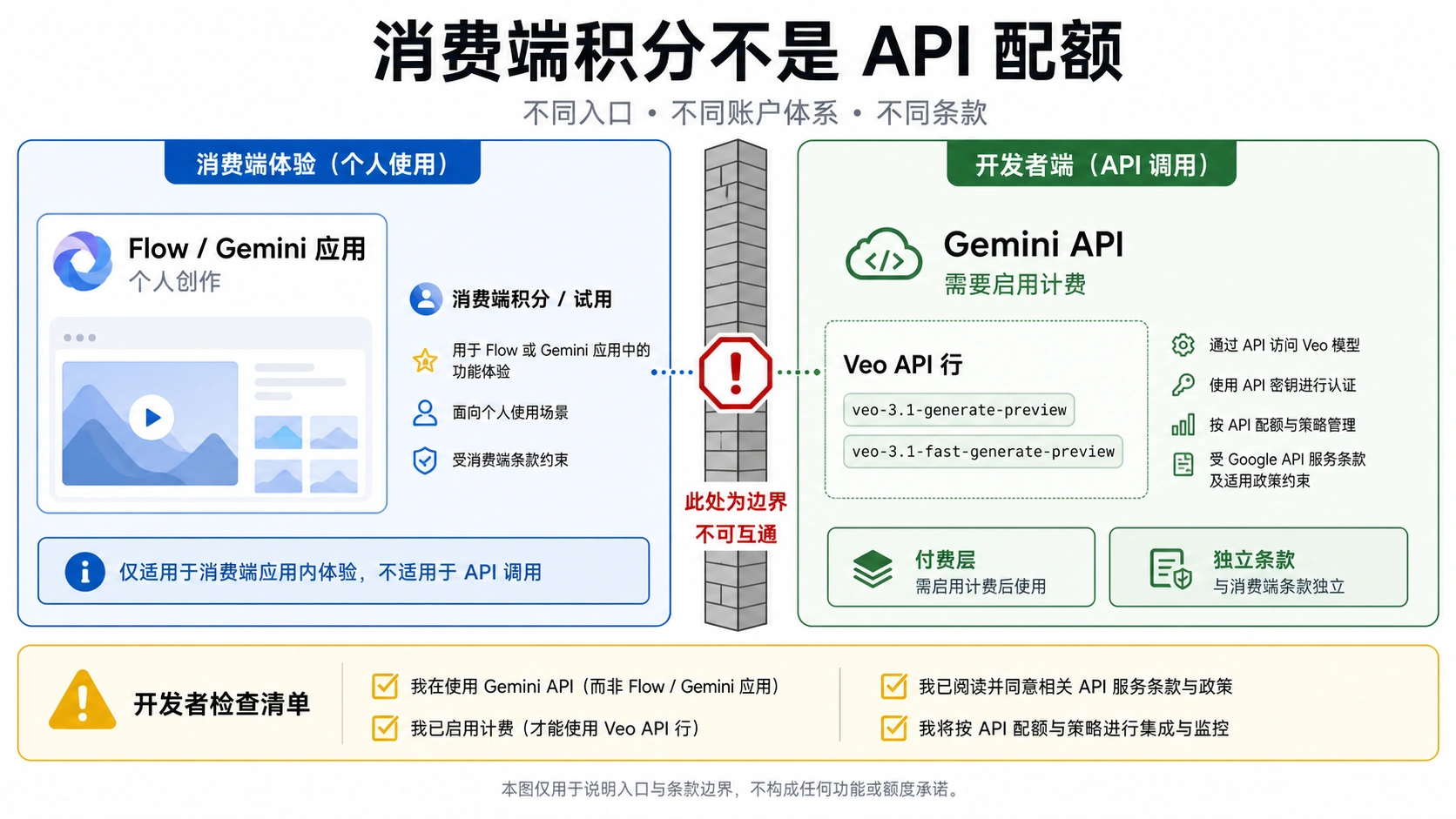
Google offers two Veo 3.1 model variants through its APIs:

  • veo-3.1-fast-generate-preview: Faster generation, lower cost ($0.15/second), optimized for iteration
  • veo-3.1-generate-preview: Higher quality, higher cost ($0.40/second), production-focused

Both remain in "preview" status, meaning specifications may change and rate limits are more restrictive than stable models.

Official Google Free Tier: What You Actually Get

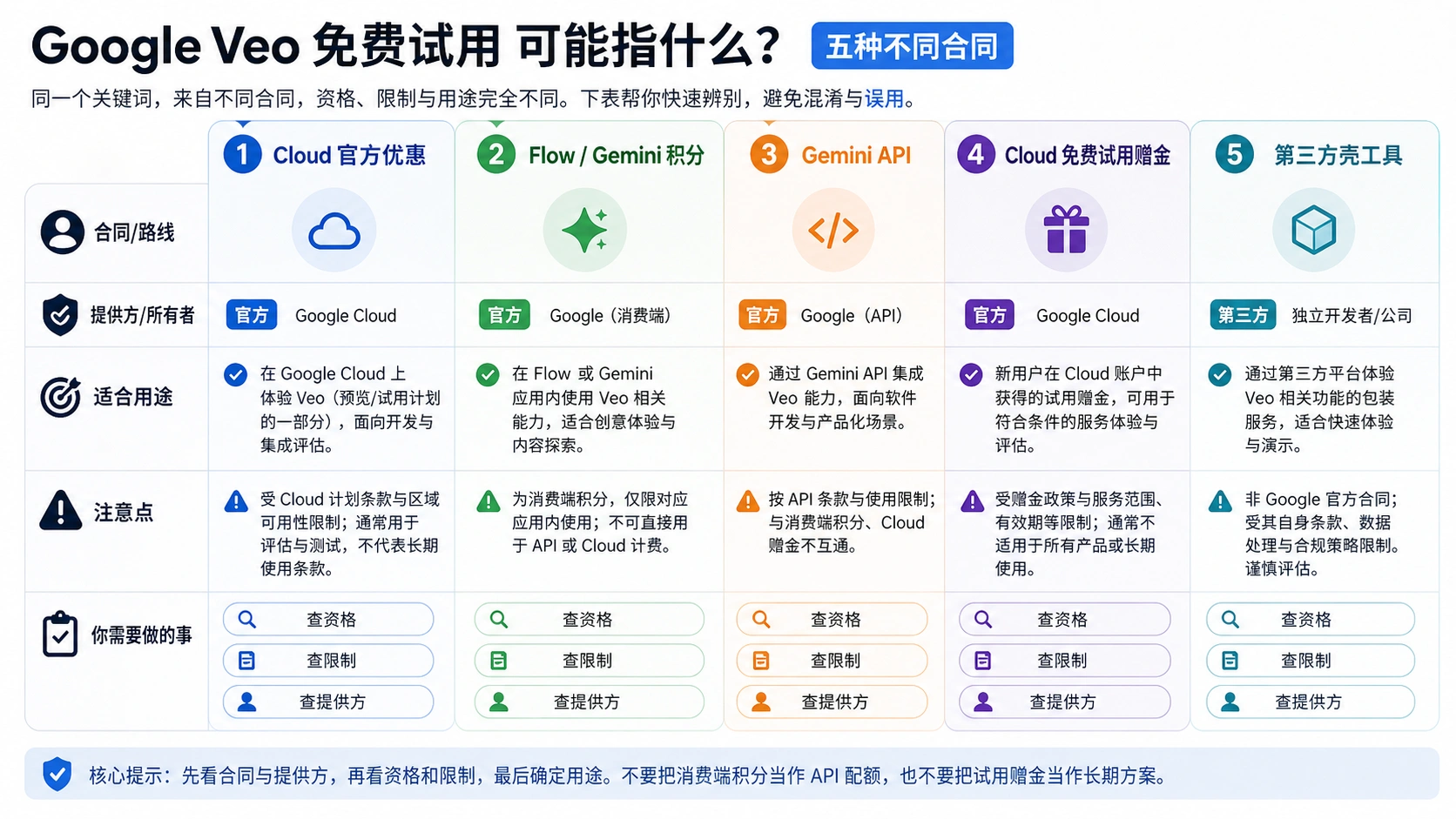
Google provides free Veo 3.1 access through several channels, each with distinct limitations. Understanding these precisely prevents disappointment when "free" proves less generous than expected.

Personal Google Account Free Credits

Every personal Google account receives 100 monthly AI credits (or 180 credits in certain regions) without any subscription. These credits work across Google's AI products including Flow and Whisk for video generation.

What 100 Credits Delivers:

  • Fast Mode: ~5 videos (approximately 20 credits each)
  • Quality Mode: ~1 video (approximately 100 credits each)
  • Resolution: Up to 1080p (4K requires paid tier)

Critical Limitations:

  • Credits reset on the first of each month
  • Unused credits do not roll over
  • No 4K resolution access
  • Rate limited to ~10 requests/minute

For casual experimentation—testing prompts, understanding the model's capabilities, generating a few clips for personal projects—100 monthly credits provides meaningful access. For any production workflow requiring consistent output, it proves insufficient within days.

Google AI Pro Free Trial

New users can access a 1-month free trial of Google AI Pro, which includes 1,000 credits—enough for approximately 50 Fast mode videos or 10 Quality mode videos.

Trial Details:

  • Duration: 1 month
  • Credits: 1,000
  • Resolution: Up to 4K
  • Requirement: Payment method on file

Important: Google requires adding a payment method to activate the trial. Forgetting to cancel before the trial ends results in automatic billing of $19.99 for the following month. Set a calendar reminder for day 25 if you intend to evaluate without committing.

Google Cloud Free Credits

Developers targeting API integration can access $300 in Google Cloud trial credits, valid for 90 days. These credits apply to Vertex AI, which hosts Veo 3.1 API access.

Developer Free Tier:

  • Credit Amount: $300
  • Validity: 90 days
  • Access: Full API capabilities
  • Use Case: Development, testing, prototyping

At $0.15/second for Fast mode, $300 generates approximately 2,000 seconds (33+ minutes) of video content—substantial for development purposes, though spread across 90 days for extended testing.

Student and Educational Access

Google offers extended AI Pro trials for eligible university students in select countries:

  • Duration: 1-12 months (varies by institution and region)
  • Resolution: Up to 1080p
  • Credits: Standard AI Pro allocation (1,000/month)

Verification typically requires a .edu email address and may involve additional institutional validation. Availability varies significantly by country—primarily available in the US, UK, and select European nations.

Third-Party Platforms Offering Free Veo 3.1

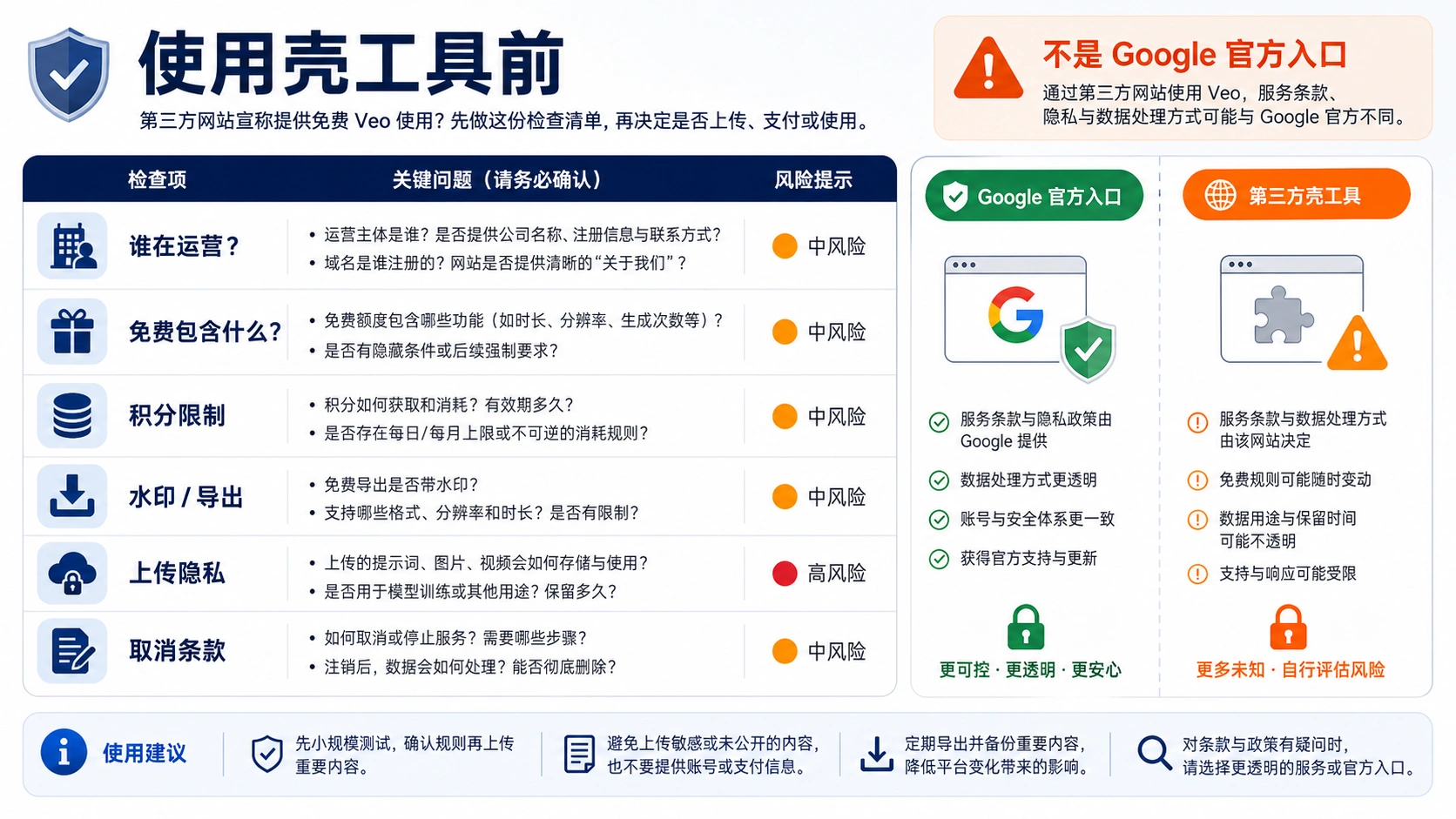
Multiple platforms provide Veo 3.1 access outside Google's ecosystem, often with different free tier structures. These range from legitimate API aggregators to platforms with questionable sustainability.

Verified Free Access Platforms

PlatformFree OfferingLimitationsQuality Assessment
TryVeo3.aiNo login requiredLow resolution, queue delaysModerate
EaseMate AI30 credits on signupAccount required, watermarkGood
Pollo AIFree trial creditsLimited generationsGood
Lovart.aiMonthly allocationFeature restrictionsModerate
Synthesia PlaygroundFree short clipsDuration limitsGood

Platform Deep Dive: What to Expect

TryVeo3.ai offers the lowest barrier to entry—no account creation required. Simply enter a prompt and generate. The tradeoff: resolution caps at 720p, queue times can reach 5-10 minutes during peak hours, and outputs may include watermarks. Useful for quick tests, impractical for production.

EaseMate AI provides 30 credits upon account creation, with daily check-in bonuses for additional credits. Output quality matches Google's native offering, but free tier outputs include watermarks. The platform offers watermark-free downloads for paid users.

Pollo AI integrates Veo 3.1 into a broader AI video toolkit, offering free trial credits for new users. The platform targets creators comfortable with API-style workflows, providing text-to-video and image-to-video capabilities without upfront cost.

Synthesia AI Playground provides free access to Veo 3.1 (labeled as Veo 3.1 Fast) for generating short clips. The platform targets professional video creation, so free access serves as evaluation rather than production capability.

Sustainability Concerns

Third-party platforms offering "free" Veo 3.1 face fundamental economics: they pay Google for API access while providing it to users without charge. Business models typically involve:

  1. Freemium conversion: Free tier attracts users who eventually upgrade
  2. Advertising: Display ads offset API costs
  3. Data collection: User prompts and preferences have commercial value
  4. Promotional periods: Temporary free access builds market awareness

Platforms without clear revenue models should raise skepticism. If a platform offers genuinely unlimited free access with no apparent business model, it likely won't exist in six months—or is monetizing in ways that aren't disclosed.

Comparison of free Veo 3.1 access options across platforms

Maximizing Free Veo 3.1 Usage

Strategic approaches extract maximum value from limited free resources, effectively multiplying what 100 credits can produce.

Prompt Optimization for First-Try Success

Each failed generation wastes precious credits. Well-crafted prompts achieve 70-80% acceptable results on first try versus 30-40% for vague prompts.

High-Success Prompt Structure:

[Scene setup] + [Subject action] + [Visual style] + [Camera movement] + [Audio description]

Example: "Medium shot of a young woman in a coffee shop, typing on laptop,
warm afternoon light through window, subtle camera push-in,
ambient café sounds with soft background music"

Elements That Improve Results:

  1. Specific scene context rather than abstract concepts
  2. Clear subject action with defined motion
  3. Lighting description preventing flat visuals
  4. Camera movement specification adding cinematic quality
  5. Audio guidance since Veo 3.1 generates native audio

Multi-Platform Strategy

Combining free tiers across platforms provides more total generations than any single platform:

Weekly Free Video Budget (Combined):

  • Google Free Tier: ~1-2 videos/week (from monthly 100 credits)
  • EaseMate AI: 30 credits initial + daily bonuses
  • Pollo AI trial: ~10-15 videos
  • TryVeo3.ai: Unlimited low-res tests

Workflow Optimization:

  1. Concept testing: Use TryVeo3.ai (no account needed) for prompt refinement
  2. Quality preview: Test refined prompts on EaseMate AI
  3. Final generation: Use Google credits for production-quality output

This approach preserves valuable Google credits for final renders while using lower-quality free tiers for iteration.

Fast vs. Quality Mode Selection

Understanding when each mode provides value optimizes credit usage:

ScenarioRecommended ModeCredit CostRationale
Prompt testingFast20 creditsQuick iteration, acceptable quality
Social media contentFast20 creditsPlatform compression hides quality differences
Product demosQuality100 creditsDetail preservation matters
Presentation videosQuality100 creditsLarge screen viewing
Personal projectsFast20 creditsCost efficiency prioritized

For most use cases, Fast mode at 1080p delivers sufficient quality. Quality mode's 5x credit cost only justifies when resolution and detail preservation genuinely matter for the final application.

Cost-Effective Paid Alternatives

When free tiers prove insufficient, understanding the cost spectrum identifies the most economical path for your usage level.

Official Google Pricing

Access MethodCostCredits/CapacityBest For
Free Tier$0100 credits/monthCasual use
AI Pro$19.99/month1,000 credits/monthRegular creators
AI Ultra$99.99/month5,000 credits/monthProfessional production
Gemini API$0.15-0.75/secPay-per-useDevelopers

API Pricing Breakdown

For developers integrating Veo 3.1 into applications, per-second pricing applies:

ModelPrice/Second8-Second Video CostWith Audio
Veo 3.1 Fast$0.15$1.20$2.40
Veo 3.1 Standard$0.40$3.20$6.40
Veo 3 Full$0.75$6.00$12.00

Audio doubles cost across all tiers—a significant consideration for budget planning. Disabling audio (when not needed) saves 50% on each generation.

Third-Party API Providers

Third-party aggregators offer Veo 3.1 API access at reduced rates. For cost-conscious projects requiring consistent API access, platforms like laozhang.ai provide video generation API access with competitive pricing—typically 30-50% below official rates for high-volume usage.

Cost Comparison Example (100 videos at 8 seconds each):

ProviderPer-Video CostTotal Cost
Google API (Fast)$1.20$120
Third-party API~$0.60-0.80$60-80
AI Pro subscription~$0.20 (within credits)$19.99/month

For regular use (50+ videos/month), the AI Pro subscription provides best value. For occasional use (10-20 videos/month), free tier plus selective third-party API calls may prove more economical.

Free Alternatives to Veo 3.1

For users prioritizing free access over specifically using Veo 3.1, several alternatives offer more generous free tiers with competitive quality.

Best Free AI Video Generators

ToolFree TierVideo LengthResolutionStrengths
Kling AI66 credits/day5-10 secondsUp to 1080pCharacter consistency, motion quality
Runway Gen-3125 credits/month5-10 seconds720pIntegrated editor, creative tools
Hailuo AIDaily free generations5-8 seconds1080pGood quality/free ratio
PikaLimited free3-4 seconds720pQuick generation, stylized output
MyEditGenerous free creditsVariable720pEasy interface

When Alternatives Beat Veo 3.1

Kling AI excels at maintaining character appearance through complex motion—a common weakness in AI video. If your content involves consistent characters across multiple clips, Kling's 66 daily credits (refreshing each day) provides more value than Veo's 100 monthly credits for this specific use case.

Runway Gen-3 integrates video generation with a full editing suite. For creators who need to generate, edit, and finish in one platform, Runway's 125 monthly credits plus editing tools may outweigh Veo's raw generation quality.

Hailuo AI offers genuinely generous free access with 1080p output and good color accuracy. Testing shows approximately 25 videos possible over 10 days on the free tier—5x what Veo's free tier delivers monthly.

Feature Comparison

FeatureVeo 3.1Kling 1.6Runway Gen-3Hailuo
Max Resolution4K1080p1080p1080p
Native Audio✅ Excellent
Free Credits100/month66/day125/monthDaily limit
Video Extension✅ (up to 3min)Limited
Image-to-Video
Character ConsistencyGoodExcellentGoodModerate

Veo 3.1's unique advantage—native audio generation—doesn't exist in alternatives. If synchronized audio matters for your content, Veo remains the only option not requiring separate audio generation and synchronization workflows.

Common Questions About Free Veo 3.1

Can I use VPN to get more free credits?

No. Google tracks credits by account, not IP address. Using multiple accounts violates terms of service and risks permanent account bans. The regional credit variation (100 vs 180 credits) is tied to account region at creation, not current connection location.

Do free credits expire?

Yes. Google's monthly credits reset on the first of each month with no rollover. Cloud trial credits expire after 90 days. Third-party platform credits may have their own expiration policies.

Is there truly unlimited free Veo 3.1?

No legitimate platform offers unlimited free Veo 3.1 access. The computational cost per video ($0.10-0.50 in raw compute) makes unlimited free access economically unsustainable. Claims of "unlimited" typically hide quality restrictions, speed throttling, or unsustainable business models.

Can I use free Veo 3.1 videos commercially?

Google's free tier outputs are permitted for commercial use, but you should verify current terms of service. Third-party platforms have varying commercial use policies—many restrict commercial application of free tier outputs.

Will the free tier improve?

Unlikely to increase significantly. As AI video generation matures and demand grows, free tiers typically constrain rather than expand. Current free offerings serve user acquisition rather than production support.

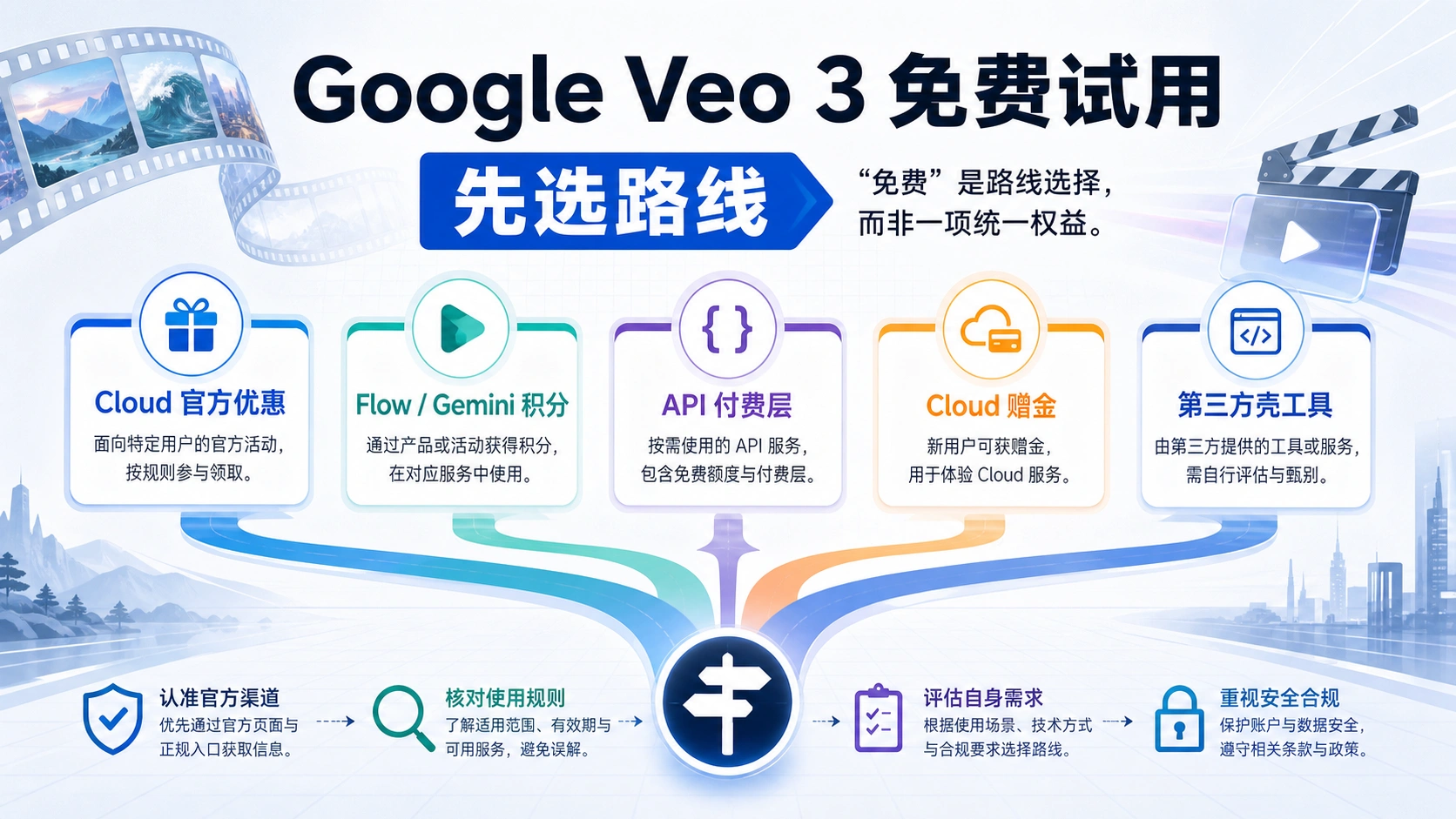
Decision guide for choosing the right Veo 3.1 access method

Making the Right Choice

The "best" free Veo 3.1 access depends entirely on your actual needs:

Choose Official Free Tier If:

  • You need 5 or fewer videos monthly
  • Quality and 4K resolution aren't critical
  • You want simple, reliable access
  • Privacy and data security matter

Choose Third-Party Platforms If:

  • You need more free generations for testing
  • Lower resolution (720p-1080p) is acceptable
  • You're comfortable with account creation
  • You understand sustainability risks

Choose Free Alternatives If:

  • Native audio isn't required
  • Character consistency matters more (use Kling)
  • You need integrated editing (use Runway)
  • Maximum free volume matters most

Choose Paid Access If:

  • You need consistent, reliable production
  • 4K resolution is required
  • Time is more valuable than money
  • Commercial use at scale

Conclusion

Google's Veo 3.1 represents exceptional AI video generation capability, but "free" access remains genuinely limited—100 monthly credits translates to approximately 5 videos. Understanding this reality upfront prevents frustration and enables informed decisions about how to proceed.

For evaluation and occasional personal use, the official free tier plus strategic use of third-party platforms provides meaningful access. For anyone requiring consistent video generation, the free tier serves only as evaluation before committing to either paid Veo access or genuinely free alternatives like Kling AI's 66 daily credits or Hailuo's generous free allowance.

The honest assessment: truly free unlimited Veo 3.1 doesn't exist and won't exist. What does exist is enough free access to evaluate whether Veo 3.1's capabilities—particularly native audio generation and 4K support—justify investment for your specific needs. Many users will find that alternatives with larger free tiers serve their purposes equally well. Others will determine that Veo 3.1's unique capabilities warrant the subscription or API costs.

Start with free evaluation across multiple platforms, understand what you actually need, then make an informed decision about whether and how to invest in expanded access. The technology is impressive; the free tier is limited; and both realities can coexist in your decision-making process.

推荐阅读