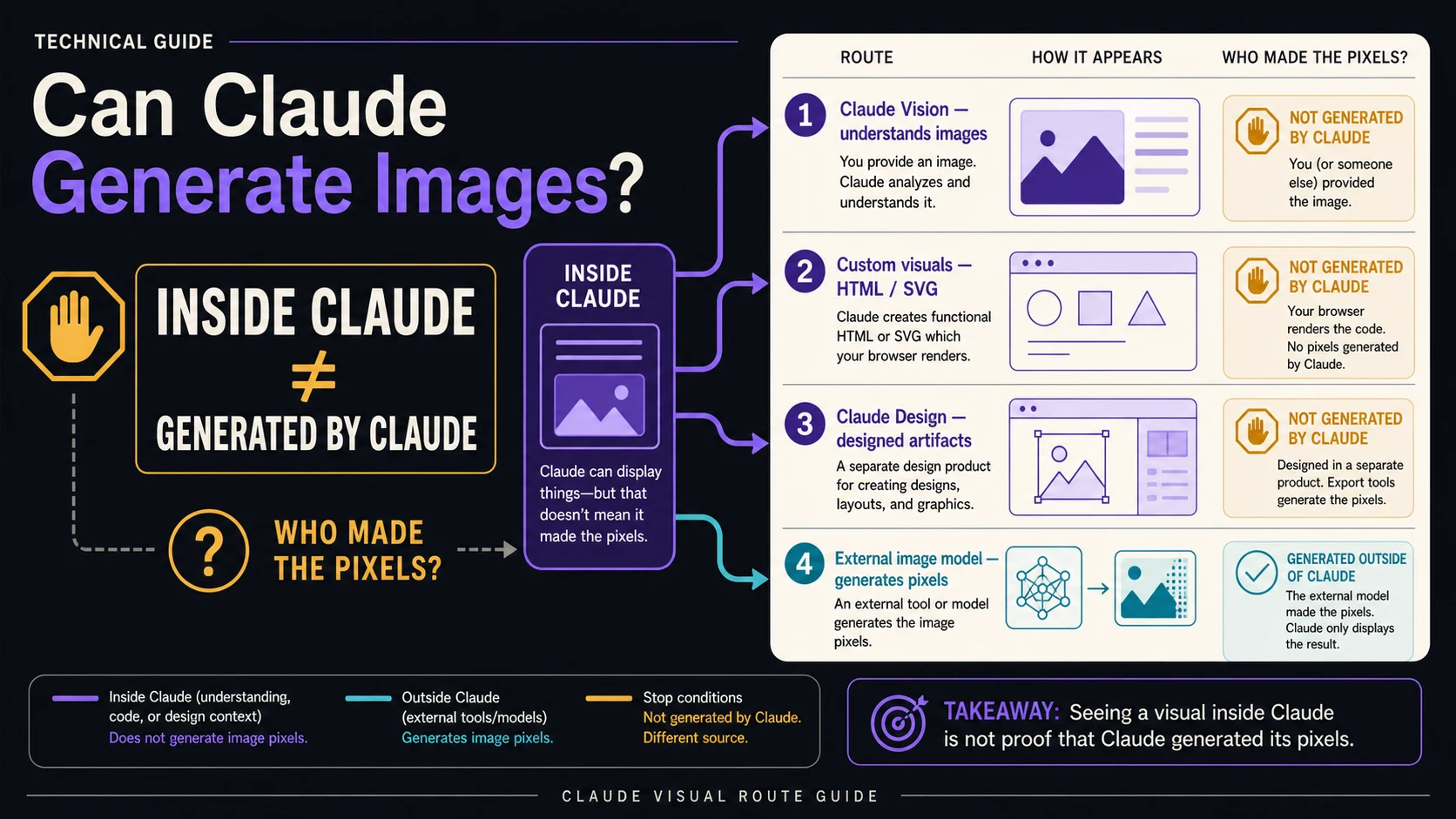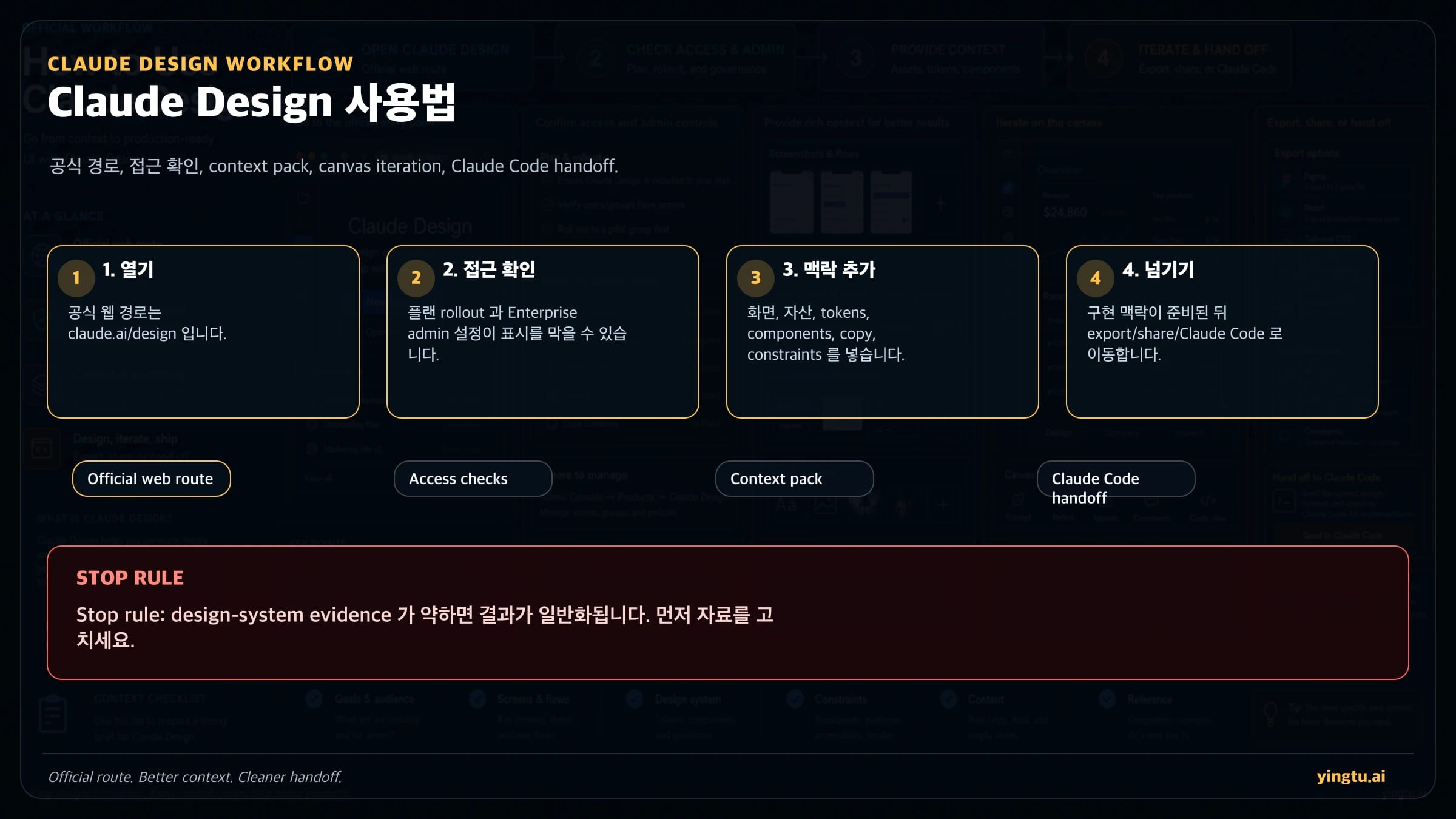
먼저 claude.ai/design을 엽니다. Design이 보이지 않으면 설치 파일이나 skill을 찾기 전에 rollout, 플랜, Enterprise 관리자 설정을 확인합니다. Claude Design은 디자인, 인터랙티브 프로토타입, 프레젠테이션, one-pager, 화면 변형을 만드는 웹 visual canvas입니다. Claude Code skill은 SKILL.md로 구현 규칙을 전달하는 별도 장치이며, Design 기능을 여는 방법이 아닙니다.
| 지금 필요한 것 | 먼저 할 일 | 멈춰야 할 때 |
|---|---|---|
| Design이 보이지 않는다 | claude.ai/design, 플랜, Enterprise 설정 확인 | 공식 경로를 보기 전에 설치 파일이나 community skill을 찾는 경우 |
| 첫 디자인이 필요하다 | Claude Design에서 screenshot, copy, asset, component, constraint를 첨부 | "더 멋지게"만 있고 제품 맥락이 없는 경우 |
| 구현이 필요하다 | spec, state, asset, QA 조건이 정리된 뒤 Claude Code로 넘김 | visual direction, breakpoint, component mapping이 비어 있는 경우 |
| 팀 workflow가 필요하다 | token, component, accessibility, review, acceptance를 문서화 | 디자인 시스템이 오래됐거나 실제 UI와 충돌하는 경우 |
2026년 4월 25일 기준 공식 Claude와 Anthropic 페이지는 Claude Design을 Anthropic Labs의 research preview로 설명합니다. 사용 가능 여부, 사용량, export, 제한은 계정과 공식 페이지에서 확인해야 합니다. 실무에서는 공식 경로 확인, context 준비, canvas 반복, 조건이 갖춰진 뒤 Claude Code handoff 순서를 지키는 것이 핵심입니다.
접속 문제를 먼저 해결한다
국내 실무 안내에서는 Claude Design으로 프로토타입을 빠르게 만든다, 발표 자료를 만든다, 랜딩페이지를 만든다는 영상과 글이 먼저 보입니다. 하지만 첫 번째 질문은 더 단순합니다. 내 계정이 claude.ai/design을 열 수 있는가입니다. 열리지 않으면 prompt 문제가 아니라 접근 문제로 처리해야 합니다.
Enterprise 계정은 관리자가 기능을 켜야 할 수 있습니다. 같은 팀의 다른 사람이 보더라도 본인 조직 설정에서는 보이지 않을 수 있습니다. 개인이나 Team 계정도 점진적 rollout 영향을 받을 수 있습니다. 따라서 다른 사람의 demo를 따라 하기 전에, 공식 경로와 계정 조건을 먼저 봅니다.
이 순서는 과한 약속을 줄입니다. 무료, 무제한, 모두 사용 가능, Figma export 같은 표현은 현재 공식 근거와 본인 계정 화면에서 확인되는 범위 안에서만 말해야 합니다. 확인할 수 없다면 article, product copy, sales message에 넣지 않는 편이 안전합니다.
Claude Design과 Claude Code skill을 분리한다
Claude Design은 시각 artifact를 만드는 층입니다. Claude Code skill은 codebase에서 구현 규칙을 유지하는 층입니다. 이름은 비슷하지만 한쪽은 canvas와 review, 다른 한쪽은 implementation context와 QA에 가깝습니다.
Claude Design에서 다루는 것은 layout, prototype, slide, one-pager, marketing surface, variant입니다. Claude Code skill에서 다루는 것은 component preference, script, test command, directory convention, code style, acceptance check입니다. Design이 방향을 만들고, Code가 구현 규칙을 지킵니다.
| layer | 담당 | 사용할 때 | 오해하면 안 되는 것 |
|---|---|---|---|
| Claude Design | visual canvas, prototype, deck, variant | 볼 수 있는 design artifact가 필요할 때 | desktop install 또는 repo automation |
| Claude Code skill | SKILL.md, script, template, repo rule | 같은 codebase rule을 반복 적용할 때 | Design 기능을 여는 공식 경로 |
| community workflow | third-party prompt 또는 guide | source를 검토하고 가져올 수 있을 때 | 공식 access, pricing, export 증거 |
| design-system governance | token, component, brand, accessibility, QA | 결과를 제품에 붙일 때 | 마지막에 덧붙이는 장식 |
이 경계를 놓치면 canvas 결과는 좋아 보여도 구현에는 state, breakpoint, component mapping, accessibility, test가 빠질 수 있습니다. 실제 handoff 전에 이 정보를 채우지 않으면 Claude Code가 추측하게 됩니다.
첫 프롬프트 전에 context pack을 만든다
Claude Design 결과는 멋진 형용사보다 context pack에 더 크게 좌우됩니다. 좋은 product designer가 묻는 정보를 먼저 모읍니다. 사용자, 작업, 기존 UI, 브랜드, component, copy, device, accessibility, acceptance criteria가 그것입니다.
| context | 넣을 내용 | 효과 |
|---|---|---|
| product brief | user, job, surface, primary action | generic한 예쁜 화면을 줄임 |
| screenshots | current product, old flow, competitor, states | density와 hierarchy를 전달 |
| design-system evidence | color, font, spacing, component, icon | 매번 다른 visual language를 막음 |
| real copy | heading, label, error, price, CTA | placeholder 기반 layout 붕괴를 막음 |
| device/accessibility | desktop, mobile, contrast, keyboard, touch | production issue를 조기에 발견 |
| acceptance criteria | reviewer가 확인할 조건 | 취향을 검증 가능한 기준으로 바꿈 |
멈춤 규칙도 필요합니다. brand asset, component example, real copy, accessibility rule, acceptance criteria가 없다면 variant를 더 만들지 말고 input을 보강합니다. 자료가 약한 상태에서 반복하면 선택지가 많아 보이지만, 실제 채택 가능한 결과는 늘지 않습니다.
첫 project prompt는 작업으로 쓴다
prompt는 "예쁘게 만들어줘"가 아니라 작업 요청이어야 합니다. artifact, audience, surface, context, design system, constraints, output, review criteria를 넣습니다.
hljs textGoal: 어떤 사용자와 어떤 작업을 위한 artifact인지. Audience: 사용하는 사람 또는 승인하는 사람. Surface: web, mobile, deck, prototype, one-pager, component. Context: screenshot, copy, assets, component examples. Design system: token, typography, spacing, accessibility. Constraints: device, states, compliance, localization. Output: first canvas, variants, states, review notes. Review criteria: 성공 여부를 판단할 조건.
예를 들어 운영 dashboard라면 이렇게 씁니다. "운영 매니저가 10초 안에 지연 workflow를 찾는 desktop-first dashboard를 만든다. 현재 screenshot, table component, spacing token, alert copy를 사용한다. left navigation과 table density는 유지하되 delay count, owner, reason, next action을 first screen에 둔다. narrow tablet variant와 empty/error state도 포함한다."
결과가 generic하다면 "더 고급스럽게"라고 하지 말고 missing evidence를 지정합니다. component density, copy hierarchy, breakpoint, accessibility contrast, state coverage처럼 검토 가능한 항목을 수정합니다.
canvas에서 반복한다
첫 canvas는 final asset이 아니라 review surface입니다. 큰 방향 변경은 chat, 특정 component 수정은 inline comment, copy 정밀 수정은 direct edit, 의사결정 비교는 variant를 사용합니다.
| 수정 필요 | 방법 | 예 |
|---|---|---|
| 전체 방향이 틀림 | chat | "executive report가 아니라 task recovery view로 바꿔줘" |
| 특정 영역이 흐림 | inline comment | "owner, delay reason, next action을 한 block에 보여줘" |
| copy가 거의 맞음 | direct edit | label을 직접 바꾸고 layout만 다시 조정 |
| stakeholder 의견이 나뉨 | variant | "dense operator view와 manager review view를 만들어줘" |
| brand와 안 맞음 | context repair | 올바른 component 예시를 첨부하고 제한된 수정 요청 |
매번 같은 기준으로 확인합니다. first screen이 작업을 해결하는가, state가 충분한가, mobile/tablet에서 깨지지 않는가, engineer가 component와 behavior를 추측하지 않아도 되는가. 아니라면 aesthetic variant가 아니라 context 보강이 다음 단계입니다.
export와 Claude Code handoff
공식 route에는 organization sharing, zip, PDF, PPTX, Canva, standalone HTML, local Claude Code, Claude Code Web handoff가 있습니다. stakeholder review면 share link나 PDF, 발표면 PPTX나 Canva, 구현이면 Claude Code handoff가 맞습니다.
Claude Code로 넘기기 전에는 user job, selected variant, why it won, component mapping, tokens, breakpoints, copy source, empty/loading/error/success states, assets, alt text, accessibility, tests, out-of-scope를 정리합니다. screenshot만 넘기면 구현 agent가 모든 것을 추측합니다.
같은 repository로 자주 넘긴다면 project skill을 만듭니다. SKILL.md에는 implementation rule, script, template, test command, review checklist를 넣습니다. 이 skill은 repo를 보호하는 장치이지 Claude Design의 공식 제품 경로가 아닙니다.
제한과 recovery를 알고 쓴다
Claude Design은 preview product입니다. usage는 일반 Claude chat 및 Claude Code와 별도로 추적됩니다. 정확한 allowance, extra usage, plan 조건은 현재 계정과 공식 help page에서 확인합니다. 영구 무료, 모두 사용 가능, 무제한 같은 약속은 하지 않습니다.
알려진 제한도 workflow에 넣어야 합니다. inline comment가 사라질 수 있고, compact view에서 save error가 날 수 있으며, 매우 큰 codebase는 browser lag를 만들 수 있습니다. chat upstream error가 나면 같은 project에서 새 chat tab을 열고 현재 design decision과 next step을 다시 적습니다.
| risk | response |
|---|---|
| comment가 사라짐 | 중요한 feedback을 chat에 붙여 넣음 |
| save error | full view로 전환 후 다시 저장 |
| large codebase lag | 관련 folder나 screenshot으로 좁힘 |
| chat error | 새 chat tab에서 현재 맥락 복원 |
| brand drift | design-system evidence를 다시 제공 |
production 전에는 human review가 필요합니다. text, claims, responsive behavior, accessibility, brand fit, component feasibility, image rights, QA condition을 확인합니다. Claude Design은 탐색과 artifact 제작을 빠르게 하지만 책임 있는 검토를 없애지는 않습니다.
handoff note에는 선택한 variant, 아직 열려 있는 state, 재사용할 component, 새로 만들어야 할 component, 테스트해야 할 breakpoint, 제외 범위를 적습니다. 이렇게 해야 demo에서는 좋아 보였지만 구현 중에 table density, mobile behavior, error state, icon rule이 비어 있었다는 문제가 줄어듭니다. Claude Design은 초기 artifact 비용을 낮추지만, 제품 결정과 QA 책임을 자동으로 끝내지는 않습니다.
자주 묻는 질문
Claude Design은 설치해야 하나요?
아니요. 먼저 claude.ai/design 웹 경로를 사용합니다. 보이지 않으면 계정과 조직 설정을 확인합니다.
Design이 보이지 않는 이유는 무엇인가요?
rollout, plan eligibility, Enterprise admin setting 때문일 수 있습니다. community skill이나 영상은 access 증거가 아닙니다.
무료로 쓸 수 있나요?
단정하지 마세요. 현재 공식 usage와 본인 계정 조건을 확인해야 합니다.
Claude Code skill로 Design을 열 수 있나요?
아니요. skill은 Claude Code의 구현 문맥입니다. Design 제품 입구가 아닙니다.
Figma로 export할 수 있나요?
현재 공식 evidence가 없다면 Figma export를 단정하지 않습니다. 계정에서 제공되는 export/share route를 확인하세요.
variant는 언제 멈춰야 하나요?
문제의 원인이 context, component, copy, acceptance criteria 부족일 때 멈춥니다. 먼저 context pack을 고칩니다.