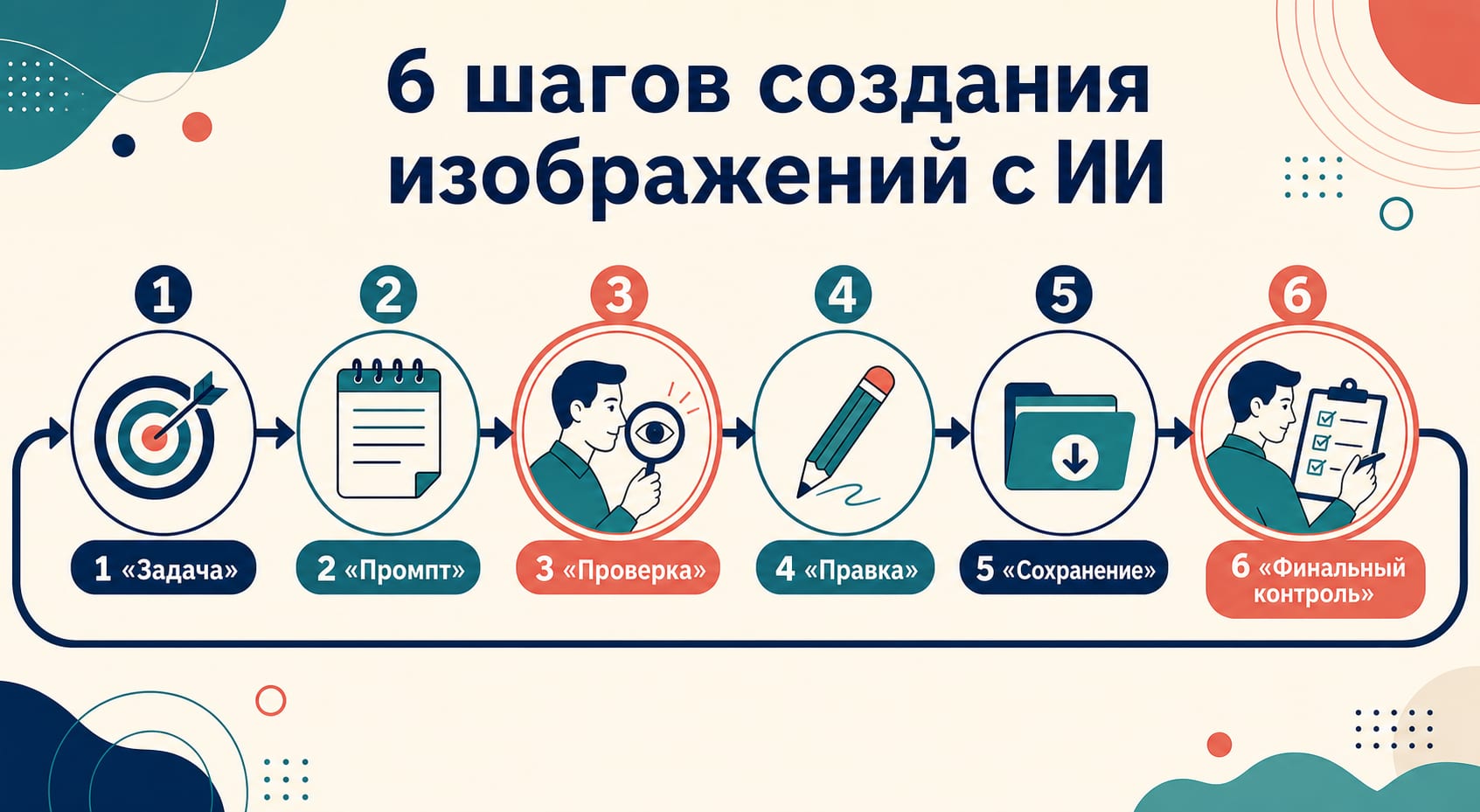
Генератор изображений ChatGPT удобнее воспринимать не как кнопку «сделать красиво», а как короткий рабочий цикл. Откройте официальный ChatGPT, сформулируйте задачу и попросите создать изображение. Затем рассмотрите результат в полном размере, назовите одну следующую правку, повторите неизменяемые требования и только после проверки сохраните файл. Для редактирования своей картинки загрузите ее в ChatGPT и отдельно укажите, что изменить и что обязательно сохранить.
Это руководство относится к официальному продукту ChatGPT. Сторонний сайт с надписью «ChatGPT image generator» может использовать другой модельный маршрут, собственные лимиты и правила хранения. Его интерфейс и обещания ничего не доказывают о тарифе или поведении ChatGPT.
Быстрый маршрут: от идеи до сохраненного файла
Если вам нужна обложка, карточка для поста, иллюстрация или черновик плаката, действуйте в таком порядке:
- Определите назначение: где будет опубликовано изображение и что читатель должен понять за несколько секунд.
- В беседе попросите ChatGPT создать изображение или откройте раздел Images/«Картинки», если он отображается в вашей версии интерфейса.
- В первом промпте задайте сюжет, композицию, формат, точный текст и ограничения.
- Откройте результат крупно и проверьте всю картинку, а не только главный объект.
- На каждом следующем шаге меняйте один параметр или небольшую связанную группу параметров.
- Снова проверяйте текст, факты, расположение объектов, права и безопасность.
- Используйте элемент управления Save/«Сохранить», затем откройте скачанный локальный файл и проверьте его формат и размеры.
Названия кнопок и их расположение могут различаться на веб-сайте и в мобильном приложении, а также меняться во время обновлений. Поэтому надежнее ориентироваться на результат действия — создать, открыть, изменить, сохранить — чем на вечную инструкцию «нажмите третью кнопку справа». Текущая справка OpenAI об изображениях в ChatGPT подтверждает создание, редактирование и сохранение, но не означает, что каждый аккаунт увидит одинаковую раскладку интерфейса.
Первый промпт: дайте ChatGPT небольшой технический бриф
Длинный набор эпитетов редко заменяет ясную задачу. Хороший первый промпт отвечает на несколько вопросов:
| Часть брифа | Что написать | Зачем это нужно |
|---|---|---|
| Назначение | «Обложка для поста о городском книжном клубе» | Задает уровень детализации и визуальную иерархию. |
| Главный объект и действие | «Открытая книга на столе, из страниц поднимается бумажный город» | Убирает неопределенность в сюжете. |
| Среда и композиция | «Вечерний свет, объект по центру, свободное место сверху» | Помогает сразу получить пригодный макет. |
| Формат | «Горизонтальная композиция 16:9» | Согласует кадр с местом публикации. |
| Текст | КНИЖНЫЙ КЛУБ — 18:30 | Фиксирует короткую строку, которую можно проверить посимвольно. |
| Ограничения | «Без логотипов, без реальных людей, без мелкого текста» | Снижает риск нежелательных деталей. |
Например:
Создай горизонтальную обложку 16:9 для поста вымышленного городского книжного клуба. На деревянном столе лежит открытая книга, а из страниц поднимается небольшой бумажный город в теплом вечернем свете. Оставь свободное место сверху и добавь только одну строку: «КНИЖНЫЙ КЛУБ — 18:30». Без логотипов, реальных людей и мелких надписей.
Такой запрос достаточно конкретен, чтобы результат можно было принять или отклонить по наблюдаемым признакам. Если точная надпись критична, делайте ее короткой. Улучшенное воспроизведение текста не является гарантией: проверьте каждую букву, тире, число и перенос вручную.
Правка без потери удачной части
Самая частая ошибка после неплохого первого результата — попросить сразу изменить цвет, композицию, надпись, фон и стиль. Тогда становится непонятно, какое требование сломало удачную часть изображения. Полезнее строить итерацию как договор:
- изменить: один конкретный параметр;
- сохранить: перечисленные инварианты;
- проверить: весь кадр после новой генерации.
Продолжение примера может выглядеть так:
Измени только освещение: вместо теплого вечернего света сделай мягкий утренний свет. Сохрани горизонтальный формат, положение книги и бумажного города, свободное место сверху и точную строку «КНИЖНЫЙ КЛУБ — 18:30». Не добавляй новые объекты или текст.
Фраза «измени только» задает цель, но не гарантирует локальный патч. Новый результат остается новым кандидатом: перепроверьте даже то, что просили сохранить. Если правка важна, сохраните предыдущий удачный вариант отдельно, чтобы не зависеть от истории предпросмотра.
Как редактировать загруженное изображение
ChatGPT может редактировать не только созданные им изображения, но и загруженный файл. Используйте этот маршрут только для материала, который вы вправе передавать и изменять.
Практический порядок такой:
- Загрузите исходник или откройте ранее созданное изображение.
- Опишите желаемое изменение обычным текстом.
- Если доступно выделение области, отметьте нужный участок, но продублируйте область словами: «в правом верхнем углу», «на вывеске», «только фон за чашкой».
- Перечислите важные элементы, которые должны остаться прежними.
- После результата осмотрите границу выделения и все участки за ее пределами.
Пример для своей фотографии предмета:
Замени только серый фон за синей керамической кружкой на светло-бежевый бумажный фон. Сохрани форму кружки, цвет глазури, ручку, блик, тень и кадрирование. Не добавляй логотипы, надписи или другие предметы.
Инструмент выделения помогает указать область, но его граница не обязана совпадать с пикселями идеально. Поэтому нельзя считать, что за пределами маски ничего не изменилось. Сравните форму, края, текстуры, тени и мелкие детали с исходником.
Если кнопка загрузки отсутствует, файл отклоняется или отправка постоянно завершается ошибкой, это уже отдельная диагностическая задача. Начните с руководства по проблемам загрузки изображений в ChatGPT, не превращая творческий промпт в длинный список случайных исправлений.
Обычная генерация или Images with thinking
Для большинства одиночных иллюстраций достаточно обычной генерации. Режим Images with thinking полезен, когда до рисунка нужно спланировать плотный макет, собрать актуальный контекст или сравнить несколько вариантов. Он не делает факты или текст автоматически достоверными.
| Ситуация | Что выбрать | Что все равно сделать вручную |
|---|---|---|
| Простая обложка, предметная сцена, иллюстрация | Обычная генерация | Проверить соответствие промпту и финальный файл. |
| Плотная инфографика или материал с несколькими смысловыми блоками | Images with thinking, если режим доступен в аккаунте | Проверить источники, числа, подписи, стрелки и порядок. |
| Визуал на основе текущих сведений | Thinking может помочь собрать и организовать контекст | Сверить каждое утверждение с авторитетным источником. |
| Повторяемая генерация внутри приложения | Не пользовательский интерфейс, а отдельный API-проект | Спроектировать хранение, ошибки, стоимость и права. |
По состоянию на 21 июля 2026 года официальная справка указывает Images with thinking для Plus, Pro и Business, а обычное создание изображений доступно и пользователям Free. Доступность и названия могут меняться; ориентируйтесь на текущий интерфейс своего аккаунта и свежую справку, а не на скриншот из старой статьи. Отсутствие thinking-режима не мешает пройти основной процесс «промпт → проверка → правка → сохранение».
Бесплатно — не значит без аккаунта или без ограничений
Пользователи Free могут создавать изображения в ChatGPT. При этом у генерации изображений может быть собственный лимит, отдельный от основного лимита чата. Когда он достигнут, ChatGPT показывает актуальную для аккаунта информацию о возможности повторить попытку.
Отсюда следуют три практических правила:
- не планируйте работу по запомненному числу «картинок в день»;
- не называйте генерацию безлимитной ни для бесплатного, ни для платного тарифа;
- не обещайте полный процесс без входа в аккаунт: текущие официальные материалы этого универсально не подтверждают.
Числовые квоты, время сброса и различия между аккаунтами меняются и принадлежат отдельной задаче. Для нее используйте актуальный разбор лимитов бесплатной генерации. Показанное самим продуктом состояние важнее чужого поста или старого скриншота.
Сохранение — еще не конец работы
Кнопка Save скачивает изображение, но не подтверждает, что файл готов к публикации. После сохранения откройте локальную копию и проведите короткий контроль:
- написание слов, имен, дат, цен, единиц и мелких подписей;
- факты, причинно-следственные связи, порядок шагов и направление стрелок;
- сходство реального человека, наличие согласия и риск вводящего в заблуждение контекста;
- права на исходники, логотипы, персонажей, фотографии и заявленное использование;
- фактические ширина, высота, формат и поведение после кадрирования;
- отсутствие случайных объектов, искажений и изменений за пределами заказанной правки.
Для важного материала сохраните рядом финальный промпт, выбранную версию, сведения о разрешении исходников и запись о проверке. Это полезнее, чем пытаться восстановить решение по одному экспортированному файлу.
Что на самом деле сообщают C2PA и SynthID
OpenAI описывает два сигнала происхождения для изображений, созданных ChatGPT, Codex и API: метаданные C2PA и невидимый водяной знак SynthID. Поддерживаемый сигнал может указать на происхождение из инструмента OpenAI. Он не подтверждает, что изображение правдиво, не редактировалось, принадлежит загрузившему его человеку или показано в верном контексте.
Обратное тоже неверно: если проверка не нашла сигнал, это не доказывает человеческое происхождение. Метаданные могут исчезнуть при конвертации или публикации, а водяной знак — ухудшиться после некоторых преобразований. Поэтому сведения о происхождении помогают ответить на узкий вопрос об источнике сигнала, но не заменяют фактчекинг, согласие и проверку прав. Эти ограничения прямо перечислены в справке OpenAI о C2PA и SynthID.
Не удаляйте и не обходите сигналы происхождения ради маскировки источника. Для публикации важнее честно описать процесс и проверить содержание, чем создавать ложное впечатление, будто изображение является документальной фотографией.
Не путайте ChatGPT, API и сторонний генератор
Одинаковое слово «генератор» может скрывать разные договоры:
| Маршрут | Для какой задачи | Что нельзя переносить из другого маршрута |
|---|---|---|
| Официальный ChatGPT | Человек создает, обсуждает, правит и сохраняет изображение в чате | API-цены, ключи, размеры и ограничения частоты запросов. |
| Image API | Приложение напрямую генерирует или редактирует изображения | Лимиты пользовательского тарифа ChatGPT. |
| Responses API | Изображение является инструментом в многошаговом процессе с текстом и другими действиями | Предположение, что это тот же интерфейс, что вкладка Images. |
| Сторонний сервис-посредник | Собственный сайт продает доступ по своим правилам | Название модели, конфиденциальность, лимиты и сведения о происхождении изображений официального ChatGPT без доказательств. |
Подписка ChatGPT не создает автоматически кредит API. Точно так же API-биллинг не определяет число генераций в приложении. Если задача стала программной, переходите к отдельному гайду о бесплатном GPT Image 2 API или разбору стоимости API-маршрута. Точные размеры и 4K — тема отдельной проверки GPT Image 2, а не свойство, которое следует угадывать по предпросмотру в ChatGPT.
FAQ
Как попросить ChatGPT создать изображение?
Опишите назначение, главный объект, действие, среду, композицию, формат и ограничения. Если нужен текст на изображении, дайте короткую точную строку и после генерации проверьте ее посимвольно.
Можно ли редактировать свою фотографию в ChatGPT?
Да, официальная справка описывает загрузку существующего изображения и правки текстом или через выделение области. Загружайте только материал, который вы вправе передавать и изменять, и после правки проверяйте весь кадр.
Сколько бесплатных изображений можно создать?
Универсального числа для этой статьи нет. Free поддерживает создание изображений, но инструменты могут иметь отдельные изменяемые лимиты. Актуальное состояние и время следующей попытки показывает сам ChatGPT.
Работает ли генератор изображений ChatGPT без регистрации?
Не стоит обещать это как универсальный сценарий. Текущие официальные источники не подтверждают полный цикл создания, редактирования и сохранения без аккаунта для всех регионов и состояний продукта.
Можно ли генерировать изображения без ограничений?
Нет оснований называть маршрут безлимитным. У тарифов и инструментов есть лимиты и защитные ограничения, а доступность может зависеть от текущего аккаунта.
Почему правка затронула участок вне выделения?
Выделение передает намерение, но не гарантирует пиксельную изоляцию. Повторите словами область изменения и неизменяемые элементы, затем сравните весь результат с исходником.
Можно ли считать изображение достоверным, если найден C2PA или SynthID?
Нет. Такой сигнал относится к происхождению из инструмента OpenAI. Он не подтверждает факты, отсутствие редактирования, собственность, согласие или корректный контекст.
Когда нужен API, а не ChatGPT?
API нужен, когда генерация встроена в приложение и требуется программно управлять входами, выходами, ошибками, хранением и затратами. Для ручного создания и нескольких итераций проще начать с официального ChatGPT.