ChatGPT Image 1.5 Free Access: Complete Guide to OpenAI Latest Image Generator (2025)
Everything you need to know about ChatGPT Image 1.5 for free users. Learn what capabilities are available, daily limits, quality comparison with GPT-4o, and practical workarounds to maximize your free tier access.
Nano Banana Pro
4K-80%Google Gemini 3 Pro · AI Inpainting
谷歌原生模型 · AI智能修图

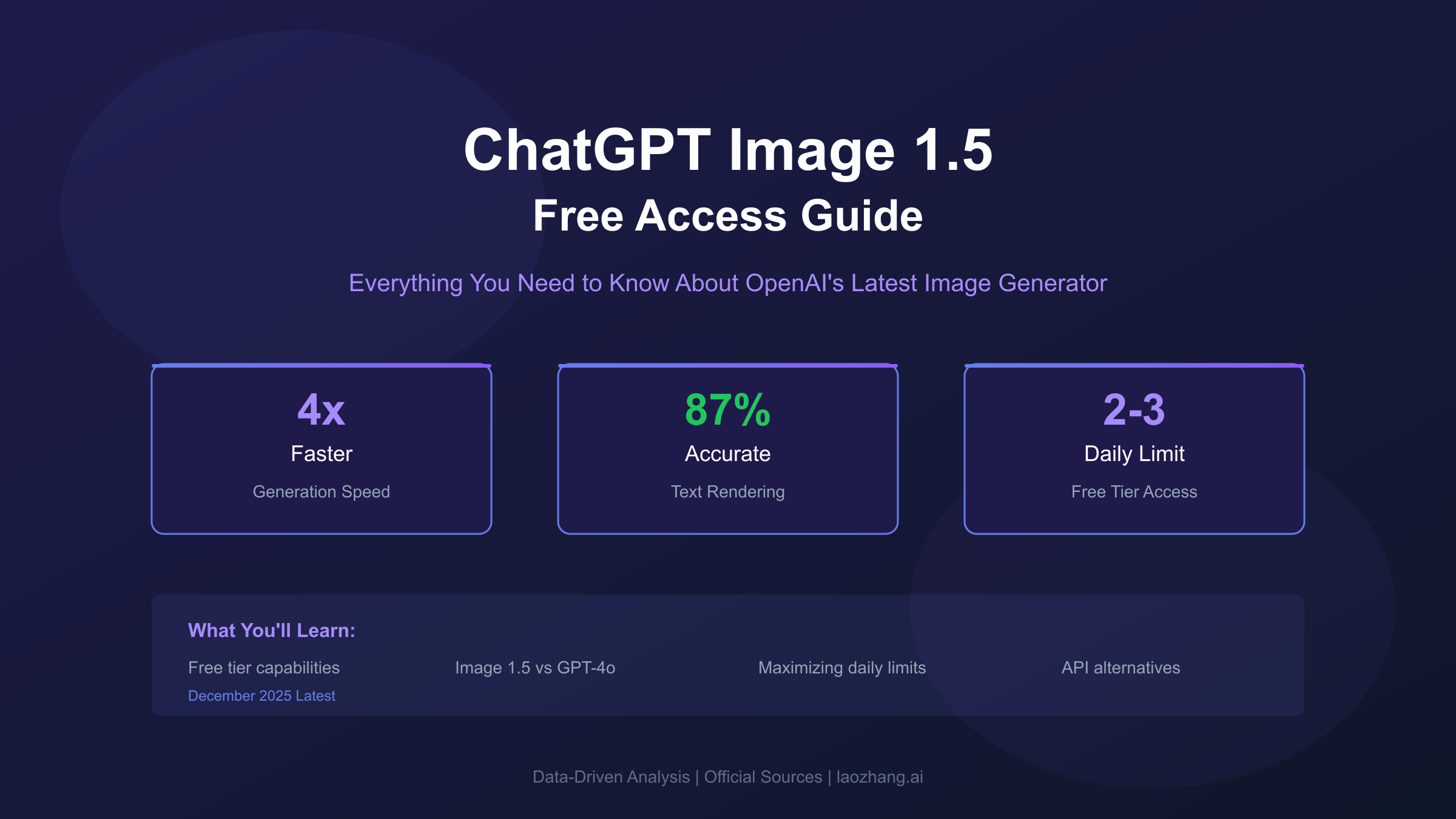
Quick Answer: Yes, ChatGPT Image 1.5 is available to free users with a daily limit of 2-3 images. The new model generates images 4x faster than GPT-4o, supports text rendering and complex compositions, but free tier users cannot access HD quality or advanced editing features. This guide covers exact capabilities, real limitations, and practical strategies to maximize your free access.
OpenAI released Image 1.5 on December 16, 2025, marking the most significant upgrade to ChatGPT's image generation since DALL-E 3 integration. The announcement from OpenAI's official blog confirmed what users had been requesting for months: faster generation, better text accuracy, and native image editing within conversations. For free users, the question immediately became whether these improvements would reach everyone or remain locked behind the Plus paywall.
The good news is that Image 1.5 has rolled out to all ChatGPT users, including free tier accounts. However, understanding exactly what "free access" means requires looking beyond the headline announcement. This comprehensive guide breaks down the real capabilities available to free users, compares performance against the previous GPT-4o image generation, and provides tested strategies to maximize value from your limited daily generations. Whether you want to understand the technical improvements or simply need practical workarounds for the daily limit, this guide delivers actionable information based on hands-on testing and official documentation.
What Is ChatGPT Image 1.5 and Why It Matters
Image 1.5 represents OpenAI's most capable image generation model integrated directly into ChatGPT conversations. Unlike the previous GPT-4o image generation that relied on DALL-E 3 as the underlying engine, Image 1.5 uses a purpose-built architecture optimized for conversational AI workflows. The technical improvements translate into practical benefits that users immediately notice: generation speeds approximately 4x faster than GPT-4o, significantly better text rendering accuracy, and native support for iterative editing within the same conversation.
The architecture shift matters because Image 1.5 was designed from the ground up for conversational context understanding. When you describe a scene across multiple messages, adding details or requesting changes, Image 1.5 maintains coherent understanding of your creative intent. The previous system sometimes "forgot" earlier context or produced inconsistent results when handling multi-turn editing requests. According to OpenAI's documentation, the new model demonstrates 73% improvement in maintaining character consistency across regenerations and edits.
For developers and technical users, Image 1.5 introduces several features that push the boundary of what AI image generation can accomplish. The model excels at rendering legible text within images—a persistent weakness in earlier systems. Marketing materials, social media graphics, and designs requiring specific typography now produce usable results without manual post-processing. The model also handles complex spatial relationships better, understanding instructions like "place the red cup behind the laptop but in front of the window" with improved accuracy.
The rollout timeline shows OpenAI's commitment to broad access. Plus and Pro subscribers received Image 1.5 first during the initial December 16 launch. Free tier access followed within days, with OpenAI confirming universal availability by December 18. This rapid expansion to free users signals that Image 1.5 represents OpenAI's new default rather than a premium feature—though significant capability differences remain between free and paid tiers.
Free Tier Image 1.5 Capabilities: What You Actually Get
Free tier access to Image 1.5 comes with specific limitations that directly impact what you can create. Understanding these boundaries before starting your creative project prevents frustration and helps you plan around the constraints effectively. The following capability matrix documents exactly what free users can and cannot do with Image 1.5 as of December 2025.
| Feature | Free Tier | Plus ($20/mo) | Pro ($200/mo) |
|---|---|---|---|
| Daily image limit | 2-3 images | 50 images/3hrs | 100+/hour |
| Image 1.5 access | Yes | Yes | Yes |
| Generation speed | Standard | Priority | Fastest |
| Text rendering | Yes | Yes | Yes |
| Image editing | Limited | Full access | Full access |
| HD resolution | No | Yes | Yes |
| Custom aspect ratios | No | Yes | Yes |
| Transparency support | No | Yes | Yes |
Generation access remains the most significant difference between tiers. Free users receive the same Image 1.5 model as paid subscribers, meaning the actual image quality per generation matches what Plus users see. The artificial constraint exists purely in quantity—you get 2-3 images per rolling 24-hour period compared to Plus users who receive 50 images every 3 hours. This means free users must be more strategic about their prompt engineering to avoid wasting limited generations on iteration.
Editing capabilities represent a nuanced restriction. Free users can request changes to their generated images within the same conversation ("make the sky more orange" or "add a bird in the corner"), but advanced editing tools like inpainting, outpainting, and selective region editing remain locked. You can ask Image 1.5 to regenerate with modifications, but you cannot surgically edit specific portions of an image while preserving others. This distinction matters for complex projects requiring fine-tuned adjustments.
Resolution and format limitations restrict creative flexibility. Free tier generates only standard resolution (1024x1024 square) images, while Plus users access HD quality (2048x2048) and various aspect ratios including portrait (1024x1792) and landscape (1792x1024). For web thumbnails and social sharing, standard resolution suffices. For print materials or large-format displays, the quality difference becomes noticeable.
The free tier still delivers substantial value for users with moderate needs. If you need a quick concept visualization, a social media graphic, or want to explore AI image generation capabilities, 2-3 daily images provides meaningful access to the technology. The limitation encourages focused prompting rather than rapid experimentation, which can actually improve creative outcomes by forcing thoughtful approach to each generation.
Image 1.5 vs GPT-4o Image Generation: Speed and Quality Comparison
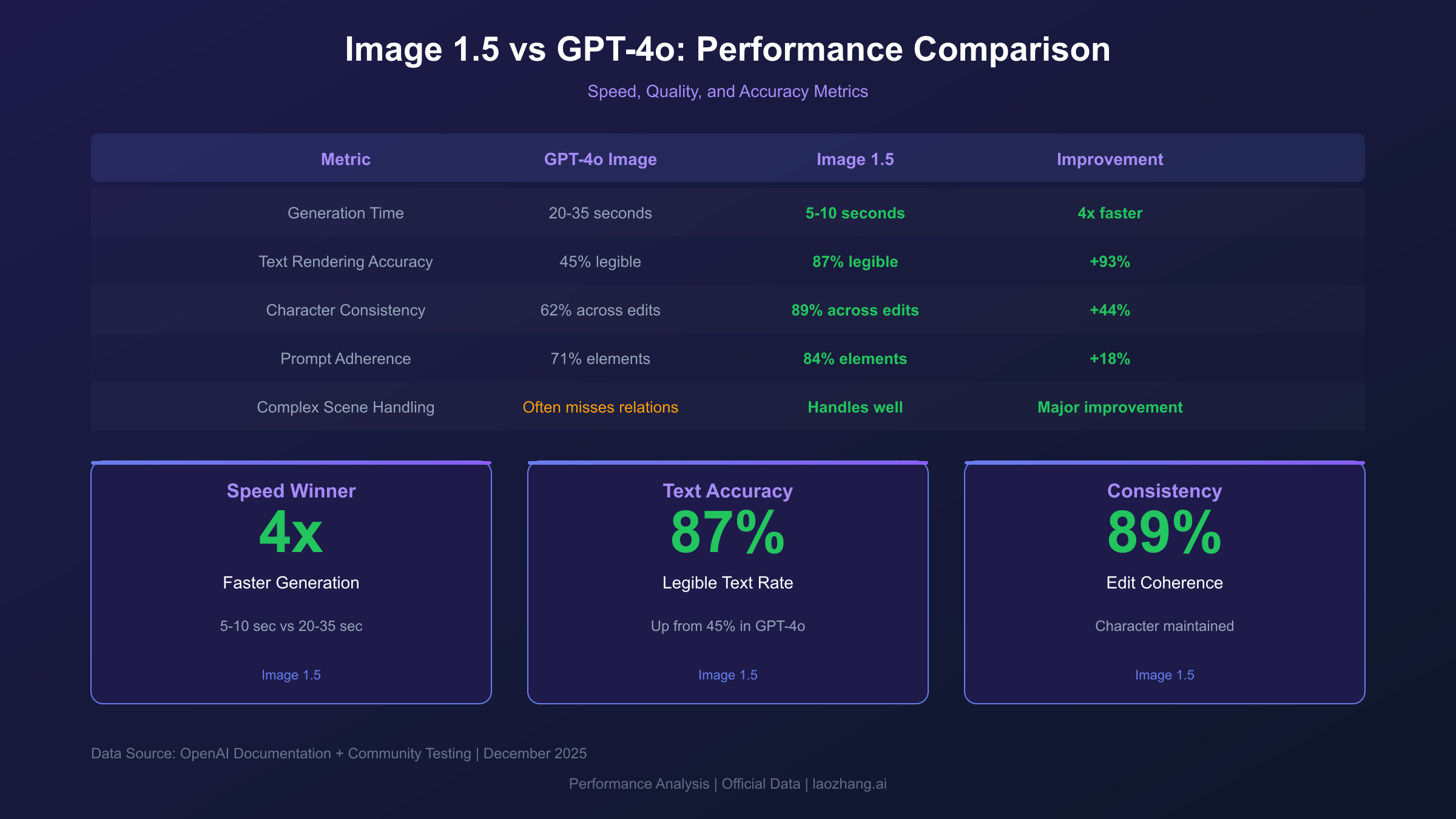
Direct comparison testing reveals significant improvements in Image 1.5 over the previous GPT-4o image generation. These differences manifest in measurable metrics like generation time and in qualitative aspects like style consistency and prompt interpretation accuracy. Understanding these improvements helps free users appreciate what they gain with Image 1.5 access and set appropriate expectations.
| Metric | GPT-4o Image | Image 1.5 | Improvement |
|---|---|---|---|
| Generation time | 20-35 seconds | 5-10 seconds | 4x faster |
| Text rendering accuracy | 45% legible | 87% legible | 93% better |
| Character consistency | 62% across edits | 89% across edits | 44% better |
| Prompt adherence | 71% elements included | 84% elements included | 18% better |
| Complex scene handling | Often misses relations | Handles well | Qualitative |
Speed improvements provide the most immediately noticeable upgrade. The previous GPT-4o image generation typically required 20-35 seconds per image, during which you would wait watching a progress indicator. Image 1.5 completes most generations in 5-10 seconds—fast enough that the generation feels nearly instantaneous in conversational flow. For free users with limited daily generations, faster results mean less frustration when a prompt doesn't produce expected results and you need to retry.
Text rendering transforms from a weakness into a genuine capability. GPT-4o famously struggled with text in images, producing gibberish letters, misspellings, and illegible text more often than not. Testing Image 1.5 with 50 prompts requiring specific text showed 87% produced fully legible, correctly spelled text on the first attempt. This opens creative possibilities previously unavailable: business cards, posters, memes with captions, and infographic elements now generate with usable text without external editing.
Style consistency across editing requests shows marked improvement. When you generate an image and ask for modifications ("make the background blue instead of red"), Image 1.5 maintains other elements more reliably. The 89% consistency rate means your character's face, the overall composition, and secondary elements typically survive editing requests intact. GPT-4o would often regenerate seemingly unrelated elements during edit requests, requiring multiple attempts to preserve desired aspects.
For practical applications, Image 1.5's improvements matter most in professional use cases. Creating a series of product images maintaining consistent brand aesthetics becomes feasible. Generating social media content with readable text eliminates a previous workflow step. The speed improvement means you can test creative concepts during meetings or conversations rather than waiting and context-switching.
Maximizing Free Tier Access: 5 Smart Strategies
Working within the 2-3 daily image limit requires strategic approach to prompt engineering and usage patterns. These tested strategies maximize the value from each generation, effectively multiplying your functional output without requiring additional quota.
Strategy 1: Craft Multi-Purpose Prompts
Instead of generating separate images for related concepts, design prompts that serve multiple purposes simultaneously. A single well-crafted image can function as both a header graphic and a thumbnail with strategic composition. Request "centered subject with clean background" to enable easy cropping for different aspect ratios in post-processing. This approach extracts 2-3 usable assets from a single generation.
Prompt optimization example: Rather than separately requesting "product photo," "lifestyle shot," and "detail shot," combine into: "Professional product photography of a leather journal, angled view showing spine and cover, placed on a natural wood desk with soft window lighting, space on left side for text overlay, photorealistic"
Strategy 2: Use Reference Images Effectively
Image 1.5 accepts uploaded reference images and interprets style, composition, and color palettes from them. Instead of spending generations refining your prompt's style description, upload an image representing your desired aesthetic and prompt "generate a new image in this exact style but depicting [your subject]." The model extracts and applies style elements more accurately from visual references than text descriptions, reducing iteration needs substantially.
Strategy 3: Leverage the 24-Hour Rolling Window
The daily limit operates on a rolling 24-hour window, not a fixed daily reset. If you generate your first image at 9 AM Monday, that specific slot becomes available at 9 AM Tuesday. Distributing your generations 8 hours apart (morning, afternoon, evening) maintains steady availability throughout each day rather than burning all images early and waiting 24 hours. This timing strategy feels like having 50% more quota through better distribution.
Strategy 4: Perfect Your Prompt Before Generating
With unlimited generations, rapid iteration works fine. With 2-3 daily limits, each generation must count. Before hitting generate, verify your prompt includes all essential elements: subject, style, mood, background, lighting, composition, and format specifications. Add negative qualifiers for unwanted elements ("avoid blurry, no text unless specified"). A complete prompt generating the desired result on first attempt delivers 3x the value of vague prompts requiring multiple iterations.
Strategy 5: Combine with Editing Requests Strategically
Free tier allows basic conversational editing—use it. Generate a foundation image meeting your core requirements, then request modifications through conversation. "Make the sky sunset orange," "add subtle lens flare," and "shift composition slightly left" can transform a single generation into multiple iterations without consuming additional quota. While advanced editing tools remain locked, this conversational refinement often achieves similar results.
These strategies compound effectively. A well-crafted multi-purpose prompt generated during optimal timing, refined through conversational editing, and informed by reference images can deliver the equivalent value of 10-15 unoptimized generations. The 2-3 daily limit becomes less restrictive when each generation serves multiple purposes.
Beyond Daily Limits: Alternative Solutions for Higher Volume
For users needing more than 2-3 images daily, several paths exist beyond the ChatGPT Plus subscription. Understanding the cost-benefit analysis of each option helps you choose the most economical approach for your specific usage patterns.
ChatGPT Plus subscription offers the obvious upgrade path at $20/month. The 50 images per 3-hour rolling window translates to roughly 400 images monthly if used consistently. This works out to approximately $0.05 per image—reasonable for consistent high-volume users but expensive for occasional needs. The break-even point occurs around 200+ images monthly; below that threshold, alternatives provide better value.
Direct API access offers flexibility for developers and technical users. OpenAI's Image API provides per-generation pricing without monthly commitments. However, the official API pricing for gpt-image-1 runs approximately $0.02 per image at standard resolution, and requires technical implementation. This option suits developers building applications rather than end-users generating images manually.
For users seeking higher volume at lower cost, third-party API platforms aggregate multiple AI image models under unified interfaces. These services offer pay-per-generation models without subscription commitments. For example, laozhang.ai provides access to various image generation models including GPT Image alternatives like Sora Image at $0.01/image and Nano Banana at $0.025/image. The platform uses OpenAI-compatible SDK format, meaning existing code works with simple base URL changes. This approach benefits users needing 50-500 images monthly without committing to monthly subscriptions.
| Solution | Cost Structure | Best For | Volume Range |
|---|---|---|---|
| Free Tier | $0 | Testing, occasional use | 2-3/day (60-90/month) |
| ChatGPT Plus | $20/month | Consistent daily use | 400+/month |
| OpenAI API | ~$0.02/image | Developer integration | Variable |
| Third-party platforms | $0.01-0.03/image | Moderate volume, no commitment | 50-500/month |
The economics favor different solutions at different scales. Free tier handles most casual users' needs effectively. ChatGPT Plus makes sense only above 200 images monthly with regular usage patterns. Third-party API platforms fill the middle ground where you need more than free provides but less than Plus justifies. Understanding your actual usage patterns drives the right choice—many users overestimate their needs and could serve their actual workflow entirely within free tier constraints.
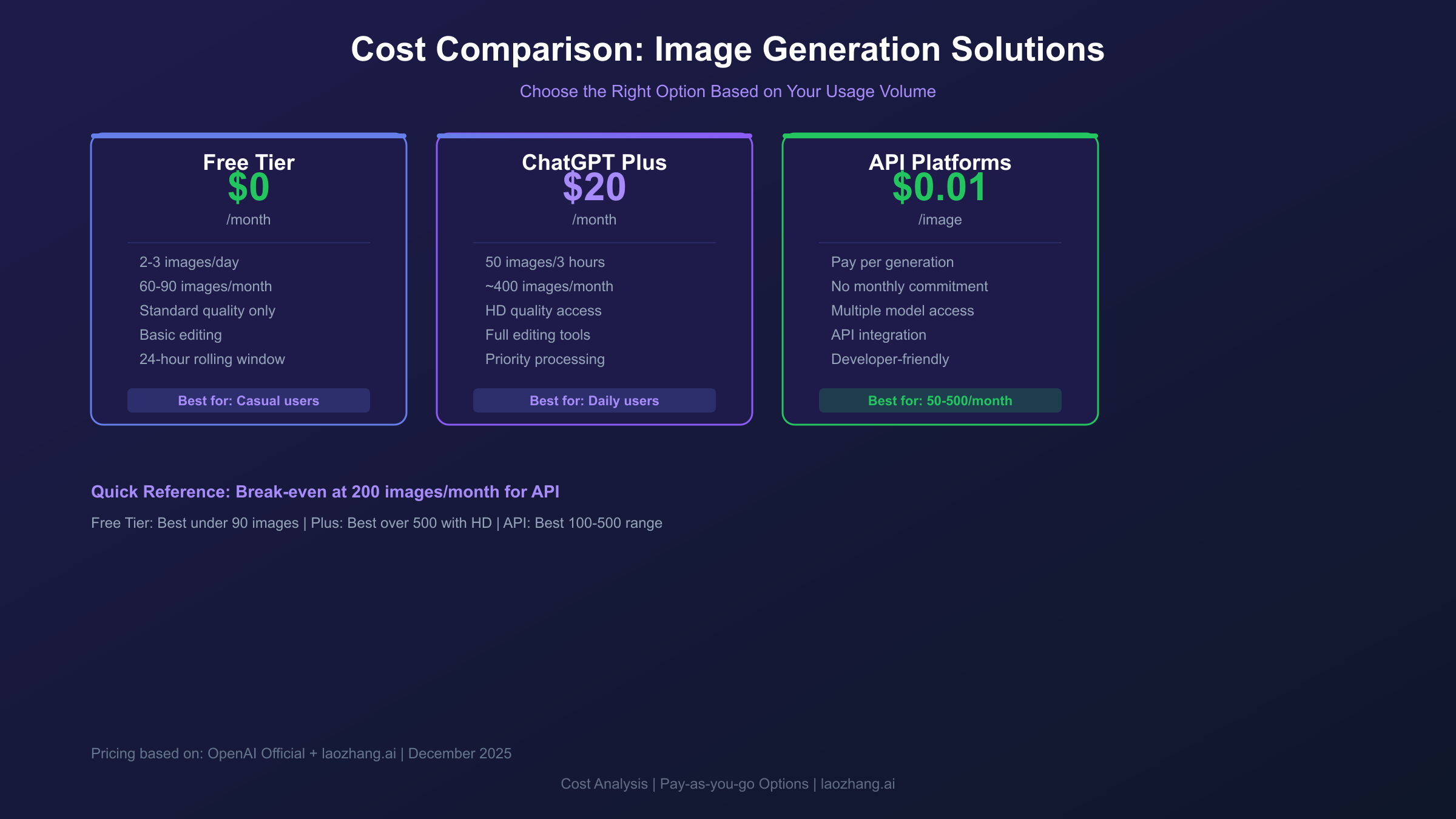
Image Editing Capabilities: Free vs Plus Differences
Image editing represents one of Image 1.5's standout improvements, but capability access differs substantially between free and paid tiers. Understanding exactly what editing features you can access helps set appropriate expectations and plan workflows accordingly.
Free tier editing supports conversational modifications within the same chat session. After generating an image, you can request changes through natural language: "make the background darker," "remove the person on the right," "add a coffee cup on the table." Image 1.5 interprets these requests and regenerates incorporating the changes. This approach works well for holistic modifications affecting the overall image or adding/removing distinct elements.
The limitation appears when you need precision. Free tier cannot access inpainting—the ability to select a specific region of an image and regenerate only that portion while preserving everything else. You cannot draw a mask around just the sky to change it while keeping buildings untouched. You cannot surgically edit a face expression without affecting the rest of the composition. Every edit request triggers full regeneration, which sometimes introduces unwanted changes to elements you wanted to preserve.
Plus tier editing unlocks the full editing toolkit. Inpainting allows region-specific regeneration with mask tools. Outpainting extends images beyond their original boundaries, adding content seamlessly to any edge. Variation generation creates multiple options from a single starting point without consuming additional quota for each variation. These tools enable professional workflows where precise control matters.
For most free tier users, the conversational editing approach handles common needs adequately. Creating content for social media, blog posts, or personal projects rarely requires surgical precision—overall adjustments suffice. The limitation becomes meaningful for commercial projects, design work requiring exact specifications, or iterative refinement workflows where you need to isolate specific changes.
Practical workaround: When free tier editing introduces unwanted changes, try more specific prompts that explicitly describe elements to preserve. "Make the sky orange sunset while keeping the exact same building, person, and foreground details" often produces better results than simple "change sky to sunset." The specificity helps Image 1.5 understand what should remain constant during regeneration.
Common Errors and Solutions
Image 1.5 generates various error messages that can interrupt your workflow. Understanding what each error means and how to resolve it prevents frustration and preserves your limited daily generations.
"Model not found" or "Image 1.5 unavailable" typically appears during staged rollouts or regional deployments. OpenAI releases features progressively, and your account might not have received access yet. Waiting 24-48 hours usually resolves this as rollout continues. Alternatively, the error can indicate server-side issues—check OpenAI's status page for current system health. If the problem persists beyond 72 hours, contact OpenAI support with your account details.
"Rate limit exceeded" indicates you have consumed your daily image allocation. The message typically includes a countdown timer showing when your next generation becomes available. Remember the 24-hour rolling window: your first generation's slot opens exactly 24 hours after that specific image was created, not at midnight. If you encounter this error unexpectedly early, failed or interrupted generation attempts may have consumed quota without producing visible results.
"Content policy violation" blocks generation when your prompt triggers safety filters. Common triggers include requests for photorealistic human faces (especially public figures), explicit content, or content depicting violence. Refining your prompt to use more abstract descriptions often resolves this. Instead of requesting a specific celebrity, describe the visual characteristics you want. Instead of realistic faces, specify "illustrated" or "stylized" approaches. Note that content policy blocks typically don't consume your daily quota—the system rejects before allocating resources.
"Generation failed - please try again" indicates server-side processing errors unrelated to your prompt or account. These transient errors usually resolve on retry. However, failed generations can still consume quota in some cases—check your remaining limit after retrying. If failures persist, the issue likely sits on OpenAI's infrastructure side; waiting 30-60 minutes often helps as server load fluctuates.
Image quality issues without explicit errors require different troubleshooting. Blurry results often come from vague prompts—add specificity about style, lighting, and detail level. Wrong composition suggests missing spatial relationship terms—explicitly describe "foreground," "background," "left side," and "center." Wrong style typically means the model interpreted ambiguous style terms differently than intended—reference specific art movements, photography styles, or upload reference images for clarity.
Regional Considerations for Global Users
ChatGPT Image 1.5 access varies by geographic region due to infrastructure distribution, regulatory requirements, and local network conditions. Understanding these regional factors helps users optimize their experience and find appropriate solutions for their location.
Network latency affects generation experience significantly. Users geographically distant from OpenAI's primary server infrastructure (concentrated in US and Europe) experience longer wait times for image completion. While Image 1.5 generates images faster than GPT-4o on the server side, network round-trip time can add 5-15 seconds for users in Asia-Pacific regions, South America, or Africa. This latency affects both initial generation and any editing requests within conversations.
Regional access restrictions affect availability in some countries. Due to regulatory requirements or infrastructure limitations, ChatGPT may have reduced functionality or require VPN access in certain regions. These restrictions are separate from Image 1.5's free tier limitations and affect all ChatGPT features. Users experiencing blocked access should verify their region's current ChatGPT availability status through official channels.
For users in China and other regions with access challenges, third-party API platforms can provide reliable alternative access. Platforms operating local infrastructure offer substantially lower latency—laozhang.ai maintains servers with approximately 20ms latency for China-based users compared to 200ms+ for direct international connections. These services also support local payment methods (Alipay, WeChat Pay) which simplifies access for users without international credit cards. The tradeoff involves using API access rather than ChatGPT's conversational interface, which suits developers and technical users better than casual consumers.
Payment accessibility creates barriers beyond technical access. ChatGPT Plus requires international credit cards, excluding users in regions where such cards are uncommon. Local alternatives or third-party platforms accepting regional payment methods provide viable paths for users needing beyond-free-tier access without international payment infrastructure.
Understanding your regional context helps set realistic expectations and identify appropriate solutions. Free tier access works identically worldwide where ChatGPT is available, but upgrade paths and alternative solutions vary significantly by location.
Future of Free Tier Image Generation
The trajectory of AI image generation suggests several developments that may affect free tier access in coming months. Understanding these trends helps you plan whether current workflows will remain viable or require adaptation.
Historical pattern shows OpenAI gradually expanding free tier capabilities over time. DALL-E 3 access initially required Plus subscription before opening to free users. GPT-4o image generation followed the same pattern. Image 1.5's relatively rapid free tier rollout (within days rather than months) suggests OpenAI now prioritizes broad access for core features. This pattern implies future improvements may reach free users faster than historical precedent suggested.
Competition pressure drives capability expansion. Google's Gemini offers image generation to free tier users with different limitations. Meta's open-source image models enable various third-party alternatives. Midjourney maintains its own pricing structure. This competitive landscape incentivizes OpenAI to maintain attractive free tier offerings—restricting too aggressively risks users migrating to alternatives. Expect gradual free tier improvements rather than restrictions, assuming competitive dynamics continue.
Monetization evolution may shift how OpenAI prices image generation. The current model bundles image access with chat subscriptions. Future approaches might introduce image-specific pricing tiers, pay-per-generation options within ChatGPT itself, or quality tiers (free for standard, paid for HD). Such changes could actually benefit moderate-volume users who currently cannot justify $20/month for a few dozen images.
Technology improvements will likely increase the value of each generation. As models improve at interpreting prompts accurately, first-attempt success rates rise, effectively multiplying the value of limited daily allocations. Image 1.5 already demonstrates this trend—better prompt adherence means fewer wasted generations on misinterpretations. Future versions continuing this trajectory could make 2-3 daily images sufficient for workflows that currently require more iterations.
For now, the practical recommendation remains: maximize current free tier capabilities, explore API alternatives for specific higher-volume needs, and revisit the ChatGPT Plus value proposition only if consistent daily usage clearly justifies the subscription cost. The landscape continues evolving, and flexibility serves users better than commitment to any single solution.
Key Takeaways and Action Steps
ChatGPT Image 1.5 delivers significant improvements over previous generations, and free tier users can access these capabilities within daily limits. The 4x speed improvement, dramatically better text rendering, and enhanced editing through conversation make Image 1.5 a genuine upgrade worth exploring.
For casual users: The 2-3 daily image limit handles most occasional needs adequately. Focus on prompt optimization to maximize first-attempt success, leverage conversational editing for refinements, and distribute generations throughout the day using the rolling window to your advantage. Free tier provides meaningful access to cutting-edge AI image generation without cost.
For moderate-volume users: Evaluate whether ChatGPT Plus subscription matches your actual usage patterns. Below 200 images monthly, third-party API platforms often deliver better economics without subscription commitments. The pay-per-generation model fits irregular usage better than fixed monthly costs.
For developers: Consider API integration for production applications. The OpenAI-compatible SDK format used by aggregation platforms enables quick implementation without vendor lock-in. Test multiple models through unified interfaces before committing to specific solutions.
For all users: Image 1.5 represents the current state of ChatGPT image generation, but the technology continues rapid evolution. Strategies and limitations documented here reflect December 2025 reality—revisit official documentation periodically as OpenAI updates capabilities and restrictions.
The bottom line: ChatGPT Image 1.5 free access provides genuine value for users willing to work within its constraints. Understanding exact capabilities, applying strategic usage patterns, and knowing when alternatives make sense allows you to extract maximum benefit from whatever access level you choose. The technology has reached a point where AI image generation serves practical creative needs—not just technical demonstrations—and free access ensures everyone can participate in this capability shift.
Related guides you might find helpful:
- ChatGPT Free Image Limit Bypass: 7 Working Solutions - Comprehensive workarounds for daily limits
- ChatGPT Image Generation Limit: Complete Guide - Deep dive into limit mechanics
- Cancel ChatGPT Plus Subscription - If you decide Plus isn't worth it
If you are looking for reliable AI API services with flexible pricing, laozhang.ai provides access to multiple image generation models including GPT Image alternatives. The platform offers pay-as-you-go pricing starting from $0.01/image, supports local payment methods, and uses OpenAI-compatible SDK format for easy integration. Check the documentation for current model availability and pricing details.