How to Cancel ChatGPT Plus Subscription: Complete Step-by-Step Guide (2026)
Complete guide to cancel ChatGPT Plus, Pro, Business, and Enterprise subscriptions on web, iOS, and Android. Learn the step-by-step process, refund policies, billing cycle tips, and what happens after cancellation.
Nano Banana Pro
4K-80%Google Gemini 3 Pro · AI Inpainting
谷歌原生模型 · AI智能修图

Deciding to cancel your ChatGPT Plus subscription is straightforward, but the exact process depends on where you originally subscribed. Whether you signed up through the OpenAI website, Apple App Store, or Google Play Store, this guide walks you through every step of the cancellation process. The good news: canceling takes just 2-5 minutes, there are no penalties or cancellation fees, and you retain full access to ChatGPT Plus features until your current billing period ends.
Before diving into the step-by-step instructions, it helps to understand the key points. ChatGPT Plus costs $20/month and provides access to GPT-4o, faster response times, and priority server access during peak hours. If you subscribed to ChatGPT Pro ($200/month) or a Business plan (formerly Team, $30/user/month), the cancellation process follows similar steps with minor variations. This guide covers all subscription tiers and platforms, including the recent changes OpenAI made in late 2025, so you can find exactly what applies to your situation.
What makes this guide different from others is the attention to details that actually matter: optimal timing to avoid unexpected charges, how to export your conversation history before canceling, refund eligibility across different platforms, and troubleshooting steps when the cancellation button does not appear. By the end of this article, you will have complete clarity on how to cancel, what happens afterward, and whether alternatives like downgrading or switching to API access might better suit your needs.
| Subscription Type | Monthly Cost | Cancellation Difficulty | Refund Window |
|---|---|---|---|
| ChatGPT Plus | $20 | Simple (2-3 minutes) | 48h (iOS/Android), 7 days (Web) |
| ChatGPT Pro | $200 | Simple (2-3 minutes) | Same as Plus |
| ChatGPT Business | $30/user | Requires workspace owner/admin | Contact sales |
| ChatGPT Enterprise | Custom pricing | Contract-based (30-day notice) | Per agreement |
Note: As of August 2025, OpenAI renamed ChatGPT Team to ChatGPT Business. If you have an existing Team subscription, the cancellation process remains the same, but your dashboard may now show "Business" instead.
What to Do Before Canceling Your Subscription
Before clicking the cancel button, taking a few preparatory steps ensures you do not lose important data or get caught off guard by billing. Many users rush to cancel and later realize they wanted to save certain conversations or did not realize their billing date was only hours away. This section covers the essential pre-cancellation checklist that protects your interests.
Export Your Conversation History
Your conversation history with ChatGPT represents potentially valuable information, especially if you have used it for work projects, research, or creative writing. While OpenAI does not automatically delete your chat history upon cancellation, having a local backup provides peace of mind and ensures access even if you do not plan to return.
To export your data, log into ChatGPT at chat.openai.com, click your profile icon in the bottom-left corner, and select Settings. Navigate to Data Controls, then click Export Data. OpenAI will send an email within 24 hours containing a download link for your complete conversation history in JSON format. This export includes all your chats, custom instructions, and shared links. The download link expires after a limited time, so save the file promptly once received.
Pro Tip: Request your data export at least 24 hours before your planned cancellation date. This ensures you receive and download the file before losing Plus access.
Check Your Billing Cycle End Date
Understanding when your next billing date falls is crucial for timing your cancellation optimally. You continue to have full ChatGPT Plus access until your current billing cycle ends, regardless of when you cancel during that period. However, if you cancel after the renewal charge has processed, you will need to request a refund separately.
To find your billing date through the web interface, go to chat.openai.com, click your profile, select My Plan, and look for the renewal date displayed under your subscription details. For iOS subscribers, open Settings on your iPhone, tap your Apple ID at the top, select Subscriptions, and find ChatGPT in the list. Android users can find this in Google Play Store → Profile → Payments & subscriptions → Subscriptions.
Review Your Subscription Alternatives
Sometimes what appears to be a reason to cancel is actually a reason to switch plans or payment methods. Before canceling entirely, consider these scenarios:
- Budget concerns with Pro ($200/month)? Downgrade to Plus ($20/month) instead of canceling
- Exploring alternatives? Consider Google Gemini access options for similar AI capabilities
- Infrequent usage? The free tier provides GPT-3.5 access for occasional needs
- Regional payment issues? Alternative payment methods or API access might solve the problem
- Need specific features only? Pay-per-use API access offers flexibility without monthly commitment
- Primarily need image generation? ChatGPT's free tier image features might meet your needs
If none of these alternatives apply and you are certain about canceling, proceed to the platform-specific instructions below.
Cancel ChatGPT Plus via Web Browser (Desktop)
Canceling through the web browser is the most straightforward method and works for anyone who subscribed directly through OpenAI's website. This method applies to users who see chatgpt.com or openai.com billing on their credit card statements. If you subscribed through the iOS or Android app and see Apple or Google charges instead, skip to the respective mobile sections below.
Step-by-Step Web Cancellation Instructions
The web cancellation process takes approximately 2-3 minutes. Follow these exact steps to cancel your subscription:
- Open ChatGPT in your browser: Navigate to chat.openai.com and ensure you are logged into the correct account
- Access your profile settings: Click your profile picture or initials in the bottom-left corner of the screen
- Select "My Plan": This opens your subscription management panel
- Click "Manage my subscription": You will be redirected to the billing portal powered by Stripe
- Select "Cancel plan": Look for the cancellation option, which may appear as "Cancel subscription" or similar wording
- Confirm cancellation: Complete any confirmation prompts. You may be asked to provide a reason, but this is optional
- Verify the confirmation screen: Ensure you see a message confirming your cancellation and the date when Plus access ends
After completing these steps, you should receive a confirmation email within minutes. If the email does not arrive, check your spam folder and verify the cancellation went through by returning to My Plan and confirming your subscription status shows as canceled or ending on a specific date.
Troubleshooting Web Cancellation Issues
Several common issues can prevent successful cancellation through the web interface. Here are the most frequent problems and their solutions:
"Manage my subscription" button does not appear: This usually indicates you subscribed through iOS or Android rather than the web. Check your email for billing receipts from Apple or Google. If you find such receipts, use the mobile-specific cancellation methods instead.
Page loads indefinitely or shows an error: Clear your browser cache and cookies, then try again in an incognito/private window. Some browser extensions, particularly ad blockers or privacy tools, can interfere with the billing portal.
Logged into wrong account: If you have multiple OpenAI accounts, ensure you are logged into the one with the active subscription. The profile icon shows your email address when you hover over it.
Important: Your ChatGPT Plus access remains active until the end of your current billing period. Canceling early does not provide a partial refund automatically—you simply retain access until the period ends.
Cancel ChatGPT Plus Subscription on iPhone and iPad
If you subscribed to ChatGPT Plus through the iOS app and see charges from Apple on your credit card statement, you must cancel through Apple's subscription management system rather than the ChatGPT website. This is because Apple handles all App Store subscription billing, and OpenAI does not have the ability to cancel or modify subscriptions made through Apple.
Method 1: Using iPhone Settings (Recommended)
The most reliable way to cancel your iOS ChatGPT subscription is through your device's Settings app. This method works even if you have deleted the ChatGPT app:
- Open Settings on your iPhone or iPad
- Tap your name at the top of the screen (your Apple ID profile)
- Select "Subscriptions" from the list of options
- Find "ChatGPT" in your active subscriptions list
- Tap on ChatGPT to view subscription details
- Tap "Cancel Subscription" at the bottom of the screen
- Confirm your cancellation when prompted
After cancellation, your subscription status will change to show the expiration date. You retain Plus access until that date, after which your account reverts to the free tier automatically.
Method 2: Cancel Through the ChatGPT App
Alternatively, you can initiate cancellation from within the ChatGPT app itself:
- Open the ChatGPT app on your iPhone or iPad
- Tap the menu icon (three horizontal lines) in the top-left corner
- Select "Settings" from the menu
- Tap "Subscription" under your account section
- Select "Manage Subscription" which redirects to Apple's subscription interface
- Follow the prompts to cancel your subscription
Both methods ultimately route through Apple's subscription management system, so the end result is identical. The Settings method is preferred when troubleshooting issues because it bypasses any potential app-related problems.
Apple's Refund Policy for ChatGPT Plus
Apple's refund policy differs from OpenAI's web-based subscription policy. For App Store subscriptions, Apple generally allows refund requests within 48 hours of purchase or renewal, though approval is at Apple's discretion. To request a refund:
- Visit reportaproblem.apple.com
- Sign in with your Apple ID
- Find the ChatGPT Plus charge in your purchase history
- Select "Request a refund" and choose your reason
- Submit the request and wait for Apple's response (typically 24-48 hours)
Apple evaluates refund requests individually. First-time requests are more likely to be approved than repeated refund requests. If your request is denied, you can contact Apple Support directly for further assistance.
Note: Canceling your subscription does not automatically trigger a refund. You must explicitly request a refund through the process above if you want your money back.
Cancel ChatGPT Plus on Android Devices
Android users who subscribed through the Google Play Store see charges from Google rather than OpenAI. Similar to iOS, you must cancel through Google's subscription management rather than the ChatGPT website. Google handles all Play Store subscription billing independently.
Step-by-Step Google Play Cancellation
The cancellation process through Google Play takes approximately 2 minutes:
- Open the Google Play Store app on your Android device
- Tap your profile icon in the top-right corner
- Select "Payments & subscriptions" from the dropdown menu
- Tap "Subscriptions" to view all active subscriptions
- Find and select "ChatGPT" from the list
- Tap "Cancel subscription" below the subscription details
- Select your cancellation reason (optional but helps developers)
- Confirm cancellation by tapping the final confirmation button
After completing these steps, you will see a confirmation message showing when your subscription ends. Google sends a confirmation email to your linked Gmail account as well.
Alternative: Cancel via Google Play Website
If you prefer using a computer or cannot access your Android device, you can cancel through the Google Play website:
- Navigate to play.google.com/store/account/subscriptions
- Sign in with the Google account used for the subscription
- Find ChatGPT in your subscriptions list
- Click "Manage" next to the subscription
- Select "Cancel subscription" and confirm
This browser-based method provides the same result as the mobile app method and can be useful when troubleshooting device-specific issues.
Google Play Refund Eligibility
Google's refund policy for subscriptions mirrors Apple's approach in many ways. You can request a refund within 48 hours of a new subscription or renewal charge. For subscriptions older than 48 hours, refunds are evaluated case-by-case.
To request a refund from Google:
- Visit support.google.com/googleplay/answer/7205930
- Sign in with your Google account
- Find the ChatGPT charge in your order history
- Select "Report a problem" and choose refund as the issue type
- Provide a brief explanation and submit
Google typically processes refund requests within 1-4 business days. The refund, if approved, returns to your original payment method.
Key Difference: Google Play subscriptions renew exactly 24 hours before the displayed renewal date. If your subscription shows "renews December 25," the actual charge may process on December 24. Plan your cancellation accordingly.
Cancel ChatGPT Business (Formerly Team) Subscription
ChatGPT Business subscriptions require special handling because they involve workspace management and multiple users. Unlike individual Plus or Pro subscriptions, Business plans can only be canceled by workspace owners or billing administrators. If you are a regular member of a Business workspace, you cannot cancel the subscription yourself—you must contact your workspace administrator.
Who Can Cancel a Business Subscription
Understanding the permission hierarchy is essential before attempting cancellation:
| Role | Can Cancel Subscription | Can Transfer Ownership | Can Remove Members |
|---|---|---|---|
| Owner | Yes | Yes | Yes |
| Admin | Yes (if billing admin) | No | Yes |
| Member | No | No | No |
If you are unsure of your role, check by navigating to Workspace Settings → Members. Your role appears next to your name in the list.
Step-by-Step Business Cancellation
For workspace owners or billing administrators, follow these steps to cancel:
- Log into ChatGPT at chat.openai.com
- Open the workspace switcher by clicking your workspace name in the bottom-left corner
- Select your Business workspace from the list (not your personal workspace)
- Navigate to Workspace Settings by clicking the gear icon or selecting "Settings"
- Click on "Billing" or "Manage Subscription" in the settings menu
- Select "Cancel plan" or "End subscription"
- Confirm the cancellation and review the end date
After cancellation, all workspace members retain access until the current billing period ends. Once the period expires, members automatically lose access to Business features and revert to their individual subscription status (if any).
Transferring Ownership Before Canceling
If you are the workspace owner but want another person to manage the cancellation or future billing decisions, you can transfer ownership:
- Go to Workspace Settings → Members
- Find the person you want to make the new owner
- Click on their current role under the "Role" column
- Select Owner from the dropdown menu
- Confirm the ownership transfer
Once transferred, the new owner gains full control over billing and subscription management. You become a regular Admin or Member depending on what role the new owner assigns you.
Important: Ownership transfer is irreversible unless the new owner transfers it back. Ensure you trust the person you are transferring ownership to before proceeding.
Cancel ChatGPT Enterprise Subscription
ChatGPT Enterprise operates under contract-based agreements rather than standard monthly billing. Canceling Enterprise subscriptions involves a formal process that differs significantly from consumer plans.
Understanding Enterprise Contracts
Enterprise agreements typically include:
- Minimum commitment period: Usually 12 months
- Notice requirements: Often 30 days written notice before contract end
- Early termination clauses: May involve penalties or fees
- Data retention policies: Specified handling of workspace data after cancellation
Your specific terms depend on the contract your organization signed with OpenAI. Review your service agreement or contact your procurement team to understand your exact obligations.
Enterprise Cancellation Process
To cancel an Enterprise subscription:
- Locate your OpenAI account manager contact information (provided during onboarding)
- Submit a formal cancellation request in writing (email typically suffices)
- Reference your contract number and desired cancellation date
- Request confirmation of the cancellation and any final billing details
- Coordinate data export if needed before the workspace closes
OpenAI's enterprise support team typically responds within 1-3 business days. For large deployments, expect a transition period where they may offer retention incentives or discuss concerns before finalizing the cancellation.
Migrating from Enterprise to Other Plans
If your organization is downscaling rather than completely leaving ChatGPT, you have options:
- Migrate to Business: Suitable for smaller teams (minimum 2 users)
- Switch to individual Plus subscriptions: Each user subscribes separately
- Move to API-only access: Pay-per-use without subscription commitment
When migrating from Enterprise to a lower tier, individual paid subscriptions associated with accounts will be cancelled, and users receive partial refunds for unused periods. Coordinate with your OpenAI account manager to ensure a smooth transition.
Best Time to Cancel: Avoiding Unexpected Charges
Timing your cancellation correctly can mean the difference between a smooth transition and an unexpected charge followed by a refund request. Understanding how billing cycles work helps you make informed decisions about when to cancel.
How ChatGPT Plus Billing Cycles Work
ChatGPT Plus operates on a monthly billing cycle that starts from your original subscription date. If you subscribed on the 15th of a month, your billing date recurs on approximately the 15th of each subsequent month. The charge processes at the beginning of each new cycle, before you use the service for that period.
Payment processors often initiate charges up to 24 hours before the displayed renewal date to ensure uninterrupted service. This means if your dashboard shows "renews January 10," the charge might actually process on January 9. This behavior is consistent across OpenAI direct billing, Apple, and Google Play subscriptions.
Calculating Your Safe Cancellation Window
To avoid any possibility of an unexpected charge, cancel your subscription at least 24-48 hours before your renewal date. This buffer accounts for time zone differences, payment processor timing variations, and any technical delays.
| Days Before Renewal | Safety Level | Notes |
|---|---|---|
| 3+ days | Very Safe | Plenty of buffer for any issues |
| 24-48 hours | Safe | Standard recommendation |
| 12-24 hours | Risky | May still work but cutting it close |
| Less than 12 hours | Not Recommended | High chance of charge processing |
If you want to maximize your Plus access before canceling, aim for 24-36 hours before renewal. This gives you nearly a full month of usage while maintaining a safe buffer for the cancellation to process.
What Happens If You Miss the Deadline
If a renewal charge processes before your cancellation goes through, you have several options depending on your subscription platform:
For OpenAI direct subscriptions: Contact OpenAI support at help.openai.com within 7 days of the charge to request a refund. Explain that you intended to cancel but the charge processed before you could complete the cancellation.
For Apple subscriptions: Use reportaproblem.apple.com within 48 hours of the charge. Apple tends to be lenient with first-time refund requests, especially when the circumstances clearly indicate an unintended renewal.
For Google Play subscriptions: Visit Google's refund request page within 48 hours. Similar to Apple, Google evaluates requests individually, with preference given to first-time requests.
In all cases, acting quickly improves your chances of receiving a refund. Waiting days or weeks significantly reduces the likelihood of approval.
ChatGPT Plus Refund Policy: Complete Breakdown
Understanding the refund landscape before canceling helps set realistic expectations. Refund policies vary significantly depending on where you subscribed, how long ago the charge occurred, and your history with the platform. This section provides a comprehensive overview of what you can realistically expect.
OpenAI's Official Refund Policy
For subscriptions made directly through the OpenAI website, the company's refund policy is relatively straightforward but not guaranteed. According to OpenAI's terms of service, subscription fees are generally non-refundable. However, the company does process refunds in specific circumstances:
Typically approved:
- Accidental subscription renewals when cancellation was attempted but failed
- Technical issues preventing use of the service during the billing period
- Duplicate charges or billing errors
- First-time refund requests within 7 days of charge
Typically denied:
- Simply changing your mind after using the service
- Dissatisfaction with specific features or model performance
- Requests made weeks or months after the charge
- Repeated refund requests from the same account
To request a refund from OpenAI directly, email their support team through help.openai.com or use the in-app support chat. Include your email address, approximate charge date, and a brief explanation of your situation. Response times typically range from 24-72 hours during weekdays.
Platform-Specific Refund Windows Comparison
The following table summarizes refund eligibility across all three subscription platforms:
| Platform | Standard Window | Extended Window | Approval Rate | Processing Time |
|---|---|---|---|---|
| OpenAI Web | 7 days | Case-by-case | ~70% (first time) | 3-5 business days |
| Apple App Store | 48 hours | 14 days (EU/UK) | ~75% (first time) | 24-48 hours |
| Google Play | 48 hours | Case-by-case | ~70% (first time) | 1-4 business days |
Note: Approval rates are community-reported estimates and may vary. Actual refund decisions are made at each platform's discretion based on individual circumstances.
EU and UK subscribers have additional protections under consumer law, including a statutory 14-day cooling-off period for digital subscriptions. If you are located in these regions, you can request a full refund within 14 days of your initial subscription, regardless of the platform. Mention your EU/UK residency when making the request.
Refund Request Template: "I would like to request a refund for my ChatGPT Plus subscription charged on [date]. The reason is [brief explanation]. My account email is [email]. Thank you for your assistance."
Special Circumstances and Exceptions
Certain situations warrant different treatment in refund requests:
Turkey and developing countries: OpenAI offers regional pricing in some countries, which may come with different refund terms. Check your local consumer protection laws, as they may provide additional rights beyond OpenAI's standard policy.
Enterprise and Team plans: These subscriptions typically involve contracts rather than month-to-month billing. Refunds for early termination are governed by the specific contract terms rather than general policies.
Gift subscriptions: If someone else purchased the subscription as a gift, the original purchaser must request the refund. The gift recipient cannot initiate refund requests.
What Happens After You Cancel ChatGPT Plus
Knowing what to expect after cancellation helps you prepare for the transition. Many users worry about losing access immediately or having their conversation history deleted, but the reality is more user-friendly than these concerns suggest.
Your Access Period After Cancellation
When you cancel your ChatGPT Plus subscription, you do not lose access immediately. Instead, you retain full Plus features until the end of your current billing period. For example, if your subscription renews on the 15th of each month and you cancel on the 5th, you continue enjoying Plus features until the 15th.
During this remaining access period, all Plus features work exactly as before:
- GPT-4o and GPT-4 model access
- Faster response times
- Priority access during peak usage
- Advanced Data Analysis features
- Image generation with DALL-E 3
- Voice conversation capabilities
OpenAI sends a reminder email a few days before your access ends, giving you an opportunity to reconsider or resubscribe if your circumstances change.
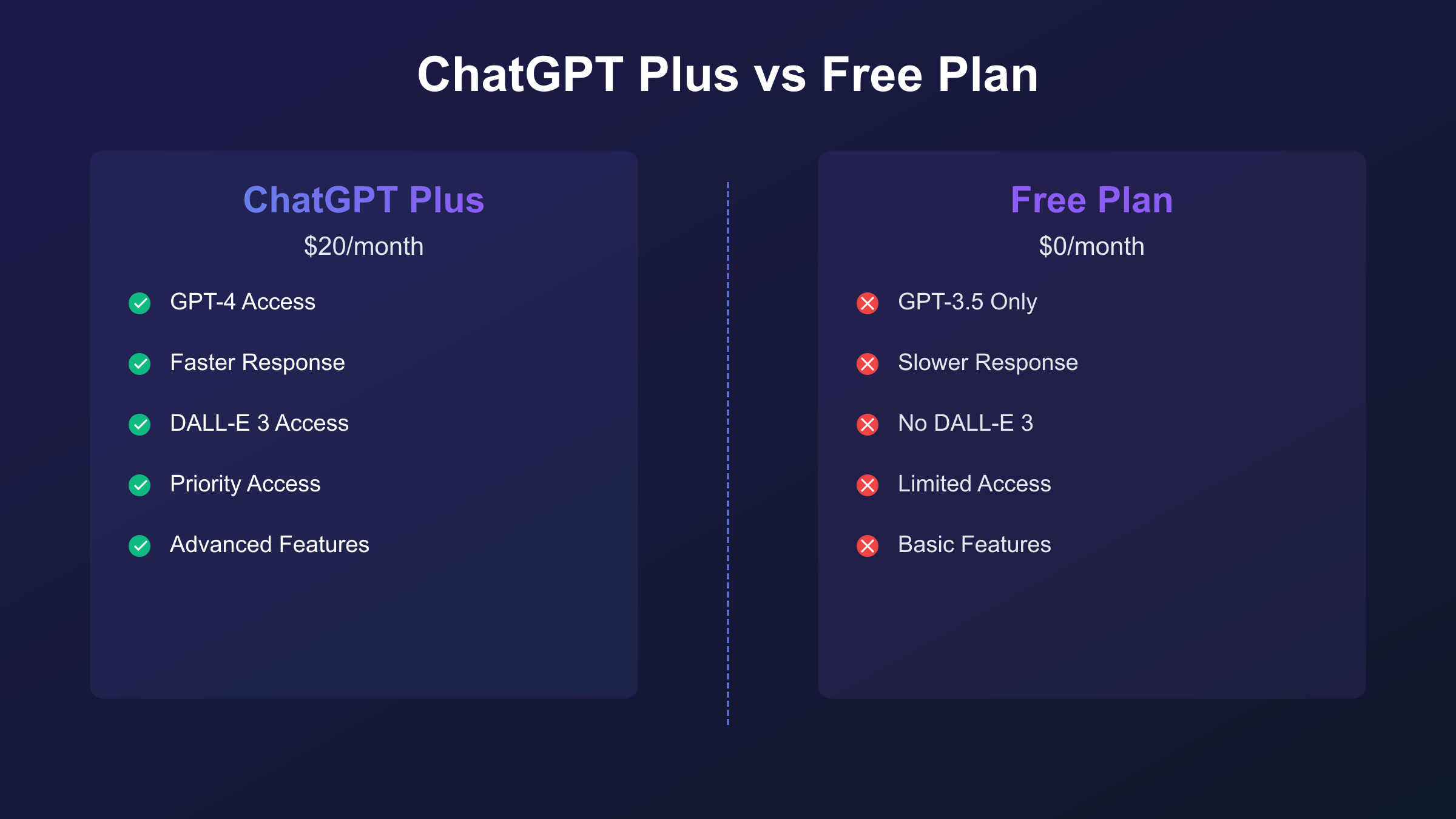
Feature Limitations on the Free Plan
Once your Plus access expires, your account reverts to the free tier automatically. You do not need to take any action for this transition to occur. Here is what changes on the free plan:
| Feature | ChatGPT Plus | Free Plan |
|---|---|---|
| Primary Model | GPT-4o, GPT-4 | GPT-4o mini (limited) |
| Response Speed | Priority | Standard |
| Peak Access | Guaranteed | May be restricted |
| DALL-E 3 | Included | Limited (details) |
| Advanced Data Analysis | Full access | Limited |
| Voice Mode | Advanced Voice | Basic Voice |
| Message Limits | Higher | Lower |
The free tier is still functional for many use cases, particularly casual conversation, simple questions, and basic writing assistance. Power users who relied on GPT-4 for complex reasoning, coding, or professional tasks will notice the most significant difference.
Data Retention and Your Conversation History
A common concern when canceling is whether OpenAI deletes your conversation history. The good news: your chats remain intact. OpenAI retains your conversation history regardless of your subscription status, and you can continue accessing previous conversations on the free tier.
If you specifically want to delete your data, you must do so manually before or after cancellation:
- Individual chat deletion: Hover over a conversation in the sidebar and click the trash icon
- Bulk deletion: Settings → Data Controls → Delete all chats
- Full account deletion: Settings → Data Controls → Delete account (irreversible)
Note that requesting a data export (covered in the pre-cancellation section) creates a copy of your data but does not remove it from OpenAI's servers. Only explicit deletion actions remove your data.
Reactivating Your Subscription Later
If you decide to return to ChatGPT Plus, reactivation is straightforward. Simply return to chat.openai.com, click "Upgrade to Plus," and follow the subscription prompts. Your account history, conversation data, and preferences typically remain intact even after extended periods without a subscription.
Reactivation does not require a new account or result in data loss. You pick up where you left off, with immediate access to Plus features upon successful payment. Some users strategically cancel during low-usage months and resubscribe when they need Plus features again.
Troubleshooting Common Cancellation Problems
Even straightforward processes sometimes encounter hiccups. This section addresses the most common issues users face when trying to cancel their ChatGPT Plus subscription, along with specific solutions for each scenario.
"Manage Subscription" Button Not Appearing
This is the most frequently reported cancellation issue. If you navigate to your ChatGPT profile and the "Manage my subscription" option is missing, consider these possibilities:
You subscribed through iOS or Android, not the web. Check your email for billing receipts. If you see charges from Apple or Google rather than OpenAI, you must cancel through those platforms instead of the ChatGPT website. Many users forget where they originally subscribed, especially if they use ChatGPT across multiple devices.
You are logged into the wrong account. Verify the email address shown in your profile matches the account used for the subscription. Some users have both personal and work accounts, with the subscription active on only one.
Browser caching issues. Try accessing ChatGPT in a private/incognito browser window. Cached data can sometimes cause interface elements to display incorrectly.
Temporary platform issue. OpenAI's billing portal occasionally experiences downtime. If the button appears intermittently, wait an hour and try again.
Cancellation Not Processing
If you complete the cancellation steps but your subscription still shows as active:
Check your email for confirmation. A missing confirmation email might indicate the cancellation did not fully process. Return to your subscription settings and try again.
Payment method issues. In rare cases, problems with the linked payment method can affect subscription management. Try updating your payment details first, then attempt cancellation again.
Contact support directly. If the cancellation seems to go through but nothing changes, document the issue with screenshots and contact OpenAI support. Include the date and time of your cancellation attempt.
Charged After Attempting Cancellation
This frustrating situation has several potential causes:
Timing issue: If you canceled very close to your renewal date, the charge may have processed before the cancellation took effect. Request a refund as described in the refund section.
Cancellation failed silently: Sometimes users think they completed cancellation but actually stopped before the final confirmation. Future sessions showed the subscription as active because the cancellation never finalized.
System error: OpenAI's billing system occasionally processes charges despite valid cancellations. These cases typically result in quick refunds when reported.
For any of these scenarios, document everything (screenshots of cancellation confirmation, billing statements) and contact the appropriate support team promptly.
Account Access Issues
If you cannot access your account at all, you face a different problem than subscription cancellation:
Forgotten password: Use the password reset function at chat.openai.com. Click "Log in" then "Forgot password."
Account locked or banned: If you see a message about account restrictions, contact OpenAI support. Note that canceling a subscription does not remove account-level restrictions.
Two-factor authentication issues: If you cannot complete 2FA, use your backup codes or contact support with account verification information.
Support Priority: Billing-related issues typically receive faster responses than general inquiries. When contacting support, clearly label your request as a billing or subscription issue.
"Something Went Wrong" Error During Cancellation
A specific error message "Something went wrong while canceling your subscription" has been reported by multiple users on the OpenAI community forums. If you encounter this error:
- Clear browser cache and cookies completely, not just for the ChatGPT site
- Try a different browser (Chrome, Firefox, Safari, or Edge)
- Disable browser extensions temporarily, especially ad blockers and privacy tools
- Use incognito/private mode to eliminate cached authentication issues
- Try from a different device or network connection
- Wait 24 hours and retry as the issue may be server-side
If none of these work, contact OpenAI support directly at help.openai.com with screenshots of the error. OpenAI support can cancel subscriptions on your behalf when technical issues prevent self-service cancellation.
VPN and Regional Access Issues
Users in certain regions or those using VPNs may experience additional complications when trying to cancel:
VPN interference with billing portal: The Stripe payment portal that handles ChatGPT subscriptions may not load properly through some VPN connections. Try temporarily disabling your VPN when accessing the cancellation page.
Regional payment mismatches: If you subscribed using a VPN to appear in a different country, you may need to connect to the same region when canceling. Mismatched regional data can cause the billing portal to behave unexpectedly.
Blocked country complications: Users in countries where ChatGPT is officially unavailable (China, Russia, Iran, etc.) face unique challenges. If you cannot access the cancellation page at all, contact OpenAI support via email and request cancellation through customer service.
Subscription Not Found in Any Platform
Sometimes users cannot find their ChatGPT subscription in any of the expected locations (OpenAI web, Apple, Google Play). This usually means:
- Third-party subscription: You may have subscribed through a corporate account, educational institution, or promotional partner
- Different email account: The subscription is on a different OpenAI account than you are currently logged into
- Promotional/gift subscription: Someone else purchased the subscription on your behalf
- Expired subscription: The subscription already ended and is no longer active
To investigate, check all email accounts for OpenAI-related messages, review bank/credit card statements to identify the charging entity, and contact OpenAI support with your account email for assistance.
Should You Cancel? Alternatives Worth Considering
Before finalizing your cancellation, take a moment to consider alternatives that might better serve your needs. Sometimes what seems like a reason to cancel is actually a reason to adjust how you use the service.
Downgrade Instead of Cancel
If you subscribed to ChatGPT Pro ($200/month) but find the cost excessive, downgrading to Plus ($20/month) might be a better option than canceling entirely. Pro features like unlimited access to o1 reasoning model and increased message limits may not justify the 10x price difference for your use case.
To downgrade from Pro to Plus:
- Cancel your current Pro subscription following the steps above
- Wait for the current billing period to end
- Subscribe to Plus as a new subscription
Note that there is no direct "downgrade" button; you must cancel and resubscribe to a different tier.
Pause Considerations (Workaround)
ChatGPT does not offer an official subscription pause feature. However, you can achieve a similar result through strategic cancellation and resubscription:
- Cancel before your renewal date
- Use the free tier during your break
- Resubscribe when you need Plus features again
The downside is that you cannot precisely time your subscription period. Each new subscription starts a fresh 30-day cycle from the subscription date, not from your previous cycle's end date.
Pay-Per-Use API Access
For developers and power users who need advanced model access without monthly commitments, the official OpenAI API provides a pay-per-use alternative at platform.openai.com. Instead of $20/month regardless of usage, you pay only for the tokens (words) you actually use.
The API approach works well when:
- Your usage varies significantly month to month
- You need programmatic access to models
- You want to avoid recurring charges during low-usage periods
- You prefer granular control over costs
The official API offers transparent pricing and direct access to the latest models. For users in regions with payment or access restrictions (particularly China), third-party API services like laozhang.ai can provide reliable regional access with comparable pricing and better local connectivity when official access requires VPN or faces payment limitations.
Switching to Free Tier Benefits
The free tier of ChatGPT has improved significantly since its launch. Current free tier capabilities include:
- GPT-4o mini access: A capable model for most everyday tasks
- Basic conversation features: Chat history, multi-turn conversations
- Web browsing: Search and summarize web content
- File upload: Analyze documents and images
- Mobile app access: Full iOS and Android functionality
- Limited GPT-4o access: Some free users now receive limited GPT-4o messages
If your primary uses fall within these capabilities, the free tier might actually meet your needs. Many casual users find that the free tier provides enough functionality after trying Plus for a while.
AI Alternatives to ChatGPT Plus
If you are canceling ChatGPT Plus because you want to explore other options, consider these alternatives that have matured significantly:
| AI Service | Monthly Cost | Key Strengths | Best For |
|---|---|---|---|
| Claude Pro | $20 | Superior reasoning, longer context | Complex analysis, writing |
| Gemini Advanced | $20 | Google integration, multimodal | Research, productivity |
| Microsoft Copilot Pro | $20 | Office 365 integration | Business documents |
| Perplexity Pro | $20 | Real-time citations, research | Fact-checking, research |
| Free tier options | $0 | Various capabilities | Casual users |
Each alternative has distinct advantages. Claude Pro excels at nuanced reasoning and handles longer documents effectively. Gemini Advanced integrates seamlessly with Google Workspace and offers strong multimodal capabilities. Microsoft Copilot Pro provides the best value if you heavily use Microsoft 365 applications. Perplexity Pro stands out for research tasks with its real-time web search and citation system.
For users seeking cost-effective AI access without monthly subscriptions, pay-per-use API services provide flexibility. Services like laozhang.ai offer access to multiple AI models (including GPT-4, Claude, and others) at competitive per-token rates, particularly beneficial for developers and users with variable usage patterns.

Cost-Benefit Analysis Framework
To make an informed decision, consider these questions:
| Question | If Yes | If No |
|---|---|---|
| Do I use GPT-4 daily for work? | Keep Plus | Consider alternatives |
| Is $20/month within my budget? | Keep Plus | Cancel or downgrade |
| Do I need priority access during peak times? | Keep Plus | Free tier may suffice |
| Am I using advanced features (code interpreter, DALL-E)? | Keep Plus | Evaluate free tier |
| Could API access better fit my usage pattern? | Consider API | Keep Plus or cancel |
Answer these honestly based on your actual usage over the past month, not what you hoped to use when subscribing.
Frequently Asked Questions
Can I Get a Partial Refund for Unused Days?
No, ChatGPT Plus subscriptions do not offer prorated refunds for unused portions of a billing period. When you cancel, you retain access until your current period ends, and no refund is issued for the remaining days. This policy applies regardless of how early in the billing cycle you cancel.
Will I Lose My Conversation History After Canceling?
No, your conversation history remains intact after cancellation. You can access all previous chats on the free tier. OpenAI does not automatically delete data when your subscription ends. Only explicit deletion actions (manual or through data controls) remove your conversation history.
Can I Resubscribe Immediately After Canceling?
Yes, you can resubscribe at any time after canceling. Your cancellation is not final in the sense of losing your account; it simply stops future billing. If you change your mind moments after canceling, you can immediately resubscribe without creating a new account.
Is There a Free Trial for ChatGPT Plus?
OpenAI does not currently offer a free trial for ChatGPT Plus. The subscription costs $20/month from day one. However, the free tier provides a limited way to experience ChatGPT capabilities before deciding to upgrade. Some third-party services occasionally offer promotional credits, but these are not official OpenAI programs.
What If I Subscribed Through a Third-Party Provider?
If you subscribed through a third-party reseller or a bundled service (such as an educational institution or corporate account), you must contact that provider to cancel. OpenAI cannot cancel subscriptions they do not manage directly. Check your billing statement to identify the charging party and contact them accordingly.
How Do I Cancel ChatGPT Pro Instead of Plus?
The cancellation process for ChatGPT Pro ($200/month) is identical to Plus. Use the same web, iOS, or Android steps depending on where you originally subscribed. Pro subscriptions have the same refund windows and policies as Plus subscriptions. If you are unsure whether Pro is right for you compared to Plus, see our ChatGPT Plus vs Pro comparison for developers.
Does Canceling Affect My Account Standing?
No, canceling your subscription does not negatively affect your account. You can resubscribe at any time at the current market rate. There are no cancellation penalties, account flags, or restrictions placed on accounts that cancel their subscriptions.
Can I Transfer My Subscription to Another Account?
No, ChatGPT Plus subscriptions cannot be transferred between accounts. Each subscription is tied to a specific account. If you need ChatGPT Plus on a different account, you must cancel the current subscription and create a new one on the desired account.
Final Thoughts
Canceling your ChatGPT Plus subscription is a straightforward process regardless of which platform you used to subscribe. The key steps to remember:
- Identify your subscription platform by checking billing receipts (OpenAI, Apple, or Google)
- Export your data before canceling if you want a local backup
- Cancel at least 24-48 hours before renewal to avoid unexpected charges
- Request a refund promptly if you miss the cancellation window and get charged
Your access continues until the current billing period ends, giving you time to adjust your workflow to the free tier or explore alternatives like API access. Conversation history remains accessible regardless of subscription status.
If you primarily used ChatGPT for occasional questions and light tasks, the free tier might serve you well going forward. For developers with variable usage needs, pay-per-use API access through platforms like laozhang.ai offers flexibility without monthly commitments. And if you find yourself missing Plus features, resubscription is always just a few clicks away.
For a comprehensive overview of what ChatGPT Plus offers and whether it might be worth resubscribing later, see our guide on What is ChatGPT Plus.
The most important takeaway: there are no penalties for canceling, and OpenAI makes it easy to return whenever you decide Plus features are worth the monthly investment again.