Cheapest and Most Stable Nano Banana Pro API: Complete Developer Guide 2025
Find the most affordable and reliable Nano Banana Pro API providers. Compare pricing from $0.05-$0.24 per image, learn stability metrics, rate limit solutions, and production-ready code examples for cost-effective AI image generation.
Nano Banana Pro
4K-80%Google Gemini 3 Pro · AI Inpainting
谷歌原生模型 · AI智能修图

Nano Banana Pro has emerged as the gold standard for AI image generation since its November 2025 release, offering unparalleled 4K resolution output and accurate multilingual text rendering. However, Google's official API pricing of $0.134-$0.24 per image presents a significant cost barrier for developers building production applications. The good news is that alternative providers now offer the same Gemini 3 Pro Image capabilities at prices ranging from $0.05 to $0.09 per image—a potential savings of 60-80% compared to official rates.
This guide provides a comprehensive analysis of the cheapest and most stable Nano Banana Pro API options available in 2025. Beyond simple price comparisons, we examine real-world stability metrics including uptime percentages, response latency, and rate limit handling across multiple providers. Whether you're building a social media content generator, an e-commerce product image pipeline, or a creative design tool, choosing the right API provider can mean the difference between a profitable application and one that bleeds money on image generation costs. We'll also provide production-ready code examples in both OpenAI-compatible and native Gemini formats, along with best practices for handling rate limits, implementing retry logic, and optimizing batch processing workflows.

Understanding Nano Banana Pro: Why Pricing Matters
Nano Banana Pro (technical name: gemini-3-pro-image-preview) represents Google DeepMind's most advanced image generation model, built on the Gemini 3 Pro architecture. Released on November 20, 2025, it quickly gained 13 million users within just four days, demonstrating massive market demand for high-quality AI image generation. The model supports output resolutions up to 4K (4096×4096 pixels), accurate text rendering in 12+ languages including Chinese, Japanese, and Korean, and the ability to combine up to 14 reference images for complex creative compositions.
For developers, the model's capabilities translate directly into production value. Unlike earlier models that struggled with text rendering—often producing garbled or misspelled text—Nano Banana Pro generates clean, legible typography suitable for marketing materials, product packaging designs, and social media graphics. The model's consistency features allow maintaining character identity across multiple generations, making it ideal for creating comic strips, mascot variations, or product line images. However, these premium capabilities come with premium pricing that can quickly become prohibitive at scale.
Cost Reality Check: Generating 10,000 images at Google's official rate of $0.134/image would cost $1,340. The same volume through an optimized provider at $0.05/image costs just $500—a savings of $840 per batch.
The pricing challenge becomes even more pronounced for 4K output, where Google charges $0.24 per image. Applications requiring high-resolution assets—such as print-ready marketing materials or large-format displays—face costs that can exceed traditional stock photography services. This economic reality has driven the emergence of API aggregator services that provide access to the same underlying model at significantly reduced rates, while adding features like improved rate limit handling and regional optimization.
Google's Official Pricing Structure Explained
Understanding Google's official pricing structure is essential for calculating potential savings and evaluating alternative providers. The Gemini API uses a token-based billing system for image generation, where output images consume tokens based on their resolution tier. This differs from simple per-image pricing because input tokens (your text prompt and any reference images) add additional costs to each generation request.
For standard tier pricing, which applies to most developers without enterprise agreements, the structure breaks down as follows:
| Resolution | Output Tokens | Cost per Image | Use Case |
|---|---|---|---|
| 1K (1024×1024) | 1,120 tokens | $0.134 | Social media, web thumbnails |
| 2K (2048×2048) | 1,120 tokens | $0.134 | Blog headers, presentations |
| 4K (4096×4096) | 2,000 tokens | $0.24 | Print materials, large displays |
The input side adds $2.00 per million tokens for text prompts and $1.10 per input image. For a typical generation request with a 100-word prompt and no reference images, input costs are negligible (approximately $0.0005). However, when using multiple reference images for style consistency—a common production pattern—input costs can add $0.001-$0.005 per request.
Google also offers a batch tier with 50% reduced rates for asynchronous processing. Batch requests don't return results immediately but are processed within 24 hours. At batch pricing, 1K/2K images cost $0.067 and 4K images cost $0.12. This option works well for content pipelines that don't require real-time generation, such as overnight batch processing of product catalogs or scheduled social media content creation. The tradeoff is latency—you cannot use batch processing for interactive applications or real-time user requests.
Rate Limits and Quotas
Google's rate limiting operates on three dimensions simultaneously: RPM (requests per minute), TPM (tokens per minute), and RPD (requests per day). Triggering any single limit returns a 429 error and blocks further requests. For the free tier, limits are restrictive: approximately 10 RPM and 100 RPD. Enabling billing upgrades you to Tier 1 with 300 RPM and 1,000+ RPD, sufficient for development and moderate production use but potentially limiting for high-volume applications.
Comprehensive Provider Cost Comparison
The alternative API provider market for Nano Banana Pro has matured significantly since the model's release. Multiple services now offer access to the underlying Gemini 3 Pro Image capabilities through aggregated or proxied endpoints, often at substantially reduced prices. The following comparison incorporates pricing data, feature support, and regional availability as of December 2025.
| Provider | 1K/2K Price | 4K Price | API Format | China Access | Minimum Deposit |
|---|---|---|---|---|---|
| Google Official | $0.134 | $0.24 | Native Gemini | No | Pay-as-you-go |
| Kie.ai | $0.09 | $0.12 | OpenAI-compatible | Yes | $5 |
| laozhang.ai | $0.05 | $0.08 | Both formats | Yes (20ms) | $10 |
| AIML API | $0.10 | $0.15 | OpenAI-compatible | No | $10 |
| Replicate | ~$0.036 | ~$0.05 | REST API | No | Pay-as-you-go |
Several factors explain the price differentials beyond simple reselling arrangements. Some providers negotiate volume discounts with Google and pass savings to customers. Others optimize infrastructure through intelligent request batching, regional endpoint selection, and caching of common style references. The most aggressive discounters may operate on thin margins with the expectation of building market share, or may bundle image generation with other AI services where they maintain healthier margins.
Provider Selection Insight: The cheapest option isn't always the best choice. Consider total cost of ownership including integration effort, support quality, and potential costs from downtime or failed generations.
For developers requiring China or Asia-Pacific access, provider selection narrows significantly. Google's official API is inaccessible from mainland China due to network restrictions. Services like laozhang.ai specifically address this market with domestic endpoints achieving approximately 20ms latency compared to 200ms+ for VPN-routed connections to Google's servers. This latency difference becomes critical for interactive applications where users expect near-instant image previews.
Stability Metrics: What Makes an API Reliable
Price optimization means nothing if your image generation pipeline fails when you need it most. API stability encompasses several measurable dimensions that together determine whether a provider can support production workloads. Understanding these metrics helps you evaluate providers beyond headline pricing and make informed decisions based on your application's reliability requirements.
The first critical metric is uptime percentage, typically expressed as a Service Level Agreement (SLA) commitment. Google's official API provides explicit uptime guarantees that third-party providers rarely match contractually. However, practical uptime can differ from stated SLAs—a provider might guarantee 99.9% uptime but experience multiple brief outages that technically meet the SLA while disrupting real-world workflows. Testing methodology matters: synthetic monitoring from multiple geographic locations provides more accurate uptime data than single-point measurements.
Response latency breaks down into several components that affect user experience differently. Network latency depends on geographic proximity between your servers and the API endpoint—a US-based application calling an Asia-Pacific endpoint will inherently experience higher latency. TLS handshake time adds overhead for each new connection, making connection pooling essential for high-throughput applications. Finally, inference time—the actual image generation process—typically ranges from 5-30 seconds depending on resolution and prompt complexity.
| Stability Metric | What It Measures | Good Threshold | How to Test |
|---|---|---|---|
| Uptime | Service availability | >99.5% | Synthetic monitoring |
| P50 Latency | Median response time | <15s for 2K | Load testing |
| P95 Latency | Tail latency | <45s for 2K | Stress testing |
| Error Rate | Failed requests | <1% | Production metrics |
| Rate Limit Headroom | Requests before throttling | >100 RPM | Burst testing |
Error rates during normal operation should stay below 1% for a stable provider. Common error types include 429 (rate limiting), 500/502/504 (server errors), and timeout errors. Some providers handle errors more gracefully than others—returning partial results, providing detailed error messages, or automatically retrying failed requests. The pattern of errors matters too: random distributed errors are more manageable than correlated failures that spike during peak usage periods.
For production applications, I recommend running a baseline stability test before committing to any provider. Generate 1,000 images over a 24-hour period, tracking success rate, latency distribution, and any error patterns. This investment of approximately $50-130 (depending on provider pricing) provides invaluable data about real-world reliability. Compare multiple providers using identical prompts and timing to ensure fair comparison.
Handling Rate Limits and 429 Errors
Rate limiting represents one of the most common challenges when scaling Nano Banana Pro applications. The HTTP 429 "Too Many Requests" error indicates you've exceeded one of the provider's rate limit dimensions—requests per minute, tokens per minute, or daily quotas. Effective rate limit handling separates robust production applications from brittle ones that fail under load.
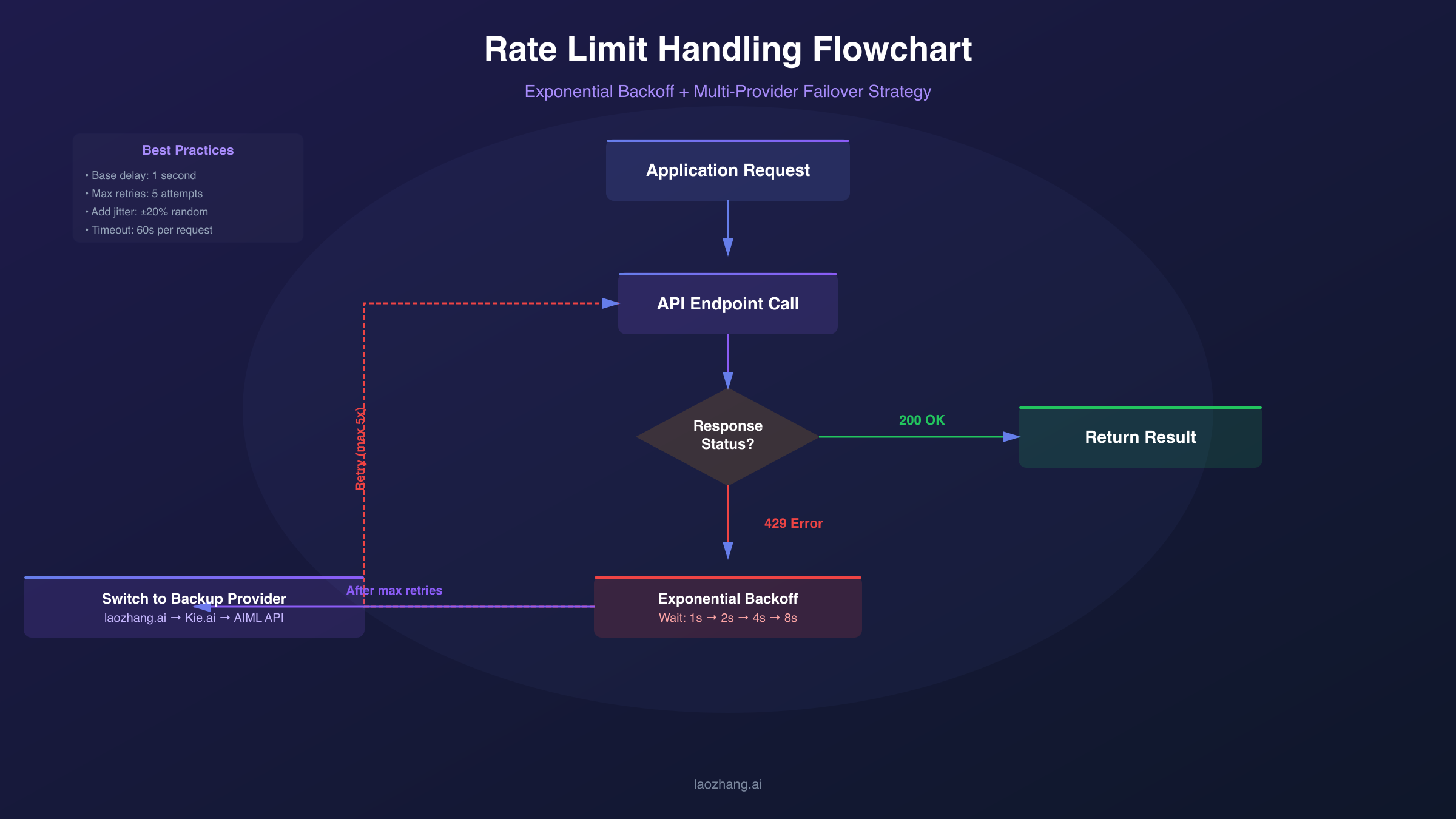
The fundamental strategy for rate limit management is exponential backoff with jitter. When you receive a 429 error, wait before retrying, with each subsequent failure doubling the wait time plus a random offset. The jitter component prevents the "thundering herd" problem where many clients retry simultaneously after an outage, immediately triggering another rate limit. Here's a production-ready implementation pattern:
hljs pythonimport time
import random
def exponential_backoff_retry(func, max_retries=5, base_delay=1):
"""Execute function with exponential backoff on rate limit errors."""
for attempt in range(max_retries):
try:
return func()
except RateLimitError:
if attempt == max_retries - 1:
raise
delay = (base_delay * (2 ** attempt)) + random.uniform(0, 1)
time.sleep(delay)
raise Exception("Max retries exceeded")
Beyond reactive retry logic, proactive rate management prevents rate limit errors from occurring. Implement a token bucket or leaky bucket algorithm to throttle requests before they hit provider limits. Track your request rate in real-time and queue excess requests for later processing rather than sending them immediately. This approach provides smoother throughput and better user experience than repeatedly hitting rate limits and backing off.
Production Tip: Request rate limits from your provider and set your internal limits 10-20% below their thresholds. This buffer absorbs request timing variations and prevents accidental limit violations.
Request batching offers another avenue for rate limit optimization. Instead of sending individual image generation requests, queue requests and send them in groups. Some providers offer batch endpoints with higher rate limits or reduced per-request overhead. Even without explicit batch support, grouping requests reduces connection overhead and makes better use of available rate limit headroom. The tradeoff is increased latency for individual requests, making batching most suitable for background processing rather than interactive applications.
For high-volume applications, consider multi-provider failover. Configure your application to automatically switch to a backup provider when the primary provider returns rate limit errors. This approach requires additional integration work but provides both higher aggregate throughput and improved reliability. Implement provider health tracking to avoid routing traffic to degraded providers.
Production-Ready Code Implementation
Implementing Nano Banana Pro in production requires careful attention to API format selection, error handling, and result processing. Two primary API formats exist: the native Gemini format and OpenAI-compatible format. Your choice affects available features, code portability, and integration complexity.
Native Gemini Format
The native Gemini format provides full access to Nano Banana Pro's capabilities, including 4K resolution parameters and advanced generation controls. This format is recommended when you need maximum feature access and are building a dedicated image generation pipeline. The following example demonstrates a complete implementation with proper error handling:
hljs pythonimport requests
import base64
from pathlib import Path
API_KEY = "your-api-key" # Obtain from your provider
API_URL = "https://api.laozhang.ai/v1beta/models/gemini-3-pro-image-preview:generateContent"
def generate_image_native(prompt: str, resolution: str = "2K") -> bytes:
"""Generate image using native Gemini format with full 4K support."""
headers = {
"Authorization": f"Bearer {API_KEY}",
"Content-Type": "application/json"
}
payload = {
"contents": [{
"parts": [{"text": prompt}]
}],
"generationConfig": {
"responseModalities": ["IMAGE"],
"imageConfig": {
"aspectRatio": "auto",
"imageSize": resolution # Supports "1K", "2K", "4K"
}
}
}
response = requests.post(
API_URL,
headers=headers,
json=payload,
timeout=180 # Image generation can take up to 60-120 seconds
)
response.raise_for_status()
result = response.json()
image_data = result["candidates"][0]["content"]["parts"][0]["inlineData"]["data"]
return base64.b64decode(image_data)
# Usage example
image_bytes = generate_image_native(
"A professional product photo of wireless earbuds on marble surface, soft lighting",
resolution="2K"
)
Path("output.png").write_bytes(image_bytes)
OpenAI-Compatible Format
The OpenAI-compatible format offers easier integration for applications already using OpenAI's SDK. While some advanced Nano Banana Pro parameters may not be available through this interface, it provides excellent developer experience and code portability. You can switch between providers or even switch to DALL-E by changing only the endpoint configuration:
hljs pythonfrom openai import OpenAI
client = OpenAI(
api_key="your-api-key",
base_url="https://api.laozhang.ai/v1" # Provider endpoint
)
def generate_image_openai_format(prompt: str) -> str:
"""Generate image using OpenAI-compatible format for easier integration."""
response = client.images.generate(
model="gemini-3-pro-image-preview",
prompt=prompt,
size="1024x1024",
quality="standard",
n=1
)
return response.data[0].url
# Usage example
image_url = generate_image_openai_format(
"Minimalist logo design for tech startup, blue gradient background"
)
print(f"Generated image: {image_url}")
Handling Multi-Image Input
Nano Banana Pro's ability to accept up to 14 reference images enables powerful style transfer and composition workflows. When implementing multi-image input, encode each image as base64 and include it in the request parts array. This capability is essential for maintaining character consistency across multiple generations or transferring design styles from reference materials.
hljs pythondef generate_with_references(prompt: str, reference_images: list[Path]) -> bytes:
"""Generate image with style references for consistent output."""
parts = [{"text": prompt}]
for img_path in reference_images[:14]: # Max 14 reference images
with open(img_path, "rb") as f:
img_base64 = base64.b64encode(f.read()).decode()
parts.append({
"inlineData": {
"mimeType": "image/png",
"data": img_base64
}
})
payload = {
"contents": [{"parts": parts}],
"generationConfig": {
"responseModalities": ["IMAGE"]
}
}
# ... rest of request handling
Regional Access Solutions
Geographic restrictions significantly impact Nano Banana Pro accessibility, particularly for developers in China, Russia, and other regions where Google services face access limitations. Understanding available solutions helps you architect applications that work reliably across different deployment regions.
Direct API access from China to Google's servers is effectively impossible without VPN infrastructure. Network filtering blocks the generativelanguage.googleapis.com endpoint at the DNS and IP levels, causing connection timeouts even with modified DNS settings. While consumer VPN services can theoretically bypass these restrictions, they introduce unacceptable latency and reliability issues for production applications. Response times of 500ms-2000ms and frequent disconnections make VPN-based access unsuitable for any serious deployment.
The preferred solution for China-based applications is using a domestic API gateway service. These services maintain servers in regions with unrestricted Google API access (typically Hong Kong, Singapore, or Japan) and provide endpoints accessible from mainland China. The architecture proxies requests through compliant infrastructure, achieving both accessibility and performance. Latency of approximately 20ms from major Chinese cities compares favorably to the 200ms+ typical of direct international connections.
For developers building applications that serve both Chinese and international users, implement geographic endpoint routing. Detect the user's region through IP geolocation or explicit selection, then route API requests to the appropriate endpoint. This approach optimizes latency for all users while ensuring accessibility across regions:
hljs pythondef get_api_endpoint(user_region: str) -> str:
"""Select optimal API endpoint based on user geography."""
endpoints = {
"CN": "https://api.laozhang.ai/v1", # China-optimized
"US": "https://generativelanguage.googleapis.com/v1", # Direct Google
"EU": "https://europe-generativelanguage.googleapis.com/v1", # EU region
"default": "https://api.laozhang.ai/v1" # Fallback
}
return endpoints.get(user_region, endpoints["default"])
Compliance Note: When using third-party API proxies, data passes through intermediate servers. Evaluate whether this architecture meets your application's data handling requirements, particularly for sensitive or regulated content. For applications handling personal data subject to GDPR or similar regulations, ensure your chosen provider offers appropriate data processing agreements.
Cost Optimization Strategies
Beyond selecting an affordable provider, several optimization strategies can further reduce your Nano Banana Pro costs without sacrificing output quality. These techniques compound with provider pricing differences to maximize your image generation budget.
Resolution optimization offers the most straightforward savings path. Not every use case requires 4K output—social media platforms compress images to much lower resolutions anyway, and web thumbnails display at 300-500 pixels maximum. Audit your actual resolution requirements and default to the minimum necessary resolution. A workflow generating 4K images at $0.24 each could potentially run at 1K for $0.134, reducing costs by 44% without visible quality loss for web-only usage.
Prompt engineering affects both cost and quality. Shorter, more precise prompts reduce input token consumption and often produce better results than verbose descriptions. The model responds well to structured prompts that specify subject, style, composition, and technical parameters in clear, direct language. Avoid padding prompts with repetitive descriptors that increase token count without improving output quality.
| Optimization Strategy | Potential Savings | Implementation Effort | Trade-offs |
|---|---|---|---|
| Resolution downsizing | 30-44% | Low | Reduced detail for print use |
| Prompt optimization | 5-15% | Medium | Requires testing |
| Batch processing | 10-50% | Medium | Increased latency |
| Caching common assets | Variable | High | Storage costs |
| Provider switching | 40-70% | Low-Medium | Integration changes |
Caching and asset reuse can eliminate redundant generation costs entirely. If your application frequently generates similar images—product shots with consistent styling, social media templates with varying text, or character images in standard poses—cache successful results and retrieve them for subsequent requests with matching parameters. Implement cache keys based on prompt hashes and generation parameters to identify cache hits accurately.
Usage monitoring and budgeting prevents unexpected cost overruns. Set up alerts for daily or monthly spending thresholds, implement hard limits that reject requests beyond budget caps, and regularly review usage patterns to identify optimization opportunities. Some providers offer built-in budgeting tools; for others, implement your own tracking through request logging and cost calculation.
When to Choose Each Provider Option
Selecting the right Nano Banana Pro provider depends on your specific requirements across several dimensions: budget constraints, regional access needs, reliability requirements, and integration complexity tolerance. This decision framework helps match provider options to common use cases.
Choose Google's official API when:
- You require explicit SLA guarantees and enterprise support
- Your application handles regulated or sensitive data requiring data processing agreements
- Budget is not a primary constraint relative to reliability assurance
- You're already invested in Google Cloud infrastructure and prefer unified billing
Choose alternative providers when:
- Cost optimization is a priority for your application economics
- You need China or restricted-region access without VPN complexity
- OpenAI-compatible API format simplifies your integration
- Higher rate limits would benefit your throughput requirements
For startups and indie developers, alternative providers typically offer the best value proposition. The 60-80% cost savings translate directly to longer runway and more experimentation capacity. Start with a provider offering low minimum deposits and straightforward pricing, validate your application concept, then consider enterprise options if you scale to volumes where SLA guarantees become critical.
Enterprise applications face a more nuanced decision. The official Google API provides audit trails, compliance certifications, and contractual protections that may be required for certain industries or customers. However, many enterprises successfully run production workloads through carefully vetted alternative providers, particularly for internal tools and non-customer-facing applications where cost optimization outweighs marginal reliability improvements.
Decision Heuristic: If image generation failure would directly impact revenue or user trust, prioritize stability over cost. If failures are recoverable and primarily affect internal workflows, optimize for cost.
For applications serving mixed geographic audiences, a multi-provider architecture often makes sense. Route China-based users through a domestic gateway service while serving international users through the provider offering the best combination of price and reliability for your primary market. This hybrid approach optimizes both accessibility and cost across your entire user base.

Conclusion and Recommendations
The Nano Banana Pro API ecosystem offers genuine opportunities to reduce image generation costs by 60-80% compared to Google's official pricing while maintaining access to the same underlying model capabilities. Success requires looking beyond headline prices to evaluate stability metrics, rate limit handling, and regional access that match your application's specific requirements.
For most developers starting with Nano Banana Pro, I recommend beginning with a provider offering $0.05-0.09 per image pricing, adequate rate limits for your expected volume, and API format compatibility with your existing codebase. Run a baseline stability test generating several hundred images before committing production traffic, tracking success rates and latency distribution to establish performance expectations. Implement robust error handling and retry logic from the start—this investment pays dividends regardless of which provider you ultimately choose.
The key technical decisions involve balancing native Gemini format (full feature access, including 4K parameters) against OpenAI-compatible format (easier integration, better code portability). Choose native format for dedicated image generation pipelines requiring maximum capability; choose OpenAI-compatible format for applications where switching providers or models might be necessary, or where existing OpenAI SDK infrastructure simplifies development.
As the Nano Banana Pro provider landscape continues to evolve, new options will emerge and pricing will likely compress further. Build your application architecture to accommodate provider switching through abstraction layers and configuration-driven endpoint selection. This flexibility ensures you can capture future cost optimization opportunities without significant refactoring, keeping your image generation pipeline both affordable and adaptable.
For China-based developers seeking detailed setup instructions, our Nano Banana Pro China Access Guide covers free platforms, API configuration, and Cherry Studio desktop setup. If you're interested in image editing capabilities, explore Nano Banana Inpainting for advanced local editing workflows using the same underlying model.