Claude Free Trial Guide: How to Access Anthropic AI for Free in 2025

Complete guide to Claude free trial and free tier access. Learn how to use Claude AI for free, get Pro trials, understand usage limits, and maximize your free Claude experience.

🍌
PRO

Nano Banana Pro

4K-80%

Google Gemini 3 Pro · AI Inpainting

谷歌原生模型 · AI智能修图

100K+ Developers·10万+开发者信赖
20ms延迟
🎨4K超清
🚀30s出图
🏢企业级
Enterprise|支付宝·微信·信用卡|🔒 安全
127+一线企业正在使用
99.9% 可用·全球加速
限时特惠
$0.24¥1.7/张
$0.05
$0.05
per image · 每张
立省 80%
AI Research Team
AI Research Team·

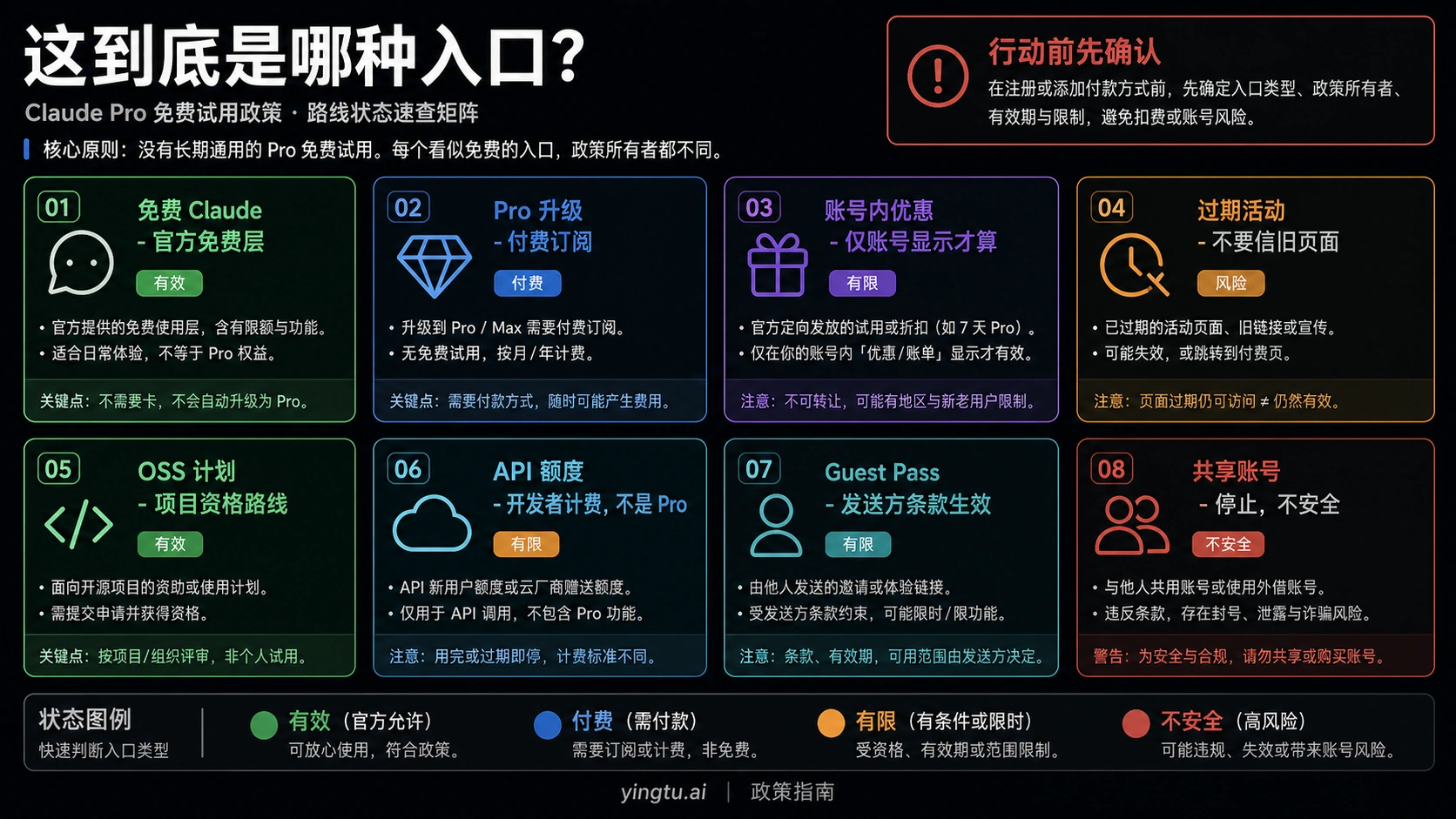
Yes, Claude AI is free to use. Anthropic offers a permanent free tier at claude.ai that gives you access to Claude Sonnet 4, one of the most capable AI models available today. Free users get approximately 9-40 messages per 5-hour window, plus file uploads, image analysis, and web search capabilities. For those wanting to test premium features, Claude Pro trials of 14-30 days are available during major product launches.

Whether you're a student exploring AI for research, a professional evaluating Claude for work, or a developer testing the API, this guide covers every legitimate way to access Claude for free. You'll learn the exact limits of the free tier, how to activate Pro trials, strategies to maximize your usage, and alternative platforms that offer free Claude access.

Claude AI free trial and free tier access guide for 2025

Is Claude AI Actually Free?

The short answer is yes, but with important nuances that affect how you can use it.

Anthropic launched Claude's free tier to let anyone experience their AI without financial commitment. When you visit claude.ai and create an account, you immediately get access to Claude Sonnet 4—the same model that powers many professional applications. No credit card required. No trial period that expires. This is a permanent free tier that Anthropic has committed to maintaining.

However, "free" doesn't mean "unlimited." Claude's free tier operates on a dynamic usage system that adjusts based on server demand. During quiet periods, you might send 40+ messages before hitting limits. During peak times after major announcements, you might be limited to 9-15 messages per session. The key number to remember is that your usage resets every 5 hours on a rolling window basis.

What makes Claude's free tier notable compared to competitors is the model quality. While ChatGPT's free tier uses GPT-4o (their mid-range model) and Gemini offers Flash (their speed-optimized model), Claude gives free users access to Sonnet 4—a model that consistently outperforms competitors on coding benchmarks and complex reasoning tasks. This makes Claude's free tier arguably the most capable free AI chatbot available in late 2025.

The main trade-off is quantity versus quality. Claude gives you fewer messages but access to a more powerful model. For users who need occasional help with complex tasks rather than constant casual chatting, this trade-off often works in their favor.

What's Included in Claude Free Tier

Claude's free tier is surprisingly feature-rich, offering capabilities that many paid AI services don't match. Understanding exactly what you get helps you decide whether free Claude meets your needs or if you should consider alternatives.

Core AI Capabilities

The foundation of Claude free is access to Claude Sonnet 4, Anthropic's balanced model that excels at both speed and capability. You can have natural conversations, ask complex questions, get help with analysis, and receive detailed explanations on virtually any topic. The model handles nuanced requests well and maintains context throughout your conversation.

File Upload and Analysis

Free users can upload files up to 30MB each, with support for 20 files per conversation. This includes PDFs, Word documents, text files, spreadsheets, and images. Claude can analyze documents, extract information, summarize lengthy reports, and answer questions about uploaded content. For students and professionals who need to process documents, this feature alone provides significant value.

Image Understanding

Claude's vision capabilities are available on the free tier. You can upload images up to 10MB and ask Claude to describe what it sees, analyze charts and graphs, extract text from screenshots, or discuss visual content. Unlike some competitors, Claude processes images with the same Sonnet 4 model, meaning you get high-quality analysis without paying extra.

Web Search Integration

Recent updates added web search to Claude free. When you need current information beyond Claude's training data, it can search the web and incorporate fresh data into its responses. This makes Claude more useful for questions about recent events, current prices, or up-to-date technical documentation.

Multi-Platform Access

Your free Claude account works across the web interface at claude.ai, iOS app, Android app, and desktop applications. Conversations sync across devices, so you can start a chat on your computer and continue it on your phone.

Code Generation and Technical Work

Claude excels at programming tasks, and free users get full access to its coding capabilities. It can write code in dozens of languages, debug existing code, explain programming concepts, and help with technical documentation. The Artifacts feature lets Claude create and display code, visualizations, and interactive elements directly in the chat.

FeatureFree TierNotes
Model AccessClaude Sonnet 4Same model as Pro for chat
Messages~9-40 per 5 hoursVaries with demand
File Uploads30MB per file, 20 filesPDF, DOCX, TXT, images
Image AnalysisYesUp to 10MB per image
Web SearchYesRecently added
Code GenerationYesFull Artifacts support
Mobile AppsYesiOS, Android, desktop
API AccessNoRequires paid plan or credits
Claude CodeNoPro subscription required
Model SelectionNoSonnet 4 only

Claude Free Tier Limits Explained

Understanding Claude's limit system helps you plan your usage effectively. Unlike competitors with simple daily message caps, Claude uses a more complex but ultimately user-friendly approach.

The 5-Hour Rolling Window

Claude's free tier operates on a 5-hour rolling window rather than a daily reset. When you send your first message, the clock starts. Five hours later, your allocation refreshes regardless of when you hit your limit within that window. This means if you exhaust your messages at 2 PM, you'll have fresh capacity at 7 PM—you don't need to wait until midnight like some services require.

This system has both advantages and drawbacks. The advantage is more flexible access throughout the day. The drawback is that if you hit limits early in your session, you face a multi-hour wait. Planning your usage around important tasks helps avoid frustration.

Dynamic Message Limits

Anthropic intentionally keeps exact message numbers unpublished because they fluctuate based on several factors. Server load is the primary variable—during high-traffic periods following product announcements or viral moments, limits tighten to ensure fair access for all users. Message length also matters; longer, more complex prompts consume more resources and may count as multiple messages against your limit.

Based on user reports and testing, here are typical ranges:

ConditionEstimated MessagesNotes
Low traffic, short messages35-45Optimal conditions
Normal traffic, average messages20-30Typical experience
High traffic periods9-15After major announcements
Long prompts with files5-10Heavy resource usage

Priority and Speed Differences

Free users receive lower computational priority than paid subscribers. During peak usage, this manifests as slower response times and occasional queuing. You might see messages indicating Claude is busy and asking you to wait. These delays typically last seconds to minutes, not hours, but they can interrupt workflow-intensive tasks.

Context Window Considerations

Claude's context window—how much conversation history it remembers—can vary for free users based on demand. While the technical capability supports 200,000 tokens (roughly 150,000 words), free tier access may sometimes be limited to smaller context windows during high-demand periods. This rarely affects casual users but matters for those working with very long documents or extended conversations.

What Triggers Limit Warnings

Claude notifies you when you're approaching or have hit your usage limit. The interface displays a message explaining that you've reached your limit and indicating when it will reset. You cannot queue messages for when limits refresh—you must return later or consider upgrading to Pro for higher limits. If you encounter quota errors while using the API, check our complete guide to fixing Claude quota errors for detailed solutions.

How to Sign Up for Claude Free

Creating a free Claude account takes about two minutes. Here's the exact process with important details at each step.

Step 1: Visit Claude.ai

Navigate to claude.ai in your web browser. The site works on all major browsers including Chrome, Firefox, Safari, and Edge. You'll see the main page with options to log in or sign up.

Step 2: Choose Your Sign-Up Method

Claude offers three ways to create an account: email, Google account, or Apple account. The Google and Apple options are fastest since they auto-fill your information. Email sign-up requires manual verification but keeps your Claude account separate from other services.

For email sign-up, enter your email address and create a password. Anthropic will send a verification email within seconds. Click the link in that email to activate your account. Check your spam folder if you don't see the email within a minute.

Step 3: Complete Phone Verification

Claude requires phone number verification for all new accounts. This helps prevent abuse and ensures fair access to the free tier. Enter your phone number and you'll receive an SMS with a verification code. Enter the code to proceed.

Note that some phone numbers don't work for verification. Most US numbers qualify, but UK numbers are explicitly excluded from the verification process. Virtual phone numbers and some VoIP services may also fail verification.

Step 4: Accept Terms and Set Preferences

Review and accept Anthropic's terms of service and privacy policy. You'll also have options for communication preferences—whether you want to receive updates about new features and promotions. These are optional and don't affect your access to Claude.

Step 5: Start Using Claude

After verification, you land directly in the Claude interface. You can immediately start chatting, upload files, or explore features. No additional setup is required for basic usage.

Tips for New Users

Your first few messages establish the tone for your session. Starting with clear, specific requests helps Claude understand what kind of assistance you need. If you plan to work on a specific project, mention the context upfront rather than revealing it gradually—this produces better results and uses fewer messages.

Consider bookmarking claude.ai for easy access. The mobile apps are also worth installing if you want Claude access on the go. Conversations sync across all your devices automatically.

Claude Pro Free Trial Options

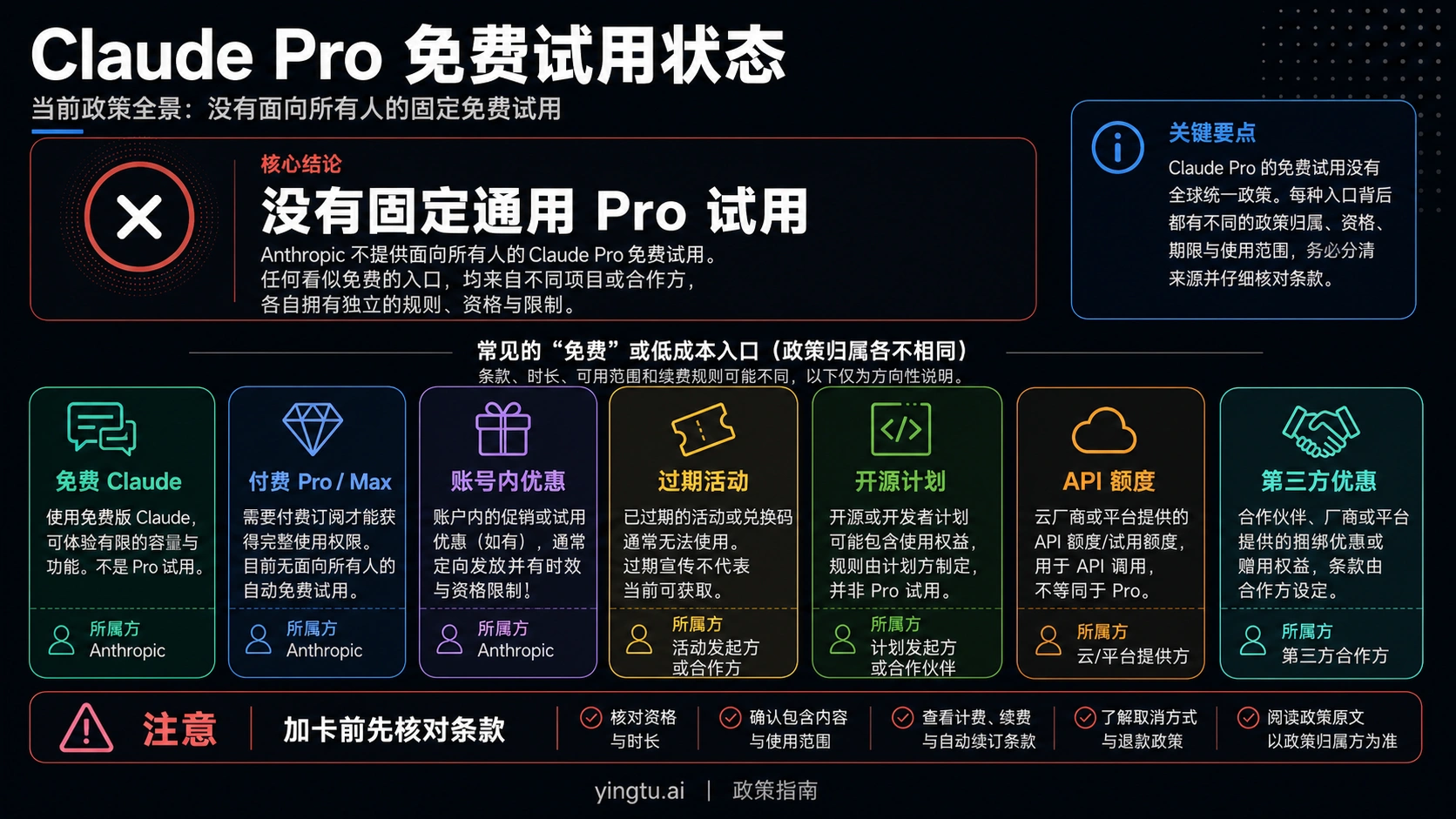
Beyond the permanent free tier, Anthropic periodically offers free trials of Claude Pro, their premium subscription. These trials give you full access to paid features without charge—but they're not always available.

14-Day Trials During Product Launches

When Anthropic releases major updates—like the Claude 4 family or significant reasoning improvements—they often open 14-day Pro trials for new users. These promotional windows typically last a few weeks after the announcement. The trial activates when you add a payment method, but you won't be charged until the 14 days end. Cancel anytime before that to avoid charges.

These trials include everything in Claude Pro: 5x higher usage limits, access to additional models including Claude Sonnet 4.5, Claude Code for terminal-based development, extended thinking capabilities, Google Workspace integration, and priority access during peak times.

30-Day Promotional Offers

Several times per year, Anthropic runs extended trial promotions. The October 2025 campaign offered a full month of Claude Pro free, accessible through claude.com/offers during the promotional window. These offers typically require email registration to receive notifications when they become available.

Signing up for Anthropic's newsletter is the most reliable way to learn about these promotions. They announce trials through official channels before third-party coverage picks up the news.

Student and Educational Access

Anthropic has launched programs offering free API credits to university students. While not exactly a "Pro trial," these credits let students experiment with Claude's full capabilities for coursework and projects. Applications are available on Anthropic's website, and eligible students can receive meaningful credit amounts at no cost.

Partner Platform Trials

Sometimes the best "Claude Pro trial" comes through partner platforms rather than Anthropic directly:

PlatformAccess TypeDurationRequirements
GitHub CopilotClaude 3.7 Sonnet30 daysGitHub account, payment method
Google CloudClaude via Vertex AIOngoing$300 in free credits
AWS BedrockFull Claude modelsVariesAWS free tier eligible
Cursor IDEClaude SonnetOngoingFree for code tasks

These alternatives may suit developers and technical users better than direct Claude Pro trials since they integrate Claude into familiar workflows.

How to Activate a Claude Pro Trial

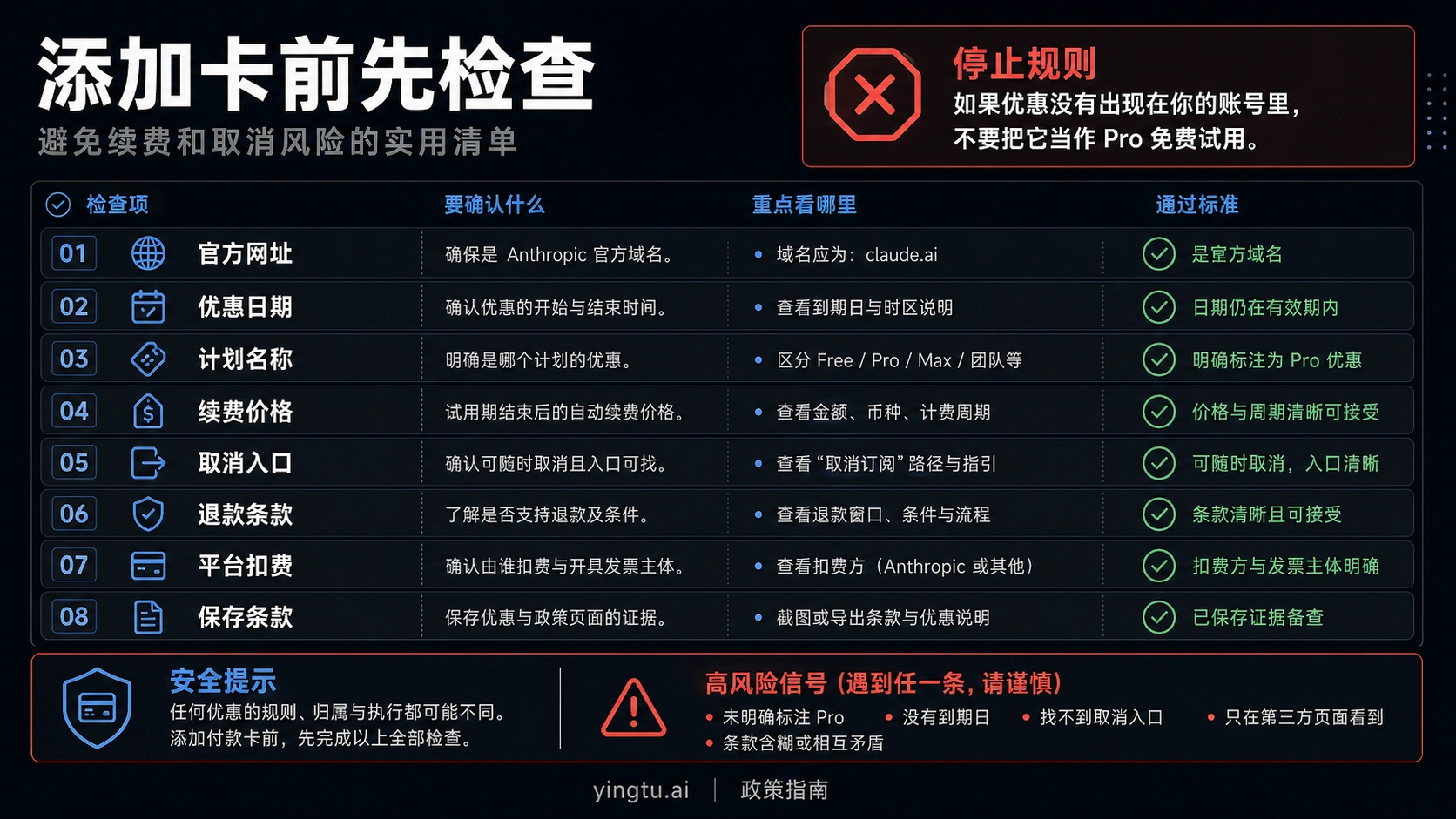
When a Pro trial is available, here's how to claim it without accidentally getting charged.

Step 1: Check Trial Availability

Visit claude.ai and log into your existing free account. Navigate to the subscription or upgrade page by clicking on your profile or the upgrade button. If a trial is currently running, you'll see a "Start Free Trial" option prominently displayed. If you only see pricing without trial options, no promotion is currently active.

Step 2: Review Trial Terms

Before activating, carefully read the trial terms. Note the exact duration (14 or 30 days), what's included, and when billing begins if you don't cancel. Most trials start the day you activate, not when you first use a Pro feature.

Step 3: Add Payment Method

Trials require a valid payment method even though you won't be charged during the trial period. This is standard practice for preventing trial abuse. You can use a credit card, debit card, or in some cases PayPal. The card won't be charged unless you continue past the trial.

Step 4: Activate and Confirm

Click the activation button and wait for confirmation. You should receive an email confirming your trial start date and end date. Save this email—it contains important information about when you need to cancel to avoid charges.

Step 5: Set a Cancellation Reminder

This is crucial: set a calendar reminder for 2-3 days before your trial ends. This gives you time to evaluate whether Pro is worth keeping and to cancel if it isn't. Late cancellations result in a full month's charge.

Step 6: Explore Pro Features

Once activated, make the most of your trial by testing features unavailable on free:

  • Switch between models to compare Sonnet 4 versus Sonnet 4.5
  • Try Claude Code for terminal-based development work
  • Use extended thinking for complex reasoning tasks
  • Connect Google Workspace if relevant to your workflow
  • Test the higher usage limits with intensive projects

Cancellation Process

To cancel before the trial ends, go to your account settings, find the subscription section, and select "Cancel subscription." You'll retain Pro access until the trial period ends, then revert to the free tier. Anthropic doesn't make cancellation difficult—it's a straightforward process.

Step-by-step guide to activating and managing Claude Pro trial

Claude Free vs Pro: Complete Comparison

Understanding the differences between free and paid Claude helps you decide whether upgrading makes sense for your use case. Here's a detailed breakdown of what changes when you pay.

Usage Limits: The Primary Difference

Claude Pro advertises "5x more usage" than the free tier. In practice, this means Pro users can send approximately 45 messages per 5-hour window compared to the free tier's 9-15 during normal conditions. For power users who hit free limits daily, this increase eliminates most friction.

Beyond message counts, Pro users get priority access during peak times. While free users might experience queuing or slowdowns after major announcements, Pro users continue with normal response times. For professionals relying on Claude during work hours, this reliability has tangible value.

Model Access and Selection

Free users are assigned Claude Sonnet 4 with no ability to switch models. Pro unlocks a model selector with access to:

  • Claude Sonnet 4.5: The latest and most capable Sonnet, with improved reasoning and instruction-following
  • Claude Haiku 4.5: Optimized for speed on simpler tasks
  • Extended Thinking Mode: Deeper reasoning for complex problems

Model flexibility matters when your tasks vary. Quick questions work fine with Haiku's speed, while complex analysis benefits from Sonnet 4.5's capabilities. Pro lets you match the model to the task.

Claude Code Access

Claude Code, Anthropic's terminal-based coding assistant, requires at least a Pro subscription. This tool integrates Claude directly into development workflows, allowing it to read codebases, execute commands, and make file changes. For developers, Claude Code often justifies the Pro cost on its own.

Advanced Features

Pro includes several features absent from free:

FeatureFreePro
Projects (persistent context)NoYes
Google Workspace integrationNoYes
Remote MCP connectorsNoYes
Extended thinking modeLimitedFull
File creation in chatNoYes
Research toolNoYes

Projects let you save context that persists across conversations—useful for ongoing work on specific topics. Google Workspace integration enables Claude to access your Gmail, Calendar, and Docs when relevant. These features transform Claude from a chat tool into a productivity system.

Cost-Benefit Analysis

Claude Pro costs $20/month or $17/month with annual billing ($200/year). For a detailed breakdown of all Claude pricing tiers including API costs, see our Claude Opus 4.5 pricing guide. Whether this price makes sense depends on your usage patterns:

Pro is worth it if you:

  • Hit free tier limits multiple times per week
  • Need Claude for professional work requiring reliability
  • Want Claude Code for development
  • Work with Google Workspace regularly
  • Need persistent project context

Free tier is sufficient if you:

  • Use Claude occasionally for personal tasks
  • Can plan around the 5-hour reset window
  • Don't need priority access
  • Aren't doing heavy development work

For many casual users, the free tier provides genuine value without requiring payment. For professionals and power users, Pro's reliability and features often pay for themselves in productivity gains.

7 Tips to Maximize Your Free Claude Usage

Strategic usage helps you get more from Claude's free tier. These techniques, drawn from the official best practices and user community experience, can effectively double your productive output.

Tip 1: Start Fresh Conversations Frequently

Every message you send includes the entire conversation history in Claude's processing. Long conversations with extensive back-and-forth consume significantly more resources than fresh chats. When you complete a topic or task, start a new conversation rather than continuing in the same thread. This simple habit can increase your effective message count by 30-50%.

Tip 2: Bundle Related Questions Together

Instead of sending three separate messages asking related questions, combine them into one comprehensive prompt. For example, rather than asking "What is X?", then "How does X compare to Y?", then "When should I use X?", write a single message: "Please explain X, compare it to Y, and advise when X is the better choice." You get complete answers while using just one message credit.

Tip 3: Prepare Context Before Messaging

Think through what Claude needs to know before you start typing. Front-loading context in your first message—explaining your situation, goals, and constraints upfront—produces better responses and eliminates follow-up clarification messages. A well-prepared first message often accomplishes what otherwise requires three or four exchanges.

Tip 4: Plan Around the 5-Hour Window

Since limits reset on a 5-hour rolling window, you can strategically time your usage. If you know you'll need Claude for an important task later, avoid casual usage that depletes your allocation. Alternatively, check your reset time and plan intensive work sessions to start just after your limits refresh.

Tip 5: Use Files Strategically

Uploading documents once and referencing them throughout a conversation is more efficient than pasting text repeatedly. However, very large files increase Claude's processing load per message. For maximum efficiency, extract and upload only the relevant portions of large documents rather than the complete files.

Tip 6: Save Important Outputs

When Claude produces content you might need later—code, analysis, explanations—copy it somewhere permanent immediately. You can't easily retrieve past conversations if you need the information again, and regenerating content uses additional message credits. Building a personal library of Claude outputs lets you reuse valuable responses without burning messages.

Tip 7: Use Alternative Platforms for Simple Tasks

Reserve your Claude credits for tasks where Claude excels—complex reasoning, nuanced writing, sophisticated code. For simple questions with factual answers, use other free resources: Google Search, Wikipedia, Stack Overflow for programming, or free tiers of other AI assistants. This preserves your Claude allocation for high-value interactions.

Bonus: Time Your Usage Wisely

Traffic patterns affect your experience. Weekday business hours in US time zones typically see higher demand, potentially tightening limits and slowing responses. Early morning, late evening, and weekends often provide smoother access with more generous limits.

Alternative Ways to Access Claude for Free

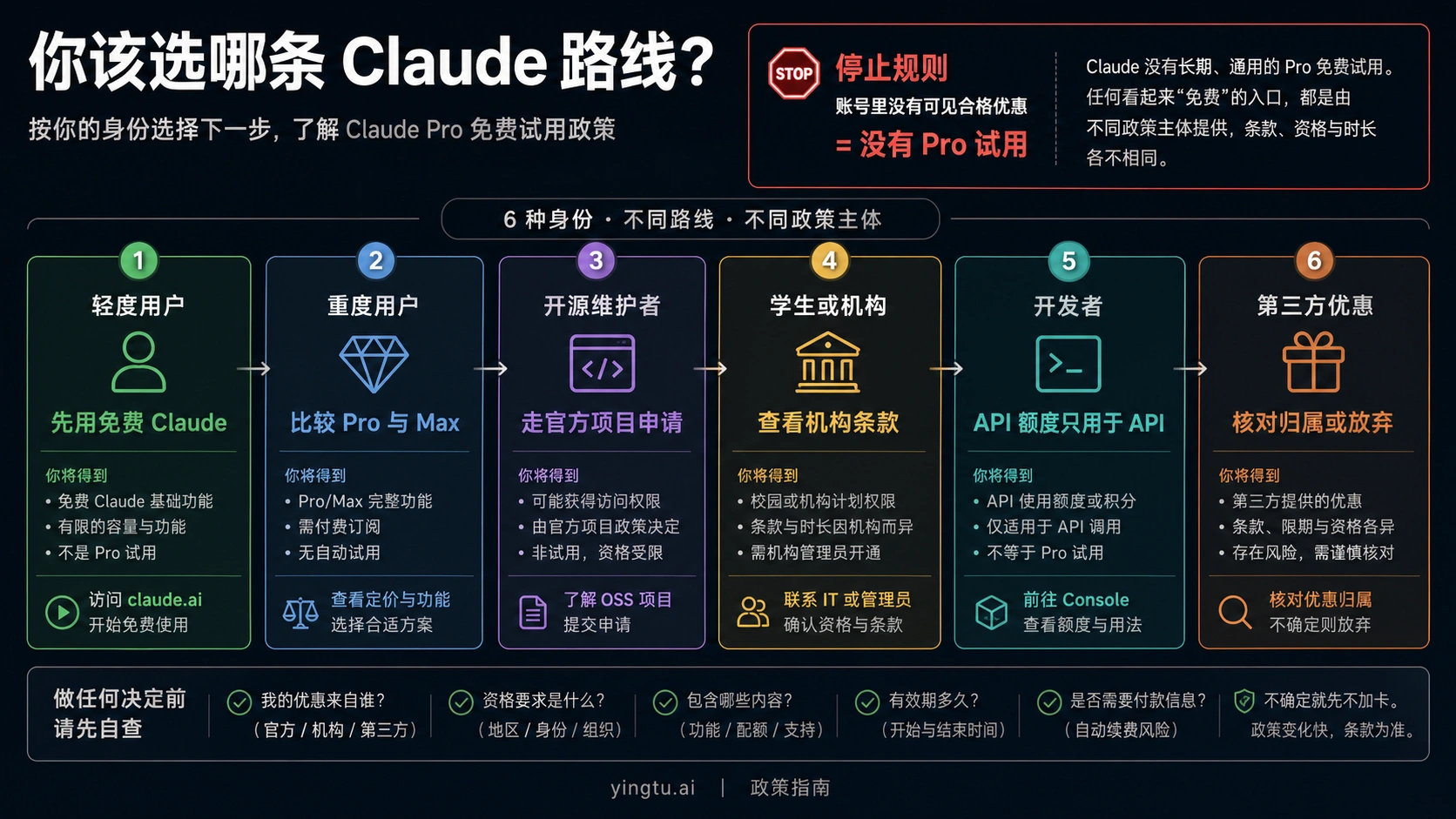
Beyond claude.ai's free tier, several legitimate platforms offer Claude access without subscription fees. Each has trade-offs worth understanding.

Cursor IDE: Best for Developers

Cursor has emerged as a premier way for developers to access Claude without paying. This AI-powered code editor integrates Claude 3.5 Sonnet (and newer versions as released) directly into the coding workflow. Unlike browser-based access, Cursor provides Claude within your development environment with no separate message limits for code-related tasks.

The key advantage is unlimited Claude access for coding work. Cursor's business model subsidizes AI access through their Pro tier, but the free version provides substantial Claude usage for legitimate development. For programmers who primarily need Claude for code, Cursor eliminates the need for any paid Claude subscription.

Poe.ai: Multi-Model Platform

Quora's Poe platform offers access to multiple AI models including Claude versions. The free tier provides 100 daily messages distributed across available models. While limits are stricter than claude.ai for heavy Claude usage, Poe's multi-model access lets you use Claude for specific tasks while using other models for general chatting.

Poe's subscription ($19.99/month) unlocks higher limits: 600 daily GPT-4 messages and 1,000 Claude-2-100k messages. For users who want both ChatGPT and Claude access, Poe's single subscription can be more economical than separate subscriptions to both services.

GitHub Copilot: Developer-Focused Option

GitHub integrated Claude 3.7 Sonnet into Copilot, their AI coding assistant. While Copilot requires a subscription after the trial period, the 30-day free trial provides full Claude access for coding tasks. For developers already in the GitHub ecosystem, this offers a natural way to evaluate Claude's coding capabilities.

The trial requires payment information but won't charge if cancelled before 30 days. Educational accounts and verified open-source contributors may qualify for extended or permanent free access.

Zed Editor: Limited Free Access

The Zed code editor includes 50 free Claude prompts per month. While limited, this provides a no-strings-attached way to access Claude for occasional coding assistance. Zed's lightweight editor appeals to developers who find VS Code or Cursor too heavy for their needs.

Cloud Platform Credits

Major cloud providers offer free credits applicable to Claude API access:

PlatformFree CreditsClaude Access
Google Cloud$300Via Vertex AI
AWSFree tier + creditsVia Bedrock
Azure$200Via partner integrations

These credits suit developers and businesses wanting to test Claude API integration. While more technical than chat interfaces, API access provides maximum flexibility for building applications.

Comparison of Free Access Methods

MethodBest ForLimitsRequires
claude.aiGeneral use~9-40/5hrAccount only
CursorDevelopmentUnlimited for codeDownload
PoeMulti-AI access100/day totalAccount
GitHub CopilotCoding in IDE30-day trialPayment method
Cloud creditsAPI testing$200-300 valueAccount + setup

For most users, starting with claude.ai makes sense. Developers should explore Cursor as a primary tool. Those wanting variety might prefer Poe's multi-model approach.

Alternative platforms offering free Claude access

Claude vs ChatGPT vs Gemini: Free Tier Comparison

Choosing between free AI chatbots requires understanding each platform's strengths and trade-offs. Here's how Claude's free tier compares to the major alternatives.

Model Quality Comparison

Claude's free tier advantage is model quality. Free Claude users get Sonnet 4, which outperforms GPT-4o (ChatGPT's free model) on coding benchmarks and matches or exceeds it on reasoning tasks. Gemini's free tier offers 2.5 Flash—optimized for speed rather than capability.

For complex tasks requiring nuanced understanding, Claude's free tier arguably provides the best output quality among major free options. ChatGPT and Gemini prioritize broader access with more capable models reserved for paid tiers.

Usage Limits Comparison

ChatGPT's free tier is notably more generous with message counts. While Claude restricts to 9-40 messages per 5-hour window, ChatGPT allows substantially more messages with rate limits rather than hard caps. Gemini similarly offers generous usage for its Flash model.

If message volume matters more than output quality, ChatGPT and Gemini free tiers allow more interactions. If you need fewer but higher-quality responses, Claude's free tier delivers more value per message.

Feature Comparison

FeatureClaude FreeChatGPT FreeGemini Free
Image GenerationNoYes (DALL-E)Yes (Imagen)
Image AnalysisYesYesYes
Web SearchYesYesYes
File UploadYes (30MB)Yes (limited)Yes
Code ExecutionNoYesYes
Voice ChatNoYesYes
Plugins/ExtensionsLimitedYes (GPTs)No

ChatGPT leads in feature breadth, offering image generation, custom GPTs, and voice features on the free tier. Gemini excels at Google ecosystem integration. Claude focuses on core AI capabilities without the extras.

Best Use Cases by Platform

Choose Claude Free when:

  • You need sophisticated reasoning or analysis
  • Code quality matters more than volume
  • You're processing complex documents
  • Writing quality is paramount

Choose ChatGPT Free when:

  • You need image generation
  • You want voice conversations
  • Message volume matters more than individual quality
  • You need custom GPTs or plugins

Choose Gemini Free when:

  • You're deep in Google's ecosystem
  • You need tight Gmail/Docs/Drive integration
  • Research with live web data is primary
  • You want the most generous free limits

Multi-Platform Strategy

Smart users leverage multiple free tiers rather than committing to one platform. Use Claude for complex analysis and coding, ChatGPT for image generation and casual chat, and Gemini for Google-integrated workflows. This maximizes free access across use cases while preserving Claude credits for high-value tasks.

Should You Upgrade to Claude Pro?

The decision to upgrade from free to Pro depends on your usage patterns, workflow needs, and budget. Here's a framework for making that decision objectively.

Signs You Should Stay on Free

The free tier genuinely works for many users. You should probably stay on free if:

  • You use Claude a few times per week for personal tasks
  • You rarely hit usage limits
  • You don't need Claude for professional work with reliability requirements
  • You can plan around the 5-hour reset window
  • You're comfortable with occasional slowdowns during peak times
  • You don't need Claude Code or model selection

For casual users exploring AI capabilities, the free tier provides real value. There's no shame in not paying—Anthropic designed the free tier to be useful, not just a demo.

Signs You Should Consider Pro

Upgrading makes sense when free tier limitations create friction that affects your productivity or work quality:

  • You hit free limits multiple times per week and lose work momentum
  • You rely on Claude for client work or professional deliverables
  • Response delays during peak times cause missed deadlines
  • You need Claude Code for development workflows
  • Persistent projects would significantly improve your efficiency
  • The $20/month would save more than $20/month in time or opportunity cost

The key question: does free Claude's limitations cost you more than $20/month in lost productivity, frustration, or workarounds? For professionals whose work benefits from AI assistance, the math often favors Pro.

Trial Before Committing

If you're unsure, watch for Pro trial opportunities and use them for realistic evaluation. During the trial, note how often you would have hit free limits, whether priority access matters during your work hours, and which Pro features you actually use.

Many users find that model selection and Claude Code justify the cost alone. Others discover they rarely need capabilities beyond the free tier. A trial provides data rather than assumptions.

Pro vs API: Developer Consideration

For developers, compare Pro ($20/month) against API pay-as-you-go pricing. If your usage is moderate and focused on specific applications, API credits might be more economical. Claude Sonnet 4 costs $3-6 per million input tokens and $15-22.50 per million output tokens. For typical usage patterns, this can be cheaper than a Pro subscription while offering more flexibility.

If you're building applications or need programmatic access, consider whether API credits better match your needs than a Pro subscription.

The Upgrade Decision Checklist

Rate each factor 1-5 based on how much it affects you:

  • Hit usage limits frequently: ___
  • Need reliable access during work hours: ___
  • Would use Claude Code: ___
  • Would benefit from Projects feature: ___
  • Need Google Workspace integration: ___
  • Value model selection flexibility: ___

Total 20+: Pro likely worthwhile Total 10-19: Consider trial, may not need Pro Total under 10: Free tier probably sufficient

Frequently Asked Questions

Does Claude have a free trial?

Claude has both a permanent free tier and periodic Pro trials. The free tier at claude.ai lets anyone use Claude Sonnet 4 indefinitely without payment. Pro trials (14-30 days) occur during major product launches and require a payment method that won't be charged during the trial period.

How many messages can I send on Claude free?

Claude's free tier allows approximately 9-40 messages per 5-hour rolling window, depending on server demand and message length. Anthropic intentionally keeps exact numbers unpublished because they adjust dynamically. Shorter messages during off-peak times allow more exchanges than long prompts during busy periods.

How do I get more Claude usage without paying?

Several strategies increase effective free usage: start new conversations frequently to reduce context size, bundle related questions into single messages, plan usage around the 5-hour reset window, and use alternative platforms like Cursor (for coding) or Poe (for multi-AI access). You can also watch for Pro trial promotions during major Anthropic announcements.

Is Claude free better than ChatGPT free?

It depends on your priorities. Claude free offers access to a more capable model (Sonnet 4 vs GPT-4o) with better reasoning and coding performance. ChatGPT free provides more messages, image generation, voice chat, and plugin access. For complex analysis and quality outputs, Claude excels. For volume and features, ChatGPT leads.

What happens when I hit Claude's limit?

Claude displays a message indicating you've reached your usage limit and shows when it will reset (within the next 5 hours). You cannot queue messages to send when limits refresh—you must wait and return later. Pro subscribers rarely experience this due to 5x higher limits.

Can I use Claude free for commercial work?

Yes, Claude's free tier permits commercial use according to their terms of service. However, the usage limits and lack of priority access make it unreliable for professional workflows with deadlines. Most businesses using Claude for commercial purposes upgrade to Pro or Team plans for reliability.

How do I cancel a Claude Pro trial?

Go to your account settings on claude.ai, navigate to the subscription section, and select "Cancel subscription." You retain Pro access until the trial period ends, then revert to the free tier. Set a reminder to cancel before the trial ends to avoid automatic billing.

Does Claude save my conversations?

Claude saves your conversation history within your account, accessible across devices. Anthropic states they don't use individual conversations to train models. You can delete conversations from your history at any time. For sensitive work, review Anthropic's privacy policy regarding data handling.

Conclusion

Claude's free tier offers genuine value that rivals paid subscriptions on other platforms. With access to Claude Sonnet 4—a model that outperforms many competitors' paid offerings—free users can accomplish sophisticated tasks without spending anything. The 5-hour rolling window provides regular refresh opportunities, and the feature set including file uploads, image analysis, and web search covers most use cases.

For users who need more, Claude Pro trials provide periodic opportunities to test premium features without commitment. The combination of permanent free access and promotional trials makes Claude accessible regardless of budget.

The practical approach is starting with the free tier to understand your actual needs. Many users discover free Claude covers their requirements. Others find that Pro's reliability and features justify the investment. Either way, informed decisions come from experience rather than assumptions.

Whether you stick with free or eventually upgrade, Claude provides one of the most capable AI assistants available. The free tier isn't a limited demo—it's a fully functional tool that millions of users rely on daily.

推荐阅读