Clawdbot Pricing and Cost Complete Guide 2026 + Online Calculator
Complete breakdown of Clawdbot running costs: hardware options ($0-599), API fees ($10-500/month), and an interactive calculator to estimate your monthly expenses.
Nano Banana Pro
4K-80%Google Gemini 3 Pro · AI Inpainting
谷歌原生模型 · AI智能修图

How Much Does Clawdbot Really Cost to Run?
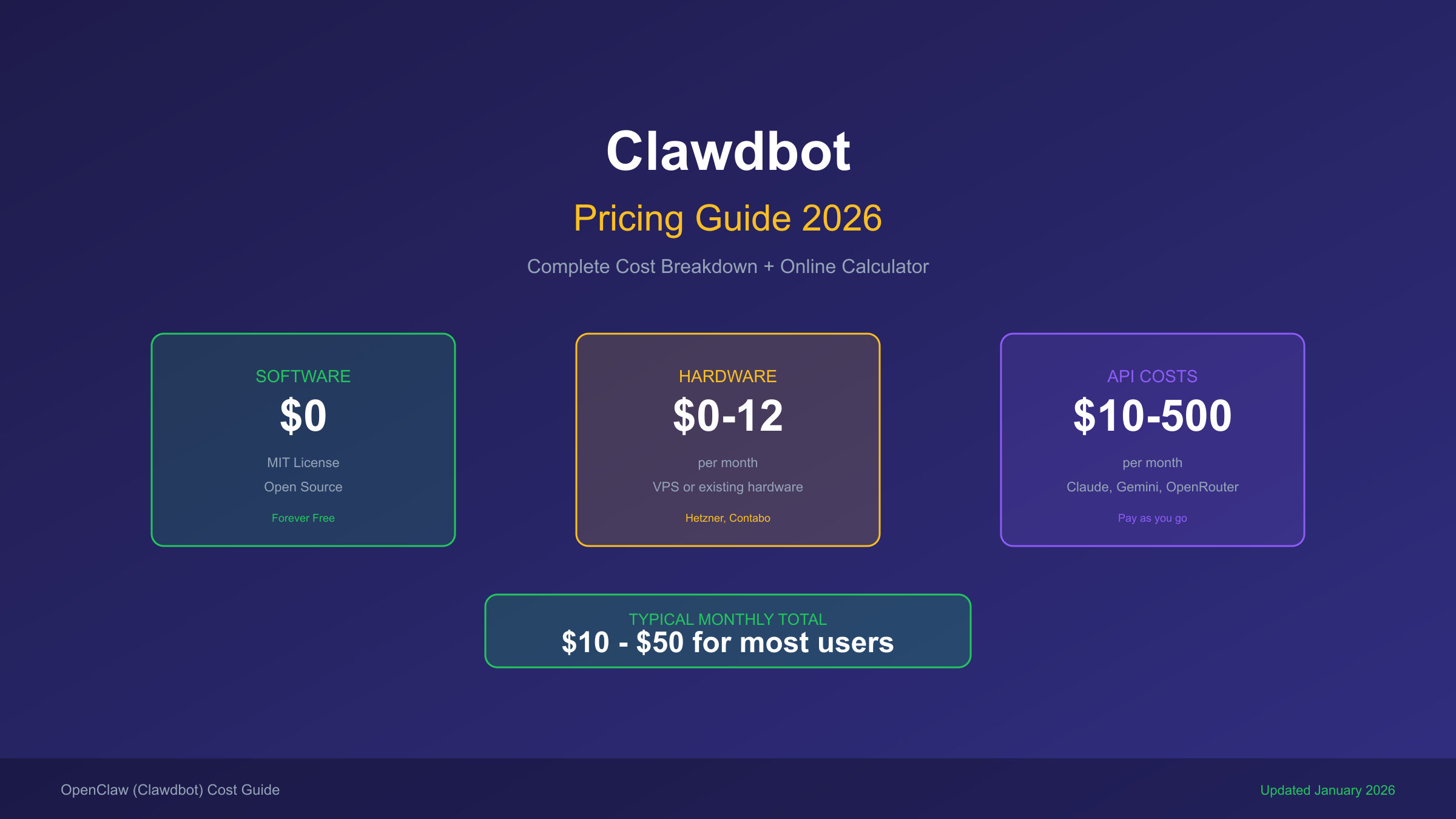
Clawdbot (now OpenClaw) is completely free and open-source software, but running it comes with real costs from two sources: the hardware to host it and the LLM API fees for the AI models it uses. For a typical single user with moderate usage, expect to spend between $10-20 per month. Heavy users running complex automations or processing millions of tokens can see costs climb to $50-500 per month or even higher.
Cost Summary: The software costs $0 (MIT license). Your actual monthly expense depends on hardware choice ($0-12/month for VPS or $599 one-time for Mac Mini) plus API usage ($5-500/month depending on model choice and token consumption).
This guide breaks down every cost component, compares Clawdbot to alternatives like ChatGPT Plus, provides an interactive cost calculator, and shares optimization strategies to keep your spending under control while maintaining a great AI assistant experience.
Understanding Clawdbot Cost Components
Before diving into specific numbers, it helps to understand what you are actually paying for when running Clawdbot. The total cost breaks down into three main categories, with API fees typically being the largest expense for most users.
The Three Cost Pillars: Hardware (hosting platform), API fees (LLM usage), and optional extras (bandwidth, storage, backup services). Most users find that API costs account for 70-90% of their total monthly spending.
The beauty of Clawdbot being open-source is that you have complete control over each cost component. You can choose to run it on an old laptop at home with zero hosting costs, or deploy it on a cloud VPS for convenience. Similarly, you can select cheaper AI models for routine tasks while reserving premium models like Claude Opus for complex reasoning—a strategy that can cut API costs by 50% or more without significantly impacting your experience.
Understanding these cost components also helps set realistic expectations. If someone tells you Clawdbot costs "$5 per month," they are likely only counting hosting costs with minimal API usage. The real monthly cost depends heavily on how intensively you use the AI assistant and which models you choose.
Hardware Costs: Where Should You Run Clawdbot?
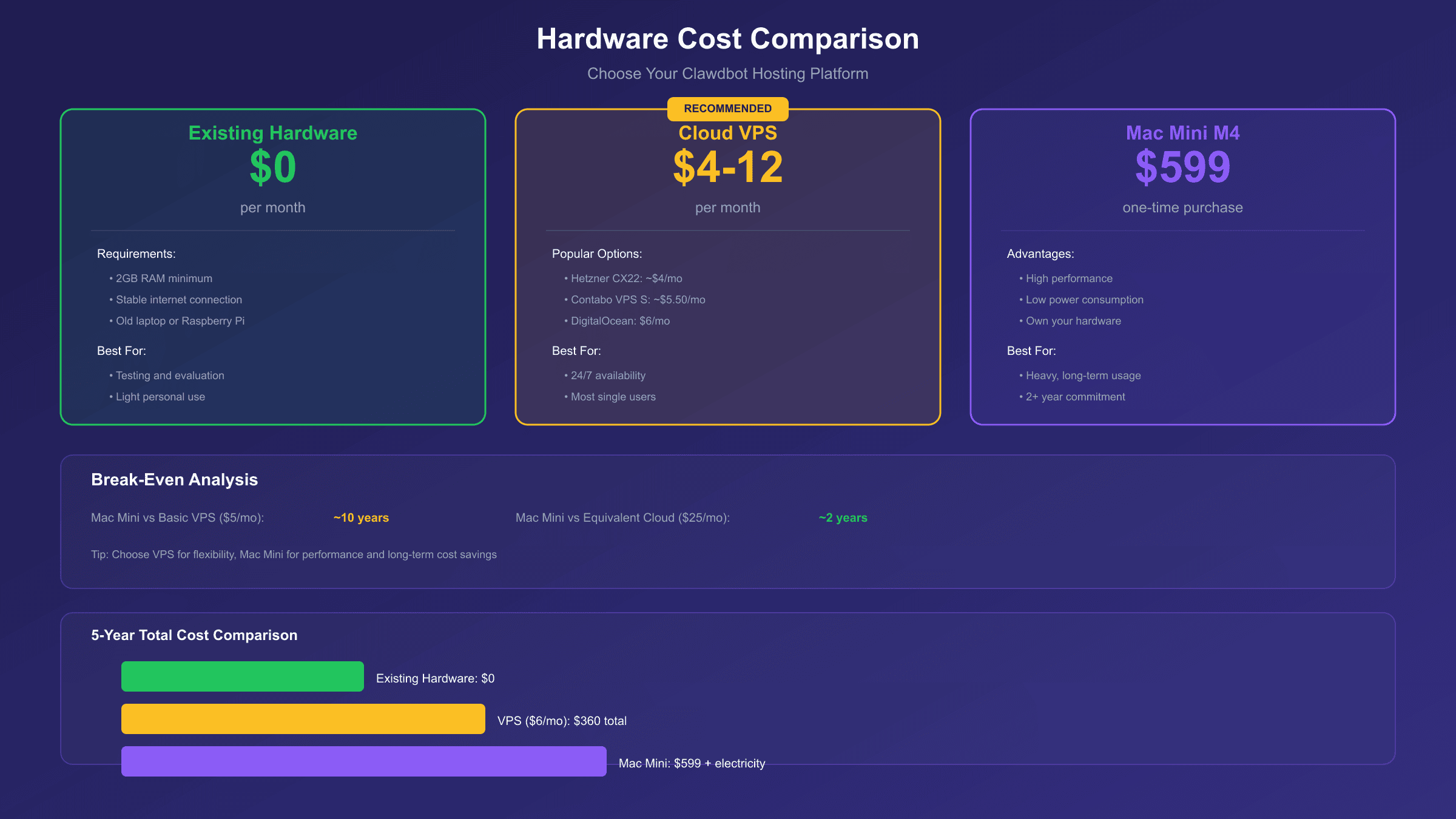
Your hardware choice is the first major cost decision. You have three main options: running on existing hardware (effectively free), renting a cloud VPS ($3-12/month), or purchasing dedicated hardware like a Mac Mini ($599 upfront).
Quick Recommendation: For most users, a $5-6/month VPS from Hetzner or Contabo offers the best balance of cost, convenience, and reliability. Only invest in a Mac Mini if you plan to use Clawdbot heavily for 2+ years.
Running on Existing Hardware ($0)
If you have a spare computer, old laptop, or even a Raspberry Pi, you can run Clawdbot at zero hardware cost. The requirements are modest: any system with 2GB RAM and a stable internet connection works fine. The main downside is that your assistant goes offline when you turn off the device, and you need to manage updates and reliability yourself.
VPS Cloud Hosting ($3-12/month)
Cloud VPS hosting offers 24/7 availability without managing physical hardware. Here are the most popular options among Clawdbot users:
| Provider | Plan | Specs | Monthly Cost |
|---|---|---|---|
| Hetzner CX22 | Entry | 2 vCPU, 4GB RAM | €3.79 (~$4) |
| Hetzner CX32 | Standard | 4 vCPU, 8GB RAM | €6.59 (~$7) |
| Contabo VPS S | Value | 4 vCPU, 8GB RAM | €4.99 (~$5.50) |
| DigitalOcean | Basic | 1 vCPU, 2GB RAM | $6 |
| AWS Lightsail | Entry | 1 vCPU, 1GB RAM | $5 |
For most single-user setups, a Hetzner CX22 or Contabo VPS S provides ample resources. These European providers offer excellent value compared to US-based clouds.
Mac Mini M4 ($599 One-Time)
The Mac Mini M4 is popular in the Clawdbot community because it offers powerful hardware with low energy consumption. At $599, it seems expensive compared to VPS hosting, but the math changes over time:
Break-Even Analysis: At $5/month VPS costs, a Mac Mini pays for itself in about 10 years. However, a Mac Mini handles much higher workloads than a basic VPS, equivalent to roughly a $20-30/month cloud instance. At that comparison, break-even drops to 2-3 years.
The Mac Mini makes sense if you plan heavy, long-term usage, want the fastest possible local performance, or prefer owning your infrastructure.
API Costs: The Major Expense
API costs are where most of your Clawdbot budget goes. Every time Clawdbot thinks, responds, or takes an action, it consumes tokens from an LLM provider. According to community data, heavy users can spend $5-10 per month even with careful optimization, while power users processing millions of tokens may spend $50-150 or more.
Important Warning: Using your Claude Pro or Claude Max subscription with Clawdbot violates Anthropic's Terms of Service. You must use pay-as-you-go API keys.
Claude API Pricing (Anthropic)
Claude is the most popular model choice for Clawdbot users due to its strong reasoning capabilities. Here is the current pricing:
| Model | Input (per 1M tokens) | Output (per 1M tokens) | Best For |
|---|---|---|---|
| Claude Opus 4.5 | $5.00 | $25.00 | Complex reasoning |
| Claude Sonnet 4.5 | $3.00 | $15.00 | Balanced performance |
| Claude Haiku 4.5 | $1.00 | $5.00 | Quick tasks, high volume |
| Claude Haiku 3 | $0.25 | $1.25 | Budget option |
For context, 1 million tokens equals roughly 750,000 words of text. A typical conversation with Clawdbot might consume 2,000-5,000 tokens per interaction.
Google Gemini API Pricing
Google Gemini offers competitive pricing, especially for the Flash models which are excellent for routine tasks:
| Model | Input (per 1M tokens) | Output (per 1M tokens) |
|---|---|---|
| Gemini 2.5 Pro | $1.25 | $10.00 |
| Gemini 2.5 Flash | $0.15 | $0.60 |
| Gemini 2.0 Flash | $0.10 | $0.40 |
Gemini also offers a generous free tier with 1,000 daily requests, which can cover light usage entirely.
OpenRouter Auto-Routing
OpenRouter provides access to multiple models through a single API, with automatic routing to the best model for each task. This can optimize costs by using cheaper models for simple queries while reserving expensive models for complex tasks. Prices vary by model but generally match or slightly exceed direct API pricing.
Real-World API Cost Examples
Based on community reports, here are realistic monthly API costs:
- Light User (50-100 interactions/day, simple tasks): $10-20/month with Gemini Flash or Claude Haiku
- Moderate User (100-300 interactions/day, mixed tasks): $30-70/month with Claude Sonnet
- Heavy User (500+ interactions/day, complex automations): $100-300/month
- Extreme Case (Federico Viticci's 180M tokens/month): ~$3,600/month
Bandwidth and Storage Costs
Beyond hardware and API fees, there are minor costs for bandwidth and storage that most users can ignore but heavy users should consider.
Bandwidth: Most VPS plans include generous bandwidth allowances (1-20TB/month) that far exceed Clawdbot's needs. You are unlikely to incur overage charges unless running very high-volume automations with large file transfers.
Storage: Clawdbot's memory and log files grow over time. A basic VPS with 40-50GB storage handles most use cases. If you store extensive conversation histories or media files, consider allocating $1-5/month for additional storage or backup services.
Backup Services: Cloud backup services like Backblaze B2 or Wasabi cost approximately $5-6 per TB per month. For a typical Clawdbot installation with 10-20GB of data, backup costs are negligible (under $0.50/month).
Price Comparison: Clawdbot vs Alternatives
How does Clawdbot's total cost compare to other AI assistant options? Let us compare the monthly costs and capabilities of the main alternatives.
| Solution | Monthly Cost | Key Advantages | Key Limitations |
|---|---|---|---|
| Clawdbot (Light) | $10-20 | Customizable, proactive, runs 24/7 | Requires setup, API costs variable |
| Clawdbot (Heavy) | $50-200+ | Full automation, multi-model | Higher costs, technical knowledge |
| ChatGPT Plus | $20 | Easy to use, reliable | No automation, web-only |
| ChatGPT Pro | $200 | More usage, priority access | Very expensive, still limited |
| Siri/Google Assistant | $0 | Built-in, voice-activated | Very limited AI capabilities |
| Claude Pro | $20 | Strong reasoning, artifacts | No automation, ToS limits |
Analysis: For users who want a simple chat interface, ChatGPT Plus at $20/month offers straightforward value. However, Clawdbot provides far more capability—proactive notifications, deep system integration, custom automations—at a similar or lower cost for light-to-moderate users. Heavy users pay more but get capabilities impossible with subscription services.
The "hidden cost" of subscription services is that you are locked into their interface and rules. Clawdbot users own their data, can switch models freely, and customize every aspect of their assistant.
Online Cost Calculator
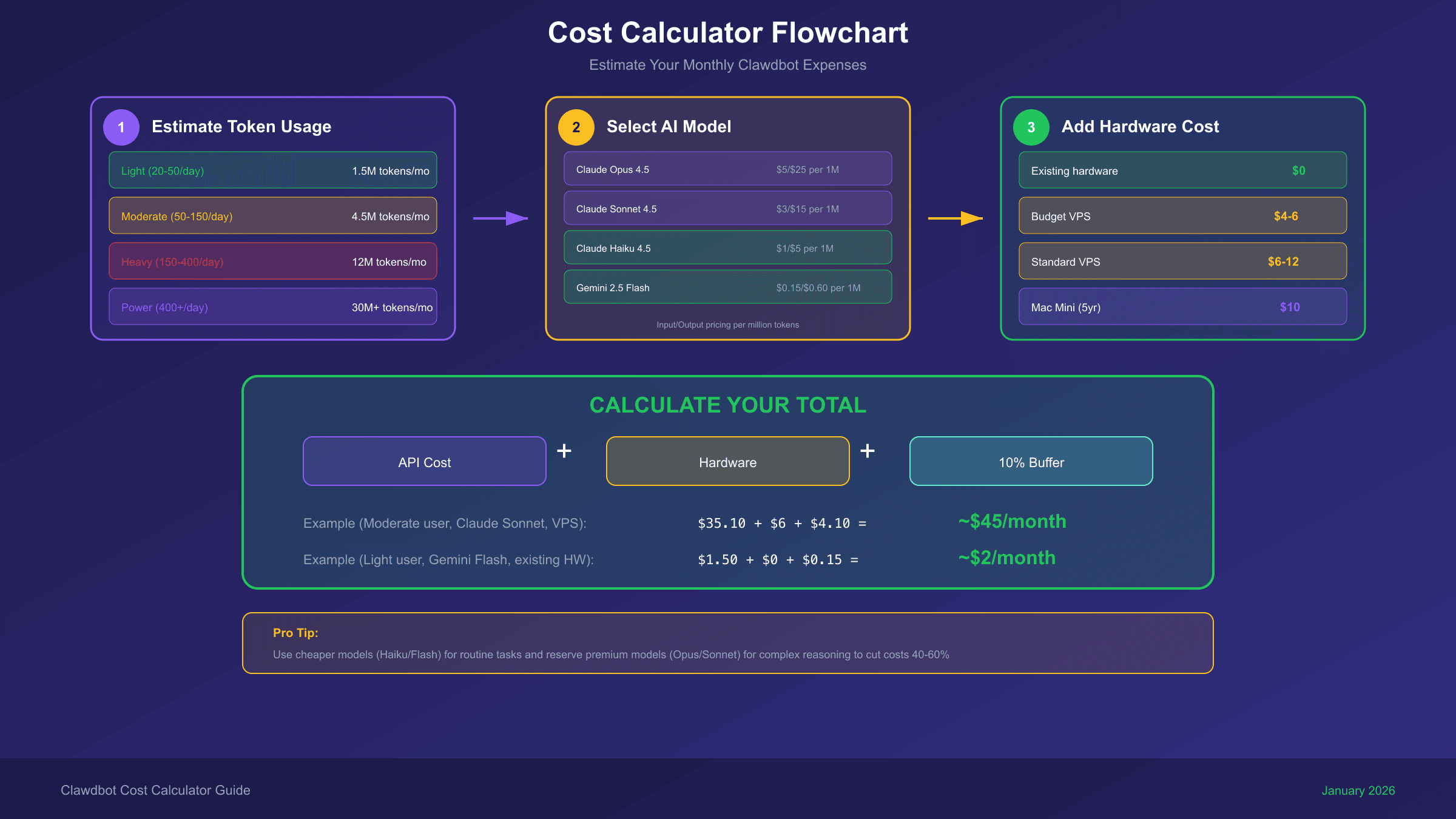
To help you estimate your monthly Clawdbot costs, use this calculator framework. While we cannot embed an interactive widget in this article, here is how to calculate your expected costs:
Step 1: Estimate Your Token Usage
First, estimate your daily token consumption based on usage patterns:
| Usage Level | Daily Interactions | Tokens/Day | Tokens/Month |
|---|---|---|---|
| Light | 20-50 | 50,000 | 1.5M |
| Moderate | 50-150 | 150,000 | 4.5M |
| Heavy | 150-400 | 400,000 | 12M |
| Power User | 400+ | 1,000,000+ | 30M+ |
Step 2: Calculate API Cost
Multiply your monthly tokens by your chosen model's pricing:
Monthly API Cost = (Input Tokens × Input Price) + (Output Tokens × Output Price)
For example, a moderate user with 4.5M tokens/month using Claude Sonnet 4.5:
- Assuming 60% input, 40% output: 2.7M input + 1.8M output
- Cost: (2.7 × $3) + (1.8 × $15) = $8.10 + $27 = $35.10/month
Step 3: Add Hardware Cost
Add your hosting costs (VPS or amortized hardware):
| Hardware Option | Monthly Cost |
|---|---|
| Existing hardware | $0 |
| Budget VPS | $4-6 |
| Standard VPS | $6-12 |
| Mac Mini (5-year amortization) | $10 |
Step 4: Total Monthly Cost
Total = API Cost + Hardware Cost + Buffer (10% for unexpected usage)
For our example moderate user: $35.10 + $6 + $4.10 buffer = ~$45/month
Cost Optimization Tips
Reducing Clawdbot costs without sacrificing functionality requires strategic choices about models, usage patterns, and configuration. Here are proven strategies from the community.
Use the Right Model for Each Task
Not every task needs Claude Opus. Configure Clawdbot to use:
- Haiku/Flash for simple queries, quick lookups, routine messages
- Sonnet for balanced tasks requiring good reasoning
- Opus/Pro only for complex analysis, coding, or creative work
This single strategy can reduce API costs by 40-60%.
Set Maximum Retry Limits
Runaway loops are a real danger. One user reported $200 in API charges from a single day of buggy automation. Configure maximum retry limits (3-5 attempts) and implement cost caps to prevent unexpected expenses.
Monitor Token Consumption
Use the built-in analytics or external tools like LangSmith to track token usage. Set up alerts when daily spending exceeds thresholds. Understanding your consumption patterns helps identify optimization opportunities.
Leverage Caching and Batching
Both Anthropic and Google offer:
- Prompt caching: Save up to 90% on repeated context
- Batch API: 50% discount for non-urgent processing
If your workflow involves similar prompts or can tolerate delays, these features significantly reduce costs.
Try Free Tiers First
Before committing to paid APIs:
- Google Gemini offers 1,000 free requests/day
- OpenRouter has free model options
- AWS Free Tier includes 12 months of basic compute
These options help you understand your usage patterns before spending money.
Consider Third-Party API Providers
Services like laozhang.ai offer access to premium models at reduced rates (often 50-80% off official pricing). This makes sense for cost-sensitive users, though you should evaluate data privacy implications for your use case.
Conclusion: Balancing Cost and Capability
Running Clawdbot cost-effectively is about making smart choices that match your usage patterns. Light users can enjoy a powerful AI assistant for $10-20/month—comparable to ChatGPT Plus but with far more flexibility. Heavy users pay more but gain capabilities impossible with any subscription service.
The key insights from this guide:
- Software is free; you pay for hardware + API
- Hardware costs: $0 (existing) to $6/month (VPS) to $599 one-time (Mac Mini)
- API costs: $10-50/month for most users, can reach $100-500+ for power users
- Optimization matters: Smart model selection cuts costs 40-60%
Start with a budget VPS and economical models like Gemini Flash or Claude Haiku. As you understand your usage patterns, adjust your model choices and hardware to optimize the cost-to-capability ratio. With careful configuration, Clawdbot delivers more value per dollar than any alternative AI assistant solution.
Related Resources:
- For detailed Claude API pricing, see our Claude API Quota and Limits Guide
- Learn about Gemini API Pricing and Cost Optimization