Gemini 3 Pro 4K Image Cost: Complete 2025 Pricing Guide ($0.24 to $0.05)
Exact Gemini 3 Pro 4K image generation costs explained. Official pricing at $0.24/image, batch API at $0.12, or save up to 79% with third-party options. Complete breakdown with code examples.
Nano Banana Pro
4K-80%Google Gemini 3 Pro · AI Inpainting
谷歌原生模型 · AI智能修图

Generating a 4K image with Gemini 3 Pro costs $0.24 per image through Google's official API. However, this price can be reduced to $0.12 using the Batch API, or as low as $0.05 through third-party providers—representing up to 79% savings without sacrificing output quality.
Understanding Gemini 3 Pro Image pricing requires looking beyond the headline number. The model, officially known as Nano Banana Pro and released on November 20, 2025, introduced native 4K resolution output alongside 99%+ text rendering accuracy—capabilities no other AI image generator currently matches. This combination of features comes at a premium, but multiple optimization paths exist for developers and businesses seeking to control costs while maintaining access to studio-grade image generation.
This guide provides a complete breakdown of Gemini 3 Pro 4K image costs, including the token-based pricing formula, all available discount options, competitor comparisons, and practical implementation code. Whether you're an individual developer exploring the API or an enterprise planning large-scale deployment, you'll find the exact pricing data and optimization strategies needed to make informed decisions.
Quick Answer: Gemini 3 Pro 4K Image Pricing
The pricing structure for Gemini 3 Pro Image generation follows a token-based model where different resolutions consume different numbers of output tokens. According to Google's official pricing documentation, image output tokens are charged at $120 per million tokens, which translates to specific per-image costs based on resolution.
| Resolution | Dimensions | Output Tokens | Price per Image | Batch API Price |
|---|---|---|---|---|
| 1K | 1024×1024 | 1,120 | $0.134 | $0.067 |
| 2K | 2048×2048 | 1,120 | $0.134 | $0.067 |
| 4K | 4096×4096 | 2,000 | $0.24 | $0.12 |
A critical insight from this pricing table: 1K and 2K resolutions share identical pricing despite the 4× difference in pixel count. This means developers should always choose 2K over 1K when given the option—it's essentially a free quality upgrade. The 4K tier costs 79% more than 2K while delivering 4× the pixel density, making it the premium option reserved for professional use cases requiring maximum detail.
Input costs add minimal overhead to each request. Text prompts consume tokens at $2.00 per million, typically adding $0.001-0.003 per image depending on prompt complexity. When using reference images for style guidance or editing, each input image consumes 560 tokens at approximately $0.0011 per image. For most practical workflows, these input costs represent less than 1% of total generation expense.
How Token-Based Pricing Works
Understanding Gemini's token calculation helps predict costs accurately and optimize spending. The pricing formula is straightforward once you know the token consumption for each resolution tier.
The Core Formula:
Image Cost = (Output Tokens × $120) / 1,000,000
For a 4K image:
(2,000 tokens × $120) / 1,000,000 = $0.24
This token-based approach differs from competitors like DALL-E 3, which charges fixed per-image rates regardless of internal computational complexity. Gemini's model provides more transparency into the actual resource consumption, though it requires developers to track token usage for accurate cost forecasting.
The token count correlates directly with output image dimensions. A 4K image (4096×4096 = 16.7 million pixels) consumes 2,000 tokens, while 2K images (2048×2048 = 4.2 million pixels) require only 1,120 tokens. This non-linear scaling reflects the computational complexity—4× more pixels doesn't require 4× more tokens because the model's architecture allows for efficient high-resolution synthesis.
Beyond output tokens, comprehensive cost tracking should account for prompt tokens (text input at $2/million) and any reference images used in the request. A typical 4K generation request with a 50-word prompt and one reference image would cost approximately:
- Output tokens: 2,000 × ($120/1M) = $0.240
- Prompt tokens: ~75 × ($2/1M) = $0.00015
- Reference image: 560 × ($2/1M) = $0.0011
- Total: ~$0.241
The output tokens dominate total cost, making resolution selection the primary lever for cost optimization.
Free Access Options for Gemini 3 Pro Image
Before committing to paid usage, developers can explore several free access pathways that provide substantial generation capacity for development, testing, and even light production workloads.
Google AI Studio offers the most generous free access for individual developers. The platform provides between 500-1,500 daily image generations at full resolution, with the exact limit varying based on overall platform demand. This allocation resets at midnight Pacific Time and requires no credit card—just a Google account. For developers building prototypes or running experiments, this free tier often covers months of development work without any spending.
The Gemini Consumer App provides a more limited but still useful free tier. Current limits allow approximately 2-10 images per day at 1MP resolution (1024×1024), with the exact number fluctuating based on Google's dynamic capacity allocation. While the resolution restriction prevents 4K generation, this tier serves well for concept validation and prompt refinement before moving to API-based production workflows.
New Google Cloud customers receive $300 in free credits that can be applied toward Gemini API usage through Vertex AI. At $0.24 per 4K image, these credits cover approximately 1,250 4K generations—enough for substantial testing and initial production deployment. The credits expire after 90 days, making them ideal for intensive development sprints.
The API Free Tier provides 500 requests per day (RPD) for developers who want programmatic access without immediate spending. This tier operates independently from consumer app quotas and supports full resolution output, though rate limits may apply during peak usage periods.
| Access Method | Daily Limit | Max Resolution | Credit Card Required |
|---|---|---|---|
| Google AI Studio | 500-1,500 | 4K | No |
| Gemini App (Free) | 2-10 | 1K | No |
| GCP Credits ($300) | ~1,250 total | 4K | Yes (for signup) |
| API Free Tier | 500 RPD | 4K | No |
For more details on free tier limits, see our Nano Banana Pro free limits guide.
Cost Optimization Strategies
Multiple pathways exist to reduce Gemini 3 Pro Image costs significantly below the standard $0.24 per 4K image rate. The optimal strategy depends on your volume, latency requirements, and willingness to use third-party services.
Batch API Processing offers the most straightforward official discount. Google provides a 50% reduction on all image generation when using the Batch API, bringing 4K costs down to $0.12 per image. The trade-off is processing time: batch requests complete within 2-24 hours rather than the standard 10-30 seconds. This option works excellently for non-time-sensitive workloads like content libraries, marketing asset creation, or overnight batch processing pipelines.
Resolution Optimization provides immediate savings without any service changes. Since 2K and 1K share identical pricing at $0.134, always generate at 2K minimum. For many web and social media use cases, 2K resolution (2048×2048 = 4.2MP) provides sufficient quality while saving 44% compared to 4K. The decision framework is simple: use 4K only when the output requires print reproduction, detailed zooming, or professional-grade asset production.
Third-party API providers offer the most aggressive cost reduction, with some services providing flat-rate pricing regardless of resolution. For example, laozhang.ai charges $0.05 per image across all resolutions—representing 79% savings compared to official 4K pricing and 63% savings compared to 2K. These providers route requests through the same underlying Gemini API while absorbing volume discount benefits. The image output quality remains identical since the generation happens on Google's infrastructure.
| Optimization Method | 4K Price | Savings | Latency Trade-off |
|---|---|---|---|
| Official Standard | $0.24 | Baseline | 15-20 seconds |
| Official Batch API | $0.12 | 50% | 2-24 hours |
| Resolution (2K) | $0.134 | 44% | None |
| Third-party (laozhang.ai) | $0.05 | 79% | ~20ms additional |
When evaluating third-party options, consider that latency increases slightly (approximately 20ms routing overhead compared to official API's 200ms+ baseline latency) but output quality remains identical. Third-party services are particularly suitable for development, testing, and production workloads where cost matters more than having direct Google support. For applications requiring official SLAs or enterprise support agreements, the direct Google API remains the appropriate choice.
For a detailed comparison of API providers, check our Nano Banana Pro API price comparison.
Competitor Pricing Comparison
Gemini 3 Pro Image occupies a unique position in the AI image generation market as the only model offering native 4K output with production-ready text rendering. This capability comes at a price premium compared to lower-resolution alternatives, but the comparison requires context.
DALL-E 3 from OpenAI charges $0.04 per standard quality image (1024×1024) and $0.08 for HD quality (1792×1024). At first glance, DALL-E 3 appears significantly cheaper—$0.08 versus $0.24 for Gemini's comparable tier. However, DALL-E 3's maximum resolution caps at approximately 2MP, while Gemini 3 Pro delivers 16.7MP at 4K. For direct pixel-to-dollar comparison, Gemini provides better value at the high end. DALL-E 3 remains the more economical choice when 2K resolution suffices.
Midjourney V7 operates on a subscription model ($10-60/month) rather than per-image pricing, making direct comparison difficult. The $30/month Pro plan includes unlimited "relaxed" generations and 30 hours of fast generation time. For high-volume users producing hundreds of images monthly, Midjourney's subscription often proves more economical. However, Midjourney lacks API access for programmatic integration, limiting its utility for automated workflows.
Imagen 3, Google's other image model, charges approximately $0.03 per image but doesn't offer 4K resolution or the advanced text rendering capabilities of Gemini 3 Pro Image. For basic image generation needs, Imagen 3 provides an 87% cost reduction compared to Gemini 3 Pro.
| Model | Best Price | Max Resolution | Text Rendering | API Available |
|---|---|---|---|---|
| Gemini 3 Pro Image | $0.24 (4K) | 4K (4096×4096) | 99%+ accuracy | Yes |
| DALL-E 3 HD | $0.08 | ~2K (1792×1024) | Good | Yes |
| Midjourney V7 | ~$0.05* | ~2K (4MP) | Improved | No |
| Imagen 3 | $0.03 | Standard | Basic | Yes |
| Flux Kontext | $0.05-0.10 | Variable | Good | Yes |
*Midjourney price estimated based on subscription cost divided by typical monthly generation volume.
The following visualization compares these options across key dimensions:
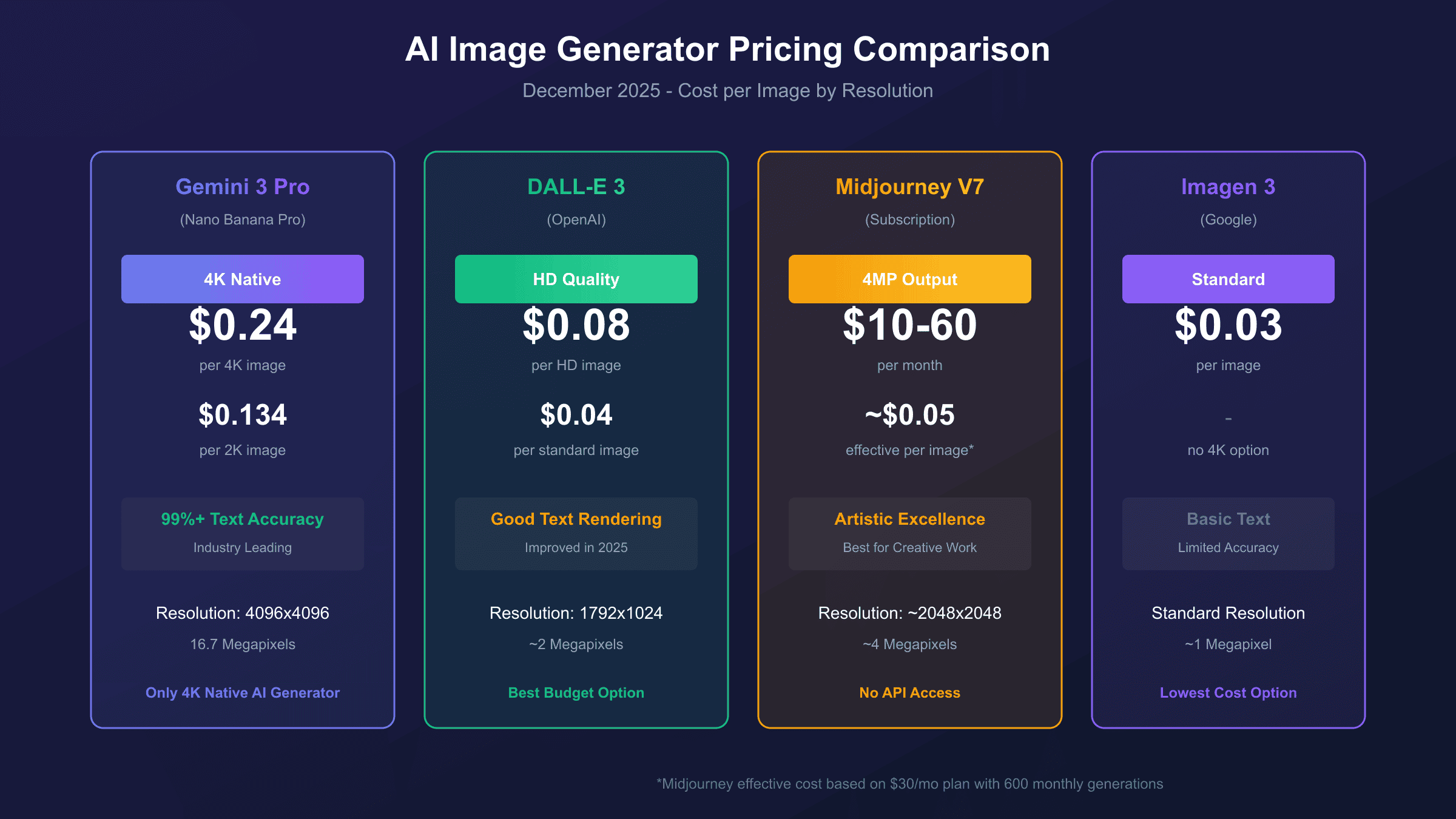
The comparison reveals that Gemini 3 Pro Image commands a premium justified by exclusive capabilities—native 4K and near-perfect text rendering—rather than competing on price alone. For developers specifically needing these features, no direct alternative exists at any price point.
4K vs 2K: Is the Extra Cost Worth It?
The 79% price premium for 4K over 2K generation ($0.24 vs $0.134) warrants careful consideration of actual use case requirements. While 4K sounds impressive, many applications don't benefit from the additional resolution.
When 4K Justifies the Cost:
Print production represents the clearest case for 4K. A 4096×4096 image at 300 DPI prints at approximately 13.6×13.6 inches—suitable for posters, magazine spreads, and professional marketing materials. The 2K alternative prints at only 6.8×6.8 inches at the same quality, requiring upscaling for larger formats that may introduce artifacts.
Product photography for e-commerce benefits from 4K when images will be zoomed or cropped significantly. Detailed product shots that users examine closely—jewelry, electronics, textiles—maintain sharpness under zoom at 4K that 2K cannot match.
Marketing assets intended for high-resolution displays (4K monitors, retina screens, large format digital signage) require native 4K to avoid visible pixelation. The pixel density difference becomes apparent on modern displays.
When 2K Suffices:
Social media content displays at significantly lower resolutions than even 1K on most platforms. Instagram limits images to 1080×1350, Twitter to 4096×4096 but typically displays much smaller, and LinkedIn compresses aggressively regardless of input resolution. Generating at 4K for social media wastes 44% of spending with no visible benefit.
Website images, particularly those used in blog posts, article headers, and standard content sections, rarely need more than 2K. Most websites display images at 800-1200 pixels wide, making 4K overkill even for retina displays.
Prototyping and iteration phases should always use 2K or lower. Spending $0.24 per image during prompt refinement stages when dozens of attempts may be needed quickly becomes expensive. Use 2K during development, then regenerate final assets at 4K only for production.
| Use Case | Recommended Resolution | Cost per Image |
|---|---|---|
| Print Production (>8") | 4K | $0.24 |
| Product Photography (zoomable) | 4K | $0.24 |
| Digital Signage (4K displays) | 4K | $0.24 |
| Social Media | 2K | $0.134 |
| Blog/Website Images | 2K | $0.134 |
| Development/Prototyping | 2K or 1K | $0.134 |
For detailed 4K generation tutorials, see our Nano Banana Pro 4K generation guide.
API Implementation Guide
Implementing Gemini 3 Pro Image generation requires the Google GenAI SDK (version 1.51.0 or later) and a valid API key from Google AI Studio. The following Python example demonstrates 4K image generation with proper configuration.
hljs pythonfrom google import genai
from google.genai import types
import base64
# Initialize client with API key
client = genai.Client(api_key="YOUR_API_KEY")
def generate_4k_image(prompt: str, aspect_ratio: str = "1:1") -> bytes:
"""
Generate a 4K image using Gemini 3 Pro Image.
Cost: $0.24 per image (2,000 output tokens)
Average generation time: 15-20 seconds
"""
response = client.models.generate_content(
model="gemini-3-pro-image-preview",
contents=prompt,
config=types.GenerateContentConfig(
response_modalities=['IMAGE'],
image_config=types.ImageConfig(
aspect_ratio=aspect_ratio, # "1:1", "16:9", "9:16", etc.
image_size="4K" # Must use uppercase K
)
)
)
# Extract image from response
for part in response.parts:
if image := part.as_image():
return image
return None
# Generate and save a 4K image
image = generate_4k_image(
prompt="A professional product photograph of a luxury watch on marble",
aspect_ratio="1:1"
)
image.save("output_4k.png")
print("Generated 4K image: 4096x4096 pixels, ~24MB PNG")
For developers seeking cost optimization, the following example demonstrates using a third-party endpoint with OpenAI SDK compatibility:
hljs pythonfrom openai import OpenAI
# Third-party provider configuration (79% cost savings)
client = OpenAI(
api_key="YOUR_LAOZHANG_API_KEY",
base_url="https://api.laozhang.ai/v1"
)
response = client.images.generate(
model="gemini-3-pro-image-preview",
prompt="A professional product photograph of a luxury watch on marble",
size="4096x4096", # 4K resolution
quality="hd"
)
print(f"Image URL: {response.data[0].url}")
# Cost: $0.05 vs $0.24 official = 79% savings
The third-party approach uses identical API parameters and produces the same output—the underlying generation still happens on Google's infrastructure. The primary differences are endpoint URL, API key source, and cost per request. For documentation on the third-party API, visit laozhang.ai docs.
Important Configuration Notes:
- Resolution parameter must use uppercase "K" (4K, not 4k)
- Supported aspect ratios: 1:1, 2:3, 3:2, 3:4, 4:3, 4:5, 5:4, 9:16, 16:9, 21:9
- Output format defaults to PNG; JPEG and WEBP also supported
- All generated images include SynthID watermark for authenticity verification
Enterprise and Volume Pricing
Organizations generating images at scale can access significant volume discounts beyond the standard API rates, though Google doesn't publish these tiers publicly. Based on available information and enterprise customer reports, the following guidelines apply.
Volume Discount Tiers (Approximate):
| Monthly Volume | Estimated Discount | Effective 4K Price |
|---|---|---|
| < 1,000 images | None | $0.24 |
| 1,000-10,000 | 10-20% | $0.19-0.22 |
| 10,000-100,000 | 20-35% | $0.16-0.19 |
| 100,000+ | 35-50% | $0.12-0.16 |
Enterprise agreements through Google Cloud's Vertex AI platform typically include committed use discounts, custom SLAs, and dedicated support channels. Organizations should contact Google Cloud sales directly to negotiate pricing for volumes exceeding 10,000 images monthly.
Annual Cost Projections:
For planning purposes, consider these annual cost scenarios at different usage levels:
| Usage Tier | Monthly Images | Official Annual | With Batch API | With Third-Party |
|---|---|---|---|---|
| Individual | 100 | $288 | $144 | $60 |
| Small Team | 1,000 | $2,880 | $1,440 | $600 |
| Production App | 10,000 | $28,800 | $14,400 | $6,000 |
| Enterprise | 100,000 | $288,000* | $144,000 | $60,000 |
*Enterprise tier likely qualifies for 35-50% volume discount, reducing actual cost to ~$144,000-187,000.
The table demonstrates significant cost differences across optimization strategies. An enterprise generating 100,000 images monthly could save over $200,000 annually by combining volume discounts with batch processing or third-party providers.
For batch API implementation details, see our Nano Banana Pro batch discount guide.
Monthly Budget Calculator
Planning monthly API spending requires realistic estimates based on typical usage patterns. The following scenarios provide budgeting guidance for different user profiles.
Individual Developer (Experimentation/Learning):
- Estimated usage: 50-200 images/month
- Resolution mix: 80% 2K, 20% 4K
- Monthly cost: $8-30 (official) or $3-10 (third-party)
- Recommendation: Start with free tier (500/day via AI Studio), move to third-party for cost efficiency
Freelancer/Small Business (Client Projects):
- Estimated usage: 200-1,000 images/month
- Resolution mix: 50% 2K, 50% 4K
- Monthly cost: $50-180 (official) or $10-50 (third-party)
- Recommendation: Use third-party for development, official API for final deliverables if client requires
Startup/Small Team (Product Development):
- Estimated usage: 1,000-5,000 images/month
- Resolution mix: 60% 2K, 40% 4K
- Monthly cost: $200-900 (official) or $50-250 (third-party)
- Recommendation: Implement cost tracking, use batch API for non-urgent generations
Production Application (User-Facing Features):
- Estimated usage: 5,000-50,000 images/month
- Resolution mix: 70% 2K, 30% 4K
- Monthly cost: $900-9,000 (official) or $250-2,500 (third-party)
- Recommendation: Negotiate volume discounts, implement aggressive caching, consider hybrid approach
Cost Tracking Implementation:
hljs pythonclass CostTracker:
PRICES = {
"1K": 0.134, "2K": 0.134, "4K": 0.24,
"1K_batch": 0.067, "2K_batch": 0.067, "4K_batch": 0.12,
"third_party": 0.05
}
def __init__(self):
self.total_cost = 0
self.generation_count = 0
def log_generation(self, resolution: str, batch: bool = False,
third_party: bool = False):
if third_party:
cost = self.PRICES["third_party"]
elif batch:
cost = self.PRICES[f"{resolution}_batch"]
else:
cost = self.PRICES[resolution]
self.total_cost += cost
self.generation_count += 1
return cost
# Usage
tracker = CostTracker()
tracker.log_generation("4K") # $0.24
tracker.log_generation("4K", third_party=True) # $0.05
print(f"Total: ${tracker.total_cost:.2f}")
Decision Framework: Choosing the Right Option
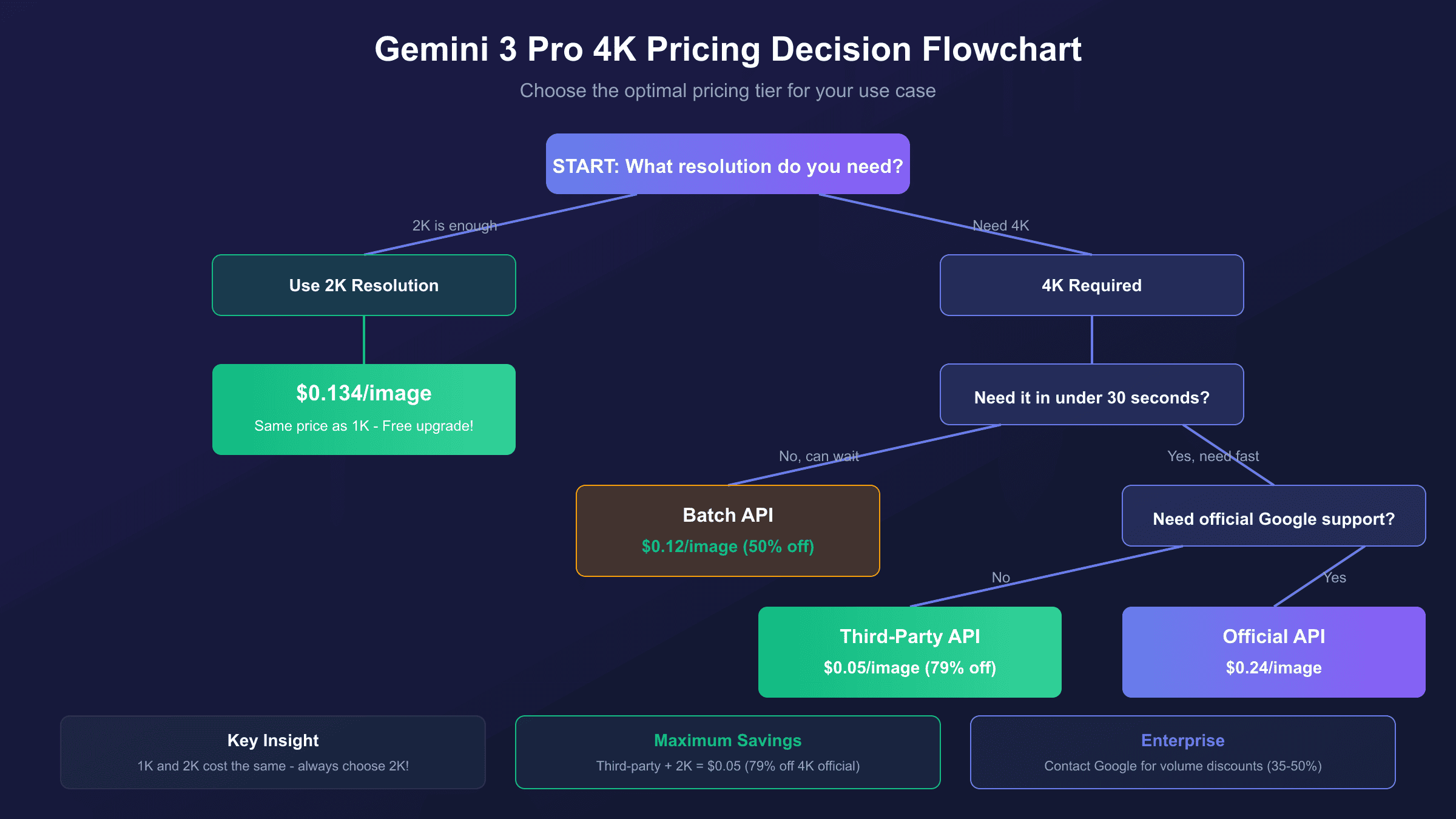
With multiple pricing tiers, providers, and resolution options available, selecting the optimal approach requires matching your specific requirements to available options. The following framework simplifies this decision.
Step 1: Determine Resolution Requirement
Ask: "Will my output be printed larger than 8 inches, displayed on 4K screens, or need detailed zoom capability?"
- Yes → 4K required ($0.24 baseline)
- No → 2K sufficient ($0.134 baseline, 44% savings)
Step 2: Assess Latency Sensitivity
Ask: "Do images need to be generated in under 30 seconds?"
- Yes → Standard API or third-party
- No → Batch API eligible (50% savings)
Step 3: Evaluate Support Requirements
Ask: "Do you need official Google support, SLAs, or enterprise compliance?"
- Yes → Official Google API (Vertex AI for enterprise)
- No → Third-party providers viable (up to 79% savings)
Decision Matrix:
| Requirement Profile | Recommended Approach | Cost per 4K Image |
|---|---|---|
| Quality + Speed + Support | Official Standard API | $0.24 |
| Quality + Speed + Budget | Third-party Provider | $0.05 |
| Quality + Budget (flexible timing) | Official Batch API | $0.12 |
| Development/Testing | Free Tier → Third-party | $0.00-0.05 |
Quick Recommendations by Use Case:
- Hobbyist/Learning: Free tier only. 500+ images/day via AI Studio covers extensive experimentation.
- Side Project: Third-party at $0.05/image. Quality identical, cost minimal.
- Startup MVP: Third-party for development, evaluate official API for production based on scale.
- Production App: Hybrid approach—third-party for non-critical generations, official API with volume discounts for core features.
- Enterprise: Negotiate directly with Google Cloud sales for custom pricing and SLAs.
Frequently Asked Questions
How much does a single 4K image cost with Gemini 3 Pro?
A single 4K image costs $0.24 through Google's standard API, $0.12 via the Batch API (50% discount with 2-24 hour processing), or as low as $0.05 through third-party providers like laozhang.ai (79% savings). The exact cost depends on which access method you choose—all produce identical image quality since generation happens on Google's infrastructure regardless of access path.
Why do 1K and 2K images cost the same ($0.134)?
Both 1K (1024×1024) and 2K (2048×2048) resolutions consume 1,120 output tokens, resulting in identical pricing at $0.134 per image. Google's token allocation reflects computational complexity rather than pure pixel count. This pricing quirk means you should always choose 2K over 1K—it's a free 4× resolution upgrade.
Is the Batch API discount worth the wait?
The 50% Batch API discount (reducing 4K from $0.24 to $0.12) makes sense for workflows that don't require immediate results. Content libraries, marketing asset preparation, and overnight batch processing benefit significantly. For interactive applications requiring sub-minute response times, standard API or third-party providers are necessary despite higher per-image costs.
Can I use the free tier for commercial projects?
Yes, Google AI Studio's free tier allows commercial use. The 500-1,500 daily generation limit applies regardless of commercial or personal intent. However, for production applications with consistent demand, API access with proper billing provides reliability guarantees that the free tier cannot match.
How does Gemini 3 Pro Image compare to DALL-E 3 on cost?
DALL-E 3 costs $0.04-0.08 per image compared to Gemini 3 Pro's $0.24 for 4K. However, DALL-E 3 maxes out at approximately 2MP resolution, while Gemini delivers 16.7MP at 4K. For comparable resolution tiers, pricing is similar. Gemini's unique advantage is native 4K output and 99%+ text rendering accuracy—capabilities DALL-E 3 doesn't offer at any price.
Do third-party providers affect image quality?
No. Third-party providers like laozhang.ai route requests to Google's actual Gemini infrastructure. The image generation happens on Google's servers using the same model and parameters. Providers simply aggregate demand to access volume discounts, passing savings to users. Output quality is identical to direct API access.
Conclusion
Gemini 3 Pro 4K image generation costs $0.24 per image through official channels—a premium justified by unique capabilities including native 4K resolution and industry-leading text rendering accuracy. However, this price point represents just one option in a spectrum of choices.
Key Takeaways:
- Official 4K pricing: $0.24/image (2,000 tokens at $120/million)
- Batch API discount: 50% reduction to $0.12/image with 2-24 hour processing
- Third-party savings: Up to 79% reduction to $0.05/image via providers like laozhang.ai
- Resolution insight: 1K and 2K cost the same—always choose 2K for free quality upgrade
- Free tier: 500+ images daily via Google AI Studio for development and testing
For most developers, the optimal strategy combines free tier access during development with third-party providers for production cost optimization. Reserve official API usage for enterprise deployments requiring Google support and SLA guarantees.
The complete pricing documentation is available at Google's official Gemini API pricing page, and implementation guides can be found in the image generation documentation. For questions about third-party access, laozhang.ai documentation provides comprehensive integration guides.