Is Nano Banana Pro Free? Daily Limits, Resolution Caps & How to Get More Images (2025)
Complete guide to Nano Banana Pro free tier limits in Gemini app: 2 images/day at 1K resolution. Learn about Pro/Ultra tiers and API alternatives for unlimited generation.
Nano Banana Pro
4K-80%Google Gemini 3 Pro · AI Inpainting
谷歌原生模型 · AI智能修图

If you've been experimenting with Nano Banana Pro in the Gemini app, you've probably hit that frustrating "daily limit reached" message. The question everyone asks: Is Nano Banana Pro actually free to use, and what are the real limits?
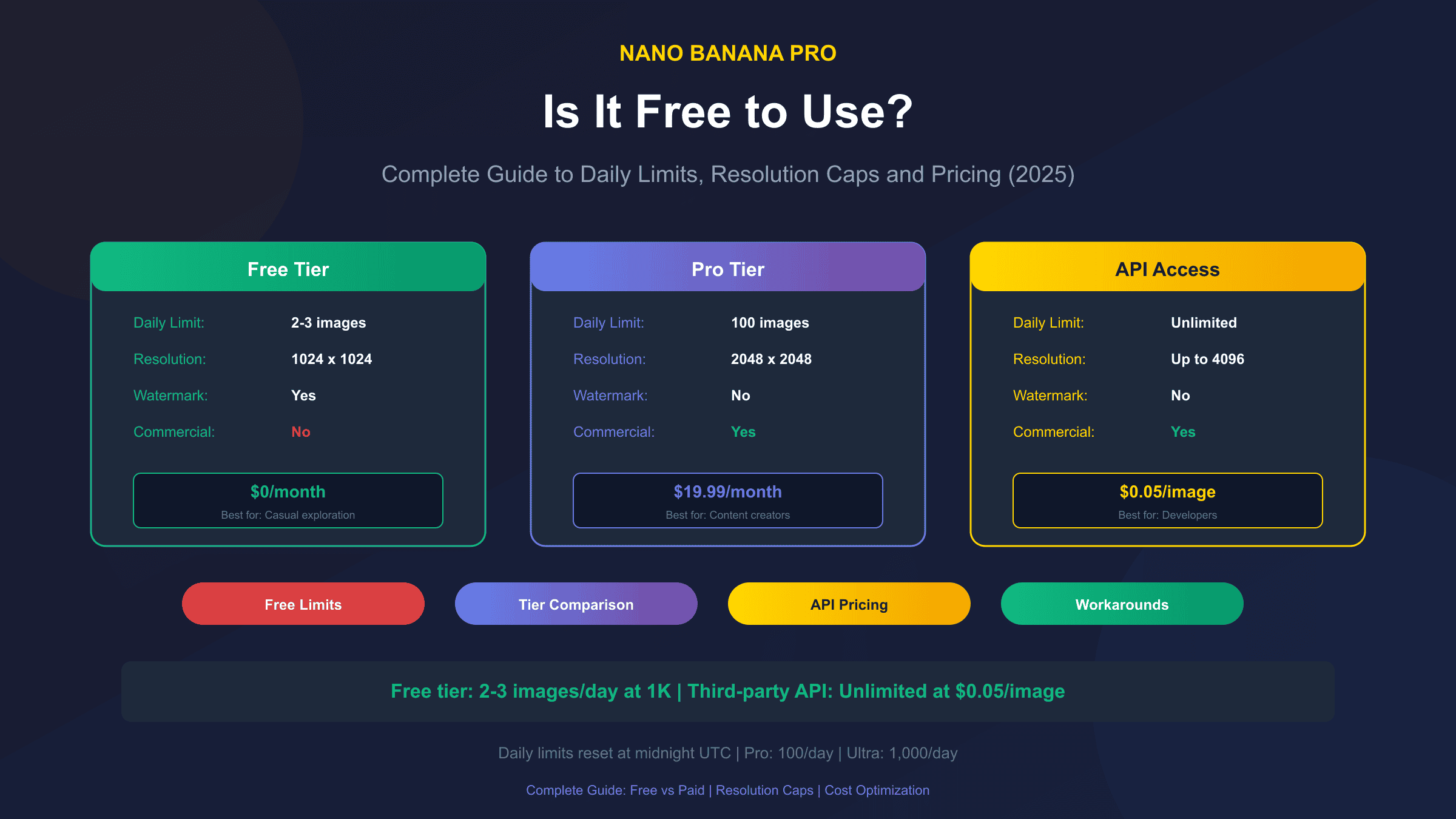
The short answer is yes—Nano Banana Pro offers a free tier, but with significant restrictions. As of December 2025, free users get approximately 2-3 images per day at a maximum resolution of 1024×1024 pixels. This represents a reduction from earlier limits, as Google has gradually tightened free access to manage server costs.
Understanding these limits is crucial whether you're a casual user testing the waters or a developer evaluating Nano Banana Pro for production use. This guide breaks down exactly what you get for free, what the paid tiers offer, and how third-party API solutions can provide a cost-effective middle ground.
What Is Nano Banana Pro and How Does It Differ from Standard Gemini?
Nano Banana Pro is Google's latest image generation model integrated into the Gemini ecosystem. Unlike the standard Gemini image capabilities, Nano Banana Pro specializes in high-fidelity, photorealistic image generation with improved prompt adherence and faster generation speeds.
The model builds on Google's Imagen architecture but introduces several key improvements:
- Enhanced prompt understanding: Better interpretation of complex, multi-element prompts
- Faster generation: Approximately 3-5 seconds for standard resolution images
- Style consistency: Improved ability to maintain consistent aesthetics across multiple generations
- Native Gemini integration: Seamless access through the Gemini app and API
What sets Nano Banana Pro apart from competitors like DALL-E 3 or Midjourney is its tight integration with Google's ecosystem and its efficiency-focused architecture. For a detailed comparison with other models, check our dedicated guide. The "Nano" designation indicates optimized resource usage, allowing for lower per-image costs—though this benefit is most apparent for API users rather than free tier consumers.
Free Tier Reality: What You Actually Get
Let's be direct about what the free tier includes. Based on current data from Google's documentation and community testing, here's the complete picture:
| Feature | Free Tier | Limitations |
|---|---|---|
| Daily Image Limit | 2-3 images | Resets at midnight UTC |
| Maximum Resolution | 1024×1024 | Cannot generate 2K or 4K |
| Watermark | Yes | Small "Generated by AI" mark |
| Commercial Use | No | Personal use only |
| Priority Queue | No | Longer wait during peak times |
| Model Version | Current stable | No access to beta features |
The daily limit can vary slightly based on server load and your account history. New accounts sometimes receive a brief promotional period with slightly higher limits (up to 5 images), but this quickly normalizes to the standard 2-3 range.
One critical limitation that isn't immediately obvious: free tier users cannot access batch generation. Each image must be generated individually through the Gemini app interface, making it impractical for any workflow requiring multiple images.
Daily Limits Explained: Free vs Pro vs Ultra
Understanding the tier structure helps you determine which option makes sense for your usage patterns:
| Tier | Monthly Cost | Daily Limit | Max Resolution | Commercial Rights |
|---|---|---|---|---|
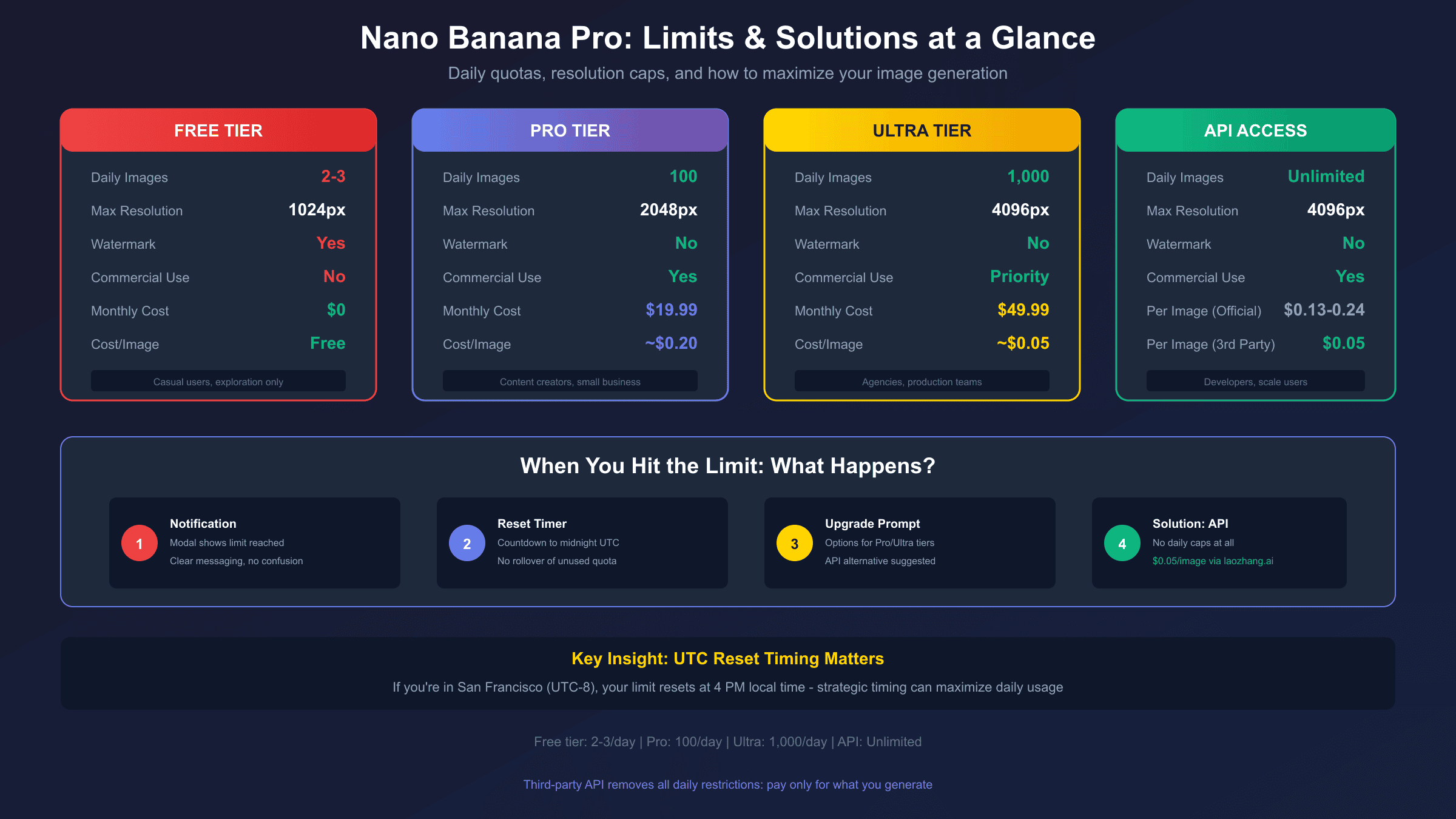
| Free | $0 | 2-3 images | 1024×1024 | No |
| Pro | $19.99 | 100 images | 2048×2048 | Yes |
| Ultra | $49.99 | 1,000 images | 4096×4096 | Yes, priority |
The Pro tier represents the sweet spot for most individual creators. At roughly $0.20 per image (assuming you use all 100 daily), it provides a significant upgrade in both quantity and quality. The 2K resolution capability opens up possibilities for print-quality outputs and detailed artwork.
Ultra tier pricing places it firmly in the professional/enterprise category. The 1,000 daily image limit and 4K resolution support cater to production workflows—think marketing agencies generating campaign assets or game studios creating concept art at scale.
What Happens When You Hit the Limit?
When you exhaust your daily allocation, Nano Banana Pro doesn't simply refuse to work—it degrades gracefully with clear messaging:
- Immediate notification: A modal appears explaining you've reached your daily limit
- Reset timer: The interface shows exactly when your limit resets (midnight UTC)
- Upgrade prompt: Options to upgrade to Pro or Ultra are presented
- Queue position: For near-limit situations, you may be placed in a slower queue rather than immediately blocked
The reset timing is worth noting: it's based on UTC, not your local timezone. If you're in San Francisco (UTC-8), your limit resets at 4 PM local time. This can be strategically useful—morning users in western timezones effectively get access across two "days" within their waking hours.
There's no rollover of unused images. If you generate only 1 image today, you still get just 2-3 tomorrow—not 4-5. Google explicitly designed the system to prevent stockpiling.
Resolution Restrictions: Why 1K Isn't Always Enough
The 1024×1024 resolution cap on free tier might seem adequate until you consider practical use cases:
Where 1K works fine:
- Social media posts (Instagram, Twitter)
- Quick concept visualization
- Personal creative projects
- Blog post illustrations
Where 1K falls short:
- Print materials (posters, flyers)
- Professional presentations
- E-commerce product mockups
- Detailed character designs
- Architectural visualizations
The quality difference between 1K and 2K is substantial—not just in pixel count, but in the level of detail the model can render. At 2K, Nano Banana Pro can generate text that's actually readable, fine textures that don't blur into mush, and facial features with proper anatomical accuracy.
For developers integrating image generation into applications, the resolution restriction often becomes a dealbreaker. User-facing applications typically require at minimum 1080p output, and the 1024×1024 constraint forces awkward cropping or upscaling that degrades quality. If you need 4K generation capabilities, you'll need to move beyond the free tier.
Accessing Nano Banana Pro: App vs API
There are two primary ways to access Nano Banana Pro, each with distinct characteristics:
Via Gemini App (Consumer Access)
The simplest approach is through Google's Gemini app, available on iOS, Android, and web. Simply type an image generation prompt, and Gemini routes it to Nano Banana Pro automatically.
Pros:
- No setup required
- Natural language interface
- Free tier available
Cons:
- Strict daily limits
- No programmatic access
- Limited parameter control
Via Google AI Studio / Vertex AI (Developer Access)
Developers can access Nano Banana Pro through Google's API infrastructure. This requires setting up a Google Cloud project and obtaining API credentials.
hljs pythonimport google.generativeai as genai
genai.configure(api_key="YOUR_API_KEY")
model = genai.GenerativeModel('gemini-2.0-flash-exp')
response = model.generate_content(
"Generate an image of a futuristic cityscape at sunset",
generation_config={"response_modalities": ["image"]}
)
API access provides granular control but follows pay-per-use pricing. At current rates, expect approximately $0.134 per image at standard resolution, scaling up to $0.24 for 4K output. There's no daily limit—only your budget constrains generation volume. For detailed API pricing analysis, see our dedicated breakdown.
Third-Party API Solutions: The Cost-Effective Alternative
For users who need more than the free tier but find official API pricing steep, third-party API gateways offer an interesting middle ground. Services like laozhang.ai provide access to Nano Banana Pro at significantly reduced rates.
The value proposition is straightforward: these platforms aggregate demand across many users, negotiate volume pricing with Google, and pass savings to customers. Current third-party pricing runs approximately $0.05 per image—roughly 60% cheaper than direct API access.
Here's a practical implementation example:
hljs pythonfrom openai import OpenAI
client = OpenAI(
api_key="your-laozhang-key",
base_url="https://api.laozhang.ai/v1"
)
response = client.images.generate(
model="nano-banana-pro",
prompt="A serene Japanese garden with cherry blossoms",
size="2048x2048",
quality="hd"
)
print(response.data[0].url)
The integration uses OpenAI-compatible endpoints, meaning existing codebases built for DALL-E can often switch to Nano Banana Pro with minimal changes. For developers already using OpenAI's SDK, this compatibility eliminates the learning curve of Google's native API structure.
Key advantages of third-party API access:
- No daily limits: Generate as many images as your budget allows
- Lower per-image cost: $0.05 vs $0.134+ for direct access
- Familiar SDK patterns: OpenAI-compatible interface
- Resolution flexibility: 2K and 4K available without tier restrictions
The trade-off is trusting a third-party intermediary with your API traffic. Established providers maintain high uptime and data security, but this represents an additional relationship to manage compared to direct Google access.
Cost Comparison: Finding Your Optimal Approach
Let's calculate real-world costs across different usage levels:
| Monthly Usage | Free Tier | Pro Subscription | Direct API | Third-Party API |
|---|---|---|---|---|
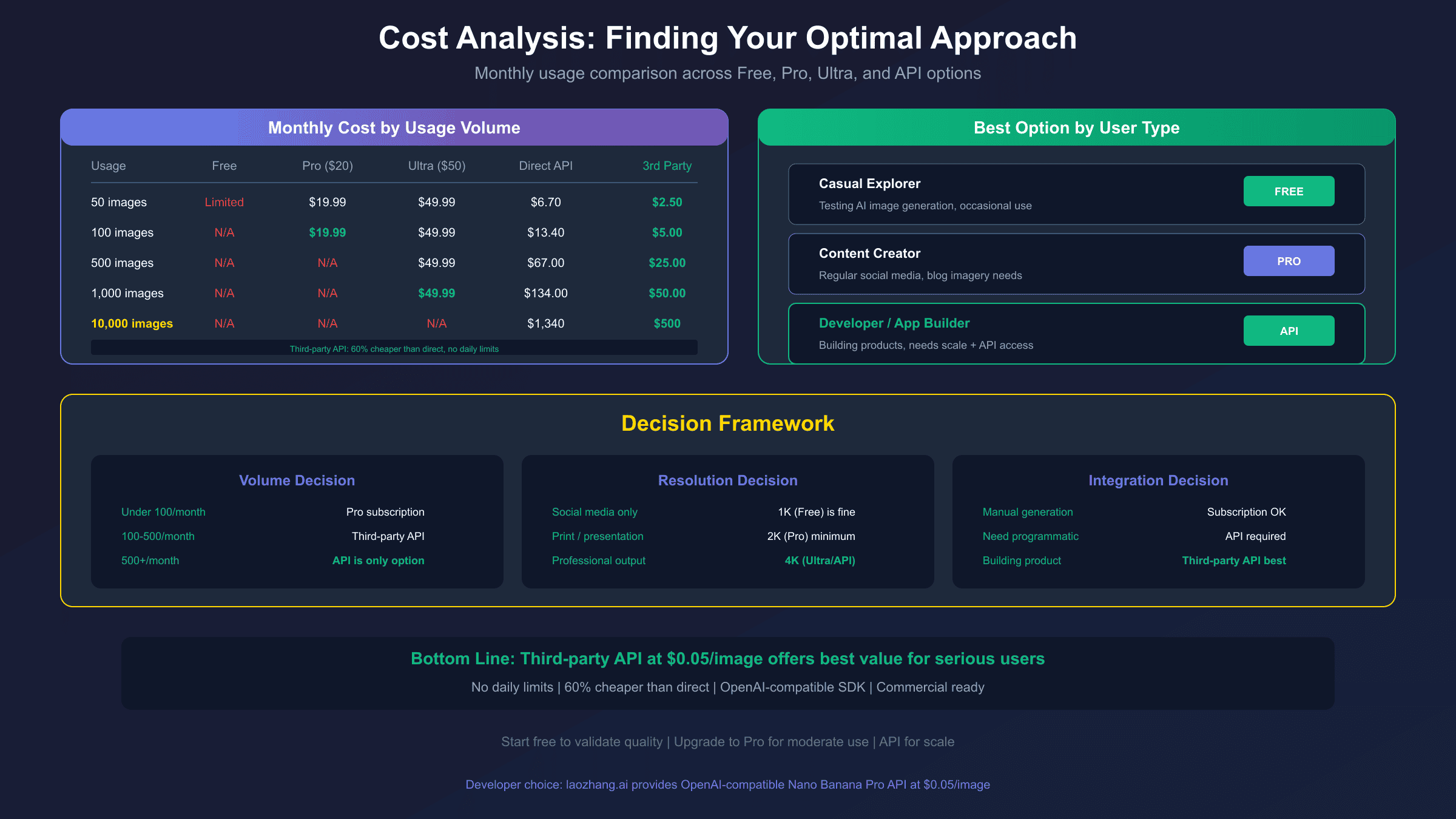
| 50 images | $0 (limited) | $19.99 | $6.70 | $2.50 |
| 100 images | Not possible | $19.99 | $13.40 | $5.00 |
| 500 images | Not possible | Not possible | $67.00 | $25.00 |
| 1,000 images | Not possible | $49.99 (Ultra) | $134.00 | $50.00 |
The breakeven analysis reveals clear patterns:
- Under 50 images/month: Free tier works if you can tolerate 1K resolution and no commercial rights
- 50-100 images/month: Pro subscription offers best value with added resolution and commercial benefits
- 100-500 images/month: Third-party API becomes most economical
- 500+ images/month: Third-party API clearly wins; direct API only makes sense if you require Google's SLA guarantees
For developers building products, third-party API access at $0.05/image allows sustainable scaling. A mobile app generating 10,000 images monthly would cost $500 via third-party vs $1,340 direct—meaningful savings that compound over time.
Workarounds and Optimization Strategies
Beyond choosing the right tier, several strategies can maximize your Nano Banana Pro value:
Prompt Optimization
More specific prompts generate better results on the first attempt, reducing wasted images. See our best prompts guide for proven examples:
# Vague (likely to need regeneration)
"A dog in a park"

# Optimized (higher first-try success rate)
"A golden retriever playing fetch in Central Park,
autumn leaves on ground, afternoon sunlight,
photorealistic style, shallow depth of field"
Batch Planning
If using the free tier, plan your 2-3 daily generations strategically. Draft prompts in advance, refine them, then generate when you're confident in the request.
Resolution Upscaling
For free tier users needing higher resolution, external upscaling tools can help. Services like Topaz Gigapixel or free alternatives like Real-ESRGAN can upscale 1K images to 2K with reasonable quality preservation—though this can't match native high-resolution generation.
Multi-Account Considerations
Creating multiple Google accounts to bypass limits violates Google's Terms of Service and risks account suspension. This approach is explicitly not recommended—the potential loss of your primary Google account far outweighs the few extra free images.
Who Should Use Each Tier?
Based on the complete picture of limits, pricing, and capabilities, here's targeted guidance:
Free Tier is ideal for:
- Casual users exploring AI image generation
- Students learning prompt engineering
- Hobbyists with low-volume, non-commercial needs
Pro Subscription suits:
- Content creators needing regular AI imagery
- Small business owners creating marketing materials
- Designers wanting reliable commercial-rights access
Ultra Subscription fits:
- Agencies with high-volume requirements
- Production teams needing 4K output
- Enterprises requiring Google SLA backing
Third-Party API serves:
- Developers building AI-powered applications
- Startups needing cost-effective scaling
- Technical users comfortable with API integration
The decision ultimately hinges on three factors: volume requirements, resolution needs, and whether you need programmatic access. For most individual users, starting with free tier to test capability, then upgrading to Pro for serious work, represents the logical progression.
Frequently Asked Questions
Does Nano Banana Pro free tier include watermarks?
Yes, free tier images include a small "Generated by AI" watermark in the corner. Pro and Ultra tiers generate watermark-free images. Third-party API access also provides watermark-free output since it routes through paid infrastructure.
Can I use free tier images commercially?
No. Google's terms explicitly restrict commercial use for free tier generations. Commercial rights require Pro subscription or higher, or API access (both direct and third-party include commercial licensing).
Why did my daily limit decrease from 3 to 2 images?
Google periodically adjusts free tier limits based on server capacity and demand. The reduction from 3 to 2 images reflects increased usage and infrastructure costs. This trend may continue—don't rely on free tier limits remaining stable.
Is there a way to check remaining daily quota?
The Gemini app doesn't display remaining quota proactively. You discover your limit when you hit it. API users can query their usage through Google Cloud Console, which provides detailed generation counts and cost tracking.
How does Nano Banana Pro compare to Midjourney's free tier?
Midjourney's free tier (when available) typically offers more generous limits but requires Discord-based access. Nano Banana Pro's Gemini integration provides a more mainstream interface, though with stricter limits. For pure free-tier comparison, Midjourney historically offers better value—but availability varies.
Conclusion
Nano Banana Pro's free tier provides a legitimate entry point for exploring AI image generation, but the 2-3 daily images at 1K resolution won't satisfy most serious use cases. The tiered subscription model (Pro at $19.99, Ultra at $49.99) addresses higher-volume needs with added resolution and commercial rights.
For developers and power users, third-party API solutions present a compelling cost optimization. At $0.05 per image—less than half the direct API cost—services like laozhang.ai enable sustainable integration of Nano Banana Pro into applications without the per-image costs eating into margins.
The practical recommendation: start with the free tier to validate that Nano Banana Pro meets your quality expectations. If it does, choose your next step based on volume—Pro subscription for moderate personal/commercial use, or third-party API access for developer workflows requiring scale without daily caps.
As Google continues developing its generative AI offerings, expect these limits and pricing structures to evolve. The fundamental trade-off between free access and capability will persist, but the specific numbers will shift. Build flexibility into your approach, and you'll be positioned to adapt as the landscape changes.