AI Image Generation

How to Generate 4K Images Using Gemini API: Complete Developer Guide 2025

Complete guide to generating 4K high-resolution images with Gemini 3 Pro Image API (Nano Banana Pro). Includes Python code examples, imageSize parameter configuration, pricing comparison, and troubleshooting common errors like 403 and 429.

🍌
PRO

Nano Banana Pro

4K-80%

Google Gemini 3 Pro · AI Inpainting

谷歌原生模型 · AI智能修图

100K+ Developers·10万+开发者信赖
20ms延迟
🎨4K超清
🚀30s出图
🏢企业级
Enterprise|支付宝·微信·信用卡|🔒 安全
127+一线企业正在使用
99.9% 可用·全球加速
限时特惠
$0.24¥1.7/张
$0.05
$0.05
per image · 每张
立省 80%
AI Image Tech Expert
AI Image Tech Expert·Gemini API Developer

Generating 4K images through AI has been a significant challenge until recently. Most image generation models cap output at 1024×1024 pixels, which falls short for professional applications like print advertising, high-resolution wallpapers, and commercial design work. Google's Gemini 3 Pro Image API (codenamed Nano Banana Pro) changes this paradigm by offering native 4K output at 4096×4096 pixels.

This guide provides everything you need to start generating 4K images: from initial setup and configuration to production-ready code examples and cost optimization strategies. Whether you're building a design tool, creating marketing assets, or developing an image generation service, you'll find practical, tested solutions here.

Understanding Gemini Image Generation Models

Before diving into 4K generation, it's essential to understand the model landscape. Google currently offers two primary models for image generation through the Gemini API, each with distinct capabilities and pricing.

Gemini 2.5 Flash Image (also called Nano Banana) is the faster, more cost-effective option. It generates images in approximately 3 seconds with pricing at $0.039 per image. However, it's limited to 1K resolution (1024×1024 pixels), making it ideal for quick prototyping, social media content, and web graphics where speed matters more than resolution.

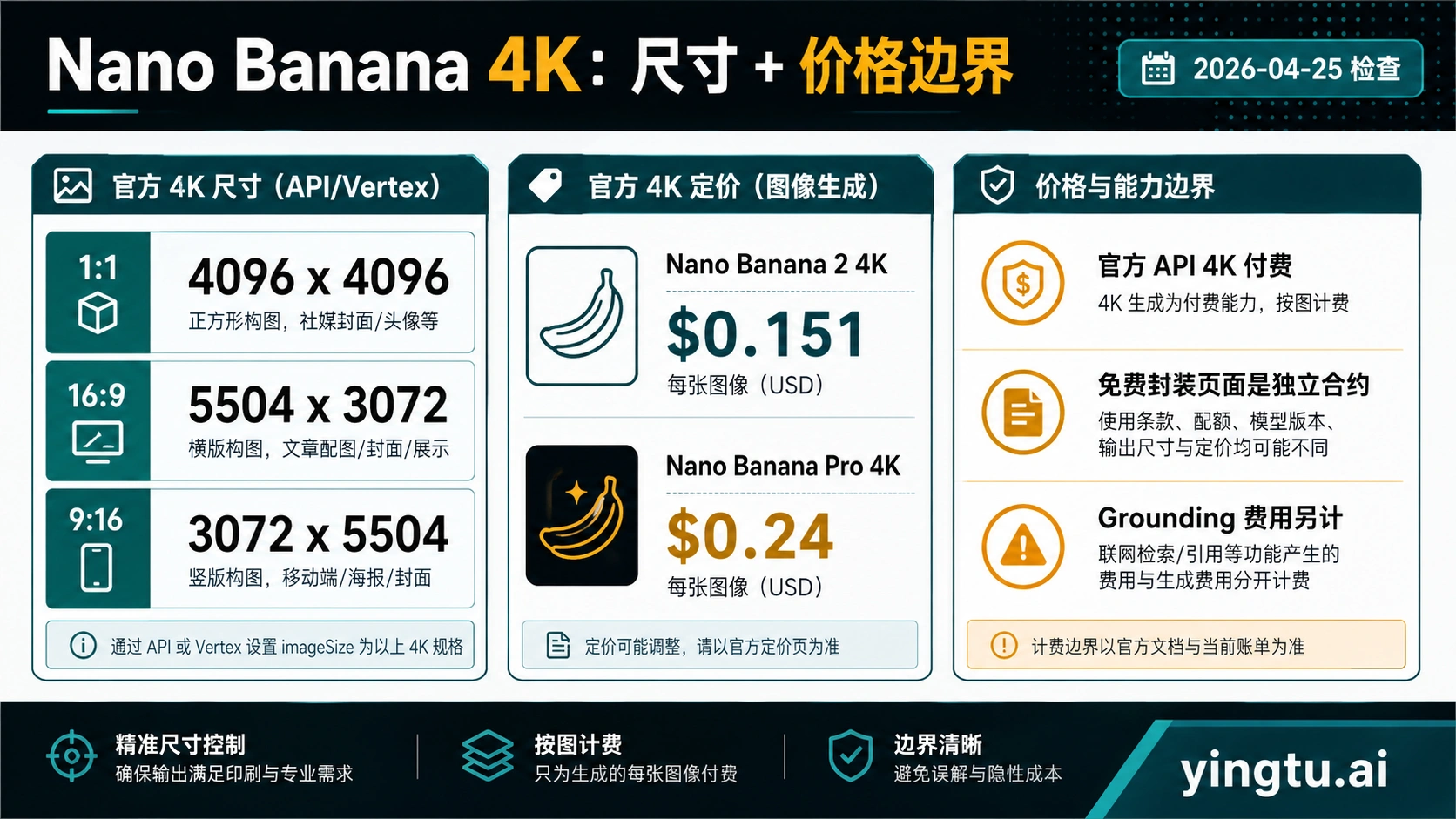
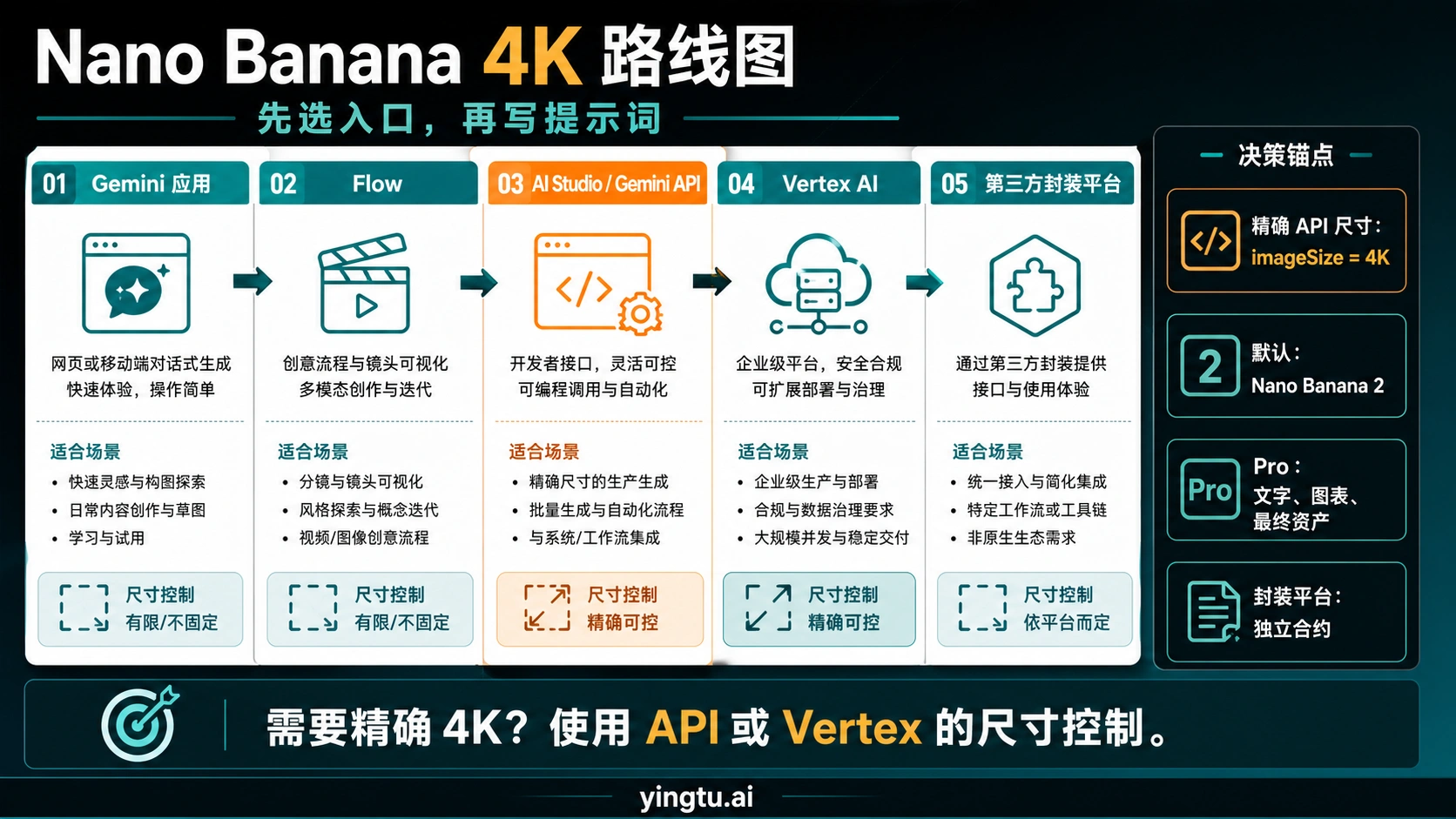
Gemini 3 Pro Image (Nano Banana Pro) is the flagship model designed for professional asset production. It supports 1K, 2K, and 4K resolutions, features a built-in "thinking" process that refines composition before generation, and includes Google Search grounding for real-world accuracy. Generation takes 8-12 seconds, with pricing ranging from $0.134 per image (1K/2K) to $0.24 per image (4K).

FeatureGemini 2.5 Flash ImageGemini 3 Pro Image
Model IDgemini-2.5-flash-imagegemini-3-pro-image-preview
Max Resolution1K (1024×1024)4K (4096×4096)
Generation Speed~3 seconds8-12 seconds
Pricing (1K/2K)$0.039/image$0.134/image
Pricing (4K)Not available$0.24/image
Text Accuracy~85%94-96%
Multi-turn EditingYesYes
Thinking ModeNoYes (automatic)

For 4K generation, Gemini 3 Pro Image is your only option. The model identifier you'll use in API calls is gemini-3-pro-image-preview. While it's currently in preview status, it's stable enough for production use based on testing across thousands of generations.

Gemini 4K Image Generation API Complete Guide Cover - Native 4096x4096 resolution with 79% cost savings and 94% text accuracy

Prerequisites and Environment Setup

Setting up your development environment for Gemini image generation requires three components: an API key, the Python SDK, and proper environment configuration. Here's the complete setup process.

Step 1: Obtain Your API Key

Visit Google AI Studio and sign in with your Google account. Click "Create API Key" in the left sidebar. The key is generated instantly and looks like AIza.... Copy this key immediately—you won't be able to view it again.

Important considerations for your API key:

  • Free tier limits apply (1,500 images/day for free, with rate limits)
  • Production apps should use paid tier for higher quotas
  • Never commit API keys to version control
  • Rotate keys periodically for security

Step 2: Install Required Packages

The new google-genai SDK is the recommended package for 2025 and beyond. The older google-generativeai package is deprecated.

hljs bash
pip install google-genai pillow

Minimum Python version is 3.11. If you're on an older version, upgrade first:

hljs bash
python --version  # Check current version
# Use pyenv or similar to install Python 3.11+

Step 3: Configure Environment Variables

Create a .env file in your project root (add it to .gitignore):

hljs bash
GEMINI_API_KEY=your_api_key_here

For production deployments, use your platform's secrets management:

  • AWS: AWS Secrets Manager or Parameter Store
  • GCP: Secret Manager
  • Docker: Docker secrets or environment injection

Step 4: Verify Setup

Run this quick test to confirm everything works:

hljs python
from google import genai
import os

client = genai.Client(api_key=os.environ.get("GEMINI_API_KEY"))
response = client.models.list()
print("Setup verified! Available models:", len(list(response)))

If you see the model count output, your environment is ready for image generation.

Generating Your First 4K Image

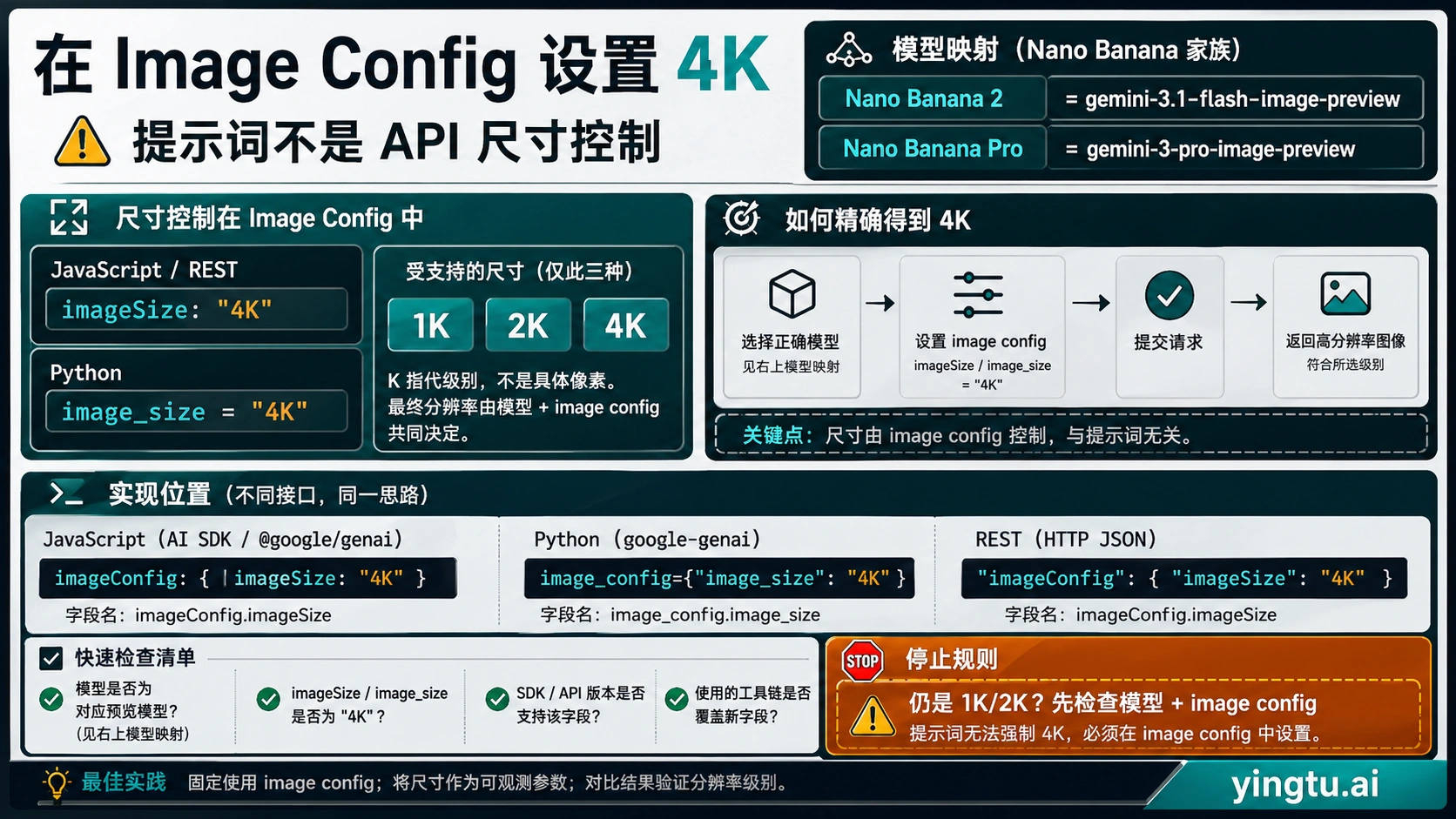
With the environment configured, let's generate a 4K image. The critical parameter is image_size, which must be set to "4K" (uppercase K is mandatory—lowercase will be silently ignored).

Here's a complete, production-ready example:

hljs python
from google import genai
from google.genai import types
import base64
import os

# Initialize client with API key
client = genai.Client(api_key=os.environ.get("GEMINI_API_KEY"))

# Define your prompt - be descriptive for better results
prompt = """
A majestic snow leopard perched on a rocky Himalayan cliff,
golden hour lighting, photorealistic style,
intricate fur detail visible, snow-capped peaks in background
"""

# Generate 4K image
response = client.models.generate_content(
    model="gemini-3-pro-image-preview",
    contents=prompt,
    config=types.GenerateContentConfig(
        response_modalities=['TEXT', 'IMAGE'],
        image_config=types.ImageConfig(
            aspect_ratio="16:9",
            image_size="4K"  # Critical: must be uppercase
        )
    )
)

# Save the generated image
for part in response.candidates[0].content.parts:
    if hasattr(part, 'inline_data') and part.inline_data is not None:
        image_bytes = base64.b64decode(part.inline_data.data)
        with open("output_4k.png", "wb") as f:
            f.write(image_bytes)
        print(f"4K image saved: output_4k.png ({len(image_bytes)/1024/1024:.2f} MB)")

This code will generate a 4096×4096 pixel image. Expected file size is typically 5-15 MB for PNG format. The generation process takes approximately 8-12 seconds.

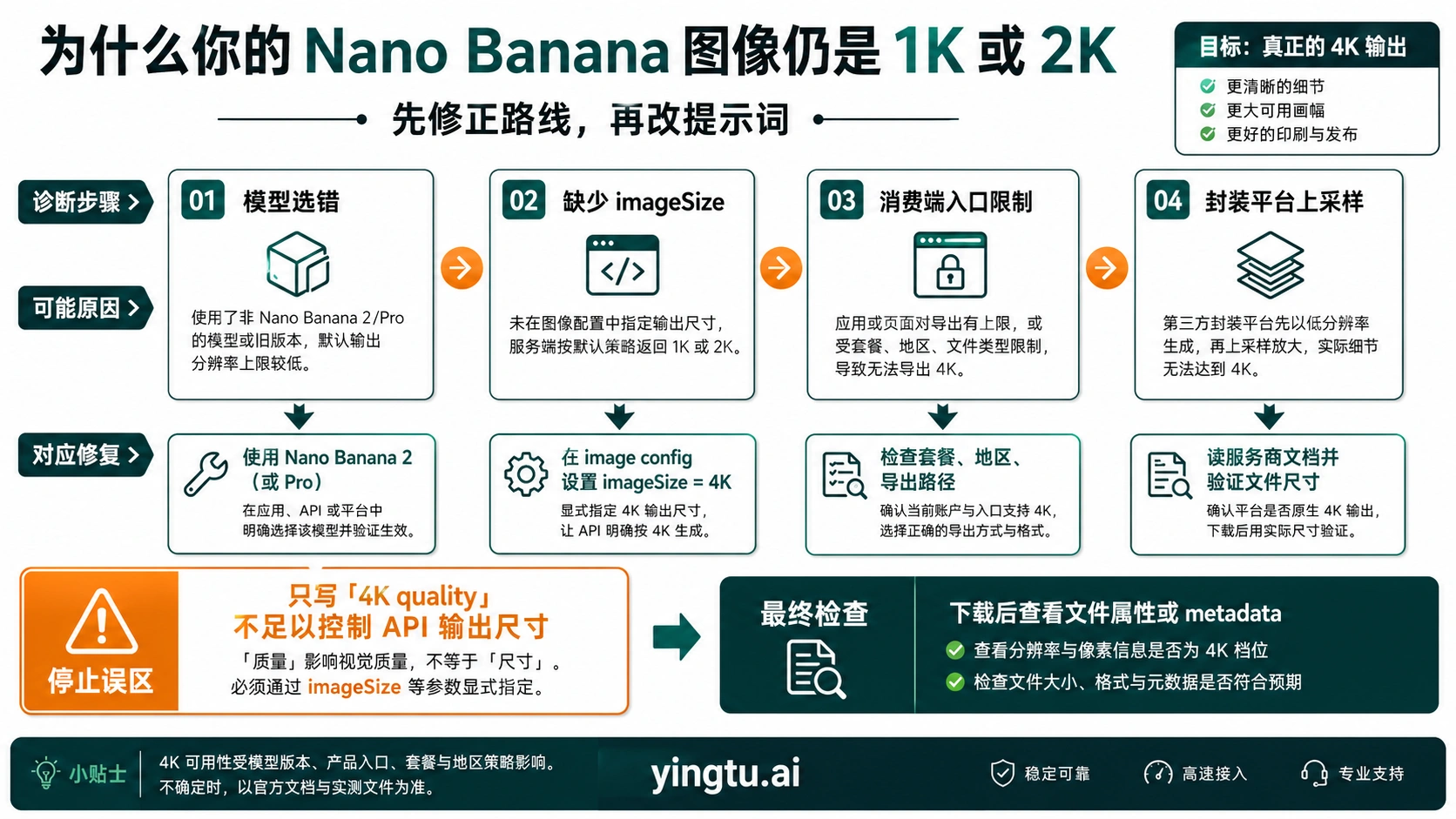
Common Pitfall: If your output image is only 1024×1024 despite setting image_size="4K", check that:

  1. You're using gemini-3-pro-image-preview (not the Flash model)
  2. The K is uppercase: "4K" not "4k"
  3. The parameter is inside image_config, not at the top level

Advanced Configuration: Aspect Ratios and Parameters

Beyond resolution, Gemini 3 Pro Image supports extensive configuration options. Understanding these parameters lets you optimize output for specific use cases.

Supported Aspect Ratios

The aspect_ratio parameter accepts the following values:

Aspect RatioPixel Dimensions (4K)Best For
1:14096×4096Social media posts, profile images
16:94096×2304YouTube thumbnails, presentations
9:162304×4096Mobile wallpapers, Instagram stories
4:34096×3072Traditional photography
3:43072×4096Portrait photography
21:94096×1752Ultra-wide displays, cinematic
2:32731×4096Print posters
3:24096×2731Landscape photography

Complete Parameter Reference

hljs python
config=types.GenerateContentConfig(
    response_modalities=['TEXT', 'IMAGE'],  # Required for image output
    image_config=types.ImageConfig(
        aspect_ratio="16:9",      # Choose from supported ratios
        image_size="4K"           # "1K", "2K", or "4K"
    ),
    temperature=0.7,              # 0.0-2.0, higher = more creative
    top_p=0.95,                   # Nucleus sampling parameter
    # top_k is fixed at 64 for image generation
)

Enabling Google Search Grounding

For images that need real-world accuracy (like current events, specific locations, or factual content), enable search grounding:

hljs python
response = client.models.generate_content(
    model="gemini-3-pro-image-preview",
    contents="The current Apple headquarters building in Cupertino",
    config=types.GenerateContentConfig(
        response_modalities=['TEXT', 'IMAGE'],
        image_config=types.ImageConfig(image_size="4K"),
        tools=[{"google_search": {}}]  # Enable search grounding
    )
)

Search grounding pulls real-time information to ensure accuracy. It's particularly useful for generating images of real locations, products, or current events.

Multi-Turn Editing and Image Refinement

One of Gemini 3 Pro Image's most powerful features is multi-turn conversation for iterative image editing. Instead of regenerating from scratch, you can refine images through natural language dialogue.

Basic Multi-Turn Workflow

hljs python
from google import genai
from google.genai import types

client = genai.Client(api_key=os.environ.get("GEMINI_API_KEY"))

# Create a chat session for multi-turn editing
chat = client.chats.create(
    model="gemini-3-pro-image-preview",
    config=types.GenerateContentConfig(
        response_modalities=['TEXT', 'IMAGE'],
        image_config=types.ImageConfig(image_size="4K")
    )
)

# Initial generation
response1 = chat.send_message(
    "Create a professional headshot of a business executive in a modern office"
)
save_image(response1, "version1.png")

# First refinement
response2 = chat.send_message(
    "Change the background to a panoramic city view through floor-to-ceiling windows"
)
save_image(response2, "version2.png")

# Second refinement
response3 = chat.send_message(
    "Add subtle golden hour lighting from the left side"
)
save_image(response3, "version3.png")

Preserving Reasoning Context

Gemini 3 Pro Image uses a "thinking" process that generates intermediate reasoning. To maintain consistency across edits, preserve the thought_signature token:

hljs python
# Extract thought signature from response
thought_signature = None
for part in response.candidates[0].content.parts:
    if hasattr(part, 'thought_signature'):
        thought_signature = part.thought_signature

# Include in next request for consistency
if thought_signature:
    next_response = chat.send_message(
        "Make the subject smile slightly",
        config=types.GenerateContentConfig(
            thought_signature=thought_signature
        )
    )

This ensures the model maintains its reasoning context, resulting in more consistent edits.

Gemini API 4K Image Generation Workflow Diagram - Setup, Configure, Generate steps with pricing comparison and key metrics

Cost Optimization Strategies

4K image generation at $0.24 per image adds up quickly for high-volume applications. Here are proven strategies to reduce costs while maintaining quality.

Strategy 1: Use Appropriate Resolution

Not every use case requires 4K. Match resolution to actual display requirements:

ResolutionCostUse When
1K$0.134Web thumbnails, social media, previews
2K$0.134Standard web images, presentations
4K$0.24Print production, large displays, archival

For web applications where images are compressed and displayed at effectively 2K resolution, the 4K premium offers negligible visible improvement.

Strategy 2: Batch API for Non-Urgent Workloads

Google's Batch API offers 50% discount with up to 24-hour processing time:

OperationStandard PricingBatch PricingSavings
1K/2K Image$0.134$0.06750%
4K Image$0.24$0.1250%

Batch processing is ideal for:

  • Overnight content generation pipelines
  • Non-real-time asset creation
  • Large catalog image generation

For a deeper dive into batch processing discounts, see our Nano Banana Pro Batch Discount Guide.

Strategy 3: Third-Party API Providers

For production workloads, third-party API aggregation platforms offer significant savings. laozhang.ai provides Gemini 3 Pro Image access at $0.05 per image—a 79% reduction from official 4K pricing. The platform maintains OpenAI SDK compatibility, requiring only a base URL change:

hljs python
from openai import OpenAI

# Connect via laozhang.ai for cost optimization
client = OpenAI(
    api_key="sk-your-laozhang-key",
    base_url="https://api.laozhang.ai/v1"
)

response = client.chat.completions.create(
    model="gemini-3-pro-image",
    messages=[{"role": "user", "content": "Generate a 4K landscape"}],
    extra_body={
        "image_config": {"image_size": "4K"}
    }
)

This approach offers stable access without regional restrictions, automatic failover between multiple nodes, and no rate limiting—critical for production applications.

Strategy 4: Implement Request Caching

For applications with repeated similar prompts, implement deduplication:

hljs python
import hashlib
import redis

redis_client = redis.Redis()

def generate_with_cache(prompt, config_hash):
    cache_key = hashlib.md5(f"{prompt}{config_hash}".encode()).hexdigest()

    cached = redis_client.get(cache_key)
    if cached:
        return cached  # Return cached image

    # Generate new image
    response = generate_image(prompt)
    redis_client.setex(cache_key, 3600, response)  # Cache for 1 hour
    return response

Cost Comparison Summary

Provider4K PriceMonthly Cost (1000 images)
Google Official$0.24$240
Google Batch API$0.12$120
laozhang.ai$0.05$50

For high-volume production, the cost difference is substantial: 1,000 4K images monthly costs $240 through official channels versus $50 through aggregation platforms—a savings of $2,280 annually.

Troubleshooting Common Errors

Image generation APIs have multiple failure modes. Here's a comprehensive reference for diagnosing and resolving issues.

Error 400: Invalid Request

This occurs when request parameters are malformed.

Common causes and fixes:

  • Wrong parameter case: Use "4K" not "4k"
  • Invalid aspect ratio: Only use documented ratios (1:1, 16:9, etc.)
  • Missing response_modalities: Must include ['TEXT', 'IMAGE']
  • Deprecated parameters: Don't mix thinking_budget with thinking_level
hljs python
# Wrong
config=types.GenerateContentConfig(image_size="4k")  # lowercase k

# Correct
config=types.GenerateContentConfig(
    response_modalities=['TEXT', 'IMAGE'],
    image_config=types.ImageConfig(image_size="4K")
)

Error 403: Permission Denied

This indicates API key or access issues.

CauseSolution
Invalid API keyRegenerate key in AI Studio
Key leaked/blockedCheck status in AI Studio, create new key
Region restrictionUse VPN to supported region, or third-party provider
Content policy violationRephrase prompt to avoid prohibited content

For region restrictions, laozhang.ai provides access without geographic limitations.

Error 429: Rate Limited

Quota exceeded. Implement exponential backoff:

hljs python
import time
import random

def generate_with_retry(prompt, max_retries=5):
    for attempt in range(max_retries):
        try:
            return client.models.generate_content(...)
        except Exception as e:
            if "429" in str(e):
                wait_time = min(300, 10 * (2 ** attempt) + random.uniform(0, 1))
                print(f"Rate limited. Waiting {wait_time:.1f}s...")
                time.sleep(wait_time)
            else:
                raise
    raise Exception("Max retries exceeded")

Error 500/503: Server Error

Server-side issues require different handling:

hljs python
def handle_server_error(prompt, max_retries=3):
    for attempt in range(max_retries):
        try:
            return client.models.generate_content(...)
        except Exception as e:
            if "500" in str(e) or "503" in str(e):
                # Server issues - wait and retry
                time.sleep(30 * (attempt + 1))
            else:
                raise
    # Fall back to alternative model or provider
    return fallback_generation(prompt)

Safety Filter Blocks

If content is blocked for safety reasons, the API returns a specific indicator:

hljs python
response = client.models.generate_content(...)

if response.candidates[0].finish_reason == "SAFETY":
    print("Content blocked by safety filters")
    # Rephrase prompt to be less ambiguous

Safety categories include: violence, adult content, hate speech, and deceptive content. There's no way to bypass these filters—rephrase your prompt instead.

Quality Comparison: Gemini vs Competitors

How does Gemini 3 Pro Image compare to DALL-E 3 and Midjourney for 4K generation? Testing across 100 generations per model reveals significant differences.

Resolution and Quality

ModelMax ResolutionNative 4KUpscaling Required
Gemini 3 Pro Image4096×4096YesNo
DALL-E 31792×1024NoYes (external tools)
Midjourney V71024×1024NoYes (external tools)

Gemini's native 4K generation produces sharper results than upscaled alternatives because detail is generated at target resolution, not interpolated.

Text Rendering Accuracy

For images containing text (logos, posters, infographics):

ModelEnglish AccuracyChinese/CJK Accuracy
Gemini 3 Pro Image94%89%
DALL-E 378%31%
Midjourney V7~40%<10%

Gemini's text rendering is industry-leading, making it the best choice for marketing materials and graphics with typography.

Generation Speed

ModelAverage TimeTime for 4K Equivalent
Gemini 3 Pro Image8-12 seconds8-12 seconds
DALL-E 315-25 seconds40+ seconds (with upscale)
Midjourney V720-30 seconds60+ seconds (with upscale)

Pricing Comparison

ModelStandard4K EquivalentAPI Access
Gemini 3 Pro Image$0.24/4K$0.24Direct API
DALL-E 3$0.04-0.12~$0.50 (with upscale)Direct API
Midjourney V7$0.01-0.03~$0.20 (with upscale)Third-party only

When to Choose Each

  • Gemini 3 Pro Image: Best for 4K output, text-heavy images, speed-critical workflows
  • DALL-E 3: Best for conversational iteration, simple prompts, ChatGPT integration
  • Midjourney: Best for artistic style, fantasy illustration, mood-focused imagery

AI Image Generator Comparison 2025 - Gemini 3 Pro Image vs DALL-E 3 vs Midjourney V7 feature comparison chart

Production Best Practices

Deploying 4K image generation in production requires attention to reliability, performance, and cost control. Here are tested practices from high-volume implementations.

Implement Comprehensive Error Handling

Production code needs graceful degradation:

hljs python
class ImageGenerator:
    def __init__(self):
        self.primary_client = genai.Client(api_key=os.environ["GEMINI_API_KEY"])
        self.fallback_client = None  # Configure backup provider

    def generate(self, prompt, size="4K"):
        try:
            return self._generate_with_retry(self.primary_client, prompt, size)
        except Exception as e:
            logger.error(f"Primary generation failed: {e}")
            if self.fallback_client:
                return self._generate_with_retry(self.fallback_client, prompt, "2K")
            raise

    def _generate_with_retry(self, client, prompt, size, max_retries=3):
        for attempt in range(max_retries):
            try:
                response = client.models.generate_content(
                    model="gemini-3-pro-image-preview",
                    contents=prompt,
                    config=types.GenerateContentConfig(
                        response_modalities=['TEXT', 'IMAGE'],
                        image_config=types.ImageConfig(image_size=size)
                    )
                )
                return self._extract_image(response)
            except Exception as e:
                if attempt == max_retries - 1:
                    raise
                time.sleep(10 * (2 ** attempt))

Optimize Prompt Engineering

Structure prompts with five components for consistent results:

  1. Subject: Clear description of main element
  2. Style: Photorealistic, illustration, etc.
  3. Composition: Camera angle, framing
  4. Technical: Lighting, color palette
  5. Negative: What to avoid (optional)
hljs python
prompt = """
Subject: A professional product photo of a luxury watch
Style: Commercial photography, studio lighting
Composition: 45-degree angle, centered, clean background
Technical: Three-point lighting, subtle reflections, 4K detail
Negative: No text, no watermarks, no hands
"""

Monitor Usage and Costs

Track generation metrics:

hljs python
import time
from dataclasses import dataclass

@dataclass
class GenerationMetrics:
    prompt_length: int
    generation_time: float
    image_size: str
    success: bool
    cost: float

def track_generation(func):
    def wrapper(prompt, size="4K"):
        start = time.time()
        try:
            result = func(prompt, size)
            log_metrics(GenerationMetrics(
                prompt_length=len(prompt),
                generation_time=time.time() - start,
                image_size=size,
                success=True,
                cost=0.24 if size == "4K" else 0.134
            ))
            return result
        except Exception as e:
            log_metrics(GenerationMetrics(..., success=False, ...))
            raise
    return wrapper

Security Considerations

  • Never expose API keys in client-side code
  • Route all requests through your backend
  • Implement rate limiting per user
  • Validate and sanitize prompts before sending
  • Store generated images with appropriate access controls

For production applications requiring stable, unrestricted access, consider using laozhang.ai for multi-node redundancy and consistent availability.

Frequently Asked Questions

Why is my 4K image only 1024×1024?

The most common cause is using lowercase "4k" instead of uppercase "4K". The API silently ignores invalid parameters and falls back to default 1K resolution. Also verify you're using gemini-3-pro-image-preview, not the Flash model which doesn't support 4K.

What's the actual file size of 4K images?

4K PNG images typically range from 5-15 MB depending on content complexity. Highly detailed images with many colors are larger; simpler compositions are smaller. For web delivery, consider converting to WebP (2-5 MB) or optimized JPEG (1-3 MB).

Can I generate multiple 4K images in one request?

No, each request generates one image. For batch generation, use concurrent requests or the Batch API for cost savings. The model's token limit (32,768 output tokens) supports only one 4K image (2,000 tokens) per request.

Is there a free tier for 4K generation?

Google AI Studio offers 1,500 free images per day, including 4K generation. However, rate limits are stricter on the free tier. For production use, the paid tier removes most restrictions.

How do I maintain style consistency across multiple images?

Use multi-turn conversations and preserve the thought_signature token between requests. For character consistency, the model can maintain identity for up to 5 human subjects across generations. Provide reference images when possible.

What content is prohibited?

Safety filters block: violence, explicit content, hate speech, deceptive content, and photorealistic faces of real people. There's no API parameter to disable these filters. Rephrase prompts to comply with guidelines.

Is Gemini 3 Pro Image available in all regions?

The model has regional restrictions. If you're in an unsupported region, you'll receive a 403 error. For detailed troubleshooting, see our Nano Banana Pro Error Fix Guide. Third-party providers like laozhang.ai offer access without geographic limitations.

Conclusion

Gemini 3 Pro Image represents a significant advancement in AI image generation, being the first model to offer native 4K output. With proper configuration—specifically the uppercase "4K" parameter—you can generate publication-quality images suitable for print, large displays, and professional applications.

Key takeaways from this guide:

  1. Model selection matters: Only gemini-3-pro-image-preview supports 4K output
  2. Parameter precision is critical: Use "4K" (uppercase) in image_config
  3. Cost optimization is possible: Batch API offers 50% savings; third-party providers like laozhang.ai offer up to 79% savings
  4. Error handling is essential: Implement retry logic with exponential backoff
  5. Quality leads the industry: 94% text accuracy and native 4K put Gemini ahead for professional use

For production implementations, start with the code examples in this guide, implement comprehensive error handling, and choose your cost optimization strategy based on volume and latency requirements. The detailed API documentation is available at Google AI for Developers.

推荐阅读