Gemini API Batch vs Context Caching: Complete Cost Optimization Guide [2026]
Master Gemini API cost optimization with our comprehensive comparison of Batch API (50% discount) vs Context Caching (up to 90% savings). Learn when to use each, how discounts stack, and implementation best practices.
Nano Banana Pro
4K-80%Google Gemini 3 Pro · AI Inpainting
谷歌原生模型 · AI智能修图

Every developer working with the Gemini API faces the same challenge: how to reduce costs without sacrificing performance. Google offers two powerful optimization strategies—Batch API with a flat 50% discount and Context Caching with savings up to 90%—but choosing between them isn't straightforward. The critical question most developers ask is whether these discounts can be combined, and the answer might surprise you.
This guide provides a complete comparison of both optimization methods, backed by official documentation and real-world implementation examples. By the end, you'll know exactly when to use batch processing, when to leverage context caching, and how to maximize your cost savings for any workload.
Understanding Gemini API Cost Structure
Before diving into optimization strategies, it's essential to understand how Gemini API pricing works. Google charges based on token consumption, with different rates for input tokens (what you send) and output tokens (what the model generates). The pricing varies significantly across model tiers, making the choice of model your first optimization lever.
Gemini 2.5 Pro, the flagship model, charges $1.25 per million input tokens and $10.00 per million output tokens for standard requests. For requests exceeding 200K tokens, these rates increase to $2.50 and $15.00 respectively. Gemini 2.5 Flash, designed for speed and cost efficiency, offers much lower rates at $0.30 per million input tokens and $2.50 per million output tokens.
| Model | Input (per 1M tokens) | Output (per 1M tokens) | Extended Context Rate |
|---|---|---|---|
| Gemini 2.5 Pro | $1.25 | $10.00 | 2x standard |
| Gemini 2.5 Flash | $0.30 | $2.50 | Up to $1.00 |
| Gemini 2.5 Flash-Lite | $0.10 | $0.40 | $0.30 |
| Gemini 2.0 Flash | $0.10 | $0.40 | $0.70 |
The token-based pricing model means that any reduction in tokens processed—whether through caching or batching—translates directly to cost savings. This fundamental principle underlies both optimization strategies we'll explore.
Batch API Deep Dive: 50% Discount Explained
The Gemini Batch API represents one of the most straightforward cost optimization opportunities available. Designed for processing large volumes of requests asynchronously, it offers a flat 50% discount on all standard API rates. This means your Gemini 2.5 Pro requests drop from $1.25 to just $0.625 per million input tokens.
How Batch Processing Works
Unlike real-time API calls that return responses immediately, batch processing operates asynchronously. You submit a collection of requests—either as inline JSON objects or through JSONL files—and the system processes them in the background. The target turnaround time is 24 hours, though most jobs complete much faster depending on their size and current system load.
The workflow follows three distinct phases. During the creation phase, you submit your requests and receive a batch job identifier. The processing phase handles the actual model inference, with jobs progressing through states from PENDING to RUNNING to completion. Finally, the retrieval phase lets you download results once processing finishes.
hljs pythonfrom google import genai
client = genai.Client()
# Create batch job with inline requests
inline_requests = [
{
'contents': [{'parts': [{'text': 'Summarize this document...'}]}]
},
{
'contents': [{'parts': [{'text': 'Extract key points from...'}]}]
}
]
batch_job = client.batches.create(
model='models/gemini-2.5-flash',
src=inline_requests,
config={'display_name': 'document-processing-batch'}
)
print(f'Batch job created: {batch_job.name}')
For larger workloads, file-based input supports up to 2GB per JSONL file, with each line containing a complete request object. This approach scales efficiently for processing thousands or even hundreds of thousands of requests in a single batch operation.
When to Use Batch API
The batch approach excels in specific scenarios where immediate responses aren't required. Data preprocessing pipelines represent an ideal use case—when you need to process large datasets for training, evaluation, or analysis, the 24-hour window is typically acceptable. Evaluation workloads, where you're testing model performance across thousands of test cases, benefit enormously from the 50% cost reduction.
Content generation at scale also fits well. If you're generating product descriptions, translating content libraries, or creating variations of marketing copy, batching these requests can cut your costs in half. The key criterion is whether your application can tolerate the latency in exchange for significant savings.
Batch processing is not suitable for real-time applications, chatbots, or any scenario requiring immediate responses. The asynchronous nature means you cannot guarantee when results will be available, making it incompatible with interactive user experiences.
Context Caching: From 75% to 90% Savings
Context caching takes a fundamentally different approach to cost optimization. Instead of reducing costs through delayed processing, caching reduces costs by avoiding redundant token processing. When you repeatedly send the same context—system instructions, documents, or reference materials—to the model, caching allows you to store this content and reuse it across multiple requests without paying full price each time.
Implicit vs Explicit Caching
Google offers two distinct caching mechanisms, each with different characteristics and use cases.
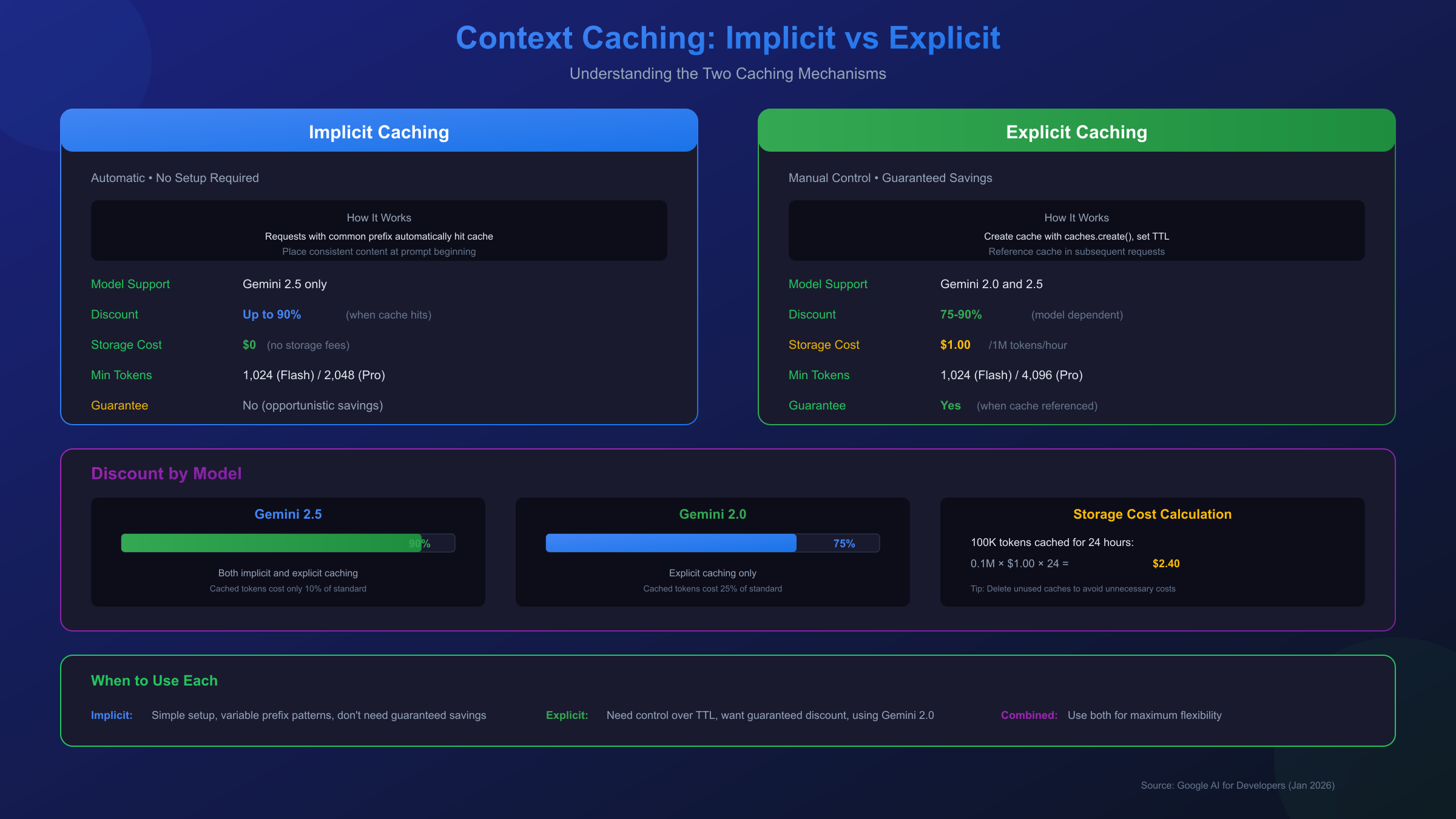
Implicit caching is enabled by default on all Gemini 2.5 models. When your request shares a common prefix with previous requests, the system automatically detects this overlap and applies cost savings without any configuration on your part. You simply structure your prompts with consistent content at the beginning, and the API handles cache optimization transparently. The discount on Gemini 2.5 models reaches 90% for cached tokens.
Explicit caching gives you direct control over what gets cached and for how long. You explicitly declare content you want to cache, set a time-to-live (TTL) duration, and then reference this cached content in subsequent requests. The explicit approach guarantees cost savings when referenced, while implicit caching provides savings opportunistically based on cache hits.
| Feature | Implicit Caching | Explicit Caching |
|---|---|---|
| Setup Required | None (automatic) | Manual cache creation |
| Cost Savings | Up to 90% (when hit) | Guaranteed 75-90% |
| Supported Models | Gemini 2.5 only | Gemini 2.5 and 2.0 |
| TTL Control | None | Configurable (default 1 hour) |
| Storage Costs | None | $1.00/1M tokens/hour |
Minimum Token Requirements
Context caching has minimum token thresholds that must be met for caching to activate. For Gemini 2.5 Flash, the minimum is 1,024 tokens. Gemini 2.5 Pro requires at least 4,096 tokens. These thresholds exist because the overhead of cache management only provides net savings when working with substantial context sizes.
hljs pythonfrom google import genai
from google.genai.types import CreateCachedContentConfig
client = genai.Client()
# Create explicit cache with system instructions
cache = client.caches.create(
model='models/gemini-2.5-flash',
config=CreateCachedContentConfig(
system_instruction='You are an expert legal analyst...',
contents=[
{'parts': [{'text': '<50-page legal document content>'}]}
],
ttl='3600s' # 1 hour TTL
)
)
# Use cached content in requests
response = client.models.generate_content(
model='models/gemini-2.5-flash',
contents='What are the key liability clauses?',
config={'cached_content': cache.name}
)
Storage Costs to Consider
While caching reduces input token costs dramatically, explicit caching introduces storage costs. At $1.00 per million tokens per hour, maintaining a cache of 100,000 tokens for 24 hours costs $2.40. This makes caching most economical for frequently-accessed content over shorter periods, or for very large contexts where the input token savings outweigh storage costs.
Head-to-Head Comparison: Batch vs Caching
Now that we understand both optimization strategies individually, let's compare them directly to see how they stack up across key dimensions.
| Dimension | Batch API | Context Caching |
|---|---|---|
| Discount Amount | 50% flat | 75-90% on cached tokens |
| Response Time | Up to 24 hours | Real-time |
| Best For | High volume, non-urgent | Repeated context queries |
| Setup Complexity | Low (just submit batch) | Medium (cache management) |
| Minimum Requirements | None | 1,024-4,096 tokens |
| Storage Costs | None | $1.00/1M tokens/hour |
| Model Support | All Gemini models | Gemini 2.0 and 2.5 |
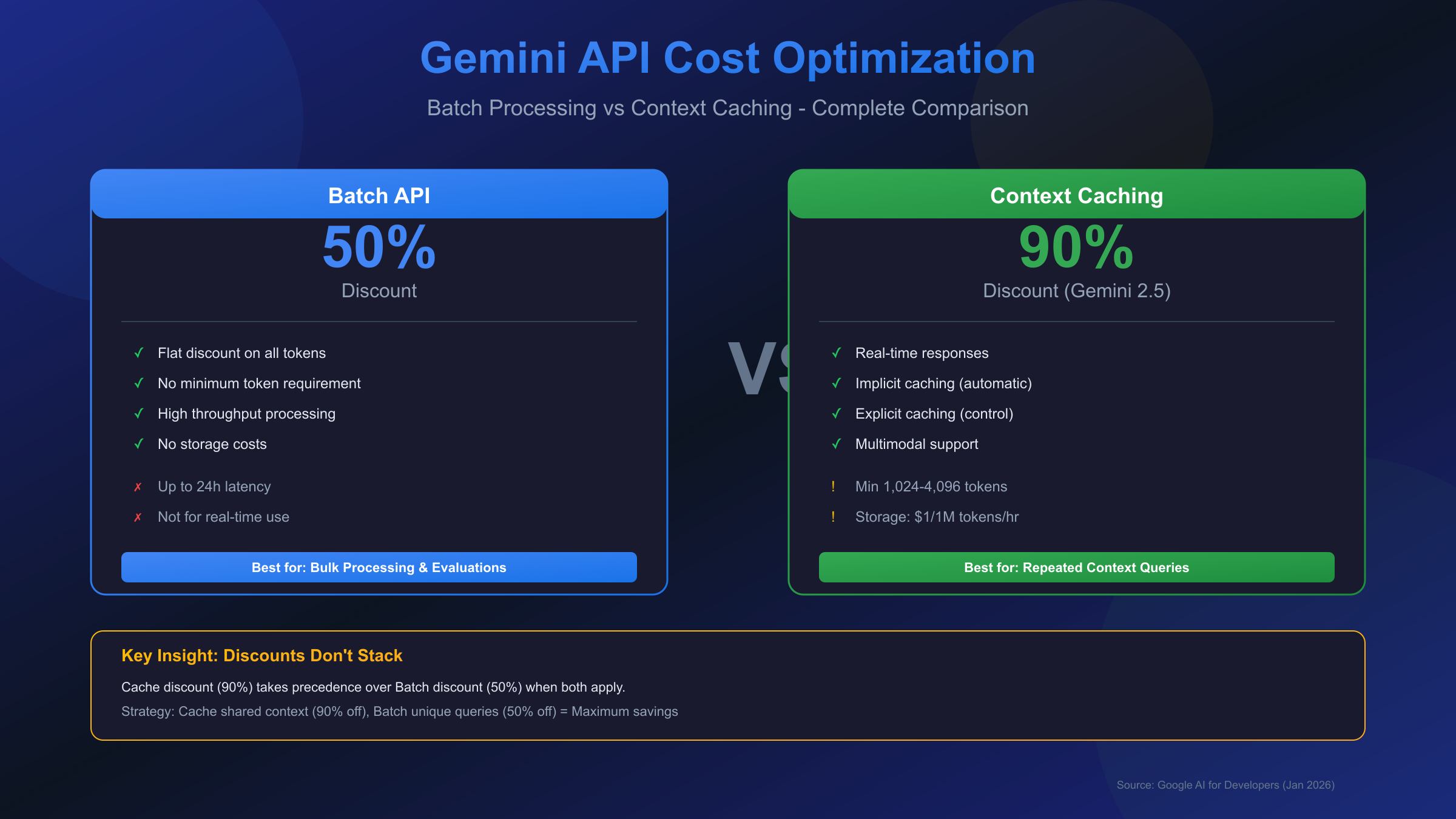
The choice between batch and caching often comes down to your workload characteristics. Batch processing shines when you have many independent requests that don't share common context—think processing a diverse set of customer inquiries or generating content for different products. The 50% discount applies uniformly to all tokens processed.
Context caching delivers superior savings when your requests share substantial common context. Analyzing multiple questions against the same document, running variations on system prompts, or maintaining consistent persona instructions across sessions all benefit tremendously from caching's 75-90% discount on the shared portions.
For real-time applications requiring immediate responses, context caching is your only option since batch processing introduces unacceptable latency. Conversely, for offline processing where response time doesn't matter, batch processing offers guaranteed savings without the complexity of cache management.
The Stacking Question: Do Discounts Combine?
This is perhaps the most critical question developers ask: can you combine batch and caching discounts for even greater savings? The answer is nuanced and important to understand.
Context caching is indeed enabled for batch requests—if a request in your batch results in a cache hit, you receive the cached token pricing. However, the discounts do not stack. The 90% cache discount takes precedence over the 50% batch discount.
Here's how it works in practice: when you submit a batch job and some requests hit the cache, those cached tokens are priced at the cache rate (10% of standard), not at a further-discounted batch cache rate. The batch discount of 50% applies only to tokens that don't hit the cache.
This precedence rule has important implications for optimization strategy. If your batch requests share common context, the cache discount (up to 90%) will typically save more than the batch discount (50%) on those shared portions. The batch discount then applies to the unique, non-cached portions of each request.
For maximum savings on large-scale document analysis, consider this approach: cache the shared document context (saving 90% on those tokens), then use batch processing for the unique queries against that cache (saving 50% on the query tokens). This hybrid strategy captures the benefits of both mechanisms where each applies best.
Decision Framework: Choosing the Right Approach
Selecting the optimal cost optimization strategy depends on several factors. Use this decision framework to guide your choice.
Choose Batch API when:
- Your requests are independent and don't share common context
- You can tolerate up to 24 hours of latency
- You're processing large volumes (hundreds or thousands) of requests
- Your workload is predictable and can be scheduled
- You want simple, guaranteed 50% savings without complexity
Choose Context Caching when:
- Multiple requests query the same large document or context
- You need real-time responses
- Your context exceeds the minimum token threshold (1,024-4,096)
- You can manage cache TTL to minimize storage costs
- Your usage pattern makes the 75-90% discount worthwhile
Combine Both when:
- You have batch workloads that share some common context
- The shared context is substantial enough to benefit from caching
- You want to maximize savings on each component of the request
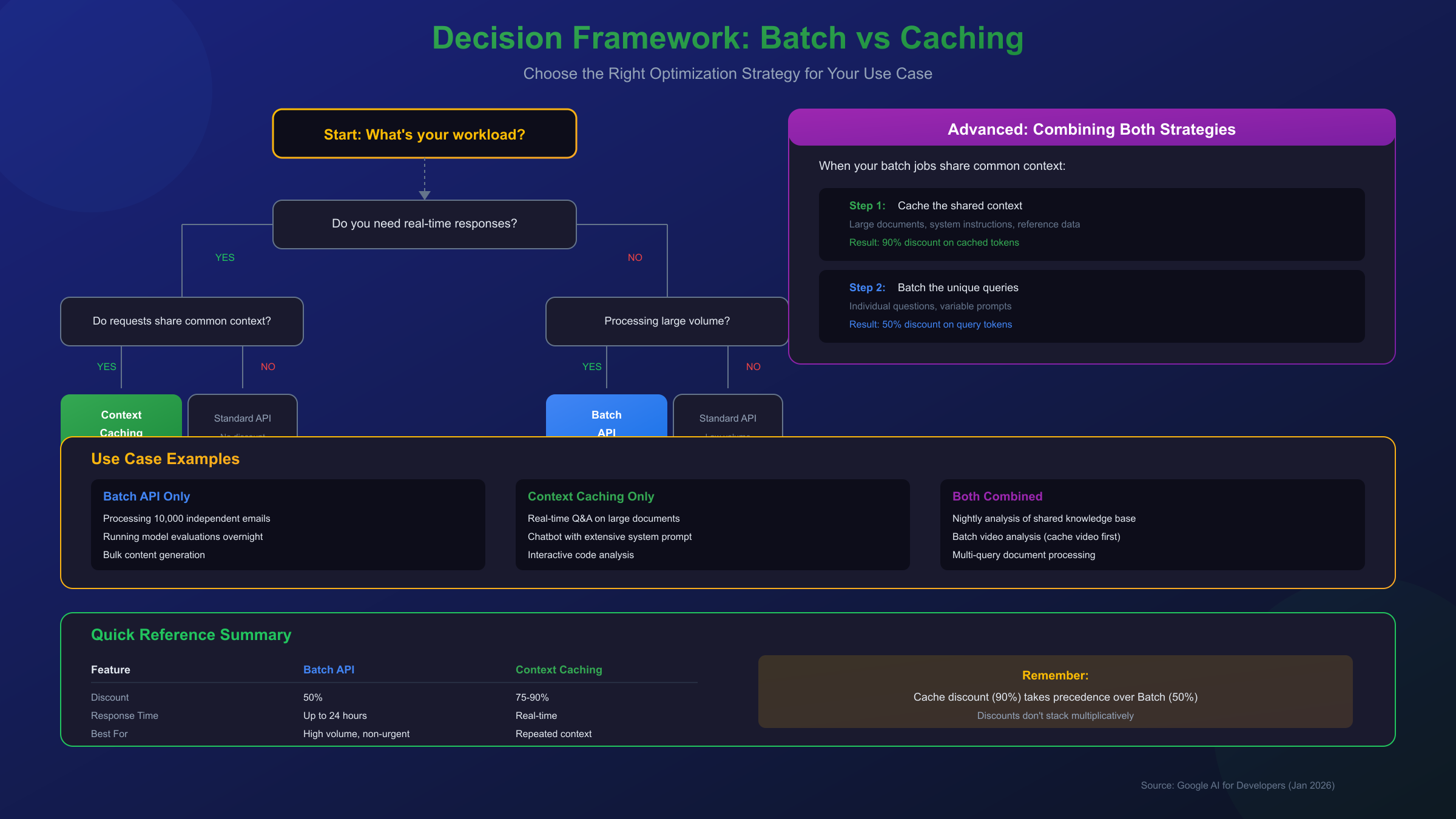
Consider a practical example: you're building an application that analyzes quarterly financial reports. If users submit questions throughout the day that need immediate answers, context caching is your primary strategy—cache the report and serve queries in real-time at 90% savings on the document tokens. If you're running an overnight job to generate 500 pre-defined analyses, batch processing delivers 50% savings without cache management complexity.
Implementation Guide with Code Examples
Let's walk through practical implementations of both optimization strategies with production-ready code examples.
Batch API Implementation
hljs pythonfrom google import genai
import time
client = genai.Client()
# Prepare batch requests (inline method for smaller batches)
requests = [
{
'key': f'analysis-{i}',
'contents': [
{'parts': [{'text': f'Analyze the following data point: {data}'}]}
]
}
for i, data in enumerate(dataset)
]
# Submit batch job
batch_job = client.batches.create(
model='models/gemini-2.5-flash',
src=requests,
config={'display_name': 'nightly-analysis-batch'}
)
# Poll for completion
completed_states = ['JOB_STATE_SUCCEEDED', 'JOB_STATE_FAILED', 'JOB_STATE_CANCELLED']
while batch_job.state.name not in completed_states:
time.sleep(60) # Check every minute
batch_job = client.batches.get(name=batch_job.name)
print(f'Status: {batch_job.state.name}')
# Retrieve results
if batch_job.state.name == 'JOB_STATE_SUCCEEDED':
for response in batch_job.responses:
print(f'Result for {response.key}: {response.response}')
Context Caching Implementation
hljs pythonfrom google import genai
from google.genai.types import CreateCachedContentConfig
client = genai.Client()
# Upload large document first (if using files)
uploaded_file = client.files.upload(file='quarterly_report.pdf')
# Create cache with document and system instructions
cache = client.caches.create(
model='models/gemini-2.5-flash',
config=CreateCachedContentConfig(
display_name='q4-financial-report',
system_instruction='You are a financial analyst expert...',
contents=[{'parts': [{'file_data': {'file_uri': uploaded_file.uri}}]}],
ttl='7200s' # 2 hour TTL
)
)
# Make multiple queries against cached content
questions = [
'What was the revenue growth?',
'Summarize the risk factors',
'What are the key investments mentioned?'
]
for question in questions:
response = client.models.generate_content(
model='models/gemini-2.5-flash',
contents=question,
config={'cached_content': cache.name}
)
# Each query pays full price only for the question tokens
# Document tokens are charged at 10% (90% discount)
print(f'Q: {question}')
print(f'A: {response.text}\n')
# Clean up cache when done
client.caches.delete(name=cache.name)
Monitoring Cache Hits (Implicit Caching)
hljs pythonresponse = client.models.generate_content(
model='models/gemini-2.5-flash',
contents=[
{'parts': [{'text': 'Large consistent context here...'}]},
{'parts': [{'text': 'Unique query here'}]}
]
)
# Check for cache hits in usage metadata
usage = response.usage_metadata
print(f'Total input tokens: {usage.prompt_token_count}')
print(f'Cached tokens: {usage.cached_content_token_count}')
# Cached tokens indicate savings were applied automatically
Cost Calculations: Real-World Scenarios
Understanding theoretical discounts is one thing—seeing actual cost calculations brings clarity. Let's work through three realistic scenarios.
Scenario 1: Document Analysis Service
Your application analyzes uploaded contracts, answering user questions in real-time. Each contract averages 50,000 tokens, and users ask an average of 20 questions per document (500 tokens each).
Without optimization:
- Document tokens: 50,000 × 20 queries × $1.25/1M = $1.25 per document
- Query tokens: 500 × 20 × $1.25/1M = $0.0125
- Total: $1.2625 per document
With context caching (90% discount on document):
- Cached document tokens: 50,000 × 20 × $0.125/1M = $0.125
- Query tokens: 500 × 20 × $1.25/1M = $0.0125
- Storage (2 hours): 50,000 × $1.00/1M × 2 = $0.10
- Total: $0.2375 per document (81% savings)
Scenario 2: Nightly Data Processing
You process 10,000 independent data records each night, with each request averaging 2,000 tokens input and 500 tokens output.
Without optimization:
- Input: 10,000 × 2,000 × $0.30/1M = $6.00
- Output: 10,000 × 500 × $2.50/1M = $12.50
- Total: $18.50 per night
With batch processing (50% discount):
- Input: 10,000 × 2,000 × $0.15/1M = $3.00
- Output: 10,000 × 500 × $1.25/1M = $6.25
- Total: $9.25 per night (50% savings)
Scenario 3: Combined Strategy
You run nightly analysis on a shared knowledge base (100,000 tokens) with 5,000 unique queries (1,000 tokens each).
Optimal approach: Cache + Batch
- Cached knowledge base: 100,000 × 5,000 × $0.125/1M = $62.50
- Query tokens (batch discount): 5,000 × 1,000 × $0.15/1M = $0.75
- Storage (8 hours): 100,000 × $1.00/1M × 8 = $0.80
- Total: $64.05
Batch only (for comparison):
- Input: (100,000 + 1,000) × 5,000 × $0.15/1M = $75.75
- Savings from combined approach: 15% additional
| Scenario | Without Optimization | Optimized | Savings |
|---|---|---|---|
| Document Analysis | $1.26 | $0.24 | 81% |
| Nightly Processing | $18.50 | $9.25 | 50% |
| Combined Strategy | $101.00 | $64.05 | 37% |
Common Mistakes and How to Avoid Them
After helping numerous developers implement these optimization strategies, certain pitfalls appear repeatedly. Understanding these common mistakes can save you both money and debugging time.
Forgetting cache storage costs. Many developers focus solely on the input token discount and overlook storage expenses. For explicit caching, you pay $1.00 per million tokens per hour. If you cache 1 million tokens and forget to delete the cache, you'll spend $24 per day on storage alone. Always set appropriate TTLs and clean up unused caches promptly.
Not meeting minimum token thresholds. Context caching only activates above certain limits—1,024 tokens for Gemini 2.5 Flash, 4,096 for Gemini 2.5 Pro. If your cached content falls below these thresholds, caching simply won't work. Pad small contexts with additional relevant information or combine multiple small contexts to reach the minimum.
Expecting stacked discounts. As discussed, batch and cache discounts don't multiply together. Some developers design systems expecting a combined 95% discount (50% × 90%), which isn't how the pricing works. The cache discount applies first where cache hits occur; batch discounts apply to remaining non-cached tokens.
Poor prompt structure for implicit caching. Implicit caching works by detecting common prefixes across requests. If you place variable content at the beginning of your prompts, you'll miss cache hits entirely. Always structure prompts with consistent content first, variable elements last.
Using batch for time-sensitive workloads. The 24-hour SLA is a target, not a guarantee. While most batches complete faster, planning around immediate batch results leads to unreliable applications. Reserve batch processing for genuinely non-urgent workloads.
Caching frequently-changing content. If your cached content updates hourly, you're paying storage costs while continually invalidating caches. Caching works best for stable content—documentation, reference materials, or static datasets that remain consistent across many queries.
For developers needing API access with additional reliability guarantees, particularly those facing regional access restrictions, third-party services like laozhang.ai offer unified access to Gemini models with compatible optimization features. These services can be particularly valuable when building production systems that require consistent availability.
Frequently Asked Questions
Q1: Can I use context caching with the free tier?
Yes, context caching is available on the free tier for Gemini 2.5 models with implicit caching enabled by default. However, explicit caching incurs storage costs that require a paid billing account. The minimum token thresholds (1,024 for Flash, 4,096 for Pro) still apply regardless of tier.
Q2: How do I know if implicit caching is working?
Check the usage_metadata in your API responses. The cached_content_token_count field indicates how many tokens were served from cache. If this number is greater than zero, you're receiving cached pricing on those tokens. For maximum visibility, log this metric across requests to track your cache hit rate.
Q3: What happens when a batch job fails?
Failed batch jobs provide detailed error information in the response. Common causes include malformed requests, quota exhaustion, or model-specific limitations. The API doesn't charge for failed requests. You can check batch_stats.failed_request_count to see how many individual requests within a batch failed, and examine each response for specific error details.
Q4: Can I cache images and videos, or just text?
Context caching supports multimodal content including images and videos. Upload files using the Files API, then reference them in your cache creation. Video caching is particularly valuable—a 5-minute video might contain millions of tokens, making the 90% discount extremely impactful for applications that query video content repeatedly.
Q5: Is there a maximum cache size or duration?
Google doesn't publish strict maximum limits for cache size or duration. The practical constraints are economic—storing very large caches for extended periods becomes expensive at $1.00 per million tokens per hour. For most use cases, caches in the 10K-1M token range with 1-24 hour TTLs provide the best balance of savings and cost.
Q6: How do these optimizations apply to Vertex AI vs Gemini Developer API?
Both optimization strategies are available on both platforms, but with some implementation differences. Vertex AI batch prediction uses different endpoints and job management APIs compared to the Gemini Developer API. Context caching semantics are identical across both platforms, but the specific API calls differ. Check the respective documentation for platform-specific implementation details.
Conclusion: Maximizing Your Gemini API Investment
Optimizing Gemini API costs requires understanding both available strategies and knowing when each delivers maximum value. Batch processing offers a simple, guaranteed 50% discount for any workload that can tolerate asynchronous processing—ideal for data pipelines, evaluation jobs, and bulk content generation. Context caching provides dramatically higher savings of 75-90% but applies specifically to repeated context scenarios—perfect for document analysis, chatbots with extensive system prompts, and applications querying shared knowledge bases.
The key insight is that these strategies address different dimensions of cost optimization. Batch processing reduces costs through deferred execution; caching reduces costs through eliminating redundant processing. When your workload combines both characteristics—shared context processed in bulk—using both strategies together delivers the greatest savings, even though the discounts don't stack multiplicatively.
For production deployments, start by analyzing your token consumption patterns. Identify which portions of your requests are consistent across calls (candidates for caching) and which workloads can accept delayed responses (candidates for batching). Monitor your cached_content_token_count to verify cache hits, and track batch job completion times to ensure they meet your operational requirements.
| Strategy | Discount | Best Use Case |
|---|---|---|
| Batch API | 50% | High-volume, non-urgent processing |
| Context Caching | 75-90% | Repeated queries on shared context |
| Combined | Variable | Batch jobs with common context |
By implementing these optimization strategies thoughtfully, you can reduce your Gemini API costs by 50-90% while maintaining the functionality your applications require. The investment in understanding and implementing these approaches pays dividends with every API call, making your AI-powered applications more economically sustainable at scale.
Sources: