Google Gemini API Free Tier Limits 2025: Complete Guide to Rate Limits, 429 Errors & Solutions
Complete guide to Gemini API free tier limits in 2025. Covers December 2025 quota changes, all model rate limits (Gemini 3, 2.5 Pro/Flash), 429 error solutions with code examples, and when to upgrade to paid tiers.
Nano Banana Pro
4K-80%Google Gemini 3 Pro · AI Inpainting
谷歌原生模型 · AI智能修图

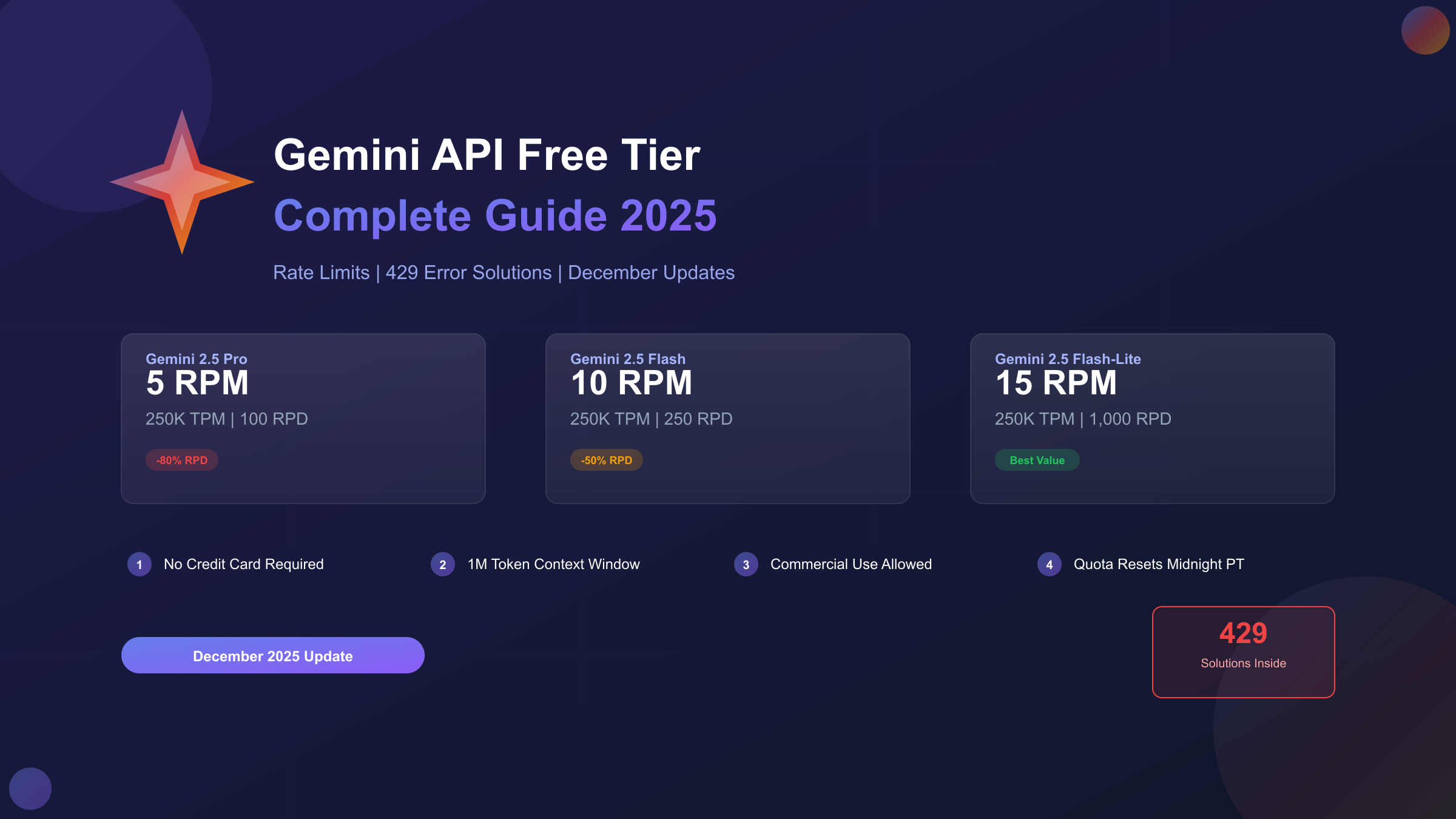
Google's Gemini API free tier offers developers genuine access to frontier AI models without requiring a credit card or upfront payment. As of December 2025, the free tier includes access to Gemini 2.5 Pro, Gemini 2.5 Flash, Flash-Lite, and even preview access to the new Gemini 3 series—all with a 1 million token context window that dwarfs most competitors. However, the landscape changed dramatically in early December 2025 when Google quietly reduced free tier quotas by 50-80%, catching thousands of developers off guard with unexpected 429 errors.
This comprehensive guide documents exactly what you can expect from the Gemini API free tier in late 2025. The information reflects verified rate limits, confirmed December 2025 changes, and practical solutions based on developer experiences across forums and GitHub discussions. Whether you're prototyping a new AI application or evaluating Gemini for production use, understanding these limits will help you avoid common pitfalls and maximize your free access.
| Free Tier Overview | December 2025 Status |
|---|---|
| Credit Card Required | No |
| Commercial Use Allowed | Yes |
| Context Window | 1 million tokens |
| Available Models | Gemini 3 Flash, 2.5 Pro/Flash/Flash-Lite |
| Key Change | 50-80% quota reduction (Dec 6-7, 2025) |
| Quota Reset | Midnight Pacific Time |
What Happened in December 2025: The Quota Reduction Timeline
The weekend of December 6-7, 2025 marked a turning point for Gemini API users. Without prior announcement, Google significantly reduced free tier quotas, leading to widespread application failures and frustrated developers tagging CEO Sundar Pichai on social media. Understanding exactly what changed—and why—helps developers plan their usage accordingly.
The Timeline of Events:
On Friday, December 6, developers began reporting 429 "quota exceeded" errors in applications that had been running smoothly for months. By Saturday morning, the developer community confirmed this wasn't an isolated incident. Production systems failed mid-deployment, with some teams estimating downtime costs between $500-$2,000 per hour while they scrambled to implement workarounds.
Google's status page acknowledged the issue on Monday, December 8. Later that week, Logan Kilpatrick, Google's Lead Product Manager for AI Studio, provided context in a developer forum post. He explained that the Gemini 2.5 Pro free tier was "originally only supposed to be available for a single weekend" but had persisted for months longer than intended. The sudden restrictions were driven by "at scale fraud and abuse" on paid tiers and massive demand from new model launches.
What Actually Changed:
| Model | Previous Daily Limit | New Daily Limit | Reduction |
|---|---|---|---|
| Gemini 2.5 Pro | 500 RPD | 100 RPD | -80% |
| Gemini 2.5 Flash | 500 RPD | 250 RPD | -50% |
| Gemini 2.5 Flash-Lite | 1,500 RPD | 1,000 RPD | -33% |
The RPM (requests per minute) limits also saw reductions, with Gemini 2.5 Pro dropping from approximately 10 RPM to 5 RPM. This means you can now only make one API request every 12 seconds on the Pro model—designed for "testing and prototyping rather than production use" according to Google's documentation.
Beyond the raw numbers, Google implemented stricter enforcement. The system now uses what developers describe as a "more aggressive token bucket approach" where burst requests that previously might have been tolerated now trigger rate limiting immediately. Even staying under published limits, some developers report receiving 429 errors during high-demand periods when Google temporarily throttles capacity.
Complete Free Tier Rate Limits by Model (December 2025)
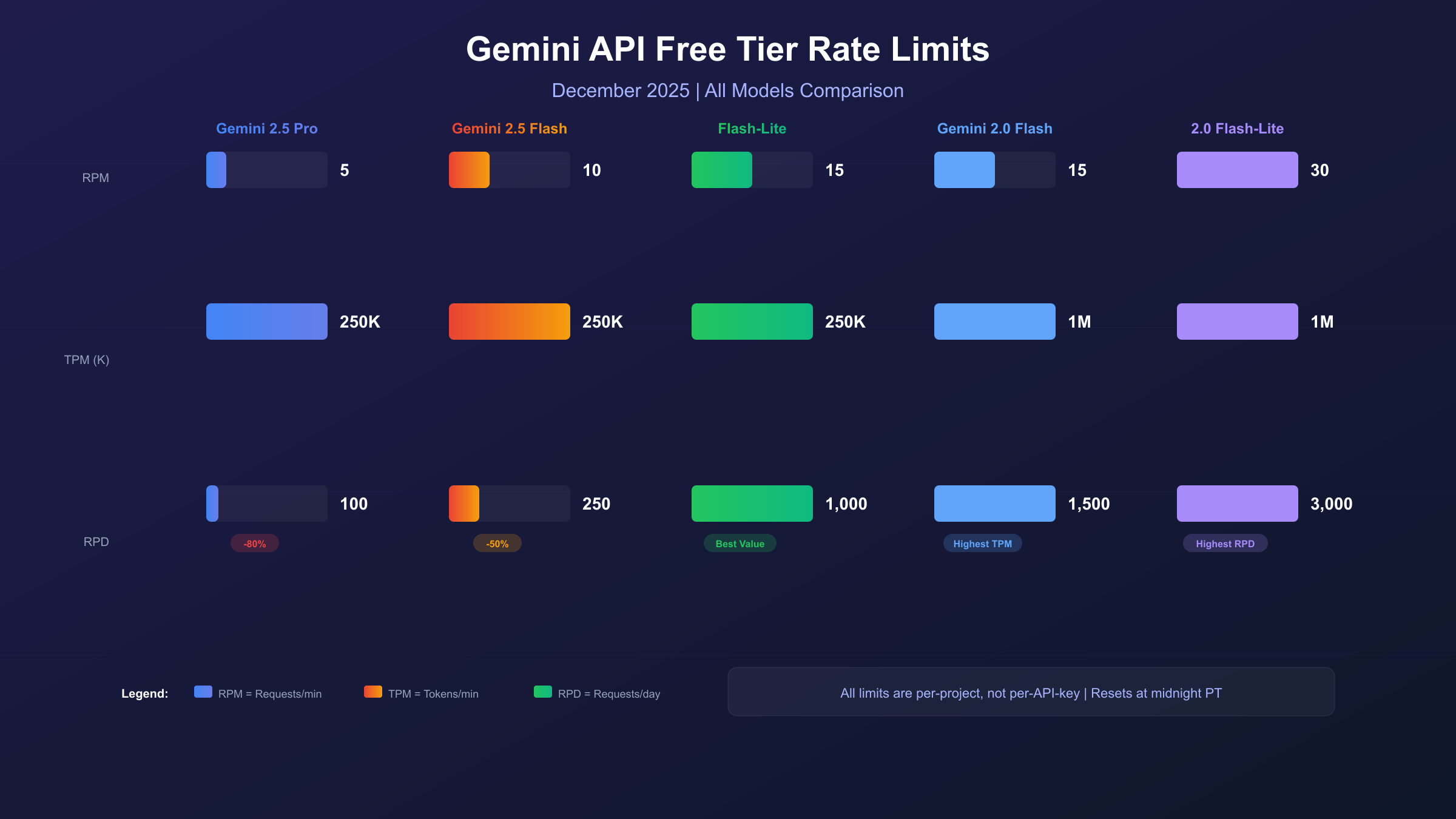
The current Gemini API free tier operates under three primary limit types: RPM (requests per minute), TPM (tokens per minute), and RPD (requests per day). All limits are enforced at the project level, not per API key—a crucial distinction that means creating multiple API keys within the same project provides no additional quota.
Gemini 2.5 Series Free Tier Limits
| Model | RPM | TPM | RPD | Context Window |
|---|---|---|---|---|
| Gemini 2.5 Pro | 5 | 250,000 | 100 | 1M tokens |
| Gemini 2.5 Flash | 10 | 250,000 | 250 | 1M tokens |
| Gemini 2.5 Flash-Lite | 15 | 250,000 | 1,000 | 1M tokens |
Gemini 2.5 Pro delivers the highest reasoning capabilities but with the most restrictive free limits. The 5 RPM cap translates to one request every 12 seconds, making it suitable only for development testing or very low-traffic applications. The 100 RPD limit means you exhaust your daily quota after about 100 API calls—roughly 4-5 hours of active development.
Gemini 2.5 Flash strikes a balance between capability and availability. With 10 RPM and 250 RPD, it handles typical development workflows better than Pro. The model excels at large-scale text processing, code generation, and tasks requiring quick responses. Its configurable "thinking" capability allows trading reasoning depth for speed.
Gemini 2.5 Flash-Lite prioritizes speed and throughput, offering the most generous free limits: 15 RPM and 1,000 RPD. For high-volume, simpler tasks like classification, summarization, or structured data extraction, Flash-Lite provides 10x the daily quota of Pro at comparable quality for straightforward prompts.
Gemini 2.0 Series Free Tier Limits
| Model | RPM | TPM | RPD | Context Window |
|---|---|---|---|---|
| Gemini 2.0 Flash | 15 | 1,000,000 | 1,500 | 1M tokens |
| Gemini 2.0 Flash-Lite | 30 | 1,000,000 | 3,000 | 1M tokens |
The older Gemini 2.0 models maintain more generous free limits, likely because Google is directing new users toward 2.5 and 3.0 series. If your use case doesn't require the latest reasoning capabilities, Gemini 2.0 Flash offers 4x higher TPM (1 million vs 250,000) and significantly more daily requests.
Gemini 3 Series (Preview)
| Model | Free API Access | AI Studio Access | Notes |
|---|---|---|---|
| Gemini 3 Pro Preview | No | Yes (free) | Paid API only |
| Gemini 3 Flash Preview | Limited | Yes (free) | Variable limits |
| Gemini 3 Pro Image | No | Limited | $0.134/image |
Gemini 3 series represents Google's latest frontier models with significant capability improvements. However, Gemini 3 Pro Preview currently has no free API tier—you can try it in Google AI Studio's chat interface, but API access requires paid billing at $2.00/1M input tokens and $12.00/1M output tokens.
Gemini 3 Flash Preview offers limited free API access with variable quotas depending on account age and region, typically 10-50 RPM and 100+ RPD. As preview models, these limits may change as Google gathers usage data. For a deeper dive into Flash model access, see our Gemini Flash free access guide.
Key Insight: All quota resets occur at midnight Pacific Time. For developers outside North America, this timing affects when you should schedule batch operations or intensive testing sessions.
Free Tier vs Paid Tier: What You Actually Get
Understanding the differences between free and paid tiers goes beyond just higher limits. The distinction affects data privacy, feature access, and how Google treats your API requests. Here's a comprehensive comparison based on official documentation and developer experiences.
Rate Limit Differences
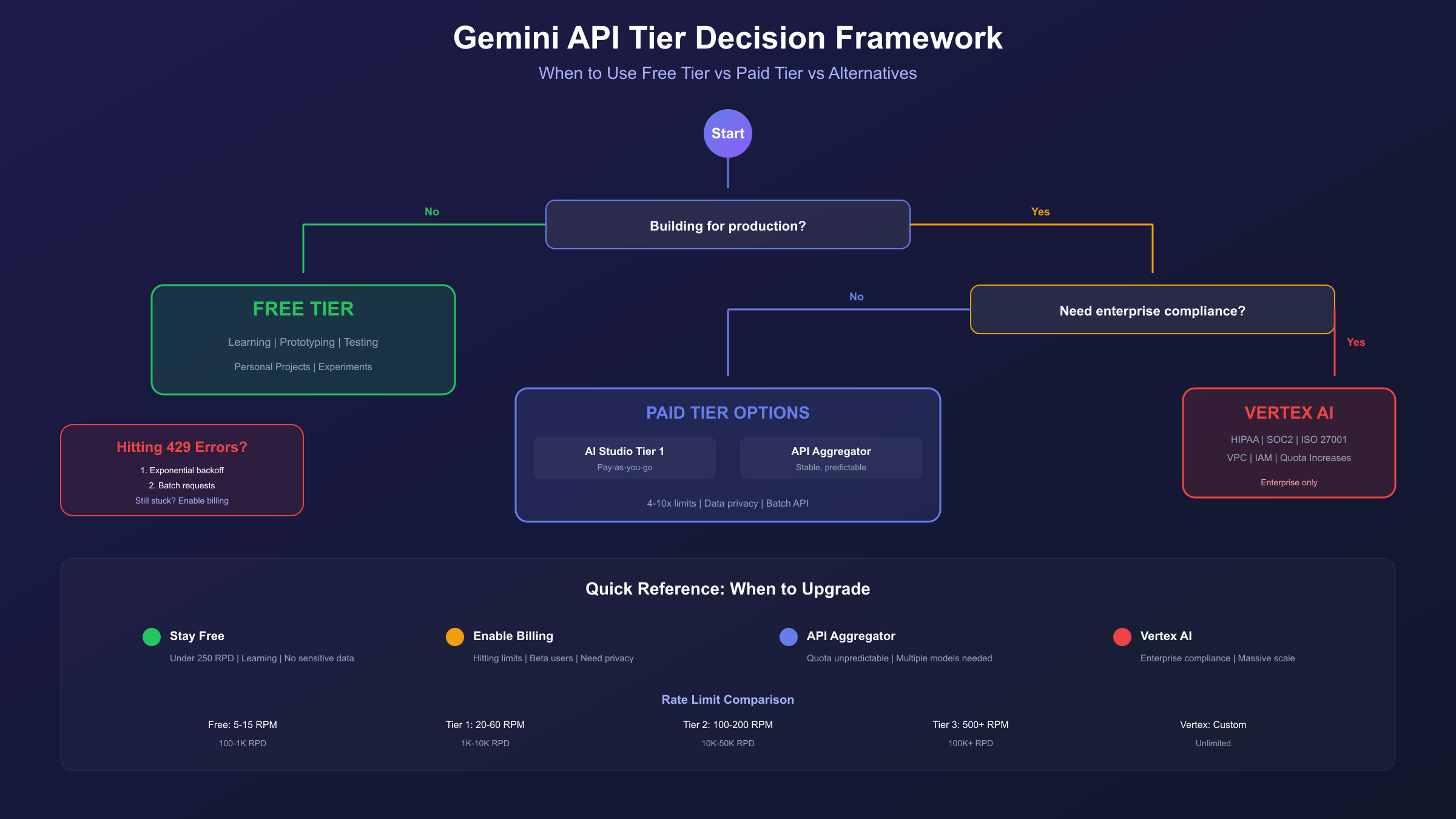
Google operates a tiered quota system with four levels. Your tier determines your limits and unlocks additional features:
| Tier | Requirements | Typical RPM | Typical RPD | Key Benefits |
|---|---|---|---|---|
| Free | Google account | 5-15 | 100-1,000 | No cost, basic access |
| Tier 1 | Billing enabled | 20-60 | 1,000-10,000 | 4-10x RPM increase |
| Tier 2 | >$250 spent, 30+ days | 100-200 | 10,000-50,000 | Batch API access |
| Tier 3 | >$1,000 spent, 30+ days | 500+ | 100,000+ | Priority capacity |
The jump from Free Tier to Tier 1 is significant—simply enabling billing (even without spending) typically unlocks 4-10x higher RPM limits and 10-50x higher RPD quotas. This makes Tier 1 the practical minimum for any application with real users.
Data Privacy: A Critical Difference
On the free tier, Google reserves the right to use your prompts and responses (with human review) to improve its products. This data handling follows Google's standard privacy terms and means your inputs could potentially influence future model training.
On paid tiers, your prompts and responses are explicitly not used to improve Google's models. Data processing falls under Google's data processing addendum, providing stronger privacy guarantees. For applications handling sensitive data—whether personal information, proprietary code, or confidential business content—this distinction matters significantly.
Feature Availability
Certain features are exclusive to paid tiers:
- Batch API: Available only with billing enabled. Offers 50% cost reduction for non-time-sensitive workloads by processing requests asynchronously.
- Context Caching: Reduces costs up to 90% for repeated token sequences. Requires paid tier and specific model support.
- Provisioned Throughput: Enterprise option for guaranteed capacity, available only through Vertex AI with paid commitment.
- SLA Guarantees: Free tier has no service level agreement. Paid tiers include uptime commitments.
Getting $300 Free Credits
New Google Cloud users receive $300 in free credits valid for 90 days. By linking AI Studio to a Cloud project, these credits can offset Gemini API costs under the paid tier. This allows developers to test production-level throughput without immediate billing—essentially extending the "free" period while accessing paid tier limits and privacy protections.
To claim these credits:
- Navigate to Google Cloud Console
- Create a new project or select existing
- Enable billing with the trial credit offer
- Link your AI Studio project to this Cloud project
Understanding 429 Errors: Why They Happen
The HTTP 429 "Too Many Requests" error has become intimately familiar to Gemini API developers, especially since December 2025. These errors indicate quota exhaustion but understanding the specific cause helps you implement appropriate solutions.
Root Causes of 429 Errors
1. RPM Exceeded (Most Common)
The rolling 60-second window is continuous, not clock-based. If you made 5 requests in the last 60 seconds and your limit is 5 RPM, your next request triggers 429 regardless of clock time. Previous requests within this window still count against your current limit.
2. TPM Exceeded
Gemini counts both input AND output tokens against TPM limits. A request with a 10,000 token prompt that generates a 5,000 token response consumes 15,000 tokens from your TPM quota. System instructions, few-shot examples, and conversation history all consume input tokens—often more than developers expect.
3. RPD Exhausted
Daily quotas reset at midnight Pacific Time (PT). If you exhaust your RPD at 11 PM PT, you only wait one hour. If you exhaust it at 1 AM PT, you wait 23 hours. This timing significantly affects usage planning.
4. Project-Level Sharing
Rate limits are enforced at the project level, not the API key level. If your team has 5 developers testing with different API keys in the same project, all 5 share the same quota. Creating multiple API keys provides no additional capacity—you need separate projects.
5. Capacity Throttling
Even staying under documented limits, Google may temporarily reduce quotas during high-demand periods. This "capacity throttling" affects free tier users disproportionately since paid users receive priority.
Diagnosing Your Specific Error
When you receive a 429 error, the response body contains details about which limit was exceeded:
| Error Message Pattern | Cause | Immediate Solution |
|---|---|---|
| "Rate limit exceeded" | RPM or TPM | Wait and retry with backoff |
| "Quota exceeded" | RPD exhausted | Wait for midnight PT reset |
| "RESOURCE_EXHAUSTED" | General quota | Check all three limits |
You can view your current limits and usage in Google AI Studio under the "Rate Limits" section. This shows real-time consumption against your quotas, helping identify which limit is constraining your application.
Production-Ready Error Handling: Code That Works
Implementing robust error handling separates prototype code from production applications. The following patterns are battle-tested by developers who've navigated the December 2025 changes.
Python: Exponential Backoff with Tenacity
The tenacity library provides the cleanest implementation of exponential backoff in Python:
hljs pythonimport google.generativeai as genai
from tenacity import retry, wait_exponential, stop_after_attempt, retry_if_exception_type
# Configure your API key
genai.configure(api_key="YOUR_API_KEY")
# Define retry behavior for 429 errors
@retry(
wait=wait_exponential(multiplier=1, min=4, max=60),
stop=stop_after_attempt(5),
retry=retry_if_exception_type(Exception) # Customize for specific exceptions
)
def generate_with_retry(prompt: str, model: str = "gemini-2.5-flash") -> str:
"""Generate content with automatic retry on rate limits."""
model_instance = genai.GenerativeModel(model)
response = model_instance.generate_content(prompt)
return response.text
# Usage
try:
result = generate_with_retry("Explain quantum computing in simple terms")
print(result)
except Exception as e:
print(f"Failed after all retries: {e}")
This implementation:
- Starts with a 4-second wait after the first failure
- Doubles the wait time up to 60 seconds maximum
- Attempts up to 5 retries before giving up
- Handles both RPM and temporary capacity throttling
JavaScript/TypeScript: Native Retry Logic
For JavaScript applications, implement retry logic with async/await:
hljs javascriptconst { GoogleGenerativeAI } = require("@google/generative-ai");
const genAI = new GoogleGenerativeAI("YOUR_API_KEY");
async function sleep(ms) {
return new Promise(resolve => setTimeout(resolve, ms));
}
async function generateWithRetry(prompt, maxRetries = 5) {
const model = genAI.getGenerativeModel({ model: "gemini-2.5-flash" });
for (let attempt = 1; attempt <= maxRetries; attempt++) {
try {
const result = await model.generateContent(prompt);
return result.response.text();
} catch (error) {
if (error.status === 429 && attempt < maxRetries) {
// Exponential backoff: 4s, 8s, 16s, 32s, 60s max
const waitTime = Math.min(4000 * Math.pow(2, attempt - 1), 60000);
// Add jitter to prevent synchronized retries
const jitter = Math.random() * 1000;
console.log(`Rate limited. Waiting ${(waitTime + jitter) / 1000}s...`);
await sleep(waitTime + jitter);
} else {
throw error;
}
}
}
throw new Error("Max retries exceeded");
}
// Usage
generateWithRetry("Write a haiku about APIs")
.then(console.log)
.catch(console.error);
Adding Jitter: Why It Matters
When multiple clients retry simultaneously (common in distributed systems), synchronized retries can overwhelm the API again, creating a "thundering herd" effect. Adding random jitter (the Math.random() * 1000 in the example above) spreads retries across time, improving success rates for everyone.
Rate Limiting at the Application Level
For production applications, implement proactive rate limiting rather than relying solely on reactive retry:
hljs pythonimport time
from threading import Lock
class GeminiRateLimiter:
def __init__(self, rpm_limit: int = 10):
self.rpm_limit = rpm_limit
self.requests = []
self.lock = Lock()
def wait_if_needed(self):
"""Block if we've exceeded RPM limit."""
with self.lock:
now = time.time()
# Remove requests older than 60 seconds
self.requests = [t for t in self.requests if now - t < 60]
if len(self.requests) >= self.rpm_limit:
# Wait until oldest request expires
wait_time = 60 - (now - self.requests[0])
time.sleep(max(0, wait_time))
self.requests = self.requests[1:]
self.requests.append(time.time())
# Usage
limiter = GeminiRateLimiter(rpm_limit=10)
def make_request(prompt):
limiter.wait_if_needed()
# Proceed with API call
return generate_with_retry(prompt)
This approach prevents 429 errors entirely by throttling requests before they hit Google's limits.
Maximizing Free Tier Usage: Smart Strategies
The December 2025 quota reductions made efficient usage essential. These strategies help you accomplish more within constrained limits.
Strategy 1: Request Batching
Combine multiple questions into a single API call to reduce RPM consumption. Instead of 5 separate requests:
hljs python# Inefficient: 5 API calls
responses = []
for question in questions:
response = model.generate_content(question)
responses.append(response.text)
Batch them into one:
hljs python# Efficient: 1 API call
combined_prompt = """Please answer each question separately:
1. {questions[0]}
2. {questions[1]}
3. {questions[2]}
4. {questions[3]}
5. {questions[4]}
Format your response with numbered answers matching each question."""
response = model.generate_content(combined_prompt)
This reduces RPM consumption by 80% while accomplishing the same work. The tradeoff is slightly higher token usage per request, but with 250,000 TPM limits, this is rarely the bottleneck.
Strategy 2: Model Routing
Route requests to appropriate models based on complexity:
| Task Type | Recommended Model | Why |
|---|---|---|
| Complex reasoning | Gemini 2.5 Pro | Best quality, save for important tasks |
| Code generation | Gemini 2.5 Flash | Good quality, higher limits |
| Summarization | Gemini 2.5 Flash-Lite | 10x daily quota |
| Classification | Gemini 2.0 Flash-Lite | 30x higher RPM |
Implementing a simple router:
hljs pythondef route_request(task_type: str, prompt: str) -> str:
model_map = {
"reasoning": "gemini-2.5-pro",
"code": "gemini-2.5-flash",
"summary": "gemini-2.5-flash-lite",
"classify": "gemini-2.0-flash-lite"
}
model_name = model_map.get(task_type, "gemini-2.5-flash")
model = genai.GenerativeModel(model_name)
return model.generate_content(prompt).text
Strategy 3: Response Caching
Cache responses for repeated queries using a hash-based key:
hljs pythonimport hashlib
import json
cache = {}
def get_or_generate(prompt: str, model: str = "gemini-2.5-flash") -> str:
# Create cache key from prompt hash
cache_key = hashlib.md5(f"{model}:{prompt}".encode()).hexdigest()
if cache_key in cache:
return cache[cache_key]
response = generate_with_retry(prompt, model)
cache[cache_key] = response
return response
For production, consider Redis or a database-backed cache for persistence across restarts.
Strategy 4: Timing Optimization
Schedule intensive operations based on quota reset timing:
- Batch processing: Run at 11 PM PT to use remaining daily quota, then continue after midnight reset
- Testing sessions: Start early in the day (PT) to maximize available quota
- International teams: Coordinate who uses the shared project based on PT timing
Strategy 5: Prompt Optimization
Reduce token consumption through efficient prompts:
- Remove unnecessary context from conversation history
- Use concise system instructions
- Request structured output (JSON) when applicable—often shorter than prose
- Limit output length with
max_output_tokensparameter
When to Upgrade to Paid Tier: A Decision Framework
The free tier works well for learning and prototyping, but certain signals indicate it's time to upgrade. Here's a practical framework for making that decision.
Signs You've Outgrown Free Tier
1. Hitting Daily Limits Regularly
If you consistently exhaust RPD before noon PT, you're fighting the system rather than building with it. The friction cost of managing limited requests often exceeds the cost of paid access.
2. Building for Real Users
Any application with external users—even beta testers—needs paid tier reliability. Free tier offers no SLA, and Google can throttle capacity without notice. Your users deserve better.
3. Processing Sensitive Data
The free tier data policy allows Google to review your prompts and responses. For applications handling personal information, proprietary code, or confidential content, paid tier privacy protections are essential.
4. Needing Batch or Caching Features
Batch API (50% cost savings) and context caching (90% savings on repeated tokens) require paid billing. For high-volume processing, these features can reduce costs below effective free tier rates.
Cost-Benefit Analysis
Let's calculate when paid makes financial sense:
Scenario: Development Team of 3
Free tier provides: 250 RPD × 3 projects = 750 requests/day Required: 2,000 requests/day for comfortable development
Paid tier cost at typical usage:
- 2,000 requests × 1,000 tokens average = 2M tokens/day
- Gemini 2.5 Flash: $0.30/1M input + $2.50/1M output ≈ $3-5/day
- Monthly cost: $90-150
The $90-150/month removes all friction, provides privacy protections, and enables production deployment. For professional development, this is rarely the bottleneck.
Alternative: API Aggregation Platforms
For developers seeking stability without enterprise commitments, API aggregation platforms provide an intermediate option. These services pool capacity across multiple providers, offering:
- Higher effective rate limits than individual free tiers
- Consistent pricing without sudden quota changes
- Unified API interface across multiple models
Platforms like laozhang.ai provide OpenAI-compatible endpoints for Gemini models, starting at $5 minimum (approximately 35 CNY). The unified interface means existing OpenAI code requires only endpoint and key changes—no SDK modifications. For teams experiencing repeated 429 errors or needing predictable capacity, this approach offers stability while avoiding direct enterprise pricing commitments.
Vertex AI vs AI Studio: Different Paths, Different Limits
Google offers two platforms for accessing Gemini models: Google AI Studio (consumer-focused, simpler) and Vertex AI (enterprise-focused, feature-rich). Understanding the differences helps you choose the right platform for your needs.
Google AI Studio
AI Studio is designed for developers who want the fastest path to production. Key characteristics:
- Setup: Create account, generate API key, start coding in minutes
- Free Tier: Available with limits discussed above
- Billing: Pay-as-you-go through Google AI Studio billing
- Rate Limits: Enforced per project, same limits for all users
- Best For: Startups, indie developers, prototyping, small-scale production
The AI Studio interface also provides a playground for testing prompts, visualizing token usage, and monitoring rate limits in real-time.
Vertex AI
Vertex AI is Google Cloud's enterprise AI platform. It provides the same Gemini models with different operational characteristics:
- Setup: Requires Google Cloud project, billing account, IAM configuration
- Free Tier: None—all usage is billed
- Credits: $300 new user credit applicable to all Google Cloud services
- Rate Limits: Higher base limits, quotas requestable through Cloud Console
- Features: Integration with Cloud logging, monitoring, VPC, IAM policies
- Best For: Enterprises, regulated industries, production at scale
Choosing Between Platforms
| Factor | AI Studio | Vertex AI |
|---|---|---|
| Setup complexity | Low | High |
| Free tier | Yes | No (credits only) |
| Rate limit flexibility | Limited | Requestable increases |
| Enterprise features | Basic | Full (IAM, logging, VPC) |
| Compliance certifications | Limited | HIPAA, SOC 2, ISO 27001 |
| Model availability | Current models | All models + custom endpoints |
For most individual developers and small teams, AI Studio is the pragmatic choice. The free tier allows evaluation, the paid tier provides adequate scale, and the simpler setup reduces operational overhead.
Choose Vertex AI when you need enterprise compliance, request quota increases beyond standard limits, or want tight integration with other Google Cloud services.
Comparing Gemini Free Tier to Competitors
How does Gemini's free tier stack up against other major AI API providers? This comparison helps contextualize what Google offers and when alternatives might make sense.
| Provider | Free Tier | Context Window | Commercial Use | Key Limitation |
|---|---|---|---|---|
| Gemini | Yes, ongoing | 1M tokens | Yes | 100-1,000 RPD |
| OpenAI | $5 credit, expires | 128k tokens | Yes | Credit expires in 3 months |
| Claude | None | N/A | N/A | No free API tier |
| Mistral | Limited free | 32k-128k | Yes | Very low limits |
| Cohere | Trial tier | 128k | Limited | Production requires paid |
Gemini's free tier stands out for several reasons:
Largest Context Window: The 1 million token context window dwarfs competitors' 128k offerings. This enables use cases impossible on other platforms: analyzing entire codebases, processing complete research papers with citations, or maintaining extended conversations without context loss.
No Expiration: Unlike OpenAI's $5 credit that expires after 3 months, Gemini's free tier continues indefinitely. You can learn at your own pace without time pressure.
Commercial Use Permitted: Google explicitly permits commercial use of the free tier, allowing startups to launch products without immediate API costs. Many competitors restrict free tiers to personal or evaluation use only.
The Main Tradeoff: Lower rate limits, especially after December 2025. The 5 RPM limit on Gemini 2.5 Pro means sustained use is impractical. OpenAI's paid tier offers more generous limits for equivalent spending.
Frequently Asked Questions
Can I use multiple API keys to increase my quota?
No. Rate limits are enforced at the project level, not per API key. Creating 10 API keys in the same project gives you exactly the same quota as 1 key. To increase effective quota, you need separate Google Cloud projects—each with its own limits.
Why am I getting 429 errors even though I haven't hit my limits?
Several possible causes:
- Rolling window timing: The 60-second RPM window is continuous. You may have hit the limit 30 seconds ago, and it hasn't reset.
- Token counting: Both input AND output tokens count against TPM. Long responses consume more quota than expected.
- Capacity throttling: During high-demand periods, Google may temporarily reduce effective limits below published numbers.
- Shared project: Other team members or applications using the same project consume shared quota.
Check Google AI Studio's rate limits dashboard for real-time consumption data.
Does enabling billing immediately increase my limits?
Generally yes, but not instantly. Enabling billing typically promotes you from Free to Tier 1 within a few hours. However, reaching higher tiers (2 and 3) requires cumulative spending and time—you can't simply pay more to get higher limits immediately.
Is Gemini API free in all countries?
No. The free tier is only available in eligible countries. Users in ineligible regions must enable billing to access the API at all, regardless of which tier they want. If you're encountering region restrictions, see our Gemini region not supported fix guide for workarounds.
Can I use Gemini free tier for commercial applications?
Yes. Google explicitly permits commercial use of the free tier. However, three considerations:
- Rate limits: 100-1,000 RPD is insufficient for most commercial applications with real users.
- Data privacy: Free tier prompts may be reviewed by Google. Paid tier provides stronger privacy.
- No SLA: Free tier offers no uptime guarantees.
For commercial applications beyond MVP stage, paid tier is strongly recommended.
How does context caching work with free tier?
Context caching is not available on the free tier. This feature, which reduces costs up to 90% for repeated token sequences, requires paid billing. The minimum cache duration is 1 hour at $1.00/1M tokens per hour for storage.
When do daily quotas (RPD) reset?
Midnight Pacific Time (PT), which is:
- 3 AM ET / 8 AM GMT (standard time)
- 4 AM ET / 9 AM GMT (daylight saving time)
Plan your intensive usage accordingly. Exhausting quota at 11 PM PT means a 1-hour wait; exhausting at 1 AM PT means a 23-hour wait.
Conclusion: Making the Most of Gemini's Free Tier in 2025
The December 2025 quota reductions fundamentally changed Gemini's free tier economics. What was once generous enough for light production use is now firmly positioned for "testing and prototyping"—Google's explicit intention all along.
For developers and teams evaluating Gemini, the free tier still provides substantial value. Access to frontier AI models with 1 million token context windows, no credit card requirement, and explicit commercial use permission creates a genuine sandbox for innovation. The key is understanding the constraints and building accordingly.
Practical recommendations based on your situation:
| Situation | Recommendation |
|---|---|
| Learning Gemini | Free tier is perfect—take your time |
| Building prototype | Free tier works—batch requests, cache responses |
| Testing with users | Enable billing for Tier 1 limits |
| Production launch | Paid tier mandatory—privacy, SLA, capacity |
| Enterprise scale | Vertex AI with quota increases |
The most successful approach combines strategies: use Gemini 2.5 Flash-Lite for high-volume, simple tasks (1,000 RPD); reserve Pro for complex reasoning (100 RPD); implement robust retry logic; and plan batch operations around the midnight PT reset.
For teams hitting limits consistently, the $300 Google Cloud credit offers a bridge to paid tier benefits. And for those needing predictable capacity without enterprise pricing, API aggregation platforms like laozhang.ai provide stability with OpenAI-compatible interfaces—explore their documentation for integration details.
The Gemini free tier remains one of the most accessible paths to frontier AI in 2025. By understanding its limits and working within them strategically, you can build sophisticated AI applications without initial capital investment. Just be prepared to upgrade when your project graduates from prototype to production.