Gemini API Rate Limits Explained: Complete 2026 Guide to All Tiers, Models & Best Practices
Comprehensive guide to Gemini API rate limits in 2026. Covers all tiers (Free, Tier 1-3), model-specific limits (2.5 Pro/Flash, 2.0 Flash), December 2025 changes, 429 error handling with code examples, and production best practices.
Nano Banana Pro
4K-80%Google Gemini 3 Pro · AI Inpainting
谷歌原生模型 · AI智能修图

Rate limits determine whether your AI application runs smoothly or crashes with frustrating 429 errors. For developers using Google's Gemini API, understanding these limits isn't optional—it's essential for building reliable applications. The Gemini API enforces quotas across multiple dimensions, with different limits for different models and tiers. Making matters more complex, Google significantly reduced free tier quotas in December 2025, catching thousands of developers off guard.
This guide explains everything you need to know about Gemini API rate limits in 2026. Whether you're debugging unexpected 429 errors, planning your tier upgrade, or architecting a production system that won't hit quota walls, you'll find the answers here. The information reflects current limits after the December 2025 changes, with practical code examples and strategies that actually work.
What Are Gemini API Rate Limits? Understanding the Fundamentals
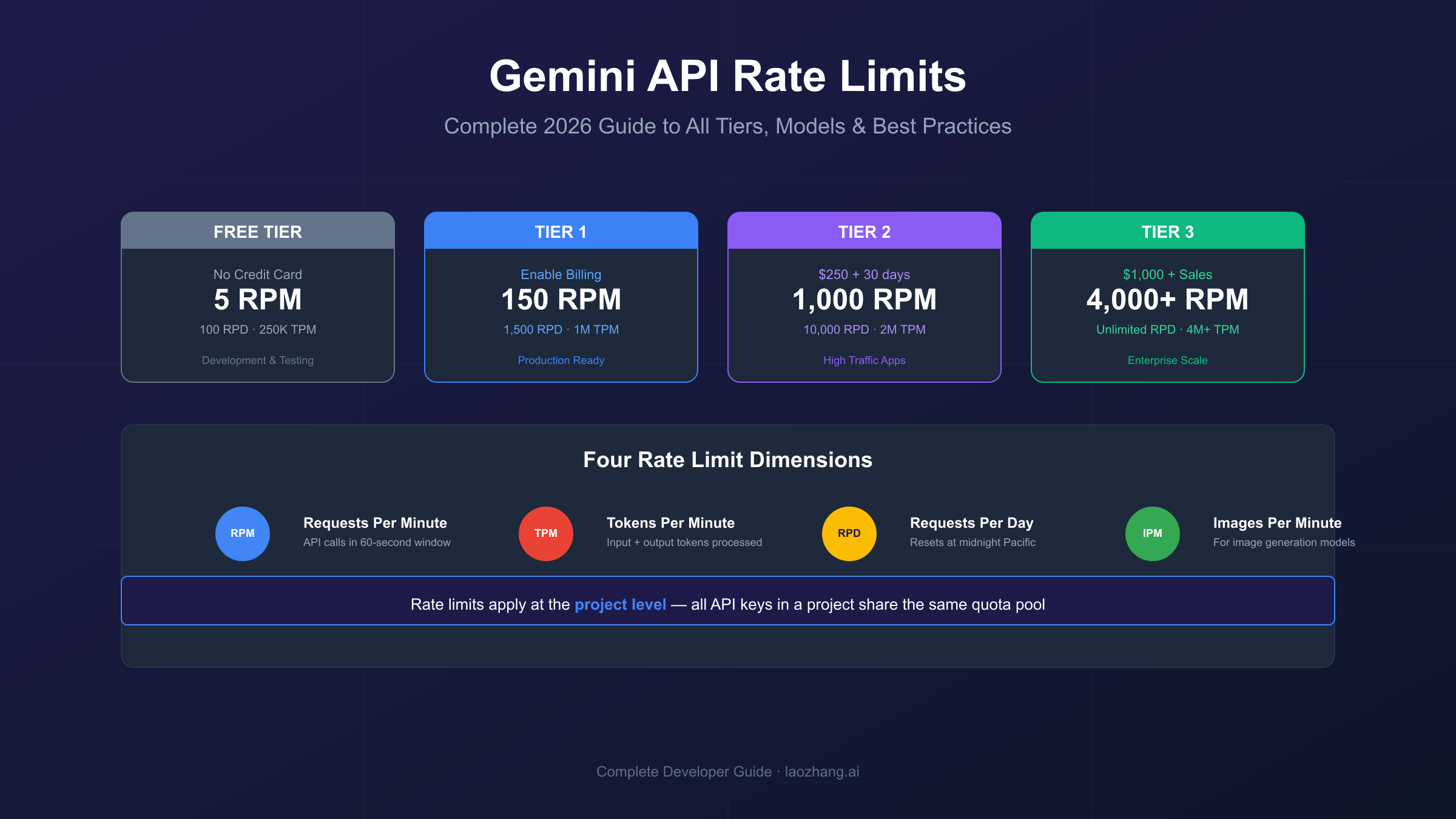
Gemini API rate limits control how many requests your application can make within specific timeframes. Google enforces four types: RPM (requests per minute), TPM (tokens per minute), RPD (requests per day), and IPM (images per minute). These limits apply at the project level—not per API key—meaning all keys in your Google Cloud project share the same quota pool.
Rate limits exist for good reasons. They protect Google's infrastructure from overload, ensure fair access across millions of developers, and prevent abuse that could degrade service quality for everyone. When you exceed any limit, the API returns a 429 RESOURCE_EXHAUSTED error, temporarily blocking further requests until the relevant time window resets.
Understanding each limit type helps you design applications that stay within bounds:
RPM (Requests Per Minute) caps how many API calls you can make in any 60-second window, regardless of request size. Even a simple "Hello" prompt counts the same as a complex multi-turn conversation. This limit typically causes the most 429 errors because it's easy to exceed during development or when handling user bursts.
TPM (Tokens Per Minute) limits the total number of tokens (input plus output) processed per minute. A token roughly equals 4 characters in English or 2-3 characters in Chinese. Large prompts or detailed responses consume more of this quota. The Gemini 2.5 models with their 1 million token context windows can hit TPM limits quickly if you're sending massive contexts.
RPD (Requests Per Day) sets a hard daily cap that resets at midnight Pacific Time. This prevents gradual accumulation from exhausting your entire day's quota. Free tier users are most affected by RPD limits, which dropped significantly in December 2025.
IPM (Images Per Minute) applies specifically to image-capable models like Gemini 2.0 Flash with native image generation. Each generated image counts against this separate quota, regardless of resolution.
A critical misconception trips up many developers: creating multiple API keys does not increase your limits. All keys within the same Google Cloud project share a single quota pool. If you need more capacity, you must either upgrade your tier or distribute workload across separate projects (each with its own billing account).
Current Rate Limit Tiers: Free, Tier 1, Tier 2, and Tier 3
Google's Gemini API offers four tiers with progressively higher limits. Free tier requires no billing but caps RPM at 5-15. Tier 1 unlocks instantly when you enable Cloud Billing, offering 150-300 RPM. Tier 2 requires $250+ cumulative GCP spend and 30 days for 1,000 RPM. Tier 3 provides unlimited daily requests but requires $1,000+ spend and sales team contact.
Each tier serves different use cases:
Free Tier: Development and Prototyping
The free tier requires no credit card and works in eligible countries. It's genuinely free—not a trial with expiring credits. You get access to frontier models including Gemini 2.5 Pro and the full 1 million token context window. However, the strict limits (5 RPM for Pro models, 15 RPM for Flash) make it unsuitable for anything beyond testing and personal projects.
The free tier resets daily at midnight Pacific Time. Once you hit your RPD limit, you're done for the day unless you upgrade.
Tier 1: Production Entry Point
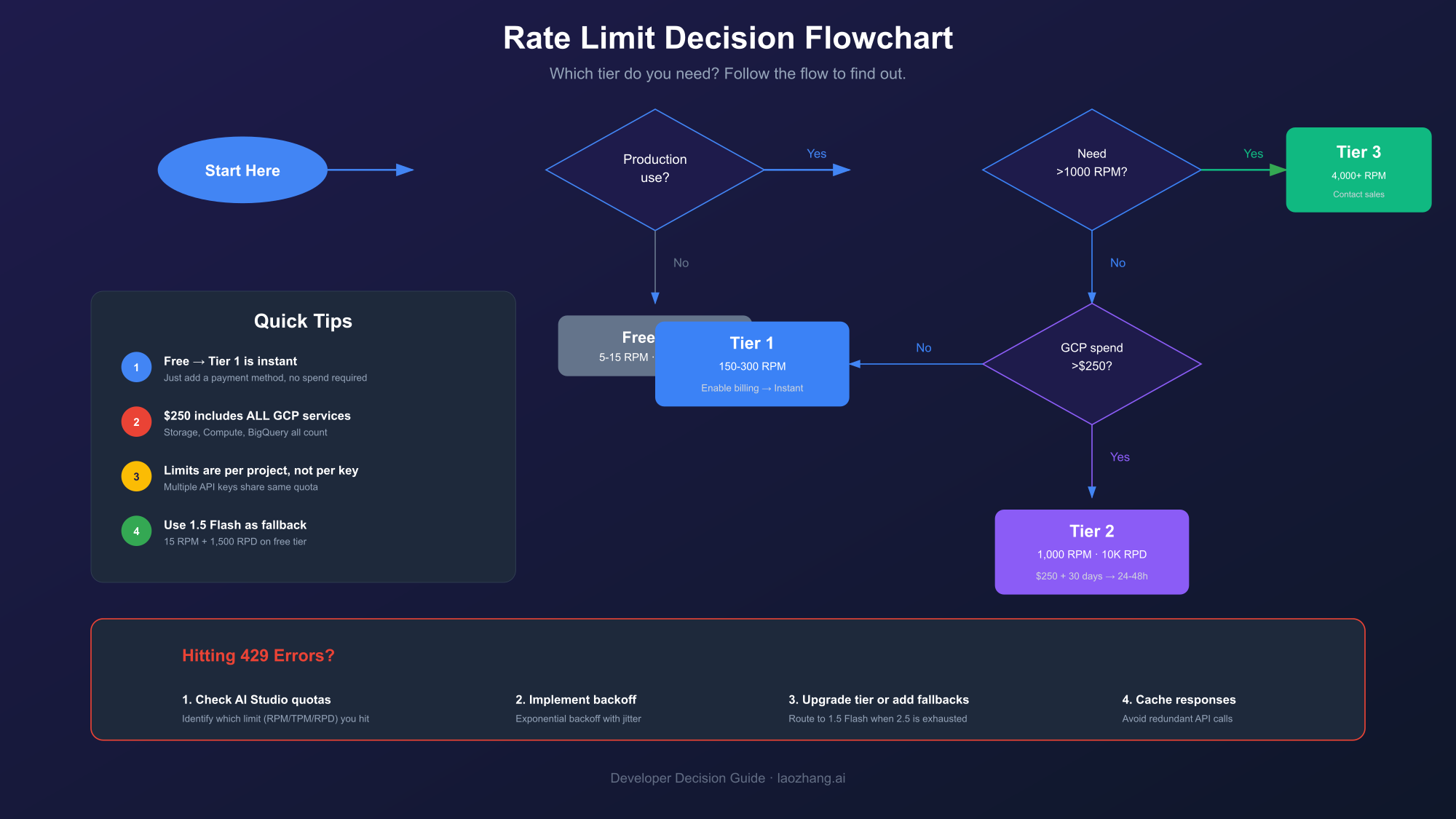
Tier 1 activates instantly when you enable Cloud Billing in Google Cloud Console. You don't need to spend anything—just adding a valid payment method unlocks the tier. This represents a 30x improvement over free tier limits, jumping from 5 RPM to 150 RPM for Pro models.
For most startups and small applications, Tier 1 provides sufficient capacity. The 1,500 RPD limit allows roughly one request per minute across a full day, which handles moderate traffic levels comfortably.
Tier 2: Scaling Applications
Tier 2 requires $250+ cumulative GCP spend (across any Google Cloud services, not just Gemini) and 30 days of billing history. Once qualified, activation happens automatically within 24-48 hours. The 1,000 RPM limit and 10,000 RPD support high-traffic applications, batch processing, and multi-user platforms.
The spending requirement includes all GCP services—Cloud Storage, Compute Engine, BigQuery, etc. If your organization already uses Google Cloud, you may already qualify without additional Gemini spending.
Tier 3: Enterprise Scale
Tier 3 is designed for enterprise applications requiring maximum throughput. With 4,000+ RPM and essentially unlimited daily requests, it handles the most demanding workloads. Qualification requires $1,000+ GCP spend, 30 days of history, and direct contact with Google Cloud sales for custom arrangements.
Tier 3 customers often receive dedicated support, custom SLAs, and occasionally negotiated pricing. If your application serves millions of users or processes enterprise-scale data, this tier ensures you won't hit quota walls.
| Tier | Requirements | RPM (Pro) | RPM (Flash) | RPD | Activation |
|---|---|---|---|---|---|
| Free | Eligible country | 5 | 10-15 | 100 | Immediate |
| Tier 1 | Enable billing | 150 | 300 | 1,500 | Immediate |
| Tier 2 | $250 + 30 days | 1,000 | 1,000 | 10,000 | 24-48 hours |
| Tier 3 | $1,000 + sales | 4,000+ | 4,000+ | Unlimited | Custom |
Model-Specific Rate Limits: 2.5 Pro, 2.5 Flash, 2.0 Flash, and 1.5 Series
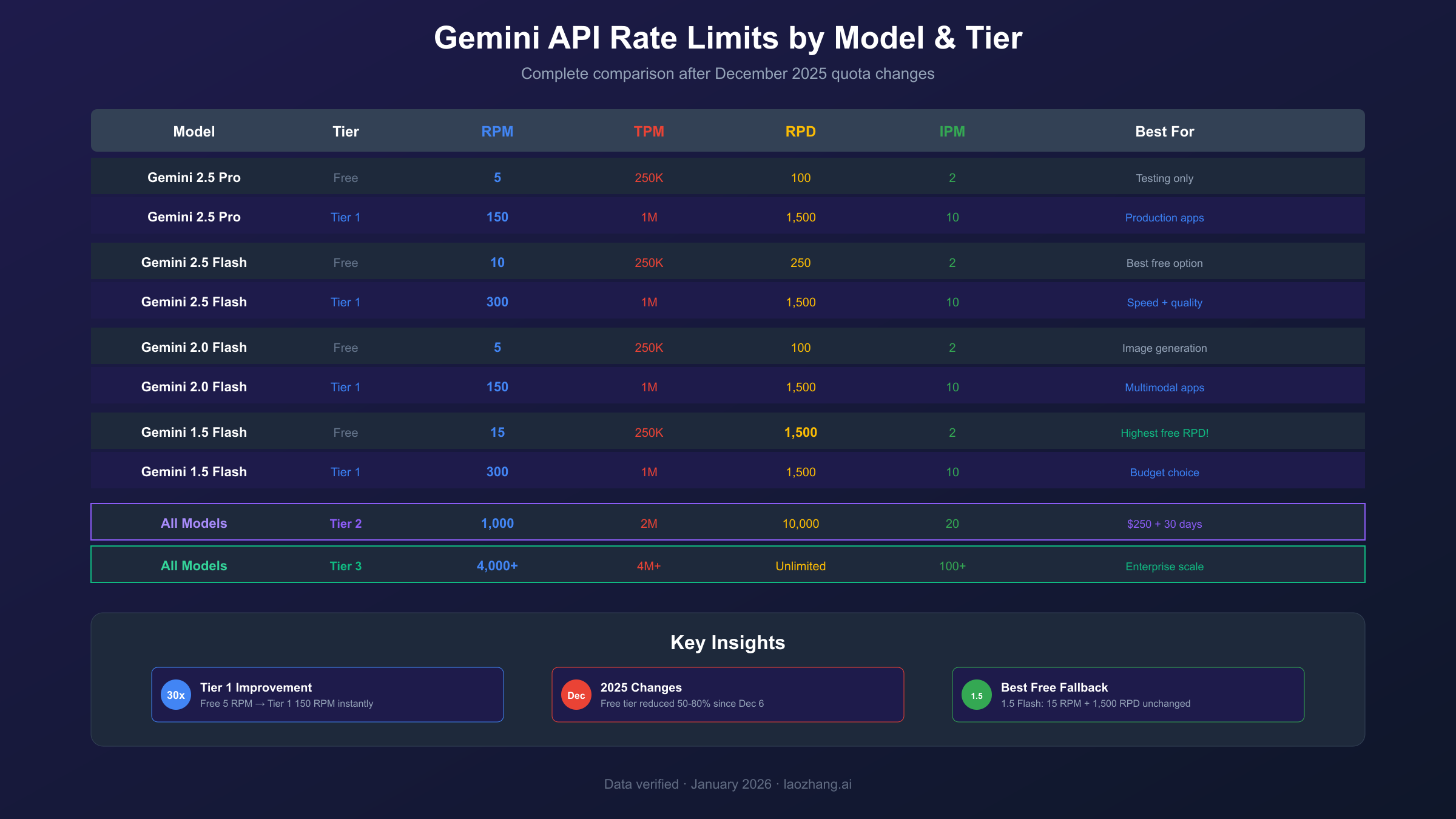
Rate limits vary significantly by model. Gemini 2.5 Pro has stricter limits (5 RPM free tier) because it consumes more resources per request. Gemini 2.5 Flash offers 10 RPM free tier with similar capabilities. Gemini 1.5 Flash provides the highest free tier limits at 15 RPM and 1,500 RPD, making it the most generous option for budget-conscious developers.
Understanding model differences helps you choose wisely:
Gemini 2.5 Pro
The flagship model offers the best reasoning capabilities but has the strictest free tier limits. At 5 RPM and 100 RPD on free tier, you can only make one request every 12 seconds and hit the daily cap after just 100 calls. The 250,000 TPM limit supports moderately sized conversations, but complex multi-turn interactions can exhaust this quickly.
Tier 1 unlocks 150 RPM, making Gemini 2.5 Pro viable for production. The dramatic improvement explains why many developers upgrade immediately after validating their prototype works.
Gemini 2.5 Flash
The balanced choice for most applications, Flash delivers strong performance at lower resource costs. Free tier offers 10 RPM (double the Pro model) and the same 100 RPD. For applications where speed matters more than peak intelligence, Flash represents the sweet spot.
The Flash-Lite variant pushes this further, offering the highest free tier throughput at 15 RPM and the lowest cost per token. It's excellent for high-volume, simpler tasks.
Gemini 2.0 Flash
Still widely used, Gemini 2.0 Flash offers native image generation capabilities that newer models are still developing. Image generation adds IPM (images per minute) limits—typically 2 IPM on free tier, scaling to 10+ on paid tiers.
If you're building image generation features, check both the standard rate limits and IPM specifically. Our detailed guide on Gemini image generation 429 errors covers image-specific quota management.
Gemini 1.5 Series
Legacy but still supported, the 1.5 series offers the highest free tier limits at 15 RPM and 1,500 RPD. Google maintained these limits through the December 2025 changes, making 1.5 Flash a viable fallback when newer models hit quota walls.
For prototypes or cost-sensitive applications, consider routing simpler requests to 1.5 Flash while reserving 2.5 Pro for tasks requiring peak intelligence.
| Model | Free RPM | Free RPD | Free TPM | Tier 1 RPM | Tier 1 TPM |
|---|---|---|---|---|---|
| Gemini 2.5 Pro | 5 | 100 | 250,000 | 150 | 1,000,000 |
| Gemini 2.5 Flash | 10 | 250 | 250,000 | 300 | 1,000,000 |
| Gemini 2.5 Flash-Lite | 15 | 1,000 | 250,000 | 300 | 1,000,000 |
| Gemini 2.0 Flash | 5 | 100 | 250,000 | 150 | 1,000,000 |
| Gemini 1.5 Flash | 15 | 1,500 | 250,000 | 300 | 1,000,000 |
| Gemini 1.5 Pro | 5 | 100 | 250,000 | 150 | 1,000,000 |
December 2025 Rate Limit Changes: What Happened and Why
On December 6-7, 2025, Google quietly reduced free tier quotas by 50-80%, causing widespread 429 errors. Gemini 2.5 Pro RPM dropped from 10 to 5; daily limits fell from 500 to 100 RPD. Google's AI Studio PM explained this was due to "at scale fraud and abuse" and the free tier persisting longer than the originally planned single weekend.
The changes blindsided the developer community. Applications that had run smoothly for months suddenly failed without any code changes. Developers tagged CEO Sundar Pichai on social media, frustrated by the lack of advance notice.
The Timeline
Friday, December 6, 2025: Developers begin reporting 429 errors in previously working applications. GitHub issues and forum posts multiply rapidly.
Saturday, December 7, 2025: Community confirms this isn't isolated. Production systems fail mid-deployment. Some teams estimate downtime costs of $500-$2,000 per hour while scrambling to implement workarounds.
Monday, December 8, 2025: Google's status page acknowledges the issue, though framing it as a quota adjustment rather than outage.
Mid-December 2025: Logan Kilpatrick, Google's Lead Product Manager for AI Studio, provides context in a developer forum post. The Gemini 2.5 Pro free tier was "originally only supposed to be available for a single weekend" but persisted for months. Restrictions were accelerated due to fraud and the launch of new models straining infrastructure.
Before vs After Comparison
| Model | Metric | Before Dec 2025 | After Dec 2025 | Change |
|---|---|---|---|---|
| Gemini 2.5 Pro | RPM | 10 | 5 | -50% |
| Gemini 2.5 Pro | RPD | ~200-500 | 100 | -50% to -80% |
| Gemini 2.5 Flash | RPM | 15 | 10 | -33% |
| Gemini 2.5 Flash | RPD | ~500 | 250 | -50% |
| Gemini 1.5 Flash | RPM | 15 | 15 | No change |
| Gemini 1.5 Flash | RPD | 1,500 | 1,500 | No change |
Impact and Lessons
If your application suddenly started failing in December 2025, these changes are the likely cause. The reduced limits require rethinking your architecture:
- Rate-limit your client: Don't rely on the API to throttle you—implement client-side limits
- Have fallbacks ready: Route to 1.5 Flash when 2.5 models hit quota
- Consider paid tiers: The gap between free and Tier 1 widened significantly
- Monitor proactively: Set up alerts before hitting limits, not after
For a deeper dive into fixing these errors, see our comprehensive Gemini API quota exceeded fix guide.
How to Check Your Current Rate Limits in AI Studio
Check your rate limits in Google AI Studio by navigating to your project settings and viewing the Quotas tab. The dashboard shows real-time usage against each limit (RPM, TPM, RPD) and indicates which tier you're currently on. When hitting 429 errors, this view helps identify exactly which limit triggered the error.
The process takes just a few steps:
Step 1: Access AI Studio
Navigate to aistudio.google.com and sign in with your Google account. Ensure you're viewing the correct project—the dropdown in the top-left shows your current project.
Step 2: Open Settings
Click the gear icon or navigate to Settings → API Keys → View Quotas. This displays your current tier and associated limits.
Step 3: Interpret the Dashboard
The quota dashboard shows three key sections:
Current Tier: Displays Free, Tier 1, Tier 2, or Tier 3, along with qualification requirements for the next tier.
Usage Metrics: Real-time graphs showing RPM, TPM, and RPD consumption over the past hour and day.
Limit Details: Specific numbers for each model, letting you compare actual limits against your usage patterns.
Programmatic Quota Checking
For production applications, you may want to check quotas programmatically. While Google doesn't provide a direct API for this, you can infer quota status from error responses:
hljs pythonfrom google import generativeai as genai
import time
def check_quota_status(model_name="gemini-2.5-flash"):
"""Check if quota is available by making a minimal request"""
try:
model = genai.GenerativeModel(model_name)
# Minimal request to test quota
response = model.generate_content("test")
return {"status": "available", "response": response}
except Exception as e:
if "RESOURCE_EXHAUSTED" in str(e):
return {"status": "quota_exceeded", "error": str(e)}
return {"status": "error", "error": str(e)}
This approach lets you detect quota issues before they impact users, enabling graceful degradation.
Understanding 429 RESOURCE_EXHAUSTED Errors
The 429 RESOURCE_EXHAUSTED error indicates your project exceeded a rate limit. The response includes a 'retryDelay' field showing how long to wait before retrying. Common causes include too many requests per minute (RPM), too many tokens processed (TPM), or hitting daily limits (RPD). Creating additional API keys won't help—limits apply at the project level.
When you receive a 429 error, the response body contains useful information:
hljs json{
"error": {
"code": 429,
"message": "You exceeded your current quota, please check your plan and billing details.",
"status": "RESOURCE_EXHAUSTED",
"details": [
{
"@type": "type.googleapis.com/google.rpc.RetryInfo",
"retryDelay": "15.002899939s"
}
]
}
}
The retryDelay field tells you exactly how long to wait. However, simply waiting and retrying isn't always optimal—if you're consistently hitting limits, you need a more systematic approach.
Common Causes
RPM Exceeded: Most common during development or user traffic bursts. Each API call counts as one request, regardless of complexity.
TPM Exceeded: Large prompts or responses consume tokens quickly. A single request with a 100K token context can exhaust free tier TPM in seconds.
RPD Exceeded: Gradual accumulation hits daily caps, especially on free tier. Once RPD is exhausted, you're blocked until midnight Pacific Time.
IPM Exceeded: Specific to image generation—generating multiple images rapidly triggers this limit.
Debugging Tips
When facing 429 errors, systematically determine which limit you've hit:
- Check AI Studio: The quota dashboard shows which metric is stressed
- Review timing: RPM errors resolve in 60 seconds; RPD requires waiting until midnight PT
- Analyze request sizes: Large contexts point to TPM issues
- Count image generations: IPM limits apply separately from text limits
Understanding the specific limit helps you choose the right mitigation strategy.
Implementing Exponential Backoff and Retry Logic
Exponential backoff is the recommended strategy for handling 429 errors. Start with a 1-second delay, then double it after each failure (2s, 4s, 8s...) up to a maximum. Add random jitter to prevent thundering herd problems. In Python, use the tenacity library; in JavaScript, implement with setTimeout or use axios-retry.
Proper retry logic distinguishes production-quality applications from fragile prototypes. Here's how to implement it correctly:
Python Implementation with Tenacity
hljs pythonfrom tenacity import (
retry,
stop_after_attempt,
wait_exponential,
retry_if_exception_type
)
from google import generativeai as genai
import google.api_core.exceptions
# Configure retry behavior
@retry(
stop=stop_after_attempt(5),
wait=wait_exponential(multiplier=1, min=1, max=60),
retry=retry_if_exception_type(google.api_core.exceptions.ResourceExhausted)
)
def generate_with_retry(prompt, model_name="gemini-2.5-flash"):
model = genai.GenerativeModel(model_name)
return model.generate_content(prompt)
# Usage
try:
response = generate_with_retry("Explain quantum computing")
print(response.text)
except Exception as e:
print(f"Failed after retries: {e}")
This implementation:
- Retries up to 5 times
- Starts with 1-second delay, doubles each time up to 60 seconds
- Only retries on quota errors, not on invalid requests
- Provides clean error handling when retries are exhausted
JavaScript/TypeScript Implementation
hljs javascriptasync function generateWithRetry(prompt, maxRetries = 5) {
let delay = 1000; // Start with 1 second
for (let attempt = 0; attempt < maxRetries; attempt++) {
try {
const response = await model.generateContent(prompt);
return response;
} catch (error) {
if (error.status === 429 && attempt < maxRetries - 1) {
// Add jitter: random delay between 0-50% of base delay
const jitter = Math.random() * delay * 0.5;
await new Promise(resolve => setTimeout(resolve, delay + jitter));
delay *= 2; // Double for next attempt
} else {
throw error;
}
}
}
}
Best Practices
Add jitter: Random variation prevents synchronized retries from multiple clients, which can cause "thundering herd" problems.
Set maximum delays: Don't let backoff grow indefinitely—60 seconds is typically sufficient for rate limits to reset.
Distinguish error types: Only retry on quota errors (429). Other errors (400, 500) require different handling.
Log attempts: Track retry patterns to identify systematic quota issues requiring architectural changes.
How to Upgrade Your Tier and What to Expect
Upgrade to Tier 1 instantly by enabling Cloud Billing in Google Cloud Console—no spending required, just a valid payment method. Tier 2 activates automatically within 24-48 hours after reaching $250 cumulative GCP spend (any Google Cloud service counts) and maintaining 30 days of billing history. Tier 3 requires contacting Google Cloud sales.
Tier 1 Upgrade Process
The easiest upgrade—and often sufficient for production applications:
- Navigate to console.cloud.google.com
- Select your project or create a new one
- Go to Billing → Link a billing account
- Add a payment method (credit card or bank account)
- Limits upgrade immediately—no spending required
You now have 30x higher RPM limits. For many applications, this solves 429 errors permanently.
Tier 2 Qualification
Tier 2 requires meeting two conditions:
Spending threshold: $250 cumulative across all GCP services. This includes:
- Gemini API usage
- Cloud Storage
- Compute Engine
- BigQuery
- Any other billable GCP service
If your organization already uses Google Cloud, you may already qualify without additional Gemini spending.
Time requirement: 30 days of active billing history. New accounts must wait regardless of spend amount.
Once qualified, Tier 2 activates automatically within 24-48 hours. You'll see the tier change reflected in AI Studio's quota dashboard.
Tier 3 and Enterprise Needs
For applications requiring Tier 3 limits:
- Ensure you meet Tier 2 requirements ($250+ and 30 days)
- Reach $1,000+ cumulative GCP spend
- Contact Google Cloud sales through the console
- Discuss custom requirements (SLAs, dedicated support, negotiated pricing)
Enterprise arrangements often include benefits beyond raw limits—dedicated technical contacts, priority support, and sometimes volume discounts.
Common Issues
Billing not linked correctly: Ensure the billing account is linked to the specific project calling the Gemini API.
Wrong project: AI Studio and Cloud Console use the same projects—verify you're upgrading the right one.
Time requirement not met: Even with $250+ spend, you must wait 30 days for Tier 2.
Production Best Practices for Rate Limit Management
For production applications, implement request queues to stay within RPM limits, use response caching to avoid redundant API calls, and leverage Context Caching for repeated system prompts. Consider Batch API (50% cost savings) for non-time-sensitive requests. Set up monitoring to alert before hitting limits and implement graceful degradation when quotas are exhausted.
Request Queuing
Implement a queue that limits concurrent requests and enforces minimum delays between calls:
hljs pythonimport asyncio
from collections import deque
class RateLimitedQueue:
def __init__(self, rpm_limit=150):
self.queue = deque()
self.rpm_limit = rpm_limit
self.min_delay = 60.0 / rpm_limit # Seconds between requests
self.last_request_time = 0
async def add_request(self, request_func):
self.queue.append(request_func)
await self._process_queue()
async def _process_queue(self):
while self.queue:
now = asyncio.get_event_loop().time()
wait_time = self.last_request_time + self.min_delay - now
if wait_time > 0:
await asyncio.sleep(wait_time)
request_func = self.queue.popleft()
self.last_request_time = asyncio.get_event_loop().time()
await request_func()
Response Caching
Cache responses to avoid redundant API calls for identical or similar requests:
hljs pythonfrom functools import lru_cache
import hashlib
@lru_cache(maxsize=1000)
def cached_generate(prompt_hash):
"""Cache based on prompt hash"""
# Actual API call happens here
pass
def generate_with_cache(prompt):
prompt_hash = hashlib.md5(prompt.encode()).hexdigest()
return cached_generate(prompt_hash)
For production, use Redis or similar for distributed caching that persists across deployments.
Context Caching
Gemini's Context Caching feature reduces token costs for repeated system prompts. If you send the same large context with multiple queries, caching avoids reprocessing those tokens each time. This reduces both costs (90% discount on cached tokens) and TPM consumption.
Batch API Usage
For non-urgent requests, the Batch API offers 50% cost savings and separate quota pools. Instead of real-time requests, you submit batches that process within 24 hours. This is ideal for:
- Content preprocessing
- Bulk document analysis
- Training data generation
- Non-interactive workloads
Graceful Degradation
When quotas are exhausted, fail gracefully rather than crashing:
hljs pythondef generate_with_fallback(prompt, primary_model="gemini-2.5-pro"):
fallback_models = ["gemini-2.5-flash", "gemini-1.5-flash"]
for model in [primary_model] + fallback_models:
try:
return generate_with_retry(prompt, model)
except ResourceExhausted:
continue
# All models exhausted - degrade gracefully
return {"error": "Service temporarily unavailable", "retry_after": 60}
Monitoring and Alerting
Set up monitoring that alerts before you hit limits, not after:
- Track RPM, TPM, RPD usage in real-time
- Alert at 80% threshold to allow proactive response
- Log all 429 errors with context for analysis
- Dashboard quota usage trends over time
Gemini vs OpenAI vs Claude: Rate Limit Comparison
Gemini offers the most generous free tier among major AI APIs—truly free with no credit card required and access to frontier models like Gemini 2.5 Pro. OpenAI's free credits expire after 3 months, while Claude requires immediate payment. For paid tiers, Gemini's Tier 1 (150 RPM) matches OpenAI's Tier 1, but Gemini's 1 million token context window far exceeds competitors.
Free Tier Comparison
| Provider | Free Access | Credit Card | Model Access | Context Window |
|---|---|---|---|---|
| Gemini | Ongoing | Not required | 2.5 Pro, Flash | 1 million tokens |
| OpenAI | $5 expiring | Required | GPT-3.5, limited GPT-4 | 128K tokens |
| Claude | None | Required | N/A | N/A |
Gemini's free tier stands out for several reasons:
No expiration: Unlike OpenAI's 3-month credit expiry, Gemini's free tier persists indefinitely.
No credit card: Truly free access without payment information. OpenAI and Claude require cards even for trial access.
Frontier model access: Free access to Gemini 2.5 Pro—the flagship model—not just a limited version.
Massive context: The 1 million token context window (8x OpenAI's GPT-4) enables use cases impossible on other platforms.
Paid Tier Comparison
For paid tiers, the platforms converge somewhat:
Tier 1 equivalents: Gemini's 150 RPM matches OpenAI's typical Tier 1 limits. Claude offers similar ranges depending on usage.
Enterprise tiers: All three offer custom enterprise arrangements with negotiated limits and pricing.
Pricing structure: Gemini and OpenAI use token-based pricing; Claude adds message-based options. Direct cost comparison requires analyzing your specific workload.
When to Choose Which
Choose Gemini when:
- You need the largest context window (1M tokens)
- Free tier access to frontier models matters
- You're already using Google Cloud services
- Multimodal capabilities (image generation) are important
Choose OpenAI when:
- Widest ecosystem and library support matters
- GPT-4's specific capabilities fit your use case
- You need the most battle-tested production infrastructure
Choose Claude when:
- Longest context window for text-only tasks
- Anthropic's safety approach aligns with your needs
- Constitutional AI features matter for your use case
For developers needing flexibility across multiple models, third-party aggregation platforms can simplify switching between providers while maintaining a single integration point.
Conclusion: Mastering Gemini API Rate Limits
Rate limits shape how you architect AI applications. Understanding Gemini's four-tier system, model-specific quotas, and the December 2025 changes lets you build applications that scale smoothly rather than crash unexpectedly. The key takeaways:
Know your limits: Free tier offers 5-15 RPM depending on model; Tier 1 jumps to 150+ RPM instantly when you enable billing.
Implement proper error handling: Exponential backoff with jitter handles transient 429 errors gracefully.
Design for quotas: Request queuing, caching, and graceful degradation keep applications running when limits are stressed.
Upgrade strategically: Tier 1 requires only enabling billing (no spending); Tier 2 needs $250 GCP spend over 30 days.
Monitor proactively: Alert at 80% usage to prevent surprises rather than reacting to failures.
For most production applications, upgrading to Tier 1 immediately after prototype validation makes sense. The 30x improvement in limits—with no required spending—removes the primary friction point for scaling. Tier 2 becomes relevant as you grow, with the $250 threshold reachable through normal GCP usage.
Rate limits will continue evolving as Google balances accessibility with infrastructure costs. Stay current with the official rate limits documentation and consider joining the Google AI Developer Forum to catch announcements early—unlike December 2025, when changes caught everyone off guard.
Build robust applications, handle errors gracefully, and your users will never know about the quota juggling happening behind the scenes.