How to Fix Gemini Image Generation Error 429: Complete Developer Guide (2025)
Complete guide to fixing Gemini API 429 RESOURCE_EXHAUSTED errors for image generation. Includes rate limit tables, Python/JavaScript code examples with exponential backoff, tier upgrade instructions, and alternative solutions for production applications.
Nano Banana Pro
4K-80%Google Gemini 3 Pro · AI Inpainting
谷歌原生模型 · AI智能修图

You're building an application with Gemini's native image generation, everything works in testing, and then production hits you with 429 RESOURCE_EXHAUSTED. Your requests are being throttled, users are seeing errors, and you need a fix—fast. This guide walks through exactly why this happens and provides battle-tested solutions that work, from quick fixes you can implement in five minutes to architectural patterns for handling rate limits at scale.
Understanding the 429 RESOURCE_EXHAUSTED Error
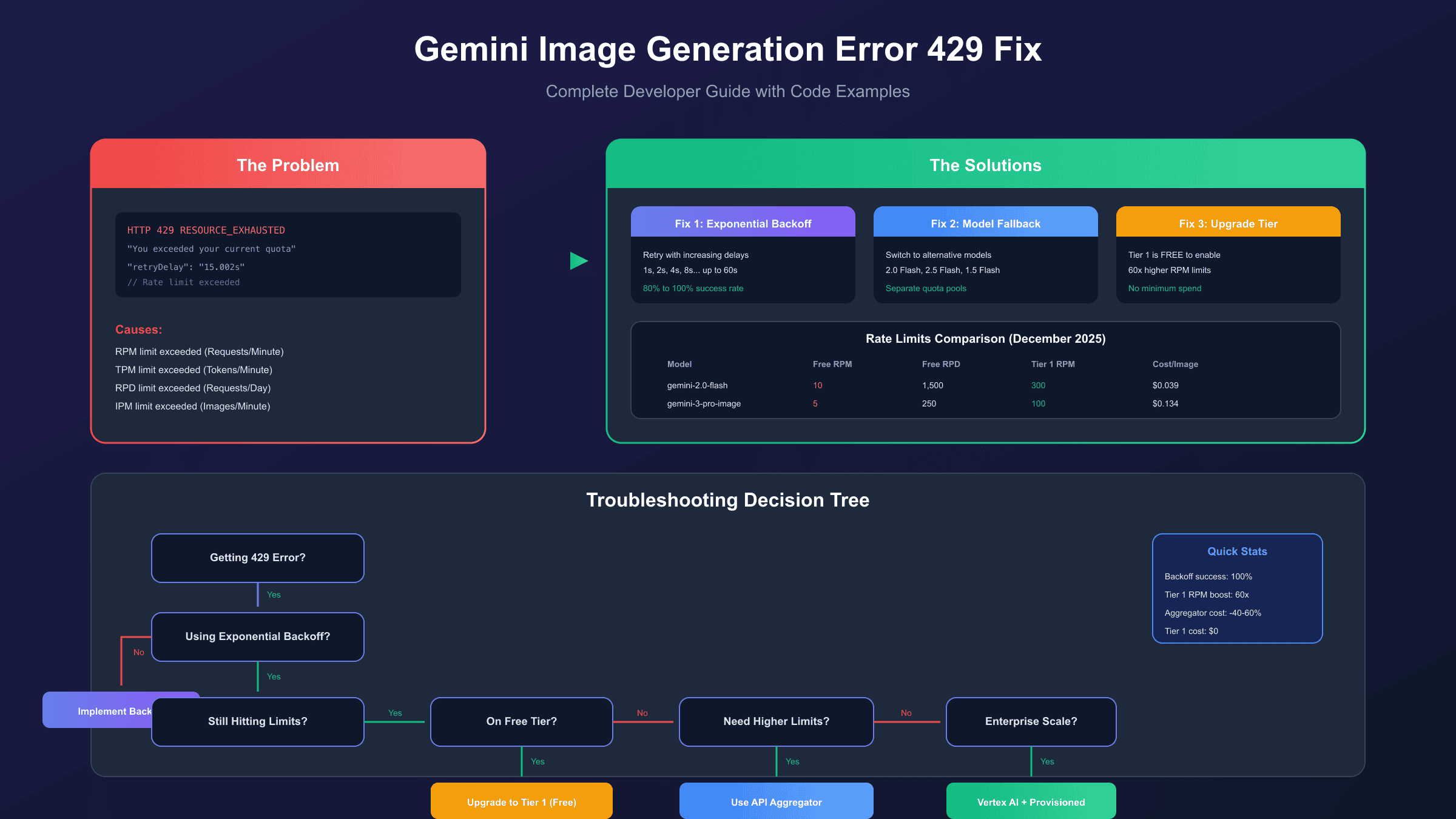
The HTTP 429 status code with RESOURCE_EXHAUSTED message means your application has exceeded one of Google's rate limits for the Gemini API. Unlike server errors (5xx), this isn't a bug in your code or a service outage—the API is working correctly, but it's protecting itself from overuse by throttling your requests.
The error response typically looks like this:
hljs json{
"error": {
"code": 429,
"message": "You exceeded your current quota, please check your plan and billing details.",
"status": "RESOURCE_EXHAUSTED",
"details": [
{
"@type": "type.googleapis.com/google.rpc.RetryInfo",
"retryDelay": "15.002899939s"
}
]
}
}
The retryDelay field tells you exactly how long to wait before trying again. However, simply waiting and retrying isn't always the best strategy—especially when you're hitting limits consistently.
Why This Error Matters for Image Generation: Gemini's native image generation (introduced in Gemini 2.0 Flash) consumes significantly more resources than text generation. Each generated image counts as 1,290 output tokens regardless of resolution, which means you'll hit token limits faster than you might expect. Additionally, Google enforces an Images Per Minute (IPM) limit specifically for image-capable models.
Rate Limit Types Explained
The Gemini API enforces four independent rate limit dimensions. Exceeding any single one triggers a 429 error, so understanding each is crucial:
| Limit Type | Description | Impact on Image Generation |
|---|---|---|
| RPM (Requests Per Minute) | Maximum API calls per minute | Each image generation = 1 request |
| TPM (Tokens Per Minute) | Combined input + output tokens | Each image = 1,290 output tokens |
| RPD (Requests Per Day) | Daily request cap, resets at midnight PT | Hard limit for free tier |
| IPM (Images Per Minute) | Image outputs per minute | Specific to Imagen and Gemini image models |
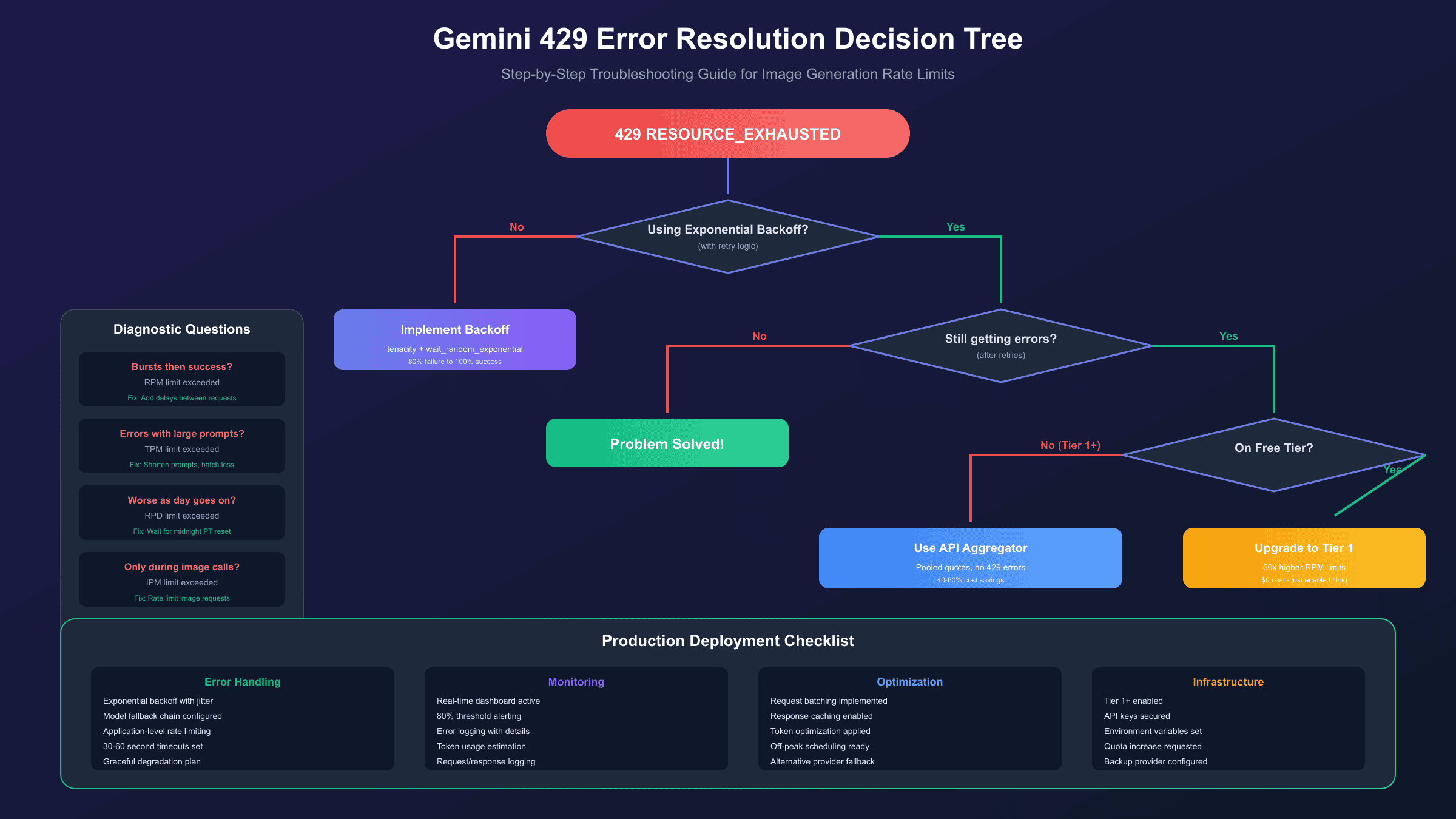
Diagnosing Which Limit You're Hitting:
- Bursts of errors followed by success: You're hitting RPM limits
- Errors correlate with prompt/image size: You're hitting TPM limits
- Errors increase throughout the day, clear after midnight PT: You've exhausted RPD
- Only happens with image generation calls: IPM is your bottleneck
Most developers hit RPM limits first, especially with the free tier's restrictive 5-10 RPM for image generation models.
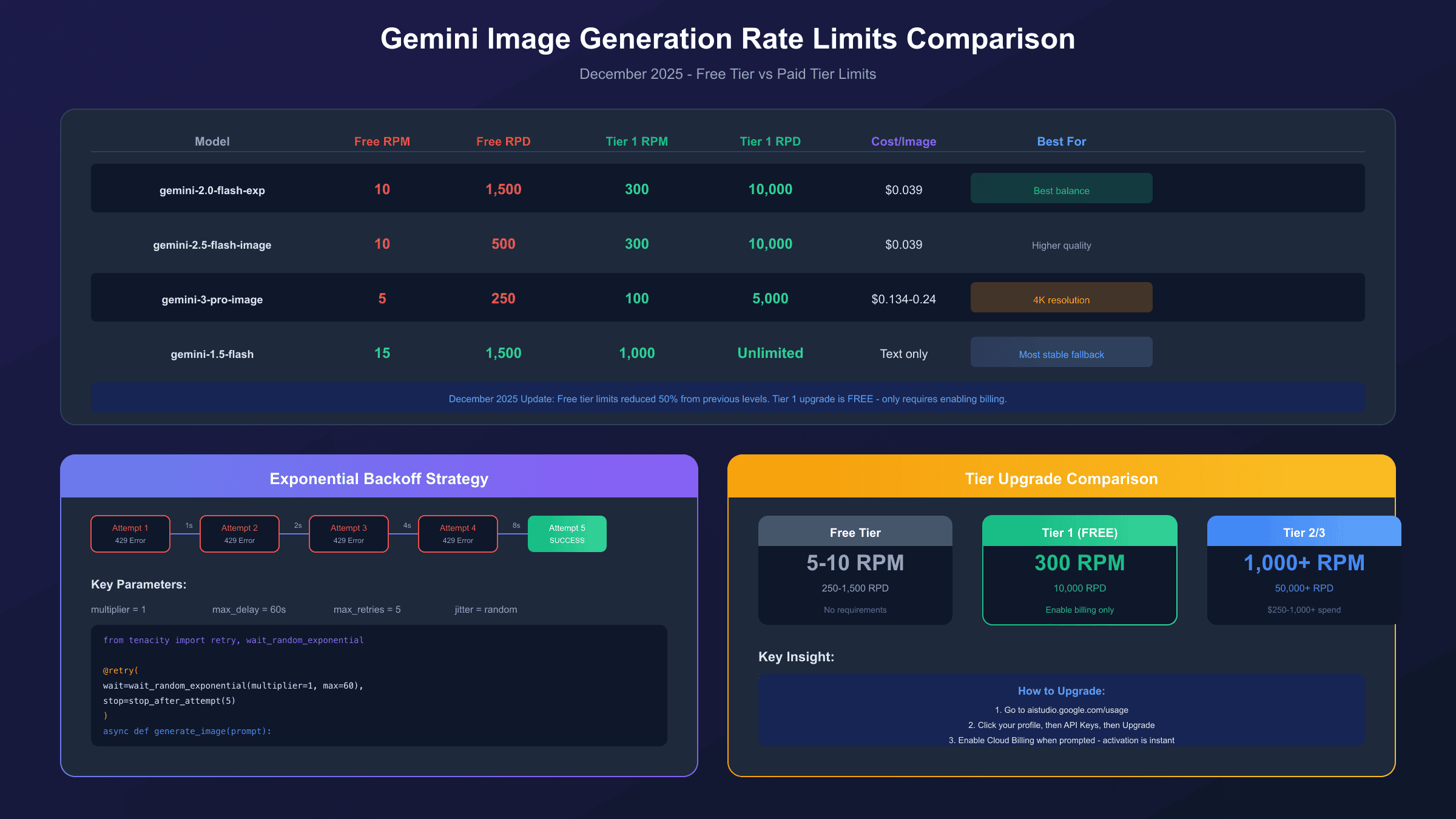
Current Gemini Image Generation Rate Limits (December 2025)
Google significantly reduced free tier limits in December 2025, which caught many developers off guard. Here are the current limits for image-capable models:
| Model | Free Tier RPM | Free Tier RPD | Tier 1 RPM | Cost Per Image |
|---|---|---|---|---|
| gemini-2.0-flash | 10 | 1,500 | 300 | $0.039 |
| gemini-2.5-flash-image | 10 | 500 | 300 | $0.039 |
| gemini-3-pro-image-preview | 5 | 250 | 100 | $0.134 (1K) / $0.24 (4K) |
| imagen-4.0 | 10 | 500 | 300 | $0.02-0.06 |
Key Changes in December 2025:
- Gemini 2.5 Pro: 10 → 5 RPM (50% reduction)
- Gemini 2.5 Flash: ~500 → 250 RPD
- Known issue: "Ghost 429s" occur on Gemini 2.5 family models even with unused quota (GitHub Issue #4500, marked as priority)
Rate limits apply at the project level, not per API key. Creating multiple API keys within the same Google Cloud project won't increase your limits—they all share the same quota pool.
Immediate Fix #1: Exponential Backoff with Jitter
Exponential backoff is the single highest-impact fix you can implement. It automatically retries failed requests with progressively longer wait times, handling temporary rate limit spikes gracefully.
Python Implementation
Using the tenacity library for robust retry logic:
hljs pythonimport time
from tenacity import retry, wait_random_exponential, stop_after_attempt, retry_if_exception_type
from google import genai
from google.genai import types
client = genai.Client(api_key="YOUR_API_KEY")
@retry(
wait=wait_random_exponential(multiplier=1, max=60),
stop=stop_after_attempt(5),
retry=retry_if_exception_type(Exception)
)
def generate_image_with_retry(prompt: str) -> bytes:
"""
Generate an image with automatic retry on rate limit errors.
wait_random_exponential(multiplier=1, max=60) means:
- Wait randomly up to 2^x * 1 seconds between retries
- Cap maximum wait at 60 seconds
"""
response = client.models.generate_content(
model="gemini-2.0-flash-exp",
contents=prompt,
config=types.GenerateContentConfig(
response_modalities=["TEXT", "IMAGE"]
)
)
for part in response.candidates[0].content.parts:
if part.inline_data:
return part.inline_data.data
raise ValueError("No image generated")
# Usage
try:
image_data = generate_image_with_retry("A serene mountain landscape at sunset")
with open("output.png", "wb") as f:
f.write(image_data)
except Exception as e:
print(f"Failed after retries: {e}")
JavaScript/Node.js Implementation
Using the p-retry package:
hljs javascriptimport { GoogleGenAI } from "@google/genai";
import pRetry from "p-retry";
import fs from "fs/promises";
const ai = new GoogleGenAI({ apiKey: process.env.GEMINI_API_KEY });
async function generateImageWithRetry(prompt) {
return pRetry(
async () => {
const response = await ai.models.generateContent({
model: "gemini-2.0-flash-exp",
contents: prompt,
config: {
responseModalities: ["TEXT", "IMAGE"],
},
});
const parts = response.candidates[0].content.parts;
for (const part of parts) {
if (part.inlineData) {
return Buffer.from(part.inlineData.data, "base64");
}
}
throw new Error("No image generated");
},
{
retries: 5,
minTimeout: 1000,
maxTimeout: 60000,
factor: 2,
randomize: true,
onFailedAttempt: (error) => {
console.log(
`Attempt ${error.attemptNumber} failed. ${error.retriesLeft} retries left.`
);
},
}
);
}
// Usage
const imageData = await generateImageWithRetry("A futuristic cityscape");
await fs.writeFile("output.png", imageData);
Why Jitter Matters: Adding randomness to retry delays prevents the "thundering herd" problem where multiple clients retry simultaneously after a shared cooldown period, causing another spike.
Immediate Fix #2: Switch to Alternative Models
Each Gemini model has separate rate limit quotas. When you hit limits on one model, switching to another can provide immediate relief:
| Scenario | Primary Model | Fallback Model | Reason |
|---|---|---|---|
| Maximum stability | gemini-2.0-flash | gemini-1.5-flash | 1.5 Flash has highest free tier limits, unaffected by Dec 2025 issues |
| Image generation | gemini-2.0-flash-exp | gemini-2.5-flash-image | Different quota pools |
| Quality priority | gemini-3-pro-image | gemini-2.5-flash-image | Lower cost per image |
Implementing Model Fallback in Python
hljs pythonfrom google import genai
from google.genai import types
client = genai.Client(api_key="YOUR_API_KEY")
MODEL_FALLBACK_CHAIN = [
"gemini-2.0-flash-exp",
"gemini-2.5-flash-image",
"gemini-1.5-flash", # Text-only fallback
]
async def generate_with_fallback(prompt: str):
"""Try models in order until one succeeds."""
last_error = None
for model in MODEL_FALLBACK_CHAIN:
try:
response = client.models.generate_content(
model=model,
contents=prompt,
config=types.GenerateContentConfig(
response_modalities=["TEXT", "IMAGE"] if "image" in model or "flash-exp" in model else ["TEXT"]
)
)
return response
except Exception as e:
if "429" in str(e) or "RESOURCE_EXHAUSTED" in str(e):
print(f"{model} rate limited, trying next...")
last_error = e
continue
raise # Re-raise non-rate-limit errors
raise last_error or Exception("All models exhausted")
Upgrading Your Tier: Free → Tier 1 → Tier 2
Upgrading to Tier 1 is completely free and provides a 60x increase in RPM limits. This is often the most effective solution for production applications.
Tier Comparison
| Tier | Requirements | RPM (Image Models) | RPD | Best For |
|---|---|---|---|---|
| Free | None | 5-10 | 250-1,500 | Development, testing |
| Tier 1 | Billing enabled | 300 | 10,000 | Production applications |
| Tier 2 | $250+ cumulative Cloud spend | 1,000 | 50,000 | High-volume services |
| Tier 3 | $1,000+ cumulative Cloud spend | 2,000 | 100,000 | Enterprise |
How to Upgrade to Tier 1
- Go to Google AI Studio
- Click your profile icon → "API Keys"
- For your project, click "Upgrade" (only appears if eligible)
- Enable Cloud Billing when prompted
- Pass validation checks
Important: Tier 1 only requires enabling billing—there's no minimum spend or subscription fee. You're only charged for actual API usage beyond free tier allocations, which remain generous. Most light-to-moderate users pay $0-5/month even with Tier 1 enabled.
Tier 2/3 Qualification
Higher tiers require cumulative spending across all Google Cloud services (not just Gemini API):
- Tier 2: $250+ lifetime spend + 30-day payment history
- Tier 3: $1,000+ lifetime spend + 30-day payment history
Complete Code Examples for Production
Here's a production-ready class that combines all the strategies discussed:
Python Production Client
hljs pythonimport time
import logging
from dataclasses import dataclass
from typing import Optional
from tenacity import retry, wait_random_exponential, stop_after_attempt
from google import genai
from google.genai import types
logging.basicConfig(level=logging.INFO)
logger = logging.getLogger(__name__)
@dataclass
class RateLimitConfig:
max_retries: int = 5
base_delay: float = 1.0
max_delay: float = 60.0
requests_per_minute: int = 8 # Stay 20% under limit
class GeminiImageClient:
"""Production-ready Gemini image generation client with rate limiting."""
MODELS = [
"gemini-2.0-flash-exp",
"gemini-2.5-flash-image",
]
def __init__(self, api_key: str, config: Optional[RateLimitConfig] = None):
self.client = genai.Client(api_key=api_key)
self.config = config or RateLimitConfig()
self._last_request_time = 0
self._request_count = 0
self._minute_start = time.time()
def _rate_limit(self):
"""Simple rate limiter to stay under RPM limits."""
current_time = time.time()
# Reset counter every minute
if current_time - self._minute_start >= 60:
self._request_count = 0
self._minute_start = current_time
# Wait if we've hit our self-imposed limit
if self._request_count >= self.config.requests_per_minute:
wait_time = 60 - (current_time - self._minute_start)
if wait_time > 0:
logger.info(f"Rate limiting: waiting {wait_time:.1f}s")
time.sleep(wait_time)
self._request_count = 0
self._minute_start = time.time()
self._request_count += 1
@retry(
wait=wait_random_exponential(multiplier=1, max=60),
stop=stop_after_attempt(5)
)
def _generate_single(self, prompt: str, model: str) -> bytes:
"""Generate image with single model, retrying on transient errors."""
self._rate_limit()
response = self.client.models.generate_content(
model=model,
contents=prompt,
config=types.GenerateContentConfig(
response_modalities=["TEXT", "IMAGE"]
)
)
for part in response.candidates[0].content.parts:
if part.inline_data:
return part.inline_data.data
raise ValueError("No image in response")
def generate(self, prompt: str) -> bytes:
"""
Generate image with automatic retry and model fallback.
Returns:
bytes: PNG image data
Raises:
Exception: If all models and retries are exhausted
"""
last_error = None
for model in self.MODELS:
try:
logger.info(f"Attempting generation with {model}")
return self._generate_single(prompt, model)
except Exception as e:
if "429" in str(e) or "RESOURCE_EXHAUSTED" in str(e):
logger.warning(f"{model} rate limited: {e}")
last_error = e
continue
raise
raise last_error or Exception("All models exhausted")
# Usage
client = GeminiImageClient(api_key="YOUR_API_KEY")
image_data = client.generate("A photorealistic cat wearing a tiny hat")
JavaScript/TypeScript Production Client
hljs typescriptimport { GoogleGenAI } from "@google/genai";
interface RateLimitConfig {
maxRetries: number;
baseDelayMs: number;
maxDelayMs: number;
requestsPerMinute: number;
}
const DEFAULT_CONFIG: RateLimitConfig = {
maxRetries: 5,
baseDelayMs: 1000,
maxDelayMs: 60000,
requestsPerMinute: 8,
};
class GeminiImageClient {
private client: GoogleGenAI;
private config: RateLimitConfig;
private requestTimestamps: number[] = [];
private static MODELS = [
"gemini-2.0-flash-exp",
"gemini-2.5-flash-image",
];
constructor(apiKey: string, config: Partial<RateLimitConfig> = {}) {
this.client = new GoogleGenAI({ apiKey });
this.config = { ...DEFAULT_CONFIG, ...config };
}
private async rateLimit(): Promise<void> {
const now = Date.now();
const oneMinuteAgo = now - 60000;
// Remove timestamps older than 1 minute
this.requestTimestamps = this.requestTimestamps.filter(
(t) => t > oneMinuteAgo
);
if (this.requestTimestamps.length >= this.config.requestsPerMinute) {
const oldestInWindow = this.requestTimestamps[0];
const waitTime = oldestInWindow + 60000 - now;
if (waitTime > 0) {
console.log(`Rate limiting: waiting ${waitTime}ms`);
await new Promise((resolve) => setTimeout(resolve, waitTime));
}
}
this.requestTimestamps.push(Date.now());
}
private async generateSingle(
prompt: string,
model: string,
attempt: number = 0
): Promise<Buffer> {
await this.rateLimit();
try {
const response = await this.client.models.generateContent({
model,
contents: prompt,
config: { responseModalities: ["TEXT", "IMAGE"] },
});
for (const part of response.candidates![0].content!.parts!) {
if (part.inlineData) {
return Buffer.from(part.inlineData.data!, "base64");
}
}
throw new Error("No image in response");
} catch (error: any) {
const is429 =
error.message?.includes("429") ||
error.message?.includes("RESOURCE_EXHAUSTED");
if (is429 && attempt < this.config.maxRetries) {
const delay = Math.min(
this.config.baseDelayMs * Math.pow(2, attempt) * (0.5 + Math.random()),
this.config.maxDelayMs
);
console.log(`Retry ${attempt + 1}/${this.config.maxRetries} after ${delay}ms`);
await new Promise((resolve) => setTimeout(resolve, delay));
return this.generateSingle(prompt, model, attempt + 1);
}
throw error;
}
}
async generate(prompt: string): Promise<Buffer> {
let lastError: Error | null = null;
for (const model of GeminiImageClient.MODELS) {
try {
console.log(`Attempting generation with ${model}`);
return await this.generateSingle(prompt, model);
} catch (error: any) {
if (
error.message?.includes("429") ||
error.message?.includes("RESOURCE_EXHAUSTED")
) {
console.warn(`${model} rate limited`);
lastError = error;
continue;
}
throw error;
}
}
throw lastError || new Error("All models exhausted");
}
}
// Usage
const client = new GeminiImageClient(process.env.GEMINI_API_KEY!);
const imageData = await client.generate("A serene Japanese garden");
Prevention Strategies
Rather than just handling 429 errors when they occur, implement these strategies to prevent them:
Request Batching
Process multiple prompts in single API calls when possible. This can reduce API calls by up to 80%:
hljs python# Instead of individual calls
for prompt in prompts:
generate_image(prompt) # 10 API calls
# Batch when generating variations
response = client.models.generate_content(
model="gemini-2.0-flash-exp",
contents="Generate 5 variations of: A sunset over mountains",
config=types.GenerateContentConfig(
response_modalities=["TEXT", "IMAGE"],
candidate_count=5 # Generate multiple in one call
)
)
Token Optimization
Since image generation costs 1,290 tokens per image, optimizing your input tokens helps:
| Strategy | Token Savings | Implementation |
|---|---|---|
| System prompt caching | 10-30% | Reuse system context across requests |
| Concise prompts | 20-50% | Remove unnecessary words from image prompts |
| Response length control | 30-60% | Set max_output_tokens when text is included |
Monitoring and Alerting
Implement monitoring to catch issues before they affect users:
hljs pythonimport time
from collections import deque
from dataclasses import dataclass, field
@dataclass
class RateLimitMonitor:
window_size: int = 60 # seconds
alert_threshold: float = 0.8 # 80% of limit
requests: deque = field(default_factory=lambda: deque())
errors_429: deque = field(default_factory=lambda: deque())
def record_request(self, is_error: bool = False):
now = time.time()
self.requests.append(now)
if is_error:
self.errors_429.append(now)
self._cleanup(now)
def _cleanup(self, now: float):
cutoff = now - self.window_size
while self.requests and self.requests[0] < cutoff:
self.requests.popleft()
while self.errors_429 and self.errors_429[0] < cutoff:
self.errors_429.popleft()
def should_alert(self, limit: int) -> bool:
return len(self.requests) >= limit * self.alert_threshold
def get_stats(self) -> dict:
return {
"requests_per_minute": len(self.requests),
"errors_per_minute": len(self.errors_429),
"error_rate": len(self.errors_429) / max(len(self.requests), 1)
}
Alternative Solutions for High-Volume Applications
When rate limits fundamentally can't meet your needs, consider these alternatives:
API Aggregators
API aggregators pool quotas from multiple provider accounts, effectively eliminating 429 errors while often reducing costs. For developers who need reliable image generation without rate limit concerns, services like laozhang.ai provide OpenAI-compatible endpoints with pooled quotas across multiple accounts.
The integration is straightforward—just change the base URL:
hljs pythonfrom openai import OpenAI
# Using an aggregator service
client = OpenAI(
api_key="YOUR_AGGREGATOR_KEY",
base_url="https://api.laozhang.ai/v1"
)
# Same code works, no 429 errors
response = client.images.generate(
model="gemini-2.0-flash",
prompt="A beautiful sunset",
n=1
)
Benefits include no rate limits (pooled quotas), cost savings (often 40-60% cheaper), unified interface across providers, and automatic failover when one provider has issues.
Vertex AI for Enterprise
For enterprise applications, Google Cloud's Vertex AI offers:
- Dynamic Shared Quota: Automatically adjusts limits based on usage patterns
- Provisioned Throughput: Reserve dedicated capacity for consistent performance
- Custom Quotas: Request limits tailored to your specific needs
- SLAs: Service level agreements for production reliability
Self-Hosting Open Source Models
For complete control, consider self-hosting:
| Model | Quality | Infrastructure Cost |
|---|---|---|
| Stable Diffusion XL | Good | $150-300/month (A10 GPU) |
| Flux.1 | Excellent | $500-1,000/month (A100 GPU) |
| DALL-E alternatives | Varies | $200-800/month |
This eliminates rate limits entirely but requires GPU infrastructure and maintenance expertise.
Troubleshooting Specific Scenarios
"429 Even Though I'm Under Limit"
This is a known issue with Gemini 2.5 family models (GitHub Issue #4500). Workarounds:
- Switch to Gemini 1.5 Flash (most stable)
- Use gemini-2.0-flash-exp instead of 2.5 models
- Add extra delay between requests (2-3 seconds minimum)
- Check for hidden token consumption from system prompts
"New Account Gets 429 Immediately"
New Google Cloud accounts sometimes face stricter initial limits:
- Verify your account with a payment method (no charge required)
- Make a few small, successful requests first
- Wait 24-48 hours for limits to normalize
- Contact Google Support if issues persist
"429 Only During Peak Hours"
Google's infrastructure has variable capacity. During high-demand periods:
- Implement request queuing with priority levels
- Schedule non-urgent generation for off-peak hours (midnight-6am PT)
- Use caching for repeat requests
- Consider geographic distribution of API keys
For more details on Gemini API limits and free tier allocations, see our complete guide to Google Gemini API free tier limits.
Production Deployment Checklist
Before deploying your Gemini image generation application:
- Exponential backoff with jitter implemented
- Model fallback chain configured
- Application-level rate limiting (stay 10-20% under limits)
- Monitoring dashboard active
- 80% threshold alerting enabled
- Error logging with rate limit details
- Timeouts set (30-60 seconds recommended)
- Batch processing for bulk operations
- Token usage estimation before requests
- Graceful degradation plan for rate limit spikes
- Alternative provider fallback configured
Frequently Asked Questions
How long do I need to wait after a 429 error?
Check the retryDelay in the error response—it tells you exactly how long. Typically 15-60 seconds, but exponential backoff handles this automatically.
Does upgrading to Tier 1 cost money?
No. Tier 1 only requires enabling billing. You're only charged for usage beyond free tier allocations. Most developers pay $0-5/month.
Why did my working code suddenly start getting 429 errors in December 2025?
Google reduced free tier limits by 50% in December 2025. Gemini 2.5 Pro went from 10 to 5 RPM, and daily limits were halved.
Can I get higher limits without paying?
Free tier limits are fixed. However, Tier 1 (which is free to enable) provides 60x higher RPM limits with no minimum spend requirement.
Are rate limits per API key or per project?
Per project. Creating multiple API keys within one Google Cloud project won't increase limits—they share the same quota pool.
What's the difference between 429 and 503 errors?
429 means you've hit rate limits (your side). 503 means server issues (Google's side). The solutions differ—429 requires backoff/limit management, while 503 requires waiting for service recovery.
Summary
Gemini 429 errors are manageable with the right approach. Start with exponential backoff—it's the highest-impact, lowest-effort fix. Then optimize based on which specific limit you're hitting (RPM, TPM, or RPD). For production applications, upgrade to Tier 1 for a free 60x boost in RPM limits.
If you're still hitting limits consistently, consider API aggregators like laozhang.ai that pool quotas across multiple accounts, effectively eliminating 429 errors while reducing costs. For enterprise needs, Vertex AI's provisioned throughput guarantees consistent performance regardless of demand.
The key is building resilience into your application from the start rather than treating rate limits as an afterthought. With proper error handling, fallback strategies, and monitoring, your Gemini image generation application can handle production traffic reliably.