How to Subscribe to ChatGPT Plus Step by Step: Complete 2025 Guide
Learn exactly how to subscribe to ChatGPT Plus in 2025. Step-by-step instructions for web, iOS, and Android. Troubleshoot payment issues, understand GPT-5 features, and discover all subscription options.
Nano Banana Pro
4K-80%Google Gemini 3 Pro · AI Inpainting
谷歌原生模型 · AI智能修图

Subscribing to ChatGPT Plus unlocks OpenAI's most powerful AI capabilities, including GPT-5 with extended thinking, Agent mode for autonomous task completion, and priority access during peak hours. With over 300 million weekly active users on ChatGPT as of late 2025, Plus subscribers gain a significant advantage in response quality and feature access. This guide walks you through every subscription method, helps you troubleshoot payment issues, and ensures you understand exactly what you're getting for $20 per month.
What ChatGPT Plus Offers in December 2025
Before subscribing, understanding exactly what you're paying for helps you make an informed decision. ChatGPT Plus costs $20 per month (with regional variations for VAT) and includes several exclusive features that the free tier simply cannot match.
GPT-5 Access with Extended Capabilities represents the core value proposition. While free users receive limited GPT-5 access (10 messages every five hours before downgrading to the mini version), Plus subscribers get 3,000 messages per week with GPT-5 Thinking mode. This thinking mode enables the model to reason through complex problems step by step, producing more accurate and thoughtful responses. According to OpenAI's benchmarks, GPT-5 with thinking is approximately 80% less likely to contain factual errors compared to previous models like o3.
Agent Mode stands out as one of the most significant Plus-exclusive features introduced in 2025. This capability allows ChatGPT to break down complex tasks into steps and execute them autonomously. Need to research a topic, compile findings, and create a presentation? Agent mode handles the entire workflow. On agentic search and browsing tasks, ChatGPT Agent achieves 68.9% accuracy, significantly outperforming standalone GPT-5 (54.9%) for web-based information synthesis.
Additional Plus Benefits include:
- Priority Access: Fewer interruptions during high-traffic periods
- Faster Response Times: Approximately 2.5x faster than the free version
- DALL-E 3 Image Generation: Create images directly within conversations
- Advanced Data Analysis: Process and analyze uploaded files with Python
- Web Browsing: Access current information via integrated search
- Custom GPTs: Build and share personalized chatbots without coding
- Voice Mode: Advanced speech processing with screen sharing capabilities
- Sora Video Generation: Create AI-generated videos (exclusive to paid tiers)
| Feature | Free Tier | ChatGPT Plus ($20/mo) |
|---|---|---|
| GPT-5 Messages | 10 per 5 hours | 3,000 per week |
| GPT-5 Thinking | Limited | Full access |
| Agent Mode | Not available | Full access |
| Image Generation | Not available | DALL-E 3 included |
| Response Speed | Standard | 2.5x faster |
| Priority Access | No | Yes |
| Custom GPTs | Create only | Create + GPT Store |
| Voice Mode | Standard | Advanced (screen share) |
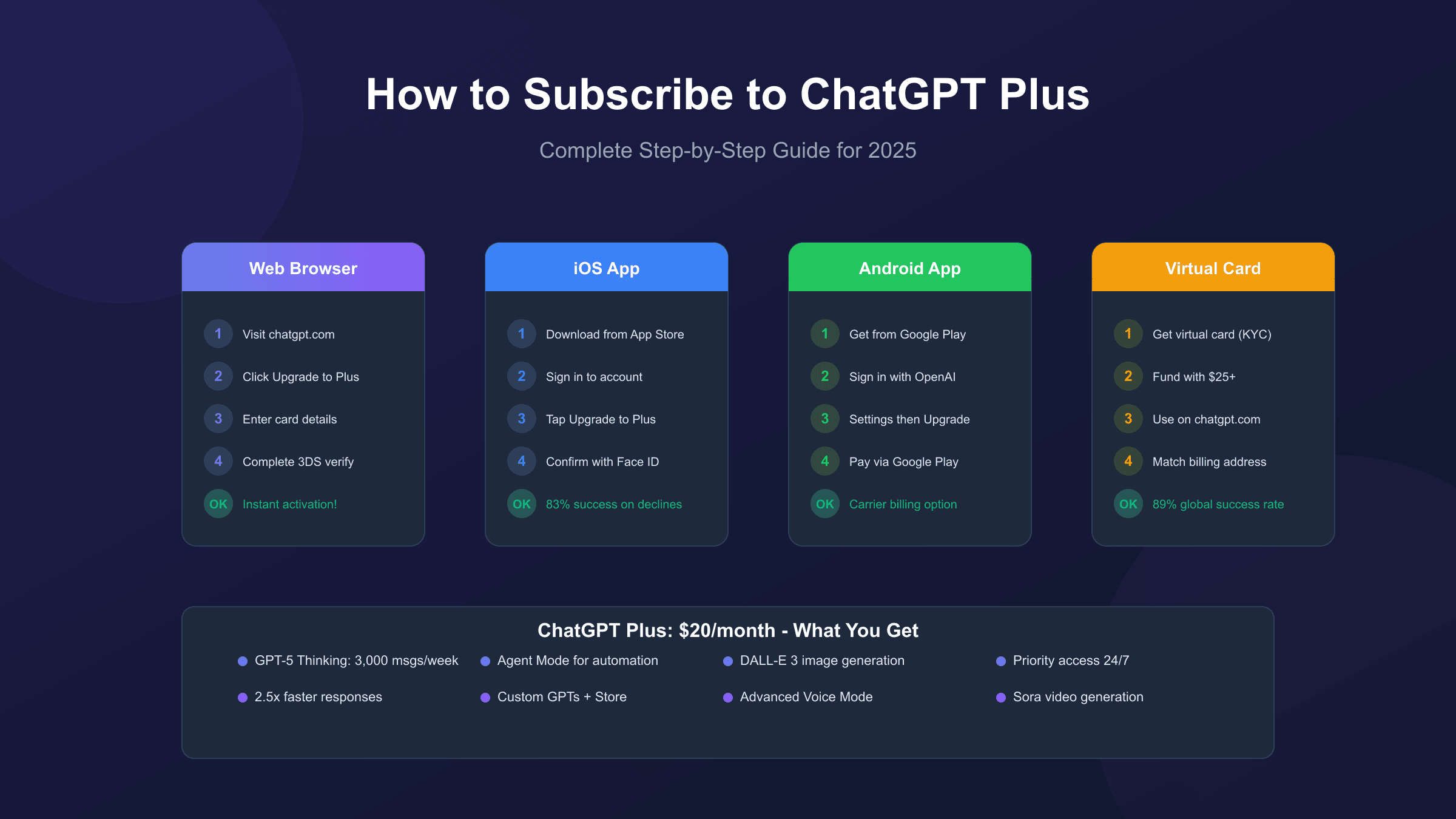
Method 1: Subscribe Through the ChatGPT Website (Recommended)
The web-based subscription process offers the most straightforward path to ChatGPT Plus and works in most countries. This method gives you direct control over your subscription without app store intermediaries.
Step 1: Create or Access Your OpenAI Account
Navigate to chatgpt.com in your browser. If you don't have an account, click "Sign Up" and provide your email address, name, and phone number for verification. You can also authenticate through Google, Microsoft, or Apple accounts for faster setup. OpenAI requires phone number verification as a security measure, so keep your mobile device handy.
Step 2: Locate the Upgrade Option
Once logged in, look for the upgrade button in one of two locations. On desktop, you'll find "Upgrade to Plus" in the bottom-left sidebar menu. Alternatively, click your profile icon in the top-right corner and select "Upgrade your plan" from the dropdown. Both paths lead to the same subscription page.
Step 3: Select ChatGPT Plus
The pricing page displays all available plans: Free, Plus ($20/month), Pro ($200/month), and Team/Enterprise options. Click "Upgrade Plan" under ChatGPT Plus. Review the feature disclaimers carefully, noting that some features like Sora video generation have separate usage limits even for Plus subscribers.
Step 4: Enter Payment Information
OpenAI accepts major credit cards including Visa, Mastercard, American Express, Discover, and Diners Club. Enter your card number, expiration date, CVC, and billing address. The billing address must match your card's registered address exactly, as mismatches trigger automatic declines.
Important: OpenAI does not accept PayPal directly, prepaid cards, or cryptocurrency. Your card must support recurring international transactions, as charges process through OpenAI's San Francisco-based payment system.
Step 5: Complete 3D Secure Authentication
Starting June 2025, OpenAI implemented stricter 3D Secure (3DS) authentication requirements. After entering your card details, your bank may redirect you to verify the transaction via SMS code, banking app notification, or biometric confirmation. Complete this step promptly, as the verification window typically expires within 5 minutes.
Step 6: Confirm Your Subscription
Upon successful payment, you'll receive an email confirmation from OpenAI. Plus features activate immediately. Refresh your ChatGPT session to see the model selector and new features. Your subscription renews automatically on the same date each month until cancelled.
Method 2: Subscribe Through the iOS App
Apple's App Store provides an alternative subscription path, particularly useful when web payments fail or if you prefer managing subscriptions through Apple's ecosystem.
Step 1: Download the Official ChatGPT App
Search for "ChatGPT" in the App Store and download the official app published by OpenAI. Verify the publisher name to avoid counterfeit apps. The legitimate app has millions of downloads and regular updates.
Step 2: Sign In to Your Account
Open the app and sign in with your OpenAI account credentials. If you don't have an account, you can create one directly in the app using the same email and phone verification process.
Step 3: Access the Subscription Menu
Tap the menu icon (three horizontal lines) in the top-left corner, then tap your name at the bottom to access Settings. You'll see an "Upgrade to Plus" option. Alternatively, in iOS 18.2 or later, navigate to Settings, then Apple Intelligence & Siri, then ChatGPT to find the upgrade option integrated into system settings.
Step 4: Complete the Apple Subscription
Tapping "Upgrade to Plus" opens Apple's standard subscription interface showing $19.99/month. Confirm with Face ID, Touch ID, or your Apple ID password. Apple handles the payment using your linked payment method, which can include credit cards, debit cards, or Apple Pay.
Advantages of iOS Subscription:
- Uses Apple's biometric authentication (83% higher success rate for declined cards)
- Can use Apple Pay or Apple Gift Card balance
- Managed through Apple's subscription center
- Potential bypass for regional payment restrictions
Disadvantages:
- Subscription managed through Apple, not OpenAI directly
- Apple takes a percentage, though OpenAI absorbs this cost
- Cancellation requires going through Apple's subscription settings
Method 3: Subscribe Through the Android App
Google Play offers a similar app-based subscription option for Android users, with Google Pay integration providing additional payment flexibility.
Step 1: Install the Official ChatGPT App
Open the Google Play Store and search for "ChatGPT" by OpenAI. Download and install the official app. Android users should be particularly careful to verify the developer is OpenAI, as numerous unofficial apps exist on the Play Store.
Step 2: Sign In and Navigate to Settings
Launch the app and sign in with your OpenAI credentials. Tap the hamburger menu in the top-left corner, then tap Settings at the bottom of the navigation panel.
Step 3: Select the Upgrade Option
Within Settings, find and tap "Upgrade to Plus." This opens Google Play's subscription interface.
Step 4: Complete Payment via Google Play
Google Play accepts the same payment methods linked to your Google account, including credit cards, debit cards, Google Pay balance, and carrier billing in supported regions. Confirm your subscription, and Plus features activate within minutes.
Note: Managing your subscription happens through Google Play. Go to Play Store, tap your profile icon, then Payments & subscriptions, then Subscriptions to modify or cancel.
Method 4: Using Virtual Cards for International Users
For users in regions where standard credit cards face frequent declines, virtual card services provide a reliable alternative. This method has an 89% average success rate compared to 61% for debit cards in challenging regions.
Why Virtual Cards Work Better
OpenAI's payment processor Stripe implements strict fraud prevention that often flags international transactions. Virtual cards issued by specialized providers typically:
- Have US or EU billing addresses that pass verification
- Support 3D Secure authentication
- Allow recurring payments required for subscriptions
- Provide dedicated cards for single-merchant use
Recommended Virtual Card Providers
| Provider | Region Focus | Success Rate | Notes |
|---|---|---|---|
| Privacy.com | US users | 91% | Free, US bank required |
| WildCard | Asia/Global | 86% | Crypto/bank funding |
| Buvei | Global | 85% | Multi-currency support |
| Wise | Global | 82% | Requires account verification |
Step-by-Step Virtual Card Process:
- Create an account with your chosen virtual card provider and complete identity verification (KYC)
- Fund your virtual card with at least $25 to cover the $20 subscription plus potential verification holds
- Generate a dedicated card for OpenAI/ChatGPT payments
- Copy the card details including number, expiry, and CVC
- Use these details on ChatGPT's web subscription page
- Set the billing address to match your virtual card's registered address (typically provided by the service)
Tip: Some virtual card services allow setting merchant locks, limiting the card to OpenAI transactions only for additional security.
Regional Pricing and Supported Currencies
ChatGPT Plus pricing varies based on your billing country due to local taxes and currency conversion. As of September 2025, OpenAI supports five billing currencies with region-specific pricing.
| Region | Currency | Price | Notes |
|---|---|---|---|
| United States | USD | $20.00 | Base price |
| Canada | USD | $20.00 | Charged in USD |
| United Kingdom | GBP | £20.00 | Includes 20% VAT |
| European Union | EUR | €22.99-24.20 | Varies by country VAT (19-27%) |
| India | INR | ₹1,750 | Also has ChatGPT Go at ₹399 |
| Indonesia | IDR | Rp320,000 | Local pricing available |
Understanding Billing Country
Your billing country is determined by your payment method's issuing country, not your physical location or VPN usage. A card issued in Germany will always bill in EUR at the European rate, regardless of where you access ChatGPT. This means using a VPN doesn't change your pricing tier.
Countries with Payment Restrictions
While ChatGPT is available in 164 countries, payment processing through Stripe is only supported in 89 countries. Users in unsupported payment regions can still access ChatGPT Plus using:
- iOS/Android app subscriptions through app stores
- Virtual cards with supported billing countries
- Gift cards (Apple/Google) purchased in supported regions
Troubleshooting Payment Declines
Payment failures affect approximately 34% of international users attempting ChatGPT Plus subscriptions. Understanding the specific error types and their solutions significantly improves success rates.
Common Error Types and Fixes
The card_declined error represents a generic rejection from your bank or card network. This typically occurs when:
- Your bank blocks international transactions by default
- The billing address doesn't match card records exactly
- Your card doesn't support recurring payments
- The bank's fraud detection flagged the transaction
Solution: Contact your bank to authorize transactions from "OpenAI, LP" or "OpenAI LLC" in San Francisco, California. Provide them with the exact amount ($20 USD), merchant details, and transaction type (recurring monthly subscription). Many banks can add OpenAI to an approved merchant list.
The payment_intent_authentication_failure error increased by 40% after OpenAI's June 2025 3DS enforcement. This occurs when 3D Secure verification fails or times out.
Solution: Ensure your phone is nearby for SMS verification. If using a banking app, have it open and ready. Some banks require you to be on mobile data rather than Wi-Fi for verification. If the window times out, wait 5 minutes before trying again.
The rate_limit error appears after too many payment attempts in a short period.
Solution: Wait 24 hours before attempting another payment. OpenAI's system temporarily blocks accounts with multiple failed attempts to prevent fraud.
Browser-Related Issues
Browser extensions, particularly ad blockers and privacy tools, can interfere with Stripe's payment API. Before attempting payment:
- Disable all browser extensions or use an incognito/private window
- Clear cookies and cache for chatgpt.com and stripe.com
- Use a standard browser (Chrome or Safari recommended)
- Disable any VPN during the payment process
Credit Card vs Debit Card Success Rates
Regional data from September 2025 shows significant success rate differences:
| Card Type | US/Canada | Europe | Asia | Other |
|---|---|---|---|---|
| Credit Card | 91% | 84% | 72% | 64% |
| Debit Card | 78% | 71% | 58% | 48% |
| Virtual Card | 89% | 87% | 86% | 85% |
Credit cards outperform debit cards primarily because they handle international recurring transactions better and have more lenient fraud detection thresholds.
When to Try the Mobile App
If web payments fail repeatedly, the iOS app offers an 83% success rate for users who experienced web declines. Apple's payment infrastructure handles authentication differently, often bypassing the issues causing web failures. This is particularly effective for Error Code 5 (processing errors) and persistent card declines.
Student Discounts and Free Trials
OpenAI periodically offers promotional access to ChatGPT Plus, though no permanent student discount currently exists.
Spring 2025 Student Program (Ended)
From March 31 to May 31, 2025, OpenAI offered verified US and Canadian college students two months of free ChatGPT Plus. This program required SheerID verification of enrollment at a degree-granting institution. No credit card was required upfront, making it genuinely risk-free. Students who claimed the offer before the deadline continue using Plus until their two-month period expires, after which standard pricing applies unless cancelled.
Current Options for Students
Without an active student promotion, students can:
- Use the free tier's limited GPT-5 access (10 messages every 5 hours)
- Subscribe at the standard $20/month rate
- Watch for future promotions at chatgpt.com/students
- Consider ChatGPT Go in India (₹399/month) if eligible - see our ChatGPT Go vs Plus comparison for details
Why No Free Trial Exists
Unlike many SaaS products, ChatGPT Plus has never offered a standard free trial period. OpenAI's approach focuses on making the free tier useful enough for evaluation while reserving premium features for subscribers. The student program represented their first genuine trial, and OpenAI indicated they may expand it to more schools and regions in the future.

Managing Your ChatGPT Plus Subscription
After subscribing, you'll want to understand how to manage billing, update payment methods, and handle plan changes.
Accessing Subscription Settings
Your subscription details live in ChatGPT's Settings menu. Click your profile icon, select Settings, then navigate to the Subscription or My Plan section. Here you can view your current plan, next billing date, and payment method on file.
Updating Payment Information
To change your payment method:
- Navigate to Settings then Subscription
- Click "Manage subscription" or "Update payment method"
- Enter new card details
- The change applies to your next billing cycle
Note: If you subscribed through iOS or Android apps, you must update payment methods through Apple Subscriptions or Google Play Subscriptions respectively, not through ChatGPT's website.
Switching Between Plans
OpenAI offers several paid tiers:
- ChatGPT Plus: $20/month, ideal for individual users
- ChatGPT Pro: $200/month, for researchers and professionals needing maximum compute
- ChatGPT Team: $25/user/month, includes workspace collaboration features
Upgrading from Plus to Pro happens through the web interface. The system prorates your remaining Plus days against the Pro subscription cost. Downgrading from Pro to Plus takes effect at the end of your current billing cycle.
Important: Upgrading to Pro can only be done through the web interface, not through mobile apps.
How to Cancel ChatGPT Plus
Cancellation is straightforward, though the process varies based on how you subscribed.
Cancelling Web Subscriptions
- Log in to chatgpt.com
- Click your profile icon and select Settings
- Navigate to Subscription or My Plan
- Click "Manage subscription"
- Select "Cancel plan" and confirm
For a more detailed cancellation walkthrough including tips on timing and refund optimization, see our complete ChatGPT Plus cancellation guide.
Your subscription remains active until the current billing period ends. You won't receive a prorated refund for unused days, but you can continue using Plus features until expiration.
Cancelling iOS Subscriptions
- Open iPhone/iPad Settings (not ChatGPT settings)
- Tap your Apple ID at the top
- Select Subscriptions
- Find ChatGPT and tap it
- Tap "Cancel Subscription"
Cancelling Android Subscriptions
- Open Google Play Store
- Tap your profile icon
- Select Payments & subscriptions, then Subscriptions
- Find ChatGPT and tap it
- Select "Cancel subscription"
Refund Policy
OpenAI's standard policy is non-refundable subscriptions with no prorated refunds for mid-cycle cancellations. However, exceptions exist:
- EU/UK/Turkey residents: 14-day withdrawal right for new subscriptions
- New subscribers within 48 hours: May qualify with minimal usage
- Billing errors: Immediate refund upon verification
- Extended outages: Potential partial refunds for 24+ hour service disruptions
To request a refund, visit chat.openai.com, access the Help Center, and use the chat widget to explain your situation. Approved refunds process within 5-7 business days.
ChatGPT Plus vs Other Plans: Making the Right Choice
Understanding when Plus is sufficient versus when other plans make more sense helps you avoid overpaying or undersubscribing.
When ChatGPT Plus Is the Right Choice
ChatGPT Plus delivers the best value for individual users who:
- Use ChatGPT daily for work or personal projects
- Need reliable access without free tier limitations
- Want Agent mode for task automation
- Create images with DALL-E 3 regularly
- Value faster response times during peak hours
At $20/month, Plus provides access to 95% of ChatGPT's capabilities. The vast majority of users never encounter the 3,000 messages/week limit on GPT-5 Thinking mode.
When to Consider ChatGPT Pro ($200/month)
ChatGPT Pro makes sense only for users who:
- Consistently hit Plus message limits (unlikely for most users)
- Need GPT-5 Pro with extended thinking for complex research
- Are professional researchers or engineers requiring maximum compute
- Work on problems where additional thinking time produces meaningfully better results
Reality check: Unless you're doing heavy AI research or complex multi-step analysis for hours daily, Plus will cover your needs. Pro is genuinely designed for edge cases, not average power users.
When Team Plans Make Sense
ChatGPT Team ($25/user/month) becomes worthwhile when you need:
- Shared workspace with colleagues
- Admin controls for user management
- Higher security guarantees for business data
- Team-wide access to custom GPTs
For solopreneurs or individuals, Team offers minimal advantages over Plus at a 25% higher price.
Alternative Considerations for API Users
If you primarily use ChatGPT through code rather than the chat interface, consider whether API access better suits your needs. OpenAI's API charges per token rather than a flat subscription, which can be more cost-effective for light usage or more expensive for heavy usage. For developers building applications, services like laozhang.ai offer API access to GPT-5 and other models with simpler billing and multi-model support through a unified interface.

Frequently Asked Questions
Can I share my ChatGPT Plus subscription with family members?
No, ChatGPT Plus is a personal subscription tied to a single OpenAI account. Sharing credentials violates OpenAI's terms of service and can result in account suspension. Each user needs their own account and subscription.
Does ChatGPT Plus work on multiple devices?
Yes, you can access your Plus subscription from any device by logging into your OpenAI account. Your conversations sync across devices, and features like custom GPTs and preferences follow your account. There's no device limit, but only one session can be active at a time.
Why is my card declined even though it works elsewhere?
OpenAI uses Stripe's international payment processing, which applies stricter fraud detection than domestic transactions. Common reasons include: bank's default blocking of international recurring charges, mismatched billing address, card not enabled for online international transactions, or bank's risk assessment flagging the specific transaction type. Contact your bank with the merchant name "OpenAI, LP" in San Francisco, CA to resolve most declines.
Can I pause my ChatGPT Plus subscription?
No, OpenAI doesn't offer subscription pausing. You can only fully cancel and resubscribe later. Your subscription remains active until the billing period ends after cancellation.
What happens if my payment fails during renewal?
OpenAI attempts to charge your card on the renewal date. If it fails, they'll retry a few times over several days. You'll receive email notifications about the failure. If payment ultimately fails, your subscription ends, and your account reverts to the free tier. You won't lose any conversation history, but you'll lose access to Plus features.
Is ChatGPT Plus available in my country?
ChatGPT is available in 164 countries, but payment processing works in approximately 89 countries. If you can access chatgpt.com and create an account, you can likely subscribe using one of the methods described (web, iOS, Android, or virtual cards).
Can I get a refund if I'm unsatisfied?
OpenAI's policy generally doesn't offer refunds for subscription dissatisfaction. Refunds are reserved for billing errors, unauthorized charges, and as required by consumer protection laws in certain regions (EU, UK, Turkey). If you're unsure about Plus, evaluate your usage patterns during the free tier period before subscribing.
Does ChatGPT Plus include API access?
No, ChatGPT Plus and API access are separate products with separate billing. Plus gives you enhanced access to the web/app interface. API access for developers is billed separately per token through platform.openai.com.
Key Takeaways
ChatGPT Plus at $20/month unlocks GPT-5's full capabilities, Agent mode, image generation, and priority access that makes the free tier feel limited by comparison. Four subscription methods exist: web (recommended for most users), iOS app (best when web payments fail), Android app, and virtual cards (ideal for international users with payment restrictions).
Payment issues affect about a third of international users, but solutions exist for nearly every scenario. Browser troubleshooting, mobile app subscription, virtual cards, and bank authorization resolve the majority of cases. If you're in the EU, UK, or Turkey, remember you have a 14-day refund window if Plus doesn't meet your expectations.
For developers and heavy users who need API access rather than chat-based interaction, consider whether per-token API billing through OpenAI directly or through aggregators like laozhang.ai better fits your workflow. The choice between Plus and API depends entirely on whether you work through the chat interface or integrate AI into applications.
Ready to subscribe? Start at chatgpt.com, click "Upgrade to Plus," and follow the step-by-step process outlined in Method 1. If you encounter issues, work through the troubleshooting steps or try the iOS/Android app method as a reliable fallback.