Nano Banana Pro API Docs: Complete Developer Guide 2025 [Production-Ready]
Comprehensive Nano Banana Pro API documentation: authentication, endpoints, parameters, error handling, and production deployment. Multi-language code examples with real-world integration patterns.
Nano Banana Pro
4K-80%Google Gemini 3 Pro · AI Inpainting
谷歌原生模型 · AI智能修图

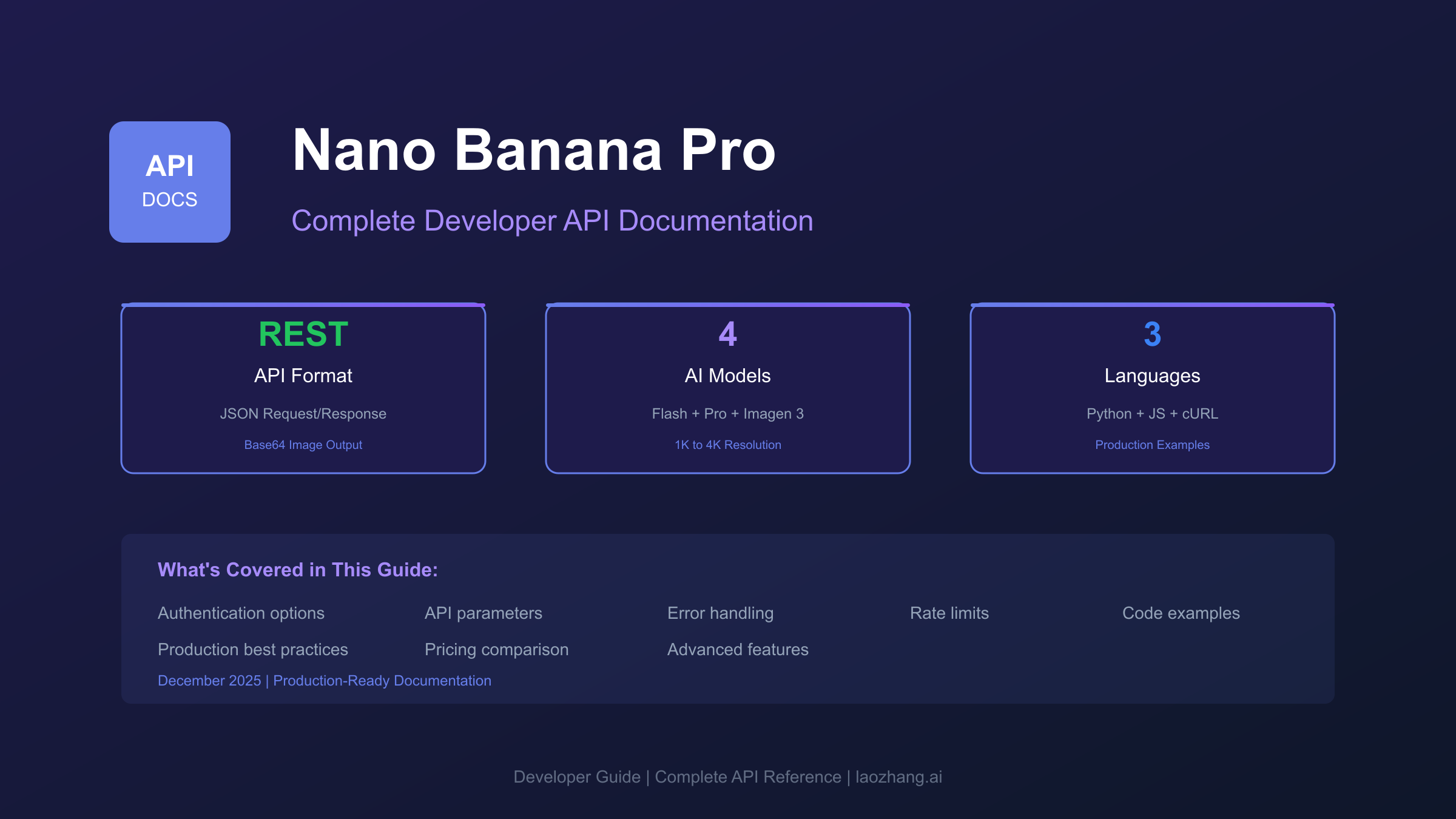
The Nano Banana Pro API represents Google's most advanced text-to-image generation capability, delivering photorealistic outputs through a straightforward REST interface. This comprehensive guide covers everything developers need—from first API call to production deployment—with complete error handling patterns and cost optimization strategies that existing documentation overlooks.
Whether you're building a product visualization system, generating marketing assets, or integrating AI imagery into your application, this guide will get you from zero to production-ready in a single read.
Quick Start: Your First Image in 5 Minutes
Let's generate your first image immediately. You'll need an API key from Google AI Studio (free tier available) or a third-party provider.
Step 1: Get Your API Key
Visit Google AI Studio and click "Get API key" in the left sidebar. Create a new key and copy it securely.
Step 2: Generate Your First Image
hljs pythonimport requests
import base64
API_KEY = "YOUR_API_KEY"
url = f"https://generativelanguage.googleapis.com/v1beta/models/gemini-2.0-flash-exp-image-generation:generateContent?key={API_KEY}"
payload = {
"contents": [{
"parts": [{"text": "A serene mountain lake at sunset, photorealistic"}]
}],
"generationConfig": {
"responseModalities": ["IMAGE", "TEXT"]
}
}
response = requests.post(url, json=payload)
result = response.json()
# Extract and save the image
for part in result["candidates"][0]["content"]["parts"]:
if "inlineData" in part:
image_data = base64.b64decode(part["inlineData"]["data"])
with open("generated_image.png", "wb") as f:
f.write(image_data)
print("Image saved successfully!")
Step 3: Verify Success
Run the script. If everything works, you'll have generated_image.png in your working directory. Common first-run issues and solutions are covered in the Error Handling section below.
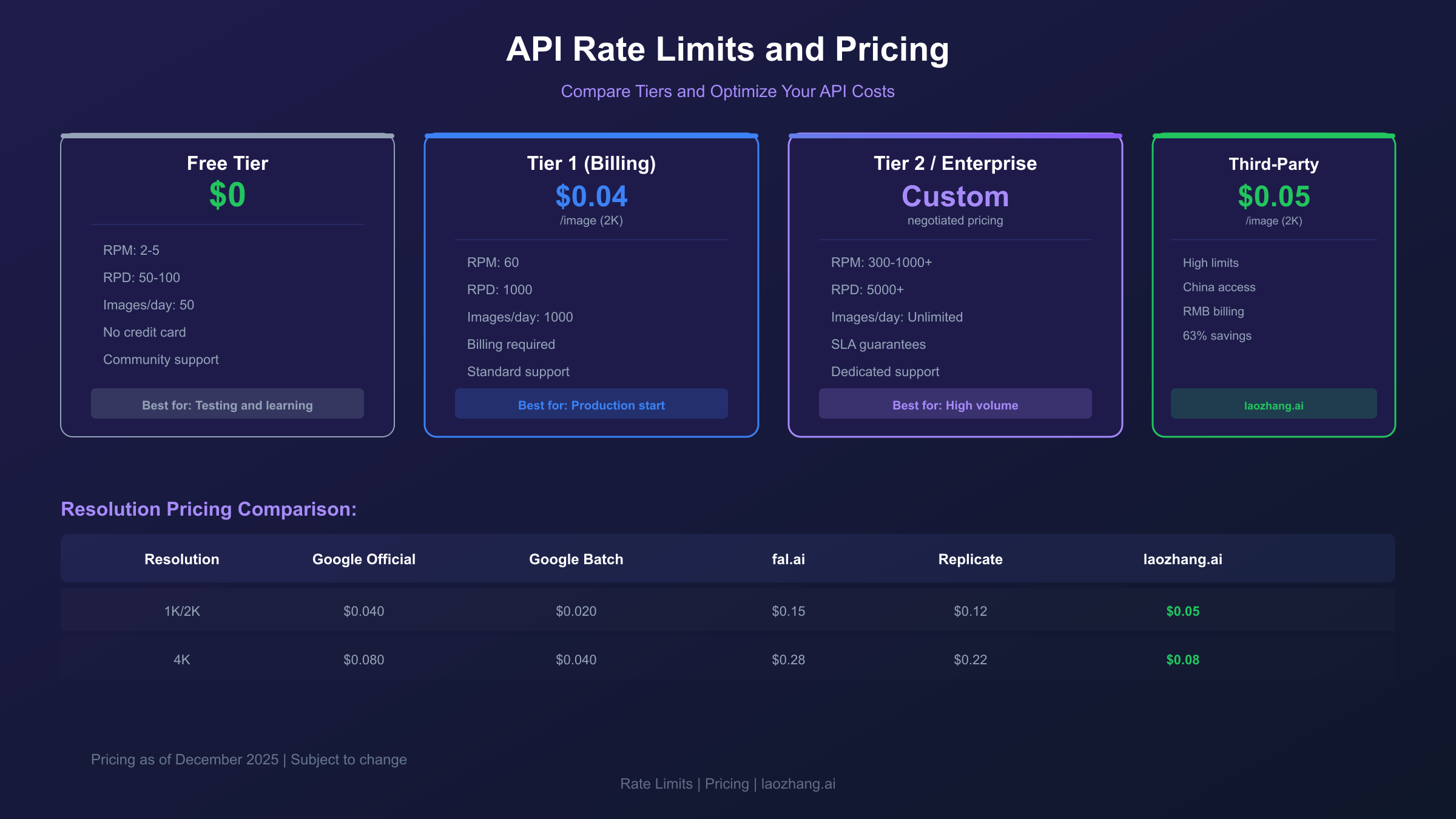
Quick tip: The free tier allows 50-100 images per day. For production usage, enable billing to unlock higher rate limits.
Authentication & API Access Options
Nano Banana Pro is accessible through multiple authentication paths, each with distinct capabilities and pricing structures.
Google AI Studio (Recommended for Development)
The simplest path for getting started. API keys from Google AI Studio work immediately without billing setup.
Capabilities:
- Free tier: 50-100 requests per day
- All model features available
- No credit card required for testing
- Limited to
generativelanguage.googleapis.comendpoint
Endpoint format:
https://generativelanguage.googleapis.com/v1beta/models/{MODEL_ID}:generateContent?key={API_KEY}
Vertex AI (Enterprise Production)
For enterprise deployments requiring SLA guarantees, compliance features, and dedicated support.
Capabilities:
- Higher rate limits (1000+ RPM with custom quotas)
- VPC Service Controls integration
- Customer-managed encryption keys
- Enterprise support and SLAs
- Access to preview and experimental models
Authentication:
hljs pythonfrom google.cloud import aiplatform
aiplatform.init(project="your-project-id", location="us-central1")
# Use service account authentication
# Requires: export GOOGLE_APPLICATION_CREDENTIALS="path/to/credentials.json"
Third-Party Providers
For developers facing geographic restrictions or seeking cost optimization, third-party API providers offer alternative access paths.
laozhang.ai provides Nano Banana Pro access with several advantages for Chinese developers:
- Direct China connectivity (no VPN required)
- RMB pricing with Alipay/WeChat Pay
- Chinese-language technical support
- Competitive pricing at $0.05 per image
Third-party endpoint example:
hljs python# Using laozhang.ai endpoint
API_URL = "https://api.laozhang.ai/v1beta/models/gemini-3-pro-image-preview:generateContent"
headers = {
"Authorization": f"Bearer {API_KEY}",
"Content-Type": "application/json"
}
Core API Reference
Understanding the API structure enables you to leverage the full capability of Nano Banana Pro.
Available Models
| Model ID | Description | Best For |
|---|---|---|
gemini-2.0-flash-exp-image-generation | Fast generation, lower cost | Prototyping, high volume |
gemini-2.0-flash-preview-image-generation | Balanced speed/quality | Production workloads |
imagen-3.0-generate-002 | Highest quality | Marketing, hero images |
gemini-3-pro-image-preview | Latest capabilities | 4K, advanced features |
Request Structure
Every API call follows this standard structure:
hljs json{
"contents": [{
"parts": [
{"text": "Your image prompt here"},
{"inlineData": {"mimeType": "image/png", "data": "base64..."}}
]
}],
"generationConfig": {
"responseModalities": ["IMAGE", "TEXT"],
"temperature": 1.0,
"topP": 0.95,
"topK": 40
},
"safetySettings": [{
"category": "HARM_CATEGORY_DANGEROUS_CONTENT",
"threshold": "BLOCK_MEDIUM_AND_ABOVE"
}]
}
Response Structure
Successful responses include generated content in this format:
hljs json{
"candidates": [{
"content": {
"parts": [
{
"inlineData": {
"mimeType": "image/png",
"data": "base64_encoded_image_data"
}
},
{
"text": "Optional description of generated image"
}
]
},
"finishReason": "STOP",
"safetyRatings": [...]
}],
"usageMetadata": {
"promptTokenCount": 15,
"candidatesTokenCount": 0,
"totalTokenCount": 15
}
}
Parameter Reference
| Parameter | Type | Default | Description |
|---|---|---|---|
responseModalities | array | ["TEXT"] | Include "IMAGE" for image generation |
temperature | float | 1.0 | Creativity control (0.0-2.0) |
topP | float | 0.95 | Nucleus sampling threshold |
topK | int | 40 | Top-k sampling parameter |
candidateCount | int | 1 | Number of images to generate (max 4) |
aspectRatio | string | "1:1" | Output dimensions (see below) |
imageSize | string | "1K" | Resolution: "1K", "2K", or "4K" |
Supported Aspect Ratios
| Ratio | Dimensions | Use Case |
|---|---|---|
| 1:1 | 1024×1024 | Social media, avatars |
| 16:9 | 1792×1024 | Landscape, presentations |
| 9:16 | 1024×1792 | Mobile, stories |
| 4:3 | 1408×1024 | Standard photos |
| 3:4 | 1024×1408 | Portrait mode |
| 21:9 | 2048×880 | Ultrawide, banners |

Multi-Language Code Examples
Python (requests)
hljs pythonimport requests
import base64
from pathlib import Path
def generate_image(prompt: str, api_key: str, resolution: str = "2K") -> bytes:
"""Generate an image using Nano Banana Pro API.
Args:
prompt: Text description of desired image
api_key: Your API key
resolution: "1K", "2K", or "4K"
Returns:
Raw image bytes (PNG format)
"""
url = f"https://generativelanguage.googleapis.com/v1beta/models/gemini-2.0-flash-exp-image-generation:generateContent?key={api_key}"
payload = {
"contents": [{"parts": [{"text": prompt}]}],
"generationConfig": {
"responseModalities": ["IMAGE", "TEXT"],
"imageConfig": {"imageSize": resolution}
}
}
response = requests.post(url, json=payload, timeout=180)
response.raise_for_status()
result = response.json()
for part in result["candidates"][0]["content"]["parts"]:
if "inlineData" in part:
return base64.b64decode(part["inlineData"]["data"])
raise ValueError("No image data in response")
# Usage
image_data = generate_image(
"Professional product photo of wireless headphones, studio lighting",
"YOUR_API_KEY",
"2K"
)
Path("headphones.png").write_bytes(image_data)
JavaScript (Node.js)
hljs javascriptconst axios = require('axios');
const fs = require('fs');
async function generateImage(prompt, apiKey, resolution = '2K') {
const url = `https://generativelanguage.googleapis.com/v1beta/models/gemini-2.0-flash-exp-image-generation:generateContent?key=${apiKey}`;
const payload = {
contents: [{ parts: [{ text: prompt }] }],
generationConfig: {
responseModalities: ['IMAGE', 'TEXT'],
imageConfig: { imageSize: resolution }
}
};
const response = await axios.post(url, payload, { timeout: 180000 });
for (const part of response.data.candidates[0].content.parts) {
if (part.inlineData) {
return Buffer.from(part.inlineData.data, 'base64');
}
}
throw new Error('No image data in response');
}
// Usage
generateImage('Minimalist logo design, tech company', process.env.API_KEY)
.then(imageBuffer => fs.writeFileSync('logo.png', imageBuffer))
.catch(console.error);
cURL
hljs bashcurl -X POST \
"https://generativelanguage.googleapis.com/v1beta/models/gemini-2.0-flash-exp-image-generation:generateContent?key=${API_KEY}" \
-H "Content-Type: application/json" \
-d '{
"contents": [{
"parts": [{"text": "Abstract art, vibrant colors, geometric shapes"}]
}],
"generationConfig": {
"responseModalities": ["IMAGE", "TEXT"]
}
}' | jq -r '.candidates[0].content.parts[0].inlineData.data' | base64 -d > output.png
Advanced Features
4K High-Resolution Generation
For print materials and large displays, enable 4K output:
hljs pythonpayload = {
"contents": [{"parts": [{"text": prompt}]}],
"generationConfig": {
"responseModalities": ["IMAGE"],
"imageConfig": {
"imageSize": "4K",
"aspectRatio": "16:9"
}
}
}
Note: 4K generation takes 2-3x longer and costs approximately 2x more than 2K. Use for final assets, not prototyping.
Multi-Image Composition
Reference up to 14 existing images in your prompt for style transfer or editing:
hljs pythonimport base64
def encode_image(image_path: str) -> str:
with open(image_path, "rb") as f:
return base64.b64encode(f.read()).decode()
payload = {
"contents": [{
"parts": [
{"text": "Apply the art style from the first image to create a similar version of the second image"},
{
"inlineData": {
"mimeType": "image/png",
"data": encode_image("style_reference.png")
}
},
{
"inlineData": {
"mimeType": "image/png",
"data": encode_image("content_image.png")
}
}
]
}],
"generationConfig": {
"responseModalities": ["IMAGE", "TEXT"]
}
}
Google Search Grounding
Enable real-time search context for current events or factual accuracy:
hljs pythonpayload = {
"contents": [{"parts": [{"text": "Current logo of OpenAI company"}]}],
"generationConfig": {
"responseModalities": ["IMAGE", "TEXT"]
},
"tools": [{
"googleSearch": {}
}]
}
Thinking Process (Extended Reasoning)
For complex compositions, enable the thinking process:
hljs pythonpayload = {
"contents": [{"parts": [{"text": prompt}]}],
"generationConfig": {
"responseModalities": ["IMAGE", "TEXT"],
"thinkingConfig": {
"thinkingLevel": "MEDIUM" # LOW, MEDIUM, HIGH
}
}
}
Error Handling & Troubleshooting
This section covers the most common errors and their solutions—a critical gap in existing documentation.
Common Error Codes
| Error Code | Message | Cause | Solution |
|---|---|---|---|
| 400 | Invalid argument | Malformed request | Check JSON syntax, validate parameters |
| 401 | Unauthorized | Invalid API key | Verify key, check billing status |
| 403 | Permission denied | Model access restricted | Enable API in Google Cloud Console |
| 429 | Resource exhausted | Rate limit exceeded | Implement exponential backoff |
| 500 | Internal error | Server-side issue | Retry with backoff |
| 503 | Service unavailable | Model overloaded | Queue requests, retry later |
PROHIBITED_CONTENT Response
When content filters block generation:
hljs json{
"candidates": [{
"finishReason": "PROHIBITED_CONTENT",
"safetyRatings": [{
"category": "HARM_CATEGORY_SEXUALLY_EXPLICIT",
"probability": "HIGH",
"blocked": true
}]
}]
}
Solutions:
- Rephrase prompt to remove potentially problematic terms
- Add explicit negative constraints: "avoid: violence, explicit content"
- Review content policy for allowed topics
Production-Ready Retry Logic
hljs pythonimport time
import random
from typing import Optional
class NanoBananaProClient:
def __init__(self, api_key: str, max_retries: int = 5):
self.api_key = api_key
self.max_retries = max_retries
self.base_url = "https://generativelanguage.googleapis.com/v1beta/models"
def generate_with_retry(
self,
prompt: str,
model: str = "gemini-2.0-flash-exp-image-generation"
) -> Optional[bytes]:
"""Generate image with exponential backoff retry."""
url = f"{self.base_url}/{model}:generateContent?key={self.api_key}"
payload = {
"contents": [{"parts": [{"text": prompt}]}],
"generationConfig": {"responseModalities": ["IMAGE", "TEXT"]}
}
for attempt in range(self.max_retries):
try:
response = requests.post(url, json=payload, timeout=180)
if response.status_code == 200:
return self._extract_image(response.json())
if response.status_code == 429:
# Rate limited - exponential backoff
wait_time = (2 ** attempt) + random.uniform(0, 1)
print(f"Rate limited. Waiting {wait_time:.1f}s...")
time.sleep(wait_time)
continue
if response.status_code >= 500:
# Server error - retry
wait_time = (2 ** attempt) + random.uniform(0, 1)
print(f"Server error {response.status_code}. Retrying in {wait_time:.1f}s...")
time.sleep(wait_time)
continue
# Client error - don't retry
response.raise_for_status()
except requests.exceptions.Timeout:
print(f"Timeout on attempt {attempt + 1}")
if attempt < self.max_retries - 1:
time.sleep(2 ** attempt)
continue
raise
return None
def _extract_image(self, result: dict) -> Optional[bytes]:
"""Extract image bytes from API response."""
try:
for part in result["candidates"][0]["content"]["parts"]:
if "inlineData" in part:
return base64.b64decode(part["inlineData"]["data"])
except (KeyError, IndexError):
pass
return None
# Usage
client = NanoBananaProClient("YOUR_API_KEY")
image = client.generate_with_retry("Product photo of laptop, white background")
Debugging Checklist
When generation fails, work through this checklist:
-
API Key Valid?
- Test with simple prompt: "A red circle"
- Check key hasn't expired or been revoked
-
Billing Enabled?
- Free tier has strict limits
- Enable billing for higher quotas
-
Model Available?
- Some models require allowlist access
- Check model ID spelling exactly
-
Prompt Issue?
- Remove special characters
- Simplify to single concept
- Check for blocked terms
-
Network Issue?
- For China: Use laozhang.ai endpoint
- Check firewall/proxy settings
Rate Limits & Pricing
Rate Limit Tiers
| Tier | Free | Tier 1 (Billing) | Tier 2 | Enterprise |
|---|---|---|---|---|
| RPM | 2-5 | 60 | 300 | 1000+ |
| RPD | 50-100 | 1000 | 5000 | Custom |
| Images/day | 50 | 1000 | 5000 | Unlimited |
| Support | Community | Standard | Priority | Dedicated |
Pricing Comparison (December 2025)
| Provider | 2K Price | 4K Price | Notes |
|---|---|---|---|
| Google Official | $0.040 | $0.080 | Base rate, ~$0.134 effective |
| Google Batch API | $0.020 | $0.040 | 50% discount, async |
| fal.ai | $0.15 | $0.28 | Simple integration |
| Replicate | $0.12 | $0.22 | Per-second billing |
| laozhang.ai | $0.05 | $0.08 | China access, RMB billing |
For detailed cost analysis and ROI calculations, see our comprehensive Nano Banana Pro pricing guide.
Cost Optimization Strategies
1. Use Flash Model for Prototyping
hljs python# Development: Flash model (faster, cheaper)
model = "gemini-2.0-flash-exp-image-generation"
# Production: Pro model (higher quality)
model = "gemini-3-pro-image-preview"
2. Batch API for High Volume
For 100+ images, use Batch API for 50% cost reduction:
hljs pythonfrom google.cloud import aiplatform
# Create batch prediction job
batch_job = aiplatform.BatchPredictionJob.create(
job_display_name="image-generation-batch",
model_name="gemini-2.0-flash-exp-image-generation",
instances_format="jsonl",
gcs_source="gs://your-bucket/prompts.jsonl",
gcs_destination_prefix="gs://your-bucket/outputs/"
)
3. Cache Results
Implement prompt-based caching to avoid regenerating identical images:
hljs pythonimport hashlib
from functools import lru_cache
@lru_cache(maxsize=1000)
def get_cached_image(prompt_hash: str) -> bytes:
# Cache miss - generate new image
return generate_image(unhash(prompt_hash))
def generate_with_cache(prompt: str) -> bytes:
prompt_hash = hashlib.md5(prompt.encode()).hexdigest()
return get_cached_image(prompt_hash)
Production Best Practices
Architecture Recommendations
For Low Volume (<100 images/day):
- Direct API calls with retry logic
- Simple error handling
- Local caching optional
For Medium Volume (100-1000 images/day):
- Queue-based architecture (Redis, RabbitMQ)
- Worker pool for parallel generation
- Persistent caching layer
- Monitoring and alerting
For High Volume (1000+ images/day):
- Batch API for bulk operations
- Multi-provider failover
- Distributed caching (Redis cluster)
- Cost monitoring dashboards
Security Considerations
hljs python# Never commit API keys
import os
API_KEY = os.environ.get("NANO_BANANA_API_KEY")
# Validate and sanitize user prompts
def sanitize_prompt(user_input: str) -> str:
# Remove potential injection patterns
sanitized = user_input.replace("\n", " ").strip()
# Limit length
return sanitized[:500]
# Rate limit user requests
from ratelimit import limits, sleep_and_retry
@sleep_and_retry
@limits(calls=10, period=60)
def user_generate_image(user_id: str, prompt: str) -> bytes:
sanitized = sanitize_prompt(prompt)
return generate_image(sanitized)
Monitoring Setup
Track these metrics for production deployments:
| Metric | Target | Alert Threshold |
|---|---|---|
| Success rate | >95% | <90% |
| P50 latency | <5s | >10s |
| P99 latency | <15s | >30s |
| Daily cost | Budget | >120% budget |
| Error rate | <5% | >10% |
hljs pythonimport time
from prometheus_client import Counter, Histogram
generation_requests = Counter('nano_banana_requests_total', 'Total generation requests')
generation_errors = Counter('nano_banana_errors_total', 'Total generation errors')
generation_latency = Histogram('nano_banana_latency_seconds', 'Generation latency')
def monitored_generate(prompt: str) -> bytes:
generation_requests.inc()
start = time.time()
try:
result = generate_image(prompt)
generation_latency.observe(time.time() - start)
return result
except Exception as e:
generation_errors.inc()
raise
Frequently Asked Questions
What's the difference between Nano Banana Pro and Imagen 3?
Nano Banana Pro is the consumer-accessible version of Google's image generation, available through Google AI Studio and ChatGPT-style interfaces. Imagen 3 is the enterprise version on Vertex AI with additional compliance features, higher rate limits, and enterprise support. The underlying model quality is identical.
Can I use generated images commercially?
Yes, images generated through the API are yours to use commercially. Google does not claim ownership of outputs. However, all images include invisible SynthID watermarks identifying them as AI-generated, which cannot be removed.
How do I handle rate limiting in production?
Implement exponential backoff with jitter. Start with 1-second delays, doubling after each 429 response, up to a maximum of 32 seconds. For sustained high volume, contact Google for custom quota increases or use multiple API keys with round-robin distribution.
Why do some prompts get blocked?
Google applies safety filters that block certain content categories: violence, explicit material, personal identification, and potentially harmful content. If your legitimate prompt is blocked, try rephrasing with more neutral language or add explicit negative constraints like "safe for work, professional".
What resolution should I use?
Use 2K (default) for most applications—it balances quality and cost effectively. Reserve 4K for final assets where detail matters (print, large displays). Use 1K for thumbnails or rapid prototyping where speed matters more than quality.
How can developers in China access the API?
Direct access to Google APIs from mainland China is unreliable. laozhang.ai provides a stable China-accessible endpoint with RMB billing and Chinese technical support. The API format is compatible—just change the endpoint URL and use their API key.
For related guides, see our Nano Banana Pro pricing analysis or explore prompt optimization techniques for better generation results.