Nano Banana Pro AI 2025: Complete Guide to Free 4K AI Image Generation
Master Nano Banana Pro (Gemini 3 Pro Image) for stunning 4K AI image generation. Learn free access methods, API integration, prompt engineering tips, and cost-effective alternatives for professional-quality AI art.
Nano Banana Pro
4K-80%Google Gemini 3 Pro · AI Inpainting
谷歌原生模型 · AI智能修图

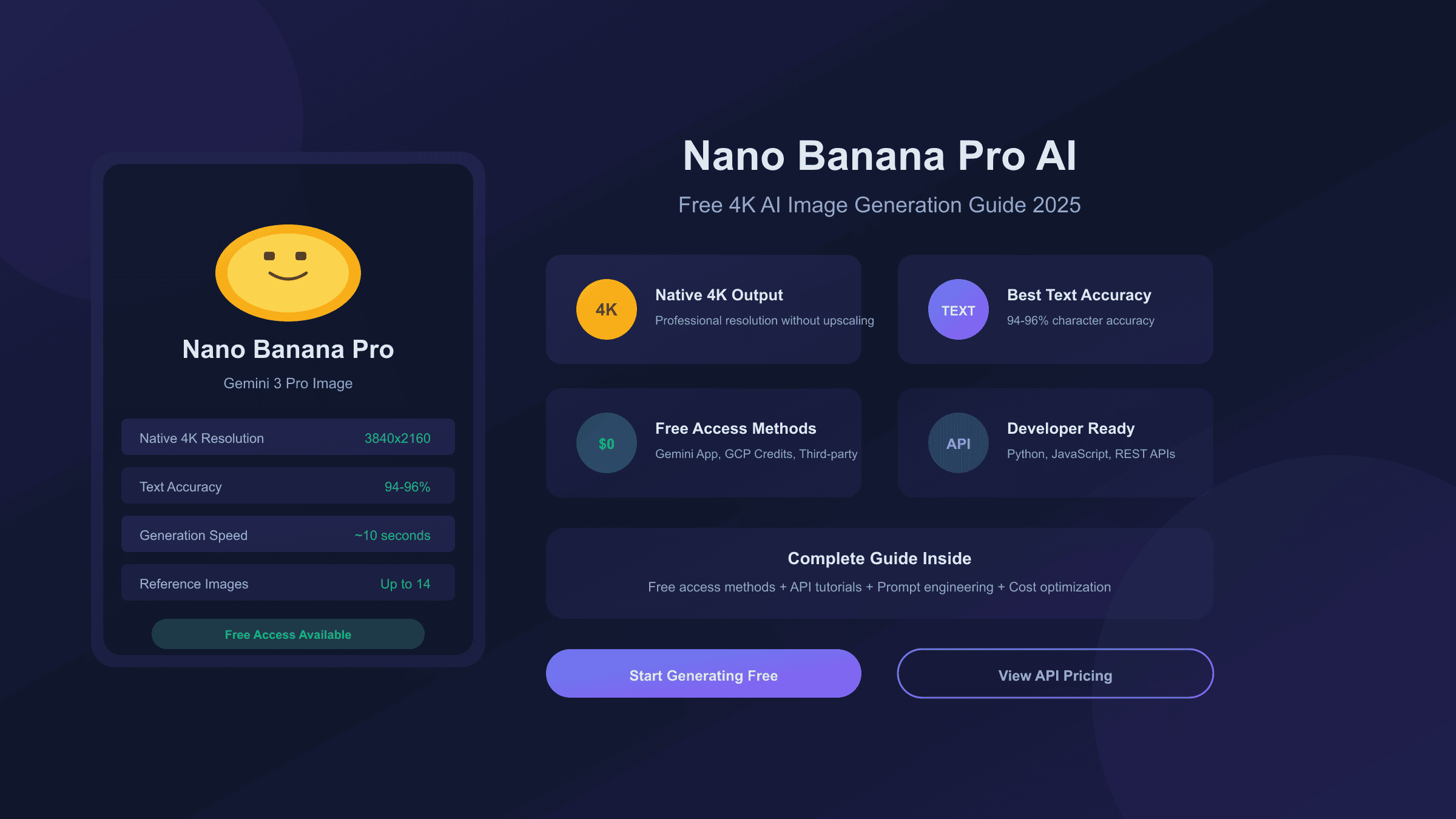
Nano Banana Pro represents Google DeepMind's most advanced AI image generation model, delivering native 4K resolution output and industry-leading text rendering accuracy of 94-96%. Released in November 2025 as part of the Gemini 3 Pro family, this "Thinking" model uses advanced reasoning to interpret complex prompts and produce professional-quality images suitable for marketing, design, and commercial applications.
Whether you're a designer seeking high-resolution assets, a developer integrating AI image generation into applications, or a creator exploring what's possible with cutting-edge AI, this guide covers everything from free access methods to advanced prompt engineering techniques. You'll learn how to generate stunning 4K images, understand pricing across different platforms, and discover cost-effective alternatives that can save up to 79% on generation costs.
What is Nano Banana Pro?
Nano Banana Pro is Google's flagship image generation model, officially known as Gemini 3 Pro Image Preview. The quirky name originated as an internal codename that Google officially adopted after the original Nano Banana model (Gemini 2.5 Flash Image) received widespread acclaim in August 2025. When the Pro version launched in November, Google kept the naming convention that users had grown to recognize.
The model builds on Gemini 3 Pro's multimodal architecture, combining state-of-the-art reasoning capabilities with image generation. For a comprehensive overview of all Nano Banana Pro capabilities, see our detailed capabilities guide. Unlike previous generation models that simply matched keywords to visual patterns, Nano Banana Pro employs a "Thinking" process—it reasons through complex prompts, considers physical constraints, understands composition principles, and generates intermediate concept images before producing the final output.
This reasoning capability transforms how the model handles creative direction. When you ask for "a vintage movie poster with Art Deco typography showing a detective silhouetted against neon city lights," Nano Banana Pro doesn't just pattern-match those keywords. It understands that Art Deco typography has specific geometric characteristics, that detective silhouettes traditionally appear in noir contexts, that neon lighting creates particular color spill effects, and that vintage movie posters follow certain compositional conventions. The result is imagery that demonstrates genuine understanding of the creative brief rather than coincidental assemblage of visual elements.
The model also introduces native 4K output, setting it apart from competitors that rely on upscaling to achieve high resolution. This matters significantly for professional applications where image quality directly impacts the final product—whether that's a billboard advertisement, a product catalog, or architectural visualization.
Core Capabilities and Features
Understanding Nano Banana Pro's technical capabilities helps you leverage its full potential. The model excels in several distinct areas that differentiate it from alternatives like DALL-E 3 or Midjourney.
Native 4K Resolution
While most AI image generators output at 1024×1024 pixels and require external upscaling for larger dimensions, Nano Banana Pro generates natively at 1K, 2K, or 4K resolutions. Native generation means the model creates detail at the target resolution rather than interpolating from a smaller image. Text remains crisp, fine details preserve accuracy, and the overall image exhibits the sharpness expected from genuine high-resolution sources.
The resolution advantage becomes particularly apparent in commercial applications. A marketing team producing billboard graphics needs assets that maintain quality at large scale. Native 4K generation eliminates the softening and artifacts that often plague upscaled AI images, delivering print-ready assets directly from the model.
Industry-Leading Text Rendering
Text in AI-generated images has historically been problematic—blurry letters, misspelled words, inconsistent fonts. Nano Banana Pro addresses this with dedicated training on billions of text-image pairs, achieving 94-96% character accuracy in benchmark tests. This performance significantly exceeds DALL-E 3 (approximately 78% accuracy) and Midjourney V7 (approximately 71% accuracy).
The practical implications are substantial. Designers can generate mockups with actual text rather than placeholder content. Marketing materials can include accurate taglines, product names, and calls to action. Infographics can display legible labels and data annotations. This capability alone justifies consideration of Nano Banana Pro for text-heavy creative work.
Multi-Reference Fusion
Creative projects often require maintaining consistency with existing brand assets, character designs, or product photography. Nano Banana Pro accepts up to 14 reference images simultaneously—6 objects and 5 human subjects—and can blend these references into new compositions while preserving their essential characteristics.
A practical example: a game studio can upload character designs, environment concepts, and prop references, then prompt the model to generate new scenes combining these elements consistently. The model maintains character proportions, color schemes, and stylistic elements across generations, enabling coherent visual development without manual intervention.
Google Search Grounding
For factual imagery—accurate maps, current event visualizations, or data-driven graphics—Nano Banana Pro can access Google Search to ground its outputs in real-world information. This prevents the model from generating plausible-looking but factually incorrect visuals, particularly important for educational content, journalism, or technical documentation.
| Capability | Specification | Competitive Advantage |
|---|---|---|
| Max Resolution | 4K (3840×2160) native | Higher than DALL-E 3, Midjourney |
| Text Accuracy | 94-96% | +16-25% vs competitors |
| Reference Images | Up to 14 | Industry-leading |
| Generation Speed | ~10 seconds | Faster than Midjourney |
| Search Grounding | Yes | Unique to Gemini models |
| Thinking Mode | Advanced reasoning | Unique to Nano Banana Pro |
Free Access Methods in 2025
Accessing Nano Banana Pro without payment is possible through several channels, though each comes with specific limitations. Understanding these options helps you choose the approach that matches your usage requirements.
Method 1: Gemini App (Recommended for Beginners)
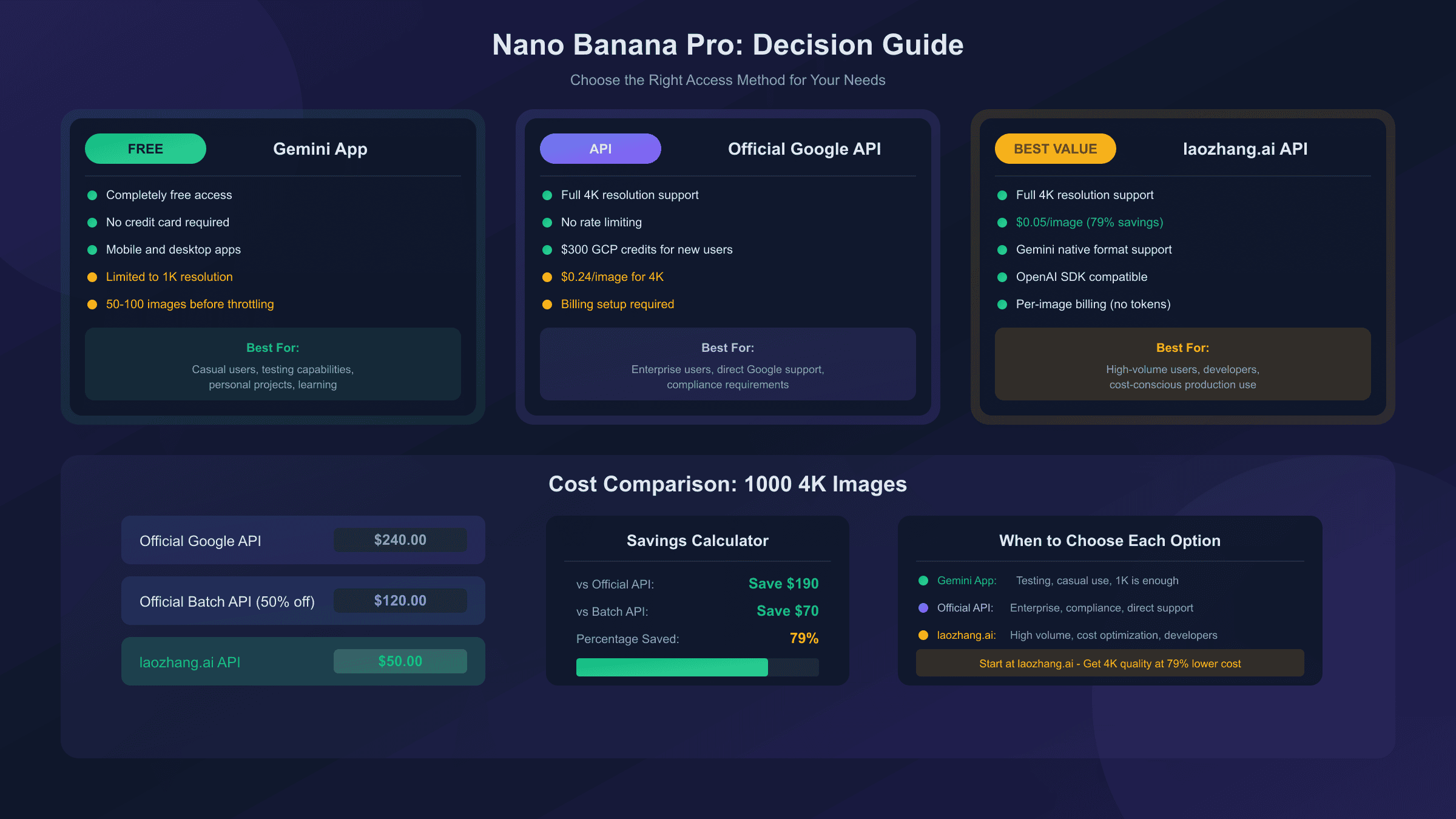
The simplest path to Nano Banana Pro is through Google's Gemini app, available on web, iOS, and Android. Free tier users receive approximately 50-100 image generations before the system throttles access and reverts to the standard Nano Banana model.
To access the Pro model specifically, open the Gemini app and look for the model selector at the top of the chat. Select "Thinking" mode rather than "Fast"—this critical step determines whether you're using Nano Banana Pro's advanced capabilities or the faster but less capable standard version. Then select "Create images" from the tools menu and enter your prompt.
Free tier limitations include resolution capping at approximately 1K (1024×1024 pixels) and the visible Gemini watermark on outputs. Once you exhaust your quota, the app automatically switches to standard Nano Banana without notification, so monitor your usage if quality consistency matters for your project.
Method 2: Google Cloud Platform Credits
New Google Cloud Platform accounts receive $300 in free credits applicable across GCP services, including the Gemini API. At official pricing of $0.134 per standard-resolution image, these credits enable approximately 2,240 image generations—substantially more than the Gemini app's free quota.
The GCP approach requires more technical setup: creating a project, enabling the Gemini API, generating API credentials, and implementing API calls. For developers comfortable with this workflow, the significantly higher generation quota makes GCP credits the most generous free option available. Learn more about Nano Banana Pro pricing options to understand the full cost structure.
Method 3: Third-Party Platforms
Several platforms wrap the Gemini API and offer free access through ad-supported or signup-gated interfaces. Platforms like felo.ai, Lovart.ai, and nano-banana.ai provide browser-based access without requiring direct API integration.
These platforms vary in reliability, quota limits, and output quality. Some throttle resolution more aggressively than Google's official channels; others impose daily generation caps. Before depending on third-party access for important projects, test the platform thoroughly to understand its limitations.
Method 4: Google Workspace Integration
Google Workspace subscribers receive promotional access to Nano Banana Pro for at least 60 days, with the model integrated into Slides, NotebookLM, and Vids. This integration enables image generation within familiar productivity tools without navigating separate interfaces.
Workspace integration is particularly useful for creating presentation graphics, educational materials, or video assets directly within your existing workflow. The promotional period provides time to evaluate whether the capabilities justify continued investment.
How to Generate 4K Images Step by Step
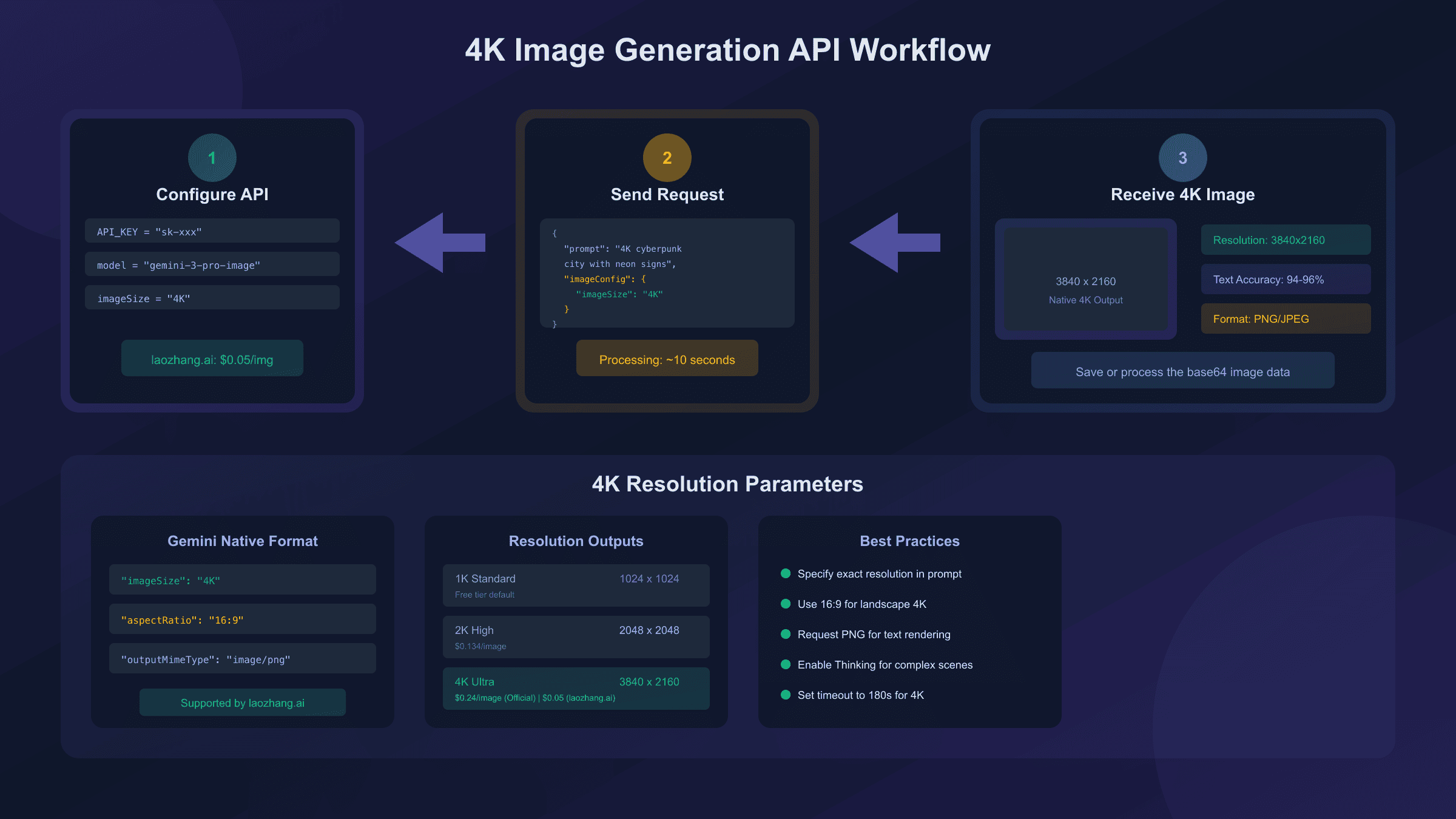
Achieving true 4K output from Nano Banana Pro requires proper configuration. Free tier access typically caps resolution below 4K, so this walkthrough assumes you're using a paid API key or have access through a platform that exposes resolution controls.
Step 1: Set Up Your Environment
For Python developers, install the Google Gen AI SDK version 1.52 or later:
hljs bashpip install -U "google-genai>=1.52.0"
pip install Pillow
Obtain an API key from Google AI Studio. Note that Nano Banana Pro requires billing-enabled API access—the free tier API doesn't include Pro model access.
Step 2: Configure the API Client
Initialize the client with your credentials and specify the Pro model:
hljs pythonfrom google import genai
from google.genai import types
client = genai.Client(api_key="YOUR_API_KEY")
# Nano Banana Pro model ID
MODEL_ID = "gemini-3-pro-image-preview"
Step 3: Request 4K Generation
The resolution parameter accepts "1K", "2K", or "4K" values:
hljs pythonresponse = client.models.generate_content(
model=MODEL_ID,
contents=["A detailed architectural rendering of a modern glass skyscraper
at sunset, with accurate reflections and city lights beginning
to illuminate the surrounding buildings"],
config=types.GenerateContentConfig(
response_modalities=['IMAGE'],
image_generation_config=types.ImageGenerationConfig(
output_mime_type="image/png",
output_resolution="4K"
)
)
)
Step 4: Handle the Response
Extract and save the generated image:
hljs pythonimport base64
from PIL import Image
from io import BytesIO
# Access the image data
image_data = response.candidates[0].content.parts[0].inline_data.data
# Decode and save
image_bytes = base64.b64decode(image_data)
image = Image.open(BytesIO(image_bytes))
image.save("output_4k.png")
print(f"Generated image: {image.width}x{image.height}")
# Expected output: Generated image: 3840x2160
Important Considerations
4K generation consumes more compute resources and costs more than lower resolutions—$0.24 per image compared to $0.134 for standard resolution. For iterative work where you're refining prompts, consider generating at lower resolution first, then producing the final output at 4K once you've achieved the desired result.
Also note that resolution may degrade during multi-turn editing. If you're using Nano Banana Pro's iterative editing capabilities, the model may internally downscale during complex editing operations. For maximum quality, generate your final version fresh rather than editing a 4K image multiple times.
API Pricing and Cost Optimization
Understanding Nano Banana Pro's pricing structure helps you budget effectively and identify optimization opportunities. Official Google pricing serves as the baseline, but several strategies can significantly reduce per-image costs.
Official Google API Pricing
Google structures pricing by resolution and API type:
| Resolution | Standard API | Batch API |
|---|---|---|
| 1K / 2K | $0.134/image | $0.067/image |
| 4K | $0.24/image | $0.12/image |
The Batch API offers 50% savings but introduces latency—up to 24 hours for processing. For time-sensitive projects, this trade-off may not work. For bulk generation where timing flexibility exists, batch processing halves your costs.
Third-Party API Providers
Several providers offer Nano Banana Pro access at significant discounts compared to Google's direct pricing. These services aggregate demand and leverage volume discounts, passing savings to users.
For developers seeking the most cost-effective Nano Banana Pro access, laozhang.ai provides the model at $0.05 per image—a 63% savings compared to Google's standard API pricing and 79% savings compared to 4K generation. The service supports Gemini's native API format, meaning you can access full 4K parameters and advanced configuration options that some third-party providers strip out.
The platform uses per-image billing rather than token-based pricing, making costs completely predictable. You pay for successful generations, not failed attempts or prompt iterations. This billing model particularly benefits workflows involving complex prompts that might consume substantial tokens under traditional pricing.
hljs python# Example using laozhang.ai's Nano Banana Pro endpoint
import requests
import base64
API_KEY = "sk-YOUR_API_KEY" # From laozhang.ai
API_URL = "https://api.laozhang.ai/v1beta/models/gemini-3-pro-image-preview:generateContent"
headers = {
"Authorization": f"Bearer {API_KEY}",
"Content-Type": "application/json"
}
payload = {
"contents": [{
"parts": [{"text": "A cyberpunk street scene with neon signs in Japanese, 4K quality"}]
}],
"generationConfig": {
"responseModalities": ["IMAGE"],
"imageConfig": {
"aspectRatio": "auto",
"imageSize": "4K"
}
}
}
response = requests.post(API_URL, headers=headers, json=payload, timeout=180)
result = response.json()
# Extract image
image_data = result["candidates"][0]["content"]["parts"][0]["inlineData"]["data"]
with open("output.png", "wb") as f:
f.write(base64.b64decode(image_data))
Cost Comparison Example
For a project requiring 1,000 images at 2K resolution:
| Provider | Cost | Savings vs Official |
|---|---|---|
| Official Google API | $134 | Baseline |
| Official Batch API | $67 | 50% |
| laozhang.ai | $50 | 63% |
Optimization Strategies
Several practices reduce costs regardless of which provider you use:
-
Iterate at low resolution: Generate variations at 1K until you achieve the desired result, then produce the final version at higher resolution.
-
Use batch processing when timing permits: The 50% discount on batch API is substantial for bulk work.
-
Cache successful prompts: Once you develop prompts that produce consistently good results, document them for reuse rather than experimenting repeatedly.
-
Choose resolution appropriately: Not every image needs 4K. Web graphics, social media posts, and preview materials work fine at 1K or 2K.
Prompt Engineering for Best Results
Nano Banana Pro's "Thinking" architecture responds differently to prompts than simpler image generators. The model genuinely reasons through your request, so prompts structured as creative briefs produce better results than keyword lists. For advanced prompting strategies, check out our collection of best prompts for Nano Banana Pro.
Principle 1: Think Like a Creative Director
Traditional AI image prompts often resemble tag collections: "cyberpunk, neon, rain, city, night, 4k, detailed." Nano Banana Pro interprets prompts more holistically. Instead of tags, describe the image as you would brief a designer:
Less effective: "cyberpunk city, neon lights, rain, night scene, 4k, photorealistic"
More effective: "A rain-slicked Tokyo alley at 2 AM, where steam rises from street-level ramen vendors while towering holographic advertisements paint everything in magenta and cyan. A lone figure in a translucent rain jacket walks toward the camera, face obscured by the glow of a handheld device. The perspective emphasizes the vertical compression of the space, with fire escapes and AC units creating a canyon effect overhead."
The second prompt gives Nano Banana Pro's reasoning engine specific constraints to work with: a location (Tokyo alley), time (2 AM), atmospheric conditions (rain, steam), lighting sources (vendor lights, holograms), color palette (magenta, cyan), composition (vertical compression, canyon effect), and narrative element (figure walking toward camera).
Principle 2: Define Your Visual Surface
Nano Banana Pro thinks in terms of output formats. Explicitly stating what kind of image you want—a movie poster, a product photograph, an infographic, a character portrait—activates appropriate internal models for that format.
Example: "Create a vintage travel poster (24×36 inches, Art Deco style) promoting Tokyo tourism. The composition should feature Mount Fuji visible behind a stylized Tokyo Tower, with a bullet train crossing the foreground. Include the tagline 'TOKYO: Where Tomorrow Meets Tradition' in period-appropriate sans-serif typography. Color palette limited to deep navy, gold, cream, and coral red."
This prompt specifies: format (travel poster), dimensions (24×36), style (Art Deco), composition elements (Fuji, Tower, train), text content, and color constraints. Each specification gives the model's reasoning engine concrete parameters.
Principle 3: Specify Layout Before Style
When creating complex compositions, layout takes priority over artistic style. Tell the model how to organize space before describing how to render it:
"Divide the canvas into three equal vertical columns. The left column contains a close-up of brewing equipment with steam rising. The center column features a barista in action, slightly larger than life, serving as the focal point. The right column shows customers enjoying drinks at a café window overlooking a rainy street. Unify the three panels with a warm amber color grade and soft focus connecting elements across panel borders."
Principle 4: Use Constraints Productively
Specifying what you don't want helps prevent common AI image issues:
"A portrait of a software engineer at their workstation, hands visible and naturally positioned on keyboard (avoid distorted fingers or unnatural hand poses), realistic office lighting from overhead fluorescents and monitor glow, shallow depth of field keeping subject sharp while background softens naturally (avoid artificial blur artifacts)."
Principle 5: Edit, Don't Re-roll
If a generated image is 80% correct, use Nano Banana Pro's editing capabilities rather than generating from scratch. The model excels at conversational refinement:
"Keep this composition but change the lighting from harsh midday to golden hour. Warm up the color temperature and add long shadows extending toward the right side of the frame."
This approach is more efficient (and cheaper) than re-rolling until you get lucky with a complete new generation.
Nano Banana Pro vs DALL-E 3 vs Midjourney
Each major AI image generator has distinct strengths. Choosing between them depends on your specific use case, budget, and workflow requirements.
Text Rendering
Nano Banana Pro's 94-96% text accuracy makes it the clear choice for any image requiring legible text. DALL-E 3 at approximately 78% still produces readable text in most cases but struggles with longer passages, unusual fonts, or multiple text elements. Midjourney V7's 71% accuracy means text should generally be avoided or added post-generation.
If your workflow involves posters, infographics, marketing materials, or any image where text is a primary element, Nano Banana Pro is the strongest option currently available.
Resolution
Nano Banana Pro's native 4K output exceeds competitors' maximum resolutions. DALL-E 3 recently added 4K support but primarily outputs at 1792 pixels with upscaling for larger sizes. Midjourney V7 remains capped at 1024 pixels natively.
For print production, large-format display, or any application where resolution directly impacts quality, Nano Banana Pro's native high-resolution generation provides genuine advantage.
Artistic Style
Midjourney maintains its lead in aesthetic output. The model produces images with distinctive artistic qualities—textured, atmospheric, with a "human touch" that avoids the sometimes sterile perfection of other generators. For creative work where artistic interpretation matters more than literal accuracy, Midjourney remains compelling.
DALL-E 3 excels at semantic understanding—it "gets" complex prompts involving abstract concepts, metaphors, or unusual combinations. When your prompt involves conceptual challenges, DALL-E 3 often interprets intent more accurately than models focused on visual fidelity.
Nano Banana Pro aims for the middle ground: strong technical execution combined with reasoning capabilities that handle complex prompts effectively. It's less artistically distinctive than Midjourney but more versatile than DALL-E 3's sometimes literal interpretations.
| Factor | Nano Banana Pro | DALL-E 3 | Midjourney V7 |
|---|---|---|---|
| Text Rendering | Best (94-96%) | Good (78%) | Weakest (71%) |
| Max Resolution | 4K native | 1792px + upscale | 1024px |
| Speed | ~10 seconds | 15-25 seconds | 20-30 seconds |
| Artistic Style | Technical | Semantic | Aesthetic |
| Edit Capability | Excellent | Limited | Via remix |
| Cost | $0.134-0.24 | $0.04-0.12 | Subscription |
Recommendation by Use Case
- Marketing materials with text: Nano Banana Pro
- Print production requiring high resolution: Nano Banana Pro
- Artistic/creative projects: Midjourney
- Conceptual or abstract imagery: DALL-E 3
- Budget-constrained high volume: Nano Banana Pro via third-party providers
- Quick iteration and experimentation: DALL-E 3 (faster feedback loop)
Common Limitations and Workarounds
Every AI image generator has weaknesses. Understanding Nano Banana Pro's limitations helps you work around them effectively.
Small Text Rendering
While Nano Banana Pro excels at text, very small text or fine print can still be problematic. Text that would be difficult to read at the generated resolution may blur, distort, or contain errors.
Workaround: Generate images at maximum resolution (4K) when text is critical. If small text is essential, consider compositing—generate the image with placeholder or absent text, then add precise typography in post-processing.
Hand and Finger Accuracy
Like all current AI image generators, Nano Banana Pro occasionally produces anatomical errors in hands—extra fingers, impossible joint angles, or merged digits. The model has improved significantly over predecessors, but hands remain a challenge.
Workaround: Include explicit constraints in prompts: "hands naturally positioned, correct finger count, anatomically accurate." For critical images, inspect hands carefully and either regenerate or edit in post-processing.
Iterative Resolution Degradation
When using multi-turn editing, resolution may decrease during complex operations. The model may internally downscale during certain editing steps.
Workaround: For maximum quality, generate your final version fresh from a refined prompt rather than iteratively editing a single image. Use editing for conceptual refinement, then produce the final version as a new generation.
Multilingual Text Accuracy
While Nano Banana Pro supports multilingual text rendering, non-English text may contain grammatical errors or miss cultural nuances, particularly in languages with complex scripts or grammatical structures.
Workaround: Have native speakers verify any generated text in their language. Consider generating images with English text, then replacing with accurate translations in post-processing.
Factual Accuracy in Data Visualizations
Even with Google Search grounding, generated infographics, charts, or data visualizations should never be trusted as factually accurate. The model may create plausible-looking but incorrect data.
Workaround: Always verify data in generated visualizations against authoritative sources. Use Nano Banana Pro for layout and visual design, but input verified data manually or validate all figures before publication.
Commercial and Enterprise Use Cases
Nano Banana Pro's capabilities make it particularly valuable for commercial applications where quality, text accuracy, and brand consistency matter.
Marketing and Advertising
Generate campaign visuals with accurate taglines, product names, and calls to action without post-processing text. Create variant ads for A/B testing at scale—same core visual with different headlines, color schemes, or product placements. Produce localized versions using multi-language text rendering.
The multi-reference capability enables brand consistency: upload your style guide, logo variants, and color palette, then generate new assets that maintain brand identity across different contexts and applications.
E-commerce Product Visualization
Generate product images in various contexts, lighting conditions, or settings without physical photography. Create lifestyle imagery showing products in use. Produce consistent product catalogs with uniform styling.
For products not yet manufactured, Nano Banana Pro can visualize concepts based on design references, enabling marketing preparation before production completion.
Presentation and Documentation
Workspace integration brings Nano Banana Pro directly into Slides, enabling generation of presentation graphics without leaving the productivity environment. Create diagrams, conceptual visualizations, and illustrative imagery that matches presentation themes.
Technical documentation benefits from the model's ability to generate accurate diagrams, process visualizations, and instructional graphics with legible labels and annotations.
Game and Entertainment
Concept artists can accelerate ideation by generating visual explorations based on written briefs. The multi-reference capability helps maintain character and environment consistency across dozens or hundreds of generated concepts.
Nano Banana Pro's composition understanding makes it effective for generating marketing assets—key art, promotional materials, social media content—that maintain the visual identity established in production.
For developers seeking reliable access to Nano Banana Pro's commercial capabilities without the complexity of direct Google API integration, services like laozhang.ai provide stable, cost-effective endpoints suitable for production deployment. The per-image pricing model simplifies budgeting for projects with defined scope, while high concurrency support handles batch processing requirements.
Frequently Asked Questions
Is Nano Banana Pro completely free?
Nano Banana Pro offers limited free access through the Gemini app (approximately 50-100 generations before throttling) and through third-party platforms with various restrictions. Full access to all capabilities including 4K resolution requires paid API access, either through Google directly or third-party providers.
What's the difference between Nano Banana and Nano Banana Pro?
Nano Banana (Gemini 2.5 Flash Image) is optimized for speed and efficiency—approximately 3 seconds per generation at lower resolution. Nano Banana Pro (Gemini 3 Pro Image Preview) uses advanced "Thinking" reasoning for complex prompts, supports 4K native output, and achieves higher text accuracy, but costs more and takes longer (~10 seconds).
Can I use Nano Banana Pro images commercially?
Yes, images generated through Nano Banana Pro can be used commercially. However, all generated images include a SynthID watermark (invisible on free tier, may be removed on higher tiers). Check the specific terms of service for your access method regarding commercial usage rights.
How do I access 4K resolution?
4K output requires paid API access with specific configuration. Free tier access typically caps at 1K resolution. When using the API, specify "4K" in the imageConfig or output_resolution parameter.
Why did my image have text errors?
While Nano Banana Pro achieves 94-96% text accuracy, errors can still occur, particularly with small text, unusual fonts, or lengthy passages. Regenerate with emphasis on text elements, generate at maximum resolution, or add critical text in post-processing.
How does pricing compare to other AI image generators?
Nano Banana Pro's standard pricing ($0.134-0.24/image) is higher than DALL-E 3 ($0.04-0.12) but lower than Midjourney subscriptions for high-volume use. Third-party providers like laozhang.ai offer Nano Banana Pro at $0.05/image, making it cost-competitive with any option.
Can Nano Banana Pro edit existing photos?
Yes, the model supports multi-turn editing. Upload an image and describe desired changes. The model can modify lighting, colors, add or remove elements, change backgrounds, and apply style transfers while preserving core composition.
What happened to free access in Google AI Studio?
Google closed free trial access to Nano Banana Pro through AI Studio. The model now requires a billing-enabled API key. Alternative free access remains available through the Gemini app and some third-party platforms.
Conclusion
Nano Banana Pro represents a significant advancement in AI image generation, offering native 4K resolution, industry-leading text accuracy, and sophisticated reasoning capabilities that enable complex creative work previously requiring multiple tools or extensive post-processing. While premium features require paid access, the combination of limited free tiers and cost-effective third-party providers makes the technology accessible across budgets.
For text-heavy commercial work—marketing materials, infographics, presentations—Nano Banana Pro is currently the strongest option available. Its text rendering accuracy eliminates the tedious post-processing that other generators require, while native high resolution enables direct use in print and large-format applications.
The model's reasoning capabilities reward thoughtful prompting. Rather than keyword lists, approach Nano Banana Pro as a creative collaborator that understands composition, style, and technical requirements. Invest time developing prompts that communicate your creative intent clearly, and use the multi-turn editing capability to refine rather than regenerate.
Whether you're exploring AI image generation for the first time or evaluating Nano Banana Pro against existing workflows, the technology delivers genuine value for creative and commercial applications. Start with free tier access to understand the model's capabilities, then consider paid options when your usage demands consistent access to premium features.