How to Get Nano Banana Pro: Complete Access Guide for 2025
Learn all the ways to access Nano Banana Pro, from free Gemini app usage to API integration. Compare subscription tiers, pricing, and discover cost-effective third-party alternatives.
Nano Banana Pro
4K-80%Google Gemini 3 Pro · AI Inpainting
谷歌原生模型 · AI智能修图

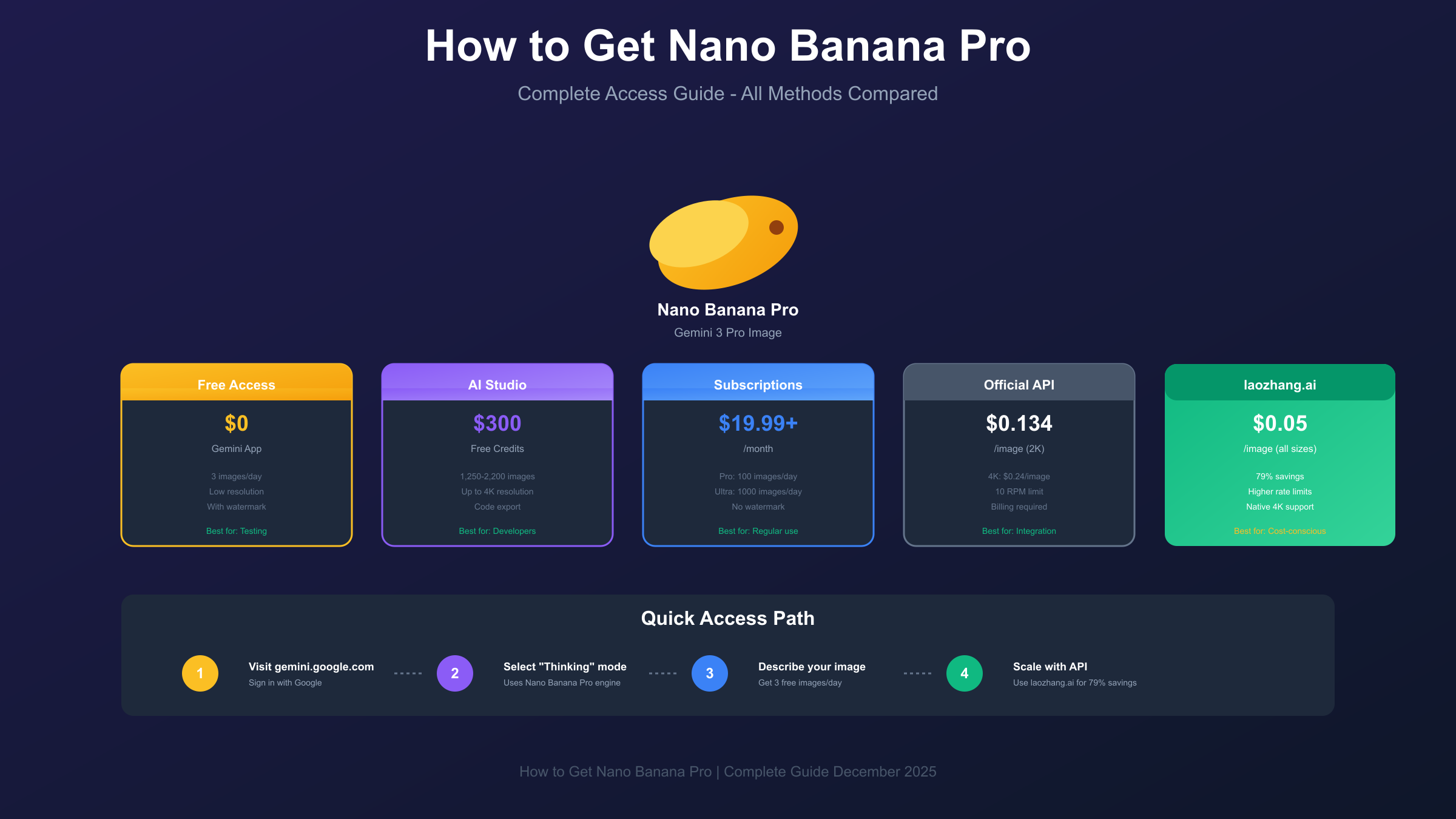
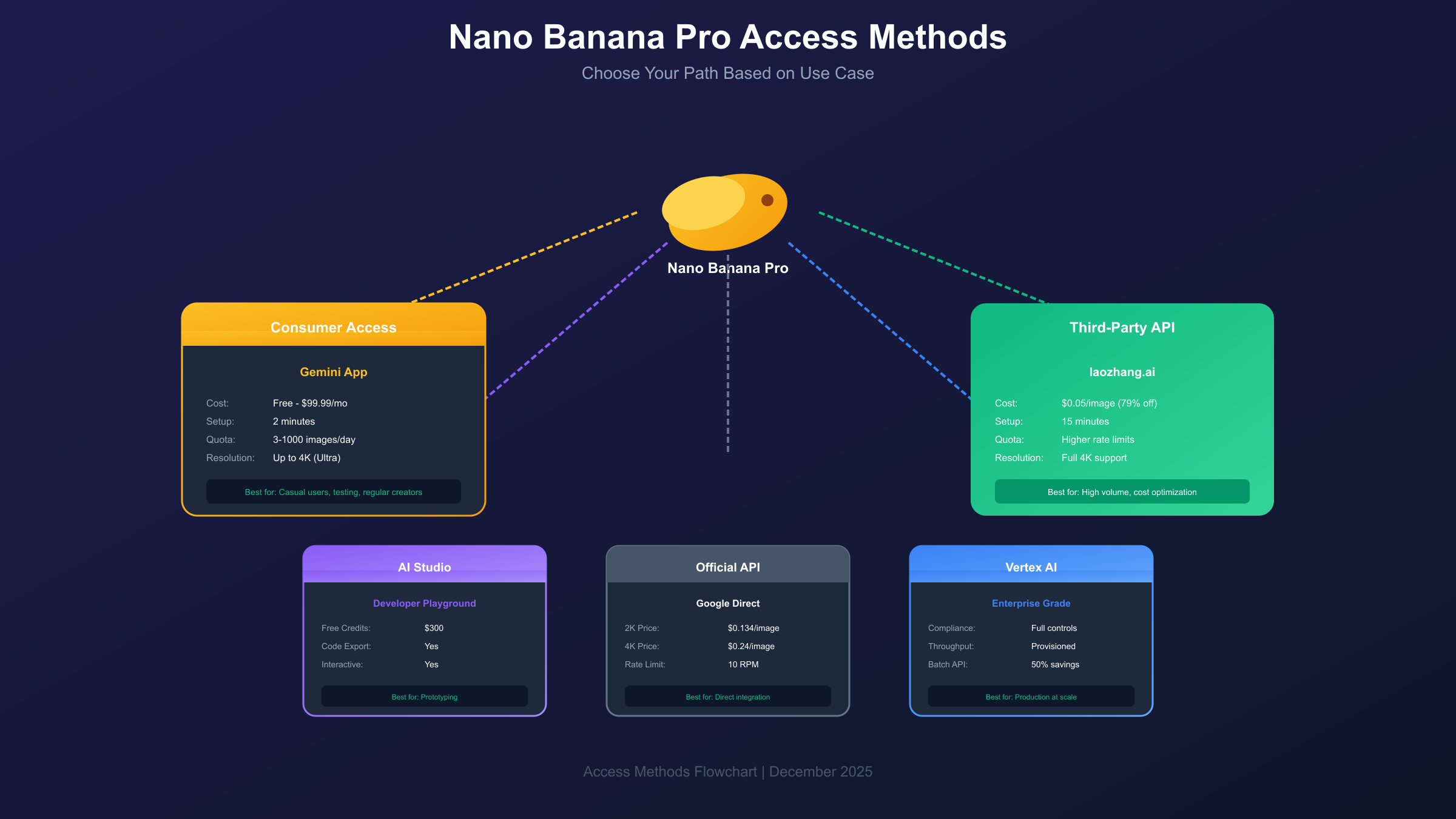
Getting access to Nano Banana Pro involves choosing from several distinct pathways, each designed for different use cases and budgets. Whether you want to test the model for free through the Gemini app, integrate it into your applications via API, or deploy it at enterprise scale through Vertex AI, this guide covers every access method available in 2025.
Nano Banana Pro represents Google DeepMind's most advanced image generation model, built on the Gemini 3 Pro architecture. Unlike its predecessor Nano Banana, which optimizes for speed, Nano Banana Pro prioritizes professional-grade output quality with native 4K resolution support, accurate text rendering in multiple languages, and the ability to blend up to 14 reference images while maintaining consistency across subjects.
What Is Nano Banana Pro and Why Access Matters
Before diving into access methods, understanding what Nano Banana Pro offers helps clarify why the various access tiers exist and which one suits your needs. Nano Banana Pro is the official codename for Gemini 3 Pro Image, Google's flagship text-to-image and image-editing model that launched in November 2025.
The model's distinguishing capabilities include studio-grade creative controls for camera angles, lighting, depth of field, and color grading. It renders text inside images with exceptional accuracy, supporting legible logos, multilingual signs, and styled typography that previously required post-production editing. The model can maintain the likeness of up to 5 people across multiple images, enabling consistent character representation for creative projects.
Search Grounding sets Nano Banana Pro apart from competing models. By accessing real-time data from Google Search, it generates accurate, up-to-date images of current events, products, and real-world locations. This capability proves particularly valuable for content creators who need images reflecting recent developments without manually sourcing reference materials.
The practical implications of these capabilities explain the tiered access structure. Google reserves certain features and output qualities for paid tiers, creating clear differentiation between free experimentation and production-ready usage. Understanding this structure helps you choose the access method that balances your quality requirements against budget constraints.
Quickest Way to Start: Gemini App Free Tier
The fastest path to using Nano Banana Pro requires nothing more than a Google account and takes under two minutes to complete. This approach works well for users who want to test the model before committing to paid access or API integration.
Open the Gemini app on your mobile device or navigate to gemini.google.com in your browser. Sign in with your Google account to ensure your free quota appears in the interface. The mobile app provides convenient access for quick image generation on the go, while the desktop web interface offers more screen space for reviewing and iterating on results.
The critical step involves selecting the correct model. At the top of the chat interface, locate the model selector and switch it to "Thinking" mode. This step is essential because "Thinking" specifically uses the Nano Banana Pro engine (Gemini 3 Pro Image), while "Fast" mode uses the standard Nano Banana model without the advanced capabilities.
Once in Thinking mode, simply describe the image you want to generate. The free tier provides three low-resolution image generations per day, which resets at midnight Pacific Time. While the resolution is lower than paid tiers, the core generation quality remains consistent with Nano Banana Pro's capabilities, making this an excellent way to evaluate whether the model meets your needs.
The primary limitations of free access center on output resolution and daily quota. Free users receive lower-resolution outputs suitable for social media and web use but inadequate for print or professional applications. The three-image daily limit constrains iterative refinement, often requiring multiple days to perfect a particular concept through progressive prompt adjustments.
Google AI Studio: Developer Playground Access
Google AI Studio provides a browser-based environment for experimenting with Nano Banana Pro in a developer-focused context. This platform bridges the gap between casual app usage and full API integration, offering interactive experimentation with the ability to export working code.
Access AI Studio by navigating to aistudio.google.com and signing in with your Google account. From the model picker in the interface, select "Nano Banana Pro" or "Gemini 3 Pro Image" to activate the advanced image generation model. The interface provides real-time parameter adjustment and immediate visual feedback on generation results.
New users receive $300 in free API credits upon creating their Google Cloud project, which translates to approximately 1,250 to 2,200 free image generations depending on resolution choices. These credits provide substantial runway for experimentation and prototype development before committing to ongoing costs.
The AI Studio interface exposes configuration options not available through the consumer Gemini app, including aspect ratio controls, resolution selection (1K, 2K, or 4K), and advanced prompting features. You can experiment with multi-turn conversations where the model iteratively refines images based on feedback, a capability particularly useful for complex creative projects.
For developers, AI Studio's code export feature generates working API calls in Python, JavaScript, or other supported languages. After perfecting your prompt and parameters interactively, you can export the configuration as production-ready code for integration into your applications. This workflow significantly accelerates the development process compared to writing API calls from scratch.
Getting API Credentials with Billing Enabled
Production API access to Nano Banana Pro requires setting up a Google Cloud project with billing enabled. Unlike the free-tier Nano Banana model, Nano Banana Pro has no free API tier, making billing configuration mandatory for programmatic access.
Begin by creating a Google Cloud project if you don't already have one. Navigate to console.cloud.google.com, create a new project with a descriptive name, and note the project ID for later reference. Enable the Generative AI API for your project by searching for it in the APIs & Services marketplace and clicking the Enable button.
Next, generate an API key by visiting the AI Studio API key page at aistudio.google.com/apikey. Select your project from the dropdown and click "Create API Key." Store this key securely, as it provides authenticated access to your project's quota and billing.
The billing setup step distinguishes Nano Banana Pro from other Gemini models. In the API key management screen, locate the "Set up billing" option next to your project and follow the on-screen instructions to add a payment method. Without active billing, API calls to Nano Banana Pro will fail with authentication or quota errors even with a valid API key.
Install the Google Gen AI SDK to begin making API calls. The latest version (1.52.0 or higher) is required for full Nano Banana Pro functionality including resolution specification:
hljs pythonpip install google-genai>=1.52.0
Note that Python 3.11 or higher is required for the latest SDK version. Verify your installation by importing the library and initializing the client:
hljs pythonfrom google import genai
client = genai.Client(api_key="YOUR_API_KEY")
Subscription Tiers: Pro vs Ultra Compared
For users who prefer subscription access over pay-per-use API billing, Google offers tiered plans that bundle Nano Banana Pro access with other Gemini features. Understanding the differences between tiers helps optimize costs based on your usage patterns.
| Tier | Monthly Price | Daily Image Quota | Max Resolution | Watermark | Best For |
|---|---|---|---|---|---|
| Free | $0 | 3 images | Low | Yes | Testing only |
| Pro | $19.99 | 100 images | 2K | No | Regular users |
| Ultra | $99.99 | 1,000 images | 4K | No | Power users |
The Free tier provides limited access for evaluation purposes. The low-resolution output and visible watermark make these images unsuitable for professional use, but the tier serves its purpose for determining whether Nano Banana Pro meets your quality requirements before upgrading.
Google AI Pro at $19.99 monthly unlocks 100 daily images at 2K resolution without watermarks. This tier suits content creators, marketers, and designers who need regular access to high-quality AI-generated images but don't require 4K output or extremely high volumes. The 2K resolution handles most web and social media use cases effectively.
Google AI Ultra at $99.99 monthly provides the full Nano Banana Pro experience with 1,000 daily images at native 4K resolution. This tier targets professional studios, agencies, and power users who need maximum output quality and volume. The 4K capability proves essential for print production, large-format displays, and projects requiring extreme detail.
The economic calculation between tiers depends on your usage volume. At 100 images per month, Pro's $0.20 per image effective cost compares favorably to API pricing. However, exceeding your daily quota wastes the subscription's remaining value, making API access more economical for irregular usage patterns.
Vertex AI: Enterprise-Grade Access
Enterprise deployments requiring compliance controls, guaranteed availability, and integration with existing Google Cloud infrastructure should consider Vertex AI access. This pathway provides production-grade capabilities beyond what consumer and developer tiers offer.
Vertex AI positions Nano Banana Pro as an enterprise-grade offering with Provisioned Throughput, Pay As You Go pricing options, and advanced safety filters. Developers access the model through the same API but benefit from additional governance features including rate-limiting rules, cost controls, usage dashboards, and compliance settings suitable for regulated industries.
The setup process begins in the Google Cloud Console. Navigate to Vertex AI, enable the API for your project, and configure your preferred pricing model. Provisioned Throughput guarantees consistent performance for predictable workloads, while Pay As You Go suits variable demand patterns.
Enterprise users gain access to features unavailable through consumer channels. Custom safety filters allow adjusting content moderation thresholds for specific use cases. Geographic deployment options enable data residency compliance for organizations operating under regulatory constraints. Integration with Cloud IAM provides granular access control across team members and applications.
For production workflows requiring batch processing, Vertex AI's Batch API reduces costs by 50% compared to synchronous requests. While batch requests may take up to 24 hours for completion, the cost savings justify the latency for non-time-sensitive generation tasks. This approach works particularly well for scheduled content generation and bulk asset production.
Third-Party API Providers: Cost-Effective Access
Third-party providers offer Nano Banana Pro access at substantially reduced costs compared to Google's official pricing. These services relay requests through their own infrastructure, enabling lower per-image costs while maintaining output quality.
Among available options, laozhang.ai provides Nano Banana Pro access at $0.05 per image regardless of resolution, representing a 79% savings compared to Google's 4K pricing of $0.24 per image. This flat-rate pricing simplifies cost calculation and eliminates the premium typically charged for higher resolutions.
The integration process requires minimal code changes for existing Google AI implementations. The service supports Gemini's native format with full 4K parameter configuration:
hljs pythonimport requests
import base64
API_KEY = "sk-YOUR_LAOZHANG_KEY"
API_URL = "https://api.laozhang.ai/v1beta/models/gemini-3-pro-image-preview:generateContent"
headers = {
"Authorization": f"Bearer {API_KEY}",
"Content-Type": "application/json"
}
payload = {
"contents": [{
"parts": [{"text": "A professional product photo of a luxury watch, 4K quality"}]
}],
"generationConfig": {
"responseModalities": ["IMAGE"],
"imageConfig": {
"aspectRatio": "1:1",
"imageSize": "4K"
}
}
}
response = requests.post(API_URL, headers=headers, json=payload, timeout=180)
result = response.json()
image_data = result["candidates"][0]["content"]["parts"][0]["inlineData"]["data"]
with open("output.png", "wb") as f:
f.write(base64.b64decode(image_data))
Third-party providers typically offer advantages beyond pricing. Higher rate limits allow faster batch processing without the 10 requests-per-minute constraint of official API access. Usage dashboards and cost tracking simplify budget management for teams with multiple users or projects.
The trade-off involves routing requests through an intermediary rather than directly to Google's infrastructure. Organizations with strict data handling requirements should evaluate whether this routing aligns with their compliance obligations. For most use cases, the substantial cost savings justify this consideration, particularly for development and prototyping phases where iteration speed matters more than data residency.
Complete Pricing Comparison
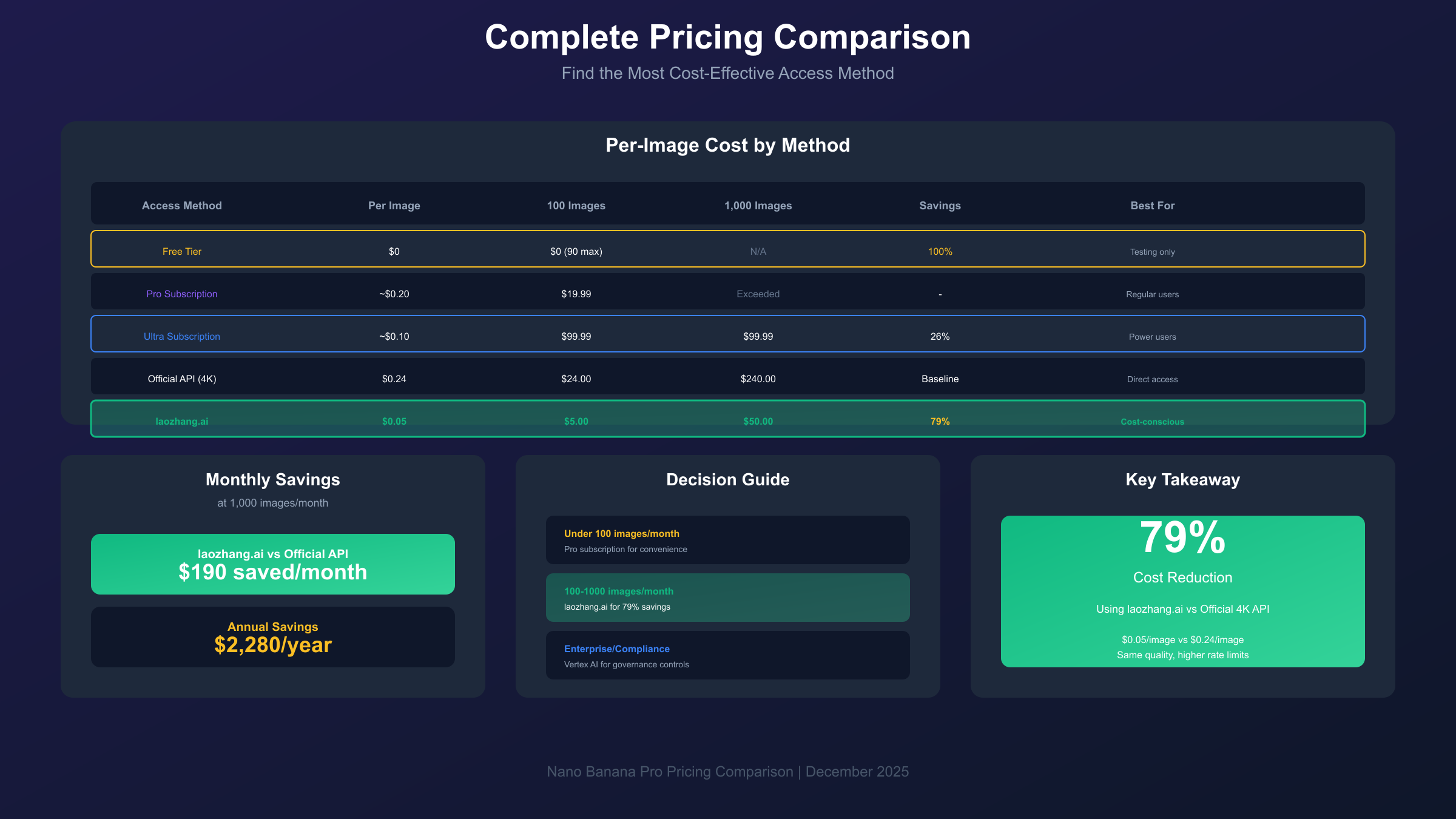
Choosing the most economical access method requires understanding costs across different usage volumes. This comparison spans all available pathways from subscriptions to API access.
| Access Method | Per-Image Cost | Monthly Cost (100 images) | Monthly Cost (1000 images) | Best For |
|---|---|---|---|---|
| Free Tier | $0 | $0 (90 images max) | N/A | Testing |
| Pro Subscription | ~$0.20 | $19.99 | N/A (exceeded) | Regular use |
| Ultra Subscription | ~$0.10 | $99.99 | $99.99 | High volume |
| Official API (2K) | $0.134 | $13.40 | $134.00 | Variable use |
| Official API (4K) | $0.24 | $24.00 | $240.00 | Quality focus |
| Batch API (4K) | $0.12 | $12.00 | $120.00 | Non-urgent |
| laozhang.ai | $0.05 | $5.00 | $50.00 | Cost-conscious |
For low-volume users generating fewer than 100 images monthly, the Pro subscription at $19.99 provides predictable costs and convenience without managing API credentials. The effective per-image cost of $0.20 or less competes with API pricing while eliminating usage tracking overhead.
Moderate-volume users generating 100-500 images monthly benefit most from third-party API access. At 300 images monthly, laozhang.ai costs $15 compared to $40 for official 2K API or $72 for 4K. The 60-80% savings compound significantly over time without sacrificing output quality.
High-volume production environments generating 1,000+ images monthly should evaluate laozhang.ai's $50 monthly cost against Ultra's $99.99 subscription. The API approach provides identical quality at half the price while offering flexibility to scale beyond 1,000 images without overage concerns. For more detailed cost analysis, see our complete Nano Banana Pro pricing guide.
Working Code Examples
These production-ready examples demonstrate common Nano Banana Pro use cases across different access methods.
Basic text-to-image using Google SDK:
hljs pythonfrom google import genai
from google.genai import types
client = genai.Client(api_key="YOUR_API_KEY")
response = client.models.generate_content(
model="gemini-3-pro-image-preview",
contents=["Create a photorealistic image of a modern minimalist kitchen"],
config=types.GenerateContentConfig(
image_config=types.ImageConfig(
aspect_ratio="16:9",
image_size="4K"
)
)
)
# Access the generated image
for part in response.candidates[0].content.parts:
if hasattr(part, 'inline_data'):
with open("kitchen.png", "wb") as f:
f.write(part.inline_data.data)
Multi-turn refinement for iterative improvement:
hljs pythonfrom google import genai
client = genai.Client(api_key="YOUR_API_KEY")
chat = client.chats.create(model="gemini-3-pro-image-preview")
# Initial generation
response1 = chat.send_message("Create a logo for a tech startup called 'Nexus'")
# Refine based on initial result
response2 = chat.send_message("Make the logo more minimalist with a blue color scheme")
# Final adjustment
response3 = chat.send_message("Add subtle geometric patterns in the background")
Batch processing with laozhang.ai for volume work:
hljs pythonimport requests
import base64
import concurrent.futures
API_KEY = "sk-YOUR_LAOZHANG_KEY"
API_URL = "https://api.laozhang.ai/v1beta/models/gemini-3-pro-image-preview:generateContent"
prompts = [
"Product photo of headphones on white background",
"Product photo of smartphone on white background",
"Product photo of laptop on white background"
]
def generate_image(prompt, index):
headers = {"Authorization": f"Bearer {API_KEY}", "Content-Type": "application/json"}
payload = {
"contents": [{"parts": [{"text": prompt}]}],
"generationConfig": {"responseModalities": ["IMAGE"]}
}
response = requests.post(API_URL, headers=headers, json=payload, timeout=180)
data = response.json()["candidates"][0]["content"]["parts"][0]["inlineData"]["data"]
with open(f"product_{index}.png", "wb") as f:
f.write(base64.b64decode(data))
return f"Generated product_{index}.png"
with concurrent.futures.ThreadPoolExecutor(max_workers=3) as executor:
results = list(executor.map(generate_image, prompts, range(len(prompts))))
For comprehensive API documentation and additional integration options, explore our Nano Banana Pro API guide.
Troubleshooting Common Issues
Even with correct setup, you may encounter issues during Nano Banana Pro access. These solutions address the most frequently reported problems.
"Model not found" errors typically occur when using incorrect model identifiers. Ensure you're targeting gemini-3-pro-image-preview rather than outdated identifiers from documentation that references earlier model versions. The preview suffix is required during the current phase and will change when the model reaches general availability.
Authentication failures most commonly result from API keys without enabled billing. Even with a valid key, Nano Banana Pro requires active billing on the associated Google Cloud project. Verify billing status in the Cloud Console under Billing > Account Management. If billing appears active but authentication fails, regenerate your API key and ensure no trailing whitespace was copied during paste.
Rate limiting errors appear when exceeding the 10 requests-per-minute limit on official API access. Implement exponential backoff in your code to handle these gracefully:
hljs pythonimport time
import random
def generate_with_retry(prompt, max_retries=5):
for attempt in range(max_retries):
try:
return client.models.generate_content(
model="gemini-3-pro-image-preview",
contents=[prompt]
)
except Exception as e:
if "rate limit" in str(e).lower():
wait_time = (2 ** attempt) + random.uniform(0, 1)
time.sleep(wait_time)
else:
raise
raise Exception("Max retries exceeded")
Timeout errors occur because image generation takes longer than text tasks. Set timeout values to at least 180 seconds for generation requests. The 4K outputs particularly require extended processing time that default timeout configurations don't accommodate.
Content filtering rejections indicate prompts that triggered safety systems. Nano Banana Pro applies content moderation to both prompts and outputs. Rephrase prompts to avoid explicit language, violent imagery, or attempts to generate recognizable individuals without proper context. The error message typically indicates which aspect triggered filtering.
Conclusion
Getting access to Nano Banana Pro depends on matching your use case to the appropriate access pathway. Casual users can start immediately with the free Gemini app tier, developers can prototype in AI Studio with $300 in credits, and production applications can choose between subscription tiers, direct API access, or cost-effective third-party providers.
For most users seeking regular access with predictable costs, third-party API providers like laozhang.ai offer the best balance of quality and economy at $0.05 per image. Power users requiring maximum daily quota should evaluate the Ultra subscription, while enterprises needing compliance controls should pursue Vertex AI integration.
Regardless of which access method you choose, Nano Banana Pro delivers exceptional image generation quality that justifies its position as Google's flagship creative AI model. The access decision ultimately reduces to matching your volume requirements and budget constraints to the tier that provides the best value for your specific situation.