How Many Images Can I Generate with Nano Banana Pro? Complete 2025 Limits Guide
Complete guide to Nano Banana Pro image generation limits: Free tier (2/day), Pro (~100/day), Ultra (~1,000/day), plus API options. Learn reset times, quota optimization, and save 79% with alternatives.
Nano Banana Pro
4K-80%Google Gemini 3 Pro · AI Inpainting
谷歌原生模型 · AI智能修图

Quick Answer: Free users get 2 images per day (reduced from 3 in November 2025). Google AI Pro subscribers receive approximately 100 images daily, while Ultra tier unlocks up to 1,000 generations. API access offers 500+ daily requests with pay-per-image pricing starting at $0.05 through third-party providers.
If you have been hitting the frustrating "You've reached your limit" message on Nano Banana Pro, you are not alone. According to Google's official announcement, usage increased by 340% in late 2025, leading to stricter quotas across all tiers. This comprehensive guide breaks down exactly how many images you can generate, when limits reset, what counts against your quota, and how to maximize every generation. Whether you are a casual creator on the free tier or a developer building production applications, understanding these limits will help you plan your workflow and avoid unexpected restrictions.
Nano Banana Pro Daily Limits: The Complete Tier Breakdown
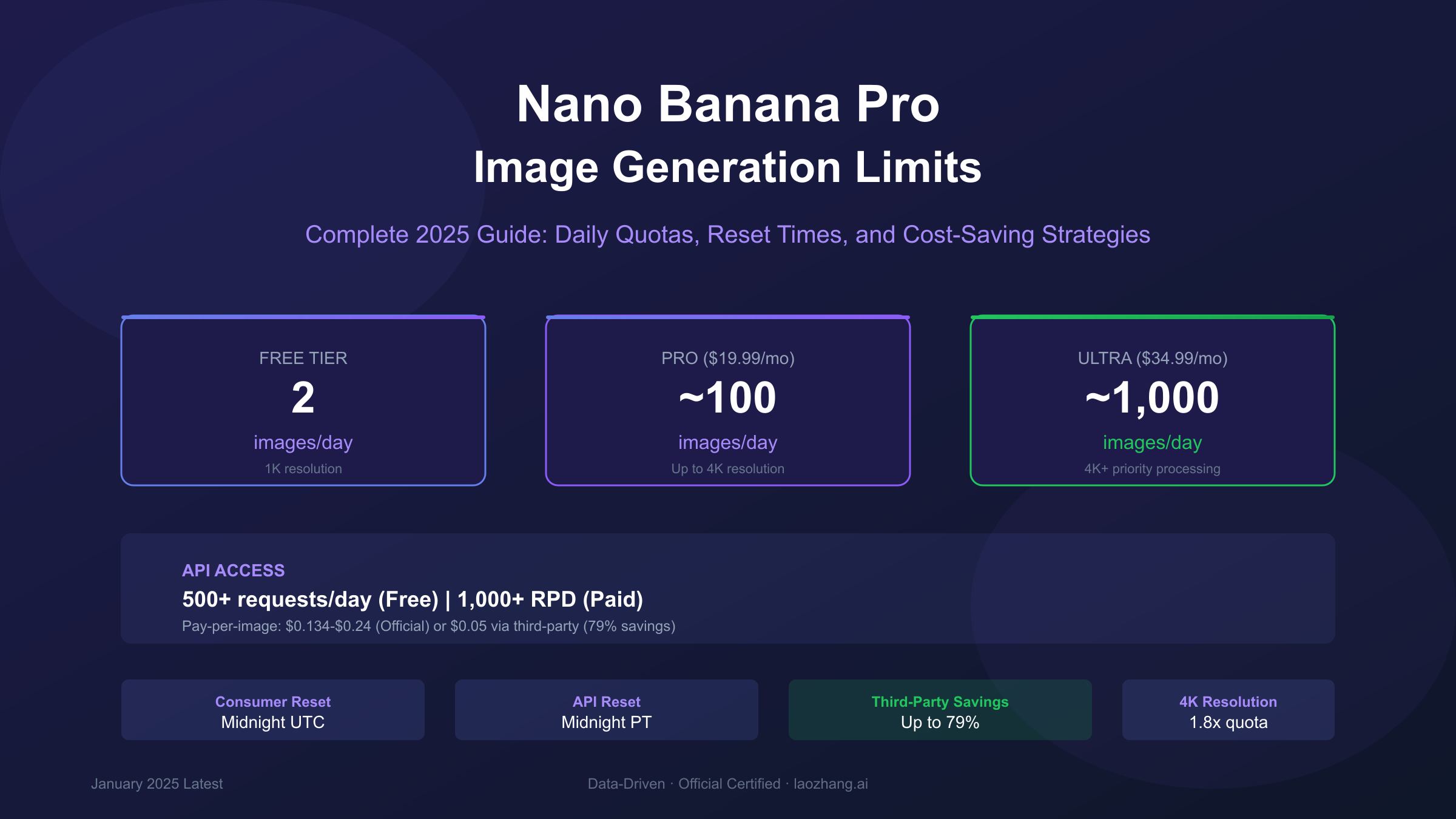
Understanding the exact limits for each Nano Banana Pro tier is essential for planning your creative workflow. Google offers three distinct consumer tiers plus API access, each with different daily quotas, resolution capabilities, and pricing structures. The limits have evolved significantly throughout 2025, with the most recent reduction occurring in November when free tier allocations dropped from 3 to 2 images daily due to what Google described as "unprecedented demand."
The free tier provides the most restrictive access, allowing just 2 image generations per day at approximately 1-megapixel resolution (1024x1024 pixels). Every image generated through the free tier includes a visible Gemini sparkle watermark that cannot be removed, and outputs are limited to standard quality without access to advanced features like aspect ratio customization or style presets. Free tier processing times can extend to 30-60 seconds during peak usage periods, compared to near-instant generation for paid subscribers.
Google AI Pro subscribers paying $19.99 per month receive approximately 100 images daily, representing a 50x increase over the free tier. Pro access unlocks 4K resolution support (up to 2048x2048 pixels), removes visible watermarks, and provides priority queue access during high-demand periods. However, real-world reports from December 2025 indicate that some Pro users experienced throttling to 35-70 images daily during the holiday season, suggesting the "approximately 100" figure represents optimal conditions rather than a guaranteed minimum.
The Ultra tier at $34.99 per month offers up to 1,000 image generations daily, designed for commercial applications and teams with high-volume requirements. Ultra subscribers gain access to 4K+ resolution with priority processing, early access to new features, and dedicated support channels. This tier supports up to 14 reference images per request for complex composition work, compared to 3 images for free users and 6-8 for Pro subscribers.
| Tier | Daily Limit | Max Resolution | Price | Watermark | Reset Time |
|---|---|---|---|---|---|
| Free | 2 images | ~1K (1024px) | $0 | Visible | Midnight UTC |
| Pro | ~100 images | 4K (2048px) | $19.99/mo | None | Midnight PT |
| Ultra | ~1,000 images | 4K+ | $34.99/mo | None | Midnight PT |
| API Free | 500 requests | All sizes | $0 | SynthID only | Midnight PT |
| API Paid | 1,000+ RPD | All sizes | $0.134-0.24/img | SynthID only | Midnight PT |
One critical detail often overlooked: resolution directly impacts your effective quota. Generating at 4K resolution consumes approximately 1.8x the computational resources of 1K generation, meaning Pro users exclusively generating 4K images may only achieve 50-70 actual generations rather than the advertised 100. For workflows that do not require maximum resolution, generating at 1K or 2K and selectively upscaling only the best results significantly stretches your daily quota. For more details on subscription costs, see our Nano Banana Pro pricing guide.
Consumer App vs API: Understanding the Key Differences
The distinction between consumer app access and API access represents one of the most misunderstood aspects of Nano Banana Pro limits. While the consumer app through gemini.google.com or the Gemini mobile app offers a streamlined interface with strict daily quotas, API access through Google AI Studio provides dramatically higher limits with pay-per-image flexibility. Choosing the right access method can mean the difference between 2 images per day and thousands.
Consumer app access is designed for casual creators who need occasional image generation without technical setup. The interface handles all complexity behind the scenes, but this convenience comes with significant restrictions. Free consumer users receive just 2 daily generations with no ability to exceed this limit regardless of willingness to pay per-image. Even paid subscribers face daily caps that reset at fixed times, with no option to "burst" beyond their allocation for urgent projects. The consumer app also restricts advanced features like multi-image composition (limited to 3 images for free, 6-8 for Pro) and does not provide access to the Batch API's 50% discount.
API access fundamentally changes the equation by shifting from daily quotas to rate limits measured in requests per minute (RPM) and tokens per day. According to Google's official rate limits documentation, the free API tier allows 500 requests per day with 5-10 RPM, while paid tiers scale to 1,000+ daily requests with 100-300 RPM. The critical advantage is pricing transparency: you pay exactly $0.134 per 1K/2K image or $0.24 per 4K image, with no artificial daily caps once billing is enabled.
| Feature | Consumer App (Free) | Consumer App (Pro) | API Free Tier | API Paid Tier |
|---|---|---|---|---|
| Daily Limit | 2 images | ~100 images | 500 requests | 1,000+ RPD |
| Rate Limit | N/A | N/A | 5-10 RPM | 100-300 RPM |
| Resolution | 1K only | Up to 4K | All sizes | All sizes |
| Cost Model | Free | $19.99/mo | Free | $0.134-0.24/img |
| Batch Discount | No | No | No | 50% off |
| Multi-Image | 3 images | 6-8 images | 14 images | 14 images |
For developers and teams with production requirements, the decision is straightforward: API access provides more control, better economics at scale, and eliminates the anxiety of hitting arbitrary daily limits. A project generating 1,000 images monthly would cost approximately $134-240 through the API versus $239.88 annually for Pro subscription with its 100/day cap. The breakeven point occurs around 1,500 monthly images, beyond which API access becomes more economical. For detailed API setup instructions, see our Nano Banana Pro API guide.
When Do Limits Reset? Complete Timezone Guide
One of the most common sources of confusion around Nano Banana Pro limits is understanding exactly when your daily quota resets. The reset time differs between consumer app access and API access, and further varies based on whether you are using the web interface or mobile app. Getting this wrong can result in wasted generations or missed opportunities when you need images most urgently.
Consumer app users accessing Nano Banana Pro through the Gemini web interface or mobile app have their limits reset at midnight UTC (Coordinated Universal Time). This global standard means your reset time depends entirely on your local timezone. For users in the United States, this translates to 4:00 PM Pacific Time or 7:00 PM Eastern Time on the previous day, meaning your "new day" of generations actually becomes available in the late afternoon. European users experience reset around midnight to 1:00 AM local time, while users in Asia see their quota refresh in the early morning hours.
API users face a different reset schedule: midnight Pacific Time (PT), which is UTC-8 during standard time and UTC-7 during daylight saving time. This 8-hour difference from consumer reset times can confuse developers who test in the web interface and then deploy via API, as their testing and production quotas reset at different times. The Pacific Time reset aligns with Google's headquarters timezone and affects all developer API quotas across Google Cloud services.
| Region | Consumer App Reset (UTC) | API Reset (PT) | Local Consumer Time | Local API Time |
|---|---|---|---|---|
| US Pacific | Midnight UTC | Midnight PT | 4:00 PM (prev day) | Midnight |
| US Eastern | Midnight UTC | Midnight PT | 7:00 PM (prev day) | 3:00 AM |
| UK/London | Midnight UTC | Midnight PT | Midnight | 8:00 AM |
| Central Europe | Midnight UTC | Midnight PT | 1:00 AM | 9:00 AM |
| India | Midnight UTC | Midnight PT | 5:30 AM | 1:30 PM |
| China/Singapore | Midnight UTC | Midnight PT | 8:00 AM | 4:00 PM |
| Japan | Midnight UTC | Midnight PT | 9:00 AM | 5:00 PM |
| Australia Eastern | Midnight UTC | Midnight PT | 10:00 AM | 6:00 PM |
A common misconception is that unused quota accumulates. It does not. If you generate 0 images today, you still have only 2 available tomorrow on the free tier, not 4. There is no "banking" mechanism for quota, so the optimal strategy is to use your full allocation each day if you have pending projects. Some users report that quota occasionally resets approximately 8 hours after first use rather than at the fixed midnight time, but this appears inconsistent and should not be relied upon for planning.
What Counts Against Your Quota?
Understanding exactly what consumes your Nano Banana Pro quota is crucial for maximizing your daily allocation. Many users are surprised to discover that failed generations, safety filter blocks, and even certain error conditions all count against their limit. This section clarifies the quota mechanics so you can avoid wasting precious generations on preventable issues.
Every generation attempt counts, regardless of outcome. If you submit a prompt and the system begins processing, that generation is deducted from your quota whether it succeeds, fails due to safety filters, or errors out due to technical issues. This makes prompt quality particularly important for free tier users who cannot afford to waste even one of their 2 daily generations. A poorly worded prompt that triggers a safety filter rejection still consumes quota, leaving you with fewer opportunities to generate the image you actually need.
Resolution significantly impacts effective quota through token consumption. According to Google's pricing documentation, a 1K resolution image (1024x1024) consumes 1,120 output tokens, while 4K resolution (up to 4096x4096) consumes 2,000 tokens, representing approximately 1.8x the computational cost. While consumer app quotas are counted in images rather than tokens, the underlying infrastructure still processes higher resolutions more slowly, which can contribute to throttling during high-demand periods. Pro users exclusively generating at 4K resolution may experience their "100 daily" images effectively reduced to 55-70 in practice.
Safety filter rejections are particularly frustrating because they consume quota without producing any output. Nano Banana Pro employs both configurable filters (four harm categories with adjustable thresholds) and non-configurable filters for content types that are always blocked. Even with safety settings configured to their most permissive levels, certain prompts trigger non-configurable restrictions. Common triggers include anime/art styles that receive stricter scrutiny, generic prompts that allow pessimistic interpretation, human figures facing "identifiable people" restrictions, and any content that could be interpreted as involving vulnerable individuals.
The December 2025 throttling incident highlighted additional quota complexities. According to reports, Pro subscribers experienced caps as low as 15-25 images during peak holiday demand, far below the advertised ~100. Google's official response cited "unprecedented demand during the holiday season" as the cause, with usage increasing 340% compared to November. This demonstrates that even paid quotas can be dynamically adjusted based on system load, making it important to have backup options for time-sensitive projects.
7 Proven Strategies to Maximize Your Image Quota
When every generation counts, optimizing your approach to Nano Banana Pro can effectively multiply your daily output. These strategies have been tested across different usage patterns and can help you extract maximum value from your quota allocation, whether you are on the free tier stretching 2 images or a Pro subscriber managing 100.
1. Craft precise, detailed prompts from the start. The most effective quota optimization happens before you click generate. According to Google's official prompting tips, successful prompts include five key components: subject (specific details like "a stoic robot barista with glowing blue optics"), composition (framing choices like "extreme close-up"), action (what is happening), location (environment context), and style (aesthetic direction like "photorealistic" or "3D animation"). Investing 2-3 minutes in prompt refinement is far more efficient than burning multiple generations on vague requests.
2. Start at lower resolution when iterating. If you are exploring concepts or refining prompts, generate at 1K resolution first. Once you have achieved the desired composition and style, regenerate only your best concepts at 4K. This approach is particularly valuable for Pro users, as 4K generations consume approximately 1.8x the resources of 1K, meaning you effectively get 80% more iterations by testing at lower resolution.
3. Implement prompt caching for API users. Before generating a new image via API, hash your prompt and check whether you have previously generated the same or highly similar content. Semantic similarity matching can identify prompts that would likely produce nearly identical outputs, allowing you to reuse cached results rather than consuming quota. This technique is especially valuable for applications with repetitive generation patterns.
4. Time your generations strategically. Quota resets at specific times (midnight UTC for consumer apps, midnight PT for API), so planning your workflow around these windows maximizes effective output. If you have unused quota at 11:30 PM UTC, use it immediately since it will not carry over. Similarly, schedule your most important generations for shortly after reset when servers experience lower load and throttling is less likely.
5. Avoid common safety filter triggers. Failed safety filter rejections waste quota without producing output. Reduce trigger probability by explicitly declaring art style ("digital art", "3D render"), providing specific details that remove ambiguity, including scene context that clarifies intended use, and using "fictional" designations for human figures. Avoid combinations of military terminology with action words, medical imagery, and any prompt that could be interpreted as involving vulnerable individuals.
6. Leverage batch processing for API workflows. The Batch API provides 50% cost reduction ($0.067-0.12 per image versus $0.134-0.24 standard) with up to 24-hour asynchronous delivery. For non-time-sensitive workloads, batching 100+ requests together significantly reduces per-image costs while avoiding rate limit throttling. The tradeoff is delivery time, but for background processing workflows, this is often acceptable.
7. Use multi-image input efficiently. Nano Banana Pro can process up to 14 reference images per generation (via API) for complex compositions. Rather than generating multiple variations separately, provide reference images that guide style, composition, and subject in a single generation. This reduces iterations needed to achieve your vision while producing more precisely controlled outputs.
Official Pricing Breakdown: What You Are Really Paying
Understanding the true cost of Nano Banana Pro requires looking beyond subscription prices to examine per-image economics, hidden costs from failed attempts, and resolution-dependent pricing that can significantly impact total expenditure. This breakdown covers all official pricing tiers with calculated per-image costs to help you make informed decisions about which access method delivers the best value for your specific usage pattern.
Subscription pricing offers predictability but varies dramatically in per-image economics based on actual usage. The Pro tier at $19.99 per month provides approximately 100 daily generations, which works out to roughly $0.0067 per image if you consistently use your full allocation. However, most users do not generate 3,000 images monthly; a more realistic 500 monthly images translates to $0.04 per image. The Ultra tier at $34.99 monthly with 1,000 daily generations offers even better unit economics at $0.0012 per image at full utilization, though few individual creators require 30,000 monthly generations.
API pricing follows a transparent per-image model based on resolution. According to Google's official pricing, standard rates are $0.134 per image for 1K/2K resolution (consuming 1,120 output tokens) and $0.24 per image for 4K resolution (consuming 2,000 output tokens). Image input costs an additional $0.0011 per image when using multi-image composition features. The Batch API provides 50% discounts across all tiers: $0.067 per 1K/2K image and $0.12 per 4K image, with processing delivered within 24 hours rather than synchronously.
| Pricing Tier | Monthly Cost | Daily Limit | Per-Image Cost (Full Use) | Per-Image Cost (50% Use) |
|---|---|---|---|---|
| Free Consumer | $0 | 2/day | $0 | $0 |
| Pro Subscription | $19.99 | ~100/day | $0.0067 | $0.013 |
| Ultra Subscription | $34.99 | ~1,000/day | $0.0012 | $0.0023 |
| API Standard (2K) | Pay-per-use | Unlimited* | $0.134 | $0.134 |
| API Standard (4K) | Pay-per-use | Unlimited* | $0.24 | $0.24 |
| API Batch (2K) | Pay-per-use | Unlimited* | $0.067 | $0.067 |
| API Batch (4K) | Pay-per-use | Unlimited* | $0.12 | $0.12 |
*Subject to rate limits (RPM/RPD)
Hidden costs emerge from failed attempts, resolution choices, and retry logic. Every failed generation (safety filter, error, or timeout) consumes quota on subscription tiers and costs money on API. If 10% of your generations fail, your effective per-image cost increases by 11%. Resolution choices compound this: a workflow generating exclusively at 4K pays 79% more per image than 2K ($0.24 vs $0.134). For production applications, implementing proper error handling and prompt validation can reduce waste significantly.
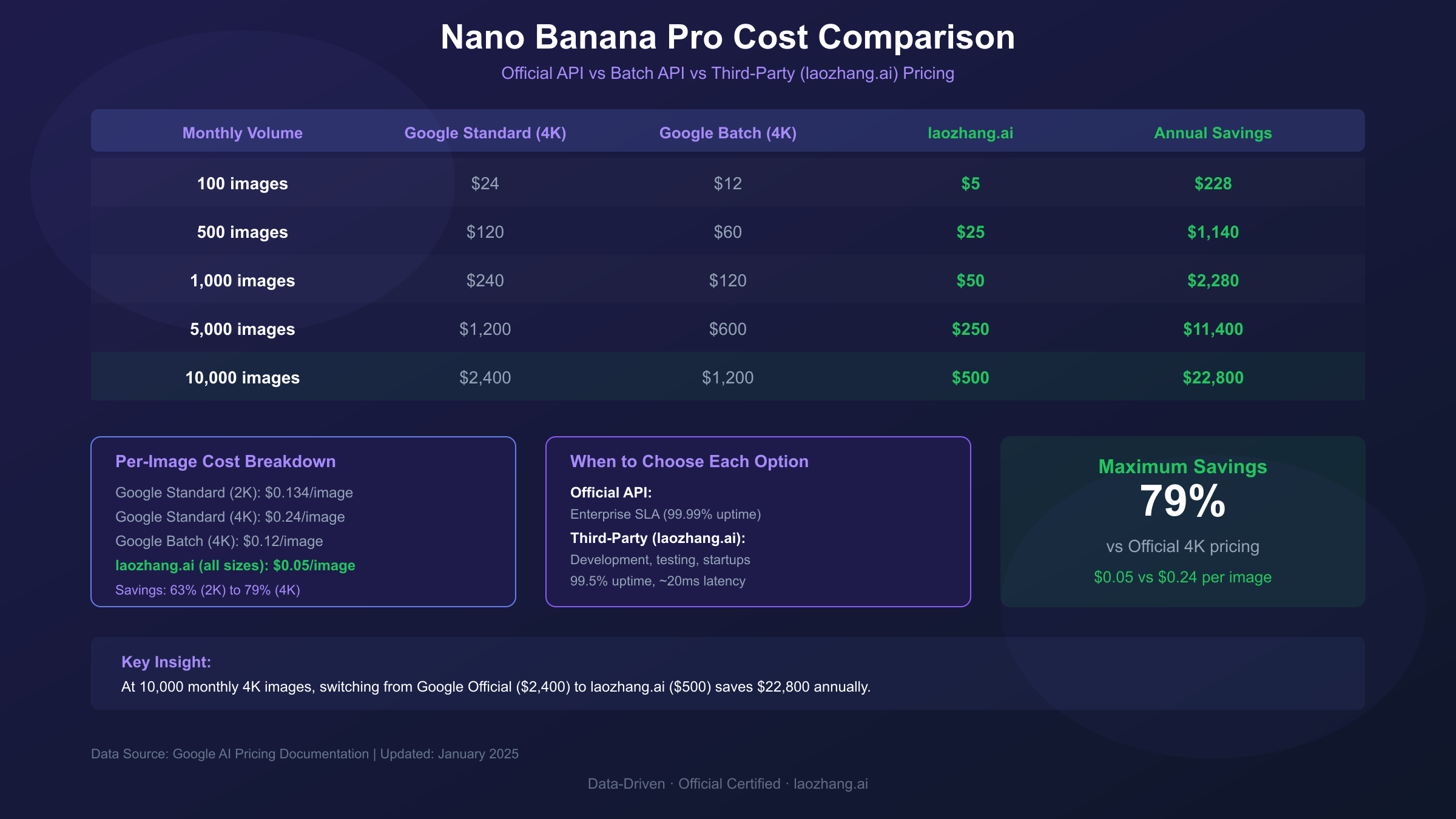
The following cost comparison visualization illustrates how different pricing options compare across various monthly volumes, from casual use (100 images) to production scale (10,000+ images):
Cost-Effective Alternatives: Save Up to 79%
While Google's official pricing provides reliability and support guarantees, third-party API providers offer substantial cost savings for users willing to trade some formal SLA coverage for dramatically lower per-image rates. This comparison examines the leading alternatives with transparent analysis of both savings and tradeoffs, so you can make an informed decision based on your specific requirements.
Third-party aggregator services access the same underlying Nano Banana Pro model through API key pooling and volume discounts, passing savings to developers. The most cost-effective option currently available is laozhang.ai, which offers Nano Banana Pro at a flat $0.05 per image regardless of resolution. This represents 79% savings compared to Google's official 4K pricing ($0.24) and 63% savings on standard 2K resolution ($0.134). The pricing is per-generation with no monthly minimums, making it suitable for both testing and production workloads.
Cost comparison at different volumes illustrates the economics clearly. For a project generating 1,000 images monthly at 4K resolution: Google's standard API costs $240, the Batch API costs $120, while laozhang.ai costs just $50, representing $190 in monthly savings or $2,280 annually. At 10,000 monthly images, the savings scale to $1,900 monthly or $22,800 annually. Even at modest volumes of 100 images monthly, switching from official to third-party saves $19 monthly ($228 annually).
| Monthly Volume | Google Standard (4K) | Google Batch (4K) | laozhang.ai | Annual Savings vs Official |
|---|---|---|---|---|
| 100 images | $24 | $12 | $5 | $228 |
| 500 images | $120 | $60 | $25 | $1,140 |
| 1,000 images | $240 | $120 | $50 | $2,280 |
| 5,000 images | $1,200 | $600 | $250 | $11,400 |
| 10,000 images | $2,400 | $1,200 | $500 | $22,800 |
When to choose official Google API: Enterprise applications requiring formal SLA guarantees (99.99% uptime) should use official endpoints. Google's API provides contractual uptime commitments, official technical support channels, and compliance certifications that may be required for regulated industries. If your application cannot tolerate any service disruption or requires audit trails for AI usage, official API access is the appropriate choice despite higher costs.
When third-party alternatives make sense: Development and testing environments, personal projects, startups operating with budget constraints, and applications where occasional service variations are acceptable. Third-party providers like laozhang.ai report 99.5% uptime with consistent performance, though without contractual guarantees. The response latency averages approximately 20ms through third-party routing versus 200ms+ through direct Google endpoints, offering performance advantages alongside cost savings.
The integration process for third-party services is straightforward, typically requiring only a base URL change and API key swap in existing code. The following section provides complete code examples for both official and third-party API integration.
API Setup: Complete Code Guide with Error Handling
Implementing Nano Banana Pro programmatically requires proper API setup, robust error handling, and rate limit management. This section provides production-ready code examples for both official Google API and third-party integration, demonstrating best practices for reliable image generation at scale.
Official Google API Setup begins with creating a project in Google AI Studio and enabling billing. The following Python example demonstrates complete integration with exponential backoff retry logic, rate limit handling, and proper error management:
hljs pythonimport requests
import base64
import time
from typing import Optional
class NanoBananaProClient:
"""
Official Nano Banana Pro API client with error handling.
Based on Gemini 3 Pro Image Preview (gemini-3-pro-image-preview).
Pricing: $0.134/image (2K), $0.24/image (4K) as of 2025-01.
"""
def __init__(self, api_key: str):
self.api_key = api_key
self.base_url = "https://generativelanguage.googleapis.com/v1beta"
self.model = "models/gemini-3-pro-image-preview"
def generate_image(
self,
prompt: str,
resolution: str = "2K",
max_retries: int = 3
) -> Optional[bytes]:
"""
Generate image with automatic retry on rate limits.
Args:
prompt: Image generation prompt
resolution: "2K" or "4K"
max_retries: Maximum retry attempts for rate limit errors
Returns:
Image bytes or None if generation failed
"""
headers = {"Content-Type": "application/json"}
payload = {
"contents": [{"parts": [{"text": prompt}]}],
"generationConfig": {
"responseModalities": ["IMAGE"],
"imageConfig": {
"aspectRatio": "auto",
"imageSize": resolution
}
}
}
url = f"{self.base_url}/{self.model}:generateContent?key={self.api_key}"
for attempt in range(max_retries):
try:
response = requests.post(
url,
headers=headers,
json=payload,
timeout=180
)
if response.status_code == 429: # Rate limited
wait_time = 2 ** attempt * 10 # Exponential backoff
print(f"Rate limited. Waiting {wait_time}s...")
time.sleep(wait_time)
continue
response.raise_for_status()
result = response.json()
# Extract base64 image data
image_data = result["candidates"][0]["content"]["parts"][0]["inlineData"]["data"]
return base64.b64decode(image_data)
except requests.exceptions.RequestException as e:
print(f"Attempt {attempt + 1} failed: {e}")
if attempt == max_retries - 1:
return None
time.sleep(2 ** attempt)
return None
# Usage example
client = NanoBananaProClient("YOUR_GOOGLE_API_KEY")
image_bytes = client.generate_image(
"A futuristic cityscape at sunset, photorealistic, 8K quality",
resolution="4K"
)
if image_bytes:
with open("output.png", "wb") as f:
f.write(image_bytes)
Third-party API integration via laozhang.ai uses the Gemini native format with a simple endpoint change. The cost is $0.05 per image regardless of resolution, representing 79% savings on 4K generation:
hljs pythonimport requests
import base64
class LaozhangNanoBananaClient:
"""
laozhang.ai Nano Banana Pro client.
Pricing: $0.05/image (all resolutions) as of 2025-01.
Uses Gemini native format for full 4K parameter support.
"""
def __init__(self, api_key: str):
self.api_key = api_key
# Gemini native endpoint for full feature support
self.base_url = "https://api.laozhang.ai/v1beta/models/gemini-3-pro-image-preview:generateContent"
def generate_image(self, prompt: str, resolution: str = "4K") -> bytes:
"""
Generate image at $0.05/image regardless of resolution.
"""
headers = {
"Authorization": f"Bearer {self.api_key}",
"Content-Type": "application/json"
}
payload = {
"contents": [{"parts": [{"text": prompt}]}],
"generationConfig": {
"responseModalities": ["IMAGE"],
"imageConfig": {
"aspectRatio": "auto",
"imageSize": resolution # 2K or 4K at same price
}
}
}
response = requests.post(
self.base_url,
headers=headers,
json=payload,
timeout=180
)
response.raise_for_status()
image_data = response.json()["candidates"][0]["content"]["parts"][0]["inlineData"]["data"]
return base64.b64decode(image_data)
# Usage - same $0.05 whether 2K or 4K
client = LaozhangNanoBananaClient("YOUR_LAOZHANG_API_KEY")
image = client.generate_image("Cyberpunk cat in neon city", resolution="4K")
with open("cyberpunk_cat.png", "wb") as f:
f.write(image)
Rate limit handling is essential for production applications. The official API enforces tier-based limits (5-10 RPM free, 100-300 RPM paid), while third-party services implement fair-use policies without hard caps. Implement request queuing and exponential backoff to gracefully handle limits without losing generations.
Avoiding Safety Filter Quota Waste
Safety filter rejections represent one of the most frustrating sources of quota waste, consuming your daily allocation without producing any usable output. Understanding what triggers these filters and how to craft prompts that avoid false positives can save significant quota, especially for free tier users who cannot afford to lose even one of their 2 daily generations.
Nano Banana Pro employs a multi-layered safety system with both configurable and non-configurable filters. The configurable filters cover four harm categories (harassment, hate speech, sexually explicit content, and dangerous content) with adjustable thresholds from "block none" to "block most." However, non-configurable filters always block certain content types regardless of settings, and these are the primary source of unexpected rejections. The model has become "way more cautious than intended" according to Google's acknowledgment, sometimes rejecting prompts as innocuous as "dog" or "bowl of cereal."
Common trigger patterns to avoid:
-
Anime/art styles without explicit declaration: Prompts requesting illustration styles face stricter scrutiny. Always explicitly state "digital art," "3D animation," or "photorealistic" to establish clear artistic intent rather than leaving style interpretation to the model.
-
Generic prompts with ambiguous interpretation: Vague prompts allow the safety system to interpret worst-case scenarios. Instead of "person in a dark room," specify "professional portrait photography of a business executive in a dimly lit modern office."
-
Human figures without context: Any prompt involving people faces "identifiable persons" restrictions. Include "fictional character," "anonymous figure," or "silhouette" designations to reduce trigger probability.
-
Action words combined with objects: Combinations like "character holding weapon" trigger warnings even in clearly fictional contexts. Reframe as "fantasy warrior with ornate ceremonial staff" to maintain creative intent while reducing flags.
-
Medical or anatomical terminology: Even educational or artistic contexts trigger elevated scrutiny. Use descriptive alternatives rather than clinical terminology where possible.
Successful prompt characteristics that reduce filter triggers include explicit art style declaration at the prompt start, specific details that remove ambiguity (exact colors, settings, lighting), scene context that clarifies intended use (marketing image, product photography, concept art), and fictional designations for any human or human-like figures.
If you experience consecutive failures in one conversation, the platform may have cached an error state. Starting a new chat session and ensuring the image generation option is properly selected often resolves the issue. For persistent problems with specific prompt patterns, see our safety filter troubleshooting guide.
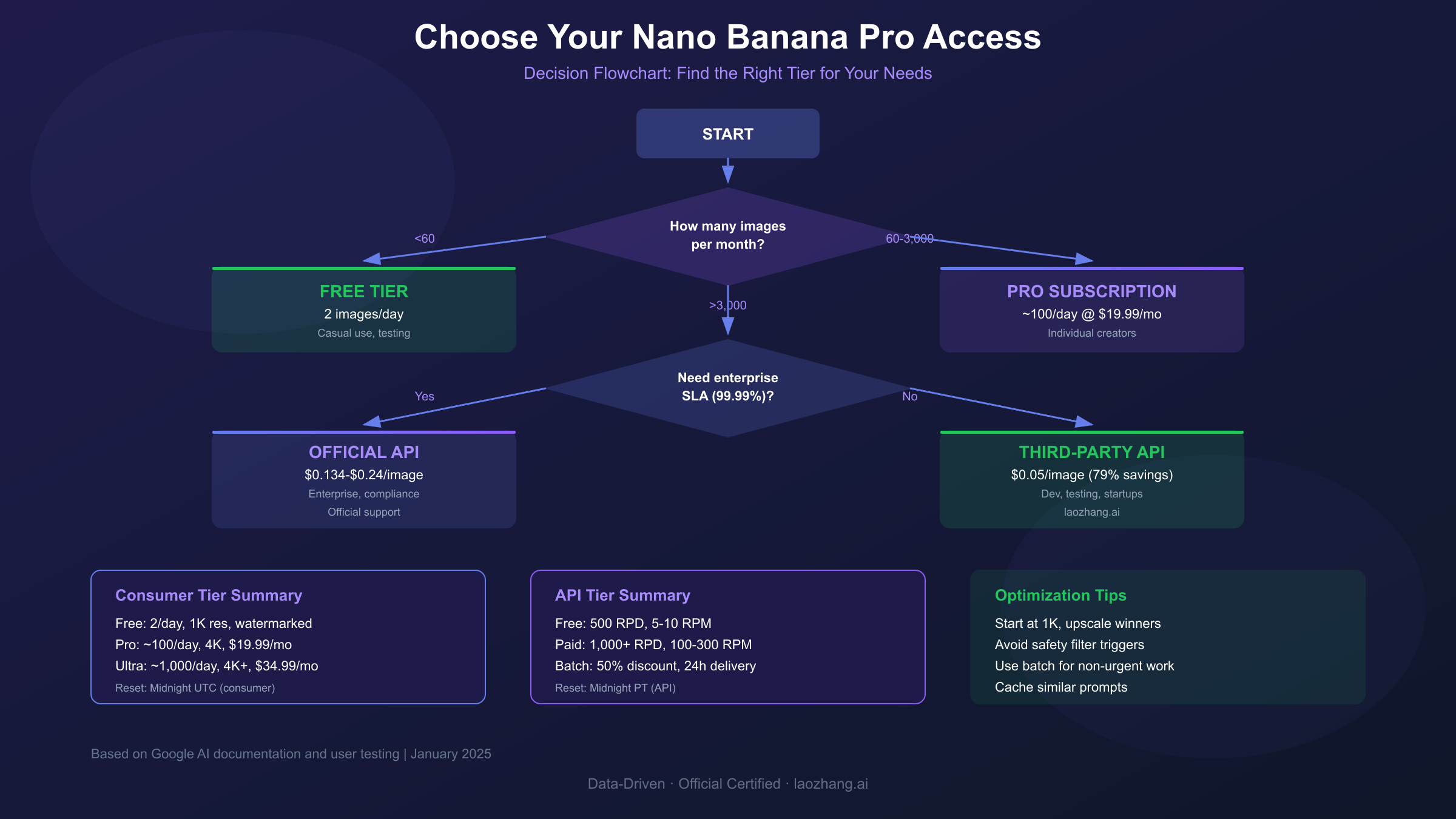
The following decision flowchart helps you determine the optimal access tier and alternative options based on your specific requirements:
Nano Banana Pro vs Competitors: Which Offers More?
Comparing Nano Banana Pro's limits and capabilities against major competitors reveals distinct strengths and tradeoffs. While this guide focuses on Nano Banana Pro quotas, understanding where alternatives excel helps inform whether supplementing with other services makes sense for your workflow.
Nano Banana Pro vs Midjourney V7 presents a speed versus artistry tradeoff. Nano Banana Pro generates 1024x1024 images in approximately 3-10 seconds, making it roughly 10x faster than Midjourney's 20-30 second average generation time. For rapid iteration and time-sensitive projects, this speed advantage is substantial. However, Midjourney maintains superior artistic style expression, atmospheric composition, and visual creativity. Professional concept artists and illustrators often prefer Midjourney despite longer generation times and Discord-based workflow friction. Regarding limits: Midjourney's Basic plan ($10/month) provides approximately 200 generations monthly, while Standard ($30/month) offers unlimited relaxed mode generations.
Nano Banana Pro vs DALL-E 3 shows Nano Banana Pro's leadership in text rendering accuracy. Internal benchmarks demonstrate 94-96% character accuracy in generated text across multiple languages, compared to DALL-E 3's approximately 85% accuracy. For marketing materials, product mockups, or any content requiring legible text integration, this difference is significant. DALL-E 3 offers more conversational editing through ChatGPT integration and slightly better factual consistency in complex scenes. DALL-E 3 pricing through the API runs $0.04-0.08 per image (cheaper than Nano Banana Pro's official rates), with ChatGPT Plus subscribers receiving approximately 50 DALL-E generations per 3 hours.
Nano Banana Pro vs Imagen 4 compares models within Google's ecosystem. Imagen 4 Fast at $0.02 per image represents the most budget-friendly option for production use cases, with 3-6 second generation times. However, Imagen 4 operates under stricter free tier limits (10-20 RPD) and lacks Nano Banana Pro's advanced multi-image composition capabilities. For photorealistic outputs and speed-sensitive applications, Imagen 4 Fast provides excellent value, while Nano Banana Pro excels at complex compositions, text rendering, and creative editing tasks.
| Feature | Nano Banana Pro | Midjourney V7 | DALL-E 3 | Imagen 4 Fast |
|---|---|---|---|---|
| Speed | 3-10 seconds | 20-30 seconds | 15-25 seconds | 3-6 seconds |
| Max Resolution | 4K (4096px) | 1024px | 1792px | 1024px |
| Text Accuracy | 94-96% | ~60% | ~85% | N/A |
| Multi-Image Input | Up to 14 | Limited | 1 | N/A |
| API Price/Image | $0.134-0.24 | ~$0.10-0.40 | $0.04-0.08 | $0.02 |
| Free Tier Daily | 2 (consumer) | None | ChatGPT limits | 10-20 |
| Best For | Text, editing, speed | Artistic style | Ease of use | Budget production |
For many workflows, the optimal approach combines multiple services: Nano Banana Pro for text-heavy graphics and rapid prototyping, Midjourney for artistic hero images, and Imagen 4 Fast for high-volume production outputs where per-image cost matters most.
FAQ: Your Questions Answered
Why did my free limit drop from 3 to 2 images?
Google reduced the free tier allocation in November 2025, citing "high demand" that increased usage by 340% compared to previous months. According to the official explanation, this reduction represented "a 33% decrease in free tier computational burden" necessary to maintain service quality for all users. The change affects all free consumer accounts globally with no announced plans to restore the previous 3-image limit. This reduction makes efficient prompt crafting even more critical for free users.
Do failed generations count against my quota?
Yes. Every generation attempt consumes quota regardless of outcome. If you submit a prompt and the system begins processing, that generation is deducted whether it succeeds, fails due to safety filters, times out, or errors due to technical issues. This applies to both consumer app quotas (daily image counts) and API quotas (daily request counts and token consumption). The only exception is if your request fails before reaching the generation model (such as authentication errors or malformed requests), which do not consume quota.
Can I accumulate unused quota across days?
No. Nano Banana Pro quotas reset completely at the designated time (midnight UTC for consumer apps, midnight PT for API) with no rollover mechanism. If you generate 0 images today, you still have only 2 available tomorrow on the free tier, not 4. There is no "banking" of unused generations, so the optimal strategy is to use your full daily allocation if you have pending projects. Some users have reported inconsistent behavior suggesting quota may sometimes reset based on first-use timing, but this is not officially documented and should not be relied upon.
What is the difference between RPM and RPD limits?
RPM (Requests Per Minute) limits how fast you can make consecutive API calls, preventing burst traffic that could overwhelm servers. Free API tier allows 5-10 RPM, scaling to 100-300 RPM for paid tiers. RPD (Requests Per Day) limits total daily volume regardless of timing. Free API tier offers 500 RPD, while paid tiers provide 1,000+ RPD scaling with usage tier. Both limits apply simultaneously: you might have 10,000 RPD capacity but cannot exceed 300 RPM within any given minute. Consumer app users face only daily image counts without RPM considerations.
Is there a way to get truly unlimited generations?
No consumer tier offers unlimited generations, but several approaches maximize your available quota. API access with billing enabled provides the highest practical limits (1,000+ daily requests with scaling based on tier and spending). Third-party services like laozhang.ai implement fair-use policies rather than hard daily caps, effectively providing unlimited access for reasonable usage patterns at $0.05 per image. For maximum flexibility without daily anxiety, API access with pay-per-image pricing remains the most practical "unlimited" option.
Conclusion: Making the Right Choice
Navigating Nano Banana Pro's tiered limit system requires matching your actual usage patterns to the most cost-effective access method. The free tier with 2 daily images serves casual experimentation, but anyone with regular generation needs should evaluate paid options carefully to find the optimal balance of cost, flexibility, and reliability.
For occasional users generating fewer than 60 images monthly, the free tier combined with strategic timing around reset windows may suffice. Focus on prompt quality to avoid wasting your limited daily allocation on failed attempts.
For regular creators generating 100-500 images monthly, the Pro subscription at $19.99 provides predictable daily access with better per-image economics than the API at these volumes. The ~100 daily limit covers most individual creator workflows with room for iteration.
For developers and production applications, API access offers the flexibility and economics that subscriptions cannot match. At volumes exceeding 1,500 monthly images, pay-per-image API access becomes more economical than Pro subscription. For high-volume production, third-party services offering $0.05 per image provide substantial savings while maintaining access to the same underlying model capabilities.
For enterprise and mission-critical applications, official Google API with enterprise tier access ensures formal SLA guarantees (99.99% uptime), compliance certifications, and official support channels. The premium pricing reflects these reliability guarantees that third-party services cannot contractually provide.
The key insight is that Nano Banana Pro's value proposition shifts dramatically based on usage pattern. Understanding your actual generation volume, timing requirements, and reliability needs determines whether free tier constraints, subscription predictability, or API flexibility best serves your workflow. Start with careful tracking of your actual usage before committing to any paid tier, and remember that the optimal solution may combine multiple access methods for different use cases within your creative pipeline.