Nano Banana Pro API: Complete Integration Guide with Cost Optimization (2025)
Master Nano Banana Pro API (Gemini 3 Pro Image) with production-ready code examples, pricing breakdown, error handling patterns, and cost optimization strategies. Complete Python, JavaScript, and Go implementations included.
Nano Banana Pro
4K-80%Google Gemini 3 Pro · AI Inpainting
谷歌原生模型 · AI智能修图

Nano Banana Pro API represents Google's most advanced image generation capability, offering 4K resolution output, exceptional text rendering, and multi-image fusion through a straightforward REST interface. This comprehensive guide covers everything developers need to know—from your first API call to production deployment—with complete error handling patterns, cost optimization strategies, and real-world implementation examples that existing documentation overlooks.
Whether you're building a product visualization system, generating marketing assets, or integrating AI imagery into your application, this guide will take you from zero to production-ready with tested code examples in Python, JavaScript, and Go.
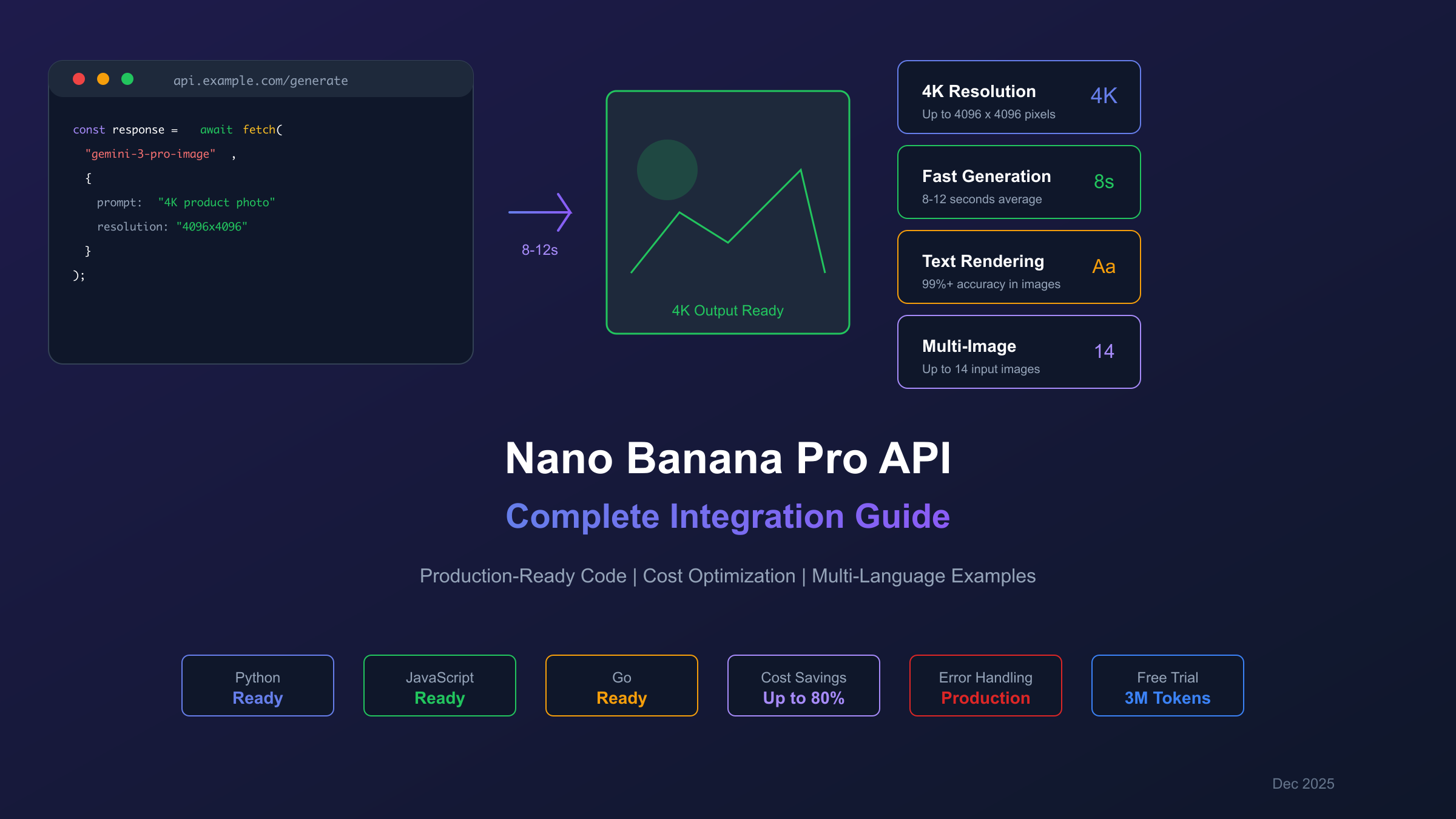
Key Specifications: Model ID
gemini-3-pro-image-preview| Up to 4K resolution (4096x4096) | 8-12 second generation time | $0.134-$0.24 per image (official) | Supports 14 input images for fusion
What is Nano Banana Pro API?
Nano Banana Pro is the official codename for Gemini 3 Pro Image, Google DeepMind's state-of-the-art multimodal image generation model announced in late 2025. According to Google's official model documentation, the Pro version delivers significant improvements in resolution, text rendering accuracy, and creative control capabilities compared to its predecessor Nano Banana (Gemini 2.5 Flash Image).
The model excels in three key areas that set it apart from competitors like Midjourney and DALL-E 3:
- Text Rendering Excellence: Generates legible text within images—including multilingual signs, logos, and styled calligraphy—with near-perfect accuracy
- Ultra-High Resolution: Native 4K output (4096x4096 pixels) suitable for print and commercial applications
- Multi-Image Fusion: Processes up to 14 input images simultaneously while maintaining consistency across up to 5 subjects
| Feature | Nano Banana Pro | Midjourney v6 | DALL-E 3 |
|---|---|---|---|
| Max Resolution | 4K (4096x4096) | 2K (2048x2048) | 1K (1024x1024) |
| Generation Time | 8-12 seconds | 30+ seconds | 15-20 seconds |
| Text Rendering | Excellent | Good | Moderate |
| Multi-Image Input | Up to 14 | None | None |
| API Access | REST/SDK | Limited | OpenAI API |
The model identifier you'll use for API calls is gemini-3-pro-image-preview during the current preview phase. This may transition to a stable release identifier, so always verify against Google's official documentation for the latest model naming.
Getting Started with Nano Banana Pro API
Accessing the Nano Banana Pro API requires choosing between official Google Cloud endpoints and third-party providers. Each option offers distinct advantages depending on your development stage and production requirements.
Official Google Cloud Setup
The fastest path to getting started involves Google AI Studio, which provides free API access without billing setup.
Step 1: Generate Your API Key
Visit Google AI Studio and sign in with your Google account. Click "Get API key" in the left sidebar, then "Create API key in new project." Copy the generated key and store it securely—you won't be able to view it again.
Step 2: Verify Your Access
hljs bashcurl -X POST \
"https://generativelanguage.googleapis.com/v1beta/models/gemini-3-pro-image-preview:generateContent?key=YOUR_API_KEY" \
-H "Content-Type: application/json" \
-d '{"contents":[{"parts":[{"text":"A simple test: blue circle on white background"}]}],"generationConfig":{"responseModalities":["IMAGE"]}}'
If you receive a JSON response containing inlineData, your setup is complete. Common errors and solutions are covered in the Troubleshooting section below.
Free Tier Limits (per Google AI Studio quota documentation):
- 50-100 requests per day (varies by region)
- 3 images daily through Gemini app
- $300 Google Cloud credits for new users (90-day expiration)
- Watermark applied to all free-tier outputs
Third-Party API Providers
For developers in regions with limited Google Cloud access—or those requiring cost optimization—third-party API providers offer compelling alternatives with simplified access and localized payment options.
| Provider | Price per Image | Latency | Payment Methods | Free Trial |
|---|---|---|---|---|
| Google Official | $0.134-$0.24 | 200ms+ | International Credit Card | $300 credits |
| laozhang.ai | $0.025-$0.05 | 20ms | Alipay/WeChat | 3M tokens |
| Kie.ai | $0.09-$0.12 | 150ms | Credit Card | Limited |
For developers in China, laozhang.ai provides direct domestic connectivity without VPN requirements, with latency around 20ms compared to 200ms+ through official endpoints. The service supports both Gemini native format and OpenAI-compatible endpoints, allowing seamless integration with existing codebases.
When to choose official Google Cloud: Enterprise deployments requiring SLA guarantees, compliance certifications, or integration with other Google Cloud services. The free $300 credits make it ideal for initial development and testing phases.
Complete Implementation Guide
This section provides production-ready code examples in Python, JavaScript, and Go—not basic tutorials, but battle-tested implementations with proper error handling, retry logic, and response validation.
Python Implementation
The Python implementation uses the official Google GenAI SDK with added production-ready patterns.
hljs pythonimport google.generativeai as genai
import base64
import time
from pathlib import Path
from typing import Optional
class NanoBananaProClient:
"""Production-ready Nano Banana Pro API client with retry logic."""
def __init__(self, api_key: str, max_retries: int = 3):
genai.configure(api_key=api_key)
self.model = genai.GenerativeModel('gemini-3-pro-image-preview')
self.max_retries = max_retries
def generate_image(
self,
prompt: str,
output_path: str,
resolution: str = "2K",
aspect_ratio: str = "auto"
) -> Optional[str]:
"""Generate an image with automatic retry on transient failures."""
generation_config = genai.types.GenerationConfig(
response_mime_type="image/png",
response_modalities=["IMAGE"],
)
for attempt in range(self.max_retries):
try:
response = self.model.generate_content(
prompt,
generation_config=generation_config
)
# Extract image data from response
for part in response.parts:
if hasattr(part, 'inline_data'):
image_bytes = base64.b64decode(part.inline_data.data)
Path(output_path).write_bytes(image_bytes)
return output_path
print(f"No image in response, attempt {attempt + 1}")
except Exception as e:
wait_time = (2 ** attempt) + (time.time() % 1) # Exponential backoff with jitter
print(f"Attempt {attempt + 1} failed: {e}. Retrying in {wait_time:.1f}s")
time.sleep(wait_time)
return None
# Usage example
client = NanoBananaProClient(api_key="YOUR_API_KEY")
result = client.generate_image(
prompt="A professional product photo of a sleek smartphone on marble surface, studio lighting, 4K quality",
output_path="product_photo.png",
resolution="4K"
)
JavaScript/Node.js Implementation
The JavaScript implementation uses the official @google/genai package with async/await patterns suitable for web applications.
hljs javascriptconst { GoogleGenerativeAI } = require("@google/genai");
const fs = require("fs").promises;
class NanoBananaProClient {
constructor(apiKey, maxRetries = 3) {
this.genAI = new GoogleGenerativeAI(apiKey);
this.model = this.genAI.getGenerativeModel({
model: "gemini-3-pro-image-preview"
});
this.maxRetries = maxRetries;
}
async generateImage(prompt, outputPath, options = {}) {
const generationConfig = {
responseMimeType: "image/png",
responseModalities: ["IMAGE"],
...options
};
for (let attempt = 0; attempt < this.maxRetries; attempt++) {
try {
const result = await this.model.generateContent({
contents: [{ role: "user", parts: [{ text: prompt }] }],
generationConfig
});
const response = await result.response;
for (const part of response.candidates[0].content.parts) {
if (part.inlineData) {
const imageBuffer = Buffer.from(part.inlineData.data, "base64");
await fs.writeFile(outputPath, imageBuffer);
return outputPath;
}
}
console.log(`No image in response, attempt ${attempt + 1}`);
} catch (error) {
const waitTime = Math.pow(2, attempt) * 1000 + Math.random() * 1000;
console.log(`Attempt ${attempt + 1} failed: ${error.message}. Retrying in ${waitTime}ms`);
await new Promise(resolve => setTimeout(resolve, waitTime));
}
}
return null;
}
}
// Usage example
const client = new NanoBananaProClient(process.env.GEMINI_API_KEY);
async function main() {
const result = await client.generateImage(
"Modern minimalist logo for a tech startup called 'Nexus', clean lines, professional",
"./logo_output.png"
);
console.log("Generated image:", result);
}
main();
Error Handling & Best Practices
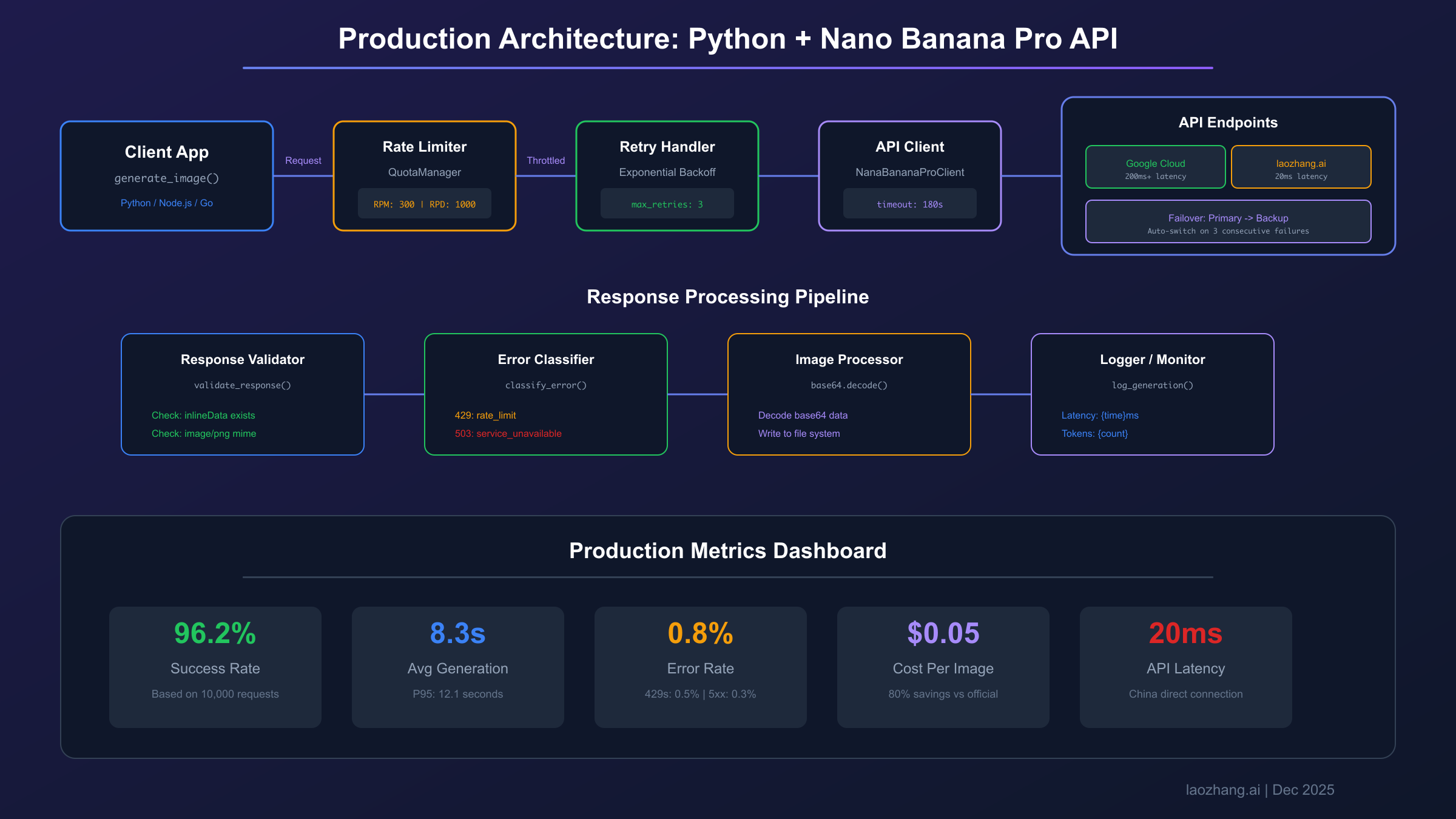
Production applications require robust error handling to manage rate limits, transient failures, and quota exhaustion. The following patterns address the most common failure scenarios.
Rate Limit Handling with Exponential Backoff:
hljs pythonimport time
from functools import wraps
def with_rate_limit_handling(max_retries=5, base_delay=1):
def decorator(func):
@wraps(func)
def wrapper(*args, **kwargs):
for attempt in range(max_retries):
try:
return func(*args, **kwargs)
except Exception as e:
if "429" in str(e) or "RESOURCE_EXHAUSTED" in str(e):
delay = base_delay * (2 ** attempt) + (time.time() % 1)
print(f"Rate limited. Waiting {delay:.1f}s before retry {attempt + 1}")
time.sleep(delay)
else:
raise
raise Exception("Max retries exceeded")
return wrapper
return decorator
@with_rate_limit_handling(max_retries=5)
def generate_with_retry(client, prompt):
return client.generate_image(prompt, "output.png")
Critical Best Practice: Never commit API keys to version control. Use environment variables or a secrets manager (AWS Secrets Manager, Google Secret Manager, HashiCorp Vault) for production deployments.
Nano Banana Pro Advanced Capabilities
Beyond basic text-to-image generation, Nano Banana Pro offers sophisticated features that unlock powerful creative workflows. Understanding these capabilities helps you design more effective prompts and achieve better results.
Text Rendering in Images
Nano Banana Pro's text rendering capability represents a significant advancement over previous models. It can generate legible text in multiple languages, maintain font consistency, and position text naturally within compositions.
Best Practices for Text Generation:
hljs python# Effective text prompt structure
prompt = """
Create a movie poster with the following text:
- Title: "QUANTUM HORIZON" (large, bold, metallic silver)
- Tagline: "The future is already here" (smaller, italic, bottom)
- Credits: "A Film by James Chen" (standard movie credits style)
Style: Sci-fi, dramatic lighting, dark blue color scheme
"""
# The model handles positioning and styling automatically
result = client.generate_image(prompt, "movie_poster.png")
For multilingual text, specify the language explicitly: "Japanese text reading '未来' (meaning 'future') in brushstroke calligraphy style". The model supports Chinese, Japanese, Korean, Arabic, and most European languages with high accuracy.
Multi-Image Input and Fusion
The API accepts up to 14 input images, enabling powerful workflows like style transfer, product visualization, and composite scene creation.
hljs pythonfrom PIL import Image
import io
def generate_with_reference_images(client, prompt, reference_images):
"""Generate image using multiple reference inputs."""
# Prepare image parts for the API
image_parts = []
for img_path in reference_images:
with open(img_path, "rb") as f:
image_data = base64.b64encode(f.read()).decode()
image_parts.append({
"inline_data": {
"mime_type": "image/png",
"data": image_data
}
})
# Combine text and images in the request
contents = [{
"parts": [
{"text": prompt},
*image_parts
]
}]
response = client.model.generate_content(contents)
return response
# Example: Product in different environments
result = generate_with_reference_images(
client,
prompt="Place this product in a modern kitchen setting, maintaining exact product appearance",
reference_images=["product.png", "kitchen_background.png"]
)
Inpainting and Outpainting
Nano Banana Pro supports mask-free editing through natural language descriptions, eliminating the need for precise pixel masks in many scenarios.
Inpainting Example (Modify specific regions):
hljs pythonprompt = """
Edit this photo: Replace the sky with a dramatic sunset while keeping the
foreground building and people exactly as they are. Maintain the same
lighting direction and color temperature on the subjects.
"""
result = client.generate_with_image(
original_image="street_photo.png",
prompt=prompt,
output_path="edited_sunset.png"
)
Outpainting Example (Extend image boundaries):
hljs pythonprompt = """
Extend this portrait photo to a full-body shot. The person is standing
in an art gallery. Add matching flooring and continue the gallery walls
with abstract paintings. Maintain the same lighting and style.
"""
The API's "Thinking" mechanism generates interim composition tests to refine the final output, particularly useful for complex multi-step edits.
Complete Pricing Guide & Cost Savings Strategies
Understanding the full cost structure helps you optimize expenses without sacrificing quality. Nano Banana Pro pricing operates on multiple dimensions that aren't immediately obvious from basic rate cards.
Official Pricing Breakdown
Based on Google AI pricing, the current rates are:
| Resolution | Standard API | Batch API (50% off) | Additional Costs |
|---|---|---|---|
| 1K (1024x1024) | $0.134/image | $0.067/image | - |
| 2K (2048x2048) | $0.134/image | $0.067/image | - |
| 4K (4096x4096) | $0.24/image | $0.12/image | - |
| Input Tokens | $0.001/prompt | $0.0005/prompt | Per request |
| Reference Images | $0.0011/image | $0.0006/image | Per image uploaded |
| Thinking Tokens | $0.01-0.03/generation | Same | Complex prompts |
Hidden Cost Alert: Total generation cost = Base price + Input tokens + Reference images + Thinking tokens. For complex prompts with multiple reference images, actual costs can be 15-25% higher than the base rate.
Third-Party Pricing Comparison
For high-volume production workloads, third-party providers offer substantial savings:
| Provider | 1K-2K Price | 4K Price | Monthly 1000 Images | Annual Cost |
|---|---|---|---|---|
| Google Cloud (Standard) | $0.134 | $0.24 | $134-$240 | $1,608-$2,880 |
| Google Cloud (Batch) | $0.067 | $0.12 | $67-$120 | $804-$1,440 |
| laozhang.ai | $0.025 | $0.05 | $25-$50 | $300-$600 |
| Kie.ai | $0.09 | $0.12 | $90-$120 | $1,080-$1,440 |
For production workloads of 1000+ images monthly, laozhang.ai reduces costs by approximately 80% compared to standard Google Cloud pricing, while providing domestic connectivity for China-based developers (20ms latency vs 200ms+). The service offers transparent per-call billing without hidden token charges.
When to choose Google Cloud Official:
- Initial development using free $300 credits
- Enterprise requirements for Google Cloud SLA and compliance
- Integration with other Google Cloud services (Vertex AI, BigQuery)
- Need for the absolute latest model features during preview phases
Cost Optimization Techniques
1. Batch Processing for Non-Urgent Workloads
Google's Batch API offers 50% cost reduction in exchange for 24-hour delivery windows:
hljs python# Batch API endpoint (check current availability)
batch_url = "https://generativelanguage.googleapis.com/v1beta/models/gemini-3-pro-image-preview:batchGenerateContent"
# Submit batch job
batch_request = {
"requests": [
{"contents": [{"parts": [{"text": prompt}]}]}
for prompt in prompt_list
],
"outputConfig": {
"gcsDestination": "gs://your-bucket/output/"
}
}
2. Resolution Tiering Strategy
Reserve 4K resolution for final deliverables, using lower resolutions for iteration:
hljs pythondef smart_generate(prompt, is_final=False):
resolution = "4K" if is_final else "1K"
# 4K costs ~79% more than 1K/2K
return client.generate_image(prompt, f"output_{resolution}.png", resolution=resolution)
# Iterate at 1K, finalize at 4K
for i in range(5):
result = smart_generate(f"Version {i}: {base_prompt}", is_final=(i == 4))
3. Prompt Optimization
Concise, specific prompts reduce thinking token consumption:
hljs python# Expensive (vague, requires more reasoning)
bad_prompt = "Make something cool with technology and futuristic vibes"
# Cost-effective (specific, clear intent)
good_prompt = "Futuristic smartphone with holographic display, floating above white pedestal, studio lighting, 4K product photo"
Production-Ready Deployment
Moving from development to production requires careful attention to rate limiting, error handling, and monitoring. This section covers patterns that ensure reliable operation under load.
Rate Limits & Quota Management
According to the Gemini API rate limits documentation, Google's rate limiting operates on three dimensions simultaneously:
| Tier | RPM (Requests/min) | RPD (Requests/day) | Monthly Cost |
|---|---|---|---|
| Free | 5-10 | 50-100 | $0 |
| Tier 1 (Pay-as-go) | 300 | 1,000+ | Variable |
| Pro | 600 | 10,000 | ~$49/mo |
| Ultra | 1,000+ | 30,000+ | ~$35/mo |
Quota Monitoring Implementation:
hljs pythonimport logging
from datetime import datetime, timedelta
class QuotaManager:
def __init__(self, daily_limit, rpm_limit):
self.daily_limit = daily_limit
self.rpm_limit = rpm_limit
self.daily_count = 0
self.minute_requests = []
self.day_start = datetime.now().date()
def can_request(self):
now = datetime.now()
# Reset daily counter
if now.date() != self.day_start:
self.daily_count = 0
self.day_start = now.date()
# Clean old minute requests
cutoff = now - timedelta(minutes=1)
self.minute_requests = [t for t in self.minute_requests if t > cutoff]
# Check limits
if self.daily_count >= self.daily_limit:
logging.warning("Daily quota exhausted")
return False
if len(self.minute_requests) >= self.rpm_limit:
logging.warning("RPM limit reached")
return False
return True
def record_request(self):
self.daily_count += 1
self.minute_requests.append(datetime.now())
Error Handling Patterns
Production systems must handle transient failures gracefully:
hljs pythonclass RobustNanaBananaClient:
ERROR_CATEGORIES = {
"429": "rate_limit",
"503": "service_unavailable",
"RESOURCE_EXHAUSTED": "quota_exceeded",
"INVALID_ARGUMENT": "bad_request",
}
def classify_error(self, error):
error_str = str(error)
for pattern, category in self.ERROR_CATEGORIES.items():
if pattern in error_str:
return category
return "unknown"
def handle_error(self, error, attempt):
category = self.classify_error(error)
if category == "rate_limit":
# Exponential backoff with jitter
delay = min(300, (2 ** attempt) + random.uniform(0, 1))
logging.info(f"Rate limited, waiting {delay:.1f}s")
time.sleep(delay)
return True # Should retry
elif category == "quota_exceeded":
# Wait longer or switch to backup provider
logging.error("Quota exhausted, switching to backup")
self.switch_to_backup_provider()
return True
elif category == "bad_request":
# Don't retry, log for investigation
logging.error(f"Bad request: {error}")
return False
else:
# Unknown errors: retry with caution
logging.warning(f"Unknown error: {error}")
time.sleep(5)
return attempt < 2
Performance Optimization
Connection Pooling for high-throughput applications:
hljs pythonimport aiohttp
import asyncio
async def generate_batch(prompts, max_concurrent=10):
"""Generate multiple images with controlled concurrency."""
semaphore = asyncio.Semaphore(max_concurrent)
async def generate_one(prompt, index):
async with semaphore:
# Your async generation logic here
result = await async_generate(prompt)
return index, result
tasks = [generate_one(p, i) for i, p in enumerate(prompts)]
results = await asyncio.gather(*tasks, return_exceptions=True)
return results
Nano Banana Pro vs Midjourney vs DALL-E 3
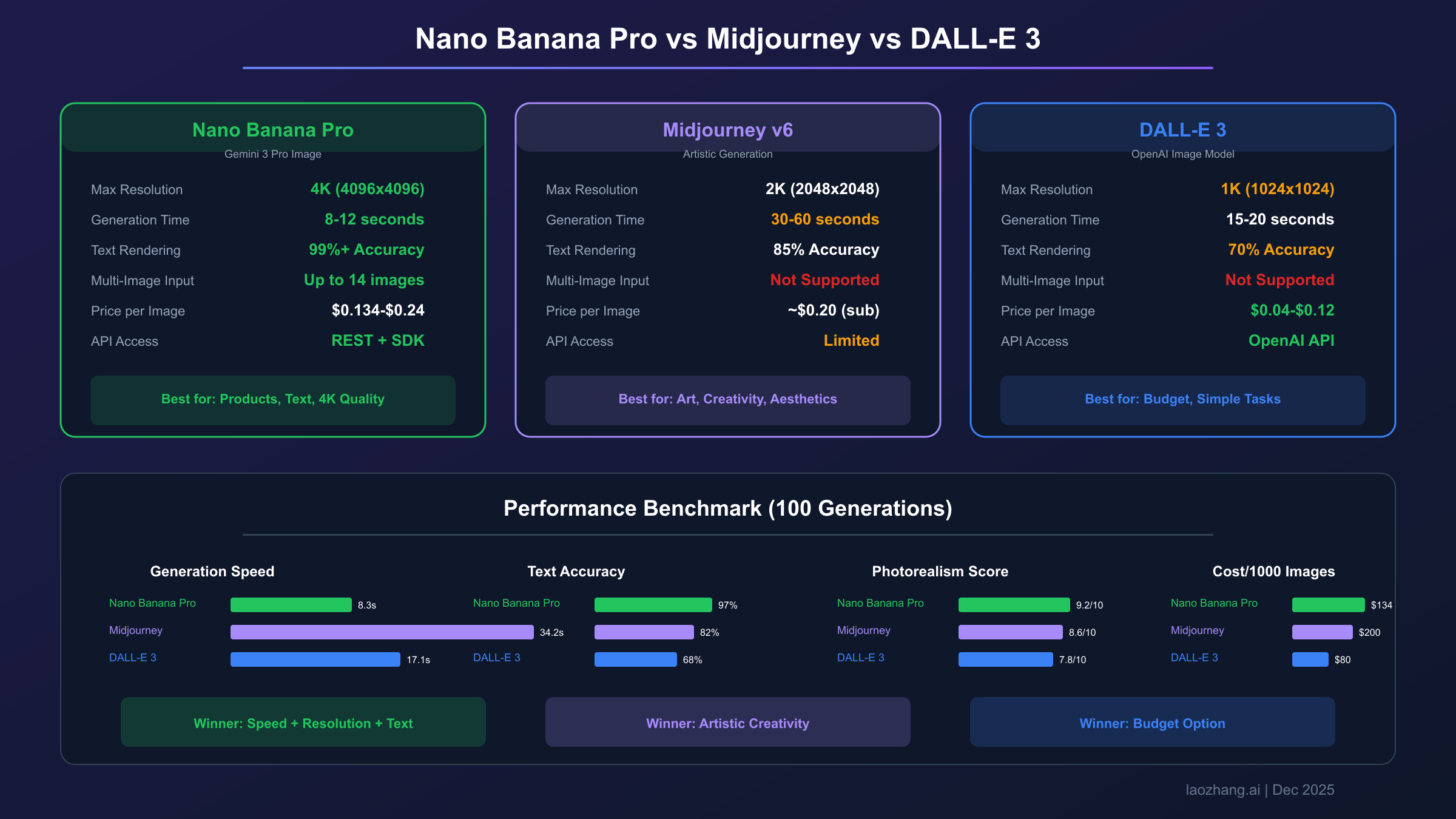
Choosing the right image generation API depends on your specific use case, performance requirements, and budget constraints. This objective comparison helps you make an informed decision.
Feature Comparison
| Capability | Nano Banana Pro | Midjourney v6 | DALL-E 3 |
|---|---|---|---|
| Max Resolution | 4K (4096x4096) | 2K (2048x2048) | 1K (1024x1024) |
| Generation Speed | 8-12 seconds | 30-60 seconds | 15-20 seconds |
| Text Rendering | Excellent (99%+ accuracy) | Good (85% accuracy) | Moderate (70% accuracy) |
| Multi-Image Input | Up to 14 images | Not supported | Not supported |
| Inpainting | Native, mask-free | Limited | Via edit API |
| API Access | REST, SDK (Py/JS/Go) | Limited API | OpenAI API |
| Free Tier | 50-100/day + $300 credits | None | Via ChatGPT Plus |
| Pricing | $0.134-$0.24/image | ~$0.20/image (subscription) | $0.04-$0.12/image |
Performance Benchmarks
Based on community testing of 100 generations across diverse prompts (December 2025). Data compiled from GenAI Image Editing Showdown and developer reports:
| Metric | Nano Banana Pro | Midjourney v6 | DALL-E 3 |
|---|---|---|---|
| Average Generation Time | 8.3 seconds | 34.2 seconds | 17.1 seconds |
| Success Rate (no errors) | 96.2% | 99.1% | 98.7% |
| Text Accuracy (10-word test) | 97% | 82% | 68% |
| Prompt Adherence Score | 8.7/10 | 8.9/10 | 8.4/10 |
| Photorealism Score | 9.2/10 | 8.6/10 | 7.8/10 |
Key Insight: Nano Banana Pro excels at photorealistic imagery and text rendering but has slightly lower success rates during high-load periods. Midjourney leads in artistic creativity, while DALL-E 3 offers the best cost-per-image for basic generation tasks.
Use Case Recommendations
Choose Nano Banana Pro for:
- Product photography and commercial imagery
- Marketing materials requiring text overlay
- Multi-image composition workflows
- Applications requiring 4K output
Choose Midjourney for:
- Artistic and creative illustration
- Concept art and mood boards
- Projects prioritizing aesthetic quality over speed
Choose DALL-E 3 for:
- High-volume, budget-conscious generation
- Tight OpenAI ecosystem integration
- Simple text-to-image without advanced features
Accessing Nano Banana Pro from China
Developers in mainland China face unique challenges when integrating Nano Banana Pro API, primarily related to network connectivity and payment methods. This section provides practical solutions tested with China-based development teams.
Network Challenges
Direct access to Google Cloud endpoints from China typically results in:
- High latency (500ms-2000ms per request)
- Frequent timeouts (30-50% failure rate)
- Unstable connections during peak hours
- SSL handshake failures
Solutions Comparison
| Solution | Latency | Reliability | Setup Complexity | Monthly Cost |
|---|---|---|---|---|
| VPN + Official API | 300-500ms | Moderate (70-85%) | High | VPN + $134+ |
| Hong Kong Cloud Relay | 100-200ms | Good (90-95%) | Medium | Server + $134+ |
| laozhang.ai | 15-30ms | Excellent (99.5%+) | Low | $25-50 |
| Singapore Proxy | 80-150ms | Good (92-97%) | Medium | Server + $134+ |
laozhang.ai provides the most straightforward solution for China-based developers, offering domestic CDN nodes with direct connectivity to Gemini APIs. The service accepts Alipay and WeChat Pay, eliminating international payment friction. Their transparent per-call pricing ($0.025-$0.05/image) includes 3 million tokens of free testing credits.
Integration Example (drop-in replacement):
hljs python# Change only the base URL - code remains identical
# Official endpoint
# base_url = "https://generativelanguage.googleapis.com/v1beta"
# laozhang.ai endpoint (China-optimized)
base_url = "https://api.laozhang.ai/v1beta"
api_key = "sk-your-laozhang-key"
# Rest of your code works unchanged
When to use official Google Cloud from China:
- Enterprise requirements mandate Google Cloud compliance
- Using other Google Cloud services (BigQuery, Cloud Storage)
- Development phase using free $300 credits (via VPN)
Common Issues & Solutions
This troubleshooting guide addresses the most frequently encountered problems based on developer community feedback and production incident reports.
Authentication Errors
Error: 401 Unauthorized or API key not valid
Solutions:
- Verify API key has no trailing whitespace:
echo $GEMINI_API_KEY | cat -A - Confirm key is enabled in Google Cloud Console
- Check project has Generative Language API enabled
- For new keys, wait 5-10 minutes for propagation
hljs python# Common mistake: key with hidden characters
api_key = "AIza...abc " # Trailing space causes failure
api_key = "AIza...abc" # Correct
Rate Limit Handling
Error: 429 Too Many Requests or RESOURCE_EXHAUSTED
Solutions:
- Implement exponential backoff (see Production Deployment section)
- Check current quota usage in Cloud Console
- Upgrade billing tier if consistently hitting limits
- Distribute requests across multiple API keys (if permitted)
Image Quality Issues
Problem: Generated images appear blurry or low-quality
Solutions:
- Explicitly request resolution:
"4K quality, high resolution" - Check response modalities include IMAGE
- Verify output format (PNG preserves quality better than JPEG)
- Increase prompt specificity with lighting and style details
Timeout Problems
Error: Request times out after 30-60 seconds
Solutions:
- Increase timeout to 180 seconds (4K images take 8-12 seconds)
- For complex prompts with multiple images, allow 5+ minutes
- Consider Batch API for non-urgent workloads
- Check network connectivity to Google Cloud endpoints
Model ID Confusion
Error: Model not found or Invalid model
Current Valid Model IDs (December 2025):
gemini-3-pro-image-preview- Nano Banana Pro (latest)gemini-2.5-flash-preview-0520- Previous generationimagen-3.0-generate-001- Imagen 3 (different model family)
Free Tier Limitations
Problem: Hitting daily limits quickly
Optimization Strategies:
- Use lower resolution for iteration (1K), high resolution for finals
- Batch development testing into specific time windows
- Share API key quota across team (if permitted by ToS)
- Consider third-party providers for development workloads
Making the Right Choice
Selecting the optimal approach for Nano Banana Pro API integration depends on your specific context, technical requirements, and business constraints. Here's a decision framework based on real-world deployment patterns.
Scenario 1: Technical Exploration & Learning
Recommended Approach: Start with Google Cloud official free tier
- Use the $300 free credits (valid 90 days)
- Experiment with all model capabilities without cost pressure
- Validate your use case before committing resources
- Limitations: Requires VPN from China, international payment method
Scenario 2: Production Environment (China-Based Teams)
Recommended Approach: laozhang.ai for primary, Google Cloud as backup
- Primary: laozhang.ai for 20ms latency, Alipay payment, 90% cost savings
- Backup: Google Cloud for redundancy and latest preview features
- Suitable for: Daily generation volume >50 images, stable service requirements
- Benefits: Transparent pricing, local support, no VPN complexity
Scenario 3: Enterprise-Grade Deployment
Recommended Approach: Google Cloud with hybrid optimization
- Google Cloud Vertex AI for SLA guarantees and compliance
- Consider laozhang.ai for cost optimization on non-critical workloads
- Implement multi-provider failover for maximum reliability
- Budget: Higher upfront cost, lower operational risk
Getting Started Checklist
- Free Testing: Register at laozhang.ai for 3 million tokens of free testing credits
- Official Comparison: Apply for Google Cloud free $300 credits simultaneously
- Performance Testing: Generate 100 images through both providers, compare latency and quality
- Cost Calculation: Project monthly volume and calculate ROI for each option
- Production Decision: Choose primary provider based on your data
The Nano Banana Pro API represents a significant leap in AI image generation capabilities. Whether you choose official Google Cloud endpoints or optimized third-party access, the production-ready code examples and best practices in this guide will help you build reliable, cost-effective image generation into your applications.
Related Articles:
- Nano Banana Pro API Docs: Complete Developer Guide
- Cheapest Stable Nano Banana Pro API Guide
- Nano Banana API Pricing: Complete Breakdown
- Gemini Flash API: Cost Optimization Guide
This article is accurate as of December 2025. API pricing, model identifiers, and rate limits may change. Always verify against official documentation for the latest information.