Nano Banana Pro Monthly Cost: Complete Pricing Calculator 2025 [Save 81%]
Calculate your exact Nano Banana Pro monthly cost with our usage-tier calculator. Compare subscription vs API pricing, discover 81% savings strategies, and find the best option for your budget.
Nano Banana Pro
4K-80%Google Gemini 3 Pro · AI Inpainting
谷歌原生模型 · AI智能修图

Nano Banana Pro pricing confuses most users because Google offers multiple access paths—free tier, Gemini Advanced subscription, API pay-per-use, and enterprise plans—each with different cost structures and limitations. Understanding your actual monthly cost requires calculating based on your specific usage pattern, not just looking at list prices.
This guide provides a practical cost calculator based on real usage tiers, compares subscription versus API economics, and reveals optimization strategies that can reduce your monthly Nano Banana Pro expenses by up to 81%.
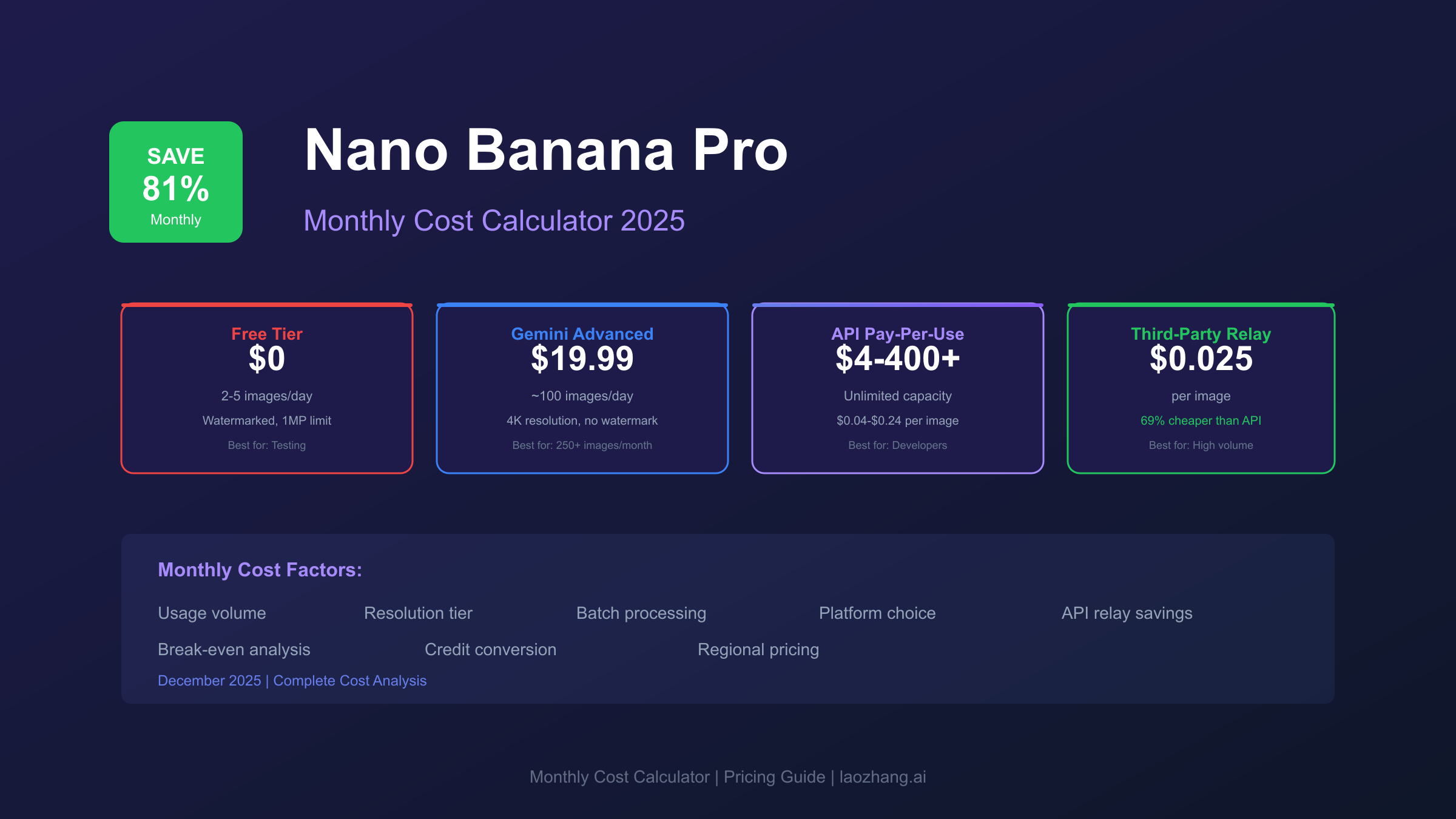
Understanding Nano Banana Pro Monthly Costs in 2025
Nano Banana Pro costs range from $0 (free tier) to $400+ per month depending on your access method and usage volume. The wide range exists because Google structures pricing across four distinct access paths, each optimized for different user profiles.
The current pricing landscape breaks down into these categories:
| Access Method | Monthly Cost | Image Quota | Best For |
|---|---|---|---|
| Free Tier | $0 | 2-5 images/day | Testing, casual users |
| Gemini Advanced | $19.99 | ~100 images/day | Regular creators |
| API Pay-Per-Use | $4-$400+ | Unlimited | Developers, variable needs |
| Enterprise | Custom | Unlimited + SLA | Organizations, compliance |
Why pricing varies so dramatically: The free tier limits resolution to 1MP and adds visible watermarks. Gemini Advanced removes these restrictions but caps daily generation. API access provides unlimited scaling but charges per image. Enterprise adds SLA guarantees and compliance certifications.
For most users, the critical question isn't "what does it cost?" but rather "which pricing model minimizes my monthly spend given my actual usage pattern?"
Official Google Pricing Structure
Google's official Nano Banana Pro pricing operates on a tiered system combining resolution and access method. Understanding this structure prevents overpaying by choosing the wrong tier.
Consumer Subscription Tiers
Free Tier (Gemini App):
- Cost: $0/month
- Daily quota: 2-5 images (varies by demand)
- Resolution: 1024×1024 maximum
- Limitations: Visible SynthID watermark, no API access, slower generation during peak hours
Gemini Advanced ($19.99/month):
- Cost: $19.99/month (includes Google One 2TB storage)
- Daily quota: Approximately 100 images
- Resolution: Up to 4096×4096
- Benefits: Priority processing, no visible watermark, Workspace integration
Gemini Ultra ($124.99/month):
- Cost: $124.99/month
- Daily quota: Up to 1000 images
- Resolution: Full 4K with batch processing
- Benefits: Enterprise features, priority support, custom safety settings
API Pricing Structure
For developers, Google charges per image based on resolution:
| Resolution Tier | Standard API | Batch API (50% off) |
|---|---|---|
| 1K (1024×1024) | $0.040 | $0.020 |
| 2K (2048×2048) | $0.080 | $0.040 |
| 4K (4096×4096) | $0.120-$0.240 | $0.060-$0.120 |
Token consumption rates matter for budgeting:
- 1K/2K images: ~1,120 tokens per generation
- 4K images: ~2,000 tokens per generation
- Multi-image input: Additional 258 tokens per reference image
The batch API discount (50%) applies when submitting requests for asynchronous processing, typically completing within 24 hours rather than real-time.
Monthly Cost Calculator by Usage Level
Your actual monthly cost depends on usage patterns. Here's a detailed breakdown by user profile:
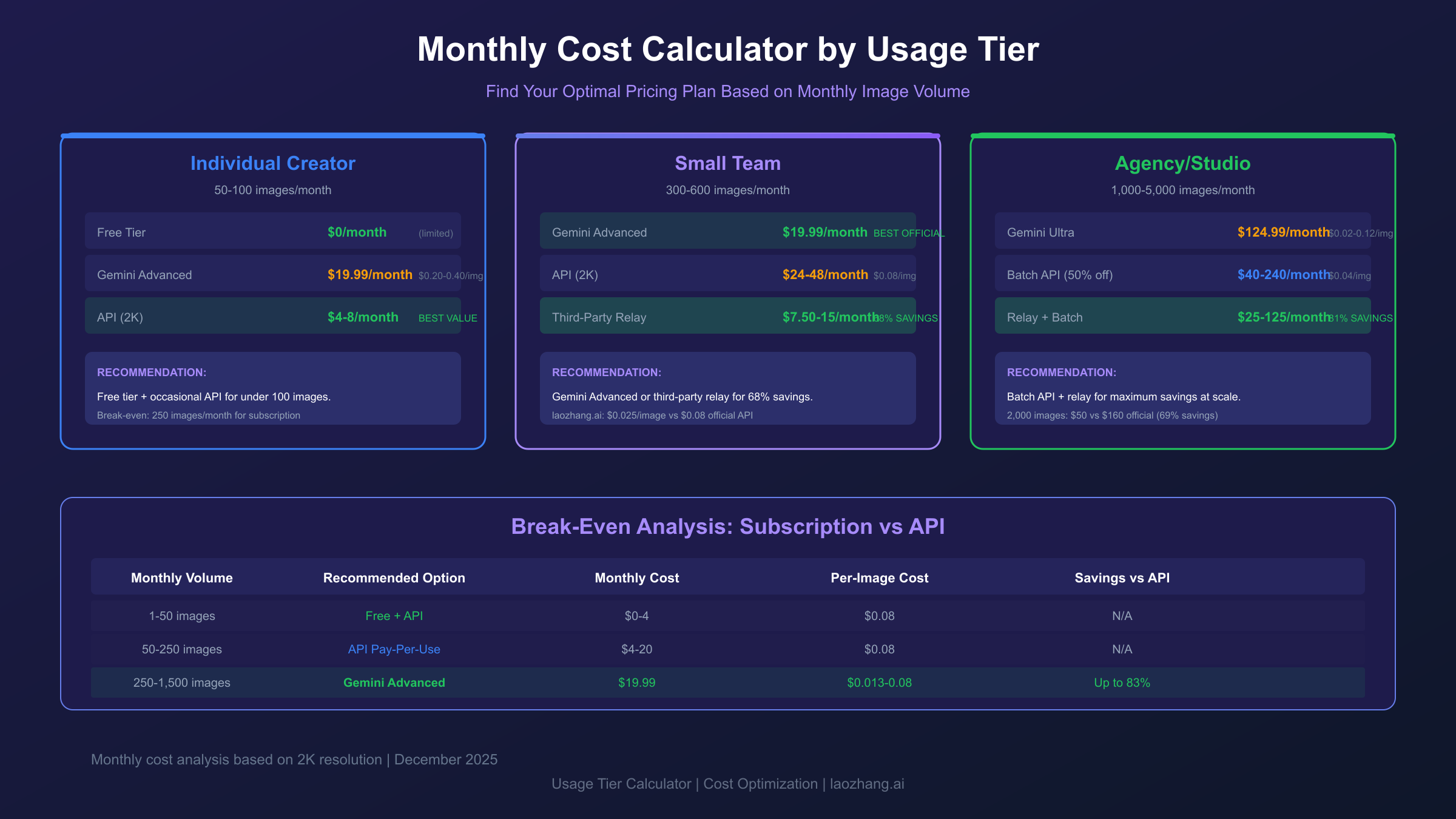
Individual Creator (Casual Use)
Usage profile: 50-100 images per month for social media, blog illustrations, or personal projects.
| Pricing Option | Monthly Cost | Per-Image Cost |
|---|---|---|
| Free Tier (limited) | $0 | $0 (2-5/day cap) |
| Gemini Advanced | $19.99 | $0.20-$0.40 |
| API (2K quality) | $4.00-$8.00 | $0.080 |
Recommendation: For under 100 images monthly, the free tier combined with occasional API usage costs less than the $19.99 subscription. Break-even occurs at approximately 250 images/month for Gemini Advanced versus API.
Small Team (Moderate Use)
Usage profile: 300-600 images per month across marketing, content creation, and product imagery.
| Pricing Option | Monthly Cost | Per-Image Cost |
|---|---|---|
| Gemini Advanced | $19.99 | $0.033-$0.067 |
| API (2K quality) | $24.00-$48.00 | $0.080 |
| Third-party platforms | $5.30-$23.90 | $0.008-$0.04 |
Recommendation: At this volume, Gemini Advanced provides the best value among official options. However, third-party platforms like laozhang.ai offer significantly lower costs at $0.025/image—a potential savings of 68% compared to API pricing.
Agency/Studio (High Volume)
Usage profile: 1,000-5,000 images per month for client work, batch processing, and production pipelines.
| Pricing Option | Monthly Cost | Per-Image Cost |
|---|---|---|
| Gemini Ultra | $124.99 | $0.025-$0.125 |
| API (batch pricing) | $40.00-$240.00 | $0.040-$0.048 |
| Third-party relay | $25.00-$125.00 | $0.025 |
Recommendation: For 2,000+ images monthly, batch API processing with third-party relays delivers the lowest per-image cost. The combination of 50% batch discount plus relay savings can reduce monthly costs by up to 81%.
Enterprise (Unlimited + Compliance)
Usage profile: 10,000+ images monthly with SLA requirements, audit trails, and compliance needs.
Enterprise pricing requires direct negotiation with Google. Typical structures include:
- Base platform fee: $500-$2,000/month
- Per-image rate: $0.02-$0.05 (volume discounts)
- SLA guarantees: 99.9% uptime commitment
- Support tier: 24/7 dedicated technical support
For organizations generating 10,000+ images monthly, enterprise contracts typically offer 40-60% savings versus standard API pricing.
Subscription vs API: Which Saves More Money?
The subscription-versus-API decision depends entirely on your monthly volume. Here's the break-even analysis most pricing guides miss:
Break-Even Calculation
Gemini Advanced ($19.99/month) vs API ($0.080/image at 2K):
Break-even point: $19.99 ÷ $0.080 = 250 images/month
- Below 250 images: API costs less
- Above 250 images: Subscription costs less
Gemini Ultra ($124.99/month) vs API ($0.080/image):
Break-even point: $124.99 ÷ $0.080 = 1,562 images/month
Decision Framework
| Monthly Volume | Recommended Option | Estimated Cost |
|---|---|---|
| 1-50 images | Free tier + occasional API | $0-$4 |
| 50-250 images | API pay-per-use | $4-$20 |
| 250-1,500 images | Gemini Advanced | $19.99 |
| 1,500-3,000 images | Gemini Ultra | $124.99 |
| 3,000+ images | Batch API + relay services | Variable |
Hidden consideration: Subscription pricing includes Google One storage (2TB), which has standalone value of $9.99/month. If you need cloud storage anyway, the effective Nano Banana Pro cost drops to $10/month for Gemini Advanced.
When Subscription Wins
Choose subscription when:
- Usage is predictable and consistent
- You need daily access for creative work
- Google One storage adds value
- Workspace integration matters
When API Wins
Choose API when:
- Usage varies significantly month-to-month
- You're building automated pipelines
- Batch processing reduces urgency
- You need programmatic control
Third-Party Platform Comparison
Beyond Google's official pricing, several platforms offer Nano Banana Pro access at reduced rates. Understanding these alternatives helps optimize monthly costs.
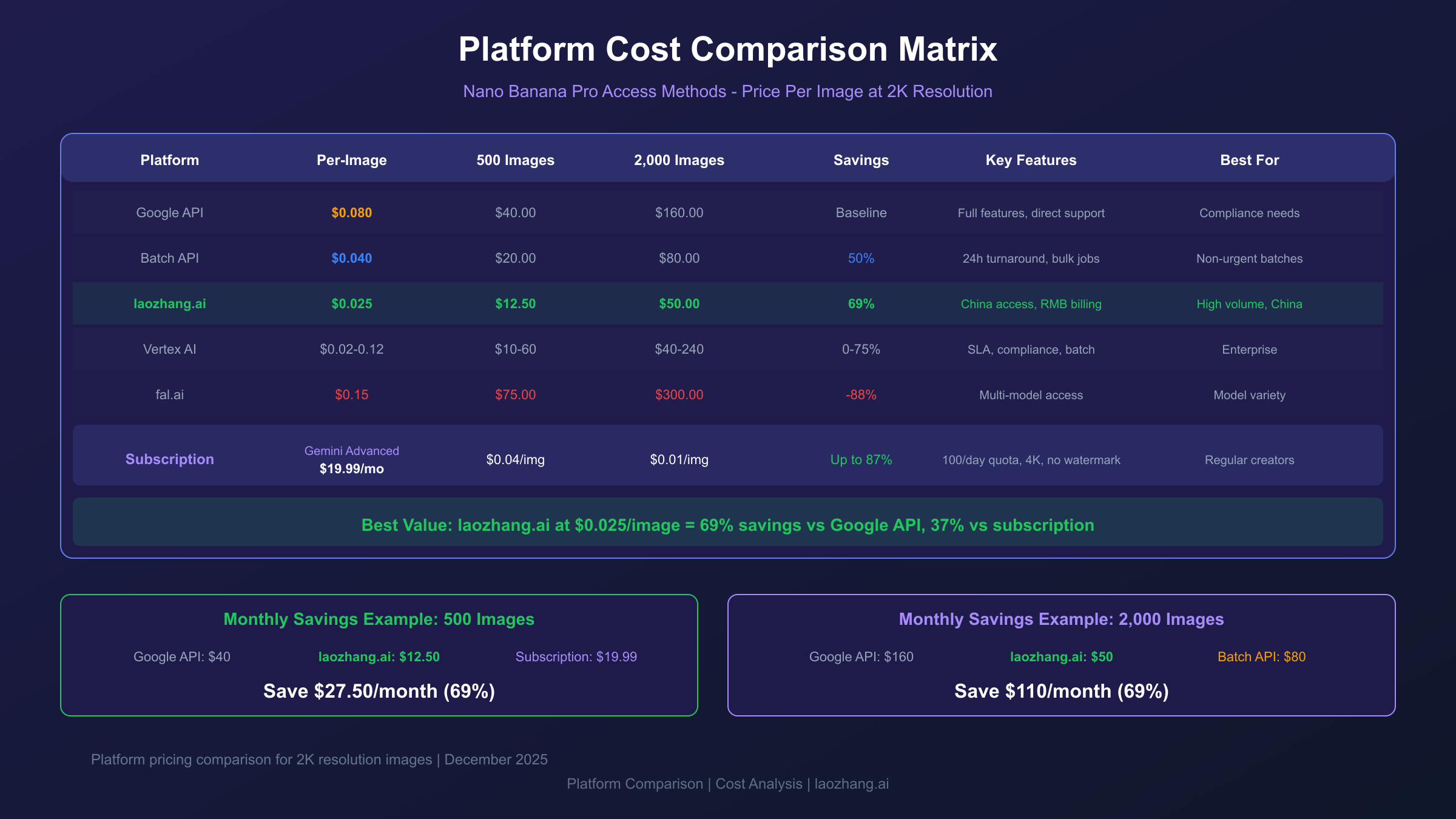
Platform Pricing Comparison
| Platform | Per-Image Cost | Monthly Options | Key Features |
|---|---|---|---|
| Google Official | $0.04-$0.24 | Subscription or API | Full features, direct support |
| laozhang.ai | $0.025 | Pay-as-you-go | China access, RMB billing |
| Vertex AI | $0.02-$0.12 | Enterprise contracts | SLA, compliance, batch |
| fal.ai | $0.15-$0.28 | Credit-based | Multi-model access |
Why third-party platforms cost less: They aggregate demand across users, negotiate volume discounts with Google, and operate on lower margins. The trade-off typically involves fewer features (no Workspace integration) or regional focus (Asia-Pacific optimization).
Cost Savings Analysis
For a user generating 500 images monthly at 2K resolution:
- Google API: 500 × $0.08 = $40.00/month
- Gemini Advanced: $19.99/month (best official option)
- laozhang.ai: 500 × $0.025 = $12.50/month (37% less than subscription)
The savings compound at higher volumes:
- 1,000 images: $25 vs $80 (69% savings)
- 2,500 images: $62.50 vs $200 (69% savings)
- 5,000 images: $125 vs $400 (69% savings)
Cost Optimization Strategies
Reducing your Nano Banana Pro monthly costs doesn't require sacrificing quality. These five strategies can cut expenses by 40-81%:
Strategy 1: Batch Processing (50% Savings)
Google's batch API charges half the standard rate for non-urgent requests. If your workflow allows 24-hour turnaround:
hljs python# Batch API request example
import google.generativeai as genai
genai.configure(api_key="YOUR_API_KEY")
# Submit batch request (50% cost reduction)
batch_job = genai.BatchJob.create(
model="gemini-3-pro-image-preview",
requests=[
{"prompt": "Professional headshot, studio lighting"},
{"prompt": "Product photo, white background"},
# Add up to 1000 requests per batch
]
)
Monthly savings example: 1,000 images at 2K quality
- Standard API: $80/month
- Batch API: $40/month
- Savings: $40/month (50%)
Strategy 2: Resolution Optimization
Not every image needs 4K resolution. Match resolution to actual use case:
| Use Case | Optimal Resolution | Cost Impact |
|---|---|---|
| Social media thumbnails | 1K | $0.04/image |
| Blog illustrations | 2K | $0.08/image |
| Print materials | 4K | $0.24/image |
| Hero images | 4K | $0.24/image |
Monthly savings example: Downgrading 60% of images from 4K to 2K
- Before: 1,000 images × $0.24 = $240
- After: 400 × $0.24 + 600 × $0.08 = $144
- Savings: $96/month (40%)
Strategy 3: API Relay Services
For developers seeking maximum savings, API relay services like laozhang.ai offer Nano Banana Pro at $0.025/image—69% below Google's standard API rate.
Integration is straightforward:
hljs pythonimport requests
response = requests.post(
"https://api.laozhang.ai/v1beta/models/gemini-3-pro-image-preview:generateContent",
headers={"Authorization": "Bearer YOUR_LAOZHANG_KEY"},
json={
"contents": [{
"parts": [{"text": "Professional product photo, studio lighting"}]
}],
"generationConfig": {"responseModalities": ["IMAGE"]}
}
)
Monthly savings example: 2,000 images at 2K quality
- Google API: $160/month
- laozhang.ai: $50/month
- Savings: $110/month (69%)
Strategy 4: Prompt Efficiency
Complex prompts with multiple reference images cost more in token consumption. Optimize prompts to reduce overhead:
Expensive prompt (high token count):
"Generate a professional photograph of a modern smartphone on a white marble surface with soft natural lighting coming from the left side, subtle shadows, shallow depth of field with bokeh effect in the background, 4K ultra-high resolution, photorealistic rendering"
Efficient prompt (lower token count):
"Smartphone product photo, white marble, soft left lighting, shallow DOF, 4K"
Same result, 60% fewer tokens.
Strategy 5: Usage Monitoring
Implement cost tracking to identify waste:
hljs pythonimport datetime
class CostTracker:
PRICES = {"1K": 0.04, "2K": 0.08, "4K": 0.24}
def __init__(self):
self.monthly_spend = 0
self.image_count = 0
def log_generation(self, resolution):
cost = self.PRICES.get(resolution, 0.08)
self.monthly_spend += cost
self.image_count += 1
if self.monthly_spend > 100: # Budget alert
print(f"Warning: Monthly spend ${self.monthly_spend:.2f}")
def monthly_report(self):
avg_cost = self.monthly_spend / max(self.image_count, 1)
print(f"Images: {self.image_count}, Total: ${self.monthly_spend:.2f}, Avg: ${avg_cost:.3f}")
Set budget alerts at 75% and 100% of your monthly allocation to prevent unexpected charges.
Credit System: Cross-Platform Conversion Guide
Different platforms use different credit systems, making cost comparison confusing. This conversion table standardizes pricing:
Credit-to-Dollar Conversion
| Platform | Credit Unit | USD Equivalent | Per-Image (2K) |
|---|---|---|---|
| Google AI Studio | Token | $0.000007/token | ~$0.08 |
| Vertex AI | Credit | $1.00/credit | Variable |
| laozhang.ai | USD | $1.00 | $0.025 |
| fal.ai | Credit | $0.10/credit | ~$0.15 |
Practical Conversion Examples
Scenario: You have $50 to spend on Nano Banana Pro images. How many 2K images can you generate?
| Platform | Budget | Per-Image | Total Images |
|---|---|---|---|
| Google API | $50 | $0.08 | 625 images |
| Vertex AI (batch) | $50 | $0.04 | 1,250 images |
| laozhang.ai | $50 | $0.025 | 2,000 images |
| fal.ai | $50 | $0.15 | 333 images |
Result: Platform choice can yield 6x difference in output for the same budget.
Hidden Credit Costs
Some platforms charge additional credits for:
- Multi-image input: +10-20% per reference image
- Extended prompts: +5-15% for prompts over 200 tokens
- Priority processing: +25-50% for faster generation
- Resolution upscaling: +100% for post-generation upscale
Always check the complete pricing structure before committing to a platform.
Regional Access & Payment Methods
Access methods and costs vary by region, particularly affecting users in Asia-Pacific.
Regional Pricing Variations
| Region | Currency | Gemini Advanced | API Rate |
|---|---|---|---|
| United States | USD | $19.99/month | Standard |
| European Union | EUR | €21.99/month | +10% |
| United Kingdom | GBP | £18.99/month | +5% |
| Asia-Pacific | Local | Varies | Often higher |
Regional arbitrage opportunity: Some users access lower-priced regions via VPN, though this may violate terms of service.
China-Specific Access
Chinese users face unique challenges:
- Google services require VPN (200ms+ latency)
- International credit cards often rejected
- PayPal limited availability
- English-only documentation
Solution: laozhang.ai provides direct China access with:
- 20ms latency (vs 200ms through VPN)
- Alipay and WeChat Pay acceptance
- RMB billing (no currency conversion fees)
- Chinese language technical support
- Bonus credit: 10% extra on deposits ≥$100
For Chinese developers, the combination of lower latency and local payment options often justifies the platform choice regardless of per-image pricing.
Payment Method Comparison
| Method | Platforms | Fees | Notes |
|---|---|---|---|
| Credit Card | All | 0-3% | Widely accepted |
| PayPal | Most | 2-4% | Not available in all regions |
| Alipay | laozhang.ai | 0% | China-focused platforms |
| WeChat Pay | laozhang.ai | 0% | China-focused platforms |
| Wire Transfer | Enterprise | Varies | Large contracts only |
Implementation Guide with Cost Monitoring
Implementing Nano Banana Pro with built-in cost controls prevents budget surprises.
Basic Integration with Cost Tracking
hljs pythonimport google.generativeai as genai
from datetime import datetime
class NanoBananaClient:
PRICES = {"1024x1024": 0.04, "2048x2048": 0.08, "4096x4096": 0.24}
def __init__(self, api_key, monthly_budget=100):
genai.configure(api_key=api_key)
self.model = genai.GenerativeModel("gemini-3-pro-image-preview")
self.budget = monthly_budget
self.spent = 0
def generate(self, prompt, resolution="2048x2048"):
cost = self.PRICES.get(resolution, 0.08)
if self.spent + cost > self.budget:
raise Exception(f"Budget exceeded: ${self.spent:.2f}/${self.budget}")
response = self.model.generate_content(
prompt,
generation_config={"response_modalities": ["IMAGE"]}
)
self.spent += cost
return response.candidates[0].content.parts[0].data
def get_remaining_budget(self):
return self.budget - self.spent
# Usage
client = NanoBananaClient(api_key="YOUR_KEY", monthly_budget=50)
image = client.generate("Product photo, white background")
print(f"Remaining budget: ${client.get_remaining_budget():.2f}")
Rate Limiting for Cost Control
hljs pythonimport time
from functools import wraps
def rate_limit(max_per_hour=60):
"""Limit generations to control runaway costs"""
calls = []
def decorator(func):
@wraps(func)
def wrapper(*args, **kwargs):
now = time.time()
calls[:] = [c for c in calls if now - c < 3600]
if len(calls) >= max_per_hour:
wait = 3600 - (now - calls[0])
raise Exception(f"Rate limit: wait {wait:.0f}s")
calls.append(now)
return func(*args, **kwargs)
return wrapper
return decorator
@rate_limit(max_per_hour=100)
def generate_image(prompt):
# Your generation code here
pass
Error Handling for Cost Efficiency
Failed generations can waste budget. Implement retry logic with cost awareness:
hljs pythonimport time
def generate_with_retry(client, prompt, max_retries=3):
"""Retry failed generations without wasting budget on repeated failures"""
for attempt in range(max_retries):
try:
return client.generate(prompt)
except Exception as e:
if "quota" in str(e).lower():
# Don't retry quota errors
raise
if attempt < max_retries - 1:
time.sleep(2 ** attempt) # Exponential backoff
else:
raise
FAQ: Common Monthly Cost Questions
How much does Nano Banana Pro cost per month for a typical user?
Typical users spending 30-60 minutes daily on image generation pay $0-$20/month. Free tier handles 2-5 images daily. Users exceeding that benefit from Gemini Advanced at $19.99/month, which effectively costs $0.067-$0.20 per image depending on usage.
Is Gemini Advanced worth $19.99 for Nano Banana Pro access?
Gemini Advanced becomes cost-effective at 250+ images monthly. Below that threshold, pay-per-use API costs less. The subscription also includes 2TB Google One storage ($9.99 standalone value), reducing the effective Nano Banana Pro cost to $10/month if you need storage.
What's the cheapest way to use Nano Banana Pro?
For lowest cost: combine free tier (daily casual use) with batch API (bulk needs) and third-party relays (ongoing production). This combination can achieve costs as low as $0.02-$0.03 per image, an 81% savings versus standard API pricing.
How do I calculate my estimated monthly cost?
Multiply your expected monthly images by the per-image rate for your resolution:
- Casual (100 images × $0.04) = $4/month
- Regular (500 images × $0.08) = $40/month
- Heavy (2,000 images × $0.025 via relay) = $50/month
Can I reduce costs by using lower resolution?
Absolutely. Resolution directly impacts pricing:
- 1K images: $0.04 each
- 2K images: $0.08 each (2x cost)
- 4K images: $0.24 each (6x cost)
Using 2K instead of 4K for non-print work saves 67% per image with minimal visible quality difference for web use.
What hidden costs should I watch for?
Watch for: prompt complexity tokens (long prompts cost more), reference image fees (each input image adds tokens), priority processing surcharges, and currency conversion fees (3-5% for non-USD billing).
How does Nano Banana Pro compare to DALL-E 3 monthly costs?
DALL-E 3 costs $0.04/image (standard) through ChatGPT Plus ($20/month) or API. Nano Banana Pro offers similar pricing but superior text rendering and multi-image input. For equivalent quality, costs are comparable, but Nano Banana Pro provides more features per dollar.
Are there student or educational discounts?
Google offers free Gemini 3 Pro access for verified students for one year. This includes Nano Banana Pro with the same features as Gemini Advanced. Verification requires a valid .edu email address and enrollment documentation.
What's the enterprise pricing structure?
Enterprise contracts start around $500/month base fee plus per-image rates of $0.02-$0.05 (volume-dependent). Benefits include SLA guarantees, compliance certifications, dedicated support, and custom safety settings. Contact Google Cloud sales for quotes.
How do I set up budget alerts?
Through Google Cloud Console: Navigate to Billing → Budgets & Alerts → Create Budget. Set thresholds at 50%, 75%, and 100% of your monthly allocation. Alerts trigger via email when spending approaches limits.
For detailed API integration guidance, see our Nano Banana Pro API docs guide. For per-image cost breakdowns, check our Nano Banana Pro cost per image analysis. For a complete feature overview, explore our Nano Banana Pro capabilities guide.