Nano Banana Pro No Watermark: Complete Guide to Watermark-Free Images
Learn how to get Nano Banana Pro images without the visible watermark. Compare subscription tiers, API access, and third-party providers for clean, commercial-ready outputs.
Nano Banana Pro
4K-80%Google Gemini 3 Pro · AI Inpainting
谷歌原生模型 · AI智能修图

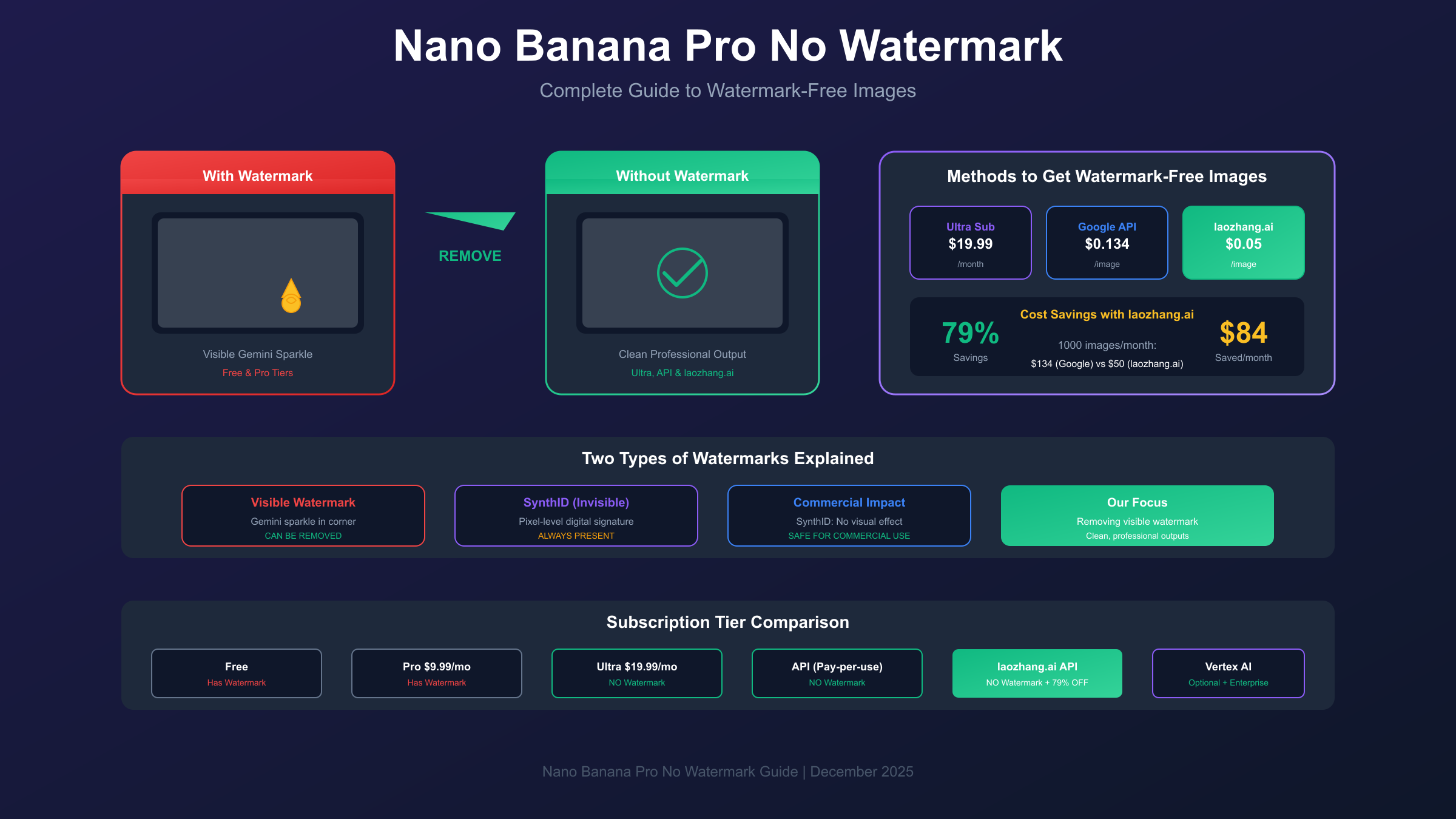
Getting watermark-free images from Nano Banana Pro requires understanding the distinction between two completely different watermark systems that Google has implemented. The visible Gemini sparkle logo that appears in the corner of generated images can be removed through several official and third-party methods, while the invisible SynthID watermark embedded at the pixel level remains permanently in all outputs regardless of your subscription tier or access method.
This comprehensive guide explores every available option for obtaining clean, commercial-ready images from Nano Banana Pro, from official subscription upgrades to cost-effective API alternatives that can save you up to 79% compared to Google's standard pricing.
Understanding Nano Banana Pro Watermarks: Visible vs Invisible
When users search for ways to remove watermarks from Nano Banana Pro images, they typically encounter confusion because Google actually implements two entirely separate watermarking systems. Understanding this distinction is essential before choosing any removal or avoidance strategy.
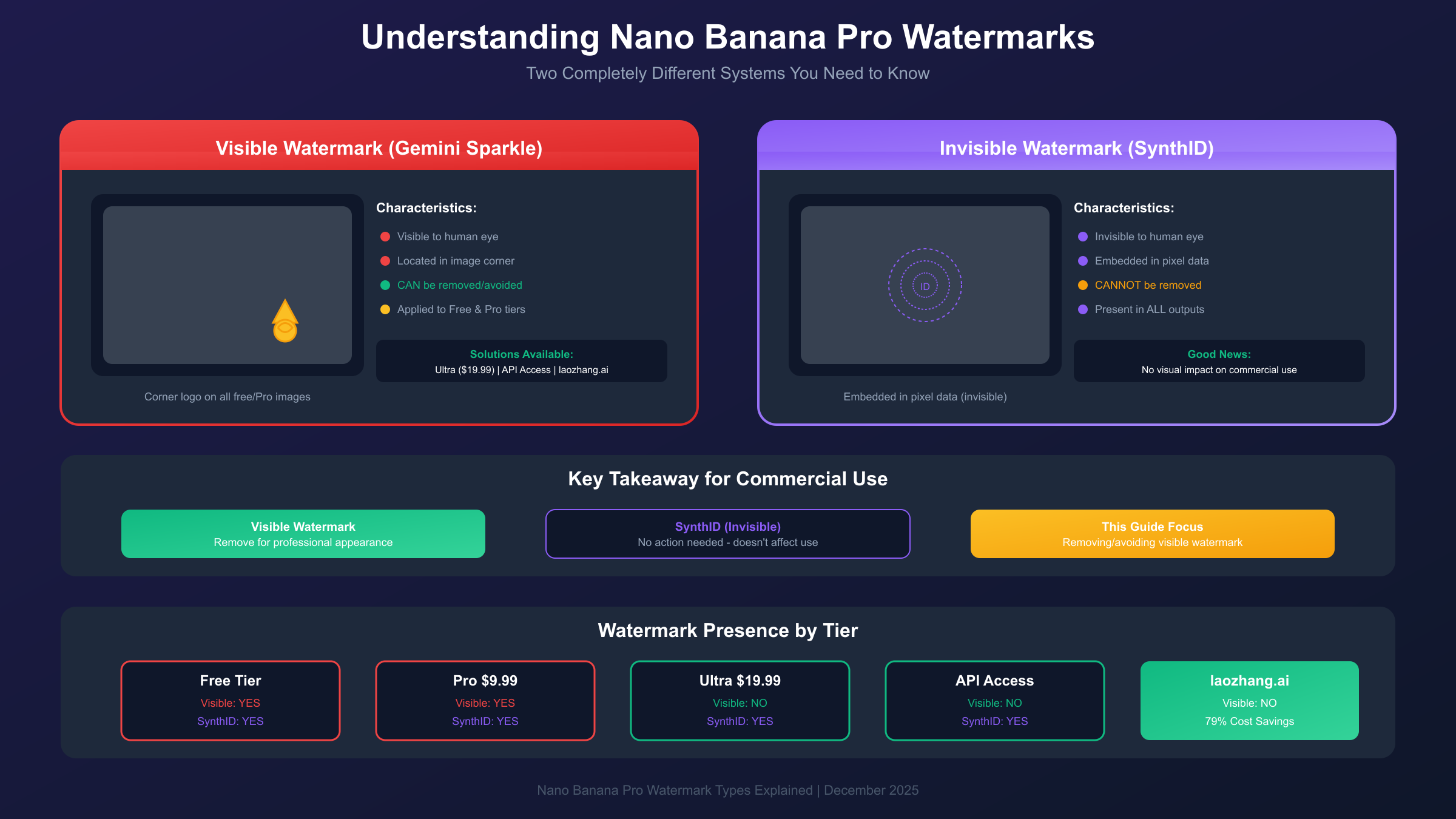
The visible watermark appears as a small Gemini sparkle logo in the corner of generated images. This is the watermark most users want to remove for professional or commercial use. Google adds this visible mark to images generated through free and lower-tier subscriptions as a way to indicate AI-generated content while also encouraging upgrades to premium tiers.
The invisible SynthID watermark is fundamentally different. Developed by Google DeepMind, SynthID embeds an imperceptible digital signature directly into the pixel data of every generated image. This watermark cannot be detected by the human eye and survives most image editing operations including cropping, resizing, compression, and color adjustments. According to Google's technical documentation, SynthID is designed to help identify AI-generated content at scale and remains present in all Nano Banana Pro outputs regardless of subscription level or API access method.
The critical takeaway here is straightforward: you can eliminate the visible Gemini sparkle through various methods described in this guide, but SynthID will always be present. For most commercial applications, this invisible watermark has no practical impact since it doesn't affect image appearance or quality. However, if your use case requires images that cannot be identified as AI-generated through any technical means, Nano Banana Pro may not be the appropriate tool.
Google's decision to implement dual watermarking reflects their broader strategy of balancing commercial accessibility with responsible AI deployment. The visible watermark serves as an immediate indicator for casual viewers, while SynthID provides a technical verification layer for platforms and researchers who need to identify AI content programmatically.
Subscription Tiers and Watermark Status
Google offers multiple subscription tiers for accessing Nano Banana Pro, and understanding which tiers remove the visible watermark is crucial for making cost-effective decisions.
| Subscription Tier | Monthly Price | Visible Watermark | SynthID (Invisible) | Commercial Rights |
|---|---|---|---|---|
| Free Tier | $0 | Yes | Yes | Limited |
| Google AI Pro | $9.99 | Yes | Yes | Yes |
| Google AI Ultra | $19.99 | No | Yes | Yes |
| Google AI Studio (API) | Pay-per-use | No | Yes | Yes |
| Vertex AI Enterprise | Variable | Optional | Yes | Yes + Indemnity |
The Free Tier provides access to Nano Banana Pro's image generation capabilities but applies the visible Gemini sparkle watermark to all outputs. While the image quality remains identical to paid tiers, the watermark makes these outputs unsuitable for most professional applications.
Google AI Pro at $9.99 per month offers enhanced features and priority access, but surprisingly retains the visible watermark. Many users upgrading from free expect the Pro tier to remove watermarks, only to discover this isn't the case. The Pro subscription focuses on increased generation limits and faster queue times rather than watermark removal.
Google AI Ultra at $19.99 per month is the first consumer tier to offer watermark-free visible outputs. This subscription removes the Gemini sparkle while providing all Pro features plus additional capabilities. For users who prefer a subscription model over API access, Ultra represents the most straightforward path to clean images.
The distinction between Pro and Ultra regarding watermarks represents an intentional product decision by Google. By reserving watermark-free outputs for the Ultra tier, Google creates clear differentiation between subscription levels while maintaining the visible indicator on more affordable tiers. For a detailed breakdown of all pricing options, see our complete Nano Banana Pro pricing guide.
Official API Access for Clean Images
For developers and power users, API access through Google AI Studio provides watermark-free images on a pay-per-use basis without requiring a monthly subscription commitment.
Google AI Studio offers direct API access to Nano Banana Pro with pricing based on image resolution and complexity. Standard resolution images cost approximately $0.134 per generation, while 4K outputs at 4096 pixels cost around $0.24 per image. These prices may fluctuate based on demand and Google's pricing updates, so checking current rates before committing to high-volume usage is recommended.
Setting up API access requires creating a Google Cloud project and obtaining an API key. The process involves visiting the Google AI Studio console, creating a new project, enabling the Generative AI API, and generating credentials. Once configured, you can make requests programmatically to generate images without the visible watermark.
The basic API request structure follows Google's Generative AI format. You'll need to specify your prompt, desired image dimensions, and authentication credentials. The API returns base64-encoded image data that you can then decode and save to your preferred format.
One consideration with official API access is rate limiting. Google imposes limits of approximately 10 requests per minute for standard accounts, which may be insufficient for high-volume production workloads. Enterprise users can negotiate increased limits through Vertex AI, but this typically involves higher costs and longer setup processes.
For most individual developers and small teams, the official API provides a reliable path to watermark-free images with the assurance of using Google's infrastructure directly. However, the per-image costs can accumulate quickly for applications requiring substantial image generation volume.
Third-Party API Providers: Cost-Effective Alternative
Third-party API providers offer access to Nano Banana Pro's image generation capabilities at significantly reduced costs compared to Google's official pricing. These services act as intermediaries, providing their own API endpoints that ultimately connect to Nano Banana Pro while offering competitive pricing and often higher rate limits.
Among available options, laozhang.ai provides Nano Banana Pro access at $0.05 per image, representing a 79% savings compared to Google's standard API pricing of $0.134 for equivalent resolution outputs. This substantial cost difference makes third-party access particularly attractive for applications requiring high image volumes.
| Provider | Price Per Image | Visible Watermark | Rate Limits | 4K Support |
|---|---|---|---|---|
| Google Official (Standard) | $0.134 | No | 10 RPM | Yes |
| Google Official (4K) | $0.24 | No | 10 RPM | Yes |
| laozhang.ai | $0.05 | No | Higher | Yes |
| Other Third-Party | $0.10-0.20 | Varies | Varies | Varies |
Integrating with laozhang.ai requires minimal code changes if you're already using the OpenAI-compatible API format. The service provides an endpoint that accepts standard image generation requests and returns results in a familiar format:
hljs pythonimport requests
import base64
API_KEY = "your_laozhang_api_key"
API_URL = "https://api.laozhang.ai/v1/images/generations"
headers = {
"Authorization": f"Bearer {API_KEY}",
"Content-Type": "application/json"
}
payload = {
"model": "nano-banana-pro",
"prompt": "A serene mountain landscape at sunset with golden light",
"n": 1,
"size": "1024x1024"
}
response = requests.post(API_URL, headers=headers, json=payload)
result = response.json()
# Save the generated image
image_data = base64.b64decode(result["data"][0]["b64_json"])
with open("generated_image.png", "wb") as f:
f.write(image_data)
The cost savings compound significantly at scale. Generating 1,000 images per month through Google's official API would cost approximately $134, while the same volume through laozhang.ai costs just $50, saving $84 monthly. For businesses generating tens of thousands of images, the annual savings can reach thousands of dollars.
Third-party providers typically offer additional benefits beyond pricing. Higher rate limits allow faster batch processing, while some providers include usage dashboards, cost tracking, and integration support that streamline development workflows. The trade-off is that you're routing requests through an intermediary rather than directly to Google, which some organizations may need to evaluate against their security and compliance requirements. For more API integration options, check our cheapest Nano Banana Pro API guide.
Complete Cost Comparison Across All Methods
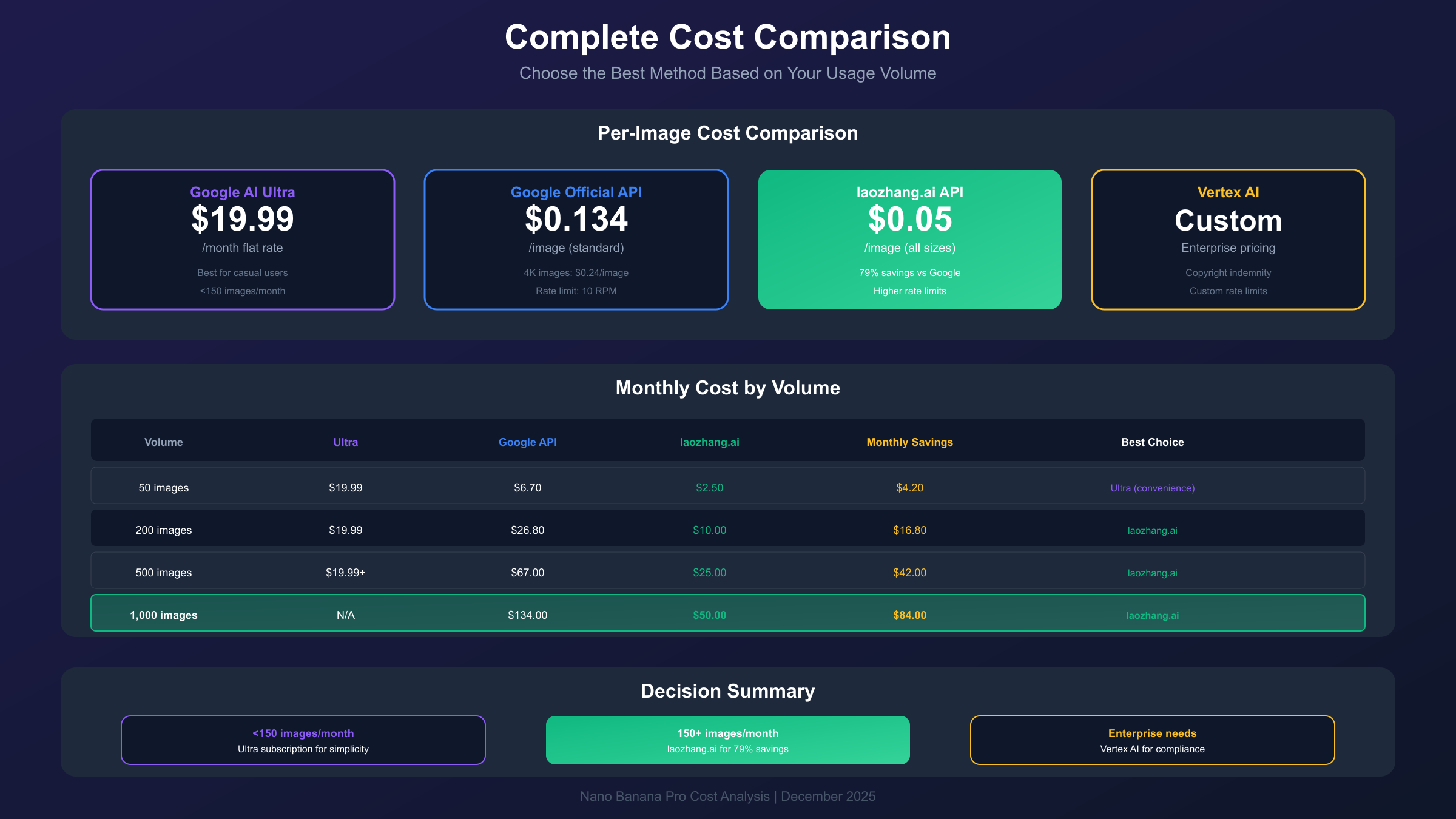
Choosing the most economical path to watermark-free Nano Banana Pro images depends on your usage volume and preferred payment model. This analysis compares all available methods across different usage scenarios to help identify the optimal approach for your needs.
For occasional users generating fewer than 50 images monthly, the Google AI Ultra subscription at $19.99 per month provides the simplest solution. The flat monthly rate covers all generations within your allocation, eliminating the need to track per-image costs or manage API credentials. The convenience of subscription access often outweighs cost optimization for low-volume users.
Moderate users generating 100-500 images monthly face a more nuanced decision. At 200 images per month:
- Google AI Ultra: $19.99 (effectively $0.10/image)
- Google Official API: $26.80 (at $0.134/image)
- laozhang.ai API: $10.00 (at $0.05/image)
At this volume, third-party API access through laozhang.ai costs approximately half of the Ultra subscription while providing flexibility to scale up or down without commitment.
High-volume users generating 1,000+ images monthly see the cost differential expand dramatically:
- Google AI Ultra: $19.99 + overage fees
- Google Official API: $134.00
- laozhang.ai API: $50.00
The 79% savings through laozhang.ai translates to $84 in monthly savings at 1,000 images, or over $1,000 annually. For businesses generating 10,000 images monthly, annual savings exceed $10,000.
| Monthly Volume | Google Ultra | Official API | laozhang.ai | Best Option |
|---|---|---|---|---|
| 50 images | $19.99 | $6.70 | $2.50 | Ultra (convenience) |
| 200 images | $19.99 | $26.80 | $10.00 | laozhang.ai |
| 500 images | $19.99+ | $67.00 | $25.00 | laozhang.ai |
| 1,000 images | $19.99+ | $134.00 | $50.00 | laozhang.ai |
| 5,000 images | N/A | $670.00 | $250.00 | laozhang.ai |
The break-even point between subscription and API access occurs around 150 images monthly when comparing Ultra to laozhang.ai, and around 400 images when comparing to official API pricing. Below these thresholds, subscription convenience may justify the higher per-image cost. Above them, API access delivers clear economic advantages.
Commercial Use Rights and Licensing
Understanding the legal framework around Nano Banana Pro outputs is essential for any commercial application. Google grants users a perpetual license to images generated through their platform, but several nuances deserve attention.
According to Google's terms of service, users retain the right to use, modify, and distribute images generated through Nano Banana Pro for both personal and commercial purposes. This license applies regardless of whether you access the service through consumer subscriptions, Google AI Studio API, or Vertex AI enterprise solutions.
The key licensing provisions include:
- Perpetual rights: Once generated, you can use the image indefinitely
- Modification permitted: Editing, cropping, and incorporating into larger works is allowed
- Commercial use: No attribution required for paid tiers
- Sublicensing: You can include generated images in products you sell or license
However, Google retains certain rights and imposes some restrictions. The company may use generated content to improve their models and services. Additionally, generating images that violate content policies, infringe third-party rights, or create misleading content remains prohibited regardless of licensing terms.
Enterprise considerations add another layer. Vertex AI enterprise customers receive copyright indemnification, meaning Google assumes liability if generated images are claimed to infringe existing copyrights. This protection doesn't exist for consumer subscriptions or standard API access, creating a meaningful distinction for risk-conscious organizations.
The broader legal landscape around AI-generated imagery remains unsettled. The U.S. Copyright Office has raised questions about the copyrightability of purely AI-generated works, though this primarily affects whether you can register copyright protection rather than your right to use the images. For most commercial applications, the practical implications are minimal, but organizations should consult legal counsel for high-stakes uses.
Watermark Removal Tools and Workarounds
While obtaining images without watermarks from the source is preferable, various tools and techniques exist for removing or minimizing visible watermarks from already-generated images.
AI-powered removal tools represent the most effective post-generation option. Services like Watermark Remover AI, Inpaint, and similar platforms use machine learning to analyze and reconstruct the image area beneath watermarks. These tools typically achieve 70-90% effectiveness depending on watermark placement and image complexity. Most offer free tiers with limited usage and paid plans for regular use.
The inpainting workaround leverages image editing AI to reconstruct watermarked areas. By selecting the watermark region and applying inpainting, the AI attempts to generate plausible content to replace the visible mark. This approach works best when watermarks appear over uniform backgrounds or textured areas that are easier to reconstruct convincingly.
Manual cropping provides a simple but limited solution. Since the Gemini sparkle typically appears in a corner, cropping can eliminate it entirely. However, this approach sacrifices image real estate and may disrupt carefully composed scenes. For images where the watermarked corner contains important content, cropping isn't viable.
| Removal Method | Effectiveness | Cost | Preserves Quality |
|---|---|---|---|
| AI Removal Tools | 70-90% | Free-$10/mo | Mostly |
| Inpainting | 60-80% | Free-$20/mo | Variable |
| Manual Cropping | 100% | Free | Loses content |
| Source Prevention | 100% | Varies | Perfect |
Honest assessment: Removal tools work reasonably well but introduce some quality degradation and require additional processing time. For professional applications, obtaining watermark-free images at the source through Ultra subscription or API access delivers superior results with less effort. Removal tools are best reserved for occasional use when you've already generated images through free tiers and need to repurpose them.
The SynthID invisible watermark cannot be removed through any publicly available method. This watermark is designed to survive all standard image manipulations and can only be detected through specialized detection tools, not removed.
Quality Preservation Best Practices
Obtaining watermark-free images is only half the equation. Preserving maximum quality through export and delivery requires attention to format selection, resolution settings, and processing workflows.
Resolution selection should match your intended use case. Nano Banana Pro supports outputs up to 4096 pixels, but generating at maximum resolution increases costs and processing time. For web use, 1024-2048 pixels typically suffices. Print applications may justify 4K output to ensure adequate DPI at physical sizes.
Format recommendations depend on your quality-versus-filesize priorities. PNG format preserves full quality without compression artifacts but produces larger files. JPEG offers excellent compression for photographic content with adjustable quality settings. WebP provides a modern alternative with superior compression ratios, though compatibility varies across platforms.
When working with API-generated images, avoid unnecessary re-encoding steps. If the API returns PNG data, work in PNG format throughout your workflow and only convert to other formats at final delivery. Each encode-decode cycle potentially introduces quality loss, particularly with lossy formats like JPEG.
Batch processing considerations become important at scale. Establish consistent naming conventions, organize outputs by generation date or project, and implement automated quality checks to catch failed generations before they propagate through your workflow. Most API responses include generation metadata that can help track and organize outputs.
For maximum quality retention:
- Request the highest resolution you'll actually use
- Save in PNG for archival, convert only for delivery
- Avoid multiple re-encoding cycles
- Verify image dimensions match your request
- Implement automated quality validation for batch operations
Choosing Your Best Method: Decision Framework
With multiple paths to watermark-free images, selecting the optimal approach requires evaluating your specific circumstances across several dimensions.
Consider subscription if you: generate images casually without consistent volumes, prefer predictable monthly costs over per-image tracking, don't want to manage API credentials, or primarily use Google's consumer ecosystem. The Ultra subscription at $19.99 monthly provides simplicity and integration with other Google AI features.
Consider official API if you: need programmatic access for automated workflows, generate variable volumes month-to-month, require integration with custom applications, or prefer paying only for actual usage. Google AI Studio API offers direct access with straightforward pricing.
Consider laozhang.ai if you: generate moderate to high volumes where cost optimization matters, need higher rate limits than official API provides, want OpenAI-compatible endpoints for easier integration, or prioritize cost efficiency over using Google directly. The 79% savings compound significantly at scale.
Consider Vertex AI if you: operate in enterprise environments requiring compliance certifications, need copyright indemnification for generated content, require custom model access or fine-tuning capabilities, or have negotiated enterprise agreements with Google Cloud.
For most individual users and small teams, the decision typically comes down to volume. Below approximately 150 images monthly, Ultra subscription offers the best balance of convenience and cost. Above this threshold, API access—particularly through cost-effective providers like laozhang.ai—delivers substantial savings that justify the slightly increased technical complexity.
Quick Start Implementation Guide
For users ready to begin generating watermark-free images immediately, this streamlined guide provides the fastest path to production-ready outputs.
Option A: Ultra Subscription (5 minutes)
The fastest non-technical path requires only a subscription upgrade. Navigate to Google AI settings, upgrade to Ultra tier, and begin generating. All subsequent outputs will lack the visible watermark automatically. No technical configuration needed.
Option B: laozhang.ai API (15 minutes)
For developers seeking cost-effective API access, laozhang.ai provides quick onboarding with substantial savings.
- Register at laozhang.ai and obtain your API key
- Add credit to your account (minimum $5 provides 100 images)
- Use the following minimal Python implementation:
hljs pythonimport requests
response = requests.post(
"https://api.laozhang.ai/v1/images/generations",
headers={"Authorization": "Bearer YOUR_API_KEY"},
json={
"model": "nano-banana-pro",
"prompt": "Your image description here",
"size": "1024x1024"
}
)
# Process the response
print(response.json())
- Verify your first generation completes successfully
- Scale to your production workflow
Verification checklist:
- API key configured correctly
- Test generation completes without errors
- Output image displays without visible watermark
- Image quality meets expectations
- Billing tracks correctly in dashboard
The initial test generation confirms your configuration works before scaling to production volumes. Most integration issues surface during this verification step, making early testing essential.
Conclusion
Obtaining watermark-free images from Nano Banana Pro is achievable through multiple methods, each with distinct trade-offs between cost, convenience, and technical requirements. The visible Gemini sparkle watermark can be eliminated through Ultra subscription, official API access, or third-party providers like laozhang.ai, while the invisible SynthID watermark remains in all outputs as part of Google's responsible AI implementation.
For cost-conscious users generating significant image volumes, third-party API access offers the most compelling value proposition, with savings up to 79% compared to official pricing. Casual users may find the Ultra subscription's simplicity worth the premium, while enterprises should evaluate Vertex AI for its compliance and indemnification features.
Regardless of your chosen method, Nano Banana Pro delivers exceptional image generation quality that justifies its position as one of the leading AI image models available. The watermark considerations, while important, are ultimately a solvable problem that shouldn't deter adoption of this powerful creative tool.