Nano Banana Pro Recharge Guide: Complete Billing, Payment Methods & Cost-Saving Strategies (2025)
Master Nano Banana Pro billing and recharge options. Learn official Google payment setup, $300 free credits, third-party alternatives saving up to 79%, and China-friendly payment solutions including Alipay and WeChat Pay.
Nano Banana Pro
4K-80%Google Gemini 3 Pro · AI Inpainting
谷歌原生模型 · AI智能修图

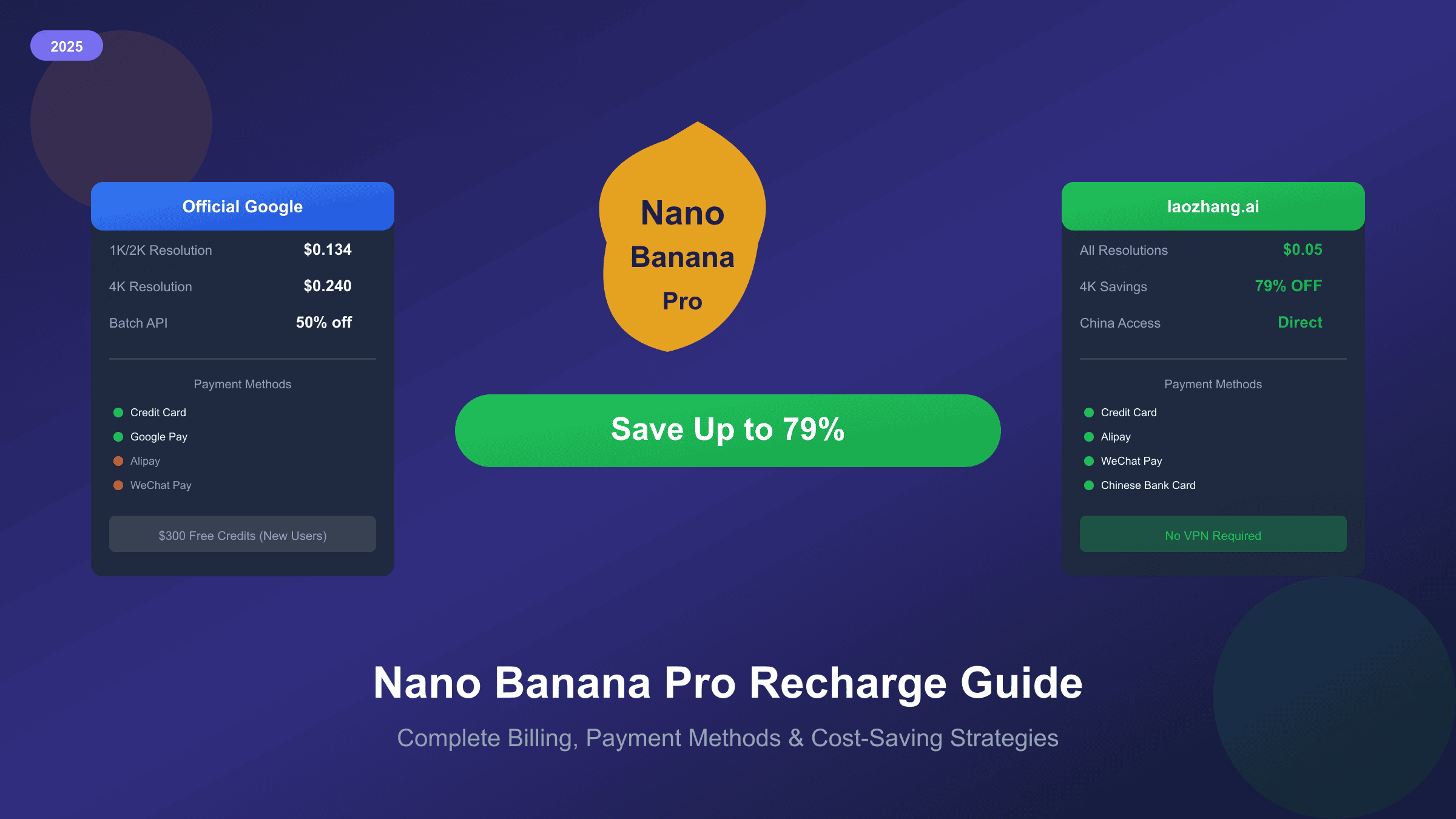
Want to recharge your Nano Banana Pro account but confused about the billing options? You're not alone. Google's pricing structure for Gemini 3 Pro Image (the official name for Nano Banana Pro) can be complex, with different rates for resolutions, batch processing, and various payment tiers. For users in China, the challenge is even greater—official Google payment methods don't support Alipay or WeChat Pay. This comprehensive guide covers everything from official billing setup to third-party alternatives that can save you up to 79% on image generation costs, plus China-friendly payment solutions that actually work.
Understanding Nano Banana Pro Billing: How Credits Work
Before diving into recharge methods, it's essential to understand how Nano Banana Pro billing actually works. Unlike traditional credit-based AI platforms, Google's Nano Banana Pro (officially called gemini-3-pro-image-preview) uses a pay-per-use model based on token consumption and image output.
The billing system operates on two parallel tracks. For text input and output, you're charged per million tokens—$2.00 for input and $12.00 for output in the standard tier. However, image generation follows a different pricing model where you pay per image generated, with rates varying by resolution. According to Google's official pricing documentation, standard tier rates are $0.134 per image for 1K/2K resolution and $0.24 per image for 4K resolution.
| Pricing Component | Standard Tier | Batch Tier (50% off) |
|---|---|---|
| 1K/2K Resolution | $0.134/image | $0.067/image |
| 4K Resolution | $0.24/image | $0.12/image |
| Image Input | $0.0011/image | $0.0006/image |
| Text Input | $2.00/1M tokens | $1.00/1M tokens |
| Text Output | $12.00/1M tokens | $6.00/1M tokens |
This pricing structure means your costs are predictable and directly tied to your usage. Generate 100 standard-resolution images, and you'll pay $13.40. Need 4K quality? That's $24.00 for the same quantity. The batch API offers a 50% discount for non-real-time processing, making it ideal for large-scale content generation. For a detailed breakdown of all pricing tiers, see our complete Nano Banana Pro pricing guide.
Official Google Payment Methods and Setup
Setting up billing for Nano Banana Pro requires linking your Google AI Studio account to Google Cloud Billing. This process is straightforward but has specific requirements that many users overlook.
Step-by-Step Billing Setup:
- Open Google AI Studio and sign in with your Google account
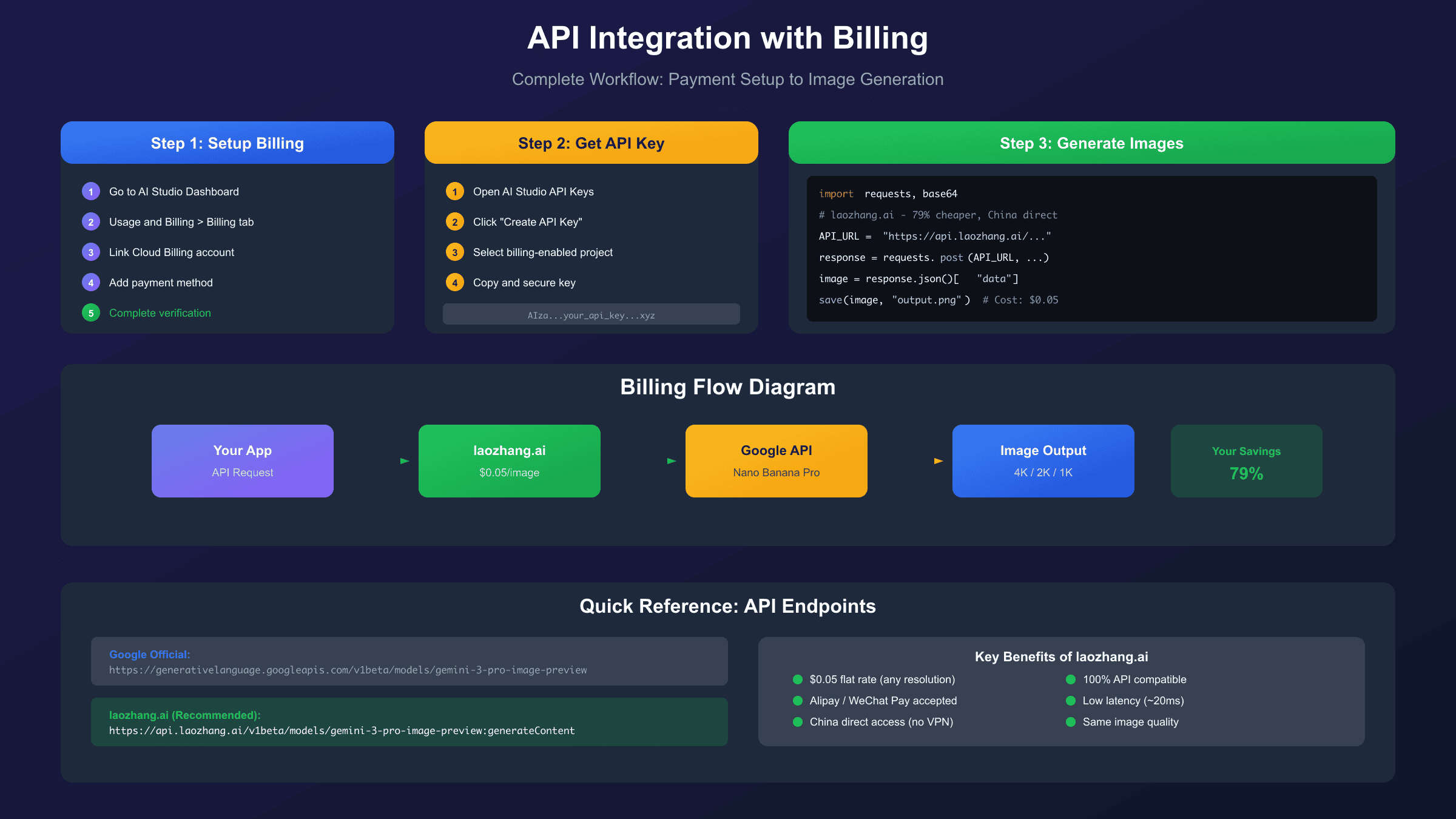
- Navigate to the left sidebar and select Dashboard > Usage and Billing > Billing tab
- Click Set up Billing to initiate the Cloud Billing connection
- Choose an existing Google Cloud project or create a new one
- Link a payment method (credit card required)
- Complete verification—Google may require a one-time prepayment
The prepayment requirement catches many users off guard. According to Google's billing documentation, this isn't a fee but rather a credit applied to your account. The full amount becomes usable credit across Google Cloud services, including Gemini API calls.
Accepted Payment Methods (Official):
| Payment Method | Supported | Notes |
|---|---|---|
| Visa/Mastercard | Yes | International cards preferred |
| American Express | Yes | May have higher processing fees |
| Google Pay | Yes | Links to card on file |
| Bank Transfer | Limited | Enterprise accounts only |
| Alipay | No | Not supported officially |
| WeChat Pay | No | Not supported officially |
Important: Google's official billing system does not accept Alipay, WeChat Pay, or Chinese bank cards directly. Users in China will need alternative solutions, which we cover in a dedicated section below.
How to Get $300 Free Google Cloud Credits
One of the best-kept secrets for Nano Banana Pro users is the $300 free credit program from Google Cloud. This trial credit can generate approximately 2,240 images at 1K/2K resolution or 1,250 images at 4K—enough for extensive testing and early-stage production use.
Eligibility Requirements:
- Must be a new Google Cloud customer (never used Google Cloud before)
- Valid credit or debit card for verification
- The card will not be charged unless you manually upgrade after the trial
- Credits are valid for 90 days from activation
Activation Steps:
- Visit Google Cloud Console
- Click "Get started for free" or "Start free"
- Sign in with your Google account
- Enter billing information for verification
- Upon completion, $300 credit is immediately applied
The free credits apply to all Google Cloud services, including Gemini API usage through AI Studio. Since Nano Banana Pro billing flows through Cloud Billing, these credits directly reduce your image generation costs.
Cost Calculation with Free Credits:
| Resolution | Price/Image | Images from $300 | Batch API Images |
|---|---|---|---|
| 1K/2K | $0.134 | 2,238 images | 4,477 images |
| 4K | $0.24 | 1,250 images | 2,500 images |
For developers and businesses testing Nano Banana Pro integration, this represents significant value. Combine the free credits with batch API processing, and you can generate over 4,000 professional-quality images without spending a cent.
Third-Party Providers: Save Up to 79% on Costs
While Google's official pricing is competitive, third-party API providers offer substantial savings—particularly for high-volume users. These services act as intermediaries, providing access to Nano Banana Pro at reduced rates through bulk purchasing agreements or optimized infrastructure.
Provider Comparison Table:
| Provider | 1K/2K Price | 4K Price | Savings | Payment Methods |
|---|---|---|---|---|
| Google Official | $0.134 | $0.24 | Baseline | Card only |
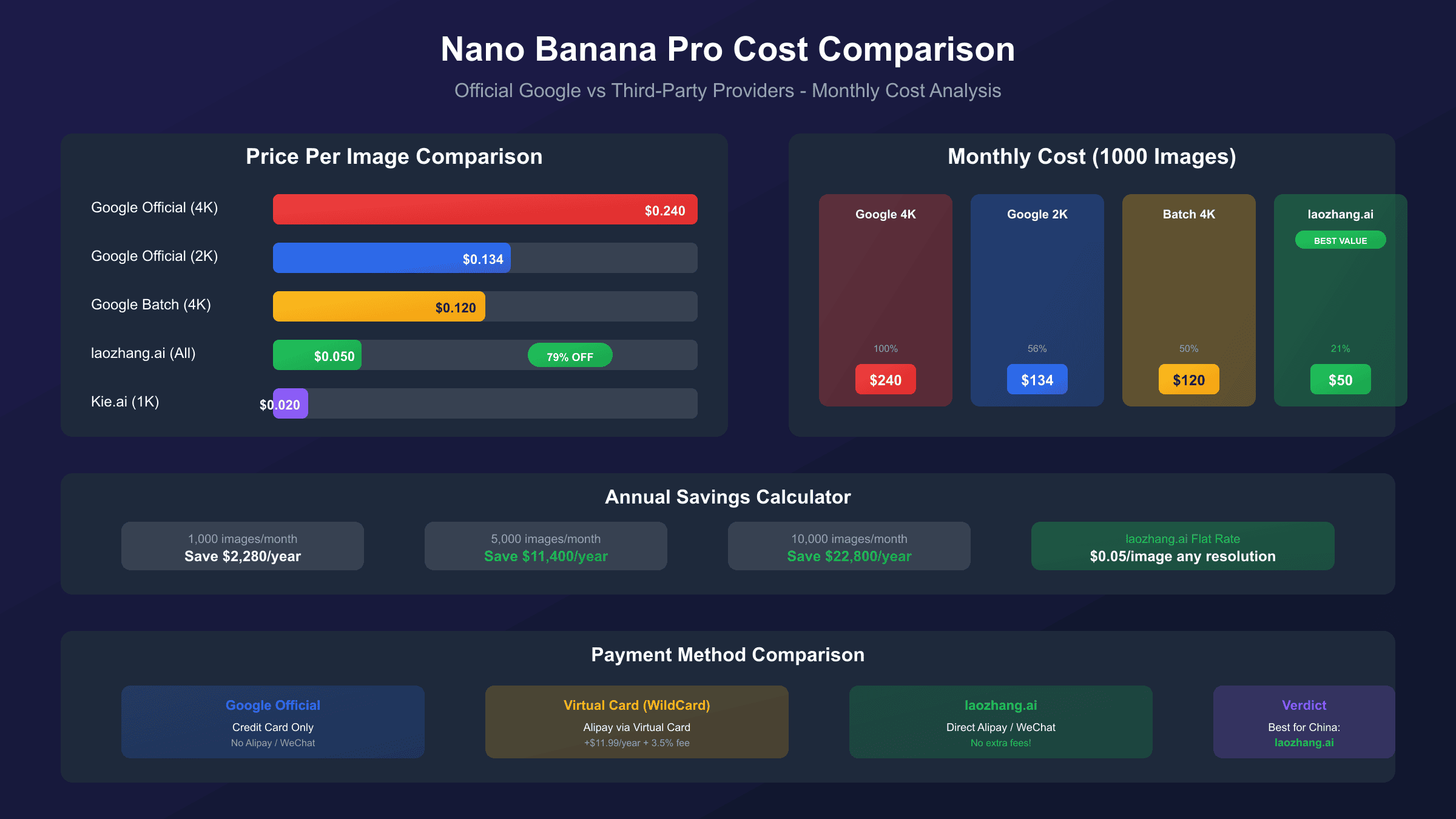
| laozhang.ai | $0.05 (flat) | $0.05 (flat) | 63-79% | Card, Alipay, WeChat |
| Kie.ai | $0.02 | ~$0.12 | 50-85% | Card, Crypto |
| NanoBananaAPI | ~$0.12 | ~$0.15 | 10-40% | Card |
The standout option for cost-conscious users is laozhang.ai, which offers a flat rate of $0.05 per image regardless of resolution. This means 4K generation—which costs $0.24 through Google—is available at a 79% discount. For comparison, generating 1,000 images at 4K resolution costs $240 through Google's official API but only $50 through laozhang.ai.
Key Advantages of Third-Party Providers:
- Significant cost reduction - Save 50-79% compared to official pricing
- Flat-rate pricing - No complex tier calculations for different resolutions
- Alternative payment methods - Alipay, WeChat Pay, and other options
- Direct China access - No VPN required for mainland users
- Per-image billing - Predictable costs without token-based confusion
Transparency Note: Third-party providers may have slightly higher latency (20-50ms additional) and failure rates (1-3% vs Google's <0.1%). For most use cases, this trade-off is worthwhile given the cost savings. Production applications with strict SLA requirements should factor in retry logic.
China Users: Payment Solutions with Alipay and WeChat
For users in mainland China, accessing Nano Banana Pro presents unique challenges. Google services are blocked, and official payment methods don't accept Chinese payment solutions. Here are three proven approaches to solve this problem.
Solution 1: API Gateway Services (Recommended)
The simplest solution is using an API gateway that provides China-accessible endpoints with local payment support. laozhang.ai is specifically designed for this use case, offering:
- Direct China access without VPN
- Alipay and WeChat Pay support
- RMB billing with transparent exchange rates
- Low latency (~20ms) from China servers
- Full API compatibility with Google's format
The service maintains 100% API compatibility, meaning your existing code works without modification—you simply change the API endpoint and key. Payment via Alipay or WeChat takes effect instantly, with no credit card required.
Solution 2: Virtual Credit Cards (WildCard)
For users who prefer accessing Google's official API, virtual credit card services like WildCard provide a workaround:
- Recharge via Alipay or WeChat (minimum $5)
- Card fee: $11.99/year or $16.99/2 years
- 3.5% recharge fee applies
- Works with Google Cloud billing
This approach costs more than third-party gateways due to fees but provides direct access to Google's infrastructure.
Solution 3: Self-Hosted Proxy (Advanced)
Technical users can deploy Cloudflare Workers as a reverse proxy:
- Free Cloudflare account required
- Requires domain ownership
- 60 requests/minute limit on free tier
- Useful for development/testing
For most China-based users, Solution 1 (API gateway) offers the best balance of convenience, cost, and reliability. The ability to pay directly with Alipay or WeChat eliminates the complexity of virtual cards while providing the same Nano Banana Pro capabilities. For more detailed instructions on accessing Nano Banana Pro from China, read our comprehensive China access guide.
Step-by-Step API Integration with Billing
Once your billing is configured, integrating Nano Banana Pro into your applications requires proper API setup. Here's a complete code example using both official Google API and a third-party alternative.
Option 1: Official Google API
hljs pythonfrom google import genai
from PIL import Image
from io import BytesIO
# Configure with your API key from AI Studio
client = genai.Client(api_key="YOUR_GOOGLE_API_KEY")
# Generate image using Nano Banana Pro
response = client.models.generate_content(
model="gemini-3-pro-image-preview",
contents="A futuristic cityscape at sunset, photorealistic, 4K",
generation_config={
"response_modalities": ["IMAGE"],
"image_config": {
"aspect_ratio": "16:9",
"image_size": "2K" # Options: 1K, 2K, 4K
}
}
)
# Extract and save image
for part in response.candidates[0].content.parts:
if part.inline_data is not None:
image = Image.open(BytesIO(part.inline_data.data))
image.save("output.png")
print("Image saved! Cost: ~$0.134 (2K resolution)")
Option 2: laozhang.ai API (China-friendly, 79% cheaper)
hljs pythonimport requests
import base64
# laozhang.ai configuration
API_KEY = "sk-YOUR_LAOZHANG_API_KEY"
API_URL = "https://api.laozhang.ai/v1beta/models/gemini-3-pro-image-preview:generateContent"
headers = {
"Authorization": f"Bearer {API_KEY}",
"Content-Type": "application/json"
}
# Gemini native format (recommended for full 4K support)
payload = {
"contents": [{
"parts": [{"text": "A futuristic cityscape at sunset, photorealistic, 4K"}]
}],
"generationConfig": {
"responseModalities": ["IMAGE"],
"imageConfig": {
"aspectRatio": "16:9",
"imageSize": "4K" # Full 4K at same price!
}
}
}
response = requests.post(API_URL, headers=headers, json=payload, timeout=180)
result = response.json()
# Extract and save image
image_data = result["candidates"][0]["content"]["parts"][0]["inlineData"]["data"]
with open("output.png", "wb") as f:
f.write(base64.b64decode(image_data))
print("Image saved! Cost: $0.05 (flat rate, 79% savings)")
The key difference is the endpoint URL and pricing. Both APIs accept identical request formats, making migration between providers seamless. For complete API documentation and advanced usage examples, check our Nano Banana Pro API integration guide.
Cost Calculator: Estimate Your Monthly Spending
Understanding your expected costs helps in choosing the right provider and billing plan. Here's a practical calculation framework for different usage levels.
Usage Scenario Analysis:
| User Type | Monthly Images | Official Cost | laozhang.ai Cost | Monthly Savings |
|---|---|---|---|---|
| Hobbyist | 100 (2K) | $13.40 | $5.00 | $8.40 |
| Creator | 500 (2K) | $67.00 | $25.00 | $42.00 |
| Developer | 1,000 (4K) | $240.00 | $50.00 | $190.00 |
| Business | 5,000 (4K) | $1,200.00 | $250.00 | $950.00 |
| Enterprise | 20,000 (4K) | $4,800.00 | $1,000.00 | $3,800.00 |
For businesses generating 5,000 or more images monthly, the cost difference becomes substantial. Using official Google pricing at 4K resolution costs $1,200/month, while third-party services reduce this to $250—saving nearly $1,000 monthly or $12,000 annually.
Cost Optimization Strategies:
- Use batch API when possible - 50% savings on official pricing
- Choose appropriate resolution - 1K/2K is sufficient for web thumbnails
- Consider third-party for high volume - Savings compound at scale
- Leverage free credits first - $300 trial covers 2,000+ images
- Monitor usage patterns - Identify and eliminate waste
Free Options Before You Pay
Before committing to paid recharge, maximize all available free options:
Immediate Free Access:
| Source | Daily Limit | Resolution | Notes |
|---|---|---|---|
| Gemini App | 2-3 images | Varies | Watermarked output |
| AI Studio | 50 requests | Full | No watermark |
| Google Cloud Trial | 2,240 images* | Full | 90-day validity |
| Flow Labs Trial | 1,000 credits | Full | 30-day validity |
*Based on $300 credits at $0.134/image
Student Verification (Best Value):
Students with .edu email addresses can access Google AI Pro free for one year, including unlimited Nano Banana Pro usage. This represents approximately $240 in value and is the best option for eligible users. The verification process requires:
- Active university/college enrollment
- Valid .edu or institutional email
- Credit card for future billing (not charged during trial)
Deadline Alert: The student verification program deadline has been extended to December 9, 2025. Apply before this date to secure free access.
Frequently Asked Questions
Q1: Can I use Alipay or WeChat to pay for official Google Nano Banana Pro?
No, Google's official billing system only accepts credit/debit cards. However, third-party services like laozhang.ai support Alipay and WeChat Pay, providing equivalent Nano Banana Pro access at lower prices.
Q2: What happens when I run out of credits?
With Google Cloud billing, you'll receive error messages and generation will stop. No automatic charges occur unless you've enabled post-paid billing. Third-party services typically require prepayment, so you'll simply need to recharge when balance is low.
Q3: Is the quality different between official and third-party providers?
No. Third-party providers like laozhang.ai route requests to the same Gemini 3 Pro Image model. Output quality is identical—only pricing and payment methods differ. You may notice slightly higher latency (20-50ms) but image quality remains unchanged.
Q4: How do I calculate my monthly costs before committing?
Estimate your monthly image count, then multiply by the per-image rate. For example: 500 images/month at 2K resolution = 500 × $0.134 = $67 (official) or 500 × $0.05 = $25 (laozhang.ai). Add 20% buffer for testing and failed generations.
Q5: Can I switch between providers without changing my code?
Yes, if using providers with API-compatible interfaces. Changing from Google official to laozhang.ai typically requires only updating the API endpoint URL and key—request format remains identical.
Q6: What's the cheapest way to generate 4K images?
The most cost-effective approach is using laozhang.ai at $0.05 per image flat rate. For comparison: Google official charges $0.24 for 4K, making third-party providers 79% cheaper. If you have free Google Cloud credits, exhaust those first using batch API ($0.12/image effective rate).