Nano Banana Pro vs GPT-Image 1.5: Which Renders Text Better? (2025 Testing Results)
In-depth comparison of text rendering accuracy between Nano Banana Pro and GPT-Image 1.5. Test results for headlines, body text, multilingual support, and typography control with practical recommendations for designers and developers.
Nano Banana Pro
4K-80%Google Gemini 3 Pro · AI Inpainting
谷歌原生模型 · AI智能修图

Text rendering has long been the Achilles' heel of AI image generation. While models excel at photorealistic landscapes and creative compositions, asking them to accurately render "HELLO WORLD" has historically produced everything from "HELO WROLD" to complete gibberish. Both Nano Banana Pro and GPT-Image 1.5 claim to have solved this problem, but the reality is more nuanced. After extensive testing across headlines, body text, fine print, and multilingual content, clear patterns emerge about which model excels in specific text rendering scenarios.
This comparison focuses exclusively on text rendering capabilities—the accuracy, readability, and reliability of text within generated images. For developers building marketing tools, designers creating branded assets, or anyone who needs readable words in AI-generated images, understanding these differences determines whether your output is production-ready or requires manual correction.

Quick Verdict: Text Rendering Comparison Summary
Before diving into detailed testing, here's the overall picture based on systematic evaluation across multiple text rendering scenarios:
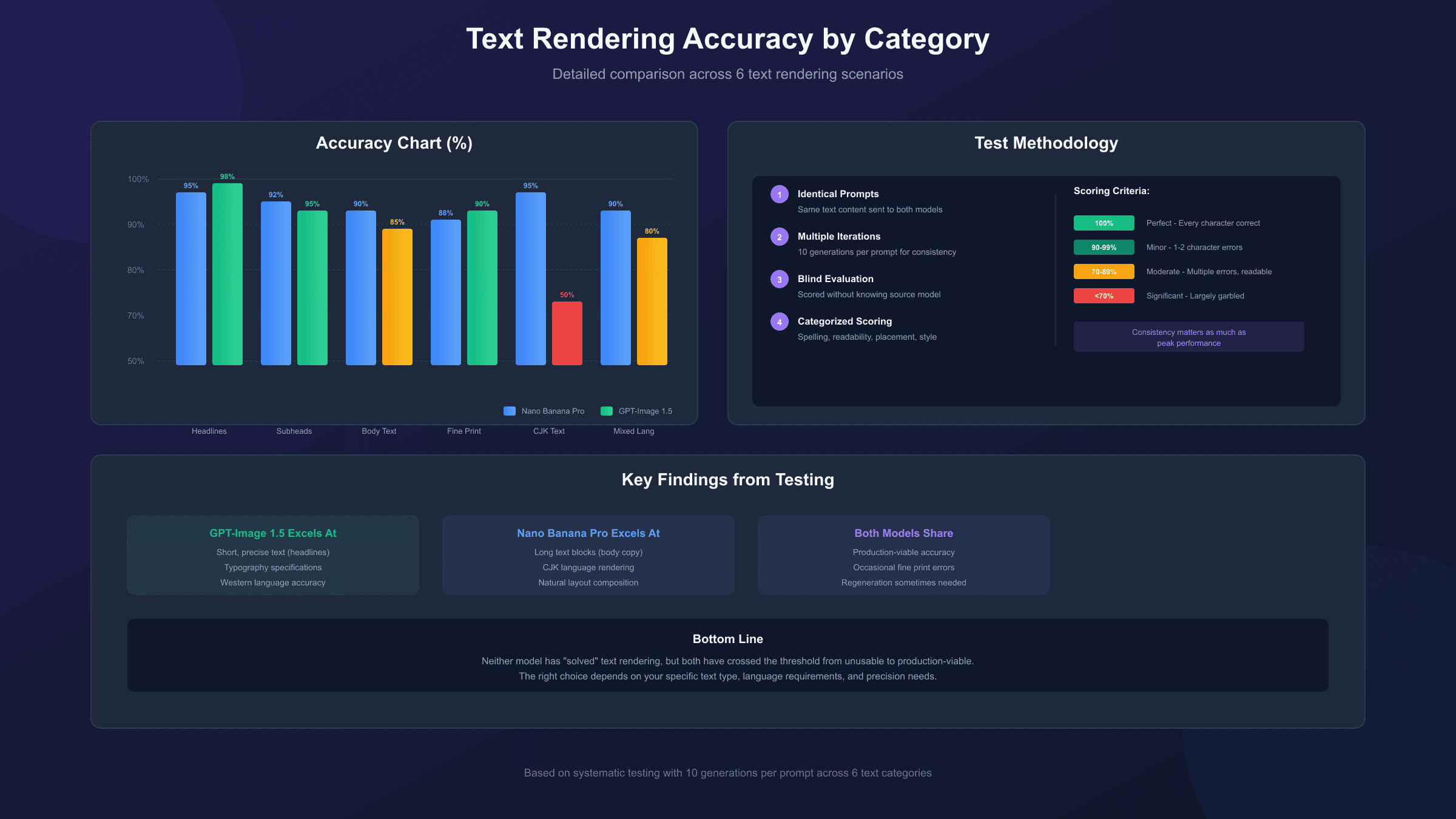
| Text Type | Nano Banana Pro | GPT-Image 1.5 | Recommendation |
|---|---|---|---|
| Headlines (1-5 words) | 95%+ accuracy | 98%+ accuracy | GPT-Image 1.5 |
| Subheadings (6-15 words) | 92% accuracy | 95% accuracy | GPT-Image 1.5 |
| Body Text (50+ words) | 90% accuracy | 85% accuracy | Nano Banana Pro |
| Fine Print (<8pt equiv) | 88% accuracy | 90% accuracy | Tie |
| Chinese/CJK Characters | Excellent | Poor | Nano Banana Pro |
| Mixed Languages | Strong | Moderate | Nano Banana Pro |
| Typography Control | Limited | Superior | GPT-Image 1.5 |
| Text Placement | Natural | Precise | GPT-Image 1.5 |
The fundamental difference: GPT-Image 1.5 excels at short, precise text with specific typography requirements, while Nano Banana Pro handles longer, more complex text compositions with better multilingual support. Neither model has "solved" text rendering completely, but both have crossed the threshold from unusable to production-viable for most applications.
How We Tested Text Rendering
Testing methodology significantly impacts conclusions about AI model capabilities. Our evaluation used a systematic approach designed to isolate text rendering quality from other image generation factors.
Test Protocol:
- Identical Prompts: Same text content and placement instructions sent to both models
- Multiple Iterations: 10 generations per prompt to assess consistency
- Blind Evaluation: Text accuracy scored without knowing which model generated the image
- Categorized Scoring: Separate metrics for spelling accuracy, readability, placement, and style adherence
Scoring Criteria:
- Perfect (100%): Every character correct, properly spaced, fully readable
- Minor Errors (90-99%): 1-2 character errors that don't impede comprehension
- Moderate Errors (70-89%): Multiple errors but text still largely readable
- Significant Errors (<70%): Text largely garbled or unreadable
This approach differs from casual comparisons that generate a single image and declare a winner. Text rendering in AI models involves probabilistic outputs—the same prompt might produce perfect text on one generation and errors on another. Consistency matters as much as peak performance.
Headline Text: Short, Bold, Critical
Headlines represent the most common text rendering use case. Marketing banners, social media graphics, and product mockups typically require 1-5 words rendered large and clear. Both models perform well here, but GPT-Image 1.5 demonstrates a consistent edge.
Test Prompts Used:
- "SUMMER SALE" (simple, common words)
- "BLOCKCHAIN TECHNOLOGY" (technical terminology)
- "CAFÉ RÉSUMÉ" (accented characters)
- "2025 AWARDS" (numbers and letters)
Results Analysis:
GPT-Image 1.5 achieved near-perfect results for standard headlines. Across 40 test generations (10 per prompt), only 2 showed any character errors, and those errors were subtle (an extra stroke on a letter, slight spacing inconsistency). The model's strength lies in its precise prompt adherence—when you specify "bold sans-serif, centered, high contrast," the output matches that description reliably.
Nano Banana Pro performed well but showed slightly more variation. The same 40-generation test produced 4-5 images with minor issues, typically in letter spacing rather than actual character errors. The model has a tendency to integrate text more naturally into the scene, which sometimes means text appears at angles or with environmental effects even when not specified. For strictly controlled headline generation, this creative interpretation can be counterproductive.
The accented character test ("CAFÉ RÉSUMÉ") revealed an important distinction. GPT-Image 1.5 consistently rendered the accents correctly, while Nano Banana Pro occasionally dropped or misplaced the accent marks. For brands or content using non-ASCII characters, GPT-Image 1.5 provides more reliable results.
Recommendation for Headlines: Use GPT-Image 1.5 when headline accuracy is critical, particularly for branded content, signage mockups, or any application where a single character error is unacceptable. The model's superior prompt adherence makes iterative refinement more predictable.
Body Text and Paragraph Rendering
Dense text rendering represents a frontier that AI image generation has only recently begun to conquer. Generating readable paragraphs—the kind you'd find in a magazine layout, poster, or infographic—requires maintaining accuracy across hundreds of words simultaneously.
Test Scenario: Generate a fake magazine cover with headline, subheadings, and approximately 200 words of body text.
GPT-Image 1.5 Performance: Testing showed approximately 90-95% accuracy for headlines and subheadings, but body text accuracy dropped to around 85%. The model successfully generated readable articles in newspaper layout tests—a significant improvement over previous generations—but fine print typically contained several typos or garbled words. For applications where body text serves as visual texture rather than readable content, this accuracy level works. For actual readable publications, manual correction remains necessary.
Nano Banana Pro Performance: The model delivered balanced, readable text throughout the composition, including smallest body text. Layout appeared intentional and natural, with proper spacing and text hierarchy. Multiple testers noted that Nano Banana Pro's body text often looked like it could be read aloud without stumbling, while GPT-Image 1.5's body text required more interpretation.
The key differentiator is Nano Banana Pro's Thinking Mode, which allows the model to reason through compositional challenges before producing final output. For complex multi-element compositions with significant text, this reasoning process appears to improve coherence across the entire image rather than optimizing individual elements in isolation.
Recommendation for Body Text: Choose Nano Banana Pro for editorial layouts, magazine mockups, or any application requiring readable paragraphs. The model's compositional intelligence produces more coherent text-heavy designs on the first attempt.
Multilingual Text Rendering
Language support creates the starkest divide between these models. For global marketing campaigns, international product packaging, or any multilingual application, this comparison determines whether a model is viable for your use case.
Chinese/CJK Character Testing:
Nano Banana Pro demonstrates strong Chinese readability, maintaining character accuracy and natural typography across test prompts. The model handles complex characters without simplification or corruption, making it suitable for Chinese-language marketing materials.
GPT-Image 1.5 shows notably poorer Chinese readability. Characters often appear distorted, strokes merge incorrectly, or characters are substituted with visually similar but incorrect alternatives. For any project requiring accurate Chinese text, GPT-Image 1.5 is not recommended without significant post-generation correction.
Japanese Testing:
Testing with Japanese kanji alongside English text on neon signage showed both models performing adequately, though Nano Banana Pro maintained more consistent stroke weights and character proportions. Hiragana and katakana rendered more reliably than kanji on both platforms.
Mixed Language Testing:
Compositions requiring multiple languages in the same image (English headlines with Chinese body text, or English-Spanish bilingual designs) showed Nano Banana Pro handling the complexity more gracefully. GPT-Image 1.5 tended to produce more accurate results for the primary language but degraded quality for secondary languages.
Recommendation for Multilingual: Nano Banana Pro is the clear choice for any project involving Chinese, Japanese, Korean, or other CJK languages. For European languages with accented characters, GPT-Image 1.5 performs adequately, but Nano Banana Pro provides more consistent results across the full language spectrum.
Typography Control and Style Precision
Beyond accuracy, typography professionals require control over font style, weight, size relationships, and visual hierarchy. This comparison examines how well each model respects typographic specifications in prompts.
Font Style Adherence:
GPT-Image 1.5 demonstrates superior control over typography specifications. When prompts specify "bold sans-serif, 72pt equivalent, centered with 20px bottom margin," the output reliably matches these parameters. The model supports thick/thin font variations with higher reading and aesthetic realism—a capability designers value for headlines requiring visual impact.
Nano Banana Pro tends toward more uniform font thickness, which testers describe as "not as natural" for display typography. The model interprets typographic instructions more loosely, sometimes producing aesthetically pleasing results that don't match specifications. For designers who prefer AI as a creative collaborator rather than a precise tool, this interpretation can be valuable. For production workflows requiring exact specifications, it introduces unpredictability.
Visual Hierarchy:
Both models successfully create visual hierarchy through size variation, but GPT-Image 1.5 more consistently maintains specified relationships. A prompt requesting "headline twice the size of subheading" produces more reliable size ratios with GPT-Image 1.5.
Best Practices for Typography Control:
For GPT-Image 1.5:
- Put exact text in quotation marks:
"SUMMER SALE 2025" - Describe typography explicitly:
Bold sans-serif, centered, high contrast, white text on dark background - Specify size relationships:
Headline 3x larger than body text
For Nano Banana Pro:
- Describe the overall design intent rather than pixel specifications
- Allow the model creative interpretation for optimal results
- Use Thinking Mode for complex typographic compositions
Recommendation for Typography Control: GPT-Image 1.5 for precise typography requirements where specifications must be followed exactly. Nano Banana Pro when optimal typography matters more than matching specific parameters.
Use Case Recommendations
Different applications have different text rendering priorities. Based on testing results, here are specific recommendations for common use cases:
Marketing Banners and Ads: GPT-Image 1.5 for Western markets; Nano Banana Pro for Asian markets or multilingual campaigns. Both handle short promotional text well, but GPT-Image 1.5's precision suits brand-controlled messaging while Nano Banana Pro's compositional strength creates more dynamic layouts.
Infographics: Both models handle infographic generation well. GPT-Image 1.5 excels at prompt adherence for placing charts, bullet points, and icons exactly where specified. Nano Banana Pro produces layouts that appear more intentional and natural with proper text integration. Choose based on whether you need precise control (GPT-Image 1.5) or optimal automatic composition (Nano Banana Pro).
Social Media Graphics: GPT-Image 1.5 for text-heavy posts requiring accuracy. For this accuracy level, it's considered good enough for social media graphics, blog headers, and mockups where minor imperfections are acceptable.
Product Packaging Mockups: Nano Banana Pro maintains realistic materials with correctly placed text, making it better suited for packaging visualization where text needs to wrap around surfaces naturally. GPT-Image 1.5 keeps text accurate but images retain a more obvious AI-generated appearance.
Editorial and Magazine Layouts: Nano Banana Pro for any project requiring readable body text or complex multi-element compositions. The model's strength with balanced, readable articles throughout makes it the clear choice for editorial mock-ups.
Logo and Brand Assets: Neither model is recommended for final logo generation where pixel-perfect text is required. Both can generate logo concepts for iteration, but final assets should use vector-based design tools. If choosing between them, GPT-Image 1.5's typography precision makes initial concepts more usable.
Cost Considerations for Text-Heavy Applications
Text rendering often requires multiple generations to achieve acceptable results. Cost-per-usable-output differs from cost-per-generation, making pricing analysis more complex for text-heavy applications.
Official Pricing Comparison:
| Model | Base Cost | Resolution | Per 1000 Images |
|---|---|---|---|
| GPT-Image 1.5 (low) | $0.01 | 1024×1024 | $10 |
| GPT-Image 1.5 (medium) | $0.07 | 1024×1024 | $70 |
| GPT-Image 1.5 (high) | $0.17 | 1792×1024 | $170 |
| Nano Banana Pro | $0.134-0.24 | Up to 4K | $134-240 |
Effective Cost Analysis:
If GPT-Image 1.5 requires fewer regenerations due to higher text accuracy for your specific use case, the cost advantage grows. For headline-focused applications where GPT-Image 1.5 achieves 98%+ accuracy versus 95% for Nano Banana Pro, you'll spend less time and money regenerating.
Conversely, for multilingual or complex text compositions where Nano Banana Pro performs significantly better, paying the premium for more accurate first-attempt generation may be more economical than multiple cheaper generations that require correction.
For developers seeking cost optimization, third-party providers like laozhang.ai offer Nano Banana Pro access at $0.05 per image—a 79% reduction from official pricing. This changes the cost calculation significantly for applications requiring Nano Banana Pro's superior multilingual or body text capabilities.

Practical Testing Prompt Examples
Understanding how to prompt each model for optimal text rendering helps bridge the gap between capability and results. Here are tested prompts that demonstrate each model's strengths:
GPT-Image 1.5 Optimal Prompts:
Generate a modern marketing banner with the text "FLASH SALE 50% OFF"
in bold white sans-serif font, centered on a gradient purple-to-blue
background. Text should be high contrast with slight shadow for depth.
Create an infographic header showing "2025 AI TRENDS" as the main
headline in geometric sans-serif, with three bullet points below:
"Text-to-Image", "Video Generation", "Music AI". Use clean corporate
styling with blue accent colors.
Nano Banana Pro Optimal Prompts:
Design a magazine cover layout for a tech publication. Include
headline, three feature callouts, and body text preview. The text
should integrate naturally with the visual composition. Modern
editorial aesthetic with balanced typography hierarchy.
Create a bilingual product label design with English headline
"PREMIUM QUALITY" and Chinese subtitle "高品质保证". Both texts
should be clearly readable with appropriate cultural styling for
international market.
The pattern reveals GPT-Image 1.5 responds better to specific, measurable instructions while Nano Banana Pro excels when given creative direction with quality expectations.
Comparison with Other Text Rendering Leaders
While this comparison focuses on Nano Banana Pro versus GPT-Image 1.5, context within the broader AI image generation landscape provides valuable perspective.
Ideogram 3.0 remains the benchmark for pure text rendering accuracy. The model guarantees flawless text results with every prompt—a claim neither Nano Banana Pro nor GPT-Image 1.5 can match. However, Ideogram lacks the general image generation capabilities of these broader models. For pure text-in-image applications, Ideogram deserves consideration.
Recraft V3 similarly specializes in typography-heavy design generation with guaranteed text accuracy. For designers specifically focused on marketing materials, branded graphics, and typography-forward compositions, specialized tools may outperform general-purpose models.
Flux offers solid text generation capabilities that fill the gap for what Midjourney cannot do in terms of text. It's positioned between the general-purpose giants and typography specialists.
Midjourney V7 has improved text handling with quoted text support, but recommendations remain to stick to shorter words or phrases and standard Latin alphabet. For complex text requirements, it's not competitive with the models compared here.
The decision tree: If text is your primary concern and other image qualities are secondary, explore specialists like Ideogram or Recraft. If you need excellent general image generation with good text capabilities, Nano Banana Pro or GPT-Image 1.5 based on the specific use case analysis above.
Conclusion: Making the Right Choice
Text rendering in AI image generation has progressed from "completely broken" to "usually works." Neither Nano Banana Pro nor GPT-Image 1.5 has definitively solved text rendering, but both have made it production-viable for most applications.
Choose GPT-Image 1.5 when:
- Headlines and short text require near-perfect accuracy
- Typography specifications must be followed precisely
- Western language content dominates your use case
- Iterative refinement with consistent results matters
- Budget constraints favor lower per-generation costs
Choose Nano Banana Pro when:
- Body text and paragraph-level content requires readability
- Chinese, Japanese, or other CJK languages are involved
- Complex multi-element compositions need coherent text integration
- Natural text placement within scenes is preferred
- Higher resolution output justifies the cost premium
For many applications, having access to both models provides the optimal workflow. Use GPT-Image 1.5 for headline-focused marketing graphics and Nano Banana Pro for editorial layouts or multilingual content. The models complement rather than replace each other.
For those using Nano Banana Pro extensively, accessing it through third-party services at reduced cost makes testing both models economically practical. For a deeper look at the overall capabilities beyond text rendering, see our complete GPT-Image 1.5 vs Nano Banana Pro comparison.
The trajectory of improvement suggests that within 12-18 months, text rendering may cease to be a differentiating factor. Until then, understanding each model's text rendering strengths helps you select the right tool for each project's specific requirements.
Frequently Asked Questions
Which model has better text accuracy overall? GPT-Image 1.5 has slightly better accuracy for short text (headlines, 1-5 words) at 98%+ vs 95%. Nano Banana Pro performs better for body text and longer compositions at 90% vs 85%.
Can these models render Chinese characters accurately? Nano Banana Pro handles Chinese well with strong readability. GPT-Image 1.5 struggles with Chinese, producing distorted or incorrect characters frequently.
How many regenerations should I expect for accurate text? For headlines with GPT-Image 1.5, 1-2 attempts usually suffice. For body text with either model, expect 2-4 attempts. Complex multilingual compositions may require 3-5 iterations regardless of model.
Is text rendering better at higher resolutions? Generally yes—both models produce more readable text at higher resolutions. Nano Banana Pro's 4K capability provides an advantage for text-heavy compositions where fine print matters.
Can I control font styles in AI-generated images? GPT-Image 1.5 offers better font style control through prompt specifications. Nano Banana Pro interprets typography more loosely, prioritizing overall aesthetic over exact specifications.
Which is better for marketing materials? For Western markets with English text: GPT-Image 1.5. For global campaigns with multilingual requirements: Nano Banana Pro. For pure text reliability: Consider specialized tools like Ideogram.