Sora 2 Credits and Limits Explained: Complete Guide to Costs, Tiers & Smart Optimization [2025]
Master the Sora 2 credit system with our complete guide. Learn credit consumption rates, tier comparisons, daily limits, relaxed mode secrets, and optimization strategies to save 85%+ on video generation costs.
Nano Banana Pro
4K-80%Google Gemini 3 Pro · AI Inpainting
谷歌原生模型 · AI智能修图

OpenAI's Sora 2 has transformed video generation with its ability to create stunning 1080p videos from text prompts, but understanding its credit system remains one of the biggest challenges for new users. The pricing structure involves monthly credits, per-second consumption rates that vary dramatically by resolution, daily generation limits, and features locked behind different subscription tiers. Without proper understanding, users can burn through their entire monthly allocation in a single session—or worse, pay $200/month for Pro when Plus would suffice for their needs.
This guide provides a complete breakdown of the Sora 2 credit system, from basic mechanics to advanced optimization strategies. Whether you're evaluating which subscription tier offers the best value, trying to calculate exactly how many videos your credits will produce, or looking for ways to stretch your allocation further, you'll find actionable answers here. The focus is on practical, verified information that helps you make informed decisions about Sora 2 spending.
How the Sora Credit System Works
Sora 2 uses a credit-based system where video generation consumes credits based on two primary factors: resolution and duration. This differs from simpler "per video" pricing because a 5-second 480p clip costs dramatically less than a 20-second 1080p production. Understanding this consumption model is essential for budgeting your video generation activities effectively.
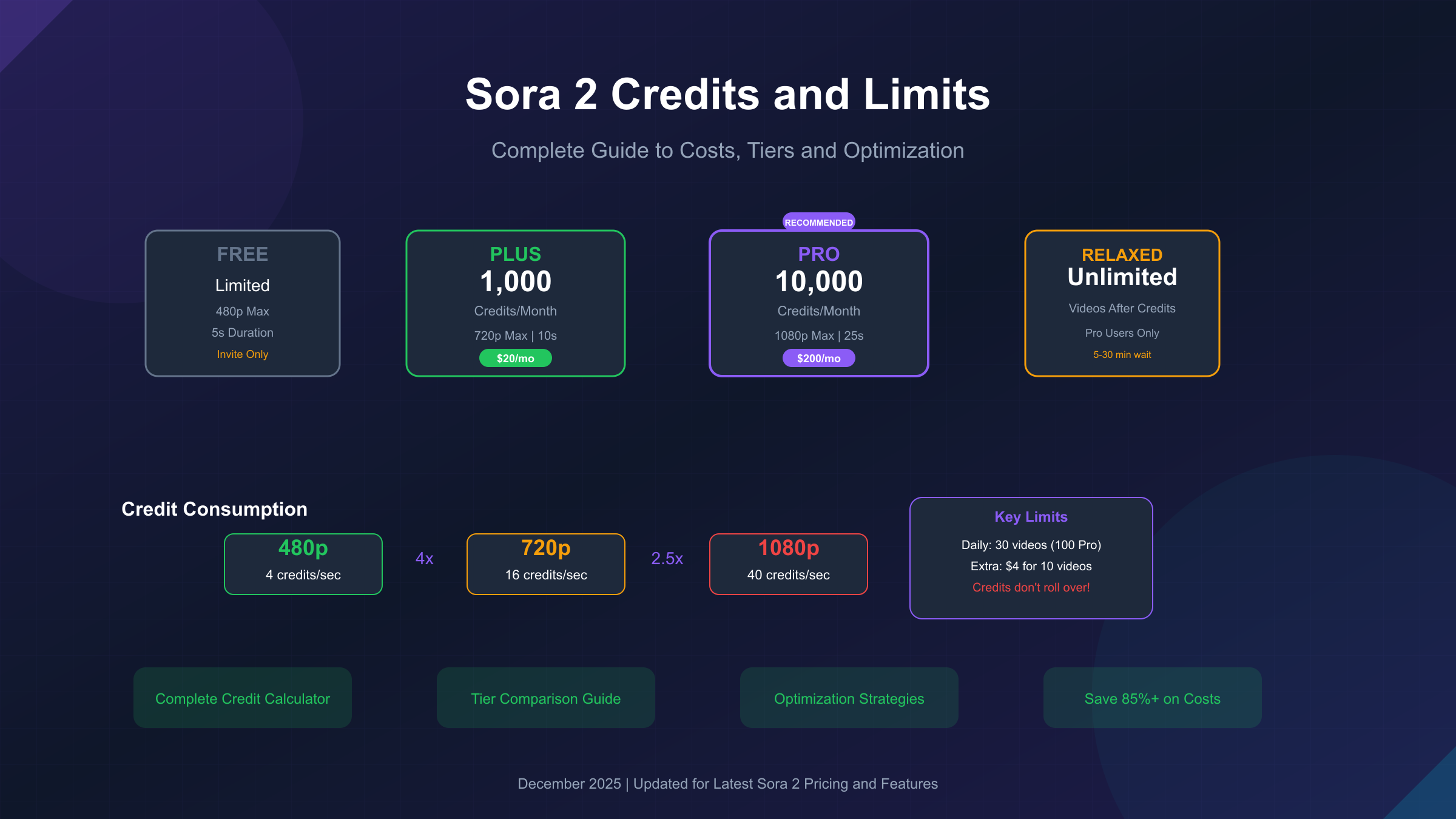
Credits function as the internal currency for all Sora video generation. Each subscription tier provides a fixed monthly credit allocation—1,000 for ChatGPT Plus and 10,000 for ChatGPT Pro. These credits reset on your billing date and do not accumulate between billing cycles. The system calculates consumption in real-time based on your chosen settings, deducting credits upon successful video generation.
The billing cycle resets at midnight UTC on your renewal date. If you subscribed on December 15th, your credits reset on January 15th at midnight UTC. Any unused credits from the previous period are lost—there's no rollover mechanism, which makes end-of-cycle planning important for maximizing value.
Beyond credits, Sora also imposes daily generation caps: 30 videos per day for Free, Plus, and Teams users, and 100 videos per day for Pro subscribers. These limits operate independently from the credit system, meaning you could have credits remaining but still hit your daily cap.
Subscription Tiers: Free vs Plus vs Pro
OpenAI offers three distinct access levels for Sora 2, each with significantly different capabilities and value propositions. The choice between tiers depends on your production volume, quality requirements, and budget constraints.
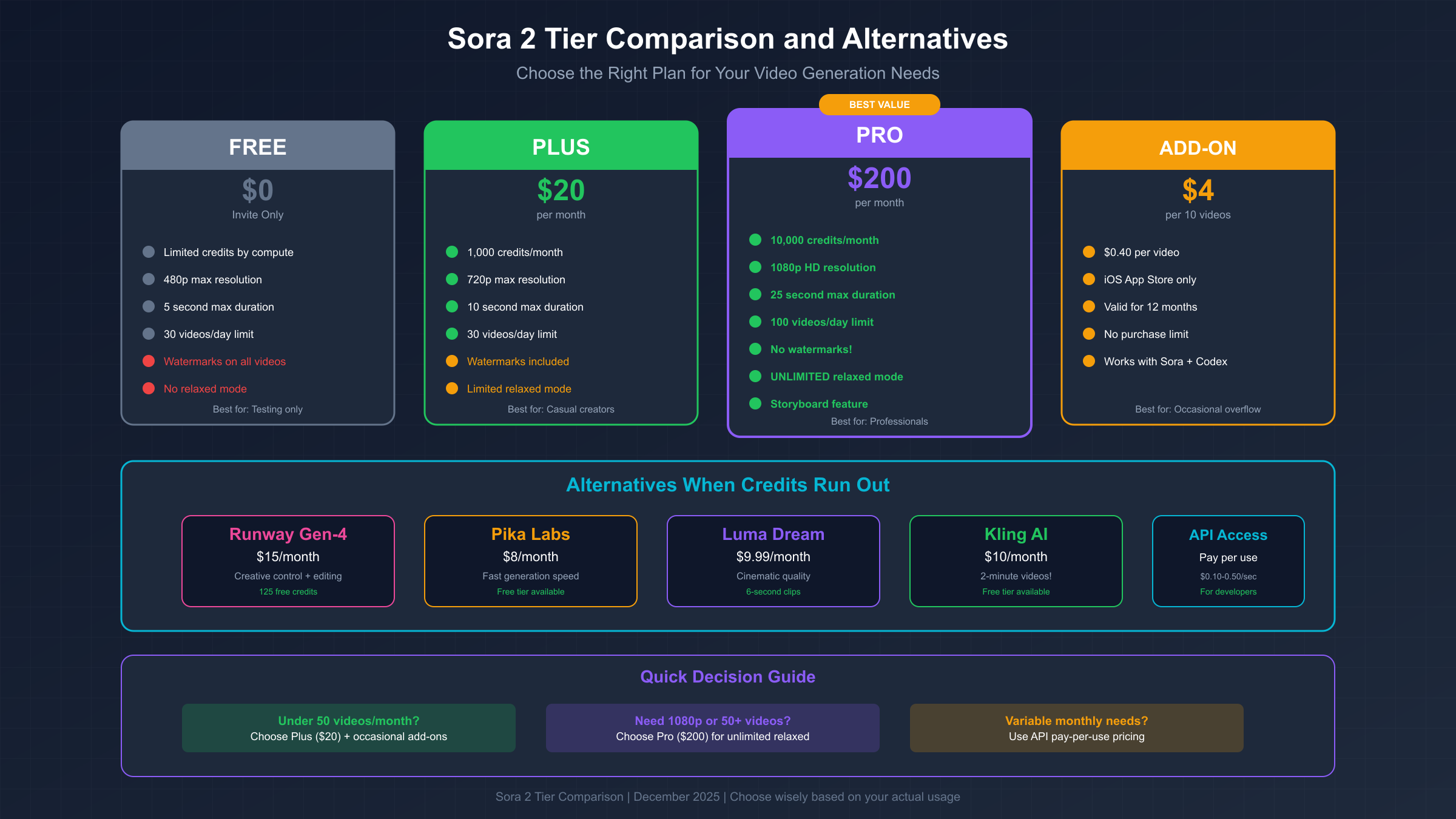
| Feature | Free (Invite Only) | ChatGPT Plus ($20/mo) | ChatGPT Pro ($200/mo) |
|---|---|---|---|
| Monthly Credits | Limited by compute | 1,000 | 10,000 |
| Maximum Resolution | 480p | 720p | 1080p |
| Maximum Duration | 5 seconds | 5-10 seconds | 20-25 seconds |
| Daily Generations | 30 | 30 | 100 |
| Relaxed Mode | No | Limited | Unlimited |
| Watermarks | Yes | Yes | No |
| Storyboard Feature | No | No | Yes |
| Audio Generation | Basic | Basic | Full |
The Free tier requires an invitation and provides limited access based on available compute capacity. It's suitable for experimentation but impractical for regular content creation. Videos are capped at 480p with watermarks, and access can be throttled during peak usage periods.
ChatGPT Plus at $20/month represents the entry point for serious users. The 1,000 monthly credits support approximately 50 videos at 480p (5 seconds each) or roughly 12 videos at 720p. The 720p resolution cap means Plus users cannot access full HD output, which may be limiting for professional use cases. However, for social media content where 720p is often sufficient, Plus offers reasonable value.
ChatGPT Pro at $200/month targets professionals and high-volume creators. The 10,000 credit allocation supports approximately 500 priority videos monthly at 480p, or 50 videos at full 1080p quality. The standout feature is unlimited relaxed mode—after exhausting priority credits, Pro users can continue generating unlimited videos at slower processing speeds. For users who can plan ahead and don't need instant results, this effectively provides unlimited video generation.
Credit Consumption Calculator: Resolution & Duration
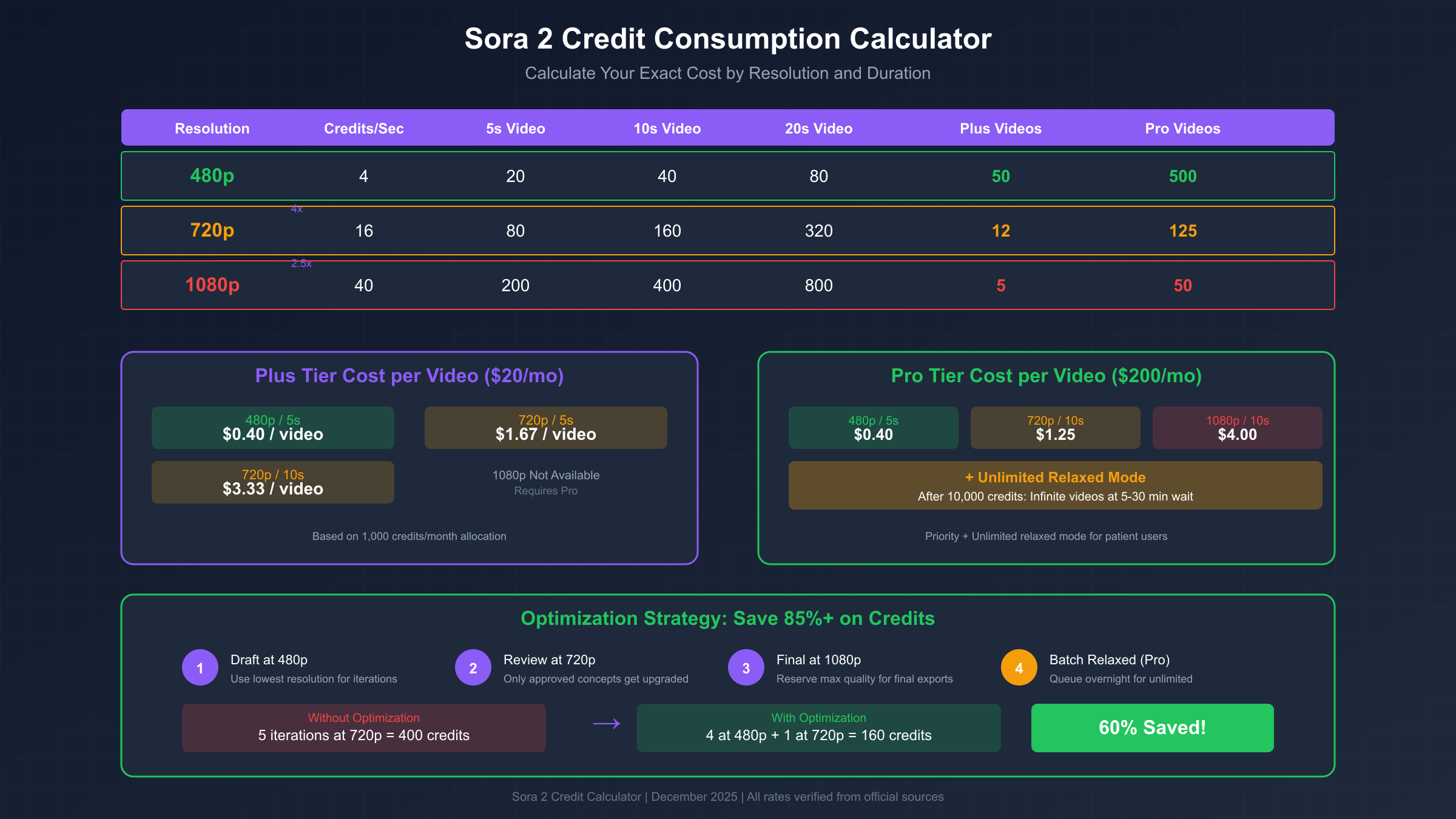
Credit consumption follows a predictable formula based on resolution and duration, allowing you to calculate exact costs before generation. The rates increase dramatically at higher resolutions, making resolution choice the single biggest factor in credit efficiency.
| Resolution | Credits Per Second | 5s Video | 10s Video | 20s Video |
|---|---|---|---|---|
| 480p | 4 credits/sec | 20 credits | 40 credits | 80 credits |
| 720p | 16 credits/sec | 80 credits | 160 credits | 320 credits |
| 1080p | 40 credits/sec | 200 credits | 400 credits | 800 credits |
The jump from 480p to 720p represents a 4x increase in credit consumption, while 720p to 1080p adds another 2.5x multiplier. This means a 10-second 1080p video (400 credits) consumes the same resources as twenty 10-second 480p videos. For draft iterations and concept testing, this difference makes 480p the obvious choice.
Duration scaling also includes non-linear factors for longer videos. While the base calculation is straightforward (credits per second × duration), videos exceeding 10 seconds may consume additional credits due to the computational complexity of maintaining coherence across longer sequences. A 20-second video might cost slightly more than twice a 10-second video at the same resolution.
For practical planning with a Plus subscription (1,000 credits monthly):
- 480p at 5 seconds: 50 videos per month
- 720p at 5 seconds: 12 videos per month
- Mixed strategy (40 × 480p drafts + 2 × 720p finals): Approximately 42 total videos
For Pro subscription (10,000 credits monthly):
- 480p at 5 seconds: 500 videos per month
- 720p at 10 seconds: 62 videos per month
- 1080p at 10 seconds: 25 videos per month
Daily and Monthly Generation Limits
Beyond the credit system, Sora imposes hard daily limits on video generations that operate independently. Understanding these caps prevents frustrating situations where you have credits but cannot generate.
Daily generation limits by tier:
- Free, Plus, and Teams: 30 videos per day
- Pro: 100 videos per day
These limits reset at midnight UTC regardless of when you generate. A "video" counts as one generation attempt, regardless of duration or resolution. Failed generations that consume credits still count toward your daily limit. If you're iterating rapidly on prompts, you can hit the daily cap well before exhausting your monthly credits.
For longer videos, the daily limit calculation changes. A 15-second video counts as two generations toward your daily limit, and a 25-second video counts as four. This means Pro users creating 25-second 1080p content effectively have 25 long-form generations per day (100 ÷ 4), not 100.
Monthly limits tie directly to your credit allocation. There's no separate monthly generation count—your credits are your limit. However, the combination of daily caps and monthly credits creates natural pacing. A Plus user with 1,000 credits and 30 daily generations will likely exhaust credits before hitting consistent daily caps, while a Pro user with 10,000 credits might hit daily limits more frequently.
Credit Expiration: The No-Rollover Policy
One of the most important aspects of Sora's credit system is that unused credits expire completely at the end of each billing cycle. There is no rollover, no credit banking, and no partial refunds for unused allocations.
If you have 500 unused credits on your renewal date, those credits disappear. The new billing cycle begins with a fresh 1,000 (Plus) or 10,000 (Pro) credits. This policy incentivizes consistent usage rather than saving credits for future projects.
Strategies for approaching renewal date with unused credits:
- Batch-generate content you might need in the future
- Create variations of successful prompts at different resolutions
- Export higher-resolution versions of your best work from the month
- Generate placeholder content for upcoming projects
The 12-month validity period applies only to purchased extra credits (the $4 add-on packs), not to subscription credits. Subscription credits always reset monthly, while purchased credits remain valid for one year from purchase date.
For users with variable monthly needs, this policy makes the Plus tier attractive as a baseline. You can supplement with $4 credit packs during high-demand months rather than committing to Pro's $200 monthly fee when you might not consistently need 10,000 credits.
Buying Extra Credits: $4 for 10 Videos
OpenAI introduced purchasable credit packs in late 2025 to address users who occasionally exceed their subscription allocation without wanting to upgrade tiers permanently.
The current offering through Apple's App Store is $4 for 10 additional video generations. This works out to $0.40 per video generation—significantly cheaper per video than upgrading from Plus to Pro for occasional overflow needs.
Key details about extra credit purchases:
- Available through iOS App Store only (currently)
- No limit on number of packs purchased
- Credits valid for 12 months from purchase date
- Work across both Sora and Codex platforms
- Do not count toward relaxed mode access (Pro-only feature)
The $0.40 per video rate compares favorably when you need just a few extra generations. However, for users consistently needing more than their tier provides, the math changes. If you're buying more than 25 extra video packs monthly ($100), upgrading to Pro ($200) makes sense because you also gain unlimited relaxed mode, higher resolution access, and no watermarks.
OpenAI has indicated that free generation limits may decrease in the future to accommodate growing demand. Bill Peebles, who leads the Sora team, stated publicly that current economics are "unsustainable" and that free generation caps will likely be reduced to ensure GPU availability.
Relaxed Mode: Unlimited Videos for Pro Users
Relaxed mode represents the most valuable but least understood feature of the Pro subscription. After exhausting your 10,000 priority credits, relaxed mode allows unlimited video generation at no additional cost—making Pro effectively an unlimited plan for patient users.
The key difference is processing time. Priority mode typically completes videos in 1-2 minutes. Relaxed mode queues your generation behind priority users, with typical wait times of 5-10 minutes during normal periods, potentially extending to 15-30 minutes during peak usage.
Critically, relaxed mode produces identical output quality. The same resolution options (up to 1080p), the same maximum duration (25 seconds), and the same model capabilities apply. You're trading speed for unlimited access, not quality for quantity.
Relaxed mode strategy for Pro users:
- Use priority credits for urgent or iterative work where quick feedback matters
- Queue longer-form content in relaxed mode overnight or during off-hours
- Batch submit multiple relaxed mode generations and check results periodically
- Save priority credits for client-facing work with deadlines
This feature alone changes the value calculation for Pro significantly. While $200/month seems steep compared to Plus's $20, the unlimited relaxed mode means Pro users face no credit anxiety. For professional creators producing dozens of videos monthly, relaxed mode ensures they can always generate more content regardless of how many priority credits remain.
Plus users have access to a limited form of relaxed mode that was extended from an initial holiday promotion. However, Plus relaxed mode has lower caps and may be restricted compared to Pro's unlimited access.
Sora API Pricing for Developers
For developers integrating Sora into applications, OpenAI offers API access with per-second pricing rather than the subscription credit model. This pay-as-you-go approach suits variable workloads and programmatic generation.
| Model | Resolution | Price Per Second |
|---|---|---|
| sora-2 | 720p | $0.10 |
| sora-2-pro | 720p | $0.30 |
| sora-2-pro | 1024p | $0.50 |
The sora-2 model is optimized for speed and iteration—good for drafts, social content, and applications where turnaround matters more than maximum fidelity. The sora-2-pro model produces higher quality output with better stability and coherence, making it suitable for production-quality content.
Cost examples for API usage:
- 5-second 720p video (sora-2): $0.50
- 10-second 720p video (sora-2): $1.00
- 10-second 1024p video (sora-2-pro): $5.00
- 25-second 1024p video (sora-2-pro): $12.50
API access operates on OpenAI's usage tier system, where higher spending unlocks higher rate limits. New accounts start with conservative limits that increase as you establish usage history. For production applications, plan for rate limit scaling during your integration.
Duration options differ between API models:
- sora-2: 4, 8, or 12 second options
- sora-2-pro: 10, 15, or 25 second options
For occasional video generation (1-5 monthly), API pricing often beats subscription costs. For regular creators (25+ monthly), subscriptions provide better per-video economics, especially considering Plus's $0.40/video equivalent with the add-on packs.
Regional Availability and Access Solutions
Sora 2 is currently available only in select countries, with significant portions of the global user base unable to access the platform directly. Understanding regional restrictions helps users in affected areas find appropriate solutions.
Currently supported countries (as of December 2025):
- United States
- Canada
- Japan
- South Korea
- Taiwan
- Thailand
- Vietnam
Notable exclusions include the entire European Union, United Kingdom, Australia, and most of Asia and Africa. OpenAI has cited regulatory compliance, content moderation requirements, and infrastructure considerations for the limited rollout.
For users in unsupported regions, options are limited. VPN usage is explicitly against OpenAI's terms of service and may result in account suspension. The platform actively detects VPN connections and blocks access attempts from unauthorized regions.
Legitimate alternatives for users in unsupported regions:
- Wait for official expansion (OpenAI has indicated European access is planned but without timeline)
- Use alternative video generation platforms available globally (Runway, Pika, Kling)
- Access through business arrangements in supported regions if applicable
OpenAI's terms state that "accessing or offering access to the services outside of the listed countries and territories may result in your account being blocked or suspended." Users should weigh this risk carefully before attempting workarounds.
For business users requiring video generation capabilities in unsupported regions, laozhang.ai offers API access to video generation models without geographic restrictions. While the models differ from Sora specifically, they provide an alternative for users who cannot access OpenAI's platform. For official Sora 2 features and quality, OpenAI's direct service remains the only option once available in your region.
Credit Optimization: Save 85%+ on Costs
Strategic credit usage can dramatically extend your monthly allocation. The difference between optimized and naive usage often exceeds 85% in effective video output per credit spent.
Resolution Strategy: Start Low, Finish High
The most impactful optimization is using 480p for all iterations and drafts, reserving higher resolutions for final exports. A prompt that needs five iterations to perfect costs 100 credits at 480p/5s versus 400 credits at 720p/5s—a 75% savings. Only the final, approved version needs your target resolution.
Batch Processing for Relaxed Mode (Pro)
Pro users should queue batches of relaxed mode generations during off-peak hours (typically 2-6am PST). Submit 10-20 generations before ending your work session, review results the next morning. This approach maximizes the unlimited relaxed mode benefit while freeing priority credits for urgent needs.
Duration Optimization
Not every video needs maximum duration. A 5-second loop often communicates the same message as a 10-second clip at half the credit cost. Consider whether your content actually requires longer duration or if editing multiple shorter clips achieves the same result.
End-of-Cycle Credit Usage
Track your billing cycle and plan to use remaining credits before reset. Generate higher-resolution versions of successful monthly content, create variations for A/B testing, or build a library of stock footage for future projects.
When API Makes More Sense
For users with highly variable needs—some months requiring 5 videos and others requiring 50—the API's pay-per-use model may cost less than maintaining a subscription. Calculate your average monthly usage to determine the break-even point.
Credit optimization framework:
- All drafts and iterations at 480p
- Review passes at target resolution, 5-second duration
- Final exports at full quality and duration
- Batch low-priority work for relaxed mode (Pro)
- Plan credit usage around billing cycle
Alternatives When Credits Run Out
When Sora credits are exhausted and you need immediate video generation, several alternatives provide capable video AI at different price points.
| Platform | Starting Price | Free Option | Key Strength |
|---|---|---|---|
| Runway Gen-4 | $15/month | 125 credits | Creative control, editing integration |
| Pika Labs | $8/month | Yes | Fast generation, affordable |
| Luma Dream Machine | $9.99/month | Limited | Cinematic quality |
| Kling AI | $10/month | Yes | 2-minute videos, good value |
Runway Gen-4 excels for users who need integrated editing workflows. Its strength lies in consistent character and scene maintenance across shots, plus powerful editing tools. At $15/month it's cheaper than Sora Plus while offering different capabilities.
Pika Labs provides the fastest generation times at the lowest price point. For social media content where speed matters more than ultimate quality, Pika's sub-2-minute generation and $8/month pricing make it accessible for high-volume creators.
Kling AI stands out for duration—generating up to 2-minute videos where most competitors cap at 10-25 seconds. For narrative content or tutorials requiring longer sequences, Kling offers capabilities Sora doesn't match at any tier.
For developers needing programmatic access without geographic restrictions, API aggregators like laozhang.ai provide unified access to multiple video generation models. This approach suits applications requiring fallback options or wanting to compare outputs across different models. Note that third-party providers offer different models than Sora directly—for specific Sora 2 output, OpenAI's official service is required.
The strategic approach is maintaining accounts on multiple platforms rather than committing exclusively to one. Each platform has strengths for different use cases, and having options prevents workflow interruption when any single service has capacity issues or credit limitations.
FAQ: Common Questions Answered
Q1: Do Sora credits roll over to the next month?
No, Sora subscription credits expire completely at the end of each billing cycle. Whether you have 1 or 900 unused credits on your renewal date, they're lost. The only credits that don't follow this rule are purchased add-on packs ($4 for 10 generations), which remain valid for 12 months from purchase. Plan to use your monthly allocation before renewal or it disappears.
Q2: What's the actual cost per video with each subscription tier?
For ChatGPT Plus ($20/month with 1,000 credits): A 5-second 480p video costs 20 credits, meaning you get 50 such videos for $0.40 each. A 5-second 720p video costs 80 credits, yielding about 12 videos at $1.67 each. For ChatGPT Pro ($200/month with 10,000 credits): The same calculations apply to priority credits ($0.40 per 480p/5s video), but unlimited relaxed mode effectively makes the per-video cost approach zero for patient users.
Q3: Can I use Sora from Europe or the UK?
Currently, no. Sora 2 is only available in the United States, Canada, Japan, South Korea, Taiwan, Thailand, and Vietnam. OpenAI has not announced a timeline for European availability, citing regulatory considerations. Using VPNs to circumvent geographic restrictions violates OpenAI's terms of service and risks account suspension.
Q4: What exactly is relaxed mode and how do I access it?
Relaxed mode is a slower processing queue that allows video generation without consuming credits. It's available to ChatGPT Pro subscribers after they use their 10,000 monthly priority credits, and in limited form to Plus subscribers. Processing takes 5-30 minutes instead of 1-2 minutes, but output quality is identical. For Pro users, this effectively provides unlimited monthly video generation.
Q5: Is ChatGPT Pro worth $200/month for Sora access?
It depends on your volume and patience. Pro's value proposition centers on three factors: 10x more monthly credits (10,000 vs 1,000), unlimited relaxed mode after credits are exhausted, and access to 1080p resolution with no watermarks. For professionals creating 50+ videos monthly, the unlimited relaxed mode alone justifies the cost. For occasional users creating under 20 videos monthly, Plus with occasional add-on purchases ($4/10 videos) is more economical.
Q6: How long until my video generates?
Priority generation (using credits) typically takes 1-2 minutes for a 10-second video. Relaxed mode takes 5-10 minutes on average, potentially 15-30 minutes during peak hours. Longer videos and higher resolutions may take proportionally longer. Generation can also slow during high-demand periods regardless of mode, so build buffer time into deadlines.
Conclusion: Choosing the Right Plan
Selecting the optimal Sora tier requires honest assessment of your usage patterns, quality requirements, and budget flexibility. The right choice differs significantly based on individual circumstances.
Choose Free tier if: You're exploring Sora's capabilities, have an invite, and don't need consistent access. Expect limitations and potential throttling during peak times.
Choose ChatGPT Plus ($20/month) if: You create fewer than 50 short videos monthly, 720p resolution meets your quality needs, and you can work with watermarks or process removals separately. The occasional $4 add-on pack handles overflow months economically.
Choose ChatGPT Pro ($200/month) if: You're a professional creator needing 1080p output, produce high volumes where unlimited relaxed mode provides value, require watermark-free exports, or use the storyboard feature for complex projects.
The credit system rewards users who understand and optimize their usage patterns. Starting with Plus, tracking actual consumption over 2-3 months, and upgrading only if you consistently need Pro's capabilities prevents overpaying for unused features. Conversely, users consistently buying $100+ in add-on packs should evaluate whether Pro's unlimited relaxed mode better serves their needs.
For detailed pricing comparisons and API alternatives, see our Sora 2 API pricing guide and explore options that match your specific workflow requirements.