Sora 2 Upgrade Tier Guide: Plus vs Pro Features, Credits & API Access (2026)
Complete guide to Sora 2 subscription tiers. Compare Plus ($20) vs Pro ($200) features, understand credit allocations, learn the upgrade process, and discover API tier requirements for Sora access.
Nano Banana Pro
4K-80%Google Gemini 3 Pro · AI Inpainting
谷歌原生模型 · AI智能修图

Understanding Sora 2's subscription tier system is essential for getting the most value from OpenAI's video generation platform. Whether you're a casual creator on Plus or considering the upgrade to Pro, this guide breaks down everything you need to know about Sora's tier structure, credit allocations, and upgrade paths.
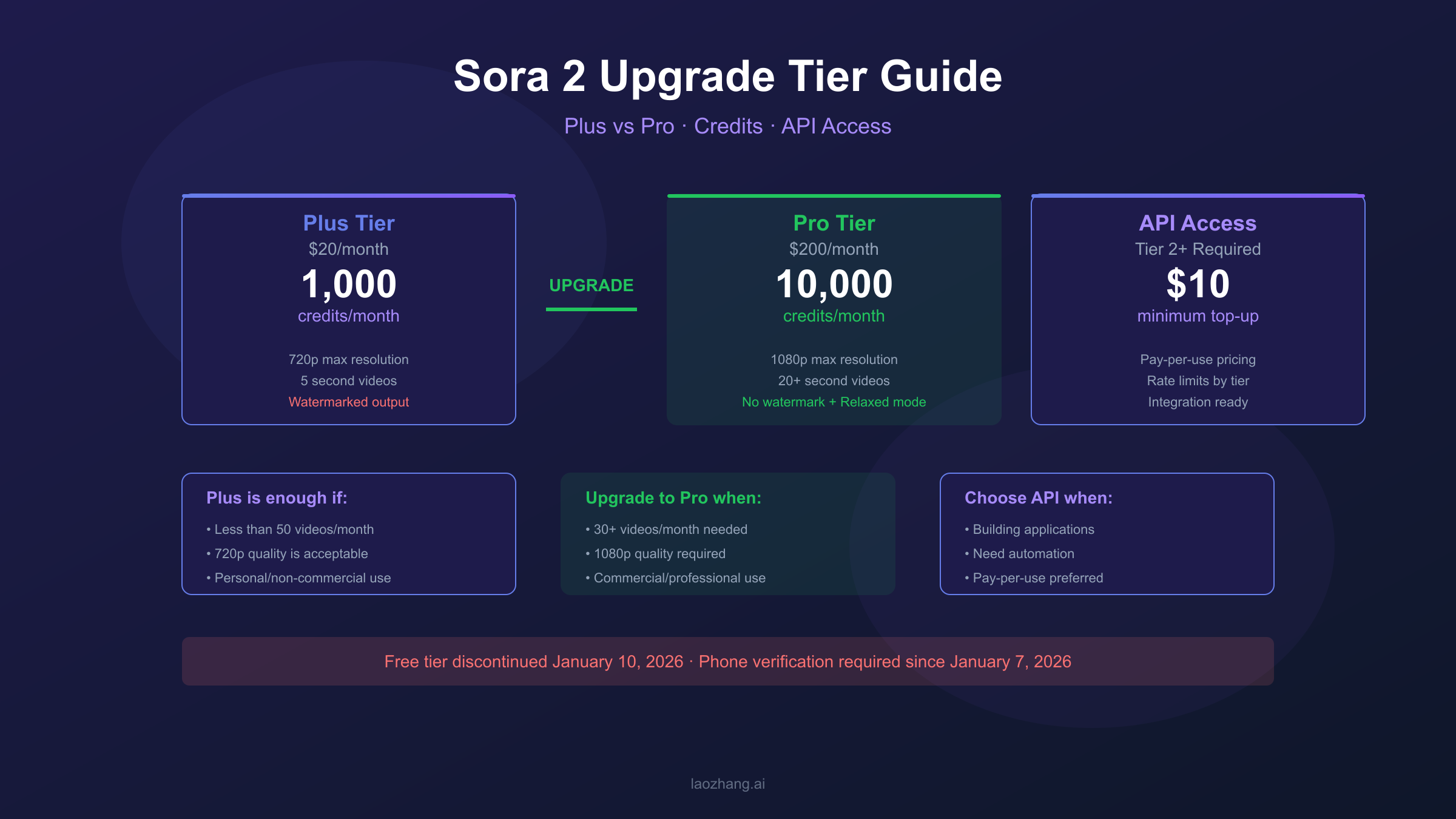
Sora operates as an add-on feature within ChatGPT subscriptions—you cannot purchase Sora access separately. Plus subscribers pay $20/month for 1,000 credits and 720p output, while Pro subscribers pay $200/month for 10,000 credits, 1080p resolution, and unlimited relaxed mode generation. For developers, API access requires reaching Tier 2 with a minimum $10 top-up. This guide will help you determine which tier best matches your video creation needs and budget.
Understanding Sora 2 Subscription Tiers
Sora 2 offers two subscription tiers: Plus at $20/month with 1,000 credits and 720p output, and Pro at $200/month with 10,000 credits, 1080p resolution, and unlimited relaxed mode.
The first thing to understand about Sora 2 is that it's not a standalone product. Unlike services where you can sign up and pay for video generation directly, Sora is integrated into the ChatGPT subscription system. This means you must have an active ChatGPT Plus or Pro subscription to access any Sora features—there's no way to purchase Sora access independently.
This integration has significant implications for how you plan your video generation workflow. When you subscribe to ChatGPT Plus or Pro, you're getting access to ChatGPT's text capabilities, DALL-E image generation, and Sora video creation all bundled together. The monthly fee covers everything, though each feature has its own usage limits.
OpenAI discontinued the free Sora tier on January 10, 2026, meaning all users must now have a paid subscription. Additionally, since January 7, 2026, phone verification is required for new Sora users as a security measure against abuse. If you're considering trying Sora, you'll need both a paid ChatGPT subscription and a verified phone number linked to your account.
The tier system uses credits as the primary resource allocation method. Every video you generate consumes credits based on resolution and duration. Understanding this credit economy is crucial because it directly determines how many videos you can create each month and at what quality level.
Plus vs Pro Feature Comparison
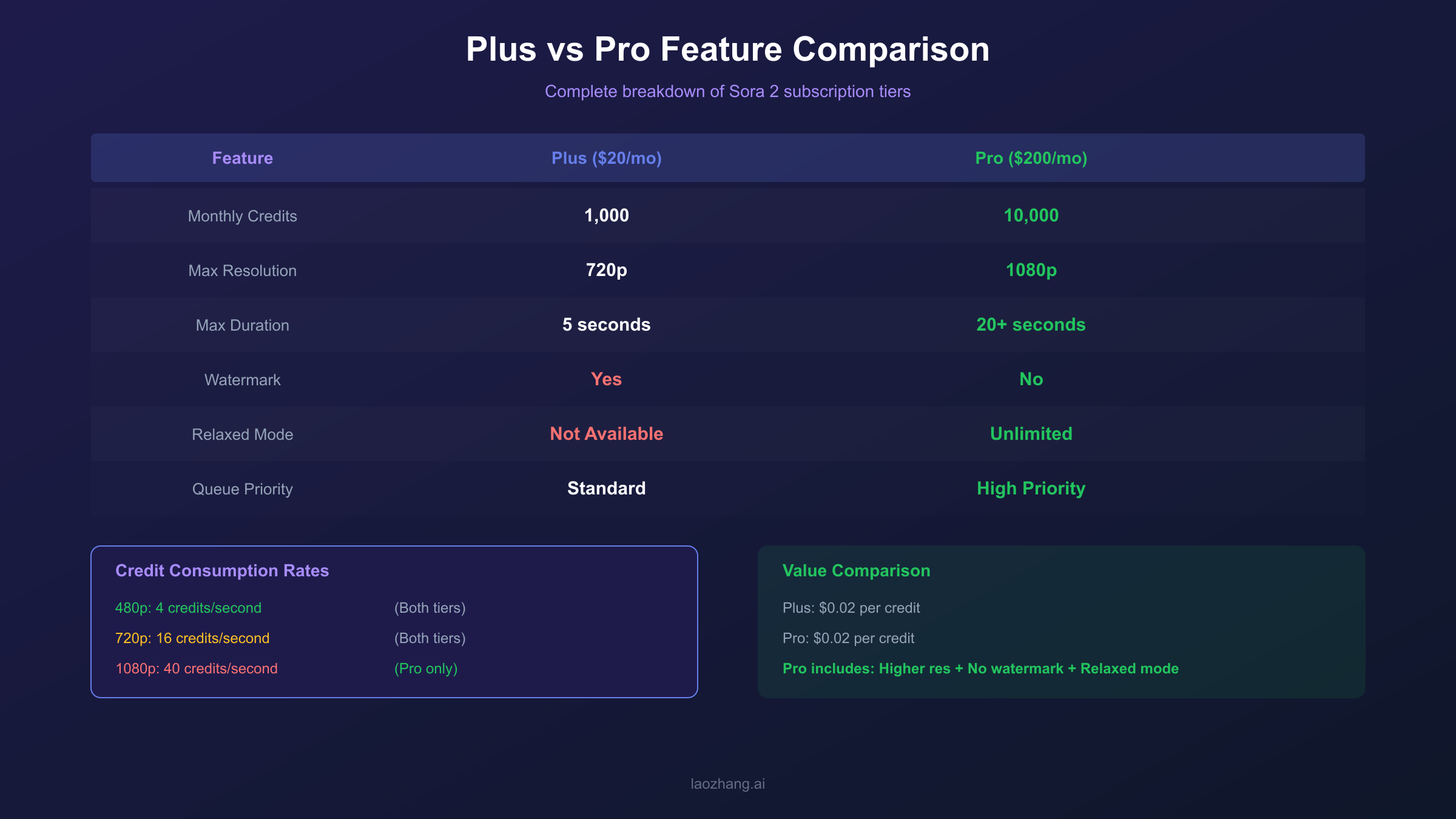
Pro subscribers get 10x more credits, higher resolution (1080p vs 720p), longer videos (20s vs 5s), no watermarks, and unlimited relaxed mode generation.
The differences between Plus and Pro tiers extend far beyond just the credit allocation. Here's a comprehensive breakdown of what each tier offers:
| Feature | Plus ($20/month) | Pro ($200/month) |
|---|---|---|
| Monthly Credits | 1,000 | 10,000 |
| Maximum Resolution | 720p | 1080p |
| Maximum Duration | 5 seconds | 20-25 seconds |
| Watermark | Yes (bottom right) | No |
| Relaxed Mode | Not available | Unlimited |
| Queue Priority | Standard | High priority |
| Commercial Rights | Limited | Full commercial use |
The watermark on Plus-tier videos is a small "Sora" text in the bottom right corner. While it doesn't significantly obstruct content, it clearly marks the video as AI-generated and may not be suitable for professional or commercial applications where branding matters.
Relaxed mode deserves special attention because it's a game-changer for Pro users. When your regular credits run out, you can switch to relaxed mode, which continues generating videos without consuming credits. The trade-off is longer queue times—sometimes 10-15 minutes per video instead of the typical 1-2 minutes. For users who don't need immediate results, this effectively provides unlimited video generation.
The resolution and duration limits on Plus can be restrictive for certain use cases. A 5-second video at 720p works well for social media clips or quick demonstrations, but professional content often requires the longer durations and higher quality that only Pro provides.
Credit System Across Tiers
Plus users receive 1,000 credits monthly, enough for about 50 standard 480p videos, while Pro users get 10,000 credits for approximately 500 standard videos plus unlimited relaxed mode.
Credit consumption in Sora follows a simple formula: higher resolution and longer duration consume more credits. The base rates are:
- 480p: 4 credits per second
- 720p: 16 credits per second
- 1080p: 40 credits per second (Pro only)
Aspect ratio also affects consumption. Square (1:1) videos serve as the baseline, while widescreen (16:9) or vertical (9:16) formats consume approximately 50% more credits for the same resolution and duration.
Let's translate these rates into practical usage scenarios. With 1,000 monthly credits on Plus:
- 50 videos at 480p, 5 seconds each (20 credits per video)
- 12 videos at 720p, 5 seconds each (80 credits per video)
- Or a mix of resolutions based on your needs
With 10,000 monthly credits on Pro:
- 500 videos at 480p, 5 seconds each
- 125 videos at 720p, 5 seconds each
- 50 videos at 1080p, 5 seconds each (200 credits per video)
- Plus unlimited additional videos via relaxed mode
One critical detail often overlooked: credits do not roll over. Any unused credits at the end of your billing cycle disappear. This reset policy means you should plan your monthly video production to maximize credit utilization rather than hoarding credits for later.
Failed generations also consume credits. If Sora attempts to generate your video but fails due to content policy violations or technical issues, you'll still lose the credits. This makes it important to understand Sora's content policies before generating videos to avoid wasting credits on rejected prompts.
How to Upgrade from Plus to Pro
Upgrade by navigating to Settings → Subscription in ChatGPT, selecting 'Upgrade to Pro', and completing the $200/month payment—Pro features activate immediately.
The upgrade process from Plus to Pro is straightforward but requires understanding the billing implications. Here's the step-by-step process:
- Log into your ChatGPT account at chat.openai.com
- Click your profile icon in the bottom left corner
- Select "Settings" from the dropdown menu
- Navigate to "Subscription" in the settings panel
- Click "Upgrade to Pro" button
- Review the pricing ($200/month or $2,400/year for annual billing)
- Complete payment using your stored payment method or enter new card details
- Confirmation: Pro features activate immediately
When you upgrade mid-cycle, OpenAI typically prorates the charges. You'll receive a credit for the unused portion of your Plus subscription and be charged the full Pro rate for the remainder of the billing period. Starting from the next billing cycle, you'll be charged the full Pro monthly rate.
There's no separate "Sora Pro" upgrade—you must upgrade your entire ChatGPT subscription to Pro level. This bundled approach means you're also getting enhanced ChatGPT features, more DALL-E generations, and other Pro benefits beyond just Sora improvements.
If you decide Pro isn't right for you, downgrading back to Plus is equally simple through the same Settings → Subscription menu. Note that downgrading takes effect at the end of your current billing period, so you'll retain Pro access until then.
API Tier Requirements for Sora Access
Sora API access requires OpenAI API Tier 2 or higher, which needs a minimum $10 account top-up and successful payment history.
For developers wanting to integrate Sora into applications, the subscription model doesn't apply. Instead, you need to qualify for API access through OpenAI's tier system, which is separate from ChatGPT subscriptions.
OpenAI's API uses a tier system based on your account's payment history and spending patterns:
| API Tier | Requirements | Sora Access |
|---|---|---|
| Tier 1 | New accounts | ❌ No access |
| Tier 2 | $10+ paid | ✅ Available |
| Tier 3 | $50+ paid | ✅ Available |
| Tier 4 | $100+ paid | ✅ Available |
| Tier 5 | $1,000+ paid | ✅ Available |
To reach Tier 2 and unlock Sora API access, you need to:
- Create an OpenAI API account at platform.openai.com
- Add a payment method
- Top up your account with at least $10
- Wait for the payment to process (usually instant)
- Your tier automatically upgrades based on cumulative spending
Higher tiers provide increased rate limits, which matters for applications making many concurrent requests. Tier 2 provides basic access suitable for development and light production use, while Tier 5 offers the highest rate limits for enterprise-scale applications.
API pricing for Sora follows a pay-per-use model based on video resolution and duration. This differs from the subscription credit system—you're charged directly for each generation rather than working within a monthly credit budget.
Is Pro Worth the Upgrade? Decision Framework
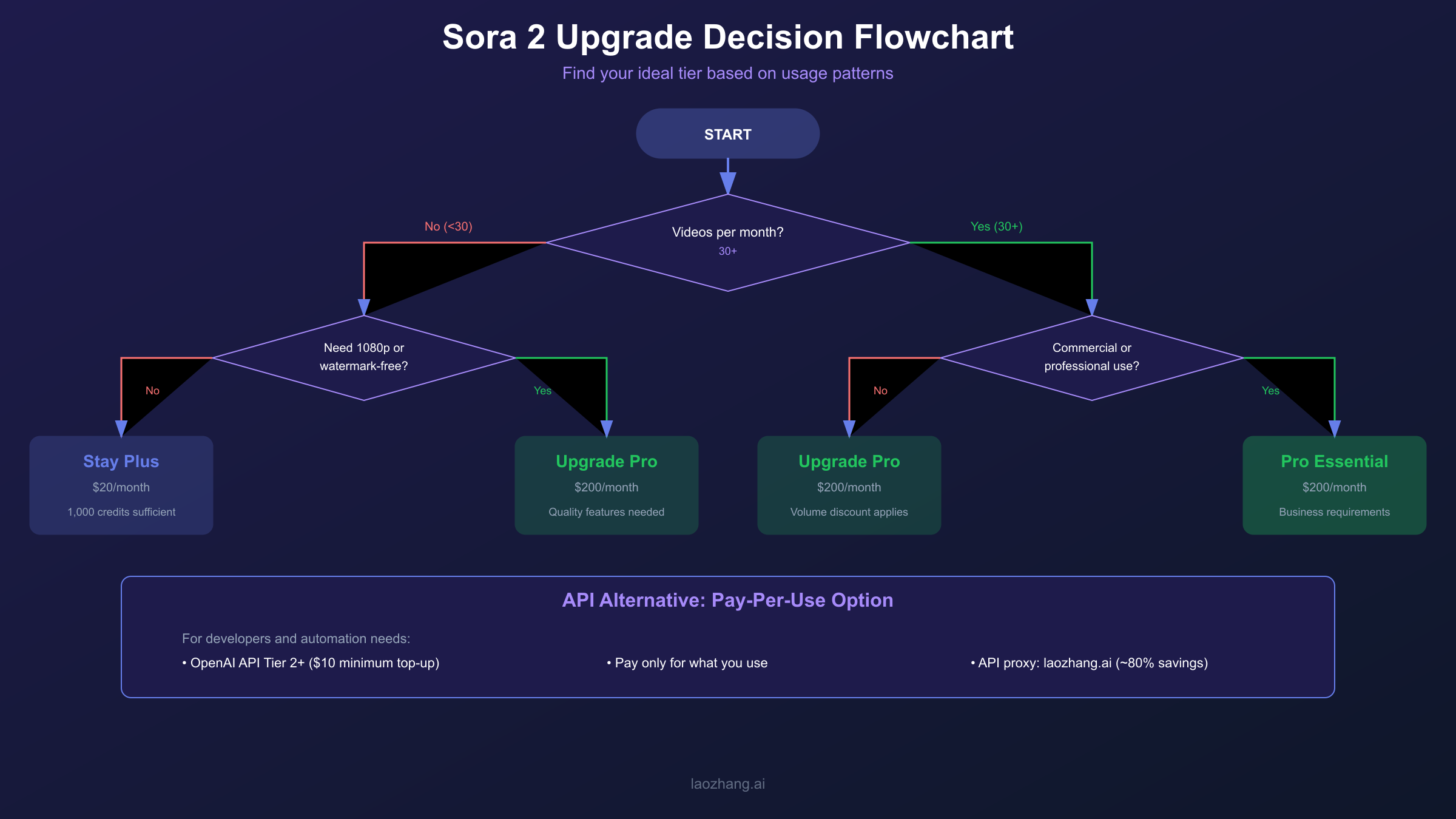
Pro is worth it if you generate 30+ videos monthly, need 1080p quality, or want watermark-free output for commercial use.
Deciding whether to upgrade from Plus to Pro requires honest assessment of your video generation needs. The 10x price difference ($20 vs $200) means Pro needs to deliver significant additional value to justify the cost.
Upgrade to Pro if you:
- Create more than 30 videos per month consistently
- Need 1080p resolution for professional content
- Require watermark-free output for commercial use
- Want longer video durations (20+ seconds)
- Value the unlimited relaxed mode for batch processing
Stay on Plus if you:
- Generate fewer than 50 videos monthly at 480p
- Primarily create content for personal use
- Can work within 5-second video limits
- Don't mind the Sora watermark
- Are experimenting or learning the platform
Let's run the numbers. At $200/month, Pro gives you 10,000 credits. If you're a heavy user generating 100 videos monthly at 720p (80 credits each), that's 8,000 credits—Plus's 1,000 credits wouldn't cover even 13 videos at this rate. Pro becomes essential at this usage level.
For developers and businesses needing API access without the $200/month commitment, consider API proxy services like laozhang.ai that provide Sora API access at significantly reduced costs (approximately 80% savings compared to direct API pricing). This pay-per-use model works well for applications with variable demand or teams testing Sora integration.
The calculation changes if you need relaxed mode. This feature alone can justify Pro for users who generate large volumes of content but don't need immediate turnaround. Essentially unlimited video generation—even with longer wait times—provides exceptional value for content creators working on longer-term projects.
Regional Availability and Restrictions
Before planning your Sora workflow, verify that the service is available in your region. As of January 2026, Sora is accessible in:
North America:
- United States
- Canada
Asia-Pacific:
- Japan
- South Korea
- Taiwan
- Thailand
- Vietnam
Latin America:
- Multiple countries (Brazil, Mexico, Argentina, and others)
Notably absent are the European Union, United Kingdom, China, and several other major markets. OpenAI has indicated plans to expand availability, but no specific timeline has been announced.
If you're in a restricted region, using VPNs to access Sora violates OpenAI's terms of service and risks account termination. The geographic restrictions are enforced through multiple mechanisms including IP detection and payment method verification.
For businesses operating across regions, this geographic limitation affects how you can integrate Sora into global workflows. Content teams in supported regions can generate videos, but sharing accounts across restricted regions could trigger security flags.
FAQ
Can I upgrade from Plus to Pro mid-billing cycle?
Yes, you can upgrade at any time. OpenAI prorates the charges, crediting you for the unused portion of your Plus subscription and charging the difference to move to Pro. Your Pro features activate immediately upon successful payment, and your new billing cycle resets to the upgrade date.
Do unused credits roll over to the next month?
No, credits reset at each billing cycle. Both Plus and Pro tiers lose any unused credits when your subscription renews. This policy encourages regular use rather than credit hoarding. Plan your monthly video production to maximize credit utilization before each reset.
What happens to my videos if I downgrade from Pro to Plus?
All previously generated videos remain accessible in your Sora library regardless of tier changes. However, you won't be able to generate new 1080p videos or videos longer than 5 seconds after downgrading. Your credit allocation will also drop from 10,000 to 1,000 starting the next billing cycle.
Is there a yearly subscription discount for Pro?
Yes, annual billing is available at $2,400/year ($200/month), but OpenAI occasionally offers promotional pricing. The annual option provides convenience but no discount compared to monthly payments. Check the subscription page for current offers.
Can I access Sora through the API without a ChatGPT subscription?
Yes, API access is completely separate from ChatGPT subscriptions. You need an OpenAI API account at Tier 2 or higher ($10 minimum top-up) to access Sora via API. API users pay per generation rather than through a monthly credit system, making it suitable for variable usage patterns.
Conclusion
Choosing the right Sora tier depends on your specific video generation needs, budget, and intended use cases. Plus at $20/month provides an accessible entry point for casual creators and those exploring AI video generation. Pro at $200/month unlocks the platform's full potential with higher resolution, longer videos, no watermarks, and unlimited relaxed mode.
For most individual creators generating fewer than 30 videos monthly, Plus offers sufficient capability. Professional users, content agencies, and anyone needing commercial-quality output should consider Pro for its expanded features and volume capacity. Developers building applications should explore the API tier system for pay-per-use flexibility.
Remember that Sora's tier system may evolve as OpenAI continues developing the platform. Keep an eye on official pricing updates and feature announcements to ensure you're always on the most appropriate tier for your needs.