Sora 2 Pricing Plans and Cost Per Second: Complete Guide to OpenAI Video Generation Costs (2026)
Comprehensive breakdown of Sora 2 pricing plans, cost per second calculations, and credit system. Compare ChatGPT Plus ($20) vs Pro ($200), understand API pricing ($0.10-$0.50/sec), and discover money-saving strategies for AI video generation.
Nano Banana Pro
4K-80%Google Gemini 3 Pro · AI Inpainting
谷歌原生模型 · AI智能修图

Understanding Sora 2 pricing plans and cost per second is essential before investing in OpenAI's revolutionary video generation technology. Whether you're a content creator evaluating ChatGPT Plus at $20/month, a marketing professional considering the $200/month Pro tier, or a developer calculating API costs at $0.10-$0.50 per second, this guide provides the exact numbers and decision frameworks you need.
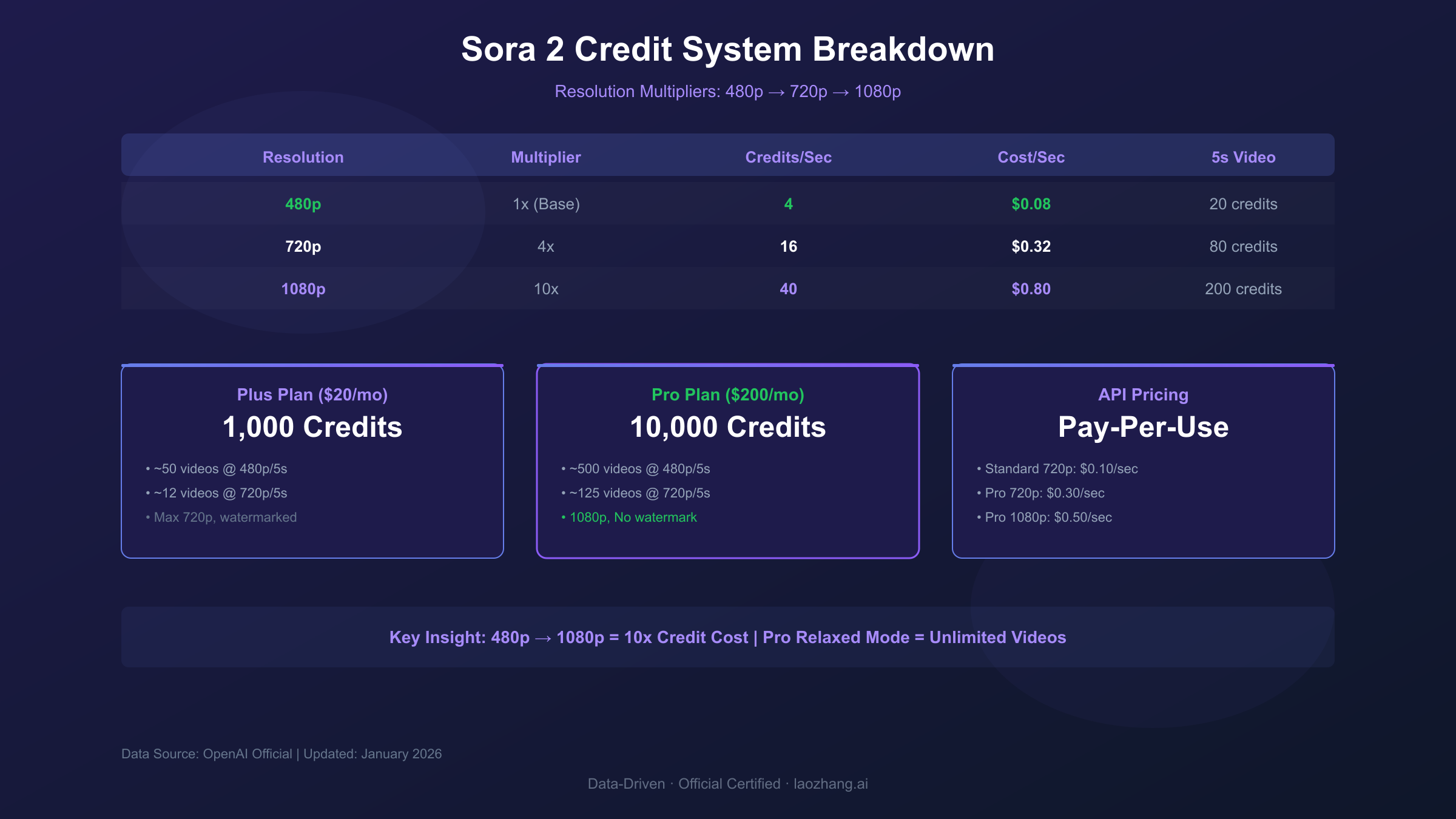
The pricing structure isn't straightforward. OpenAI uses a credit-based system where 480p video consumes 4 credits per second, 720p uses 16 credits per second, and 1080p demands 40 credits per second—a 10x difference that dramatically impacts your effective cost per video. A 5-second 1080p clip costs 200 credits, while the same duration at 480p costs just 20 credits. Understanding these multipliers separates informed users from those who burn through their monthly allocation in days.
This comprehensive guide breaks down every pricing tier, calculates real-world costs for common use cases, compares Sora 2 against competitors like Runway and Pika, and provides actionable strategies to maximize your video generation budget. By the end, you'll know exactly which plan fits your needs and how to optimize every dollar spent on AI video creation.
| Plan | Monthly Cost | Credits | Videos (720p/5s) | Cost Per Video | Best For |
|---|---|---|---|---|---|
| Free | $0 | Limited | 10-20 | $0 | Testing |
| Plus | $20 | 1,000 | ~12 | ~$1.67 | Hobbyists |
| Pro | $200 | 10,000 | ~125 | ~$1.60 | Professionals |
| API | Pay-per-use | N/A | Unlimited | $1.00-5.00 | Developers |
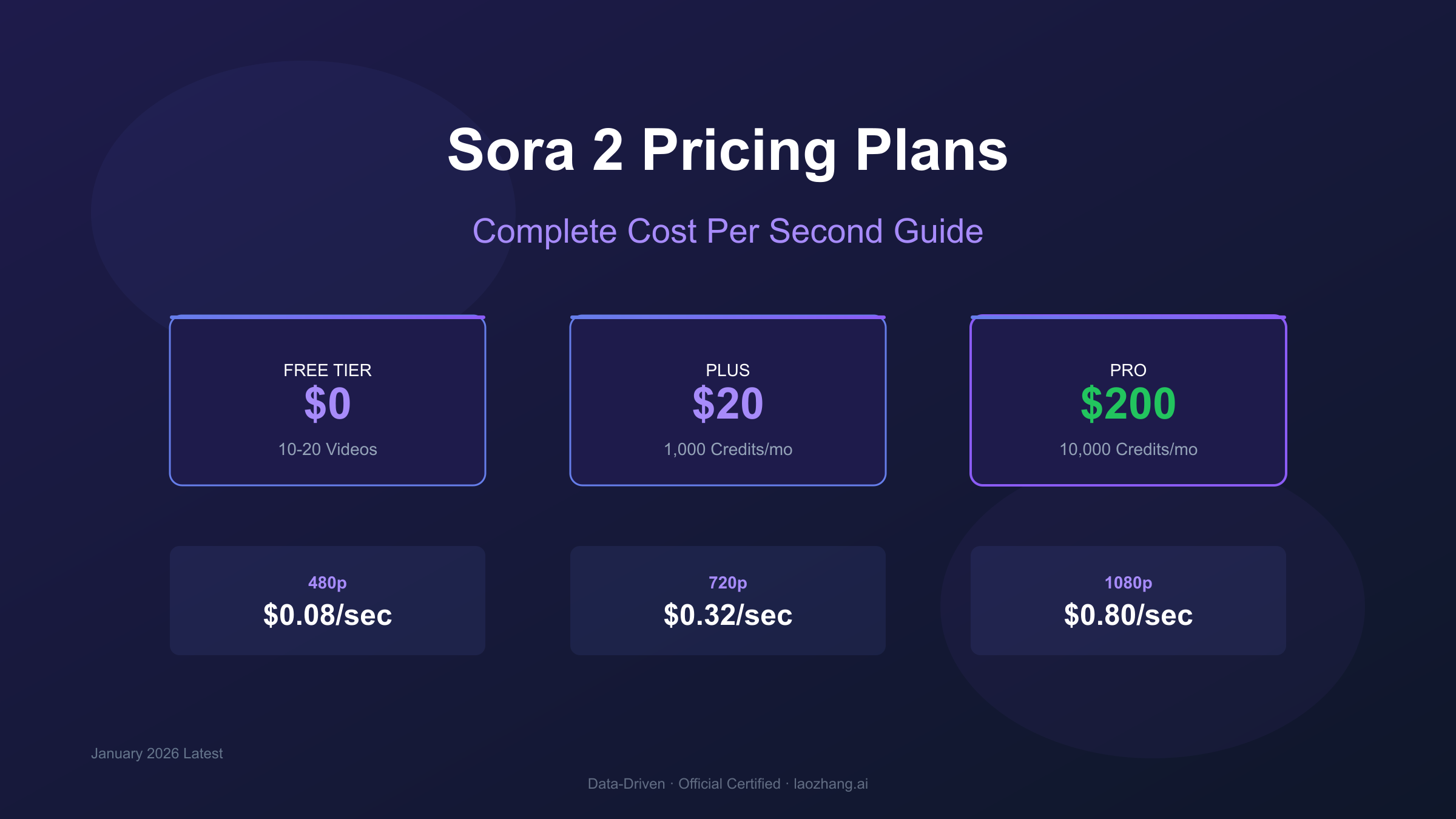
Quick Answer: How Much Does Sora 2 Cost Per Second?
For readers seeking immediate answers, here's the direct breakdown of Sora 2's per-second pricing across all access methods:
Subscription-Based Access (Credits System):
- 480p resolution: 4 credits/second → approximately $0.08/second with Plus, $0.08/second with Pro
- 720p resolution: 16 credits/second → approximately $0.32/second with Plus, $0.32/second with Pro
- 1080p resolution: 40 credits/second → approximately $0.80/second (Pro only)
API Access (Direct Billing):
- Sora 2 Standard (720p): $0.10/second
- Sora 2 Pro (720p): $0.30/second
- Sora 2 Pro (1080p): $0.50/second
The critical insight here: subscription plans offer better value for consistent monthly usage, while API pricing suits occasional users or developers needing programmatic access. A content creator generating 50 videos monthly at 720p resolution pays effectively $0.40/video on the Plus plan versus $1.00/video through the API—a 60% savings that adds up significantly over time.
Key Takeaway: The "cost per second" question has two answers depending on your access method. Subscription users should think in terms of credits (where 1 credit ≈ $0.02 on Plus, $0.02 on Pro), while API users pay direct per-second rates. Both methods achieve roughly similar total costs for moderate usage, but diverge significantly at high or low volume extremes.
Understanding Sora 2 Subscription Plans: Free, Plus, and Pro
OpenAI structures Sora 2 access through three distinct subscription tiers, each targeting different user profiles with varying credit allocations, feature access, and output restrictions. Understanding the nuances between these plans prevents overpaying for features you don't need—or worse, hitting frustrating limitations mid-project.
Free Tier: Testing the Waters
The Sora 2 free tier provides limited access for users wanting to explore AI video generation before committing financially. However, "free" comes with significant constraints that make it impractical for any serious use.
Free tier users receive approximately 10-20 video generations per month, subject to server capacity. During peak hours, access may be further restricted or unavailable entirely. All outputs are capped at 480p resolution with a 5-second maximum duration, and every video includes a visible watermark. These limitations make the free tier suitable only for initial experimentation—not content creation.
The geographic restriction is particularly relevant: free access is currently limited to users in the United States and Canada, requiring verification through phone number or payment method associated with these regions. Users in other countries cannot access even the free tier through official channels. For those seeking alternatives, our guide to the cheapest stable Sora 2 video API covers third-party access options.
ChatGPT Plus ($20/month): The Entry Point
ChatGPT Plus at $20 per month represents the most accessible paid tier for Sora 2 access. This plan allocates 1,000 monthly credits that can be spent across various resolution and duration combinations.
The credit consumption rates define your effective output:
| Resolution | Aspect Ratio | Credits/Second | 5-Second Video Cost |
|---|---|---|---|
| 480p | 1:1 (Square) | 4 | 20 credits |
| 480p | 16:9 (Landscape) | 6 | 30 credits |
| 720p | 1:1 (Square) | 16 | 80 credits |
| 720p | 16:9 (Landscape) | 20 | 100 credits |
With 1,000 credits monthly, Plus subscribers can generate approximately 12 videos at 720p/5s or 50 videos at 480p/5s. The math becomes unforgiving quickly: a creator wanting daily video content at 720p exhausts their allocation in under two weeks.
Plus plan limitations extend beyond credit allocation. Maximum video duration caps at 5 seconds—insufficient for many professional applications. All outputs retain watermarks, making the plan unsuitable for commercial content requiring clean branding. There's no access to the enhanced Sora 2 Pro model, limiting output quality compared to higher tiers.
ChatGPT Pro ($200/month): Professional Capabilities
The ChatGPT Pro tier at $200 per month unlocks Sora 2's full potential with 10,000 priority credits, extended duration support up to 20 seconds, 1080p resolution access, and watermark-free outputs.
The 10x credit increase compared to Plus enables significantly higher production volume. At 720p resolution, Pro subscribers can generate approximately 125 five-second videos monthly—enough for daily content creation with buffer for iterations and revisions. The 1080p option, exclusive to Pro, commands 40 credits per second but delivers broadcast-quality output suitable for professional applications.
Pro's "relaxed mode" deserves special attention. After exhausting priority credits, Pro subscribers gain access to unlimited generation at reduced priority—meaning longer wait times (5-10 minutes versus 1-2 minutes) but no additional cost. This effectively provides unlimited video generation for users willing to sacrifice immediate gratification, making the Pro tier's per-video cost approach zero for patient, high-volume creators.
| Feature | Plus ($20) | Pro ($200) |
|---|---|---|
| Monthly Credits | 1,000 | 10,000 |
| Max Resolution | 720p | 1080p |
| Max Duration | 5 seconds | 20 seconds |
| Watermark | Yes | No |
| Relaxed Mode | No | Unlimited |
| Queue Priority | Standard | Highest |
| Generation Speed | 5-8 min | 3-5 min |
The decision between Plus and Pro often reduces to a volume calculation. If you're generating fewer than 20 videos monthly at 720p, Plus provides adequate capacity. Beyond 40 videos monthly, Pro's economics become compelling—especially when factoring in relaxed mode for non-urgent projects. The crossover point where Pro's value exceeds Plus typically lands around 30-40 videos per month for most users. For a detailed comparison of subscription benefits beyond Sora 2, see our ChatGPT Plus vs Pro for developers guide.
The Credit System Explained: Resolution and Duration Multipliers
Sora 2's credit system determines your true cost per video. Understanding how resolution and duration interact prevents the common mistake of exhausting monthly credits within the first week. The system isn't linear—moving from 480p to 1080p doesn't double your credit consumption; it increases it by 10x.
Base Credit Consumption Rates
The foundational unit in Sora 2's pricing is the credit. OpenAI doesn't publish explicit credit-to-dollar conversions, but the math is straightforward: Plus provides 1,000 credits for $20 (effectively $0.02/credit), while Pro offers 10,000 credits for $200 (also $0.02/credit). The value proposition between tiers isn't per-credit pricing—it's the additional features and relaxed mode access that differentiate them.
Resolution multipliers apply first in the credit calculation:
| Resolution | Base Multiplier | Credits/Second | Effective Cost/Second |
|---|---|---|---|
| 480p | 1x | 4 | $0.08 |
| 720p | 4x | 16 | $0.32 |
| 1080p | 10x | 40 | $0.80 |
This exponential scaling makes resolution selection the single most impactful decision in credit management. A creator who habitually generates at 1080p "just to be safe" consumes 10x more credits than necessary for social media content where 480p suffices perfectly.
Duration Tiers and Credit Scaling
Beyond resolution, duration follows a linear credit multiplication. Sora 2 supports specific duration tiers rather than arbitrary lengths:
Standard Model Durations:
- 4 seconds
- 8 seconds
- 12 seconds
Pro Model Durations:
- 10 seconds
- 15 seconds
- 25 seconds
A 720p video at 5 seconds consumes 80 credits (16 credits/second × 5 seconds). The same video extended to 10 seconds doubles to 160 credits. At 20 seconds, consumption reaches 320 credits—nearly one-third of a Plus subscriber's monthly allocation for a single video.
Aspect Ratio Impact
Aspect ratio introduces an additional modifier that's often overlooked in cost calculations. While 1:1 (square) aspect ratio serves as the baseline, widescreen formats require more computational resources:
| Aspect Ratio | Resolution | Credit Modifier | Effective Credits/Second |
|---|---|---|---|
| 1:1 (Square) | 720p | 1.0x | 16 |
| 16:9 (Landscape) | 720p | 1.25x | 20 |
| 9:16 (Portrait) | 720p | 1.25x | 20 |
Content creators targeting Instagram Stories (9:16) or YouTube thumbnails (16:9) pay a 25% premium over square content at identical resolution. This premium reflects the increased pixel count in non-square aspect ratios: a 720p square video contains 518,400 pixels per frame, while 720p landscape contains 921,600 pixels—a 78% increase that's only partially reflected in the 25% credit premium.
Credit Allocation Strategy
Maximizing credit efficiency requires strategic thinking about your content pipeline. Here's a practical framework:
For Testing and Iteration:
- Use 480p at the shortest supported duration
- Minimum credit consumption: 20 credits (480p/5s)
- Reserve for prompt testing before committing to final quality
For Social Media Content:
- 720p provides sufficient quality for most platforms
- Typical consumption: 80-100 credits per video
- Instagram, TikTok, Twitter all compress uploads anyway
For Professional/Commercial Work:
- 1080p justified only for broadcast, cinema, or premium client deliverables
- Typical consumption: 200-400 credits per video
- Pro subscription essential—Plus caps at 720p
Pro Tip: Many successful creators use a two-pass workflow. First, generate at 480p to refine prompts and concepts—costing 4-6 credits per second. Once satisfied, regenerate the final version at target resolution. This approach can reduce overall credit consumption by 50-70% compared to iterating at full resolution.
Sora 2 API Pricing: Developer Cost Analysis
For developers and businesses requiring programmatic access, Sora 2's API provides direct per-second billing without subscription commitments. This model suits applications where video generation happens on-demand—marketing automation platforms, content management systems, or user-facing generation tools.
Official API Pricing Structure
OpenAI's API pricing follows a straightforward per-second model differentiated by model variant and resolution:
Sora 2 Standard API:
- 720p (1280×720): $0.10/second
- Duration options: 4s, 8s, 12s
- Best for high-volume, standard-quality needs
Sora 2 Pro API:
- 720p (1280×720): $0.30/second
- 1080p (1792×1024): $0.50/second
- Duration options: 10s, 15s, 25s
- Enhanced quality and longer duration support
The API's direct billing eliminates the credit system complexity of subscription plans. A 10-second video costs exactly $1.00 on Standard or $3.00-$5.00 on Pro, regardless of how many videos you've generated previously that month.
API vs. Subscription: Break-Even Analysis
When does API access make financial sense compared to subscriptions? The crossover points depend on your usage pattern:
| Monthly Videos (720p/10s) | Subscription Cost | API Cost | Better Option |
|---|---|---|---|
| 5 | $20 (Plus) | $5.00 | API |
| 15 | $20 (Plus) | $15.00 | API |
| 25 | $20 (Plus) | $25.00 | Subscription |
| 50 | $200 (Pro) | $50.00 | API |
| 100 | $200 (Pro) | $100.00 | API |
| 150 | $200 (Pro) | $150.00 | API |
| 250 | $200 (Pro) | $250.00 | Subscription |
The analysis reveals an interesting pattern: API pricing beats subscriptions for light users (under 20 videos) and moderate professional users (under 200 videos). Subscriptions provide value at the extremes—either as an affordable entry point (Plus for 20-50 videos) or for heavy production needs (Pro for 250+ videos with relaxed mode).
For developers building user-facing applications, API pricing introduces a variable cost component that should be factored into unit economics. If your platform charges users $5 per generated video and generation costs $1 via API, your gross margin is 80%—healthy for a SaaS model. But if generation quality issues require 3-5 attempts on average, that margin shrinks to 20-40%.
Third-Party API Alternatives
The gap between Sora 2's capabilities and official API availability has created a market for third-party providers. These services aggregate access through various means, often offering substantially lower pricing:
| Provider Type | 10s Video Cost | Reliability | Best For |
|---|---|---|---|
| Official API (when available) | $1.00-5.00 | 99.9% SLA | Enterprise, compliance |
| Third-party aggregators | $0.15-0.40 | 95-98% | Cost optimization |
| Regional arbitrage providers | $0.02-0.10 | 85-95% | Extreme budget needs |
Third-party providers typically offer per-second rates 70-85% below official pricing. A 10-second video might cost $0.15 instead of $1.00—significant savings for high-volume applications. However, these savings come with tradeoffs in reliability, support, and potential compliance concerns.
For teams prioritizing stability and cost efficiency without official API access, platforms like laozhang.ai provide aggregated access to multiple AI models including video generation capabilities. The platform offers unified API endpoints, transparent pricing, and typically delivers latency under 50ms for users in Asia—a significant advantage over direct international API calls that can exceed 200ms. Documentation and pricing details are available at docs.laozhang.ai.
When evaluating third-party options, consider these factors:
- Uptime guarantees: Official APIs offer 99.9% SLA; third-party providers typically range 95-99%
- Support responsiveness: Hours for official, varies widely for third-party
- Terms of service compliance: Using unofficial access may violate OpenAI's terms
- Data handling: Understand how your prompts and outputs are processed
Real-World Cost Scenarios: What You'll Actually Pay
Abstract pricing tables don't capture the reality of Sora 2 costs in production. This section examines four common use cases with concrete cost projections based on typical workflows.
Scenario 1: Social Media Content Creator
Profile: Creates short-form video content for TikTok, Instagram Reels, and YouTube Shorts. Needs 5-8 second clips, primarily vertical (9:16) format, moderate quality acceptable.
Monthly Volume: 30 videos Settings: 720p, 9:16 aspect ratio, 5-second duration Credits per video: 100 (20 credits/second × 5 seconds) Monthly credit consumption: 3,000 credits
Recommended Plan: ChatGPT Pro ($200/month)
- Plus plan provides only 1,000 credits (10 videos)
- Pro's 10,000 credits covers full requirement with buffer
- Relaxed mode handles overflow at no additional cost
Effective cost per video: $6.67 (with full credit usage) With relaxed mode: Can approach $2-3/video for patient creators
Scenario 2: Marketing Agency
Profile: Produces video ads and promotional content for clients. Requires 1080p quality, no watermarks, professional output.
Monthly Volume: 15 premium videos + 50 draft iterations Settings: 1080p for finals, 480p for iterations, various durations Premium credits: 15 × 200 credits = 3,000 credits (1080p/5s) Iteration credits: 50 × 20 credits = 1,000 credits (480p/5s) Total consumption: 4,000 credits
Recommended Plan: ChatGPT Pro ($200/month)
- 1080p access requires Pro tier
- Watermark-free outputs mandatory for client work
- 10,000 credits provides comfortable margin for revisions
Effective cost per final video: $13.33
Scenario 3: Developer Building Video Generation App
Profile: Building a SaaS platform where users generate videos on-demand. Needs API access, variable monthly volume, must control unit economics.
Monthly Volume: 500-2,000 videos (user-driven) Settings: 720p, various durations API Rate: $0.10/second × 10 seconds = $1.00/video average
Recommended Approach: API-first with subscription fallback
- Under 200 videos: API at $200-$2,000
- Over 200 videos: Pro subscription + API hybrid
Unit Economics:
- Revenue per user generation: $5.00
- API cost: $1.00
- Gross margin: 80%
However, factor in iteration costs. If users average 2.5 attempts before satisfaction:
- Effective cost: $2.50/successful generation
- Adjusted gross margin: 50%
Scenario 4: Enterprise Video Production
Profile: Large organization producing internal training, product demos, and marketing videos. Requires reliability, compliance, and scalability.
Monthly Volume: 100+ videos across departments Settings: Mixed quality requirements, batch processing needs Budget: $5,000+/month
Recommended Approach: Azure AI Foundry or enterprise agreement
- Direct OpenAI enterprise pricing negotiation
- Volume discounts typically 15-30% below listed rates
- SLA guarantees and dedicated support
Enterprise considerations:
- Data residency requirements may mandate specific deployment regions
- Audit trails and usage reporting for cost allocation
- Integration with existing Azure/cloud infrastructure
Cost Reality Check: These scenarios assume reasonable prompt engineering skills. Beginners typically require 2-3x more iterations to achieve acceptable results, doubling or tripling effective costs. Investment in prompt optimization training often pays for itself within the first month of production use.
Sora 2 vs. Competitors: Pricing Comparison
How does Sora 2's pricing stack against alternatives like Runway Gen-3, Pika Labs, and Google Veo? Understanding the competitive landscape helps determine whether Sora 2's premium positioning delivers commensurate value.
Head-to-Head Price Comparison
| Platform | Entry Price | Pro Price | Max Duration | Max Resolution | Cost/10s Video |
|---|---|---|---|---|---|
| Sora 2 | $20/mo | $200/mo | 20s | 1080p | $0.40-4.00 |
| Runway Gen-3 | $15/mo | $95/mo | 10s | 1080p | $0.45-0.60 |
| Pika Labs | $10/mo | $76/mo | 8s | 1080p | $0.05-0.07 |
| Google Veo 3 | API only | API only | 8s | 1080p | $0.30-0.50 |
| Kling AI | $5/mo | $35/mo | 10s | 1080p | $0.15-0.25 |
The comparison reveals Sora 2 sits at the premium end of the market. Its $200/month Pro tier costs more than double Runway's top-tier unlimited plan ($95/month) and nearly 6x Pika's professional offering ($35/month). This premium positioning raises a critical question: does output quality justify the price differential?
Quality vs. Cost Trade-offs
Based on extensive community testing and professional evaluations, each platform demonstrates distinct strengths:
Sora 2 Advantages:
- Superior physics simulation and object permanence
- More consistent character rendering across scenes
- Better handling of complex camera movements
- Longer maximum duration (20s vs. 8-10s for competitors)
Where Competitors Excel:
- Runway offers superior editing tools and workflow integration
- Pika provides better value for high-volume, quality-acceptable content
- Kling delivers impressive results at fraction of the cost
- Veo integrates seamlessly with Google Cloud ecosystem
For creators prioritizing photorealism and cinematic quality where visual fidelity is paramount, Sora 2's premium pricing may be justified. But for social media content, rapid prototyping, or budget-conscious production, competitors offer compelling alternatives at 50-80% lower cost.
Cost Per Second Across Platforms
Normalizing to cost-per-second reveals the true pricing hierarchy:
| Platform | Cost Per Second (Standard) | Cost Per Second (Pro) |
|---|---|---|
| Pika Labs | $0.006 | $0.009 |
| Kling AI | $0.015 | $0.025 |
| Sora 2 | $0.020 | $0.040 |
| Google Veo | $0.030 | $0.050 |
| Runway Gen-3 | $0.045 | $0.060 |
Interestingly, Sora 2 lands mid-pack on per-second pricing when accounting for video length differences. Pika's apparent cost leadership comes with an 8-second maximum duration that limits professional applications. Runway's higher per-second rate reflects its mature editing ecosystem and professional feature set.
When Each Platform Makes Sense
Choose Sora 2 when:
- Output quality is non-negotiable (advertising, film, premium content)
- You need longer video durations (15-25 seconds)
- Physics accuracy matters (product demonstrations, educational content)
- Budget allows for premium positioning
Choose Runway when:
- You need professional editing tools alongside generation
- Workflow integration with existing video production pipelines is essential
- Moderate volume at professional quality is the target
Choose Pika when:
- Volume is high and "good enough" quality suffices
- Budget is the primary constraint
- Social media short-form is the primary use case
Choose Kling when:
- Cost-per-video must stay under $0.30
- Quality requirements are moderate
- Asian market optimization matters
For teams already using platforms like laozhang.ai for other AI model access, the unified API approach provides an additional option—accessing multiple video generation models through a single endpoint, enabling A/B testing across providers without managing multiple integrations. This approach is particularly valuable when production needs require switching between models based on specific scene requirements.
Cost Optimization Strategies for Sora 2
Maximizing value from Sora 2 requires strategic thinking about resolution, duration, and workflow design. These optimization strategies can reduce effective costs by 40-70% without sacrificing output quality.
Strategy 1: Resolution Ladder Approach
The most impactful optimization leverages the 10x credit differential between 480p and 1080p. Implement a resolution ladder:
Draft Phase (480p):
- Test all prompts and concepts at minimum resolution
- Cost: 4 credits/second
- Iterate freely without cost anxiety
- Typical iterations: 10-15 per concept
Refinement Phase (720p):
- Validate composition and movement at medium resolution
- Cost: 16 credits/second
- Fine-tune prompts before final commitment
- Typical iterations: 3-5 per concept
Production Phase (1080p/native):
- Generate final output at target resolution
- Cost: 40 credits/second (Pro only)
- Single generation, confidence high
- Typical iterations: 1-2
This ladder reduces average credit consumption by 60-70% compared to iterating at full resolution. A concept requiring 15 iterations at 1080p would cost 3,000 credits ($60). Using the ladder approach: 12 iterations at 480p (240 credits) + 2 iterations at 720p (160 credits) + 1 final at 1080p (200 credits) = 600 credits ($12)—an 80% savings.
Strategy 2: Batch Similar Content
Sora 2's credit system charges per-video regardless of prompt similarity. However, creating multiple variations of similar content yields efficiency gains through prompt refinement:
Batch workflow:
- Develop a master prompt template for a content series
- Generate first video to validate template
- Apply template with minimal modifications for subsequent videos
- Success rate improves from ~20% (first video) to ~60% (subsequent)
For a 10-video content series, this approach reduces total iterations from 100+ (10 videos × 10+ iterations each) to approximately 40 (15 for first + ~3 each for remaining 9).
Strategy 3: Leverage Relaxed Mode (Pro Only)
ChatGPT Pro's relaxed mode provides unlimited generation after priority credits exhaust—but requires patience. Optimize by categorizing content urgency:
Priority Credit Usage (Fast Queue):
- Client-facing deliverables with deadlines
- Time-sensitive social media content
- Final production renders
Relaxed Mode Usage (Slow Queue):
- Creative exploration and experimentation
- Content library building
- Non-urgent variations and alternatives
A Pro subscriber generating 200 videos monthly might allocate 50 to priority (5,000 credits at 100 credits each) and 150 to relaxed mode (essentially free). Effective cost: $200/200 videos = $1/video instead of $2/video with priority-only usage.
Strategy 4: Smart Duration Selection
Sora 2 offers specific duration tiers rather than arbitrary lengths. Mismatching content needs to duration tiers wastes credits:
| Content Type | Optimal Duration | Credits (720p) |
|---|---|---|
| Logo animation | 4s | 64 |
| Social media hook | 5s | 80 |
| Product showcase | 8s | 128 |
| Short ad | 10-15s | 160-240 |
| Explainer segment | 20s | 320 |
Many creators default to longer durations "just in case," but a 10-second video costs 60% more than necessary for content that works fine at 5 seconds. Audit your content library: how many seconds do viewers actually watch? Social media analytics typically show 50-70% drop-off after 3-4 seconds, making 5-second generations optimal for most short-form content.
Strategy 5: Prompt Engineering Investment
The highest-leverage optimization isn't technical—it's skill development. First-attempt success rate varies dramatically based on prompt engineering proficiency:
| Skill Level | Success Rate | Iterations Needed | Credit Multiplier |
|---|---|---|---|
| Beginner | 10-15% | 7-10 | 7-10x |
| Intermediate | 30-40% | 3-4 | 3-4x |
| Advanced | 60-70% | 1.5-2 | 1.5-2x |
Investing 10-20 hours in prompt engineering tutorials, community resources, and deliberate practice can reduce effective costs by 50-70%. Resources like OpenAI's official documentation, the Sora community Discord, and YouTube tutorials from experienced creators provide free education with immediate ROI.
Which Sora 2 Plan Should You Choose?
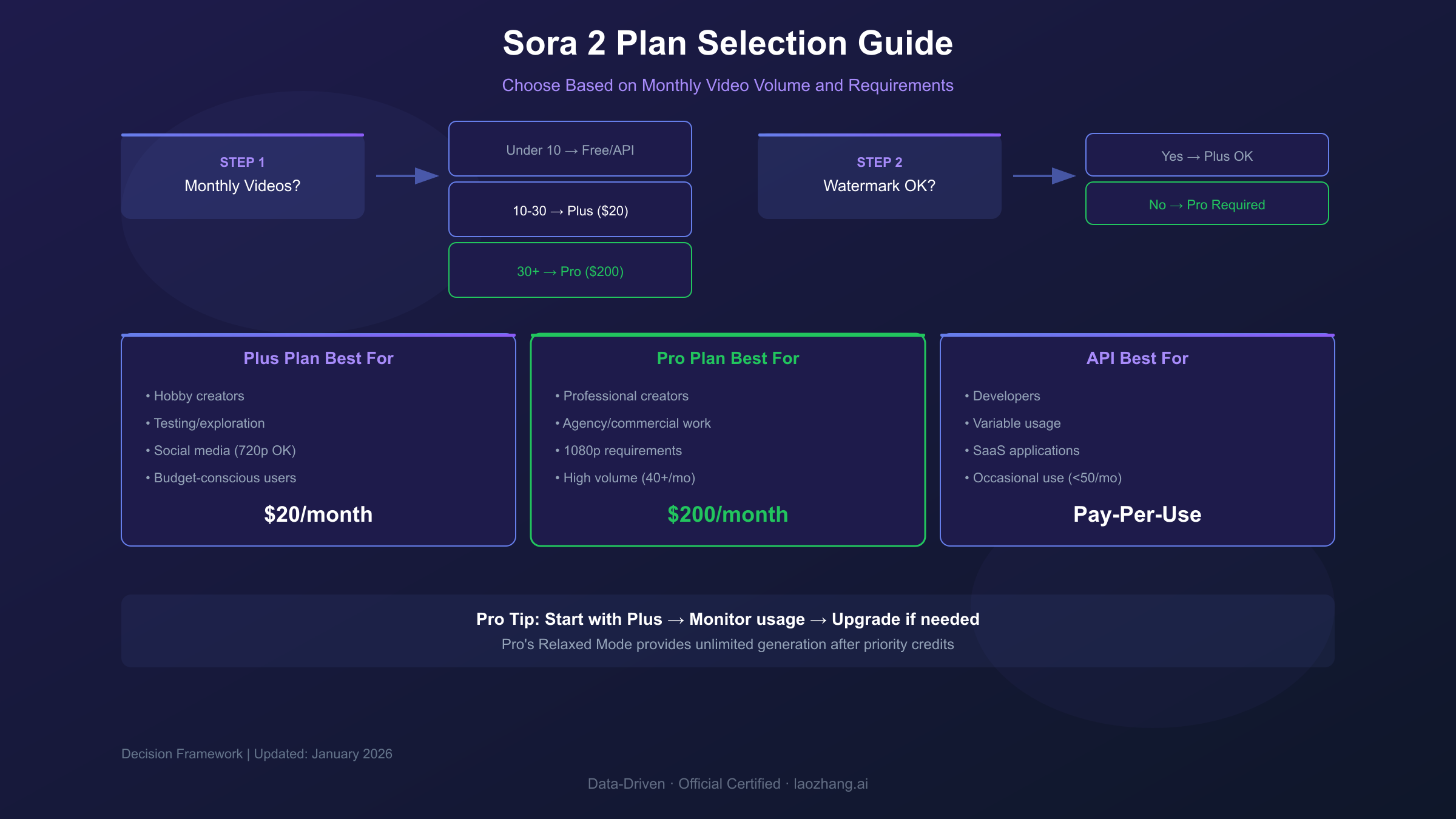
After analyzing pricing structures, credit systems, and real-world scenarios, here's a decision framework for selecting the right Sora 2 access method.
Decision Matrix
| Your Situation | Recommended Plan | Monthly Cost | Why |
|---|---|---|---|
| Testing/exploring AI video | Free tier | $0 | Sufficient for evaluation |
| Hobby creator, <15 videos/mo | Plus | $20 | Adequate credits, lowest investment |
| Serious creator, 20-50 videos/mo | Pro | $200 | Relaxed mode provides buffer |
| Agency/commercial work | Pro | $200 | 1080p + no watermark required |
| Developer, <100 API calls/mo | API | $10-100 | Pay-per-use beats subscription |
| High-volume app, >500 calls/mo | Pro + API hybrid | $200+ | Optimize for each use case |
| Enterprise, compliance needs | Azure/Enterprise | Custom | SLA and support essential |
The "5 Questions" Test
Before committing, answer these questions:
1. What's your monthly video volume?
- Under 10: Free tier or API
- 10-30: Plus
- 30-100: Pro
- 100+: Pro with relaxed mode, or API
2. Do you need watermark-free output?
- No: Plus or Free may suffice
- Yes: Pro is mandatory
3. What resolution do you require?
- 720p or less: Plus covers it
- 1080p: Pro required
4. How predictable is your usage?
- Steady monthly: Subscription preferred
- Highly variable: API preferred
5. Are you in a supported region?
- US/Canada: All options available
- Other regions: Third-party providers may be only option
Common Mistakes to Avoid
Mistake 1: Starting with Pro "to be safe" Most creators overestimate their needs. Start with Plus, monitor actual usage for one month, then upgrade if consistently hitting limits. The $180 monthly savings covers a lot of learning curve.
Mistake 2: Ignoring the iteration reality Budget calculations assuming one-shot success dramatically underestimate costs. Multiply your expected video count by 3-5x for realistic credit planning.
Mistake 3: Not utilizing relaxed mode Pro subscribers leaving relaxed mode unused are paying for a feature they're not exploiting. Shift non-urgent generation to relaxed queue to effectively double or triple your output capacity.
Mistake 4: Resolution overkill Most social media platforms compress uploads to 720p or lower. Generating at 1080p for TikTok or Instagram Reels wastes 2.5x credits for invisible quality gains.
Frequently Asked Questions About Sora 2 Pricing
How much does a single Sora 2 video cost?
The cost depends on resolution, duration, and access method. At 720p resolution for 5 seconds: approximately $1.60-2.00 on subscription plans (Pro/Plus), or $0.50 via Standard API. At 1080p for 10 seconds: approximately $4.00 on Pro subscription, or $5.00 via Pro API. The "real" cost typically runs 2-4x higher due to iteration requirements.
Is Sora 2 free to use?
Sora 2 offers limited free access to users in the United States and Canada with a ChatGPT account. Free tier provides approximately 10-20 video generations monthly at 480p resolution with 5-second maximum duration and watermarks. For any serious use, paid plans are necessary.
Why is ChatGPT Pro so expensive for Sora 2?
The $200/month Pro tier reflects Sora 2's computational intensity—video generation requires significantly more processing power than text or image generation. The Pro tier also bundles unlimited "relaxed mode" access, effectively providing unlimited generation for patient users. For high-volume creators, the per-video cost actually approaches $1-2, making it competitive with API pricing.
Can I access Sora 2 outside the US?
Official access currently requires US or Canada verification. International users have limited options: VPN usage may violate terms of service; third-party providers offer unofficial access with varying reliability. For users in China and Asia, platforms like laozhang.ai provide regional access with optimized latency.
Do Sora 2 credits expire?
Yes, credits expire at the end of each billing cycle with no rollover. This creates a "use it or lose it" dynamic that affects planning—unused Plus credits at month-end represent pure waste. Pro subscribers can mitigate this through relaxed mode, which continues functioning regardless of priority credit balance.
How does Sora 2 pricing compare to Runway?
Sora 2 Pro ($200/mo) costs roughly double Runway's Unlimited tier ($95/mo). However, Sora 2 offers longer maximum duration (20s vs. 10s) and potentially superior output quality for photorealistic content. Runway provides better editing tools and workflow integration. For pure video generation, Pika Labs offers the best value at $10-35/month for similar quality.
Is the Sora 2 API worth it for developers?
For applications generating 50-150 videos monthly, API pricing ($0.10-0.50/second) typically beats subscription costs. Below 50 videos, API provides flexibility without monthly commitment. Above 200 videos, Pro subscription with relaxed mode becomes more economical. The API's value depends heavily on your unit economics and iteration rate.
What's the cheapest way to use Sora 2?
The absolute cheapest is the free tier—but severely limited. For functional access, the Plus tier at $20/month offers the lowest entry point. For budget optimization with serious usage: start with Plus, use 480p for iterations, reserve 720p for finals, and upgrade to Pro only if consistently exhausting credits. Third-party providers can reduce costs further but introduce reliability tradeoffs.
Conclusion: Making Smart Decisions on Sora 2 Pricing
Sora 2's pricing structure—spanning free access, $20/month Plus, $200/month Pro, and variable API rates—accommodates users from curious beginners to enterprise production teams. The key to maximizing value lies in matching your actual needs to the appropriate tier rather than defaulting to the most expensive option.
For most individual creators, the Plus tier provides adequate access for experimentation and moderate content creation. The 1,000 monthly credits support approximately 12-50 videos depending on resolution choices, making it suitable for weekly content schedules or portfolio building. The $20 monthly investment represents minimal risk for evaluating whether AI video generation fits your workflow.
Professional and commercial users should evaluate Pro tier economics carefully. The 10x credit increase and relaxed mode access justify the price jump only for users consistently generating 40+ videos monthly or requiring watermark-free 1080p output. Marketing agencies, content studios, and serious creators will find the $200 investment reasonable when amortized across professional output volumes.
Developers and businesses requiring programmatic access should model their unit economics against both API and subscription pricing. For variable or unpredictable usage patterns, API's pay-per-use model avoids commitment waste. For steady high-volume applications, Pro subscription with relaxed mode can dramatically reduce per-video costs.
The competitive landscape offers alternatives at every price point. Pika Labs at $10-35/month provides exceptional value for quality-flexible applications. Runway's $95/month Unlimited tier suits professional workflows requiring integrated editing tools. These alternatives deserve serious consideration before committing to Sora 2's premium positioning.
Whatever tier you choose, implement the cost optimization strategies covered in this guide: resolution laddering, relaxed mode utilization, prompt engineering investment, and duration optimization. These practices can reduce effective costs by 40-70%, making even the premium Pro tier accessible for budget-conscious creators.
The AI video generation market continues evolving rapidly. Pricing structures will shift, new competitors will emerge, and OpenAI may adjust Sora 2's economics based on market response. Stay flexible, monitor your actual usage patterns, and don't hesitate to switch tiers or platforms as your needs change.
For developers and teams seeking stable, cost-effective API access to multiple AI models, exploring aggregator platforms provides additional flexibility. Unified APIs simplify integration while enabling cost comparison across providers—a valuable capability as the market matures.