Sora 2 API Size Error Fix: Complete Resolution Reference Guide 2026
Complete guide to fixing Sora 2 API size and dimension errors. Includes all supported resolutions, image reference matching requirements, and working code examples with auto-resize functionality.
Nano Banana Pro
4K-80%Google Gemini 3 Pro · AI Inpainting
谷歌原生模型 · AI智能修图

Working with the Sora 2 API often leads to frustrating size and dimension errors that provide minimal diagnostic information. These errors typically occur when resolution parameters don't match supported values, when reference images have incorrect dimensions, or when using Pro-only resolutions with the standard model. The lack of clear error messages makes troubleshooting particularly challenging for developers encountering these issues for the first time.
This guide provides a complete reference for understanding and resolving Sora 2 API size errors. You'll find consolidated resolution tables covering all models and platforms, detailed explanations of the critical image reference matching requirement, and working code examples that include automatic image resizing. By following the troubleshooting flowchart and prevention checklist, you can avoid these errors entirely in future API calls.
The information here reflects the January 2026 API specifications, including the latest resolution options and the correct endpoint paths that replaced deprecated methods.
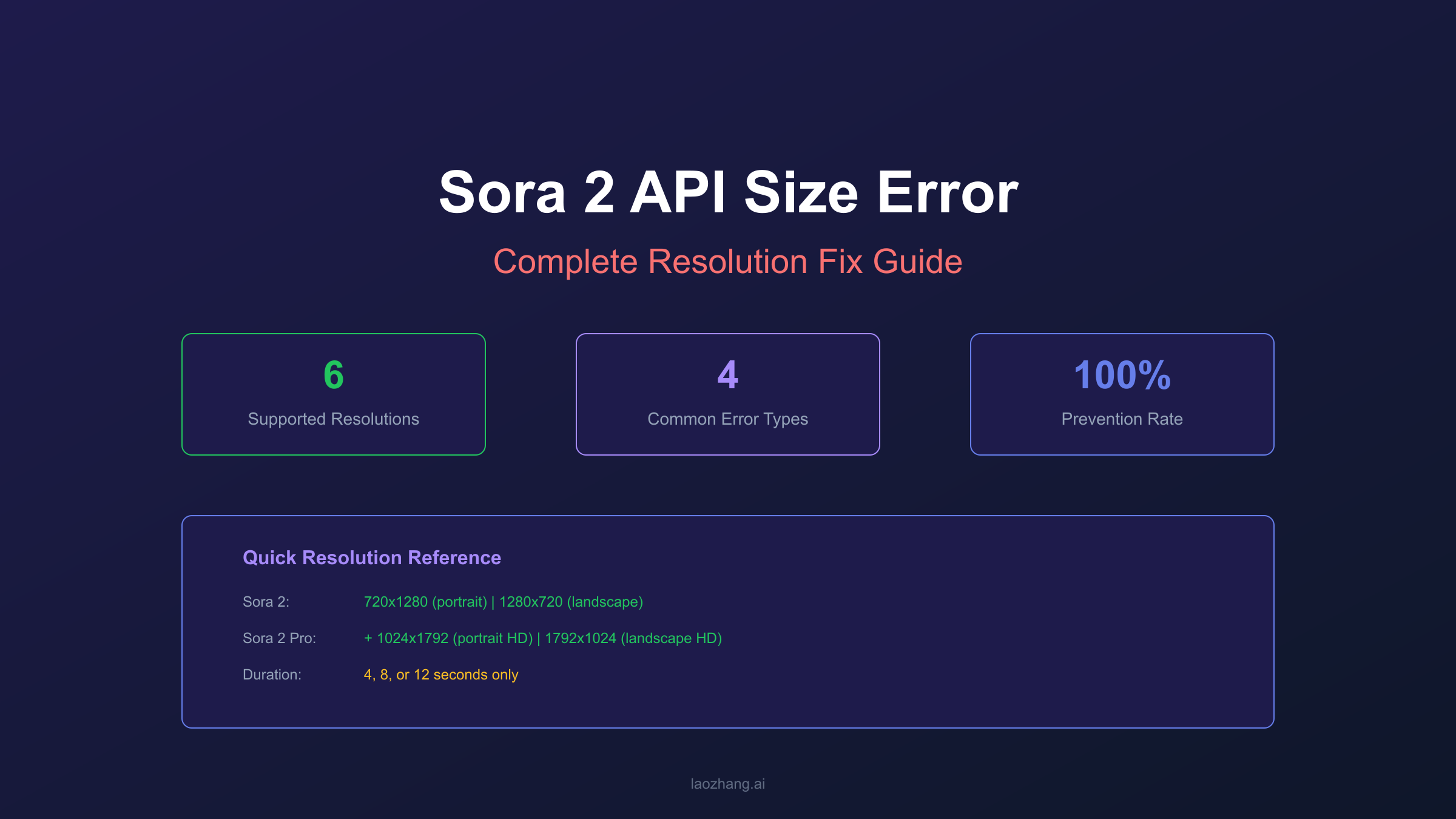
Understanding Sora 2 API Size Errors
Sora 2 API size errors occur when the resolution parameter doesn't match supported values, when reference image dimensions mismatch the target video size, or when using model-specific resolutions with the wrong model version.
The Sora 2 API validates dimension parameters strictly, yet often returns unhelpful error messages when validation fails. Understanding the root causes helps you diagnose issues faster, even when error messages provide little guidance.
The most common cause involves using arbitrary resolution values. Developers accustomed to specifying custom dimensions like "1920x1080" or "4K" discover that Sora 2 only accepts specific preset resolution strings. The API returns an HTTP 400 error with a generic "invalid parameter" message, leaving developers to guess which parameter caused the failure.
Image reference resolution mismatch presents a particularly frustrating scenario because it often fails silently. When the input_reference image doesn't exactly match your specified size parameter, the API may accept the request but fail during generation—or produce distorted results. No error message explains what went wrong, making this one of the most time-consuming issues to debug.
Model and resolution mismatch errors occur when requesting Pro-only resolutions (1792x1024 or 1024x1792) with the standard Sora 2 model. This results in an invalid parameter error that doesn't clearly indicate the resolution-model incompatibility.
Format string issues cause errors when developers use variations like "1280*720", "1280 x 720", or "720p" instead of the exact format "1280x720". The API requires the precise "WIDTHxHEIGHT" format with a lowercase 'x' separator. For more context on Sora 2 API capabilities and pricing structure, understanding these constraints helps plan your implementation approach.
Complete Resolution Reference
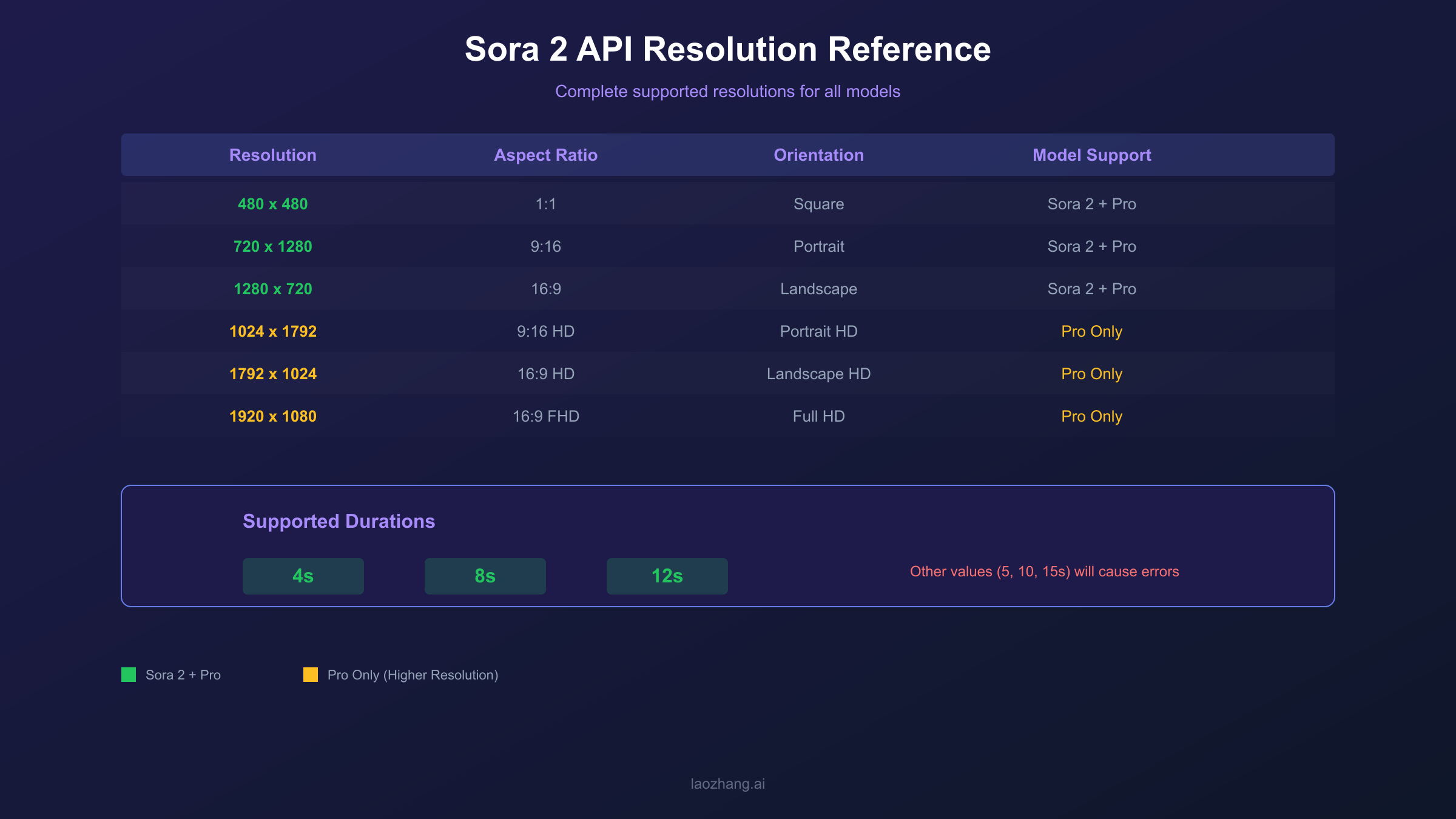
Sora 2 supports specific resolution presets that vary by model tier and platform. The standard Sora 2 model accepts 720x1280 (portrait) and 1280x720 (landscape), while Sora 2 Pro extends to 1024x1792 and 1792x1024 for higher-quality output.
OpenAI Direct API Resolutions
The OpenAI API supports these exact resolution strings:
| Model | Resolution | Aspect Ratio | Orientation |
|---|---|---|---|
| sora-2 | 720x1280 | 9:16 | Portrait (default) |
| sora-2 | 1280x720 | 16:9 | Landscape |
| sora-2-pro | 720x1280 | 9:16 | Portrait |
| sora-2-pro | 1280x720 | 16:9 | Landscape |
| sora-2-pro | 1024x1792 | 9:16 | Portrait HD |
| sora-2-pro | 1792x1024 | 16:9 | Landscape HD |
Azure OpenAI Extended Resolutions
Azure's implementation supports additional resolution options:
| Resolution | Aspect Ratio | Use Case |
|---|---|---|
| 480x480 | 1:1 | Square thumbnails |
| 480x854 | 9:16 | Low-bandwidth portrait |
| 854x480 | 16:9 | Low-bandwidth landscape |
| 720x720 | 1:1 | Square standard |
| 720x1280 | 9:16 | Portrait standard |
| 1280x720 | 16:9 | Landscape standard |
| 1080x1080 | 1:1 | Square HD |
| 1080x1920 | 9:16 | Portrait full HD |
| 1920x1080 | 16:9 | Landscape full HD |
Duration Constraints
Regardless of resolution, duration only accepts three values:
| Duration | Credits Impact | Recommendation |
|---|---|---|
| 4 seconds | Lowest | Testing and iteration |
| 8 seconds | Medium | Short clips |
| 12 seconds | Highest | Full sequences |
Attempting other duration values triggers parameter validation errors. Start with 4-second generations during development to conserve credits while validating your resolution and prompt configurations.
Sora 2 vs Sora 2 Pro: Resolution Differences
The key difference between Sora 2 and Sora 2 Pro lies in maximum supported resolution: standard Sora 2 caps at 720p (1280x720), while Sora 2 Pro extends to approximately 1080p equivalent with 1792x1024 landscape and 1024x1792 portrait options.
Understanding which model supports which resolution prevents the common error of requesting Pro resolutions from the standard model. This comparison helps you choose the appropriate model for your quality requirements.
Feature Comparison
| Feature | Sora 2 | Sora 2 Pro |
|---|---|---|
| Max Landscape | 1280x720 | 1792x1024 |
| Max Portrait | 720x1280 | 1024x1792 |
| Quality Level | 720p | ~1080p |
| Credit Cost | Lower | Higher |
| Generation Time | ~60-70s (4s video) | ~80-90s (4s video) |
When to Use Each Model
Choose Sora 2 Standard when:
- Prototyping and testing prompt variations
- Budget constraints require lower credit consumption
- Output will be viewed on mobile devices where 720p suffices
- Speed matters more than maximum quality
Choose Sora 2 Pro when:
- Final production output requires higher resolution
- Content targets large screens or desktop viewing
- Marketing materials demand professional quality
- The additional generation time and credits are acceptable
The resolution capabilities directly affect your API parameter choices. Specifying "1792x1024" with model "sora-2" (not "sora-2-pro") causes an invalid parameter error because that resolution exceeds the standard model's capabilities.
Image Reference Resolution Matching
When using the input_reference parameter for image-to-video generation, the reference image must exactly match your target video's size parameter—mismatches cause silent failures or distorted output without helpful error messages.
This requirement represents one of the most frustrating aspects of Sora 2 API integration because violations often produce no clear error. The API may accept your request, process it, and fail during generation or produce unusable results.
The Matching Requirement
According to the OpenAI API documentation, when you include an image file as the input_reference parameter:
- The image must match the target video's resolution (size parameter)
- Supported formats: JPEG, PNG, WebP
- The image anchors the first frame of the generated video
What Happens When Dimensions Mismatch
The API behavior varies unpredictably with dimension mismatches:
| Scenario | Likely Outcome |
|---|---|
| Slightly off (e.g., 1279x720) | Silent failure during generation |
| Wrong aspect ratio | Distorted video output |
| Significantly different | Generation failure with generic error |
| Correct dimensions | Successful generation |
Prevention Strategy
Before submitting any image-to-video request:
- Check your target
sizeparameter - Verify reference image dimensions match exactly
- Resize if necessary before API call
- Validate aspect ratio matches (9:16 or 16:9)
The code examples section provides automatic image resizing functions that handle this validation for you, eliminating this common error source entirely.
Step-by-Step Fix: Resolving Size Errors
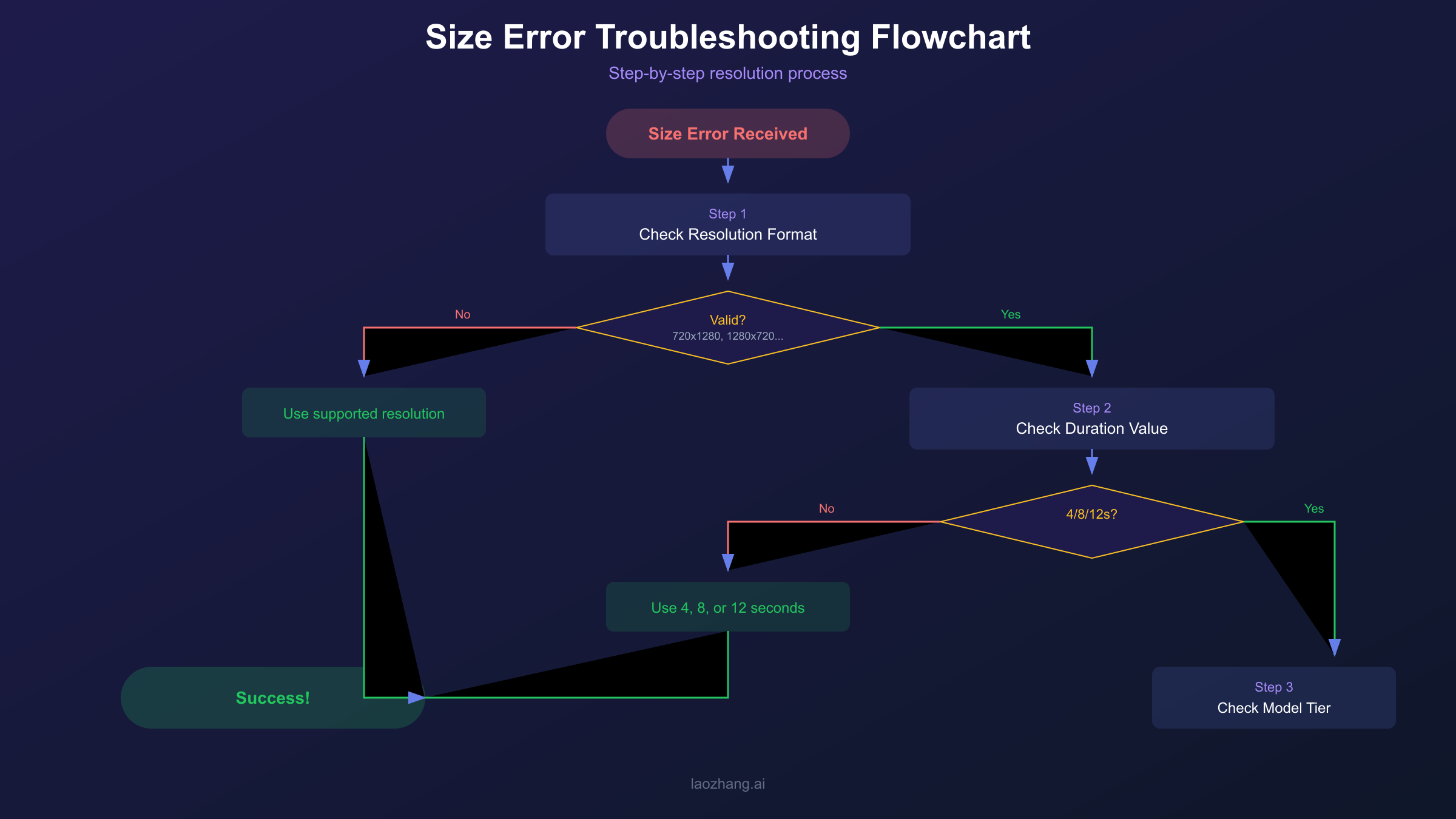
To fix Sora 2 API size errors, verify your resolution string matches supported values exactly, ensure reference images match target dimensions, and confirm you're using the correct model for your desired resolution.
Follow this systematic approach when encountering size-related errors:
Step 1: Verify Resolution String Format
Check that your size parameter uses the exact format:
✅ Correct: "1280x720"
❌ Wrong: "1280*720"
❌ Wrong: "1280 x 720"
❌ Wrong: "720p"
❌ Wrong: "1280X720" (uppercase X)
Step 2: Confirm Resolution Supported for Your Model
Cross-reference your requested resolution with the model you're using:
Model: sora-2
Supported: 720x1280, 1280x720

Model: sora-2-pro
Supported: 720x1280, 1280x720, 1024x1792, 1792x1024
Step 3: Check Image Reference Dimensions (if applicable)
If using input_reference, verify the image dimensions:
hljs pythonfrom PIL import Image
def check_image_dimensions(image_path, target_size):
img = Image.open(image_path)
target_width, target_height = map(int, target_size.split('x'))
if img.size == (target_width, target_height):
print(f"✅ Image matches target: {img.size}")
return True
else:
print(f"❌ Mismatch - Image: {img.size}, Target: ({target_width}, {target_height})")
return False
Step 4: Validate API Endpoint
Ensure you're using the current endpoint:
✅ Current: /v1/videos
❌ Deprecated: /video/generations/jobs
Step 5: Review Complete Request
Before submission, validate all parameters:
hljs pythondef validate_sora_request(model, size, duration, prompt):
errors = []
# Model validation
valid_models = ['sora-2', 'sora-2-pro']
if model not in valid_models:
errors.append(f"Invalid model: {model}")
# Size validation by model
sora2_sizes = ['720x1280', '1280x720']
sora2_pro_sizes = ['720x1280', '1280x720', '1024x1792', '1792x1024']
if model == 'sora-2' and size not in sora2_sizes:
errors.append(f"Size {size} not supported for sora-2")
elif model == 'sora-2-pro' and size not in sora2_pro_sizes:
errors.append(f"Size {size} not supported for sora-2-pro")
# Duration validation
valid_durations = [4, 8, 12]
if duration not in valid_durations:
errors.append(f"Duration must be 4, 8, or 12 seconds")
return errors if errors else None
If official API access proves problematic, third-party services like laozhang.ai offer OpenAI-compatible endpoints with the same resolution requirements but often better error messaging.
Working Code Examples
These code examples include automatic image resizing and parameter validation to prevent size errors before they occur—copy and adapt them for your Sora 2 API integration.
Python: Complete Implementation with Auto-Resize
hljs pythonimport requests
import time
from PIL import Image
from io import BytesIO
# Configuration
API_KEY = "your_api_key_here"
BASE_URL = "https://api.openai.com/v1" # Or third-party endpoint
# Supported configurations
SORA2_SIZES = ['720x1280', '1280x720']
SORA2_PRO_SIZES = ['720x1280', '1280x720', '1024x1792', '1792x1024']
VALID_DURATIONS = [4, 8, 12]
def resize_image_for_sora(image_path, target_size):
"""
Resize image to match Sora 2 target resolution.
Returns the resized image as bytes.
"""
target_width, target_height = map(int, target_size.split('x'))
img = Image.open(image_path)
# Check if resize needed
if img.size == (target_width, target_height):
# Already correct size, return original
buffer = BytesIO()
img.save(buffer, format='PNG')
return buffer.getvalue()
# Resize with high quality
resized = img.resize((target_width, target_height), Image.Resampling.LANCZOS)
buffer = BytesIO()
resized.save(buffer, format='PNG')
return buffer.getvalue()
def validate_parameters(model, size, duration):
"""Validate all parameters before API call."""
errors = []
# Model check
if model == 'sora-2':
if size not in SORA2_SIZES:
errors.append(f"Size '{size}' not valid for sora-2. Use: {SORA2_SIZES}")
elif model == 'sora-2-pro':
if size not in SORA2_PRO_SIZES:
errors.append(f"Size '{size}' not valid for sora-2-pro. Use: {SORA2_PRO_SIZES}")
else:
errors.append(f"Unknown model: {model}")
if duration not in VALID_DURATIONS:
errors.append(f"Duration must be 4, 8, or 12. Got: {duration}")
return errors
def generate_video(prompt, model='sora-2', size='1280x720', duration=4, image_path=None):
"""
Generate video with full parameter validation and optional image reference.
"""
# Validate before calling API
errors = validate_parameters(model, size, duration)
if errors:
raise ValueError(f"Parameter validation failed: {errors}")
headers = {
'Authorization': f'Bearer {API_KEY}',
}
# Prepare request based on whether image reference is used
if image_path:
# Multipart form for image-to-video
image_data = resize_image_for_sora(image_path, size)
files = {
'input_reference': ('image.png', image_data, 'image/png')
}
data = {
'model': model,
'prompt': prompt,
'size': size,
'seconds': str(duration)
}
response = requests.post(
f'{BASE_URL}/videos',
headers=headers,
files=files,
data=data,
timeout=60
)
else:
# JSON for text-to-video
headers['Content-Type'] = 'application/json'
payload = {
'model': model,
'prompt': prompt,
'size': size,
'seconds': duration
}
response = requests.post(
f'{BASE_URL}/videos',
headers=headers,
json=payload,
timeout=60
)
response.raise_for_status()
return response.json()
def poll_for_completion(video_id, max_wait=300):
"""Poll for video generation completion."""
headers = {'Authorization': f'Bearer {API_KEY}'}
for _ in range(max_wait // 5):
response = requests.get(
f'{BASE_URL}/videos/{video_id}',
headers=headers,
timeout=30
)
data = response.json()
status = data.get('status')
if status == 'completed':
return data.get('video_url')
elif status == 'failed':
raise Exception(f"Generation failed: {data.get('error', 'Unknown error')}")
time.sleep(5)
raise TimeoutError("Video generation timed out")
# Usage examples
if __name__ == '__main__':
# Text-to-video with landscape orientation
try:
result = generate_video(
prompt="A drone shot flying over a coastal city at sunset",
model='sora-2',
size='1280x720',
duration=4
)
print(f"Video task created: {result}")
except ValueError as e:
print(f"Validation error: {e}")
except requests.HTTPError as e:
print(f"API error: {e}")
JavaScript/Node.js: With Validation
hljs javascriptconst axios = require('axios');
const sharp = require('sharp');
const FormData = require('form-data');
const fs = require('fs');
const API_KEY = 'your_api_key_here';
const BASE_URL = 'https://api.openai.com/v1';
const SORA2_SIZES = ['720x1280', '1280x720'];
const SORA2_PRO_SIZES = ['720x1280', '1280x720', '1024x1792', '1792x1024'];
const VALID_DURATIONS = [4, 8, 12];
function validateParameters(model, size, duration) {
const errors = [];
if (model === 'sora-2' && !SORA2_SIZES.includes(size)) {
errors.push(`Size '${size}' not valid for sora-2`);
} else if (model === 'sora-2-pro' && !SORA2_PRO_SIZES.includes(size)) {
errors.push(`Size '${size}' not valid for sora-2-pro`);
}
if (!VALID_DURATIONS.includes(duration)) {
errors.push(`Duration must be 4, 8, or 12`);
}
return errors.length ? errors : null;
}
async function resizeImageForSora(imagePath, targetSize) {
const [width, height] = targetSize.split('x').map(Number);
const resizedBuffer = await sharp(imagePath)
.resize(width, height, { fit: 'fill' })
.png()
.toBuffer();
return resizedBuffer;
}
async function generateVideo(prompt, options = {}) {
const {
model = 'sora-2',
size = '1280x720',
duration = 4,
imagePath = null
} = options;
// Validate parameters
const errors = validateParameters(model, size, duration);
if (errors) {
throw new Error(`Validation failed: ${errors.join(', ')}`);
}
const headers = { 'Authorization': `Bearer ${API_KEY}` };
let response;
if (imagePath) {
// Image-to-video with multipart form
const imageBuffer = await resizeImageForSora(imagePath, size);
const form = new FormData();
form.append('model', model);
form.append('prompt', prompt);
form.append('size', size);
form.append('seconds', String(duration));
form.append('input_reference', imageBuffer, {
filename: 'image.png',
contentType: 'image/png'
});
response = await axios.post(`${BASE_URL}/videos`, form, {
headers: { ...headers, ...form.getHeaders() },
timeout: 60000
});
} else {
// Text-to-video with JSON
response = await axios.post(`${BASE_URL}/videos`, {
model,
prompt,
size,
seconds: duration
}, {
headers: { ...headers, 'Content-Type': 'application/json' },
timeout: 60000
});
}
return response.data;
}
// Usage
(async () => {
try {
const result = await generateVideo(
'A time-lapse of clouds moving over mountain peaks',
{ model: 'sora-2', size: '1280x720', duration: 8 }
);
console.log('Video task:', result);
} catch (error) {
console.error('Error:', error.message);
}
})();
For alternative API access with potentially clearer error messaging, laozhang.ai offers OpenAI-compatible endpoints. Simply replace the BASE_URL while keeping the same parameter format and validation logic.
Frequently Asked Questions
Why does my Sora 2 API call fail with no clear error message?
Silent failures typically indicate image reference dimension mismatches. The API accepts the request but fails during generation when your reference image dimensions don't exactly match the size parameter. Always verify image dimensions match your target resolution before submitting. Use the auto-resize code provided in this guide to eliminate this issue.
Can I use custom resolutions like 1920x1080 with Sora 2?
No, Sora 2 only accepts specific preset resolutions. For standard Sora 2, use 720x1280 or 1280x720. For Sora 2 Pro, add 1024x1792 and 1792x1024. Azure deployments support additional presets including 1920x1080, but direct OpenAI API access is limited to the listed options.
What's the difference between Sora 2 and Sora 2 Pro resolution support?
Standard Sora 2 maxes at 720p (1280x720 landscape, 720x1280 portrait). Sora 2 Pro extends to approximately 1080p equivalent with 1792x1024 landscape and 1024x1792 portrait options. Requesting Pro-only resolutions with the standard model causes parameter validation errors.
How do I resize an image to match Sora 2's expected dimensions?
Use an image processing library like Python's Pillow or Node.js's Sharp. The key is matching both width and height exactly. See the code examples section for complete auto-resize functions that handle this automatically before API submission.
Why does the format "1280 x 720" cause errors when "1280x720" works?
The API requires the exact format "WIDTHxHEIGHT" with a lowercase 'x' and no spaces. Variations like "1280 x 720", "1280*720", or "720p" fail validation. Always use the precise format with no additional characters or spacing.