Sora 2 Pricing Per Second: Complete 2025 Cost Guide ($0.10 to $0.50/s)
Detailed Sora 2 pricing breakdown per second. Learn exact costs for 720p and 1080p, credit system explained, hidden fees, and cost-saving strategies.
Nano Banana Pro
4K-80%Google Gemini 3 Pro · AI Inpainting
谷歌原生模型 · AI智能修图

Sora 2 costs between $0.10 and $0.50 per second depending on the model tier and resolution you choose. For a typical 10-second video, that translates to $1 to $5 through the official API, making OpenAI's video generation one of the more expensive options in the AI video space. However, the per-second pricing model offers unique advantages for precise budget control that subscription-based alternatives cannot match.
Understanding exactly how Sora 2 charges for each second of video is essential before committing significant budget to video generation projects. The pricing structure involves multiple variables including model selection (Standard vs Pro), resolution (720p vs 1080p), and access method (API vs subscription credits). Many creators discover unexpected costs when scaling from experiments to production because they did not fully understand how resolution multipliers and hidden fees compound. This guide breaks down every cost component so you can accurately forecast your video generation budget.
Sora 2 Per-Second Pricing Breakdown
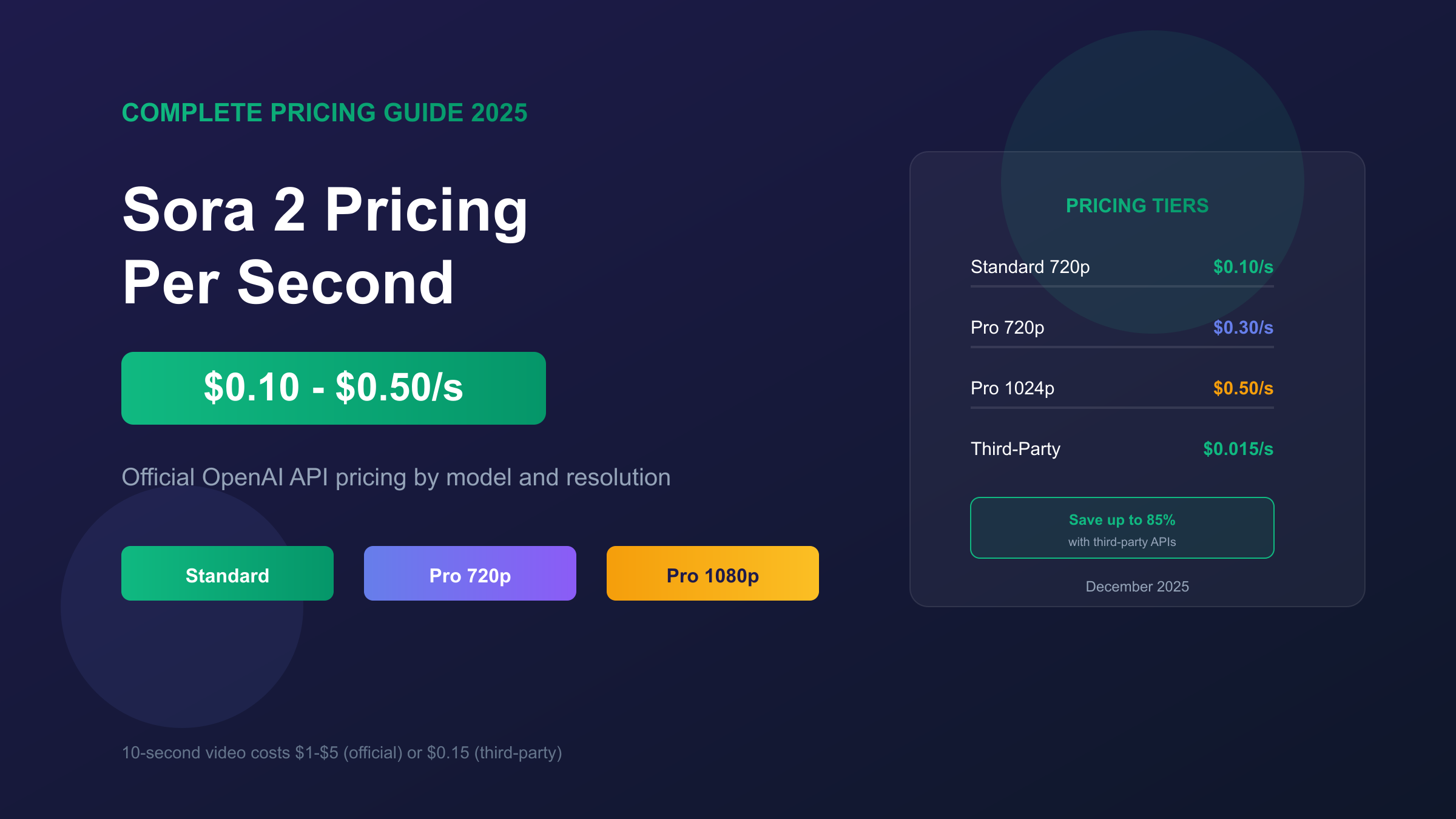
OpenAI's Sora 2 API uses a straightforward per-second billing model with no minimum generation length or per-request fees. According to OpenAI's official documentation, the API launched on October 6, 2025, and bills in exact one-second increments, meaning a 3-second test video costs exactly $0.30 at the standard tier.
| Model | Resolution | Cost Per Second | 5s Video | 10s Video | 20s Video |
|---|---|---|---|---|---|
| Sora 2 Standard | 720p | $0.10 | $0.50 | $1.00 | $2.00 |
| Sora 2 Pro | 720p | $0.30 | $1.50 | $3.00 | $6.00 |
| Sora 2 Pro | 1024p | $0.50 | $2.50 | $5.00 | $10.00 |
| Sora 2 Pro | 1792×1024 | $0.50 | $2.50 | $5.00 | $10.00 |
The Standard model at $0.10/second represents the entry point for developers, delivering 720p output suitable for social media and web content. The Pro model at $0.30-$0.50/second unlocks higher resolutions and improved prompt adherence, particularly for complex scenes with text or specific character requirements. The price jump from 720p to 1024p in Pro tier is significant: the same 10-second video costs $3.00 at 720p but $5.00 at 1024p, a 67% increase for approximately 2x the pixel count.
One critical detail many miss: API access currently requires OpenAI approval and remains invite-only for most developers. The per-second pricing applies once approved, but gaining initial access may involve waiting periods or specific use-case justifications.
Understanding the Credit System
ChatGPT subscribers access Sora 2 through a credit-based system rather than direct per-second billing. The credit model converts complex per-second calculations into a simpler currency, but understanding the exchange rate is essential for accurate budgeting. Each credit effectively costs $0.02 based on subscription pricing, though the value varies significantly by how you use them.
Credit Consumption by Resolution:
| Resolution | Credits Per Second | 5s Video | 10s Video | Effective $/Second |
|---|---|---|---|---|
| 480p | 4 | 20 | 40 | $0.08 |
| 720p | 16 | 80 | 160 | $0.32 |
| 1080p | 40 | 200 | 400 | $0.80 |
The resolution multiplier creates dramatic cost differences. Moving from 480p to 720p quadruples your credit consumption (4 credits/second to 16 credits/second). The jump to 1080p adds another 2.5x multiplier (16 to 40 credits/second). A 10-second video that costs 40 credits at 480p consumes 400 credits at 1080p, a 10x difference for the same duration.
Subscription Allocation:
| Plan | Monthly Price | Monthly Credits | 1080p Videos (10s) | Effective Cost/Credit |
|---|---|---|---|---|
| ChatGPT Plus | $20 | 1,000 | 2.5 | $0.02 |
| ChatGPT Pro | $200 | 10,000 | 25 | $0.02 |
ChatGPT Plus subscribers receive 1,000 credits monthly, enough for approximately 62 ten-second videos at 480p, 6 at 720p, or just 2.5 at 1080p. The math reveals why Plus users frequently run out of credits mid-month. Pro subscribers get 10x the allocation (10,000 credits), making 1080p production practical at 25 ten-second videos monthly. Credits reset monthly and do not roll over, creating use-it-or-lose-it pressure that often leads to inefficient end-of-month generation.
API Pricing vs Subscription: Which Costs More?
The choice between API access and subscription depends heavily on your production volume and resolution requirements. Direct API billing provides precise cost control while subscriptions offer predictable monthly expenses. Breaking down the math reveals which option delivers better value for different use cases.
Cost Comparison at 720p Resolution (10s videos):
| Monthly Volume | API Cost | Plus Cost | Pro Cost | Best Value |
|---|---|---|---|---|
| 5 videos | $5 | $20 | $200 | API |
| 25 videos | $25 | $20 | $200 | Plus |
| 50 videos | $50 | N/A | $200 | API |
| 100 videos | $100 | N/A | $200 | API or Pro |
| 200 videos | $200 | N/A | $200 | Pro |
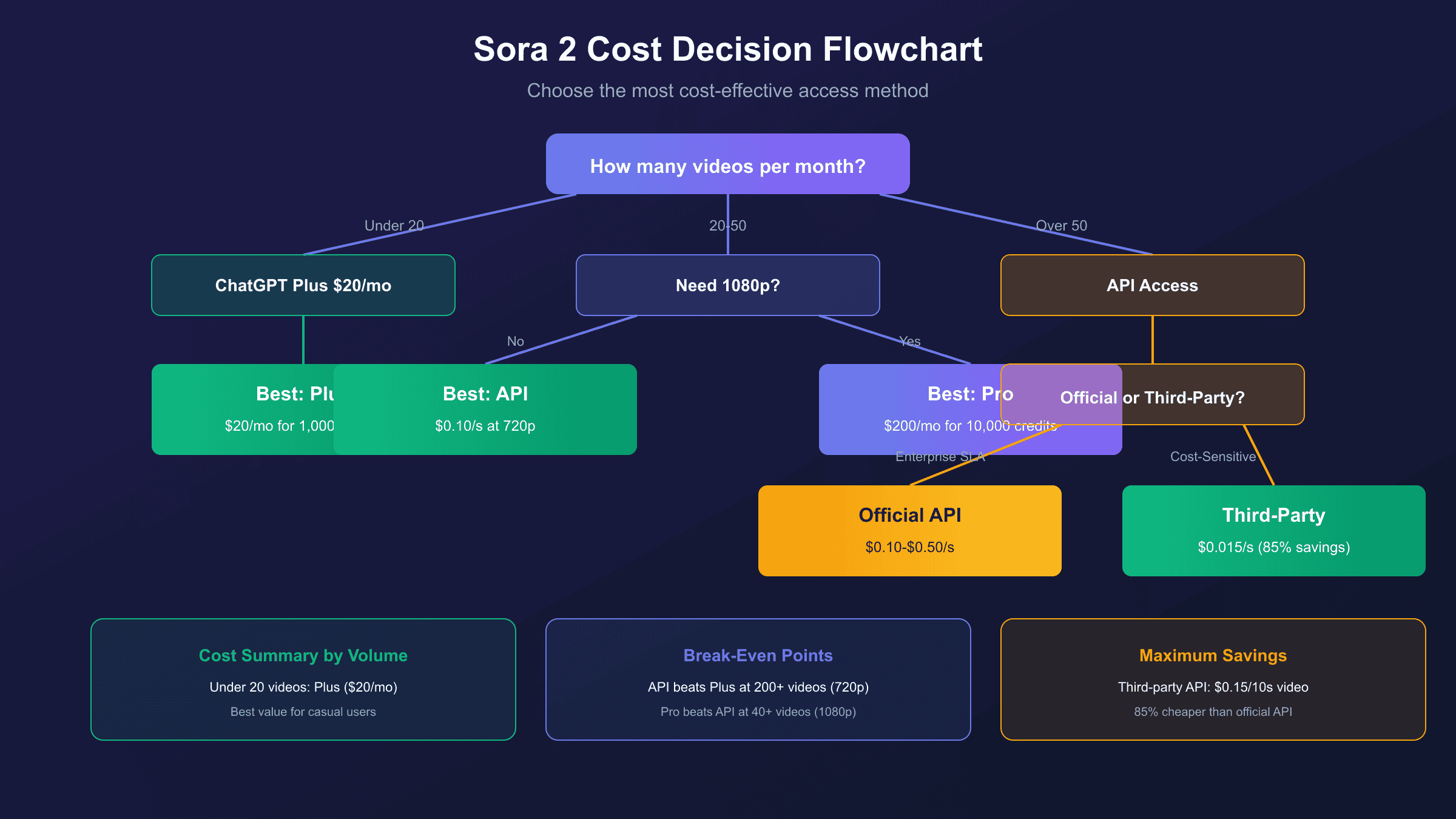
For low-volume users (under 20 videos monthly at 720p), Plus subscription provides the best value despite the $20 flat cost because you gain access to other ChatGPT features. API becomes more economical above approximately 50 videos monthly where the pay-per-use model outperforms the Pro subscription's $200 fixed cost. The break-even point for Pro occurs around 200 ten-second 720p videos, where $200 in API costs equals the subscription price.
However, resolution dramatically shifts these calculations. At 1080p, Plus users cannot access full resolution at all, making API or Pro the only options. Pro subscription makes economic sense at just 50 ten-second 1080p videos monthly ($250 API cost vs $200 subscription). For 1080p production, Pro subscription almost always delivers better value unless you generate fewer than 40 videos monthly.
One underappreciated advantage of API: you pay only for successful generations. Subscription credits are consumed even for generations you dislike or cannot use, while API billing applies only when you save content.
Hidden Costs Most Guides Miss
The advertised per-second rates represent only the base cost. Several additional charges can significantly inflate your actual video generation budget, and understanding these hidden costs prevents budget overruns during production scaling.
Resolution Upscaling Impact:
Moving from 720p to 1080p is not a simple upscale operation. Sora 2 regenerates the entire video at higher resolution, consuming 3-5x more resources. This explains why credit consumption jumps from 16/second to 40/second (2.5x) while API pricing increases from $0.30 to $0.50 (1.67x). The disparity means subscription users face steeper resolution penalties than API users.
| Transition | Credit Multiplier | API Multiplier | Real Cost (10s) |
|---|---|---|---|
| 480p → 720p | 4x | 3x | $0.40 → $1.00 |
| 720p → 1080p | 2.5x | 1.67x | $1.00 → $5.00 |
| 480p → 1080p | 10x | 5x | $0.40 → $5.00 |
Failed Generation Charges:
OpenAI bills for the generation attempt, not the result quality. If Sora 2 produces a video with distorted faces, incorrect text, or other artifacts, you pay the full per-second rate regardless. At $0.50/second for Pro 1080p, a single failed 10-second generation costs $5 with no refund mechanism. Budget 15-20% additional for expected failures during complex prompt work.
Feature-Specific Costs:
| Feature | Additional Cost | Notes |
|---|---|---|
| Remix (modification) | 30-50% of new generation | Cheaper than regenerating |
| Storyboard | Variable (200-1200 credits) | Multi-clip planning mode |
| Extended storage | $0.01/GB/month | Beyond 30-day retention |
| 15-second videos | Counts as 2 videos | Toward daily limits |
| 25-second videos | Counts as 4 videos | Pro storyboard only |
The Remix feature offers savings for iterative work: modifying an existing generation costs 30-50% of creating new content. If you are refining a concept, always use Remix rather than fresh generation. Storyboard mode enables multi-clip planning but can consume 800-1,200 credits for complex sequences, far exceeding simple single-clip generation.

Cost Calculator: Real-World Examples
Abstract per-second rates become meaningful when applied to actual production scenarios. These examples demonstrate how costs compound across typical creator workflows.
Example 1: Social Media Creator (50 videos/month)
Target: 50 short-form videos at 720p, 10 seconds each
| Method | Calculation | Monthly Cost |
|---|---|---|
| API Standard | 50 × 10s × $0.10 | $50 |
| API Pro | 50 × 10s × $0.30 | $150 |
| Plus Subscription | 50 × 160 credits = 8,000 (exceeds limit) | N/A |
| Pro Subscription | 50 × 160 credits = 8,000 | $200 |
Recommendation: API Standard at $50/month provides the best value. Pro subscription only makes sense if you need 1080p or other Pro features.
Example 2: Marketing Agency (200 videos/month)
Target: 200 mixed-resolution videos (100 at 720p, 100 at 1080p), averaging 15 seconds
| Method | Calculation | Monthly Cost |
|---|---|---|
| API (720p portion) | 100 × 15s × $0.30 | $450 |
| API (1080p portion) | 100 × 15s × $0.50 | $750 |
| Total API | $1,200 | |
| Pro Subscription | Limited to 25 1080p 10s videos | Insufficient |
Recommendation: API is the only viable option at this volume. Consider hybrid approach with Pro for guaranteed baseline plus API for overflow.
Example 3: Developer Testing (10 videos/day)
Target: 300 test videos monthly at 480p, 5 seconds each
| Method | Calculation | Monthly Cost |
|---|---|---|
| API Standard | 300 × 5s × $0.10 | $150 |
| Plus Subscription | 300 × 20 credits = 6,000 (exceeds limit) | N/A |
| Pro Subscription | 300 × 20 credits = 6,000 | $200 |
Recommendation: API at $150 beats Pro subscription for testing workflows where 480p suffices.
Sora 2 vs Competitors: Price Per Second
Understanding how Sora 2 pricing compares to alternatives helps identify whether OpenAI's offering delivers appropriate value for your requirements. Each platform optimizes for different trade-offs between cost, quality, and features.
| Platform | Cost Per Second | Max Duration | Resolution | Best For |
|---|---|---|---|---|
| Sora 2 Standard | $0.10 | 20s | 720p | Quality-focused creators |
| Sora 2 Pro | $0.30-$0.50 | 90s | 1080p | Professional production |
| Runway Gen-3 | ~$0.018 | 10s | 4K | Film production |
| Pika 2.0 | ~$0.009 | 8s | 1080p | Budget creators |
| Haiper AI | $0.012 | 6s | 720p | Maximum economy |
Sora 2 commands premium pricing at $0.10-$0.50/second compared to competitors averaging $0.01-$0.02/second. The 5-10x price difference reflects OpenAI's positioning for photorealistic, physics-accurate output rather than stylized or abstract video. Runway Gen-3 offers 4K output at lower per-second cost but limits duration to 10 seconds versus Sora 2's 20-90 second capability.
For budget-conscious projects, Pika 2.0 at approximately $0.009/second delivers 1080p output at roughly 3% of Sora 2 Pro pricing. The quality difference is noticeable but may be acceptable for social media or experimental content. Haiper AI provides the absolute lowest cost at $0.012/second but limits videos to 6 seconds maximum.
Value analysis reveals Sora 2's strength lies in longer-form content where competitors face duration restrictions. A 60-second video is possible only through Sora 2 (with Pro subscription), making it the default choice regardless of per-second cost for extended sequences.
Third-Party API Options
The official OpenAI Sora 2 API remains invite-only, leaving most developers seeking access through third-party aggregation platforms. These services provide API access at significantly reduced costs, though with different reliability and support characteristics.
| Provider | Cost/10s Video | vs Official | Reliability | Notes |
|---|---|---|---|---|
| OpenAI Official | $1.00-5.00 | Baseline | Enterprise SLA | Invite-only |
| laozhang.ai | $0.15 | -85% | Stable | 200+ models |
| Defapi | $0.10 | -90% | Variable | Flat rate |
| fal.ai | $0.16-0.20 | -80% | Good | Established platform |
Third-party platforms achieve 50-90% cost reduction by aggregating demand across many users and negotiating volume pricing. laozhang.ai offers Sora 2 access at $0.15 per 10-second video, representing 85% savings compared to official $1.00+ pricing. The platform supports 200+ AI models through a unified API, making it particularly convenient for developers already using multiple AI services.
The trade-offs with third-party access are real but manageable for most use cases. Enterprise SLA guarantees do not extend to unofficial integrations, meaning uptime commitments and support responsiveness may differ from OpenAI direct. Output consistency depends on the aggregator's backend infrastructure and their access arrangements with OpenAI. For production workloads requiring guaranteed uptime, official API access (once available) remains the safer choice. For development, testing, and cost-sensitive production, third-party options deliver equivalent output at a fraction of the cost.
Code integration with aggregators typically mirrors official SDK patterns, requiring only endpoint URL changes. The familiar OpenAI SDK works with most providers, minimizing migration effort if you later transition to official API access.
Cost Optimization Strategies
Strategic choices throughout the video generation workflow can reduce costs by 50-80% without sacrificing output quality. These techniques apply whether using official API or third-party access.
Resolution Strategy:
Start every project at 480p during concept development. At 4 credits/second versus 40 for 1080p, you save 90% during the iterative phase where most failed generations occur. Only upgrade resolution for final approved concepts. This single practice can reduce total project costs by 60% for typical workflows involving 5-10 iterations per final video.
| Phase | Recommended Resolution | Credits/Second | Purpose |
|---|---|---|---|
| Concept testing | 480p | 4 | Fast iteration, cheap failures |
| Draft review | 720p | 16 | Client/stakeholder preview |
| Final production | 1080p | 40 | Delivery quality |
Remix for Iterations:
Never regenerate from scratch when refining existing content. The Remix feature costs 30-50% of new generation while preserving elements you want to keep. A typical refinement cycle of 5 iterations costs $7.50 using Remix versus $25 regenerating each time (at Pro 1080p rates).
Prompt Engineering Investment:
Spend time crafting detailed prompts before generation. Sora 2 responds well to specific camera angles, lighting descriptions, and movement instructions. A precise prompt generating acceptable output in 2 attempts costs half as much as a vague prompt requiring 4+ iterations. Consider using GPT-4 to refine prompts before sending them to Sora 2.
Batch Planning:
Group similar video requests into single generation sessions. Sora 2's context window allows specifying multiple related outputs, and batch processing reduces overhead from repeated API calls. Plan your monthly content calendar and generate in batches rather than on-demand.
API Implementation for Developers
Integrating Sora 2 into applications requires understanding both the technical implementation and cost monitoring patterns. The official OpenAI Python SDK provides the simplest path to video generation.
Basic Generation Example:
hljs pythonfrom openai import OpenAI
import time
client = OpenAI(api_key="your-api-key")
# Generate video
video = client.videos.create(
model="sora-2-pro", # or "sora-2" for standard
prompt="A serene mountain lake at sunrise, camera slowly panning across the water",
size="1280x720", # Resolution affects pricing
duration=10 # Seconds - directly impacts cost
)
print(f"Video ID: {video.id}")
print(f"Estimated cost: ${0.30 * 10:.2f}") # Pro 720p rate
# Wait for generation (typically 60-180 seconds)
time.sleep(120)
# Download result
content = client.videos.download_content(video.id, variant="video")
content.write_to_file("output.mp4")
Cost Monitoring Pattern:
hljs pythondef generate_with_cost_tracking(prompt, duration, model="sora-2", resolution="720p"):
# Define pricing lookup
pricing = {
"sora-2": {"720p": 0.10},
"sora-2-pro": {"720p": 0.30, "1024p": 0.50}
}
cost = pricing[model][resolution] * duration
print(f"Estimated cost: ${cost:.2f}")
# Implement budget check
if cost > MAX_SINGLE_GENERATION_COST:
raise ValueError(f"Generation exceeds budget limit of ${MAX_SINGLE_GENERATION_COST}")
# Proceed with generation
video = client.videos.create(
model=model,
prompt=prompt,
duration=duration
)
return video, cost
For third-party integration (when official API is unavailable), the pattern adapts with minimal changes. Most aggregators support OpenAI SDK compatibility, requiring only base URL modification. Consult laozhang.ai documentation for specific integration details if using their Sora 2 endpoint.
Frequently Asked Questions
Q1: Is there any free way to use Sora 2?
No free tier currently exists for Sora 2. The minimum access path is ChatGPT Plus at $20/month, which provides 1,000 credits for limited video generation. Free ChatGPT accounts, Enterprise accounts, and Edu accounts do not have Sora access. Some invite-based early access programs existed previously but have concluded. Third-party platforms occasionally offer trial credits, but sustained free access is not available anywhere.
Q2: Why does 1080p cost so much more than 720p?
The 1080p pricing reflects genuine computational differences, not arbitrary upselling. Sora 2 does not simply upscale 720p output to 1080p. It regenerates the entire video at higher resolution, processing approximately 2.25x more pixels per frame (2,073,600 vs 921,600) while maintaining temporal consistency across all frames. The credit multiplier (2.5x) and API price increase (1.67x) reflect this additional processing load. The cost difference is real, which is why production workflows benefit from developing at lower resolution before final 1080p rendering.
Q3: Do unused credits roll over to the next month?
No. Both Plus and Pro subscription credits reset monthly without rollover. Credits are valid for 12 months from purchase but monthly allocations do not accumulate. This creates end-of-month pressure to use remaining credits, though generating unwanted content just to avoid waste is economically irrational. Better strategy: monitor usage patterns over 2-3 months to right-size your subscription tier.
Q4: How does API pricing compare to subscription for production use?
API becomes more cost-effective at approximately 50+ videos monthly at 720p (Standard tier) or 40+ videos at 1080p (Pro tier). Below these volumes, subscriptions offer better value because you gain additional ChatGPT features. Above these volumes, pay-per-use API billing eliminates waste from unused subscription credits. Most production users generating consistent volume prefer API for cost predictability and freedom from monthly resets.
Q5: Can third-party APIs match official Sora 2 quality?
Yes, third-party aggregators access the same underlying Sora 2 models, producing identical output quality. The difference lies in infrastructure, not model capability. Platforms like laozhang.ai route requests to genuine Sora 2 endpoints, meaning output is indistinguishable from direct OpenAI API access. The trade-off is support and SLA: official API includes OpenAI enterprise support, while aggregators handle support independently. For most development and production scenarios, the quality equivalence makes third-party options attractive at 85% cost savings.
Conclusion: Choosing Your Sora 2 Pricing Path
Sora 2's per-second pricing spans from $0.10 (Standard 720p) to $0.50 (Pro 1080p), with actual project costs heavily influenced by resolution choices, iteration count, and access method. The credit system adds complexity but generally translates to similar effective rates around $0.02-$0.08 per credit depending on resolution.
For occasional users generating fewer than 20 videos monthly, ChatGPT Plus at $20/month provides adequate access. Production users exceeding 50 videos monthly benefit from API access (official or third-party) for precise cost control. High-volume 1080p production justifies ChatGPT Pro at $200/month only when generating 40+ videos, below which API billing delivers better value.
Hidden costs from resolution upscaling, failed generations, and feature usage can inflate budgets 20-40% beyond base rates. Budget accordingly and implement the optimization strategies outlined above to maintain cost efficiency. For developers needing immediate API access without invite restrictions, third-party platforms like laozhang.ai offer production-ready Sora 2 access at 85% savings compared to official pricing.
For detailed comparison with image generation pricing, see our Nano Banana Pro vs Sora 2 guide. For the lowest-cost video API options, explore our cheapest Sora 2 API comparison.