Try Nano Banana Pro Free Today: Complete 2025 Guide to Free 4K AI Image Generation
Access Nano Banana Pro free through Google AI Studio (500+ images/day), Gemini App, and third-party platforms. Complete guide to generating true 4K images, API integration with code examples, and quality comparisons vs DALL-E 3.
Nano Banana Pro
4K-80%Google Gemini 3 Pro · AI Inpainting
谷歌原生模型 · AI智能修图

Want to generate stunning 4K AI images with Google's most advanced image model—without paying a cent? Nano Banana Pro (officially gemini-3-pro-image-preview) delivers native 4096×4096 resolution, 94% text rendering accuracy, and generation speeds under 2 seconds. The catch: Google has tightened free access to just 2-3 images per day on the consumer Gemini app. This guide reveals every method to access Nano Banana Pro free—from the generous 500+ images/day on AI Studio to zero-registration third-party platforms—plus complete tutorials for generating true 4K images and integrating the API into your projects.
What is Nano Banana Pro: Google's Most Powerful AI Image Generator
Nano Banana Pro represents Google DeepMind's flagship AI image generation technology, built on the Gemini 3 Pro multimodal foundation. The official model identifier is gemini-3-pro-image-preview, though the community has embraced the playful internal codename that Google eventually made official. Released in November 2025, this "Thinking" model fundamentally differs from previous generators by employing genuine reasoning before image creation—analyzing compositional requirements, understanding physical constraints, and generating intermediate concepts before producing final output.
The technical specifications place Nano Banana Pro at the industry's leading edge. Native resolution support spans 1K (1024px), 2K (2048px), and 4K (4096px), with the maximum 4K output producing images suitable for large-format printing, digital billboards, and professional design work without any upscaling artifacts. Text rendering accuracy reaches 94% legibility across 10 languages including English, Chinese, Japanese, and Korean—a significant advancement over competitors where embedded text often appears garbled or illegible. The model can maintain character consistency across multiple generations by referencing up to 14 input images, achieving 95% consistency in testing. Average generation time falls between 1.3 and 1.5 seconds for standard resolution, scaling to 6-8 seconds for 4K output.
| Technical Specification | Value |
|---|---|
| Model ID | gemini-3-pro-image-preview |
| Maximum Resolution | 4K (4096×4096) native |
| Text Rendering Accuracy | 94% (10 languages) |
| Character Consistency | 95% (up to 14 reference images) |
| Generation Time | 1.3-1.5s (standard), 6-8s (4K) |
| API Formats | Gemini Native + OpenAI Compatible |
Beyond raw specifications, Nano Banana Pro demonstrates what Google terms "world knowledge"—the ability to generate accurate representations of real-world locations, objects, and cultural elements. Request an image of the Eiffel Tower at sunset, and the model produces correct architectural details, appropriate Parisian surroundings, and authentic lighting conditions rather than generic tower imagery. This grounded understanding extends to product photography, architectural visualization, and any scenario requiring factual accuracy alongside creative execution.
Free Access Methods: Every Platform Compared
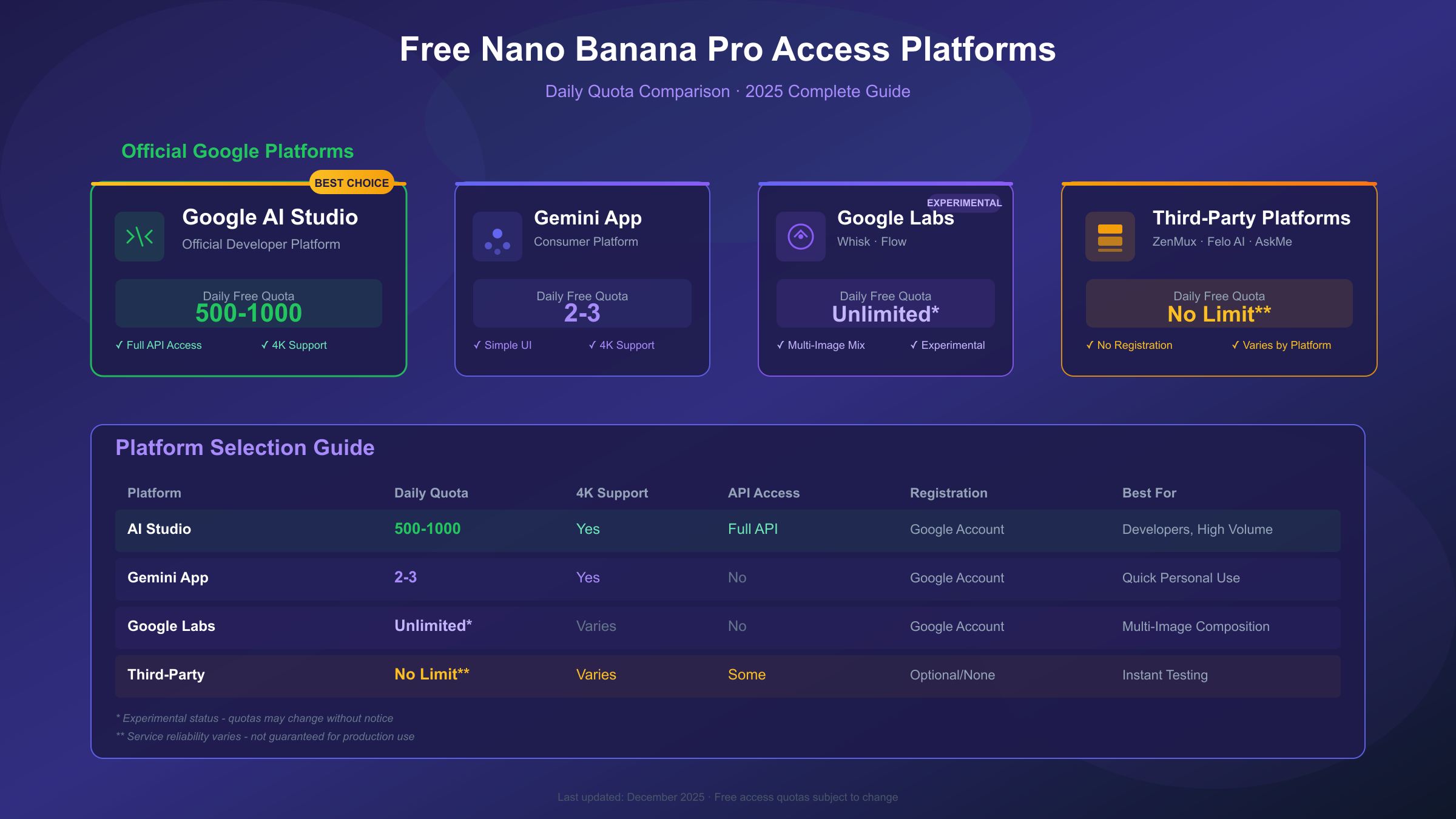
Accessing Nano Banana Pro without payment requires navigating an evolving landscape of official channels and third-party integrations. Google has progressively tightened free quotas in response to overwhelming demand, but multiple pathways remain for generating substantial numbers of images at no cost.
Google AI Studio stands as the most generous official option for developers. The platform provides 500-1000 free generations per day, though this number fluctuates based on current system load. Rate limiting applies at 5-10 requests per minute on the free tier, expanding to 300 RPM once billing is enabled. AI Studio requires a Google account and offers direct API key generation, making it ideal for developers building applications or experimenting with programmatic access. The daily quota resets at midnight Pacific Time.
Gemini App provides the simplest consumer experience but imposes severe limitations. Following the November 2025 demand surge, Google reduced free Nano Banana Pro access to just 2-3 images per 24 hours. This quota applies specifically to the Pro image model; the app's general image generation using standard Nano Banana remains more generous at approximately 100 images daily. Users select "Thinking" mode and the "Create images" tool to access the Pro model.
Google Labs platforms including Whisk and Flow operate under experimental status with more relaxed quotas. Whisk specializes in multi-image mixing, allowing combination of up to 6 reference images to generate new compositions. Flow focuses on video creation but supports static image generation as well. Both platforms access Nano Banana Pro capabilities without explicit daily limits, though Google may adjust access at any time given their experimental nature.
Third-party platforms have emerged to fill the gap as Google restricted official access. ZenMux operates as a model aggregator offering Nano Banana Pro with no apparent generation limits, though response times may be slower than direct Google access. Felo AI provides straightforward browser-based access with 4K support and built-in watermarking. AskMeAnything at ama.stockai.trade requires no registration whatsoever—simply open the page and start generating. Puter.js takes a unique approach, offering free API access where end users cover their own generation costs rather than developers.
Google AI Studio Setup: Developer's Free Tier Guide
For developers and power users, Google AI Studio provides the most practical path to substantial free Nano Banana Pro access. The setup process takes approximately five minutes and unlocks 500-1000 daily generations with full API access.
Navigate to aistudio.google.com and sign in with your Google account. The platform immediately provides access to multiple Gemini models including Nano Banana Pro under its official designation. From the left sidebar, select "Get API key" to generate credentials for programmatic access. Store this key securely—it provides authenticated access to your daily quota.
The free tier operates under specific constraints that affect practical usage. Requests per minute (RPM) are limited to 5-10 depending on current system load. Requests per day (RPD) cap at 500-1000, again varying with demand. During high-traffic periods, Google may dynamically reduce free allocations to maintain service quality for paid users. Testing during off-peak hours (late night to early morning Pacific Time) typically yields better quota availability.
New Google Cloud Platform accounts receive an additional bonus: $300 in free credits applicable to Gemini API usage, valid for 90 days. At standard pricing of $0.134 per image, this credit enables approximately 2,240 additional generations beyond the daily free tier—particularly valuable for 4K output which consumes more compute resources.
The Gemini API supports two distinct request formats. The native Gemini format provides complete parameter access including 4K resolution specification, while the OpenAI-compatible format simplifies migration from existing OpenAI integrations. For 4K generation specifically, the native format is required as the OpenAI compatibility layer doesn't expose all resolution parameters.
hljs python# Google AI Studio - Basic setup verification
import google.generativeai as genai
# Configure with your API key from AI Studio
genai.configure(api_key="YOUR_API_KEY")
# List available models to confirm access
for model in genai.list_models():
if "image" in model.name.lower():
print(f"Model: {model.name}")
print(f"Supported methods: {model.supported_generation_methods}")
5-Minute Quick Start: No Registration Required
For immediate testing without account creation, two platforms provide instant access to Nano Banana Pro capabilities.
AskMeAnything offers the fastest path to generation. Open ama.stockai.trade in any browser, type your image description in the chat interface, and receive results within 10-15 seconds. The platform requires no login, no API key, and no payment information. The tradeoff: generation history isn't saved, and you cannot revisit previous creations after closing the browser tab. This makes AskMeAnything ideal for quick experiments, testing prompt variations, or evaluating whether Nano Banana Pro suits your needs before committing to account creation elsewhere.
Felo AI provides a more feature-complete experience while remaining accessible. The platform explicitly supports Nano Banana Pro with 4K resolution output and includes automatic watermarking for content protection. Unlike AskMeAnything, Felo AI maintains generation history and offers model selection controls. The interface guides users through prompt construction with suggestions for achieving better results.
The quick-start workflow follows a straightforward pattern. First, confirm your network can reach the target platform—some enterprise networks block AI generation services. Second, prepare your prompt with specific visual requirements: subject, style, lighting, composition, and any text elements to include. Third, submit and evaluate. Fourth, iterate on promising results by refining the prompt rather than starting from scratch.
Quick Start Checklist: Confirm network access → Prepare detailed prompt → Generate test image → Evaluate quality → Refine and regenerate as needed
Most users can complete their first generation within three minutes using this approach. The resulting images provide an authentic preview of Nano Banana Pro capabilities, helping inform decisions about which platform to use for ongoing work.
Free Quota Comparison Table: Which Platform Offers Most
Choosing the optimal free platform depends on your specific requirements—whether prioritizing maximum quantity, highest resolution, or simplest access. The following comparison consolidates testing data across all major access methods.
| Platform | Daily Free Quota | 4K Support | API Access | Registration Required | Best For |
|---|---|---|---|---|---|
| Google AI Studio | 500-1000 | Yes | Yes | Yes (Google account) | Developers, high volume |
| Gemini App | 2-3 | Yes | No | Yes (Google account) | Quick personal use |
| Whisk (Labs) | Unlimited (experimental) | No | No | Yes | Multi-image composition |
| Flow (Labs) | Unlimited (experimental) | No | No | Yes | Video/sequence creation |
| ZenMux | No explicit limit | Yes | Yes | Yes | Model comparison |
| Felo AI | Unlimited | Yes | No | Optional | Casual generation |
| AskMeAnything | Unlimited | Unknown | No | No | Instant testing |
| Puter.js | Unlimited (user-pays) | Yes | Yes | Developer setup | Apps with user billing |
Google AI Studio clearly leads for serious work requiring volume and API integration. The 500-1000 daily limit, combined with full 4K support and programmatic access, makes it the default choice for developers and power users. The requirement for a Google account presents minimal friction for most users.
For quick experimentation without commitment, AskMeAnything's zero-registration approach proves unmatched. The inability to access 4K output limits professional applications, but for prompt testing and capability evaluation, nothing provides faster access.
Third-party aggregators like ZenMux occupy a middle ground, offering generous quotas without the Google account requirement while supporting advanced features. Response times may be slower than direct Google access, and long-term service reliability remains uncertain for platforms without Google's infrastructure backing.
The Google Labs platforms (Whisk, Flow) deserve consideration for specialized use cases. Their experimental status means quotas remain generous, though feature sets are narrower than the full Nano Banana Pro model. Whisk's multi-image mixing creates possibilities unavailable through standard text-to-image generation.
How to Generate True 4K Images: Technical Guide
Achieving genuine 4K output requires specific configuration that differs from default generation parameters. Many users unknowingly generate at 1K resolution and upscale afterward, losing the quality advantages that native 4K provides.
The critical parameter is imageSize in the generation configuration, which must be explicitly set to "4K" (uppercase). Without this specification, the API defaults to 1K output. The parameter exists within the imageConfig block of the generationConfig object when using the Gemini native API format.
hljs pythonimport requests
import base64
API_KEY = "YOUR_API_KEY" # From Google AI Studio
API_URL = "https://generativelanguage.googleapis.com/v1beta/models/gemini-3-pro-image-preview:generateContent"
headers = {
"Content-Type": "application/json",
"x-goog-api-key": API_KEY
}
# 4K generation configuration
payload = {
"contents": [{
"parts": [{
"text": "A majestic mountain landscape at golden hour, snow-capped peaks, detailed rock textures, professional photography quality"
}]
}],
"generationConfig": {
"responseModalities": ["IMAGE"],
"imageConfig": {
"aspectRatio": "auto",
"imageSize": "4K" # Must be uppercase: 1K, 2K, or 4K
}
}
}
response = requests.post(API_URL, headers=headers, json=payload, timeout=180)
result = response.json()
# Extract and save the base64 image
if "candidates" in result:
image_data = result["candidates"][0]["content"]["parts"][0]["inlineData"]["data"]
with open("output_4k.png", "wb") as f:
f.write(base64.b64decode(image_data))
print("4K image saved successfully")
Token consumption increases significantly with resolution. While Google hasn't published exact ratios, community testing indicates 4K generation consumes approximately 1.5-2x the compute units of 1K generation. This affects both rate limits (you may hit per-minute caps faster) and quota consumption (500 daily 1K images might translate to 250-330 4K images).
Generation time also scales with resolution. Expect 6-8 seconds for 4K output compared to 1.3-1.5 seconds at standard resolution. Setting appropriate timeout values (180 seconds recommended) prevents premature request termination during high-resolution generation.
The aspect ratio parameter accepts "auto" for model-determined ratios or specific values like "16:9", "4:3", "1:1", or "9:16". At 4K resolution, a 16:9 output produces a 4096×2304 pixel image, while 1:1 yields the full 4096×4096 maximum.
Maximize Your Free Quota: Optimization Strategies
With free quotas increasingly constrained, strategic approaches to generation maximize the value extracted from limited allocations.
Timing optimization significantly impacts effective quota availability. Google AI Studio quotas reset at midnight Pacific Time, and system load affects dynamic allocation throughout the day. Testing during off-peak hours—typically 11 PM to 6 AM Pacific—often yields access to the higher end of the 500-1000 daily range. Weekday mornings Pacific Time tend toward heavier load as US developers begin their workdays.
Resolution strategy requires balancing quality needs against quota consumption. Reserve 4K generation for final outputs where maximum quality matters. Use 1K resolution for prompt iteration, concept development, and test generations. A workflow generating 10 test images at 1K followed by 2-3 finals at 4K consumes far less quota than generating everything at maximum resolution.
Prompt refinement before generation reduces wasted attempts. Spend time crafting detailed, specific prompts before submitting. Include explicit style references, lighting conditions, composition details, and any text requirements. A well-constructed prompt often succeeds on the first attempt, while vague prompts may require 5-10 iterations to achieve desired results.
Multi-platform distribution extends total daily capacity. Generate developer-focused work through AI Studio's generous quota, quick tests through AskMeAnything, and multi-image compositions through Whisk. Each platform's quota operates independently, effectively multiplying available generations.
Caching and organization prevents regenerating images unnecessarily. Maintain a structured library of successful generations with associated prompts. When a previous output partially meets new requirements, consider image editing over complete regeneration.
Quality Comparison: Nano Banana Pro vs DALL-E 3 vs Midjourney
Understanding how Nano Banana Pro compares to established alternatives helps determine when each tool best applies. Recent benchmark testing reveals distinct strengths across the major platforms.
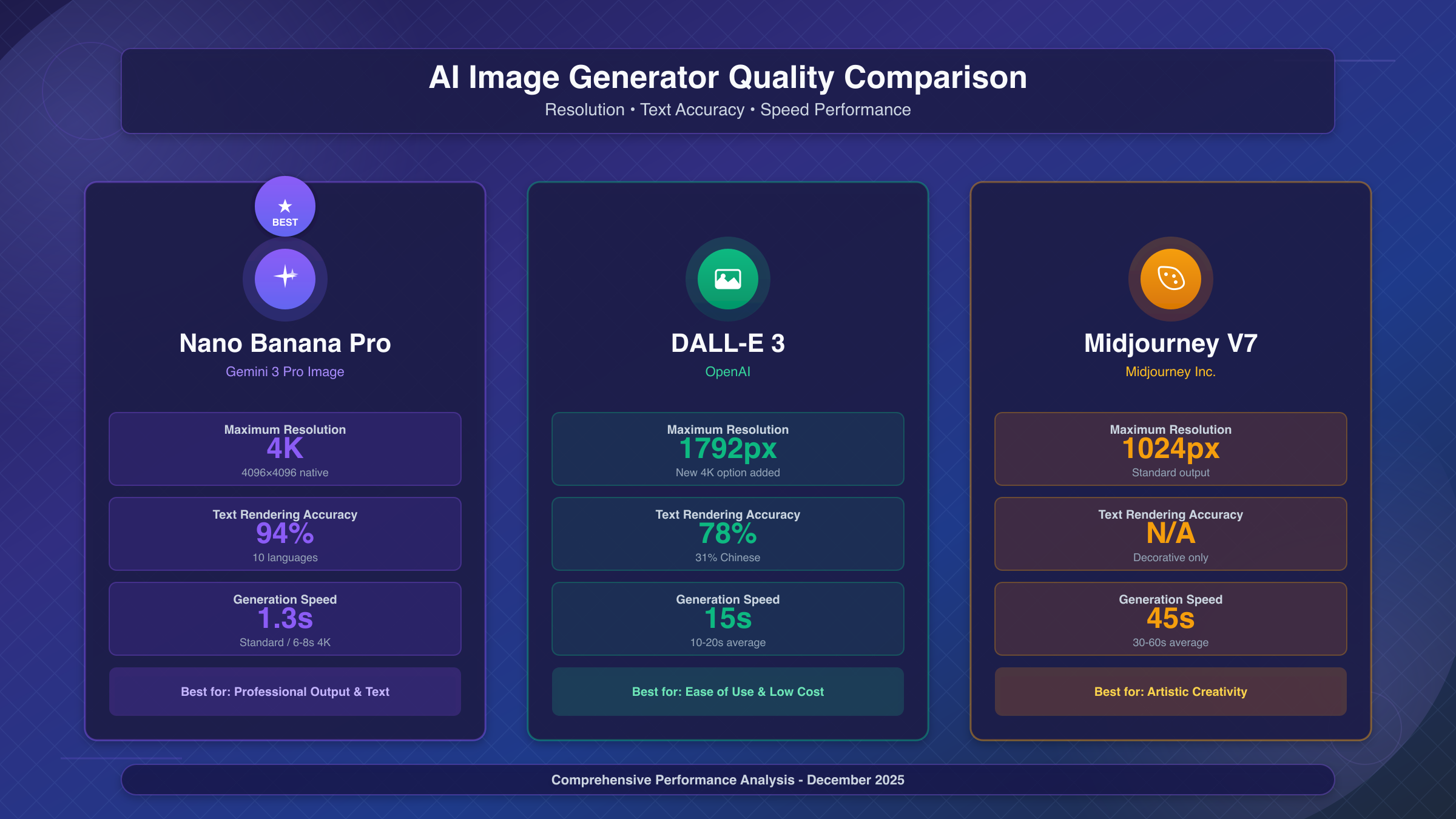
Resolution capability favors Nano Banana Pro substantially. Native 4K output at 4096 pixels significantly exceeds DALL-E 3's maximum of 1792 pixels (with a new 4K option recently added) and Midjourney V7's 1024 pixel cap. For print work, large displays, or any application requiring fine detail, Nano Banana Pro's resolution advantage proves decisive.
Text rendering accuracy shows even greater differentiation. Nano Banana Pro achieves 94% legibility for embedded text, making it suitable for generating marketing materials, infographics, and designs incorporating typography. DALL-E 3 reaches 78% accuracy for English text, dropping to just 31% for Chinese characters. Midjourney produces primarily decorative pseudo-text that may appear stylistically appropriate but fails legibility requirements.
Artistic style and aesthetic quality presents a more nuanced comparison. Midjourney V7 often produces textures with an organic, hand-crafted quality that avoids the "AI look" sometimes present in other generators. For concept art, fantasy illustration, and creative work prioritizing mood over precision, Midjourney remains a strong choice. Nano Banana Pro excels at photorealism and professional product imagery where accuracy matters more than artistic interpretation.
| Capability | Nano Banana Pro | DALL-E 3 | Midjourney V7 |
|---|---|---|---|
| Max Resolution | 4K native | 1792px (new 4K) | 1024px |
| Text Accuracy | 94% | 78% (31% Chinese) | Decorative only |
| Generation Speed | 1.3-8s | 10-20s | 30-60s |
| Pricing Model | Per-image ($0.134-0.24) | Per-image (~$0.04) | Subscription |
| Best For | Professional output, text | Ease of use, low cost | Artistic creativity |
Speed comparison favors Nano Banana Pro significantly. Generation times of 1.3-8 seconds (depending on resolution) compare favorably to DALL-E 3's 10-20 seconds and Midjourney's 30-60 seconds. For iterative workflows involving many generations, this speed advantage compounds substantially.
API Integration: Complete Code Examples
Integrating Nano Banana Pro into applications requires understanding both the native Gemini API format and available third-party alternatives that may offer cost advantages for production workloads. For comprehensive API documentation and advanced integration patterns, see our Nano Banana Pro API guide.
The native Gemini API provides maximum flexibility and feature access. The following example demonstrates a production-ready implementation with error handling, retry logic, and proper response parsing.
hljs pythonimport requests
import base64
import time
from typing import Optional
class NanoBananaProClient:
"""Production-ready Nano Banana Pro API client."""
def __init__(self, api_key: str, base_url: str = None):
self.api_key = api_key
self.base_url = base_url or "https://generativelanguage.googleapis.com/v1beta/models/gemini-3-pro-image-preview:generateContent"
def generate_image(
self,
prompt: str,
size: str = "1K", # Options: 1K, 2K, 4K
aspect_ratio: str = "auto",
max_retries: int = 3
) -> Optional[bytes]:
"""
Generate an image with retry logic.
Args:
prompt: Text description of desired image
size: Resolution - 1K, 2K, or 4K (uppercase required)
aspect_ratio: auto, 16:9, 4:3, 1:1, or 9:16
max_retries: Number of retry attempts on failure
Returns:
Image bytes or None on failure
"""
headers = {
"Content-Type": "application/json",
"x-goog-api-key": self.api_key
}
payload = {
"contents": [{"parts": [{"text": prompt}]}],
"generationConfig": {
"responseModalities": ["IMAGE"],
"imageConfig": {
"aspectRatio": aspect_ratio,
"imageSize": size
}
}
}
for attempt in range(max_retries):
try:
response = requests.post(
self.base_url,
headers=headers,
json=payload,
timeout=180 # 4K may take longer
)
if response.status_code == 200:
result = response.json()
image_b64 = result["candidates"][0]["content"]["parts"][0]["inlineData"]["data"]
return base64.b64decode(image_b64)
elif response.status_code == 429: # Rate limited
wait_time = 2 ** attempt * 10 # Exponential backoff
print(f"Rate limited, waiting {wait_time}s...")
time.sleep(wait_time)
else:
print(f"Error {response.status_code}: {response.text}")
return None
except requests.exceptions.Timeout:
print(f"Timeout on attempt {attempt + 1}")
continue
return None
# Usage example
client = NanoBananaProClient(api_key="YOUR_API_KEY")
image_bytes = client.generate_image(
prompt="Professional product photo of a sleek smartphone, studio lighting, white background",
size="4K",
aspect_ratio="1:1"
)
if image_bytes:
with open("product_photo.png", "wb") as f:
f.write(image_bytes)
For production deployments where cost optimization matters, third-party API providers offer substantial savings. Official Google pricing sets standard resolution at $0.134 per image and 4K at $0.24 per image. For developers seeking cost-effective API access, laozhang.ai offers Nano Banana Pro at $0.05 per 4K image—representing 79% savings compared to official pricing. The service maintains OpenAI-compatible SDK format, simplifying migration from existing integrations. For projects requiring official Google support or enterprise compliance certifications, direct Google API access remains the appropriate choice despite higher per-image costs.
| Provider | Standard (1K/2K) | 4K Resolution | Savings vs Official |
|---|---|---|---|
| Google Official | $0.134/image | $0.24/image | Baseline |
| Google Batch API | $0.067/image | $0.12/image | 50% |
| laozhang.ai | $0.025/image | $0.05/image | 79% |
When to Upgrade: Cost Analysis and ROI Calculation
The decision between maximizing free access and subscribing to paid tiers depends on volume requirements, feature needs, and workflow value calculations.
Volume thresholds provide the clearest upgrade trigger. If daily generation needs consistently exceed 500 images, paid access becomes necessary regardless of optimization strategies. The Google AI Plus subscription at $20/month provides 1000 daily Nano Banana Pro generations, while Pro ($50/month) and Ultra ($100/month) tiers scale higher for professional and enterprise needs.
Feature requirements may justify paid access even at lower volumes. Free tier limitations include visible watermarks (SynthID embedded in all generations), restricted resolution on some platforms, and the inability to generate people on the lowest tiers. Paid subscriptions remove watermarks and unlock the full feature set.
Cost-per-image calculations help contextualize subscription value. At official API pricing of $0.134 per standard image, generating 150 images monthly costs approximately $20—equivalent to the AI Plus subscription that includes 1000 daily generations. Users generating more than 150 images monthly generally benefit from subscription pricing over pay-per-image.
For many users, third-party API access provides the optimal middle ground. At $0.025-0.05 per image, the economics support moderate-volume usage without subscription commitment. Generating 400 standard images monthly through third-party API costs approximately $10—well below any subscription tier while maintaining flexibility to scale up or down based on actual needs.
The calculation changes for specific use cases. Marketing teams requiring consistent output quality and brand safety may value Google's direct enterprise support. Developers building products that include AI image generation may prefer API access for integration flexibility. Individual creators with variable needs often benefit from pay-per-image pricing that scales with actual production.
FAQ: Common Questions About Free Nano Banana Pro Access
Q1: Why was my Nano Banana Pro quota reduced from 3 to 2 images?
Google progressively tightened free access throughout late 2025 in response to unprecedented demand for Nano Banana Pro capabilities. The original launch offered up to 5 daily prompts, reduced to 3 images by November, and now fluctuates between 2-3 depending on system load. This pattern may continue as Google balances accessibility with infrastructure costs. Users requiring consistent access should consider Google AI Studio's developer tier or third-party alternatives rather than relying on consumer app quotas.
Q2: Can I access Nano Banana Pro 4K output on the free tier?
Yes, 4K generation is available on the free tier through Google AI Studio's API access. The imageSize parameter accepts "4K" (uppercase required) to generate native 4096×4096 output. However, 4K generation consumes more compute resources, effectively reducing your daily quota by approximately 40-50% compared to 1K generation. Some third-party platforms like Felo AI also support 4K on free access, though response times may be longer than direct Google API calls.
Q3: How do I check my remaining Nano Banana Pro quota?
Google AI Studio displays current quota status in the dashboard under "Usage" for authenticated users. The Gemini app shows remaining generations when you attempt to create an image, though it doesn't provide specific numbers until you approach the limit. Third-party platforms typically don't track quota visibility since most operate on unlimited or high-limit access models. For programmatic access, quota exhaustion manifests as 429 (Too Many Requests) HTTP responses.
Q4: Is Nano Banana Pro available in all countries?
Nano Banana Pro access varies by region due to Google's phased global rollout. North America, Europe, and most of Asia-Pacific have full access through both consumer and developer channels. Some regions face restrictions on specific features, particularly people generation capabilities. Users in restricted regions can often access the model through third-party API providers that operate from supported jurisdictions, though this approach may not satisfy compliance requirements for enterprise use cases.
Q5: What's the difference between Nano Banana and Nano Banana Pro?
Nano Banana (standard) is based on Gemini 2.5 Flash Image and serves as the default when Pro quotas are exhausted. Nano Banana Pro builds on Gemini 3 Pro's multimodal architecture with significantly enhanced capabilities: native 4K resolution (versus ~1K for standard), 94% text rendering accuracy (versus ~70%), support for 14 reference images (versus limited), and the "Thinking" reasoning process that produces more compositionally sophisticated outputs. The Pro model also generates faster despite higher resolution output, completing in 1.3-8 seconds versus 3-10 seconds for standard Nano Banana.
Conclusion: Start Generating Free 4K Images Today
Nano Banana Pro represents a genuine leap in AI image generation capability—native 4K resolution, industry-leading text accuracy, and reasoning-based composition that produces professional-quality results. While Google has progressively restricted consumer app access to 2-3 daily generations, multiple pathways remain for substantial free usage.
For developers and power users, Google AI Studio provides the optimal path: 500-1000 daily generations, full API access, and complete 4K parameter control. The five-minute setup process unlocks capabilities that would have required enterprise budgets just months ago.
For quick experimentation, no-registration platforms like AskMeAnything provide instant access to evaluate Nano Banana Pro against your specific use cases. Combine this with Felo AI for 4K testing and third-party aggregators for extended quota access.
For production workloads, consider the cost structure carefully. Official Google pricing at $0.134-0.24 per image makes sense when enterprise support and compliance matter. Third-party API access at 79% savings suits cost-sensitive projects without strict vendor requirements.
The AI image generation landscape continues evolving rapidly. Nano Banana Pro's current position as the quality leader may shift as competitors respond. What remains constant: the ability to access cutting-edge AI creativity at minimal cost for those willing to navigate the available options strategically.
Start with AI Studio's free tier today. Generate your first 4K image using the code examples above. Evaluate whether the quality justifies the workflow integration. The technology is ready—the question is simply which access path best fits your specific needs.