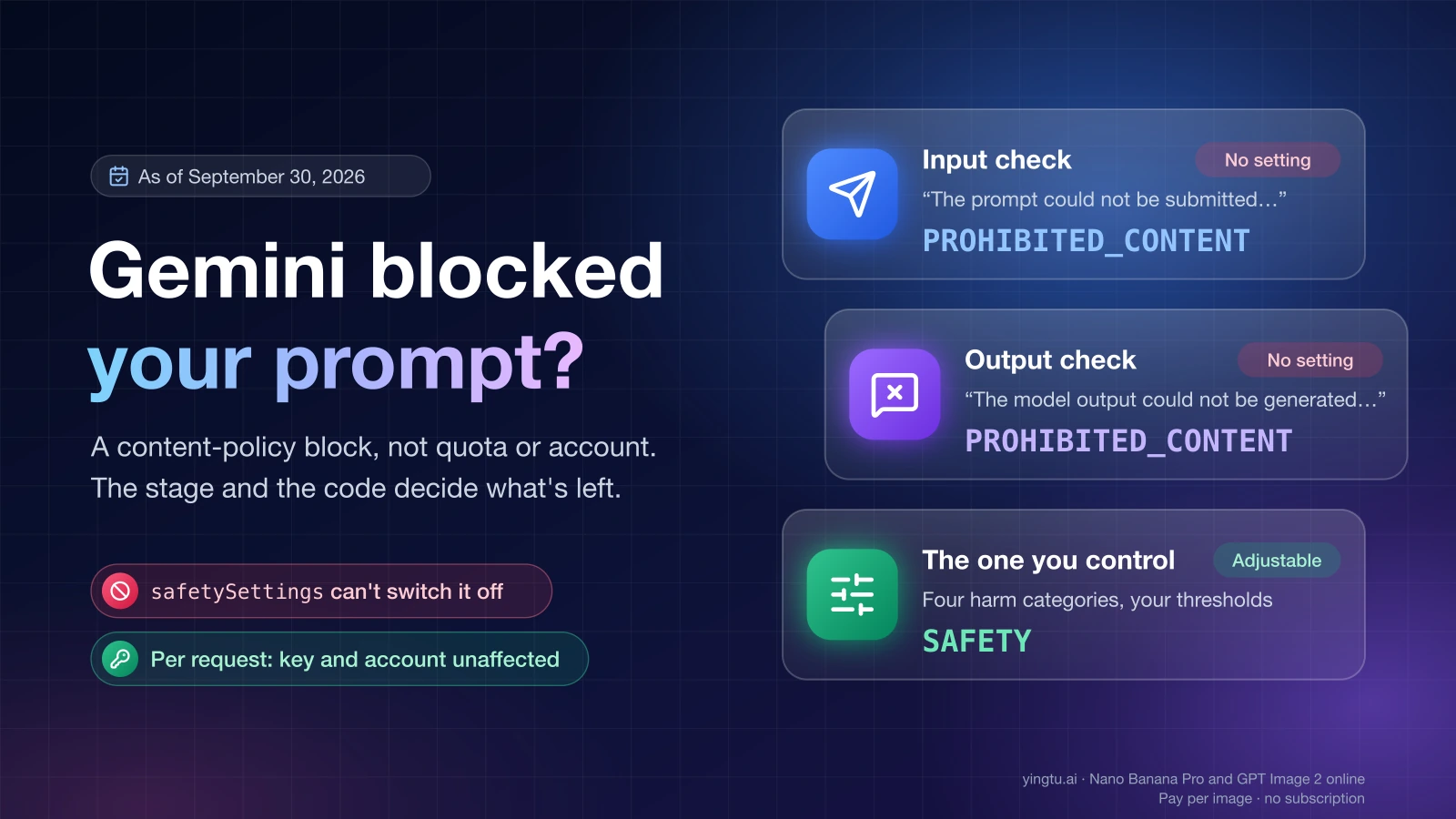
"The prompt could not be submitted. The prompt contains sensitive words that violate Google's Generative AI Prohibited Use Policy. Try rephrasing the prompt. If you think this was an error, send feedback." is Gemini's input-stage content-policy block: Google's classifier judged your whole request (typed text, uploaded images, earlier turns, system instructions) as falling under the Generative AI Prohibited Use Policy and never handed it to the model. It is not a network error, a quota limit, a region restriction or an account penalty, and as of September 30, 2026 it is not a block that any safetySettings value can switch off. Its sibling, "The model output could not be generated…", is the same policy applied one stage later, to what the model produced. Which stage refused, and which code sits behind the sentence, decides what you can still do.
| What you see (as of September 30, 2026) | Where it appears | Stage | Code behind it | Safety settings help? | Next step |
|---|---|---|---|---|---|
| "The prompt could not be submitted. The prompt contains sensitive words…" | Gemini app and Google AI Studio as a message; Gemini API as promptFeedback.blockReasonMessage; SDKs as HTTP 400 "Input blocked: …" | Input | promptFeedback.blockReason: PROHIBITED_CONTENT | No | Isolate what in the request triggers it, then rewrite toward the result you want |
| "The model output could not be generated. This output contains sensitive words…" | Gemini app and AI Studio as a message; API as finishMessage | Output | finishReason: PROHIBITED_CONTENT | No | Change what you ask the model to produce, not just the wording |
| "This request was blocked by Gemini's filters. They can occasionally trigger by mistake on safe coding, security, or biology-related queries…" | Reported by users as an on-screen message; Google's documentation does not list which product shows it | Input, by its wording | Not shown to the user | No | Check pasted code, test data and logs the same way as row 1 |
Empty or cut-off answer with finishReason: SAFETY | Gemini API, AI Studio | Output | SAFETY plus safetyRatings | Yes, four categories | Set thresholds explicitly and read the ratings |
blockReason: BLOCKLIST | Gemini API | Input | BLOCKLIST | No | One specific term hit a terminology blocklist; rewrite that term |
No image, finishReason: IMAGE_SAFETY, IMAGE_PROHIBITED_CONTENT or NO_IMAGE | Gemini API image models, AI Studio | Output | Those finishReason values | No | Run the four-combination image test below |
The prompt could not be submitted. The prompt contains sensitive words that violate Google's Generative AI Prohibited Use Policy. Try rephrasing the prompt. If you think this was an error, send feedback.
This sentence means the input check refused the request before any model ran; on the Gemini API the same request comes back with promptFeedback.blockReason set to PROHIBITED_CONTENT, no candidates, and the sentence itself in promptFeedback.blockReasonMessage. Google's reference defines PROHIBITED_CONTENT as "The prompt was blocked because it contains prohibited content." (as of September 30, 2026), and its safety-settings guide states the rule for this layer: the API "has built-in protections against core harms, such as content that endangers child safety. These types of harm are always blocked and cannot be adjusted."
Through the official SDKs the block often looks like a different problem. Developers using google-genai reported in June and July 2026 that a blocked prompt surfaces as HTTP 400 invalid_request with the message "Input blocked: The prompt could not be submitted. …". A 400 reads like a malformed request or a model you are not allowed to use. A July 7, 2026 forum thread shows exactly that confusion: billing enabled, a preview model, HTTP 400, and the author assuming the key was ineligible. The answer the next day was that the filter had blocked that specific prompt's content, not the account's access to the model. The block is a per-request decision: it does not restrict your key, your project or your Gemini account, and a different request is judged on its own.
"Sensitive words" is not a word list, even though the sentence sounds like one. Google keeps a separate block reason, BLOCKLIST, for prompts that contain "a term from the terminology blocklist" (as of September 30, 2026). When you get PROHIBITED_CONTENT instead, a classifier judged the meaning of the whole request. A September 14, 2026 forum report shows how wide that reading is: a coding agent on gemini-3.8-flash was blocked on a test summary about "adversarial mutation testing" with <script> injection test cases and "mutant killers", which is ordinary defensive testing vocabulary. Two consequences follow. Swapping single words (weapon to tool, kill to stop) rarely helps, because the meaning that triggered the classifier is still there. And a prompt that looks harmless on its own can be blocked because of something else in the request: a pasted document, an earlier turn in the chat, a system instruction, or an uploaded photo.
The model output could not be generated. This output contains sensitive words that violate Google's Generative AI Prohibited Use Policy. If you think this was an error, send feedback.
This sentence means your prompt passed the input check and the model ran, but the text or image it produced was caught by the output check; the API reports it as finishReason: PROHIBITED_CONTENT, which the google-genai SDK documents as "Token generation stopped for potentially containing prohibited content." (as of September 30, 2026). Users paste this message with its API form attached, finishReason: PROHIBITED_CONTENT finishMessage: The model output could not be generated…, which is how the same sentence reaches third-party apps.
Because the judgment is on the output, rewording the request while keeping its target changes little. An identical retry only re-samples the model; if the second attempt is blocked as well, the direction of the output is the problem. What works is narrowing what the model is allowed to produce: specify the setting, the clothing, the age of every person as an adult, the absence of gore or explicit detail, or the format (a summary instead of a verbatim reproduction). For a long story or a chat that has drifted, the trigger is usually the scene the model was about to write, not the last line you typed; steer the scene, or start a new chat.
For Gemini's native image models on the API (gemini-3.1-flash-lite-image, gemini-3.1-flash-image, gemini-3-pro-image and the legacy gemini-2.5-flash-image as of September 30, 2026), the output codes are more specific: IMAGE_PROHIBITED_CONTENT ("Image generation stopped because the generated images have prohibited content."), IMAGE_SAFETY ("generated images have safety violations") and NO_IMAGE ("The model was expected to generate an image, but none was generated."). NO_IMAGE on its own is not a policy verdict; it says only that no image came back, so read it together with any text the model returned.
When streaming, a blocked output can arrive as an empty stream rather than an error: the SDK note on finishReason: SAFETY reads "When streaming, content is empty if content filters blocks the output." A client that only checks for exceptions will treat that as a successful, empty answer, so read finishReason on the final chunk.
This request was blocked by Gemini's filters. They can occasionally trigger by mistake on safe coding, security, or biology-related queries. Please try rephrasing your prompt. You can send feedback or read more about our policies here.
This wording is a message users report seeing when a request is blocked before the model answers; the message itself names three areas, coding, security and biology, where it admits the filter can fire by mistake. Google's API documentation does not carry this string as of September 30, 2026, so which product shows it cannot be pinned to a page; treat it as the same block as the first message, with a developer-shaped context.
In a coding session the trigger is often not your instruction but the material the tool sent along with it: an exploit payload in a test fixture, an injection string in a unit test, a malware signature in a log, a protocol in a lab notebook. The September 14, 2026 report above has that shape: the agent's own summary of a defensive test suite was the blocked content. Two moves address it. State the defensive or educational purpose at the top of the request; the policy's own exceptions for "educational, documentary, scientific, or artistic considerations" are the ground for that work, and a request that states its purpose is easier to classify. And ask for the analysis without shipping the raw payload wholesale; a description of what the test does is usually enough for the model to reason about it.
Which code came back, and whether a setting can change it
The API exposes the verdict in two places: a blocked prompt sets promptFeedback.blockReason and returns no candidates; a blocked response sets candidates[].finishReason, with safetyRatings alongside when the reason is SAFETY. Google's one-line meanings, quoted from the Gemini API reference and the google-genai SDK types as of September 30, 2026:
| Field | Value | Google's meaning (as of September 30, 2026) | Adjustable? |
|---|---|---|---|
promptFeedback.blockReason | SAFETY | "The prompt was blocked for safety reasons." | Yes, via the four harm categories |
promptFeedback.blockReason | PROHIBITED_CONTENT | "The prompt was blocked because it contains prohibited content." | No |
promptFeedback.blockReason | BLOCKLIST | "…contains a term from the terminology blocklist." | No |
promptFeedback.blockReason | IMAGE_SAFETY | "…content that is unsafe for image generation." | No |
promptFeedback.blockReason | OTHER | "…may be due to the prompt's language, or because it contains other harmful content." | No; the troubleshooting guide adds it may contravene the terms of service or be unsupported |
candidates[].finishReason | SAFETY | "Token generation stopped because the content potentially contains safety violations." | Yes, via the four harm categories |
candidates[].finishReason | PROHIBITED_CONTENT | "Token generation stopped for potentially containing prohibited content." | No |
candidates[].finishReason | BLOCKLIST | "…contains forbidden terms." | No |
candidates[].finishReason | SPII | Sensitive personally identifiable information in the output | No |
candidates[].finishReason | RECITATION | Output reproduced source material | No setting; make the prompt more unique, raise temperature |
candidates[].finishReason | IMAGE_SAFETY / IMAGE_PROHIBITED_CONTENT | Generated images had safety violations / prohibited content | No |
candidates[].finishReason | NO_IMAGE | "The model was expected to generate an image, but none was generated." | Not a policy code |
The error-codes page lists the same families in lower case for tooling (safety, prohibited_content, blocklist, spii, image_safety, image_prohibited_content, no_image), so prohibited_content in a log means the same as PROHIBITED_CONTENT in a response.
The decision rule that follows from the table:
- If the value is
SAFETY, the four adjustable categories apply: Harassment, Hate speech, Sexually explicit and Dangerous, each with thresholdsOFF,BLOCK_NONE,BLOCK_ONLY_HIGH,BLOCK_MEDIUM_AND_ABOVEandBLOCK_LOW_AND_ABOVE, and each rating a probability ofNEGLIGIBLE,LOW,MEDIUMorHIGH. ReadsafetyRatings, find the category that crossed your threshold, and decide whether to loosen it for your use case. - If the value is
PROHIBITED_CONTENT,BLOCKLIST,IMAGE_SAFETYorIMAGE_PROHIBITED_CONTENT, no setting applies. The only variables are the content of the request and, for edits, the uploaded image. - If the value is
OTHER, check the language of the prompt and whether the request type is supported for that model before assuming a policy problem. - If there is no
blockReasonand nofinishReason, but an HTTP 400invalid_requestorfailed_precondition, or a 429rate_limit_exceeded, it is not a content block at all, unless the 400 message begins with "Input blocked:".
One fact explains most "but I set BLOCK_NONE" confusion: "If the threshold is not set, the default block threshold is Off for Gemini 2.5 and 3 models." (Google, as of September 30, 2026). On those models the adjustable layer does nothing by default, so almost every block you hit without touching settings is already the non-adjustable layer, and setting BLOCK_NONE or OFF explicitly changes nothing. The settings matter in the other direction: if you have set BLOCK_LOW_AND_ABOVE for a consumer-facing app, you will see SAFETY far more often, and those are the blocks you own.
Set safety settings explicitly and read the block reason in code
The value of setting thresholds explicitly is not looser filtering; it is that your logs then distinguish a block you configured from a block you cannot configure. With the google-genai Python SDK (as of September 30, 2026):
hljs pythonfrom google import genai
from google.genai import types, errors
client = genai.Client()
def log_block(stage, reason, detail):
# Replace with your logger; keep stage + reason queryable.
print(f"[blocked] stage={stage} reason={reason} detail={detail}")
safety_settings = [
types.SafetySetting(category=c, threshold=types.HarmBlockThreshold.BLOCK_MEDIUM_AND_ABOVE)
for c in (
types.HarmCategory.HARM_CATEGORY_HARASSMENT,
types.HarmCategory.HARM_CATEGORY_HATE_SPEECH,
types.HarmCategory.HARM_CATEGORY_SEXUALLY_EXPLICIT,
types.HarmCategory.HARM_CATEGORY_DANGEROUS_CONTENT,
)
]
try:
response = client.models.generate_content(
model="gemini-3.8-flash",
contents=prompt_text,
config=types.GenerateContentConfig(safety_settings=safety_settings),
)
except errors.ClientError as e:
# SDKs may raise HTTP 400 for a blocked prompt: "Input blocked: The prompt could not be submitted. ..."
if "Input blocked" in str(e):
log_block(stage="input", reason="PROHIBITED_CONTENT", detail=str(e))
raise
fb = response.prompt_feedback
if fb and fb.block_reason:
# Prompt blocked: no candidates. SAFETY -> your thresholds; anything else -> not adjustable.
log_block(stage="input", reason=fb.block_reason.name, detail=fb.block_reason_message)
else:
cand = response.candidates[0]
if cand.finish_reason and cand.finish_reason.name not in ("STOP", "MAX_TOKENS"):
# Response blocked: SAFETY comes with safety_ratings; PROHIBITED_CONTENT does not depend on settings.
log_block(stage="output", reason=cand.finish_reason.name, detail=cand.safety_ratings)
else:
print(response.text)
Log three things per request, in a form you can query later: the final assembled text the API actually received (system instruction plus history plus the user's turn plus any file references), the blockReason or finishReason, and the safetyRatings when present. A month of these records tells you whether your blocks are SAFETY (tune thresholds), PROHIBITED_CONTENT from a few users (product policy), or PROHIBITED_CONTENT on harmless inputs from many users (a false-positive pattern worth reporting with examples).
Find the trigger without guessing
Resubmitting the same request with one word changed is the slowest way to locate the trigger. The following sequence finds it in a handful of requests, and each step is a legitimate rewrite toward the result you were after, not a way around the policy.
- Reproduce the block with the prompt alone. New chat, no system instruction, no attached files, no earlier turns. If the bare prompt passes, the trigger is in what you removed; add the pieces back one at a time (system instruction, then history, then files) and stop at the one that fails.
- Split a long prompt in half and send each half by itself. Repeat on the failing half until you hold the sentence or block of pasted text that trips it. Pasted material (a document, a chat log, scraped text, a test fixture) is the most common carrier; summarize it in your own words instead of pasting it.
- State age explicitly wherever a person's appearance, clothing or a violent scene is involved. "A 32-year-old woman" is unambiguous; "girl" or "teen" next to such a scene push the request toward the built-in child-safety protection, which is never adjustable and does not weigh intent. If the subject is a minor and the scene is intimate or violent in any way, the block is correct and the sequence ends here.
- Describe the picture or text you want, not the transgression you are removing. "A cavalry charge in the style of a nineteenth-century history painting, no blood" is a specification; "make it more brutal" is an instruction to cross a line the classifier watches.
- Check whether a real, named person is in the request. A recognizable public figure placed in an intimate, violent or deceptive scene falls under the policy's non-consensual imagery and impersonation clauses; the same composition with a fictional or unnamed person is a different request.
- For image edits, run the four-combination test with a plain control image (a stock photo of a mug) and a plain control prompt ("make the background white"):
| Original image + original prompt | Plain image + original prompt | Original image + plain prompt | Reading |
|---|---|---|---|
| Blocked | Blocked | Passes | The prompt is the trigger; rewrite it per steps 3–5 |
| Blocked | Passes | Blocked | The uploaded photo is the trigger: a face, a child, visible skin, a celebrity, text or a logo in it |
| Blocked | Passes | Passes | The combination is the trigger; the prompt asks to do something to that photo that the filter reads as intimate, deceptive or harmful |
| Blocked | Blocked | Blocked | Send the plain image with the plain prompt as well; if that fails too, it is not a content trigger, so check model, request shape and quota first |
When the photo is the trigger, the categories that image filters watch for are documented for Google's Imagen models on Vertex AI (as of September 30, 2026): child, celebrity, people and faces, personal information, sexual, violence, vulgar, toxic, hate, dangerous and third-party content. Gemini API image models report the finishReason values above instead of Imagen's numeric codes, but the list is a fair description of what an image filter reacts to, and a photo with a real person's face or a child in it can fail a harmless edit prompt on its own. A product shot with a model wearing the product is legitimate work; describing the model as an adult, cropping to the product where the face is not needed, or starting from a generated figure instead of a customer's photo are all rewrites toward the same deliverable.
When you cannot see the code: Gemini app and third-party apps
In the Gemini app and in apps built on the API, you see the sentence, never the blockReason, but the sentence still tells you the stage: "could not be submitted" is the input check, "output could not be generated" is the output check. Steps 1 to 5 above work without code. Start a fresh chat to drop history and any file you attached earlier, retype the request in your own words with adults named as adults, and for a photo edit swap the photo for a plain one once to learn whether the picture or the wording is the problem.
Two limits are specific to apps you do not control. The developer chose the safety settings, so a SAFETY block is theirs to adjust, but a PROHIBITED_CONTENT block is not adjustable for them either; the most their support can do is pass your example to Google as feedback. And an app that assembles a long hidden system prompt or roleplay history sends all of it with every message, so a request that is innocent on its face can be blocked because of content you never typed. A new session in the app, or a different persona, is the only reset you have.
The block is not a strike against your Google account. The message carries a "send feedback" link for a reason: the filter that exists to block pornography also blocked a security engineer's test summary on September 14, 2026, and the feedback link is the path Google offers for the second kind of case.
False positives on record, and the last legitimate step
Three reports on Google's own developer forum show the classifier over-triggering on ordinary work, with dates: a coding agent's defensive-testing summary blocked as prohibited content on September 14, 2026; a plain API prompt returned as HTTP 400 "Input blocked" on July 7, 2026, with the community diagnosis that the content, not the account, was the cause; and on March 13, 2026, Veo 3.1 image-to-video blocked a "wholesome commercial storyboard" as a child-safety false positive, with the filter still firing after references to minors were removed. Veo is a different product, but it runs under the same policy family, and the report is a useful reminder that the child-safety layer errs toward blocking.
If you have run the isolation steps, the request is legitimate, and the same prompt is still refused, three options remain. Use the "send feedback" link in the message, attaching the exact prompt and, for the API, the blockReason or finishReason; that report is the only path that can change the classifier. Wait and retry the identical request later, since classifiers are updated over time; the March 13, 2026 Veo report, where the block persisted after every reference to minors was removed, shows that a fix on your side is not always available. Or run the same legitimate prompt on a different image model: in the YingTu browser studio you can paste a key and try GPT Image 2 or Seedream, pay per image (Nano Banana Pro $0.09 per image, GPT Image 2 VIP $0.03 per image as of September 26, 2026), without a subscription. Note that Nano Banana Pro is Google's gemini-3-pro-image model behind a different door, so Google's built-in image filters still apply to it; GPT Image 2 and Seedream are separate models with their own policies, and YingTu runs its own output check and refuses policy-violating content as well. None of this changes the answer for a request that is actually prohibited.
Where the answer stops
Google's Generative AI Prohibited Use Policy (last modified December 17, 2024) lists what the block is there to catch: child sexual abuse or exploitation; content that "facilitates non-consensual intimate imagery"; "Sexually explicit content -- for example, content created for the purpose of pornography or sexual gratification"; violent extremism; facilitation of self-harm or illegal activity; privacy and intellectual-property violations; hate speech and harassment; and impersonation "without explicit disclosure, in order to deceive". It also lists "Circumventing safety filters", meaning manipulating the model to violate the policy, as a prohibited use in itself. So if the request you are isolating is sexual content, a minor in any intimate or violent context, a real person in an intimate, violent or deceptive scene, or a way to get past the filter, the block is the correct outcome, word-swaps and setting changes are themselves a policy violation, and nothing above applies. The policy's exceptions, "based on educational, documentary, scientific, or artistic considerations, or where harms are outweighed by substantial benefits to the public", are what the isolation steps help you make visible to the classifier; they are not a loophole for the list.
Frequently asked questions
What does prohibited_content mean in a Gemini response?
prohibited_content (or PROHIBITED_CONTENT) means Google's Prohibited Use Policy classifier blocked the request or the response; the error-codes page defines it as "Prohibited content guidelines blocked the request." (as of September 30, 2026). In promptFeedback.blockReason it refers to your input; in finishReason it refers to the model's output. In both places it is independent of safetySettings.
Why did BLOCK_NONE or OFF not remove the block?
Because thresholds only govern the four adjustable categories, and on Gemini 2.5 and 3 models the default is already Off when no threshold is set (as of September 30, 2026). Setting BLOCK_NONE on those models changes nothing, and the block you see, PROHIBITED_CONTENT, BLOCKLIST or the built-in child-safety protection, sits in a layer that has no threshold at all.
Why does a harmless edit prompt like "brighten the photo" get blocked?
Because the uploaded image is part of the request the classifier judges, and a photo with a real person's face, a child, visible skin, a celebrity, or personal information in it can trigger the image filters regardless of the wording. The four-combination test above (original and plain image, original and plain prompt) shows in two extra requests whether the photo, the prompt or their combination is the trigger.
Is my Google account or API key restricted after this message?
No. The message is a per-request content decision; the July 2026 forum case with billing enabled and a valid key was resolved as a content block, not an eligibility problem, and the next request with different content goes through. Repeatedly submitting content the policy prohibits is a separate matter governed by Google's terms, but the block message itself is not a strike.
Do the Imagen safety filter codes such as 58061214 apply to the Gemini API?
No. Numeric support codes such as 58061214 (child, input) or 29310472 (celebrity) belong to Imagen on Vertex AI as of September 30, 2026, and Vertex AI has its own filter configuration. Gemini API image models report finishReason values (IMAGE_SAFETY, IMAGE_PROHIBITED_CONTENT, NO_IMAGE) instead. The category list is still useful as a description of what image filters look for.