- Home
- /
- Blog
- /
- AI Image Generation
- /
- Nano Banana Pro Pricing & Quota Guide 2026: Complete Comparison (Save Up to 79%)
Nano Banana Pro Pricing & Quota Guide 2026: Complete Comparison (Save Up to 79%)
Complete Nano Banana Pro pricing guide for 2026. Compare official API ($0.134-$0.24/image), subscription plans, and third-party APIs. Save up to 79% with our cost calculator and decision framework.
Nano Banana Pro (Google's Gemini 3 Pro Image model) costs $0.134 per image at 2K resolution and $0.24 at 4K through the official API, as of February 2026. Free users get 50 requests per day through Google AI Studio, while Pro subscribers ($19.99/month) receive approximately 100 images daily. The most cost-effective option is using third-party APIs at $0.05 per image — saving up to 79% compared to official 4K pricing. This guide compares every pricing path including Batch API discounts, subscription tiers, and budget alternatives, with a decision framework to help you choose the right option.
TL;DR — Every Nano Banana Pro Pricing Option at a Glance
Before diving into the details, here is the complete pricing landscape for Nano Banana Pro in February 2026. This table covers every way you can access the model — from free tiers to enterprise-scale API usage — so you can immediately find the option that matches your budget and volume.
| Access Method | Cost per Image | Daily Limit | Resolution | Best For |
|---|---|---|---|---|
| Gemini App (Free) | $0 | 2 images | 1MP (1024×1024) | Quick personal use |
| AI Studio (Free) | $0 | 50 requests | Up to 2K | Developers testing |
| Official API (2K) | $0.134 | Tier-based (5-300+ RPM) | 2K | Production apps |
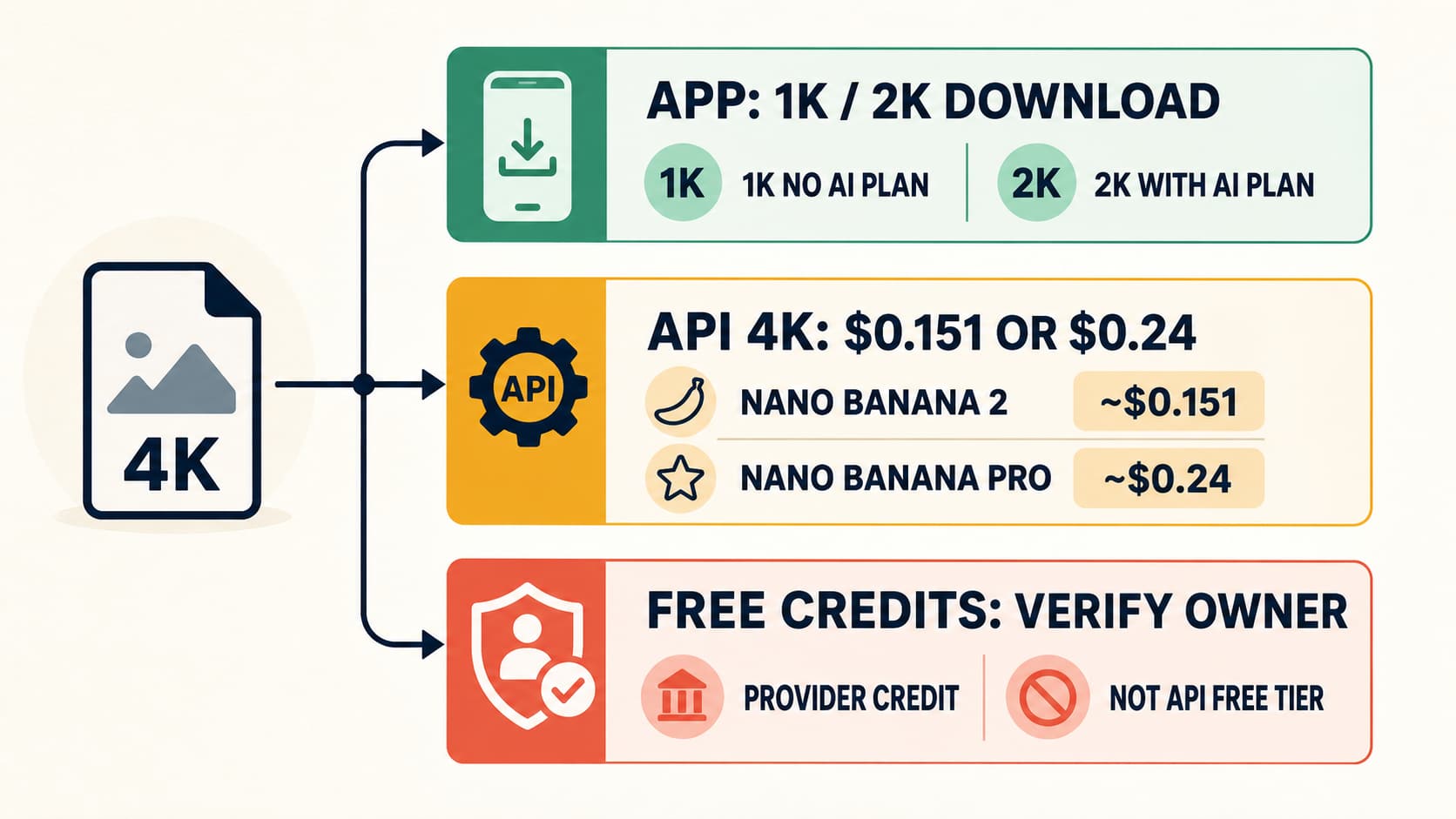
| Official API (4K) | $0.24 | Tier-based (5-300+ RPM) | 4K | High-res needs |
| Batch API (2K) | $0.067 | Async processing | 2K | Bulk generation |
| Batch API (4K) | $0.12 | Async processing | 4K | Bulk high-res |
| Pro Subscription | ~$0.007/image | ~100/day | 2K | Creators (no code) |
| Ultra Subscription | ~$0.003-$0.008/image | ~1,000/day | 4K | Power users |
| Third-Party API | $0.05 | No hard limit | Any resolution | Budget optimization |
The gap between the cheapest option ($0.003/image via Ultra subscription at full usage) and the most expensive ($0.24/image for 4K API) represents an 80× cost difference. Your actual best choice depends on your volume, technical requirements, and whether you need API access — which is exactly what the rest of this guide helps you figure out.
What Is Nano Banana Pro and Why Does Pricing Matter?
Nano Banana Pro is Google's flagship AI image generation model, released as part of the Gemini 3 Pro family in late 2025. It generates studio-quality images from text prompts, handles complex compositions with multiple subjects, renders readable text within images, and produces photorealistic outputs that rival dedicated image generation services. The model is available through Google's API (as gemini-3-pro-image-preview), the Gemini mobile and web apps, and through third-party providers that offer access via OpenAI-compatible endpoints.
Understanding its pricing structure matters more than you might expect, because Google has created an unusually complex pricing landscape around this model. Unlike most AI services where pricing is straightforward — one model, one price — Nano Banana Pro sits at the intersection of multiple pricing paths with dramatically different costs for essentially the same output. A 2K image costs $0.134 through the official API but only $0.05 through a third-party proxy, while subscription users might pay as little as $0.003 per image depending on their plan and actual daily usage. The difference between choosing wisely and choosing poorly can translate to thousands of dollars per month at scale. If you are new to the model and want to understand its capabilities before diving into pricing, our getting started with Nano Banana Pro guide covers the fundamentals.
The pricing complexity exists because Nano Banana Pro serves fundamentally different user groups. Casual users generating a few images per day have entirely different needs from developers building applications that process thousands of requests. Google addresses this through a tiered system: free access with heavy restrictions, paid subscriptions for consumer use, and API billing for developers. Each path has its own rate limits, resolution caps, and hidden costs that are not immediately obvious from Google's pricing pages. By the end of this guide, you will understand exactly what each option actually costs and which one is right for your specific situation.
Official API Pricing Decoded — Every Dollar Explained

The official Nano Banana Pro API pricing is token-based, which makes it less intuitive than simple per-image pricing. Every API call involves token consumption for both the text prompt input and the generated image output, and understanding this breakdown is essential for accurate cost forecasting. According to Google's official pricing page (verified February 2026 via ai.google.dev/pricing), the output token rate for Nano Banana Pro is $0.00012 per token, while input tokens cost $0.000000075 each. The real cost difference between resolutions comes entirely from the number of output tokens each image requires.
A standard 2K resolution image consumes 1,120 output tokens, which translates to $0.134 per image (1,120 × $0.00012). A 4K resolution image requires 2,000 output tokens, pushing the cost to $0.24 per image (2,000 × $0.00012). The text prompt input typically uses 20-100 tokens depending on prompt length, adding only $0.0000015 to $0.0000075 per request — essentially negligible. Image-to-image editing requests also consume 560 input tokens for the source image ($0.0011), which means editing workflows cost slightly more than pure text-to-image generation but the difference remains marginal at scale.
Batch API: Cut Your Costs by 50%
Google's Batch API offers a flat 50% discount on all token costs, making it the most significant cost reduction available through official channels. With Batch pricing, a 2K image drops to $0.067 and a 4K image to $0.12. The tradeoff is that Batch API processes requests asynchronously — you submit a batch of prompts and retrieve the results later, rather than getting instant responses. This makes it unsuitable for real-time applications where users are waiting for images, but ideal for pre-generating content libraries, creating marketing assets in bulk, or processing large datasets where a few hours of delay is acceptable.
Batch API access requires a paid tier (not available on the free tier), and batches are processed within a 24-hour window. The daily token quotas for Batch processing scale with your tier: Tier 1 accounts receive 2,000,000 batch tokens per day, while Tier 2 and Tier 3 accounts get substantially larger allocations of 270,000,000 and 1,000,000,000 tokens respectively. For a detailed walkthrough of API pricing mechanics and code examples, see our detailed API pricing breakdown.
Hidden Costs Most Guides Miss
The per-image prices above are the advertised costs, but the actual cost of running Nano Banana Pro in production is higher due to several factors that most pricing guides overlook. First, not every API call succeeds on the first attempt. Safety filters, content policy rejections, and transient errors mean that a realistic success rate for diverse prompts is around 85-95%, effectively increasing your per-successful-image cost by 5-18%. Second, complex prompts that require iterative refinement — generating multiple variations before finding the right output — multiply your costs by the number of attempts per final image.
Third, API integration itself has costs. Developer time for building and maintaining the API integration, handling retries and rate limiting, managing image storage and delivery, and monitoring usage all contribute to the true cost of ownership. For a small team generating 500 images per day, the effective cost per usable image often lands closer to $0.16-$0.18 at 2K resolution rather than the advertised $0.134, once you factor in retries and overhead. At enterprise scale with optimized pipelines and higher success rates, the overhead percentage decreases, but it never reaches zero.
Rate Limits by Tier
Your API tier determines not just your pricing but also how many images you can generate per minute and per day. Moving to higher tiers requires meeting both a minimum spending threshold and a minimum account age, which means you cannot simply pay more to unlock higher limits immediately. For developers planning production workloads, understanding these limits is critical to avoid hitting bottlenecks. Our paid tier upgrade guide covers the qualification process in detail.
| Tier | RPM (Requests/Min) | RPD (Requests/Day) | Qualification |
|---|---|---|---|
| Free (AI Studio) | 5-10 | 50 | None (free) |
| Tier 1 (Paid) | ~100 | ~1,000 | Billing enabled |
| Tier 2 | ~300 | ~10,000 | $250 spent + 30 days |
| Tier 3 | Higher | Higher | $1,000 spent + 30 days |
The jump from Free to Tier 1 is immediate once you enable billing, but progressing from Tier 1 to Tier 2 requires both $250 in cumulative spending and at least 30 days of account history. This gating mechanism means new projects cannot immediately scale to high volumes — a constraint that pushes some developers toward third-party providers that offer higher rate limits without tier restrictions.
Subscription Plans — Free vs Pro vs Ultra Explained
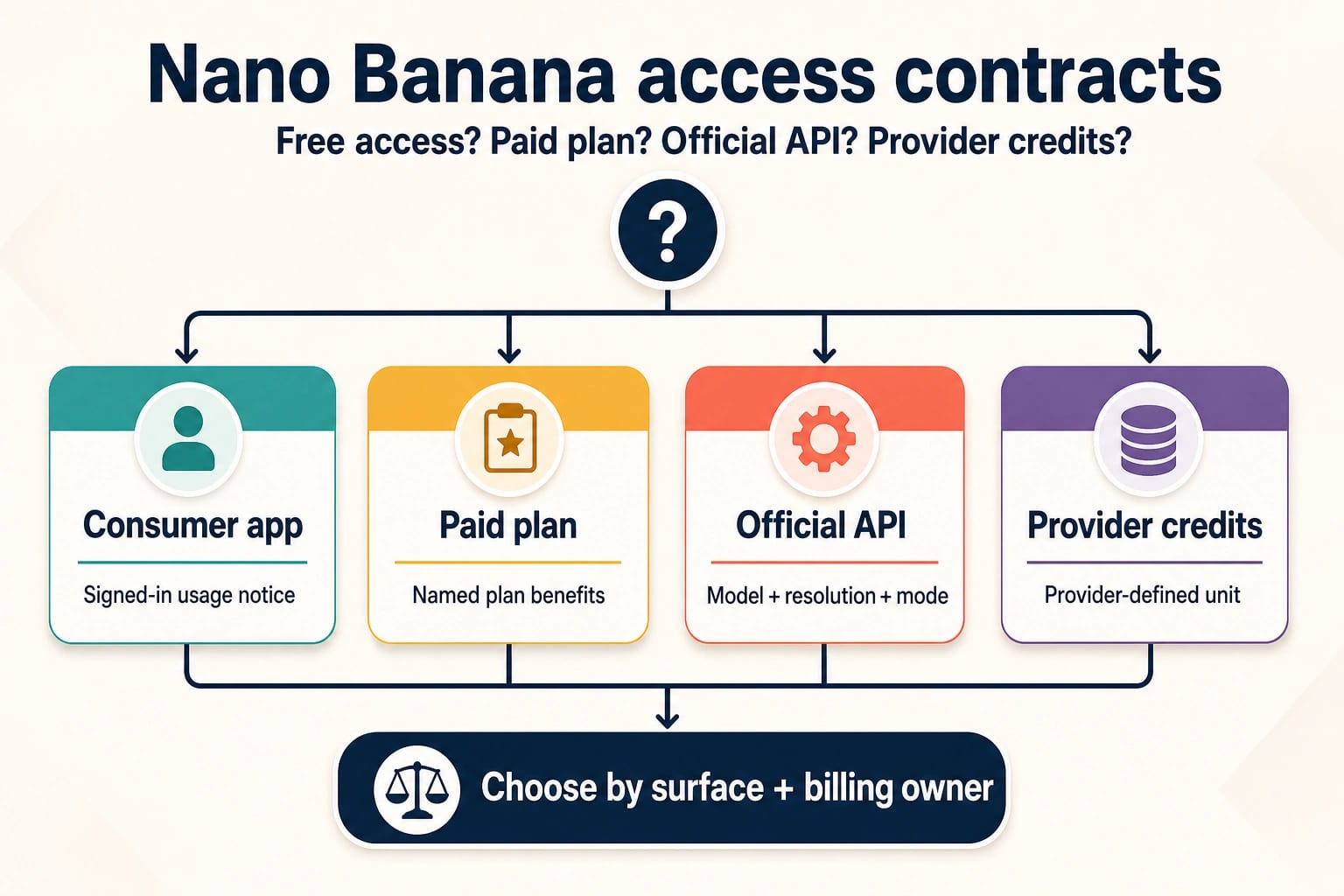
For users who prefer a subscription model over pay-per-use API billing, Google offers Nano Banana Pro access through the Gemini app ecosystem. This is the simplest way to use the model — no coding required, no API keys to manage, just a web or mobile interface. However, the subscription tiers come with daily image quotas and feature restrictions that make the cost calculation more nuanced than the headline prices suggest.
The free tier of the Gemini app provides access to Nano Banana Pro with the strictest limitations: 2 images per day at 1MP resolution (1024×1024), with a visible watermark on every output. This is enough to evaluate the model's quality and experiment with prompts, but not enough for any regular creative workflow. The 1MP resolution constraint is particularly limiting because it produces images roughly one-quarter the pixel count of the 2K API output, resulting in visibly less detailed results. Still, for users who simply want to try Nano Banana Pro before committing to any paid plan, it provides a zero-risk entry point.
Google AI Studio offers a separate free tier with more generous limits: 50 requests per day at up to 2K resolution with no watermark. This free tier is accessed through the developer-oriented AI Studio interface rather than the Gemini consumer app, which means it is technically designed for testing and development. The 50 RPD limit makes it viable for low-volume personal projects, though the terms of service technically restrict commercial use at the free tier. The key distinction is that AI Studio's free tier provides API-style access without requiring a billing account, making it the most generous free option for developers and technically-inclined users.
Pro Subscription ($19.99/month)
The Pro plan at $19.99 per month removes the watermark, increases resolution to 2K, and provides approximately 100 images per day. At full daily usage (100 images × 30 days = 3,000 images/month), the effective cost drops to roughly $0.007 per image — dramatically lower than the $0.134 API price for equivalent 2K output. The Pro subscription is the most cost-effective option for creators who generate a consistent volume of images and do not need programmatic API access. It includes Google's built-in editing tools, style presets, and prompt enhancement features that are not available through the raw API.
The limitation of the Pro plan is its ceiling: approximately 100 images per day is a hard cap, not a starting point for negotiation. If you need more than 3,000 images per month with no API access requirement, the Ultra plan is the next step. Additionally, Pro images are limited to 2K resolution — if your workflow demands 4K output, the Pro plan cannot deliver that regardless of how few images you generate.
Ultra Subscription ($99.99-$249.99/month)
The Ultra plan represents the premium subscription tier, with pricing that varies by region and plan configuration between $99.99 and $249.99 per month. It provides approximately 1,000 images per day at full 4K resolution with priority processing during peak hours. At maximum usage (1,000 images × 30 days = 30,000 images/month), the Ultra plan's effective per-image cost ranges from $0.003 to $0.008 — making it the cheapest per-image option available for high-volume users who work within the subscription model.
The Ultra plan makes economic sense only if you consistently generate hundreds of images daily. A user who generates 50 images per day on Ultra effectively pays $0.067-$0.167 per image — no better than the Batch API. The subscription model also lacks the flexibility of pay-per-use pricing: you pay the monthly fee whether you use 30,000 images or 30. For users with variable demand, the API model (or a third-party alternative) often provides better cost efficiency despite the higher per-image rate.
One important distinction that trips up many potential subscribers is the difference between the Gemini app subscription and the API. The Pro and Ultra subscriptions provide access only through Google's Gemini web and mobile interfaces — they do not include API access for programmatic use. If your workflow requires automated image generation, webhook-triggered processing, or integration with custom applications, you need the API (either official or third-party) regardless of your subscription status. Conversely, if you work entirely within the Gemini app and never need to call the model from code, the subscription plans offer dramatically better per-image economics than any API path at equivalent usage levels.
Same Google Account, Cheaper Models — Imagen 4 & Gemini Flash

One of the most overlooked cost optimization strategies is that your existing Google Cloud or AI Studio account gives you access to two other image generation models that cost significantly less than Nano Banana Pro. Neither Imagen 4 nor Gemini 2.5 Flash Image match Nano Banana Pro's full capability set, but depending on your use case, they might deliver acceptable quality at a fraction of the price. This comparison is notably absent from most Nano Banana Pro pricing guides, yet it represents the most practical cost reduction strategy for users whose quality requirements are flexible.
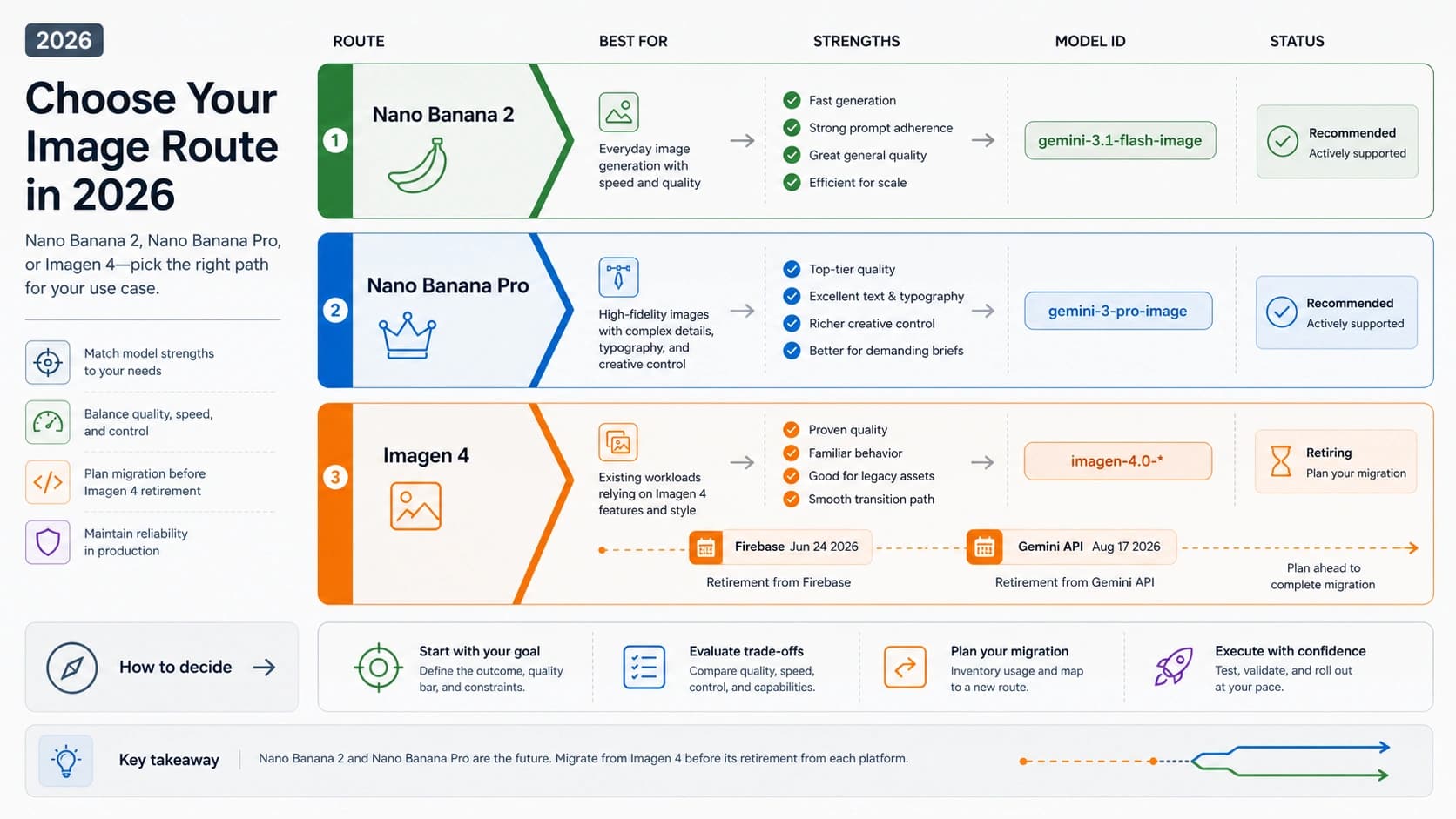
Imagen 4 is Google's dedicated image generation model, available in three speed tiers through the same API infrastructure. The Fast tier generates images at $0.02 per image — 85% cheaper than Nano Banana Pro's 2K pricing. Standard quality costs $0.04, and Ultra quality runs $0.06 per image. Imagen 4 excels at photorealistic scenes, product photography, and landscapes, producing images with exceptional detail and natural lighting. Where it falls short compared to Nano Banana Pro is in text rendering within images, complex multi-subject compositions, and stylistic versatility. If your use case is primarily photorealistic content where text overlay is not needed, Imagen 4's Fast tier at $0.02 per image offers the best value in Google's entire ecosystem. For a detailed quality comparison, see our Nano Banana Pro vs Imagen 4 quality comparison.
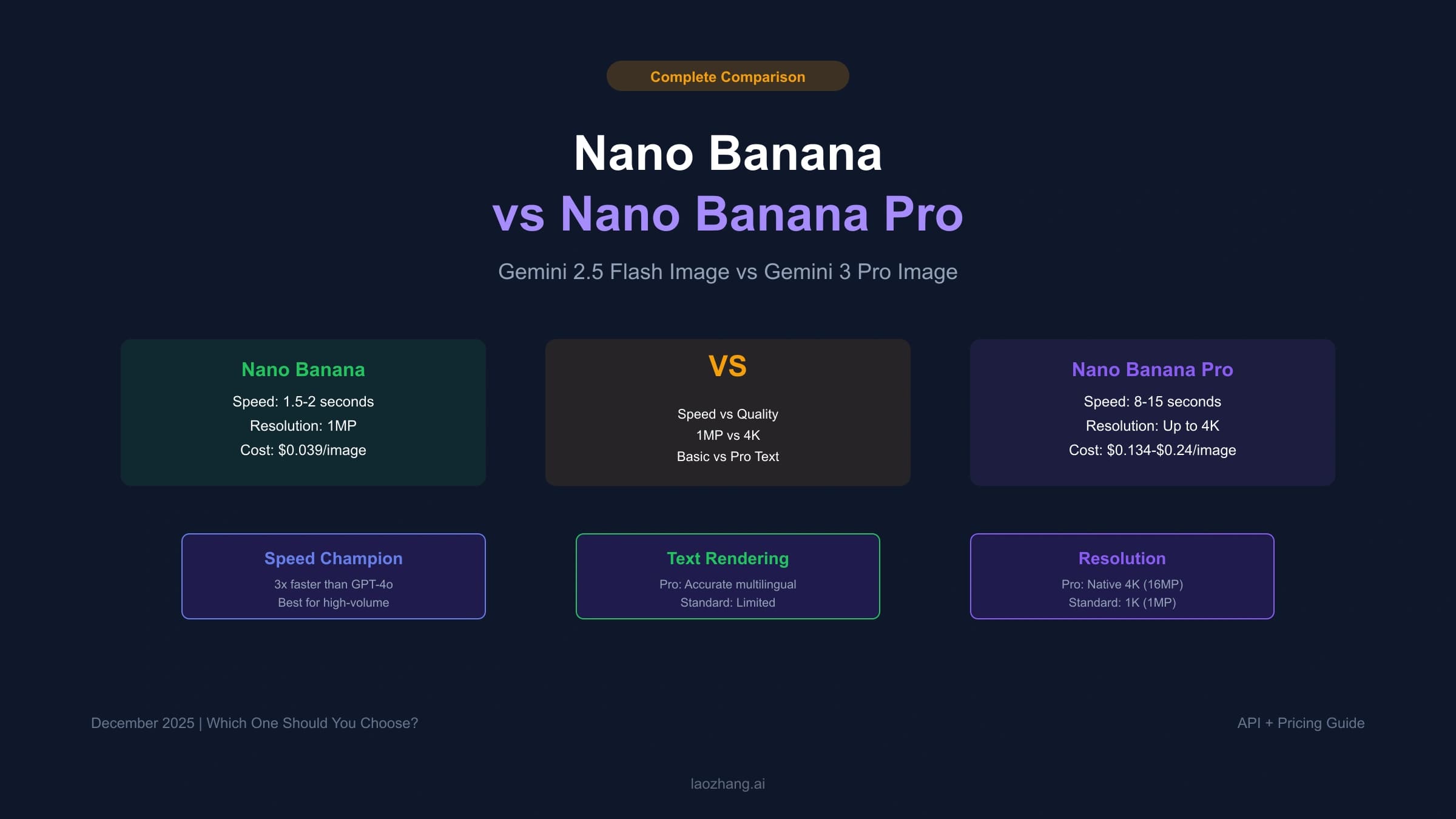
Gemini 2.5 Flash Image is the budget-friendly variant in the Gemini family, priced at $0.039 per image with output up to 1K resolution. It uses a lightweight architecture optimized for speed and cost efficiency rather than maximum quality. Flash Image is particularly well-suited for thumbnail generation, social media previews, concept visualization, and any application where speed matters more than pixel-perfect output. The 1K resolution ceiling means it cannot replace Nano Banana Pro for high-resolution work, but for applications where images will be displayed at small sizes (social media cards, email thumbnails, chat previews), the quality difference is virtually invisible to end users while the cost saving is substantial — 71% less than Nano Banana Pro at 2K.
The practical recommendation is to use a tiered approach within Google's ecosystem: route high-quality hero images and text-containing graphics through Nano Banana Pro, use Imagen 4 for photorealistic backgrounds and product shots, and assign Flash Image to thumbnails and previews. This multi-model strategy can reduce your average per-image cost by 40-60% compared to routing everything through Nano Banana Pro, while maintaining quality where it matters most. All three models use the same API authentication and billing account, so there is no additional setup overhead.
Third-Party APIs — How to Actually Save Up to 79%
Third-party API providers offer Nano Banana Pro access through proxy endpoints that aggregate demand across many users, allowing them to negotiate volume pricing from Google and pass the savings to individual customers. The most significant advantage is pricing: services like laozhang.ai offer Nano Banana Pro at $0.05 per image regardless of resolution — a 63% saving compared to official 2K pricing ($0.134) and a 79% saving compared to 4K pricing ($0.24). This makes third-party APIs the most cost-effective option for developers who need API access without subscription constraints.
The key technical advantage of reputable third-party providers is endpoint compatibility. Most offer OpenAI-compatible API endpoints, which means you can switch from the official Google API to a third-party provider by changing only the base URL and API key in your existing code — no architectural changes required. This is particularly valuable for teams running applications built on OpenAI's API format, as it enables access to Google's image generation models without rewriting any application logic. A basic integration looks like this:
hljs pythonimport openai
client = openai.OpenAI(
api_key="your-laozhang-api-key",
base_url="https://api.laozhang.ai/v1"
)
response = client.images.generate(
model="nano-banana-pro",
prompt="A serene Japanese garden at sunset with cherry blossoms",
size="2048x2048"
)
Third-party providers also typically impose no tier-based rate limits, which means new users get the same throughput as established accounts — a significant advantage over Google's tier progression system where reaching Tier 2 requires $250 in spending and 30 days of account history. For projects that need to scale quickly from prototype to production, this removes a meaningful bottleneck.
The tradeoff with third-party providers is that you are adding a dependency between your application and the provider's infrastructure. If the provider experiences downtime or changes their pricing, your service is affected. Reputable providers like laozhang.ai mitigate this through SLA guarantees and stable pricing commitments (pricing verified February 2026; refer to laozhang.ai documentation for current rates). For mission-critical applications, consider maintaining a fallback to the official API, using the third-party provider as the primary path for cost optimization and the official API as a reliability backstop. For a comprehensive setup walkthrough including error handling and fallback strategies, our complete third-party API guide covers everything you need.
Real-World Cost Calculator — From Hobby to Enterprise
Abstract pricing per image only becomes meaningful when mapped to actual usage patterns. The table below calculates monthly costs across five usage levels and four pricing paths, giving you a concrete dollar figure for your specific situation. All calculations assume 30 days per month and account for the pricing structures detailed in earlier sections of this guide.
| Usage Level | Images/Day | Official API (2K) | Batch API (2K) | Pro/Ultra Sub | Third-Party ($0.05) |
|---|---|---|---|---|---|
| Hobby | 10 | $40/mo | $20/mo | $19.99/mo (Pro) | $15/mo |
| Creator | 50 | $201/mo | $101/mo | $19.99/mo (Pro) | $75/mo |
| Developer | 200 | $804/mo | $402/mo | $99.99+/mo (Ultra) | $300/mo |
| Business | 1,000 | $4,020/mo | $2,010/mo | $99.99-$249.99/mo (Ultra) | $1,500/mo |
| Enterprise | 5,000 | $20,100/mo | $10,050/mo | N/A (exceeds sub limits) | $7,500/mo |
Several patterns emerge from this cost matrix that are not obvious from per-image pricing alone. At the hobby level of 10 images per day, the Pro subscription ($19.99/month) and third-party API ($15/month) are essentially equivalent, with the subscription offering the simpler experience and the API offering more flexibility. The Pro subscription becomes dramatically more cost-effective as usage increases to 50 images per day, where it saves over $180/month compared to the official API — provided you do not need programmatic access.
The crossover point where third-party APIs become the clear winner is at the Developer tier and above. At 200 images per day, a third-party API at $300/month undercuts the official API by $504/month while providing comparable throughput without tier restrictions. At enterprise scale (5,000 images/day), the savings become substantial: $12,600/month compared to the official API, or $2,550/month compared to the Batch API. These differences compound over time — a year of enterprise usage at third-party rates saves over $150,000 compared to official API pricing.
The Ultra subscription appears unbeatable at the Business tier (1,000 images/day) at $99.99-$249.99/month versus $1,500 for third-party. However, this calculation assumes you are consistently maxing out the daily quota. If your actual usage fluctuates — heavy on some days, light on others — the subscription model's fixed cost works against you, while the pay-per-use model of API pricing (official or third-party) scales exactly with demand. Additionally, subscription access through the Gemini app does not provide the programmatic API endpoints needed for automated workflows, which limits its applicability for developer and business use cases.
One factor that most cost calculators miss is the compounding effect of resolution choices. If you can accept 2K output instead of 4K for the majority of your images — reserving 4K only for hero images that need maximum detail — your API costs drop by 44% immediately. A developer generating 200 images per day who routes 80% to 2K and 20% to 4K pays an effective average of $0.155 per image through the official API, versus $0.24 if everything were generated at 4K. Applying the same logic with a third-party provider, the cost is $0.05 regardless of resolution, making the resolution decision irrelevant and the cost savings even more dramatic at higher volumes.
For teams managing costs across multiple models, third-party providers like laozhang.ai offer additional savings through unified billing across different AI models (text, image, video), simplifying cost tracking and potentially qualifying for volume discounts across your entire AI spending. The ability to access Nano Banana Pro, GPT image models, and other generation tools through a single API key and billing dashboard eliminates the operational overhead of managing multiple provider accounts and reconciling separate invoices each month.
Which Option Is Right for You? — The Decision Framework

After analyzing every pricing path in detail, the choice comes down to four variables: your daily volume, whether you need API access, your quality requirements, and your budget sensitivity. Rather than presenting another comparison table, here is a decision framework that maps specific user profiles to their optimal pricing path.
If you generate fewer than 5 images per day and just want to try the model, use the free Gemini app tier. The 2 images/day limit with watermark is sufficient for evaluation, and you can supplement with AI Studio's 50 free requests per day if you want higher resolution output. You pay nothing and sacrifice nothing meaningful at this volume — the quality difference between 1MP and 2K only matters if you are using the images for print or high-resolution display.
If you are a content creator producing 20-100 images daily without coding requirements, the Pro subscription at $19.99/month is your best option by a wide margin. At 100 images per day, your effective cost is $0.007 per image — lower than any other option including third-party APIs. The built-in editing tools, prompt enhancement, and style presets add value that pure API access cannot match. The only scenario where Pro does not work is if you need 4K resolution or programmatic access, in which case you should look at Ultra ($99.99+/month) or the API paths respectively.
If you are a developer building an application that generates 100-1,000 images per day, the third-party API route offers the best balance of cost, flexibility, and scalability. At $0.05 per image with no tier restrictions and OpenAI-compatible endpoints, you get predictable costs, immediate scaling capability, and minimal integration complexity. The official API makes sense only if you have strict data residency requirements or need Google's direct SLA, in which case the Batch API at $0.067 per 2K image provides a reasonable middle ground for non-real-time workloads.
If you operate at enterprise scale (1,000+ images daily) with real-time requirements, the decision depends on your processing pattern. Consistent high-volume generation favors the Ultra subscription for its unmatched per-image cost, while variable or burst-pattern workloads favor the third-party API's pay-per-use model. Many enterprise teams use a hybrid approach: Ultra subscription for their baseline daily volume through the Gemini app interface, supplemented by third-party API calls for overflow and automated pipeline needs. This combination captures the subscription's low per-image cost for predictable demand while maintaining API flexibility for everything else.
If budget is your primary constraint regardless of volume, consider the Google ecosystem alternatives discussed earlier. Imagen 4 at $0.02 per image (Fast tier) or Gemini 2.5 Flash Image at $0.039 per image may deliver sufficient quality for your use case at a fraction of Nano Banana Pro's cost. The multi-model routing strategy — Nano Banana Pro for hero images, Imagen 4 for photorealistic content, Flash Image for thumbnails — offers the best overall cost efficiency without compromising quality where it matters.
FAQ — Quick Answers About Nano Banana Pro Pricing
Is Nano Banana Pro free to use?
Yes, partially. You can access Nano Banana Pro for free through two channels: the Gemini app (2 images/day at 1MP with watermark) and Google AI Studio (50 requests/day at up to 2K with no watermark). The Gemini app free tier is designed for casual users, while AI Studio's free tier is aimed at developers who want to test the API before enabling billing. Neither free tier supports commercial use at scale, but both provide a genuine zero-cost way to evaluate the model's output quality and determine whether it meets your needs before committing to a paid plan.
How much does it cost to generate one image with Nano Banana Pro?
The cost ranges from $0 (free tiers) to $0.24 (official API at 4K resolution), with multiple options in between. Through the official API, a 2K image costs $0.134 and a 4K image costs $0.24. The Batch API offers a 50% discount, bringing costs to $0.067 (2K) and $0.12 (4K). Third-party providers like laozhang.ai charge $0.05 per image at any resolution. Subscription users at the Pro tier ($19.99/month) pay approximately $0.007 per image when fully utilizing their daily quota. Your actual per-image cost depends entirely on which access method you choose and how consistently you use it.
What are the rate limits for the Nano Banana Pro API?
Rate limits are tier-based and increase as your account matures. The free AI Studio tier allows 5-10 requests per minute and 50 per day. Tier 1 (billing enabled) increases this to approximately 100 RPM and 1,000 RPD. Tier 2 (requires $250 cumulative spend and 30+ days) provides approximately 300 RPM and 10,000 RPD. Tier 3 (requires $1,000 spend and 30+ days) offers even higher limits. Progressing through tiers requires both spending and time — you cannot skip directly to Tier 2 by spending $250 on day one, as the 30-day account age requirement is independently enforced.
Is the Batch API worth it?
The Batch API is worth it if your use case tolerates asynchronous processing (results within 24 hours rather than seconds). At 50% off standard pricing, a 2K image costs $0.067 versus $0.134 for real-time API calls. For pre-generating content libraries, creating marketing asset variants, or any batch processing workflow where you can submit jobs and collect results later, the Batch API offers the largest official discount available. It is not suitable for real-time applications where users expect immediate image generation, interactive editing workflows, or any scenario requiring sub-second response times. The sweet spot for Batch API usage is pre-scheduled content pipelines — such as generating tomorrow's social media graphics overnight, or creating product image variations in bulk before a seasonal marketing campaign. Teams that can plan their image needs 24 hours ahead consistently save 50% on their generation costs without any quality compromise.
How do third-party APIs compare to the official API?
Third-party APIs typically offer the same Nano Banana Pro model at 50-79% lower prices by aggregating demand across users. The main advantages are lower cost ($0.05 vs $0.134-$0.24), no tier-based rate restrictions, and OpenAI-compatible endpoints for easy integration. The main tradeoffs are an additional infrastructure dependency and slightly higher latency (typically 100-500ms additional). For most use cases outside of enterprise environments with strict compliance requirements, third-party APIs offer superior cost efficiency with minimal quality tradeoffs, since the underlying model is identical. The image quality is the same because third-party providers route requests to the same underlying Google model — they do not run their own inference infrastructure. The practical decision comes down to whether the cost savings justify the additional provider relationship and whether your compliance requirements mandate direct Google API usage.
Can I switch between pricing options later?
Yes, there is no lock-in with any Nano Banana Pro pricing path. You can use the free Gemini app tier today, subscribe to Pro next week, and switch to API billing the month after that. Your Google account retains access to all options simultaneously — a Pro subscriber can also use the API with separate billing, and a developer using the API can also use the free Gemini app tier for quick personal generations. The most common migration path is: free tier for evaluation, Pro subscription for regular creative use, then API (official or third-party) when programmatic access becomes necessary. Each transition is seamless and does not affect your existing work or generated images.
Nano Banana Pro
4K-80%Google Gemini 3 Pro · AI Inpainting
Google Native Model · AI Inpainting