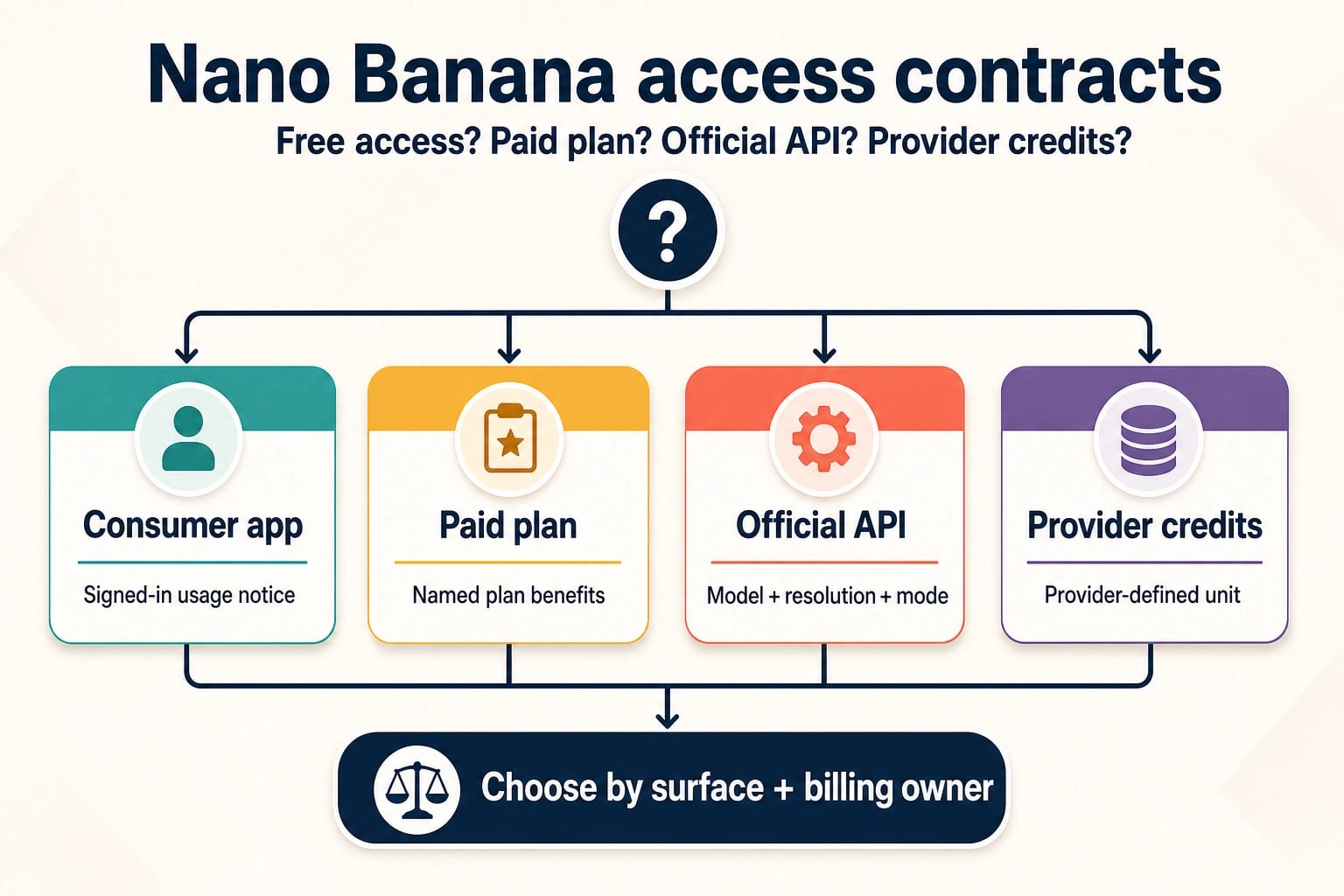
There is no single Nano Banana free-trial, subscription, quota, or credit contract. The answer depends on where you use it: a consumer app, a paid plan attached to that app, the official API, or a third-party provider that issues its own credits. An allowance shown on one surface should not be treated as a balance you can carry to another.
Start by identifying the surface and the company that bills it. That one step tells you whether to inspect an in-app usage notice, plan benefits, API billing, or provider credit terms. The sections ahead show what to verify in each case, how to avoid stale fixed-count claims, and how to choose the right route before you subscribe or buy credits.
| Surface | Who controls the contract | What “free” or “quota” means here | What to check before paying |
|---|---|---|---|
| Consumer app | The app and the signed-in account | An app-specific usage allowance that can be compute-based and change | The current in-app limit notice, refresh state, model access, and account eligibility |
| Paid plan | The plan issuer | Benefits and higher app allowances described for that plan | Exact plan benefits, renewal price, cancellation terms, and whether the feature you need is included |
| Official API | The API project and Google's published model pricing | A model-specific billing row; current listed Nano Banana image rows do not offer a Free Tier | Model, resolution, execution mode, project billing, and expected accepted-output cost |
| Provider credits | The individual provider | A provider-defined unit that may represent requests, images, or another billing event | Credit unit, model route, expiry, failed-job billing, refund terms, logs, and support |
The practical rule is simple: if the billing owner or surface changes, check the contract again. A consumer allowance is not an API balance. A subscription benefit is not a bundle of official API credits. Provider credits are not evidence of Google's API price.
Is Nano Banana free, or is there a free trial?
Nano Banana can be available on a consumer surface without the official image API being free. Google's current Gemini app limits page lists Nano Banana 2 across all plans, but describes usage limits as compute-based rather than promising one permanent number of images. It also says limits can change.
If your task is to create images in a browser rather than compare contracts, use the browser-based Nano Banana 2 creation guide to check the current tool flow and access boundary.
That distinction matters when someone quotes a fixed daily allowance. A compute-heavy request may consume more of the available capacity than a simpler one, and the limit shown to one signed-in account is not a durable promise for every account. Treat the current account notice as the operational answer.
Google describes the consumer limit as refreshing every five hours until the weekly limit is reached, with plan-specific multipliers. This is a rolling access rule, not a transferable wallet. Once a weekly ceiling applies, another five-hour interval should not be interpreted as a guaranteed reset to a full allowance.
“Free trial” is also too broad to answer without naming the issuer. If a trial offer is visible, verify five details on that exact offer before accepting it:
- Which app or provider issued it?
- Which Nano Banana feature or model route is included?
- Is the allowance a usage limit, a time-limited plan benefit, or credits?
- When does the offer end, and does it convert to paid renewal automatically?
- Can the allowance be used only in that surface, or is another product explicitly named?
If the offer does not say it includes official API usage, do not infer that it does. The official API pricing table and the consumer app are separate contracts.
What a paid Gemini plan changes—and what it does not
A paid plan can increase consumer access and unlock plan-specific image actions, but it still does not turn the app subscription into official API credits. Google's limits page presents different multipliers by plan, while the signed-in limit notice remains the best place to see what is currently available to that account.
There is a second, narrower paid-plan distinction. Google says Redo with Pro is for paid plans only. Its image-generation help page says paid subscribers can redo an image with Pro, and that this action depends on the Nano Banana 2 daily quota. In other words, a Pro redo is not an unlimited side channel; it remains tied to the consumer allowance described for that app.
For a task centered on editing an uploaded image, the Nano Banana Pro image-to-image access guide covers that workflow without turning its app allowance into an API claim.
Before subscribing, write down the task you actually need the plan to perform. Then check:
- whether Nano Banana 2 access or Redo with Pro is the relevant feature;
- what the signed-in account currently shows for usage limits;
- the plan's current price, billing period, renewal, and cancellation terms;
- whether the work must happen in the consumer app or through an API;
- whether organizational, age, region, or account policies shown by the product affect access.
This prevents the most expensive category error: buying a consumer subscription for a production integration that needs an API. If your code must send requests, the API project's billing contract—not the app plan—controls that route.
Official Nano Banana API prices
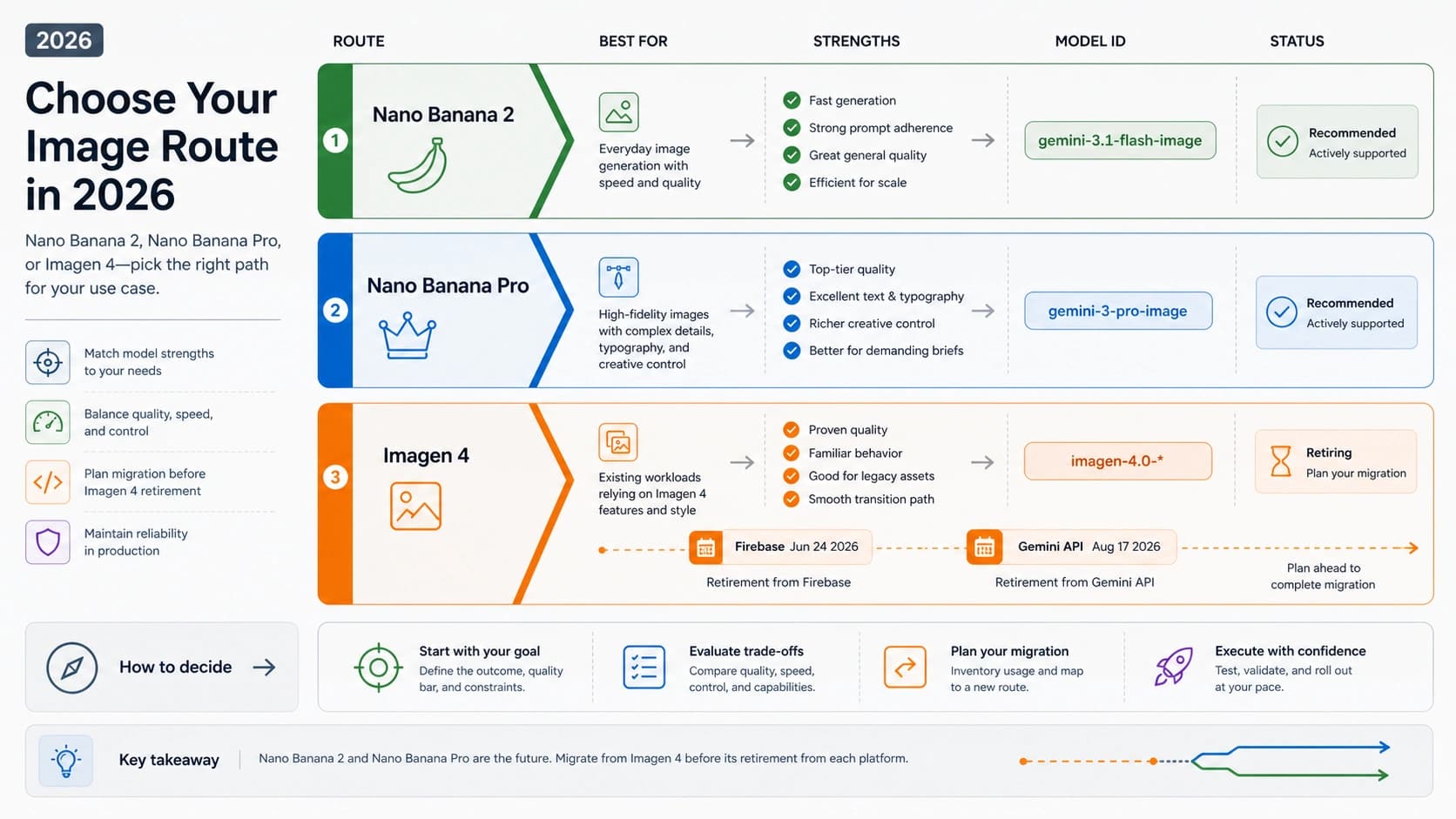
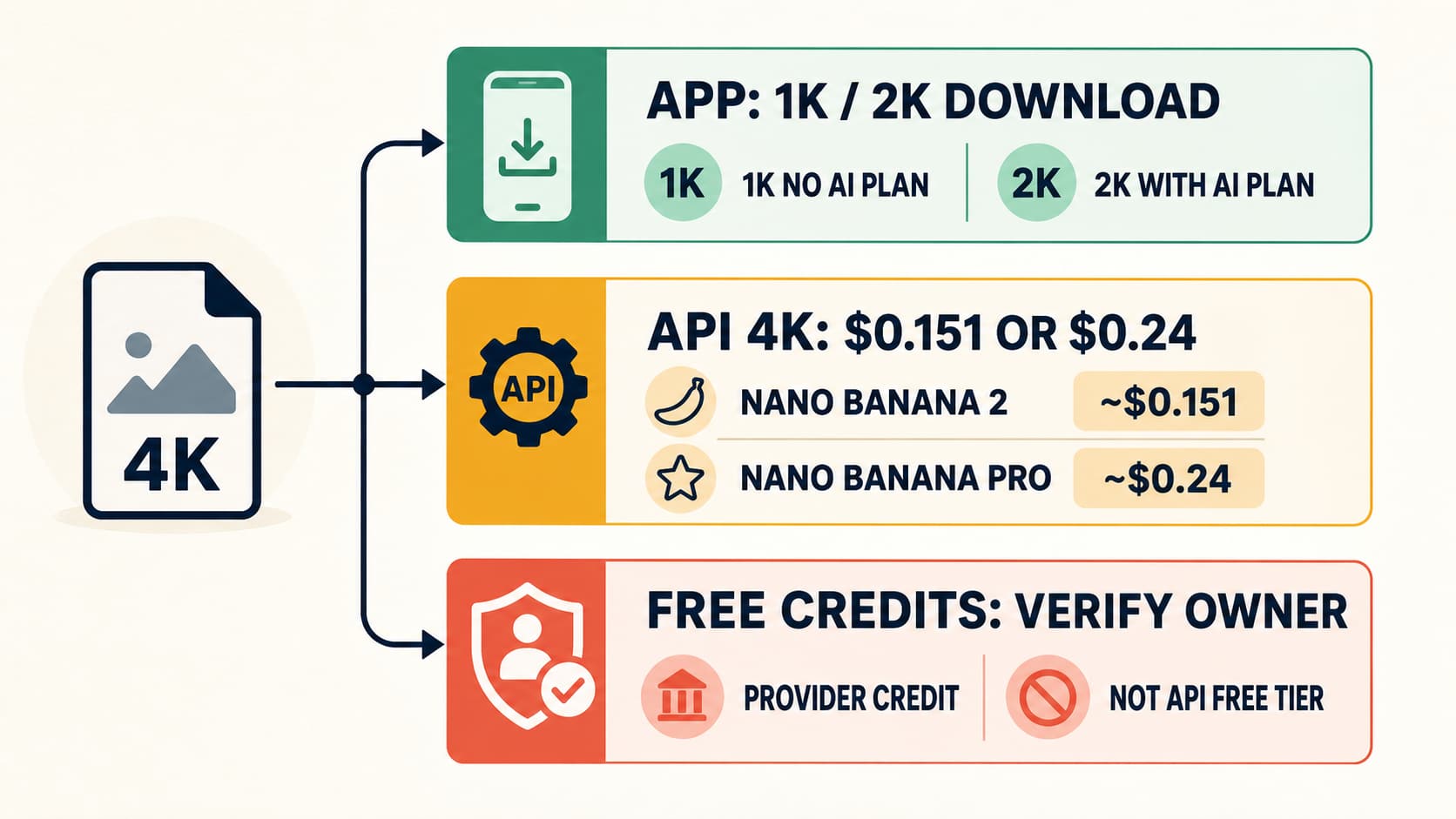
Google's Gemini API pricing page is the source of truth for the official image-model rows below. Each current listed row says Free Tier: Not available. The broader API billing documentation notes that the API Free Tier applies only to certain models; that general statement does not override an image model row that explicitly says it is unavailable.
| Official image model | Output resolution | Standard per image | Batch or Flex per image | Listed Free Tier |
|---|---|---|---|---|
| Gemini 3.1 Flash Lite Image | 1K | $0.0336 | Batch: $0.0168 | Not available |
| Gemini 3.1 Flash Image | 0.5K | $0.045 | Batch: $0.022 | Not available |
| Gemini 3.1 Flash Image | 1K | $0.067 | Batch: $0.034 | Not available |
| Gemini 3.1 Flash Image | 2K | $0.101 | Batch: $0.050 | Not available |
| Gemini 3.1 Flash Image | 4K | $0.151 | Batch: $0.076 | Not available |
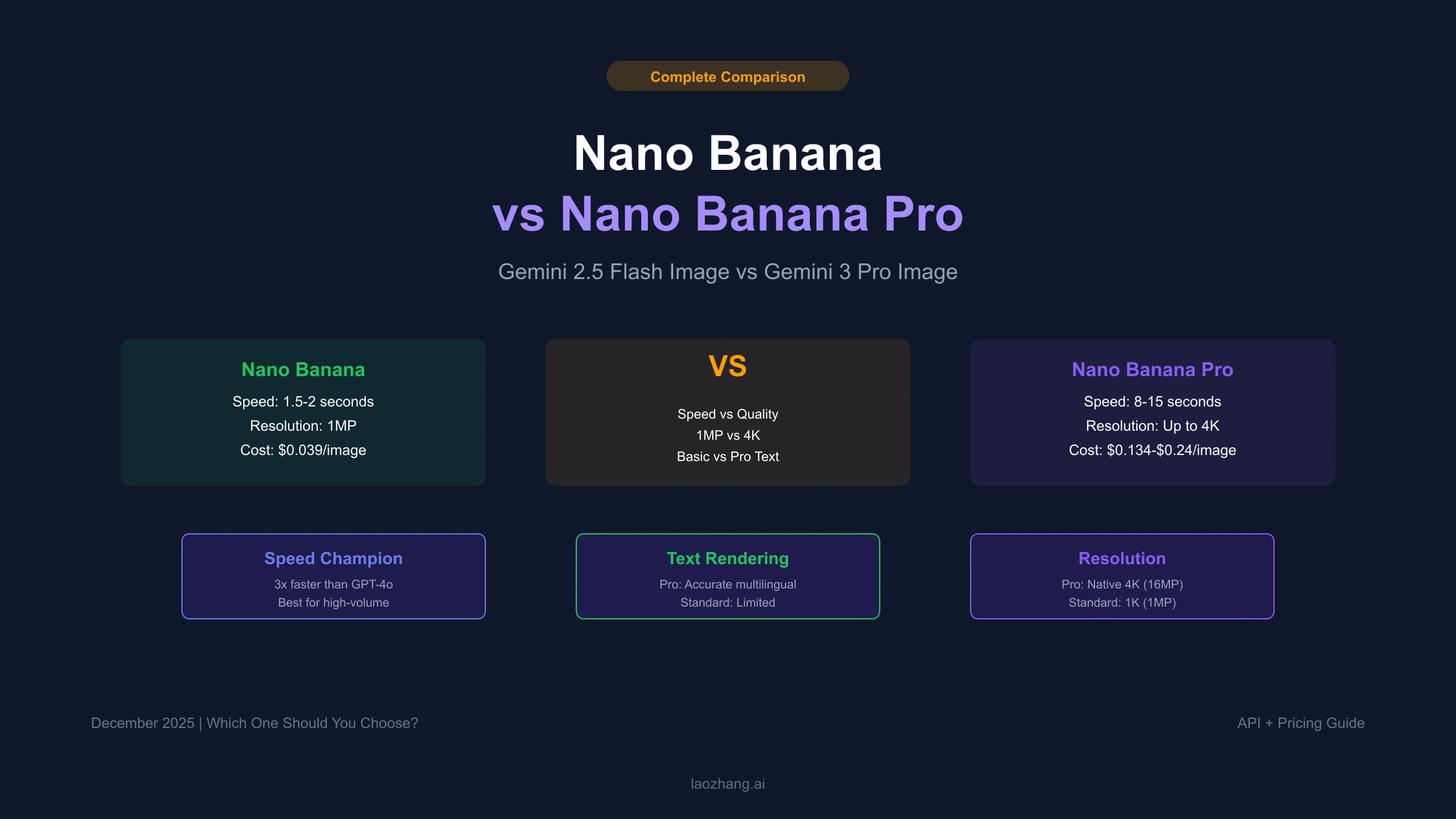
| Gemini 3 Pro Image | 1K or 2K | $0.134 | Batch/Flex: $0.067 | Not available |
| Gemini 3 Pro Image | 4K | $0.240 | Batch/Flex: $0.120 | Not available |
| Gemini 2.5 Flash Image | Listed image output | $0.039 | Batch/Flex: $0.0195; Priority: $0.0702 | Not available |
These prices answer a specific question: the listed output price for a named official API model, resolution, and execution mode. They do not answer how many images a Gemini app account can make, what a consumer plan includes, or how a provider defines one credit.
If you only need model-by-model API arithmetic, continue with the Nano Banana API price calculation guide rather than carrying consumer limits into the estimate.
The same dollar number can also describe different contracts. For example, $0.067 is the Standard 1K row for Gemini 3.1 Flash Image and the Batch/Flex 1K-or-2K row for Gemini 3 Pro Image. A quote is incomplete until it names the model, resolution, mode, and billing owner.
Standard versus Batch or Flex
Use Standard when an interactive workflow needs the result promptly. Price Batch or Flex when the workload can tolerate queued or flexible execution and the selected model actually lists that mode. The lower row is not a coupon that can be applied to an ordinary Standard request.
For 1,000 attempts, the listed output baseline becomes:
| Route | Standard | Batch or Flex | Difference before other costs |
|---|---|---|---|
| Gemini 3.1 Flash Lite Image, 1K | $33.60 | $16.80 | $16.80 |
| Gemini 3.1 Flash Image, 1K | $67.00 | $34.00 | $33.00 |
| Gemini 3.1 Flash Image, 4K | $151.00 | $76.00 | $75.00 |
| Gemini 3 Pro Image, 1K or 2K | $134.00 | $67.00 | $67.00 |
| Gemini 3 Pro Image, 4K | $240.00 | $120.00 | $120.00 |
These are output baselines, not complete invoice forecasts. Keep retry volume, failed or rejected generations, review time, and any separately billed components visible rather than hiding them inside “cost per image.”
Calculate cost per accepted output, not just per attempt
The cheapest listed attempt is not necessarily the cheapest usable result. A team may reject an output for composition, text, reference fidelity, brand rules, or another predeclared requirement. Measure that loss with an acceptance rate:
attempts required = accepted outputs / accepted-output rate
effective output cost per accepted result = list price / accepted-output rate
Suppose the target is 100 accepted images and the workflow accepts 80% of attempts. The expected requirement is 100 / 0.80 = 125 attempts. Applying the current Standard rows gives:
| Standard API row | Listed cost per attempt | Expected attempts for 100 accepted at 80% | Expected output cost |
|---|---|---|---|
| Gemini 3.1 Flash Lite Image, 1K | $0.0336 | 125 | $4.20 |
| Gemini 3.1 Flash Image, 1K | $0.067 | 125 | $8.38 |
| Gemini 3.1 Flash Image, 2K | $0.101 | 125 | $12.63 |
| Gemini 3 Pro Image, 1K or 2K | $0.134 | 125 | $16.75 |
| Gemini 3.1 Flash Image, 4K | $0.151 | 125 | $18.88 |
| Gemini 3 Pro Image, 4K | $0.240 | 125 | $30.00 |
The arithmetic is planning math, not a quality claim about any model. Your acceptance rate must come from the same representative prompt set, input assets, output requirements, and review rubric for each candidate.
The calculation can reverse a list-price decision. A hypothetical $0.067 route accepted 50% of the time costs $0.134 per accepted output. A hypothetical $0.101 route accepted 95% of the time costs about $0.1063 per accepted output. The second attempt costs more, but the expected accepted result costs less. Only a controlled evaluation can show whether that pattern applies to your workload.
For a useful pilot ledger, record the surface, billing owner, model, resolution, mode, attempts, accepted outputs, output charges, and review time. If the route is a provider, add the provider's billing event and credit deduction for each attempt.
Provider credits are a separate purchase contract
A provider can issue credits for access to its own route, but there is no universal Nano Banana credit. The provider decides what one credit represents and how its system handles errors, retries, refunds, expiry, and support. Verify those terms for each provider; do not transfer an answer from one provider to another.
When provider credits are already the chosen route, use the provider-credit purchasing checklist to compare units and purchase terms before funding a balance.
Before buying, normalize the provider offer into a form you can compare:
| Check | Question the provider contract must answer |
|---|---|
| Issuer | Which company owns the balance and charges the payment? |
| Route | Which exact image model or route does the credit cover? |
| Unit | Is one credit a request, one returned image, a resolution-dependent unit, or something else? |
| Failures | Are credits deducted for timeouts, moderation stops, retries, or jobs that return no usable image? |
| Validity | Do credits expire, roll over, or remain tied to a subscription? |
| Refunds | Are unused credits or failed jobs refundable under the current terms? |
| Evidence | Can you inspect usage logs, deductions, error status, invoices, and the model route? |
| Support | Who handles billing disputes and technical failures, and through which channel? |
Do not compare “100 credits” with 100 official API images until the provider proves that one credit maps to one equivalent billed event. A provider bundle may still be useful, but the comparison needs a common unit: same route, same resolution, same output count, and explicit failure handling.
A decision workflow before you spend
- Name the surface. Is the work happening in a consumer app, under a paid app plan, through the official API, or through a provider?
- Name the billing owner. Check the company shown on the plan page, API project, checkout, or invoice.
- Define the job. Decide whether you need occasional interactive generation, paid consumer features, programmatic integration, or provider operations.
- Read the matching allowance. Use the signed-in app notice for consumer limits, the exact plan benefits for a subscription, Google's model row for official API cost, or the provider's terms for credits.
- Reject cross-surface assumptions. Do not carry an app quota into an API budget, treat a plan as API credit, or use a provider price to rewrite Google's table.
- Normalize the cost. For API or provider work, compare the same model route, resolution, mode, billing event, and failure policy.
- Run a bounded pilot. Measure attempts, accepted outputs, deductions, errors, and review time before buying volume or committing to a renewal.
- Recheck volatile terms. Limits, plan benefits, and prices can change. Verify the controlling page again at the purchase decision.
For casual consumer use, start with the signed-in app and its current limit notice. Choose a paid plan only when its named benefit solves the task. For programmatic work, start from the official API row and project billing. Consider provider credits only after their unit and failure contract are clear enough to compare.
Frequently asked questions
Is Nano Banana 2 free in the Gemini app?
Google currently lists Nano Banana 2 across all consumer plans, but the allowance is compute-based, can change, and is controlled by the signed-in account's current limit notice. That consumer access does not make the official image API Free Tier available.
Is Nano Banana Pro included in a subscription?
Google says Redo with Pro is available on paid plans, and that its use depends on the Nano Banana 2 daily quota. Check the current plan benefits and signed-in allowance; do not interpret this consumer feature as official API access or API credits.
Does a Gemini subscription include Nano Banana API credits?
Do not assume it does. A consumer subscription and an API project are separate billing surfaces. Unless the plan explicitly names API usage, price the official API from the selected model row.
Is the official Nano Banana API free?
The current official pricing rows for Gemini 3.1 Flash Lite Image, Gemini 3.1 Flash Image, Gemini 3 Pro Image, and Gemini 2.5 Flash Image list Free Tier as “Not available.” A broader statement that some Gemini API models have a Free Tier does not change those specific image rows.
How much do 1,000 official API attempts cost?
Multiply 1,000 by the selected model, resolution, and mode row. Examples include $33.60 for Gemini 3.1 Flash Lite Image 1K Standard, $67.00 for Gemini 3.1 Flash Image 1K Standard, and $134.00 for Gemini 3 Pro Image 1K or 2K Standard. Add other billed components and adjust for rejected outputs.
Are provider credits the same as Google API credits?
No universal equivalence exists. Provider credits are defined by that provider's own unit and terms. Verify the route, deduction event, expiry, failure handling, refunds, logs, and support before comparing them with an official API row.
Which route should I choose?
Use the consumer app for occasional interactive work, a paid plan for a specific named consumer benefit, the official API for a programmatic integration with model-level billing, and a provider only when its credit and operating contract has been verified independently. If the surface or billing owner changes, redo the comparison.